AA

おすすめ製品

    人気のカテゴリー

      急上昇ワード

        記事

          ブログ

            製品

              カテゴリー

                検索候補

                  検索中…
                  結果がありません
                  エラーが発生しました。
                  ↑↓ 選択↵ 開くEsc 検索を閉じる
                  • English
                  • Čeština
                  • Deutsch
                  • Español
                  • Français
                  • Italiano
                  • Polski
                  • 日本語
                  • 注文
                  • 住所
                  • 在庫ありのアラート
                  • 講座
                  • サブスクリプション
                  • アカウント編集
                  • 3Dプリンター9+▾

                    3Dプリンターnew

                    newPrusa CORE One Lさらに詳しく
                    newPrusa CORE One+さらに詳しく
                    newPrusa CORE One L+ INDX 8-ToolnewPrusa CORE One+ (Gen 2) INDX 8-ToolPrusa CORE One L: Critical InfrastructureOriginal Prusa MK4SnewOriginal Prusa XLOriginal Prusa XL:クリティカルインフラストラクチャー

                    プリンターのアップグレード

                    newCORE One/+ INDX Conversion KitnewMK3S/+ から MK4SnewXL - シリコンプリンティングツールヘッドnewMMU3 (Multi Material Upgrade)
                    Prusa 報酬プログラムシェアして、紹介して、特典をゲット。
                    3Dプリンターを選び方スペース・予算・用途に合わせて最適なマシンを選ぶための基本をご紹介します。
                    無料の電子書籍無料の電子ブック Basics of 3D Printing with Josef Prusa をダウンロードして、3Dプリンティングの世界への第一歩を踏み出しましょう。
                    Original Prusa のプリント可能なパーツOriginal Prusa 3Dプリンターとアップグレード用のプリント可能なスペアパーツコレクション。
                    配送情報プリンターの現在の生産量と納期に関する情報を定期的に更新しています。
                    カスタム3Dプリント様々な素材を使用したプロフェッショナルなカスタム3Dプリントサービス。
                  • マテリアル▾

                    フィラメント

                    PrusamentPLAPETGASA / ABSPCブレンドPA (Nylon)FlexComposites特別Materials clearance sale

                    レジン

                    Prusament Resin Tough柔軟性
                    フィラメントガイドプルサメントスプールをチェック
                    Prusament.com
                  • 部品 & アクセサリー▾

                    アクセサリー

                    エンクロージャーノズルスチールシート必須アクセサリーカメラ&アドオンツール&クラフト接着剤

                    補修部品

                    商品

                    スペアパーツ - すべてのプリンターCORE OneMK4/S & MK3.9/SMK3/MK3S/MK3S+XL
                    Merch
                  • 法人向け▾
                    Prusa Pro HT90Prusa Pro SLXPrusa Pro AFSPrusa Pro Medical OneOriginal Prusa XLOriginal Prusa XL:クリティカルインフラストラクチャー
                    Prusa CORE One+さらに詳しく
                    Prusa CORE One Lさらに詳しく
                    Prusa CORE One L: Critical Infrastructure Edition クリティカルインフラ版(高セキュリティ対応モデル)

                    3Dプリンティングの用途

                    製造と研究開発自動車産業ヘルスケア教育と学術研究建築家とデザイナー映画産業重要インフラ

                    3Dプリンティングのストーリー

                    No items yet.

                    プルサ正規販売代理店
                    サステナビリティ
                    Prusa Education
                    お問い合わせ・ご連絡
                    カスタム3Dプリント
                    ISO認証取得
                  • ソフトウェア▾
                    PrusaSlicer

                    PrusaSlicerPrusaSlicer

                    PrusaSlicer は、オープンソースで機能が豊富、頻繁に更新されるツールで、3Dプリンタ用の完璧なプリントファイルをエクスポートするために必要なものがすべて含まれています。ニュースやリリースログは Github で確認できます。

                    WindowsMacOSLinux
                    Prusa Connect

                    Prusa Connect

                    Prusa Connectは、3Dプリンターの遠隔操作と監視を可能にするクラウドサービスで、安全なデータの取り扱い、簡単なセットアップ、どこからでも複数のプリンターを管理できるサポートを提供します。

                    ログインして接続する
                    Prusa.app

                    Prusa.app

                    Prusa Connect技術を活用し、どこからでもリモートでプリンターを操作可能!Prusa.appは、AndroidおよびiOSデバイス向けに新たなPrusaプリンター体験を提供します。

                    今すぐお試しください!
                    ドライバー&ファームウェア3Dプリンタの最新のファームウェアとドライバをダウンロードしてください。
                    PrusaSlicer サポート
                    Prusa Connect サポート
                  • 3Dモデル▾
                    3Dプリンターアート&デザインホビー&メーカー日用雑貨テーブルトップミニチュアおもちゃ&ゲームPrintablesストア

                    人気の3Dモデル

                    • Strong garden hose holder
                    • Prusa Spool Bot
                    • Build Tray — Modular Organizer for Assembly, Disassembly and Maintenance
                    • Broom Holder
                    • Octagon Fabric
                    • Prusa CORE One ? (Mimic Skin)

                    デザインコンテスト

                    • Framework Laptop 12 Mainboard Wiederverwendung2026/9/1 – 2026/9/30
                    • 🏆 Designer Herausforderung: Zaubertricks!2026/9/1 – 2026/9/22
                    • Make-up Aufbewahrungslösungen2026/9/4 – 2026/9/20
                  • コミュニティ▾

                    イベント情報

                    • IFA 20262026/9/4 – 2026/9/8 · Berlin, Germany · Prusa Team
                    • Maker Faire Bay Area2026/9/25 – 2026/9/27 · Kalifornie, United States · Prusa Team
                    • 3D Printopia 20262026/9/26 – 2026/9/27 · Pennsylvania, United States · Prusa Team
                    • Hobby Messe2026/10/2 – 2026/10/4 · Sachsen, Germany · Prusa Team

                    プルサフォーラム

                    • Index Layer Shifts?
                    • firmware error - screen freeze
                    • Nozzle stuck with filament
                    プルサワールドマッププルサワールドマップ地元の3Dプリントユーザーを見つけて、あなたの周りのコミュニティを探索してみてください。
                  • ヘルプ▾
                    ガイド & チュートリアルPrusaSlicerPrusa Connectマテリアル

                    プリンターモデル

                    CORE One INDXCORE One LCORE One+CORE One

                    ハードウェアのトラブルシューティング

                    • Selftest failed (CORE One/+)
                    • ホットエンドの詰まり (MK4)
                    • ベルトテンションの調整(CORE One L/CORE One)
                    • Prusa ConnectとPrusaLink について

                    ドライバー&ファームウェア

                    INDX familyCORE One familyMK4 familyXL familyMMU familyPRO family
                  • コース一覧▾

                    3Dプリンティングのエキスパートになろう

                    Prusa アカデミーでは、3Dプリンティングに関する様々なトピックのオンラインコースを提供しています。各コースの特徴:

                    • 多くの写真と短いビデオを含む読みやすいテキスト
                    • インスピレーションやさらなる学習のためのリンク
                    • 知識を試すためのテスト
                    • 修了証明書
                    Browse all coursesMy courses library
                    • 3D Modeling in Autodesk Fusion
                    • PrusaSlicerマスタークラス – 初心者から上級者まで
                    • Complete Guide to 3D Print Postprocessing, Painting, and Detailing
                    • Airbrush Your 3D Prints: From Basics to Advanced Tricks
                  • ブログ▾
                    • より高品質なプリントを、もっと簡単に:Prusa XL+、CORE One L+、CORE One+(Gen 2)― 大規模製品アップグレード
                    • Prusament PA11 Natural:極めて優れた機械的・耐薬品性を備えた素材 ギアや可動部品の造形に最適
                    • INDXの状況 ― 2026年7月アップデート:Founder’s Editionの出荷開始と今後の展開
                    電子書籍: 3Dプリンティングの基礎
                  • 会社概要▾

                    Prusa Research について

                    私たちは、ヨーロッパおよびアメリカ最大の3Dプリンターメーカーです。

                    Prusa Research は、チェコ出身のホビイスト/メイカー/発明家である Josef Prusa によって 2012 年に 1 人で立ち上げられました。そこからわずか 15 年で、従業員 1,200 名を超える企業へと成長しました。毎月、チェコ共和国プラハの本社および米国デラウェア州から、160 カ国以上のユーザーに向けて 10,000 台以上の革新的で安全な 3D プリンターを設計・製造・出荷しています。

                    動画をご覧になり、Prusa Research がどのように誕生し、わずか 10 年で何を達成したかをご確認ください!

                    Prusa Research についてタイムラインサステナビリティオープンソース
                    Prusa Research について
                    お問い合わせ
                    ロゴ・写真素材
                    ISO認証取得
                  1. サポート
                  2. QR Error codes [進行中の翻訳]

                  ブログ

                  • より高品質なプリントを、もっと簡単に:Prusa XL+、CORE One L+、CORE One+(Gen 2)― 大規模製品アップグレード
                  • Prusament PA11 Natural:極めて優れた機械的・耐薬品性を備えた素材 ギアや可動部品の造形に最適
                  • INDXの状況 ― 2026年7月アップデート:Founder’s Editionの出荷開始と今後の展開

                  ニュースレター

                  ご登録いただくと、毎月 新しいファームウェア、PrusaSlicerの新バージョン、3Dプリントプロジェクトの一般的なヒントなど、役立つ情報をお届けします。

                  クリックして、ニュースレターを受け取る。

                  このサイトはreCAPTCHA Enterpriseによって保護されており、Googleのプライバシーポリシーと利用規約が適用されます。

                  Strong garden hose holder
                  E-shop
                  • 3Dプリンター
                  • プリンターのアップグレード
                  • フィラメント
                  • アクセサリー
                  • Prusa 商品

                  © Prusa Research a.s.

                  Printables
                  • 3Dモデル
                  • Store
                  • Clubs
                  • 3Dデザインコンテスト
                  • Brands
                  コミュニティ
                  • ワールドマップ
                  • フォーラム
                  • ユーザーグループ
                  • イベント
                  ヘルプ
                  • Prusa ヘルプ
                  • Prusa アカデミー
                  • 3Dプリンティング計算機
                  ソフトウェア
                  • PrusaSlicer
                  • Prusa.app
                  • Prusa Connect
                  • ドライバーとソフトウェア
                  会社概要
                  • 私たちについて
                  • Blog
                  • プルサ正規販売代理店
                  • お問い合わせ
                  • ISO 9001・ISO 14001・ISO 45001 認証取得済み
                  • 一般利用規約
                  • PRUSAウェブサイト利用のための一般利用規約
                  • プライバシーポリシー
                  • クッキーに関する情報
                  • お客様の苦情対応に関する方針
                  • Webサイトのステータスページ
                  • Cookie 設定
                  • 一般利用規約
                  • PRUSAウェブサイト利用のための一般利用規約
                  • プライバシーポリシー
                  • クッキーに関する情報
                  • お客様の苦情対応に関する方針
                  • Webサイトのステータスページ
                  • Cookie 設定

                  © Prusa Research a.s.

                  JOSEF PRUSA®、PRUSA RESEARCH®、PRUSA POLYMERS®、PRUSA ORANGE®、PRUSA 3D ® および PRUSAMENT® は、Prusa Development a.s. の登録商標であり、Prusa Research a.s. が Prusa Development a.s. からのライセンスに基づき使用しています。

                  トピックス

                  • プリント品質のトラブルシューティング
                  • QR Error codes [進行中の翻訳]
                  • プリンタートラブルシューティング
                  • プリントエラーメッセージ

                  QR Error codes [進行中の翻訳]

                  QRエラーコード

                  QRエラーコード

                  これは、エラー画面を表示するための高度なシステムで、ユーザーにより有用な情報を提供します。問題が発生した場合、プリンターはエラーの名前に続いて簡単な説明とQRコードを表示します。スマートフォンを取り出してコードをスキャンすると、プリンターに何が起こったのか、そしてその問題をどのように解決するかを詳しく説明する記事に即座にリダイレクトされます。 QRコードを表示するプリンターは、GitHubページで確認できます。古いファームウェアバージョンでは外観が異なる場合があることに注意してください。 エラーコードの使用方法 プリンターがエラー画面を表示した場合、記事にアクセスする方法は複数あります: スマートフォンやタブレットを使用してプリンター画面のQRコードをスキャンする 画面に表示されているリンクを使用する(例:help.prusa3d.com/en/12201) help.prusa3d.comを開き、エラーを検索する(例:12201) 何が問題で、どのように修正するかを説明する記事に従ってください。一部のエラーでは、プリンターの破損した部品の交換が必要になる場合があることに注意してください。交換が必要な場合は、記事の下部にサービスガイドへのリンクがあります。 エラーコードの説明 各コードはどのように作成されているのでしょうか?再び例としてエラー#12201を使用しましょう。コードは5つの数字で構成され、以下のパターンに従っています:XXYZZ #…

                  ヒートベッドの温度エラー/Mintemp error bed #12207 (MINI)

                  ヒートベッドの温度エラー/Mintemp error bed #12207 (MINI)

                  このエラーで発生していること プリンタのヒートベッドの温度が15 ºC以下になると、プリンタはディスプレイに「Mintemp error」と表示します。この場合、プリンタは加熱を停止し、画面にメッセージを表示します。その後、ユーザーはプリンタのすべての部品を検査し、必要であれば問題を解決します。 エラーの名称: Mintemp error bed  エラーコード:…

                  Temperature sensor failed #10205 (SL1/SL1S)

                  Temperature sensor failed #10205 (SL1/SL1S)

                  What happened? The printer is displaying the message: The Ambient temperature/UV LED temperature sensor failed. Error name: Temperature sensor failed Error code: #10205 The SL1…

                  Speaker test failed #10310 (SL1/SL1S)

                  Speaker test failed #10310 (SL1/SL1S)

                  What happened? The printer is displaying the message: Speaker test failed, please check the connection and repeat the action. Error name: Speaker test failed Error code: #10310 The…

                  Fan RPM not in range #10122 (SL1/SL1S)

                  Fan RPM not in range #10122 (SL1/SL1S)

                  What happened? The printer is displaying the message: RPM of (fan)s not in range. Check if the fan is connected correctly. Error name: Fan RPM not in range Error code: #10122 Issued…

                  Firmware update failed #10534 (SL1)

                  Firmware update failed #10534 (SL1)

                  What happened? The printer is displaying the message: The update of the firmware failed! Restart the printer and try again. Error name: Firmware update failed Error code: #10534 How…

                  Tower moving failed #10103 (SL1/SL1S)

                  Tower moving failed #10103 (SL1/SL1S)

                  What happened? The printer displaying the message: Moving the tower failed. Make sure there is no obstacle in its path and repeat the action. Error name: Tower moving failed Error…

                  Failed to read the configuration file #10505 (SL1)

                  Failed to read the configuration file #10505 (SL1)

                  What happened? The printer displaying the message: Failed to read the configuration file. Try to reset the printer. If the problem persists, contact support. Error name: Failed…

                  Ambient temperature too high #10702 (SL1/SL1S)

                  Ambient temperature too high #10702 (SL1/SL1S)

                  What happened? The printer is displaying the message: The ambient temperature is too high, the print can continue, but it might fail. Error name: Ambient temp. too hot Error code:…

                  Calibration error #10113 (SL1/SL1S)

                  Calibration error #10113 (SL1/SL1S)

                  What happened? The printer is displaying the message: The printer is not calibrated. Please run the Wizard first. Error name: Not mechanically calibrated Error code: #10113 Issued…

                  Cannot get update channel #10514 (SL1)

                  Cannot get update channel #10514 (SL1)

                  What happened? The printer displaying the message: Cannot get the update channel, please restart the printer and try again. Error name: Cannot set update channel Error code: #10514 This…

                  UV intensity too high #10317 (SL1/SL1S)

                  UV intensity too high #10317 (SL1/SL1S)

                  What happened? The printer is displaying the message: Requested intensity cannot be reached by min. allowed PWM. Error name: UV intensity too high  Error code: #10317 The most…

                  Temperature out of range #10208 (SL1/SL1S)

                  Temperature out of range #10208 (SL1/SL1S)

                  What happened? The printer is displaying the message: (sensor)s not in range! Measured temperature: (temperature). Keep the printer out of direct sunlight at room temperature (18…

                  Not connected to network #10402 (SL1/SL1S)

                  Not connected to network #10402 (SL1/SL1S)

                  What happened? The printer is displaying the message: The printer is not connected to the internet, please check the connection in the Settings. Error name: Not connected to network Error…

                  Tilt check failed #10119 (SL1/SL1S)

                  Tilt check failed #10119 (SL1/SL1S)

                  What happened? The printer is displaying the message: Tilt axis check failed! Check if the tilt can move smoothly in its entire range. Error name: Tilt check failed Error code:…

                  Tilt homing failed #10101 (SL1/SL1S)

                  Tilt homing failed #10101 (SL1/SL1S)

                  What happened? The printer is displaying the message: Tilt homing failed, check its surroundings, and repeat the action. Error name: Tilt homing failed Error code: #10101 Issued…

                  Wrong printer model #10544 (SL1/SL1S)

                  Wrong printer model #10544 (SL1/SL1S)

                  What happened? The printer is displaying the message: This project was prepared for a different printer. Error name: Wrong printer model Error code: #10544  This error informs…

                  An unexpected error has occurred #10701 (SL1)

                  An unexpected error has occurred #10701 (SL1)

                  What happened? The printer displaying the message: An unexpected error has occurred. Please restart the printer. Contact our tech support if the problem persists. Error name: An…

                  Data overwrite failed #10530 (SL1/SL1S)

                  Data overwrite failed #10530 (SL1/SL1S)

                  What happened? The printer is displaying the message: Saving the new factory default value failed. Restart the printer and try again. Error name: Data overwrite failed Error code:…

                  Tower homing failed #10102 (SL1/SL1S)

                  Tower homing failed #10102 (SL1/SL1S)

                  What happened? The printer is displaying the message: Tower homing failed, make sure there is no obstacle in its path and repeat the action. Error name: Tower homing failed Error…

                  Not enough layers #10540 (SL1/SL1S)

                  Not enough layers #10540 (SL1/SL1S)

                  What happened? The printer is displaying the message: The project must have at least one layer. Error name: Not enough layers Error code: #10540  This error happens when the project…

                  Display test failed #10120 (SL1/SL1S)

                  Display test failed #10120 (SL1/SL1S)

                  What happened? The printer is displaying the message: Display test failed, check the connection between the display and the A64 board. Error name: Display test failed Error code:…

                  Invalid tilt align position #10121 (SL1/SL1S)

                  Invalid tilt align position #10121 (SL1/SL1S)

                  What happened? The printer is displaying the message: Invalid tilt alignment position. Error name: Invalid tilt align position Error code: #10121 How to fix it? Use the steps below…

                  Ambient temperature too cold #10703 (SL1/SL1S)

                  Ambient temperature too cold #10703 (SL1/SL1S)

                  What happened? The printer is displaying the message The ambient temperature is too low, the print can continue, but it might fail. Error name: Ambient temp. too cold Error code:…

                  UV data error #10533 (SL1)

                  UV data error #10533 (SL1)

                  What happened? The printer is displaying the message: Data is from unknown UV LED sensor! Error name: UV data error Error code: #10533 After calibration using the UV calibrator,…

                  Resin sensor error #10307 (SL1/SL1S)

                  Resin sensor error #10307 (SL1/SL1S)

                  What happened? The printer displays the message: The resin sensor was not triggered. Check whether the tank and the platform are properly secured. Error name: Resin sensor error Error…

                  Z軸ホーミングエラー #31301 (CORE One) #26301 (MK4S) #13301 (MK4) #28301 (MK3.9S) #21301 (MK3.9)

                  Z軸ホーミングエラー #31301 (CORE One) #26301 (MK4S) #13301 (MK4) #28301 (MK3.9S) #21301 (MK3.9)

                  修正方法は? フィラメント供給時の応力 エクストルーダーがフィラメントを引き下げる力を加えていないことを確認してください。不確かな場合は、Z軸をテストする際にスプールから少量巻き戻してみてください。 MMU、エンクロージャー、またはPTFEチューブでエクストルーダーにフィラメントを供給するカスタムセットアップをお使いの場合、エクストルーダーがチューブを引き下げる力を加える必要がないことを確認してください。 スクリューナット CORE…

                  Invalid API key #10405 (SL1/SL1S)

                  Invalid API key #10405 (SL1/SL1S)

                  What happened? The printer is displaying the message: Please turn on the HTTP digest (which is the recommended security option) or update the API key. You can find it in Settings…

                  UV intensity too low #10318 (SL1/SL1S)

                  UV intensity too low #10318 (SL1/SL1S)

                  What happened? The printer is displaying the message: Requested intensity cannot be reached by max. allowed PWM Error name: UV intensity too low Error code: #10318 The most probable…

                  Fan failure #10106 (SL1/SL1S)

                  Fan failure #10106 (SL1/SL1S)

                  What happened? The printer is displaying the message: Incorrect RPM reading of the fan. Please check its wiring and connection. Error name: Fan failure Error code: #10106 This…

                  Tower position error #10123 (SL1/SL1S)

                  Tower position error #10123 (SL1/SL1S)

                  What happened? The printer is displaying the message: Tower not in the expected position. Are the platform and tank mounted and secured correctly? Error name: Tower position error Error…

                  Can't copy project #10704 (SL1/SL1S)

                  Can't copy project #10704 (SL1/SL1S)

                  What happened? The printer is displaying the message: The internal memory is full, the project cannot be copied. You can continue printing - however, you must not remove the USB…

                  Unexpected error #10501 (SL1/SL1S)

                  Unexpected error #10501 (SL1/SL1S)

                  What happened? The printer is displaying the message: "An unexpected error has occurred. If print job is in progress, it should be finished. You can turn the printer off by pressing…

                  Boost board problem #10320 (SL1S)

                  Boost board problem #10320 (SL1S)

                  What happened? The printer is displaying the message: Communication with the Booster board failed. Error name: Boost board problem Error code: #10320 This error happens when the…

                  Tower endstop not reached #10114 (SL1/SL1S)

                  Tower endstop not reached #10114 (SL1/SL1S)

                  What happened? The printer is displaying the message: Failed to reach tower endstop, please check that the tower motor is connected and repeat the action. Error name: Tower endstop…

                  Project is corrupted #10541 (SL1/SL1S)

                  Project is corrupted #10541 (SL1/SL1S)

                  What happened? The printer is displaying the message: Opening the project failed. The file is corrupted. Please re-slice or re-export the project and try again. Error name: Project…

                  Tilt endstop not reached #10115 (SL1/SL1S)

                  Tilt endstop not reached #10115 (SL1/SL1S)

                  What happened? The printer is displaying the message: Failed to reach tilt endstop, please check that the cable is connected and repeat the action. Error name: Tilt endstop not…

                  File already exists! #10520 (SL1)

                  File already exists! #10520 (SL1)

                  What happened? The printer displaying the message: File already exists! Error name: File already exists! Error code: #10520 When initiating a transfer of files to the printer,…

                  Cannot remove project #10545 (SL1/SL1S)

                  Cannot remove project #10545 (SL1/SL1S)

                  What happened? The printer is displaying the message: Removing this project is not possible. The project is locked by a print job. Error name: Cannot remove project Error code:…

                  Display usage error #10535 (SL1)

                  Display usage error #10535 (SL1)

                  What happened? The printer is displaying the message: Display usage error. The display has just been replaced or a factory reset has been performed, clearing the usage data. Error…

                  Internal error (DBUS mapping failed) #10507 (SL1/SL1S)

                  Internal error (DBUS mapping failed) #10507 (SL1/SL1S)

                  What happened? The printer displaying the message: Internal error (DBUS mapping failed), please restart the printer. Contact the support if the problem persists. Error name: Internal…

                  Disconnected UV LED panel #10321 (SL1/SL1S)

                  Disconnected UV LED panel #10321 (SL1/SL1S)

                  What happened? The printer is displaying the message: The UV LED panel is not detected. Error name: Disconnected UV LED panel Error code: #10321 This error is shown when the UV…

                  UV led voltage error #10309 (SL1)

                  UV led voltage error #10309 (SL1)

                  What happened? The printer displaying the message: UV LED voltages differ too much. The LED module might be faulty, please contact our support. Error name: UV led voltage error Error…

                  A64 Overheat #10207 (SL1/SL1S)

                  A64 Overheat #10207 (SL1/SL1S)

                  What happened? The printer is displaying the message: A64 temperature is too high. Measured: [temp] °C!. Error name: A64 Overheat Error code: #10207 This error is presented when…

                  Resin too high #10109 (SL1/SL1S)

                  Resin too high #10109 (SL1/SL1S)

                  What happened? The printer is displaying the message: Measured resin volume [amount] ml is higher than required for this print. Make sure that the resin level does not exceed the…

                  Incorrect printer model #10705 (SL1/SL1S)

                  Incorrect printer model #10705 (SL1/SL1S)

                  What happened? The printer is displaying the message: The model was sliced for a different printer model, please reslice. Error name: Printer model mismatch warning Error code:…

                  Boot slot changed #10601 (SL1/SL1S)

                  Boot slot changed #10601 (SL1/SL1S)

                  What happened? The printer is displaying the message: The printer has booted from an alternative slot due to failed boot attempts using the primary slot. Update the printer with…

                  Fan warning #10713 (SL1/SL1S)

                  Fan warning #10713 (SL1/SL1S)

                  What happened? The printer is displaying the message: Incorrect RPM reading of the fan. Warning name: Fan warning Warning code: #10713 This warning is sent when the printer is…

                  This Wizard cannot be canceled #10522 (SL1/SL1S)

                  This Wizard cannot be canceled #10522 (SL1/SL1S)

                  What happened? The printer displaying the message: This Wizard cannot be canceled, please finish the steps. Error name: This Wizard cannot be canceled Error code: #10522 Is not…

                  Remote API error #10407 (SL1/SL1S)

                  Remote API error #10407 (SL1/SL1S)

                  What happened? The printer is displaying the message: This request is not compatible with the Prusa remote API. See our documentation for more details. Error name: Remote API error Error…

                  Unknown printer model #10323 (SL1/SL1S)

                  Unknown printer model #10323 (SL1/SL1S)

                  What happened? The printer is displaying the message: The printer model was not detected. Error name: Unknown printer model Error code: #10323 This error happens when the printer…

                  Hostname error #10536 (SL1/SL1S)

                  Hostname error #10536 (SL1/SL1S)

                  What happened? The printer is displaying the message: Failed to set hostname Error Name: Hostname error Error code: #10536 How to fix it? The Hostname set up on your printer does…

                  Printer Variant Mismatch #10711 (SL1/SL1S)

                  Printer Variant Mismatch #10711 (SL1/SL1S)

                  What happened? The printer is displaying the message: The model was sliced for a different printer variant [SL1/SL1S]. Your printer variant is [SL1S/SL1]. Warning name: Printer…

                  Tower check failed #10118 (SL1/SL1S)

                  Tower check failed #10118 (SL1/SL1S)

                  What happened? The printer is displaying the message: Tower axis check failed! Please check if the ball-screw can move smoothly in its entire range. Error name: Tower check failed  Error…

                  Mask noavail warning #10709 (SL1/SL1S)

                  Mask noavail warning #10709 (SL1/SL1S)

                  What happened? The printer is displaying the message: Print mask is missing. Error name: Mask no avail warning Error code: #10709 This error shows when the print mask part of the…

                  UV LED calibrator link error #10313 (SL1)

                  UV LED calibrator link error #10313 (SL1)

                  What happened? The printer is displaying the message: Communication with the UV LED calibrator has failed. Check the connection and try again. Error name: UV LED calibrator link…

                  Printer is not UV calibrated #10308 (SL1)

                  Printer is not UV calibrated #10308 (SL1)

                  What happened? The printer displaying the message: The printer is not UV calibrated, please connect the UV calibrator and run the procedure. Error name: Printer is not UV calibrated Error…

                  UV calibration error #10319 (SL1)

                  UV calibration error #10319 (SL1)

                  What happened? The printer is displaying the message: Correct settings were found, but the standard deviation (found) is greater than the allowed value (allowed). Verify the UV…

                  Internal memory full #10516 (SL1/SL1S)

                  Internal memory full #10516 (SL1/SL1S)

                  What happened? The printer displaying the message: Internal memory full, please delete some of your projects first. Error name: Internal memory full Error code: #10516 Projects…

                  USB drive not detected #10528 (SL1/SL1S)

                  USB drive not detected #10528 (SL1/SL1S)

                  What happened? The printer is displaying the message: No USB storage present Error name: USB drive not detected  Error code: #10528 How to fix it? The printer will copy the project…

                  No file to reprint #10508 (SL1)

                  No file to reprint #10508 (SL1)

                  What happened? The printer displaying the message: Error, there is no file to reprint. Error name: No file to reprint Error code: #10508 This error is displayed in case of a reprint…

                  Opening project failed #10504 (SL1/SL1S)

                  Opening project failed #10504 (SL1/SL1S)

                  What happened? The printer displaying the message: Opening the project failed, the file is possibly corrupted. Please re-slice or re-export the project, try again. Error name:…

                  Parameters out of range #10707 (SL1/SL1S)

                  Parameters out of range #10707 (SL1/SL1S)

                  What happened? The printer is displaying the message: The print parameters are out of range of the printer, the system can try to fix the project. Proceed? Error name: Parameters…

                  Not enough resin #10706 (SL1/SL1S)

                  Not enough resin #10706 (SL1/SL1S)

                  What happened? The printer is displaying the message: The amount of resin in the tank is not enough for the current project. Adding more resin will be required during the print. Error…

                  UV LED temperature error #10209 (SL1/SL1S)

                  UV LED temperature error #10209 (SL1/SL1S)

                  What happened? The printer is displaying the message: Reading of UV LED temperature has failed! This value is essential for the UV LED's lifespan and printer safety. Please contact…

                  Calibration project is invalid #10543 (SL1/SL1S)

                  Calibration project is invalid #10543 (SL1/SL1S)

                  What happened? The printer is displaying the message: Calibration project is invalid. Error name: Calibration project is invalid Error code: #10543 This error is shown when the…

                  Cannot set update channel #10513 (SL1/SL1S)

                  Cannot set update channel #10513 (SL1/SL1S)

                  What happened? The printer displaying the message: Cannot set the update channel, please restart the printer and try again. Error name: Cannot set update channel Error code: #10513 This…

                  Serial number error #10527 (SL1/SL1S)

                  Serial number error #10527 (SL1/SL1S)

                  What happened? The printer is displaying the message: Serial numbers in wrong format! Please contact tech support! Error name: Serial number error  Error code: #10527 How to fix…

                  Calibration load failed #10524 (SL1)

                  Calibration load failed #10524 (SL1)

                  What happened? The printer is displaying the message: Failed to load fans and LEDs factory calibration. The printer was not able to find the UV PMW value due to a calibration error,…

                  Another action is already running #10506 (SL1/SL1S)

                  Another action is already running #10506 (SL1/SL1S)

                  What happened? The printer displaying the message: Another action is already running. Finish this action directly using the printer's touchscreen. Error name: Another action is…

                  Unexpected MC error #10306 (SL1/SL1S)

                  Unexpected MC error #10306 (SL1/SL1S)

                  What happened? The printer displaying the message: The motion controller has encountered an unexpected error, please restart the printer. Error name: Unexpected MC error Error…

                  Resin too low #10108 (SL1/SL1S)

                  Resin too low #10108 (SL1/SL1S)

                  What happened? The printer is displaying the message: Measured resin volume [amount] ml is lower than required for this print. Please refill the tank and restart the print. Error…

                  Broken UV LED panel #10322 (SL1S)

                  Broken UV LED panel #10322 (SL1S)

                  What happened? The printer is displaying the message: A part of the LED panel is disconnected. Error name: Broken UV LED panel Error code: #10322 This error shows that part of…

                  Resin measuring failed #10124 (SL1/SL1S)

                  Resin measuring failed #10124 (SL1/SL1S)

                  What happened? The printer is displaying the message: Measuring the resin failed. Check the presence of the platform and the amount of resin in the tank. Error name: Resin measuring…

                  UV LED calibrator error #10314 (SL1)

                  UV LED calibrator error #10314 (SL1)

                  What happened? The printer is displaying the message: The UV LED calibrator detected some light on a dark display. This means there is a light 'leak' under the UV calibrator, or…

                  File not found #10518 (SL1/SL1S)

                  File not found #10518 (SL1/SL1S)

                  What happened? The printer displaying the message: Cannot find the selected file!  Error name: File not found Error code: #10518 General error when a file is not found. Possible…

                  UV LED heatsink overheating #10206 (SL1)

                  UV LED heatsink overheating #10206 (SL1)

                  What happened? The printer displaying the message: UV LED is overheating! Check whether the heatsink is installed correctly. Error name: UV LED heatsink overheating  Error code:…

                  Unauthorized #10406 (SL1/SL1S)

                  Unauthorized #10406 (SL1/SL1S)

                  What happened? The printer is displaying the message: The printer uses HTTP digest security. Please enable it also in your slicer (recommended), or turn off this security option…

                  UV LED calibrator not detected #10311 (SL1)

                  UV LED calibrator not detected #10311 (SL1)

                  What happened? The printer is displaying the message: The UV LED calibrator is not detected. Check the connection and try again. Error name: UV LED calibrator not detected Error…

                  Data preparation failure #10525 (SL1/SL1S)

                  Data preparation failure #10525 (SL1/SL1S)

                  What happened? The printer is displaying the message: Failed to serialize Wizard data. Restart the printer and try again. Error name: Data preparation failure Error code: #10524 How…

                  Project analysis failed #10542 (SL1/SL1S)

                  Project analysis failed #10542 (SL1/SL1S)

                  What happened? The printer is displaying the message: Analysis of the project failed. Error name: Project analysis failed Error code: #10542 The printer can fail to analyze the…

                  Cannot read project #10539 (SL1/SL1S)

                  Cannot read project #10539 (SL1/SL1S)

                  What happened? The printer is displaying the message: Opening the project failed. The file is possibly corrupted. Please re-slice or re-export the project and try again. Error…

                  Print examples missing #10523 (SL1/SL1S)

                  Print examples missing #10523 (SL1/SL1S)

                  What happened? The printer is displaying the message: Examples (any projects) are missing in the user storage. Redownload them from the "Settings" menu. Error name: Print examples…

                  Object cropped warning #10710 (SL1/SL1S)

                  Object cropped warning #10710 (SL1/SL1S)

                  What happened? The printer is displaying the message: Object was cropped because it does not fit the print area. Warning name: Object cropped warning Warning code: #10710 This…

                  Wrong revision of motion controller #10301 (SL1)

                  Wrong revision of motion controller #10301 (SL1)

                  What happened? The printer displaying the message: Wrong revision of the motion controller. Please replace it or contact our support. Error name: Wrong revision of motion controller Error…

                  UV LED calibrator readings error #10315 (SL1)

                  UV LED calibrator readings error #10315 (SL1)

                  What happened? The printer is displaying the message: The UV LED calibrator failed to read expected UV light intensity. Check the UV calibrator placement on the screen. Error name:…

                  Download failed #10404 (SL1/SL1S)

                  Download failed #10404 (SL1/SL1S)

                  What happened? The printer is displaying the message: The download failed. Check the connection to the internet and try again. Error name: Download failed Error code: #10404 How…

                  UV LED calibrator connection error #10312 (SL1)

                  UV LED calibrator connection error #10312 (SL1)

                  What happened? The printer is displaying the message: Cannot connect to the UV LED calibrator. Check the connection and try again. Error name: UV LED calibrator connection error Error…

                  Y軸ホーミングエラー #26305 (MK4S) #13305 (MK4) #21305 (MK3.9) #23305 (MK3.5)

                  Y軸ホーミングエラー #26305 (MK4S) #13305 (MK4) #21305 (MK3.9) #23305 (MK3.5)

                  何が起きているのか? Original Prusa MK4S/MK4/MK3.9/MK3.5 のディスプレイにメッセージが表示されます。:"Failed to home the Y-axis, make sure there is no obstacle on Y-axis".(Y軸起因でホームに帰着できませんでした。Y軸の確認をしてください。) エラー名称:…

                  No UV calibration data #10532 (SL1)

                  No UV calibration data #10532 (SL1)

                  What happened? The printer is displaying the message: No calibration data to show! UV calibration needs to be remade. Error name: No UV calibration data Error code: #10532 How…

                  Resin low #10712 (SL1/SL1S)

                  Resin low #10712 (SL1/SL1S)

                  What happened? The printer is displaying the message: Measured resin volume is too low. The print can continue, however, a refill might be required. Warning name: Resin low Warning…

                  Wizard data failure #10526 (SL1/SL1S)

                  Wizard data failure #10526 (SL1/SL1S)

                  What happened? The printer is displaying the message: Failed to save Wizard data. Restart the printer and try again. Error name: Wizard data failure Error code: #10526 How to fix…

                  署名の検証に失敗  #26606 (MK4S) #13606 (MK4) #27606 (MK3.9S) #21606 (MK3.9) #28606 (MK3.5S) #23606 (MK3.5) #31606 (CORE One)

                  署名の検証に失敗 #26606 (MK4S) #13606 (MK4) #27606 (MK3.9S) #21606 (MK3.9) #28606 (MK3.5S) #23606 (MK3.5) #31606 (CORE One)

                  何が起こったのか? Original Prusa プリンタに非公式ファームウェアをインストールしようとすると、画面に「ファームウェア署名の検証に失敗しました! 公式の署名付きファームウェアのみをフラッシュできます」と表示されます。 エラー名称: 署名の検証失敗 エラーコード: #26606 (MK4S) #13606 (MK4) #27606 (MK3.9S)…

                  X軸ホーミングエラー #26304 (MK4S) #13304 (MK4) #21304 (MK3.9) #23304 (MK3.5)

                  X軸ホーミングエラー #26304 (MK4S) #13304 (MK4) #21304 (MK3.9) #23304 (MK3.5)

                  何が起きているのか? Original Prusa MK4S/MK4/MK3.9/MK3.5 がメッセージを表示します:"Failed to home the extruder in X-axis, make sure there is no obstacle on X-axis"(X軸に障害物がないことを確認してください。) エラー名称: Homing…

                  I2C送信のタイムアウト  #26313 (MK4S) #13313(MK4) #21313 (MK3.9) #23313 (MK3.5)

                  I2C送信のタイムアウト #26313 (MK4S) #13313(MK4) #21313 (MK3.9) #23313 (MK3.5)

                  何が起きているのか? Original Prusa MK4S/MK4/MK3.9/MK3.5では、xBuddyボードが他のプリンタコンポーネントと通信するためにI2Cバスが使用されます。xBuddyボードからデータを送信している間に一定時間、通信が行われなかった場合、プリンタはメッセージを表示します。:"HAL detected an I2C timeout…

                  クリーニングアダプター欠品 #10125 (SL1/SL1S)

                  クリーニングアダプター欠品 #10125 (SL1/SL1S)

                  What happened? The printer is displaying the message "Cleaning adaptor was not detected, it does not seem to be correctly attached to the print platform. Attach it properly and…

                  ヒートベッドの熱暴走 #26203 (MK4S) #13203 (MK4) #27203 (MK3.9S) #21203 (MK3.9) #28203 (MK3.5S) #23203 (MK3.5) #31203 (CORE One)

                  ヒートベッドの熱暴走 #26203 (MK4S) #13203 (MK4) #27203 (MK3.9S) #21203 (MK3.9) #28203 (MK3.5S) #23203 (MK3.5) #31203 (CORE One)

                  何が起こったのか? プリンターに次のメッセージが表示されています:「ヒートベッドのサーミスターの配線に損傷がないか確認してください。」 エラー名:ベッドのサーマルランナウェイ エラーコード:#26203 (MK4S) #13203 (MK4) #27203 (MK3.9S) #21203 (MK3.9) #28203 (MK3.5S) #23203…

                  メモリー切れ  #26507 (MK4S) #13507 (MK4) #27507 (MK3.9S) #21507 (MK3.9) #28507 (MK3.5S) #23507 (MK3.5) #31507 (CORE One)

                  メモリー切れ #26507 (MK4S) #13507 (MK4) #27507 (MK3.9S) #21507 (MK3.9) #28507 (MK3.5S) #23507 (MK3.5) #31507 (CORE One)

                  何が起きているのか? Original Prusa プリンタのエレクトロニクスボードには、RAM(ランダムアクセスメモリ)を含むメモリが搭載されています。まれに、RAMが完全に消費され、プリンタがそれ以上の動作を実行できなくなることがあります。このような場合、プリンタにメッセージが表示されます。: "Dynamic allocation failed…

                  ロードセル測定の失敗 #31526 (CORE One) #26526 (MK4S) #13526 (MK4) #27526 (MK3.9S) #21526 (MK3.9)

                  ロードセル測定の失敗 #31526 (CORE One) #26526 (MK4S) #13526 (MK4) #27526 (MK3.9S) #21526 (MK3.9)

                  何が起こったのか? Prusa CORE One、Original Prusa MK4/S、MK3.9/Sにはロードセルが装備されており、ノズルがプリントシートに十分に近づいたことを検出し、シートに食い込むことによって生じる損傷を防ぎます[1][2]。 ロードセルは、ノズルがシートに加える力の大きさを測定します。測定値が異常に高い場合、または未定義の場合、プリンターには"Loadcell…

                  USBデバイスの過電流  #26307 (MK4S) #13307 (MK4) #27307 (Mk3.9S) #21307 (MK3.9) #28307 (MK3.5S) #23307 (MK3.5) #31307 (CORE One)

                  USBデバイスの過電流 #26307 (MK4S) #13307 (MK4) #27307 (Mk3.9S) #21307 (MK3.9) #28307 (MK3.5S) #23307 (MK3.5) #31307 (CORE One)

                  何が起きているのか? Original Prusa プリンタにメッセージが表示されます。:"Overcurrent detected on connected USB device, disconnect it."(接続されたUSBデバイスに過電流が検出されたので、それを切断してください。) エラー名称: USB Device Overcurrent エラーコード:…

                  I2C受信の失敗 #13315  #26315 (MK4S)(MK4) #21315 (MK3.9) #23315 (MK3.5)

                  I2C受信の失敗 #13315 #26315 (MK4S)(MK4) #21315 (MK3.9) #23315 (MK3.5)

                  何が起きているのか? Original Prusa MK4S/MK4/MK3.9/MK3.5では、xBuddyボードが他のプリンタコンポーネントと通信するためにI2Cバスが使用されます。xBuddyボードがデータを受信中にエラーが発生した場合、プリンタはメッセージを表示します: "HAL detected an I2C error when receiving…

                  ホットエンドの熱暴走 #26204 (MK4S) #13204 (MK4) #27204 (MK3.9S) #21204 (MK3.9) #31204 (CORE One)

                  ホットエンドの熱暴走 #26204 (MK4S) #13204 (MK4) #27204 (MK3.9S) #21204 (MK3.9) #31204 (CORE One)

                  何が起こったのか? プリンターに「ホットエンドの熱暴走:プリントヘッドのサーミスターの配線に損傷がないか確認してください」というエラーが表示されています。 エラー名:ホットエンドの熱暴走 エラーコード:#26204 (MK4S) #13204 (MK4) #27204 (MK3.9S) #21204 (MK3.9) #31204 (CORE One) このエラーは、ノズルの温度が長時間にわたって12…

                  USBポートの過電流  #26306 (MK4S) #13306 (MK4) #27306 (MK3.9S) #21306 (MK3.9) #28306 (MK3.5S) #23306 (MK3.5) #31306 (CORE One)

                  USBポートの過電流 #26306 (MK4S) #13306 (MK4) #27306 (MK3.9S) #21306 (MK3.9) #28306 (MK3.5S) #23306 (MK3.5) #31306 (CORE One)

                  何が起きているのか? プリンタにメッセージが表示されます。:"Overcurrent detected on USB port."(USBポートに過電流が検出されました。) エラー名称: Advanced Power Overcurrent USB Host エラーコード: #26306 (MK4S) #13306 (MK4) #27306 (MK3.9S)…

                  BBFの割当に失敗しました #26531 (MK4S) #13531 (MK4) #27531 (MK3.9S) #21531 (MK3.9) #28531 (MK3.5S) #23531 (MK3.5) #31531 (CORE One)

                  BBFの割当に失敗しました #26531 (MK4S) #13531 (MK4) #27531 (MK3.9S) #21531 (MK3.9) #28531 (MK3.5S) #23531 (MK3.5) #31531 (CORE One)

                  何が起こったのか? Original Prusa プリンターのファームウェアはBBFフォーマットです。ファームウェアをフラッシュする際、これがUSBドライブからプリンターの内部メモリにコピーされます。ファームウェアファイル用の内部スペースの割り当てに問題がある場合、プリンターは「ファームウェアBBFファイルのスペース割り当てに失敗しました。操作を繰り返すか、別のUSBドライブを試してください。」というメッセージを表示します。 エラー名:…

                  ファイルシステムエラー #26613 (MK4S) #13613 (MK4) #27613 (MK3.9S) #21613 (MK3.9) #28613 (MK3.5S) #23613 (MK3.5) #31613 (CORE One)

                  ファイルシステムエラー #26613 (MK4S) #13613 (MK4) #27613 (MK3.9S) #21613 (MK3.9) #28613 (MK3.5S) #23613 (MK3.5) #31613 (CORE One)

                  何が起きているのか? Original Prusa プリンタへのファームウェア書き込み中にエラーが発生し、画面に以下のメッセージが表示される場合があります。:"File system error! Try a different USB drive or format the drive with FAT32 filesystem (all data…

                  USBメモリが接続されていません #26602 (MK4S) #13602 (MK4) #21602 (MK3.9) #23602 (MK3.5)

                  USBメモリが接続されていません #26602 (MK4S) #13602 (MK4) #21602 (MK3.9) #23602 (MK3.5)

                  何が起きたのか? Original Prusaプリンターでファームウェアを書き込む際に、"USBドライブが接続されていません!有効なファームウェアファイルの入ったUSBドライブを挿入してください"というメッセージが表示されることがあります。 エラー名: USBが接続されていません エラーコード: #26602 (MK4S) #13602 (MK4)…

                  I2C 送信ビジー #26312 (MK4S) #13312 (MK4) #21312 (MK3.9) #23312 (MK3.5)

                  I2C 送信ビジー #26312 (MK4S) #13312 (MK4) #21312 (MK3.9) #23312 (MK3.5)

                  何が起きているのか? Original Prusa MK4/MK3.9/MK3.5では、xBuddyボードが他のプリンタコンポーネントと通信するためにI2Cバスが使用されます。xBuddyボードからのデータ送信中にこの状態が発生すると、プリンタはメッセージを表示します。:"HAL detected an I2C busy when sending data…

                  MCU Maxtemp Error #31213 (CORE One) #35213 (CORE One L) #26213 (MK4S) #13213 (MK4) #27213 (MK3.9S) #21213 (MK3.9) #17213 (XL) #12213 (MINI/+)

                  MCU Maxtemp Error #31213 (CORE One) #35213 (CORE One L) #26213 (MK4S) #13213 (MK4) #27213 (MK3.9S) #21213 (MK3.9) #17213 (XL) #12213 (MINI/+)

                  What happened?  If the thermistor integrated into one of the electronic boards measures a temperature above 100 °C at any point, the printer will stop and show the message "MCU…

                  サポートされていないBBFバージョン  #26614 (MK4S) #13614 (MK4) #27614 (MK3.9S) #21614 (MK3.9) #28614 (MK3.5S) #23614 (MK3.5) #31614 (CORE One)

                  サポートされていないBBFバージョン #26614 (MK4S) #13614 (MK4) #27614 (MK3.9S) #21614 (MK3.9) #28614 (MK3.5S) #23614 (MK3.5) #31614 (CORE One)

                  何が起きているのか? Original Prusa プリンタにファームウェアを書き込みしている間にエラーが発生し、画面に以下のメッセージが表示されることがあります。:"USB flash drive contains unsupported firmware BBF file".(USBフラッシュドライブにサポートされていないファームウェアBBFファイルが含まれています。) エラー名称:…

                  Filament sensor too early #04106 (MMU)

                  Filament sensor too early #04106 (MMU)

                  What happened? When loading the filament from the MMU to the extruder, the printer uses the extruder filament sensor to detect when the filament arrives in the extruder. Since…

                  ESPエラー  #26504 (MK4S) #13504 (MK4) #27504 (MK3.9S) #21504 (MK3.9) #28504 (MK3.5S) #23504 (MK3.5) #31504 (CORE One)

                  ESPエラー #26504 (MK4S) #13504 (MK4) #27504 (MK3.9S) #21504 (MK3.9) #28504 (MK3.5S) #23504 (MK3.5) #31504 (CORE One)

                  何が起きているのか? プリンタにメッセージが表示されます。: "Reading ESP firmware failed."(ESPファームウェアの読み込みに失敗しました。) エラー名称: ESP Error エラーコード: #26504 (MK4S) #13504 (MK4) #27504 (MK3.9S) #21504 (MK3.9) #28504…

                  ヒートベッドポートの過電流  #26309 (MK4S) #13309 (MK4) #27309 (MK3.9S) #21309 (MK3.9) #28309 (MK3.5S) #23309 (MK3.5) #31309 (CORE One)

                  ヒートベッドポートの過電流 #26309 (MK4S) #13309 (MK4) #27309 (MK3.9S) #21309 (MK3.9) #28309 (MK3.5S) #23309 (MK3.5) #31309 (CORE One)

                  何が起きているのか? プリンタ上にメッセージが表示されます。:"Overcurrent detected on xBuddy heatbed port, disconnect the device."(xBuddyヒートベッドポートへの過電流が検出されました。) エラー名称: Heatbed Port Overcurrent エラーコード: #26309…

                  フラッシュ消去エラー  #26605 (MK4S) #13605 (MK4) #27605 (MK3.9S) #21605 (MK3.9) #28605 (MK305S) #23605 (MK3.5) #31605 (CORE One)

                  フラッシュ消去エラー #26605 (MK4S) #13605 (MK4) #27605 (MK3.9S) #21605 (MK3.9) #28605 (MK305S) #23605 (MK3.5) #31605 (CORE One)

                  何が起きているのか? Original Prusa プリンタにファームウェアをフラッシュしている間、エラーが発生し、画面に以下のメッセージが表示されることがあります。:"Error erasing flash! Restart the printer and try again"(エラーが発生しました。プリンタを再起動して再試行してください。) エラー名称:…

                  サポートされていないプリンタバージョン #26611 (MK4S) #13611 (MK4) #27611 (MK3.9S) #21611 (MK3.9) #28611 (MK3.5S) #23611 (MK3.5) #31611 (CORE One)

                  サポートされていないプリンタバージョン #26611 (MK4S) #13611 (MK4) #27611 (MK3.9S) #21611 (MK3.9) #28611 (MK3.5S) #23611 (MK3.5) #31611 (CORE One)

                  何が起きているのか? Original Prusa プリンタへのファームウェアの書き込み中にエラーが発生し、画面に以下のメッセージが表示される場合があります。:"Firmware/printer versions do not match! You are trying to flash FW meant for another revision of…

                  PNGバッファのメモリ不足  #26508 (MK4S) #13508 (MK4) #27508 (MK3.9S) #21508 (MK3.9) #28508 (MK3.5S) #23508 (MK3.5) #31508 (CORE One)

                  PNGバッファのメモリ不足 #26508 (MK4S) #13508 (MK4) #27508 (MK3.9S) #21508 (MK3.9) #28508 (MK3.5S) #23508 (MK3.5) #31508 (CORE One)

                  何が起こったのか? Original Prusaプリンターの電子基板にはメモリがあり、PNGファイルを処理するための専用の動的メモリを含んでおり、プリンターディスプレイ上にモデルのイメージプレビューを表示します。まれに、このメモリが完全に消費され、プリンターがそれ以降の動作を実行できなくなることがあります。このような場合、プリンターには次のメッセージが表示されます:「PNGバッファの動的割り当てに失敗しました…

                  緊急停止 #26510 (MK4S) #13510 (MK4) #27510 (MK3.9S) #21510 (MK3.9) #28510 (MK3.5S) #23510 (MK3.5) #31510 (CORE One)

                  緊急停止 #26510 (MK4S) #13510 (MK4) #27510 (MK3.9S) #21510 (MK3.9) #28510 (MK3.5S) #23510 (MK3.5) #31510 (CORE One)

                  何が起きているのか? Original Prusa プリンタがメッセージを表示します。: "Emergency stop invoked by G-code (M112)".(GコードM112により緊急停止しました。) エラー名称: Emergency stop エラーコード: #26510 (MK4S) #13510 (MK4) #27510 (MK3.9S)…

                  ホットエンド最低温度エラー #26208 (MK4S) #13208 (MK4)  # 27208 (MK3.9S) #21208 (MK3.9) #31208 (CORE One)

                  ホットエンド最低温度エラー #26208 (MK4S) #13208 (MK4) # 27208 (MK3.9S) #21208 (MK3.9) #31208 (CORE One)

                  何が起きているのか? プリンタにメッセージが表示されます。: "Check the print head thermistor wiring for possible damage."(プリントヘッドサーミスタの配線をチェックし、損傷の可能性を確認してください。) エラー名称: Hotend mintemp error エラーコード: #26208…

                  EEPROM I2C 受信ビジー  #26316 (MK4S) #13316 (MK4) #21316 (MK3.9) #23316 (MK3.5)

                  EEPROM I2C 受信ビジー #26316 (MK4S) #13316 (MK4) #21316 (MK3.9) #23316 (MK3.5)

                  何が起きているのか? Original Prusa MK4S/MK4/MK3.9/MK3.5,では、xBuddyボードが他のプリンタコンポーネントと通信するためにI2Cバスが使用されます。xBuddyボードがデータを受信しているときにこの状態が発生すると、プリンタはメッセージを表示します。: "HAL detected an I2C busy when…

                  Load to extruder failed #04108 (MMU)

                  Load to extruder failed #04108 (MMU)

                  What happened? While loading into the extruder, the printer performs an automatic loading check as soon as the filament sensor detects a filament. If the check fails, this error…

                  ホットエンドプリヒートエラー #26201 (MK4S) #13201 (MK4)  # 27201 (MK3.9S) #21201 (MK3.9) #31201 (CORE One)

                  ホットエンドプリヒートエラー #26201 (MK4S) #13201 (MK4) # 27201 (MK3.9S) #21201 (MK3.9) #31201 (CORE One)

                  何が起きているのか? プリンタにメッセージが表示されます。: "Hotend preheat error: Check the print head heater and thermistor wiring for potential damage"(ホットエンド予熱のエラー:プリントヘッドヒーターとサーミスタの配線をチェックしてください。) エラー名称:…

                  ノズルヒーターへの過電流 #26308 (MK4S) #13308 (MK4) #21308 (MK3.9)

                  ノズルヒーターへの過電流 #26308 (MK4S) #13308 (MK4) #21308 (MK3.9)

                  何が起こったのか? Original Prusa MK4/MK3.9に次のメッセージが表示されます:「ノズルヒーターで過電流が検出されました。」 エラー名:ノズルヒーター過電流 エラーコード:#26308(MK4S)#13308(MK4)#21308(MK3.9)#31308(CORE One) このエラーは、ホットエンドヒーターまたはその接続部に損傷したワイヤーがある場合に表示されます。 どのように修正するか? この問題の最も可能性の高い原因は、ホットエンドヒーターケーブルの損傷です。ホットエンドヒーターとLoveBoardの間の経路をチェックし、破損や挟まれている部分がないか確認してください。 損傷がない場合は、LoveBoardボードへのケーブル接続を確認してください。ケーブルをコネクタに再接続してみてください。 まれに、LoveBoardやxBuddyボードの損傷の場合にもこのエラーメッセージが表示されることがあります。そのため、ケーブルとコネクタに問題がない場合は、ボードに目に見える損傷がないか確認してください。 電子基板を操作する際は、必ず基板の側面に触れてください。チップ、コンデンサー、その他の電子部品には触れないようにしてください。

                  ESPエラー #26505 (MK4S) #13505 (MK4) #27505 (MK3.9S) #21505 (MK3.9) #28505 (MK3.9S) #23505 (MK3.5) #31505 (CORE One)

                  ESPエラー #26505 (MK4S) #13505 (MK4) #27505 (MK3.9S) #21505 (MK3.9) #28505 (MK3.9S) #23505 (MK3.5) #31505 (CORE One)

                  何が起きているのか? プリンタがメッセージを表示します。:"Command error"(コマンドエラー) エラー名称: ESP Error エラーコード: #26505 (MK4S) #13505 (MK4) #27505 (MK3.9S) #21505 (MK3.9) #28505 (MK3.9S) #23505 (MK3.5) #31505 (CORE…

                  内蔵メモリ内のFWが破損しています  #26608 (MK4S) #13608 (MK4) #27608 (MK3.9S) #21608 (MK3.9) #28608 (MK3.5S) #23608 (MK3.5) #31608 (CORE One)

                  内蔵メモリ内のFWが破損しています #26608 (MK4S) #13608 (MK4) #27608 (MK3.9S) #21608 (MK3.9) #28608 (MK3.5S) #23608 (MK3.5) #31608 (CORE One)

                  何が起きているのか? Original Prusa プリンタのファームウェアを書き込みしようとする際に、プリンタにエラーが表示されます。:"Firmware in the internal flash corrupted! Please reflash the firmware."(内蔵メモリ内のファームウェアが壊れています!ファームウェアを再度書き込みしてください。) エラー名称:…

                  ESPエラー #26506 (MK4S) #13506 (MK4) #27506 (MK3.9S) #21506 (MK3.9) #28506 (MK3.5S) #23506 (MK3.5) #31506 (CORE One)

                  ESPエラー #26506 (MK4S) #13506 (MK4) #27506 (MK3.9S) #21506 (MK3.9) #28506 (MK3.5S) #23506 (MK3.5) #31506 (CORE One)

                  何が起きているのか? プリンタにというメッセージが表示される。"Unknown error"(不明なエラーです。)というメッセージが表示されます。 エラー名称: ESP Error エラーコード: #26506 (MK4S) #13506 (MK4) #27506 (MK3.9S) #21506 (MK3.9) #28506 (MK3.5S) #23506…

                  I2C送信の失敗  #26311 (MK4S) #13311(MK4) #21311 (MK3.9) #23311 (MK3.5)

                  I2C送信の失敗 #26311 (MK4S) #13311(MK4) #21311 (MK3.9) #23311 (MK3.5)

                  何が起きているのか? Original Prusa MK4/MK3.9/MK3.5では、xBuddyボードが他のプリンタコンポーネントと通信するためにI2Cバスが使用されます。xBuddyボードからのデータ送信にエラーがある場合、プリンタはメッセージを表示します: "HAL detected an I2C error when sending data…

                  ベッドプリヒートエラー #26201 (MK4S) #13201 (MK4)  # 27201 (MK3.9S) #21201 (MK3.9) #28201 (MK3.5S) #23201 (MK3.5) #31201 (CORE One)

                  ベッドプリヒートエラー #26201 (MK4S) #13201 (MK4) # 27201 (MK3.9S) #21201 (MK3.9) #28201 (MK3.5S) #23201 (MK3.5) #31201 (CORE One)

                  何が起きているのか? プリンタに"Check the heatbed heater & thermistor wiring for possible damage." (ヒートベッドヒーターとサーミスタの配線をチェックし、損傷の可能性を確認してください)というメッセージが表示されています。 エラー名称: Bed preheat error エラーコード:…

                  USBのFWサイズが無効 #26603 (MK4S) #13603 (MK4) #27603 (MK3.9S) #21603 (MK3.9) #28603 (MK3.5S) #23603 (MK3.5) #31603 (CORE One)

                  USBのFWサイズが無効 #26603 (MK4S) #13603 (MK4) #27603 (MK3.9S) #21603 (MK3.9) #28603 (MK3.5S) #23603 (MK3.5) #31603 (CORE One)

                  何が起きているのか? Original Prusa プリンタへのファームウェアのフラッシュ中にエラーが発生し、画面に以下のメッセージが表示されることがあります。:"Firmware file has invalid size! Check the file on the USB drive and try again".(ファームウェアファイルのサイズが無効です!USBドライブのファイルを確認して再試行してください。) エラー名称:…

                  ヒートベッド最高温度エラー  #26205 (MK4S) #13205 (MK4) #27205(MK3.9S) #21205 (MK3.9) #28205 (MK3.5S) #23205 (MK3.5) #31205 (CORE One)

                  ヒートベッド最高温度エラー #26205 (MK4S) #13205 (MK4) #27205(MK3.9S) #21205 (MK3.9) #28205 (MK3.5S) #23205 (MK3.5) #31205 (CORE One)

                  何が起こったのか? プリンターに次のエラーが表示されています:「ヒートベッドのサーミスター配線の損傷を確認してください。」 エラー名:ベッド最高温度エラー エラーコード:#26205 (MK4S) #13205 (MK4) #21205 (MK3.9) #23205 (MK3.5) #31205 (Core One) このエラーは、プリンターのヒートベッド温度が任意の時点で125…

                  モジュラーベッド エラー #17255 (XL)

                  モジュラーベッド エラー #17255 (XL)

                  どのようなエラーなのか? プリンターに「ヒートベッドタイル番号 #: 予期せぬ温度ピークを検出」というメッセージが表示されています。 エラー名: モジュラーベッドピーク温度 エラーコード: #17255 修正方法 目視点検 ヒートベッドタイルに物理的な損傷がないか確認してください。例えば、ヒートベッドタイル表面の傷や、ヒートベッドタイル底部のケーブルの状態不良などです。ヒートベッドタイル番号を特定してください。 表示されたヒートベッドケーブルがモジュラーベッド電子機器とヒートベッドタイルに正しく接続されているか確認し、接続を再度行ってください。 ヒートベッドタイル1または7のエラー 特にヒートベッドタイル1またはヒートベッドタイル7でエラーが発生した場合、PSUの1つが故障している可能性があります。以下のフローチャートでケーブルの交換を試みる前に、次の手順を実行してください: プリンターの電源を切り、冷えていることを確認し、主電源から切断してください。 プリンターの背面を見て、ヒートベッドタイル1のエラーの場合は左のPSUに、ヒートベッドタイル7のエラーの場合は右のPSUに以下の手順を適用してください。 2.5mmの六角レンチを使用して、スイッチカバーを固定しているボルトを取り外します。取り外したら、PSUがオンになっているか(記号「I」)確認してください。 2.5mmの六角レンチを使用して、PSUカバーを固定している2本のボルトを取り外します。次に、PSUカバーを取り外します。 プリンターの電源を入れます。緑のライトが点灯するか、消えたままかを観察します。プリンターの電源を入れたときに緑のPSUライトが消えたままの場合、PSUに問題があることを示しています。 左PSU 右PSU トラブルシューティングフローチャート 接続の操作は、プリンターが冷えている状態で電源を切った状態でのみ行ってください。 故障したコンポーネントを診断するために、以下のフローチャートの手順に従ってください。最初のステップとして、エラーが発生しているタイルに接続されているタイル側のケーブルを、他のタイル側のケーブルと交換してください。 各コネクタには安全ラッチがあります。取り外す前にラッチを押す必要があります。そうしないと、コネクタが損傷する可能性があります。 ヒートベッドタイル側のケーブルコネクタ。 ボード側のケーブルコネクタ。

                  I2C受信のタイムアウト #26317 (MK4S) #13317 (MK4) #21317 (MK3.9) #23317 (MK3.5)

                  I2C受信のタイムアウト #26317 (MK4S) #13317 (MK4) #21317 (MK3.9) #23317 (MK3.5)

                  何が起きているのか? Original Prusa MK4S/MK4/MK3.9/MK3.5では、xBuddyボードが他のプリンタコンポーネントと通信するためにI2Cバスが使用されます。xBuddyボードがデータを受信している間に一定時間、通信が行われない場合、プリンタはメッセージを表示します。:"HAL detected an I2C timeout…

                  ヒートベッド最低温度エラー  #26207 (MK4S) #13207 (MK4) #27207 (MK3.9S) #21207 (MK3.9) #28207 (MK3.5S) #23207 (MK3.5)

                  ヒートベッド最低温度エラー #26207 (MK4S) #13207 (MK4) #27207 (MK3.9S) #21207 (MK3.9) #28207 (MK3.5S) #23207 (MK3.5)

                  何が起こったのか? プリンターに次のメッセージが表示されています:「ヒートベッドのサーミスターの配線に損傷がないか確認してください。」 エラー名:ベッド最低温度エラー エラーコード:#26207 (MK4S) #13207 (MK4) #27207 (MK3.9S) #21207 (MK3.9) #28207 (MK3.5S) #23207 (MK3.5)…

                  I2C受信の未定義 #26318 (MK4S) #13318 (MK4) #21318 (MK3.9) #23318 (MK3.5)

                  I2C受信の未定義 #26318 (MK4S) #13318 (MK4) #21318 (MK3.9) #23318 (MK3.5)

                  何が起きているのか? Original Prusa MK4S/MK4/MK3.9/MK3.5では、xBuddyボードが他のプリンタコンポーネントと通信するためにI2Cバスが使用されます。xBuddyボードへのデータ受信で未知のエラーが発生した場合、プリンタはメッセージを表示します。:"HAL detected an I2C undefined error…

                  USBにファームウェアがありません  #26604 (MK4S) #13604 (MK4) #27604 (MK3.9S) #21604 (MK3.9) #28604 (MK3.5S) #23604 (MK3.5) #31604 (CORE One)

                  USBにファームウェアがありません #26604 (MK4S) #13604 (MK4) #27604 (MK3.9S) #21604 (MK3.9) #28604 (MK3.5S) #23604 (MK3.5) #31604 (CORE One)

                  何が起きているのか? Original Prusa プリンターでファームウェアをフラッシュする際、"Firmware file missing in USB flash!"というメッセージが表示されることがあります。 エラー名称: No FW on USB flash drive エラーコード: #26604 (MK4S) #13604 (MK4)…

                  ロードセル未キャリブレーション #31523 (CORE One) #26523 (MK4S) #13523 (MK4) #27523 (MK3.9S) #21523 (MK3.9)

                  ロードセル未キャリブレーション #31523 (CORE One) #26523 (MK4S) #13523 (MK4) #27523 (MK3.9S) #21523 (MK3.9)

                  何が起こったのか? Prusa CORE One、Original Prusa MK4/S、MK3.9/Sにはロードセルが搭載されており、ノズルがプリントシートに十分近づいているかを検出し、シートに食い込むことによる損傷を防ぎます。 セルフテスト中にロードセルがテストされます。ロードセルのテストはプリンターメニューからいつでも実行できます。ロードセルのキャリブレーションが完了していない場合、またはプリンターがキャリブレーションの完了を認識していない場合、次のメッセージが表示されます:"Loadcell…

                  ロードセルのキャリブレーション不良 #31527 (CORE One) #26527 (MK4S) #13527 (MK4) #27527 (MK3.9S) #21527 (MK3.9)

                  ロードセルのキャリブレーション不良 #31527 (CORE One) #26527 (MK4S) #13527 (MK4) #27527 (MK3.9S) #21527 (MK3.9)

                  何が起こったか? Prusa CORE One、Original Prusa MK4/S、MK3.9/Sにはロードセルが装備されています。これはノズルがプリントシートに十分近づいているかを検知し、シートに食い込むことによる損傷を防ぎます。 プリンタがロードセルの不適切な設定を検出した場合(ただし、ロードセルのゼロ点調整やキャリブレーションとは無関係)、プリンタは次のメッセージを表示します:"The…

                  ロードセルのタイムアウト #31528 (CORE One) #26528 (MK4S) #13528 (MK4) #27528 (MK3.9S) #21528 (MK3.9)

                  ロードセルのタイムアウト #31528 (CORE One) #26528 (MK4S) #13528 (MK4) #27528 (MK3.9S) #21528 (MK3.9)

                  何が起こったのか? Prusa CORE One、Original Prusa MK4/S、MK3.9/Sにはロードセルセンサーが装備されており、ノズルがプリントシートに十分近いかどうかを検出し、シートに食い込むことによる損傷を防ぎます。 プリンターのファームウェアは、指定された時間内にロードセルから測定サンプルが発生することを期待しています。これが発生しない場合、プリンターは…

                  ヒートブレイク最低温度エラー #26211 (MK4S) #13211 (MK4) #27211 (MK3.9S) #21211 (MK3.9)

                  ヒートブレイク最低温度エラー #26211 (MK4S) #13211 (MK4) #27211 (MK3.9S) #21211 (MK3.9)

                  何が起きているのか? プリンタにメッセージが表示されます。: "Check the print head thermistor wiring for possible damage."(ヒートブレイクサーミスタの配線をチェックし、損傷の可能性を確認してください。) エラー名称: Heatbreak MINTEMP error エラーコード: #26211…

                  ヒートブレイク最高温度エラー #26212 (MK4S) #13212 (MK4) #27212 (MK3.9S) #21212 (MK3.9) #31212 (CORE One)

                  ヒートブレイク最高温度エラー #26212 (MK4S) #13212 (MK4) #27212 (MK3.9S) #21212 (MK3.9) #31212 (CORE One)

                  何が起きているのか? プリンタにメッセージが表示されます。: "Check the print head thermistor wiring for possible damage."(ヒートブレイクサーミスタの配線をチェックし、損傷の可能性を確認してください。) エラー名称: Heatbreak MAXTEMP error エラーコード: #26212…

                  パワーパニック  #26321 (MK4S) #13321 (MK4) #27321 (MK3.9S) #21321 (MK3.9) #28321 (MK3.5S) #23321 (MK3.5) #31321 (CORE One)

                  パワーパニック #26321 (MK4S) #13321 (MK4) #27321 (MK3.9S) #21321 (MK3.9) #28321 (MK3.5S) #23321 (MK3.5) #31321 (CORE One)

                  何が起こったのか? Original PrusaプリンターにはPower Panic機能が搭載されています。この機能は、突然の電源喪失の場合にプリントを復旧することができます(詳細はこちらをご覧ください)。Power PanicケーブルはプリンターのPSUからxBuddyボードに接続されています。ケーブルに損傷がある場合、プリンターは「プリンター初期化中にPower…

                  内蔵フラッシュ内にFWが存在しない #26612 (MK4S)  #13612 (MK4) #27612 (MK3.9S) #21612 (MK3.9) #28612 (MK3.5S) #23612 (MK3.5) #31612 (CORE One)

                  内蔵フラッシュ内にFWが存在しない #26612 (MK4S) #13612 (MK4) #27612 (MK3.9S) #21612 (MK3.9) #28612 (MK3.5S) #23612 (MK3.5) #31612 (CORE One)

                  何が起こったのですか? Original Prusaプリンターにファームウェアをフラッシュしている際にエラーが発生すると、以下のメッセージが画面に表示されることがあります:"内部フラッシュにファームウェアが見つかりません!まずファームウェアをフラッシュしてください!"。 エラー名: 内部フラッシュ内にFWなし エラーコード: #26612 (MK4S)…

                  LEDメモリーエラー #31529 (CORE One) #26529 (MK4S) #13529 (MK4) #27529 (MK3.9S) #21529 (MK3.9) #28529 (MK3.5S) #23529 (MK3.5)

                  LEDメモリーエラー #31529 (CORE One) #26529 (MK4S) #13529 (MK4) #27529 (MK3.9S) #21529 (MK3.9) #28529 (MK3.5S) #23529 (MK3.5)

                  何が起こったのか? Prusa CORE One、Original Prusa MK4/S、MK3.9/S、およびMK3.5/Sの電子基板にはメモリがあります:プリンターは自律的にその割り当てを管理します。LEDの点灯パターンに影響するメモリ管理に問題が発生した場合、プリンタは"Memory allocation failed for scheduled…

                  BBFの初期化に失敗しました #26532 (MK4S) #13532 (MK4) #27532 (MK3.9S) #21532 (MK3.9) #28532 (MK3.5S) #23532 (MK3.5) #31532 (CORE One)

                  BBFの初期化に失敗しました #26532 (MK4S) #13532 (MK4) #27532 (MK3.9S) #21532 (MK3.9) #28532 (MK3.5S) #23532 (MK3.5) #31532 (CORE One)

                  何が起こったのか? Original Prusa プリンターのファームウェアはBBF形式です。ファームウェアをプリントする際、USBドライブからプリンターの内部メモリにコピーされます。この手順の開始時に問題が発生した場合、プリンターは次のメッセージを表示します: "BBFの初期化に失敗しました。動作を繰り返すか、別のUSBドライブを試してください。" エラー名:…

                  ロードセル基準値の設定失敗 #31525 (CORE One) #26525 (MK4S) #13525 (MK4) #27525 (MK3.9S) #21525 (MK3.9)

                  ロードセル基準値の設定失敗 #31525 (CORE One) #26525 (MK4S) #13525 (MK4) #27525 (MK3.9S) #21525 (MK3.9)

                  何が起こったのか? Prusa CORE One、Original Prusa MK4/S、MK3.9/Sにはロードセルが搭載されており、ノズルがプリントシートに十分近づいているかを検出し、シートに食い込むことによる損傷を防ぎます。 ロードセルはゼロ点調整(tare)と呼ばれる基準を設定します。この手順中に問題が発生した場合、プリンターは次のメッセージを表示します:"Setting…

                  I2C送信の未定義 #26314 (MK4S) #13314 (MK4) #21314 (MK3.9) #23314 (MK3.5)

                  I2C送信の未定義 #26314 (MK4S) #13314 (MK4) #21314 (MK3.9) #23314 (MK3.5)

                  何が起きているのか? Original Prusa MK4S/MK4/MK3.9/MK3.5では、xBuddyボードが他のプリンタコンポーネントと通信するためにI2Cバスが使用されます。xBuddyボードへのデータ受信で未知のエラーが発生した場合、プリンタはメッセージを表示します。:"HAL detected an I2C undefined error…

                  Idler cannot home #04125 (MMU)

                  Idler cannot home #04125 (MMU)

                  What happened? Before it can align with any of the filament positions, the Idler inside the MMU unit needs to be “homed” to determine its position. First, the Idler moves to one…

                  USB flash drive not connected #17602 (XL)

                  USB flash drive not connected #17602 (XL)

                  What happened? During firmware flashing on your Original Prusa XL, you might get the message "USB drive not connected! Please insert a USB drive with a valid firmware file". Error…

                  ハッシュの検証に失敗  #26607 (MK4S) #13607 (MK4) #27607 (MK3.9S) #21607 (MK3.9) #28607 (MK3.5S) #23607 (MK3.5) #31607 (CORE One)

                  ハッシュの検証に失敗 #26607 (MK4S) #13607 (MK4) #27607 (MK3.9S) #21607 (MK3.9) #28607 (MK3.5S) #23607 (MK3.5) #31607 (CORE One)

                  何が起こったのか? Original Prusa プリンターでファームウェアをフラッシュしようとすると、次のエラーが表示されます:「ファームウェアのハッシュ検証に失敗しました!ファームウェアファイルが破損しています。再度ダウンロードしてUSBドライブにコピーしてみてください」。 エラー名:ハッシュ検証失敗 エラーコード:#26607 (MK4S) #13607…

                  フィラメントスタックの検出  #31101 (CORE One) #26101 (MK4S) #13101 (MK4) #27101 (MK3.9S) #21101 (MK3.9) #17108 (XL)

                  フィラメントスタックの検出 #31101 (CORE One) #26101 (MK4S) #13101 (MK4) #27101 (MK3.9S) #21101 (MK3.9) #17108 (XL)

                  Prusa CORE One、Original Prusa XL、MK4/S、MK3.9/Sにはロードセルセンサーが装備されています。このコンポーネントのおかげで、ファームウェア6.0.0以降、プリンタはフィラメントが詰まって動かなくなっているかどうかを検出できます。例えば、ノズルが詰まった場合などです。 これが検出されると、プリントが一時停止し、プリンターは次のメッセージを表示します:"Stuck…

                  FINDA: Filament Stuck #04102 (MMU)

                  FINDA: Filament Stuck #04102 (MMU)

                  What happened? While the MMU unit was unloading a filament, the SuperFINDA sensor inside the selector stayed triggered/detecting a filament, while it shouldn’t.  The superFINDA…

                  ツールチェンジャーエラー #17101 (XL)

                  ツールチェンジャーエラー #17101 (XL)

                  どのようなエラーか? Original Prusa XL が "すべてのツールが正しくパークされているか、または選択されているか確認してください" というメッセージを表示しています。 エラー名: Err Toolchanger エラーコード: #17101 修正する方法 ツールチェンジャーのキャリッジが清潔で、ゴミがないことを確認してください。ドックピンが曲がっていたり、他の方法で損傷していないことを確認してください。 プリント中にエラーが発生した場合、手動で全てのツールをパークし、プリンタをホームに戻し、プリントを再開してください。 エラーが続く場合は、ドック位置キャリブレーションとツールオフセットキャリブレーションを再実行してください。 まだ問題がありますか?サポートチームに連絡し、この指示で問題を解決しようとしたことを伝えてください。私たちが引き継ぎます。

                  ツールオフセットが不整合 #17104 (XL)

                  ツールオフセットが不整合 #17104 (XL)

                  どのようなエラーなのか? Original Prusa XLのマルチツールバージョンでは、最初のツールと比較した他のツールのオフセットがツールオフセットキャリブレーションを通じてキャリブレーションされます。いずれかのツールのオフセットが動作想定範囲から大きく外れている場合、プリンターは次のメッセージを表示します:「ツール%dのオフセット%c:%.3fが範囲外です[%.3f、%.3f]」。 %dの代わりにツールの番号が、%cの代わりに軸が、%3fの代わりに値が表示されます。 エラー名:ツールオフセット範囲外 エラーコード:#17104 修正方法 フィラメントのアンロード キャリブレーションプロセスの前に、フィラメントがアンロードされていることを確認してください。 ノズル位置確認 さらに進める前に、プリンタが完全に室温まで冷却され、電源がオフになっていることを確認してください! シングルツールXLの場合、Xキャリッジカバーを取り外した後、ヒーターブロックを持ち(ノズルが加熱されていないことを確認してください!)、図のようにTorx…

                  ドック位置が不整合 #17103 (XL)

                  ドック位置が不整合 #17103 (XL)

                  どのようなエラーか? XLツールヘッドは、XLの背面部にある金属プロファイルに接続されています。マルチツールヘッドのセルフテスト中に、ウィザードが Dock position calibration に誘導し、ツールヘッドの位置を正しく合わせるように仕向けます。ツールが正しくアライメントされていない場合、このエラーが表示されます。 エラー名称: Dock…

                  Modular bed error #17256 (XL)

                  Modular bed error #17256 (XL)

                  What happened?  If your Original Prusa XL fails to heat correctly one of the heatbed tiles, the printer will show the message "Heatbed tile no. #: Preheat error".  Error name:…

                  サポートされていないプリンタタイプ  #26610 (MK4S) #13610 (MK4) #27610 (MK3.9S) #21610 (MK3.9) #28610 (MK3.5S) #23610 (MK3.5) #31610 (CORE One)

                  サポートされていないプリンタタイプ #26610 (MK4S) #13610 (MK4) #27610 (MK3.9S) #21610 (MK3.9) #28610 (MK3.5S) #23610 (MK3.5) #31610 (CORE One)

                  何が起きているのか? Original Prusa プリンターにファームウェアをフラッシュしている間、エラーが発生し、画面に以下のメッセージが表示されることがあります。:"Firmware/printer types do not match. Make sure you have the right firmware file for your printer…

                  接続認証の失敗

                  接続認証の失敗

                  何が起きているのか? Original Prusa MINI/+、MK4/S、MK3.9/S、MK3.5/SまたはXLで、Prusa Connectの設定中にエラーが発生し、プリンタに「Prusa Connectへの登録に失敗しました: ~」というメッセージが表示されることがあります。~の部分には、以下のリストから詳細なテキストが表示されます。表示されるテキストによって、原因と解決方法が異なります。 エラー名:…

                  ホットエンド最高温度エラー #26206 (MK4S) #13206 (MK4)  # 27206 (MK3.9S) #21206 (MK3.9) #28206 (MK3.5S) #23206 (MK3.5) #31206 (CORE One)

                  ホットエンド最高温度エラー #26206 (MK4S) #13206 (MK4) # 27206 (MK3.9S) #21206 (MK3.9) #28206 (MK3.5S) #23206 (MK3.5) #31206 (CORE One)

                  何が起こったのですか? プリンターに次のメッセージが表示されています:「プリントヘッドのサーミスター配線に損傷がないか確認してください。」 エラー名:ホットエンド最高温度エラー エラーコード:#26206 (MK4S) #13206 (MK4) # 27206 (MK3.9S) #21206 (MK3.9) #28206 (MK3.5S) #23206…

                  Unload manually #04506 (MMU)

                  Unload manually #04506 (MMU)

                  What happened? Implausible SuperFINDA sensor reading. This error occurs when the SuperFINDA sensor detects filament inside the Selector, but the MMU has no record of any filament…

                  Zホーミングエラー #17301 (XL)

                  Zホーミングエラー #17301 (XL)

                  何が起きているのか? プリンタが「Z軸の原点復帰に失敗しました。ロードセルが動作していることを確認してください」"Failed to home the Z-axis, make sure the loadcell is working"というメッセージを表示します。 エラー名称: Zホーミングエラー エラーコード: #17301  解決方法 ノズルが緩んでいないか 先のステップに進む前に、プリンタが室温で完全に冷却され、電源がオフになっていることを確認してください!  シングルツールXLの場合、Xキャリッジカバーを外した後、ヒーターブロックを持ち(ノズルが加熱されていないことを確認してください!)、写真のようにトルクスTX8キーでセットスクリューを締めます。余分な力を加えて締め付けると、ホットエンドチューブが破損する恐れがあります。ホットエンドケーブルを傷つけないよう、ノズルの角度を約35°-40°…

                  Unsupported printer version #12611 (MINI/MINI+)

                  Unsupported printer version #12611 (MINI/MINI+)

                  What happened? While flashing firmware to your printer an error might occur, and the screen will display the following message: "Firmware/printer versions do not match! You are…

                  Firmware in the internal flash corrupted! #12608 (MINI)

                  Firmware in the internal flash corrupted! #12608 (MINI)

                  What happened? While flashing firmware to your printer an error might occur, and the screen will display the following message: "Firmware in the internal flash corrupted!". The…

                  Modular bed error #17250 (XL)

                  Modular bed error #17250 (XL)

                  What happened?  In case the printer detects a problem with the modular bed, the display will show the following message: "Heatbed tile no. #: Damaged tile or wiring. Follow online…

                  ESP error #17504 (XL)

                  ESP error #17504 (XL)

                  What happened? The printer is showing the message: "Reading ESP firmware failed" Error name: ESP FW read Error code: #17504 On the Original Prusa XL, the XLBuddy board includes…

                  Loadcell measure failed #17526 (XL)

                  Loadcell measure failed #17526 (XL)

                  What happened? The Original Prusa XL is equipped with a loadcell, to detect that the nozzle is close enough to the steel sheet for printing, and to avoid damage that would be caused…

                  Modular bed error #17501 (XL)

                  Modular bed error #17501 (XL)

                  What happened? In case the printer detects an unknown problem with the modular bed, the display will show the following message "Heatbed tile no. #: Unknown error: #". Error name:…

                  Tilt moving failed #10104 (SL1/SL1S)

                  Tilt moving failed #10104 (SL1/SL1S)

                  What happened? The printer is displaying the message: Moving the tilt failed. Make sure there is no obstacle in its path and repeat the action. Error name: Tilt moving failed Error…

                  MMU MCU Error #04306 (MMU)

                  MMU MCU Error #04306 (MMU)

                  What happened? The Main Control Unit on the MMU control board has detected a power-related issue. How to fix it? Do not touch, move, connect, or disconnect any cables or electronic…

                  Filament sensor: Fil. stuck #04104 (MMU)

                  Filament sensor: Fil. stuck #04104 (MMU)

                  What happened? When the MMU unit unloads a filament from the extruder, the filament sensor inside the extruder should stop detecting the filament. In case it does not, this error…

                  Hash verification failed #12607 (MINI/MINI+)

                  Hash verification failed #12607 (MINI/MINI+)

                  What happened? When trying to flash the firmware, the printer shows the error: "Firmware hash verification failed! Firmware file is damaged. Try downloading and copying it onto…

                  USB not connected #12602 (MINI/MINI+)

                  USB not connected #12602 (MINI/MINI+)

                  What happened? If flash the firmware with the Alternative Method, you might get the text "USB drive not connected! Please insert a USB drive with a valid firmware file.". Error…

                  File system error #12613 (MINI/MINI+)

                  File system error #12613 (MINI/MINI+)

                  What happened? While flashing firmware to your printer an error might occur, and the screen will display the following message: "File system error! Try a different USB drive or…

                  Firmware missing #17612 (XL)

                  Firmware missing #17612 (XL)

                  What happened? While flashing firmware to your Original Prusa XL, an error might occur, and the screen will display the following message: "No firmware found in the internal flash!…

                  Heatbreak Mintemp error #17211 (XL)

                  Heatbreak Mintemp error #17211 (XL)

                  What happened? The printer will display the message "Check the heatbreak thermistor wiring for possible damage" if the heatbreak temperature measures less than 5 °C at any point.…

                  Homing Error #12301 (MINI)

                  Homing Error #12301 (MINI)

                  What happened? During calibration, mesh bed leveling, or before a print, it is crucial for the printer firmware to determine the print head and heatbed position. This is done through…

                  Modular bed error #17254 (XL)

                  Modular bed error #17254 (XL)

                  What happened?  The printer is showing the message "Heatbed tile no. #: Unexpected temperature drop detected".  Error name: MB drop temp Error code: #17254 The error message includes…

                  パピーエラー #17513 (XL)

                  パピーエラー #17513 (XL)

                  どのようなエラーなのか? Original Prusa XLでは、周辺ボード(例:Dwarfボード)との通信にMODBUSプロトコルが使用されています。MODBUSには2種類のデバイスがあります:マスターとスレーブで、それぞれクライアントとサーバーとも呼ばれます。Original Prusa XLのファームウェアでは、マスターはXLBuddyで、各スレーブはpuppyと呼ばれます。 この文脈では、ディスカバリーという言葉は各puppyを識別し、その利用可能な機能と通信パラメータを決定するプロセスを指します。この段階でpuppyがXLBuddyのリクエストに応答しない場合、プリンターは「Puppy…

                  Modular bed error #17252 (XL)

                  Modular bed error #17252 (XL)

                  What happened?  The printer is showing the message: "Heatbed tile no. #: Temperature measurement error; thermistor may be faulty".  Error name: MB Mintemp Err Error code: #17252 The…

                  USB Port Overcurrent #17306 (XL)

                  USB Port Overcurrent #17306 (XL)

                  What happened? The Original Prusa XL is showing the message "Overcurrent detected on USB port." Error name: USB Port Overcurrent  Error code: #17306  The error is shown when there…

                  I2C Send Failed #17311 (XL)

                  I2C Send Failed #17311 (XL)

                  What happened? On the Original Prusa XL, the I2C bus is used for the XLBuddy to communicate with other printer components. If there is an error in sending data from the XLBuddy,…

                  Loadcell timeout #17528 (XL)

                  Loadcell timeout #17528 (XL)

                  What happened? The Original Prusa XL is equipped with a loadcell, to detect that the nozzle is close enough to the steel sheet for printing, and to avoid damage that would be caused…

                  No file on USB #12604 (MINI/MINI+)

                  No file on USB #12604 (MINI/MINI+)

                  What happened? When flashing the firmware with the Alternative Method, you might get the text "Firmware file missing in the USB flash!". Error name: No file on USB Error code:…

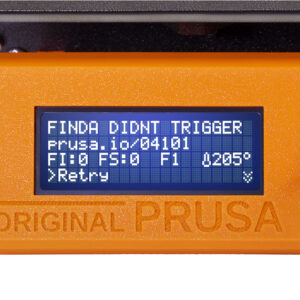
                  FINDA didn't trigger #04101 (MMU)

                  FINDA didn't trigger #04101 (MMU)

                  What happened? During Filament loading, either to the MMU unit or to the Nozzle, if the filament does not reach the  SuperFINDA or is not detected, the printer will show an error. How…

                  Modular bed error #17253 (XL)

                  Modular bed error #17253 (XL)

                  What happened?  The printer is showing the message "Heatbed tile no. #: Temperature measurement error; thermistor may be faulty".  Error name: MB Maxtemp Err Error code: #17253 The…

                  XY position invalid #17106 (XL)

                  XY position invalid #17106 (XL)

                  What happened?  During XY probing, part of the Tool Offset calibration, if the offset in one of the tools is out of a range of acceptable values, the printer will show the message…

                  Unsupported printer type #12610 (MINI/MINI+)

                  Unsupported printer type #12610 (MINI/MINI+)

                  What happened? While flashing firmware to your printer an error might occur, and the screen will display the following message: "Firmware/printer types do not match. Make sure…

                  Modular bed error #17257 (XL)

                  Modular bed error #17257 (XL)

                  What happened?  Before starting each print, your Original Prusa XL will test the resistance of the heatbed tile, by heating it and measuring its current. In case of an issue related…

                  Dwarfボードエラー #17503 (XL)

                  Dwarfボードエラー #17503 (XL)

                  どのようなエラーか? Original Prusa XL Dwarfボード上では、Marlinファームウェアが動作しています。Marlinファームウェアには独自のエラーがあり、そのMarlinエラーが他のOriginal Prusa XLエラーに含まれていない場合、これらのエラーがDwarfボードに伝播されます。この場合、プリンターは「Dwarfボード…

                  TMC Driver reset #04302 (MMU)

                  TMC Driver reset #04302 (MMU)

                  What happened? Each of the three stepper motors on the MMU unit is controlled by a TMC driver on the control board. This message is shown when the TMC driver for the Pulley has…

                  Puppy error #17519 (XL)

                  Puppy error #17519 (XL)

                  What happened? On the Original Prusa XL, communication with the peripheral boards (e.g. Dwarf board) is achieved using the MODBUS protocol. In MODBUS, there are two types of devices:…

                  Puppy error #17521 (XL)

                  Puppy error #17521 (XL)

                  What happened? On the Original Prusa XL, communication with the peripheral boards (e.g. Dwarf board) is achieved using the MODBUS protocol. In MODBUS, there are two types of devices:…

                  Out of memory #17507 (XL)

                  Out of memory #17507 (XL)

                  What happened? The Original Prusa XL electronic boards have memory, including RAM (Random Access Memory). In rare cases, the RAM can be fully consumed, with the printer unable…

                  Dwarfボードエラー #17502 (XL)

                  Dwarfボードエラー #17502 (XL)

                  どのようなエラーか? プリンターに「Dwarf ボードで次の問題が発生しました #」というメッセージが表示されています エラー名: Dwarf unknown err エラーコード: #17502 Original Prusa XLでは、Dwarfボードは各プリントヘッドの一部です。XLのマルチツールバージョンには、ツールの数と同じ数のDwarfボードが装備されています。エラーメッセージには、エラーの性質を特定する追加のテキストが含まれています。 …

                  Selector cannot home #04115 (MMU)

                  Selector cannot home #04115 (MMU)

                  What happened? Before it can align with any of the filament positions, the selector on the MMU unit needs to be “homed” to determine its position. For that, the selector moves…

                  Invalid FW size on USB #12603 (MINI/MINI+)

                  Invalid FW size on USB #12603 (MINI/MINI+)

                  What happened? While flashing firmware to your printer an error might occur, and the screen will display the following message: "Firmware file has invalid size! Check the file…

                  Modular Bed Error #17319 (XL)

                  Modular Bed Error #17319 (XL)

                  What happened? The Original Prusa XL can detect a power fault on the Modular Bed, with hardware measurements: in case this happens, the printer will show the message "Power failure". Error…

                  ESP error #17506 (XL)

                  ESP error #17506 (XL)

                  What happened? The printer is showing the message: "Unknown error" Error name: ESP unknown error Error code: #17506 On the Original Prusa XL, the XLBuddy board includes a WiFi…

                  Puppy error #17515 (XL)

                  Puppy error #17515 (XL)

                  What happened? On the Original Prusa XL, communication with the peripheral boards (e.g. Dwarf board) is achieved using the MODBUS protocol. In MODBUS, there are two types of devices:…

                  MMU not responding #04401 (MMU)

                  MMU not responding #04401 (MMU)

                  What happened? The printer is trying to initiate communication with the MMU unit, but there is no response. How to fix it? Check the following: Make sure the MMU unit is present…

                  Connect Registration Failed #31401 (CORE One) #35401 (CORE One L) #36401 (CORE One INDX) #17401 (XL) #26401 (MK4S) #13401 (MK4) #27401 (MK3.9S) #21401 (MK3.9) #28401 (MK3.5S) #23401 (MK3.5) #12401 (MINI)

                  Connect Registration Failed #31401 (CORE One) #35401 (CORE One L) #36401 (CORE One INDX) #17401 (XL) #26401 (MK4S) #13401 (MK4) #27401 (MK3.9S) #21401 (MK3.9) #28401 (MK3.5S) #23401 (MK3.5) #12401 (MINI)

                  What happened?  During the configuration of Prusa Connect on the Original Prusa Printers, an error can occur, and the printer shows the message "Registration to Prusa Connect failed…

                  Imposter! Fake signature #17606 (XL)

                  Imposter! Fake signature #17606 (XL)

                  What happened? When trying to install non-official firmware on your Original Prusa XL, the screen shows "Firmware signature verification failed! Only official signed firmware can…

                  Extruder temp not matching #17210 (XL)

                  Extruder temp not matching #17210 (XL)

                  The printer displays the message "Measured temperature is not matching expected value. Check the thermistor is in contact with hotend. In case of damage, replace it." when the…

                  Loadcell tare error #17524 (XL)

                  Loadcell tare error #17524 (XL)

                  What happened? The Original Prusa XL is equipped with a loadcell, to detect that the nozzle is close enough to the steel sheet for printing, and to avoid damage that would be caused…

                  LED Memory Error #17529 (XL)

                  LED Memory Error #17529 (XL)

                  What happened? The Original Prusa XL memory allocation is managed autonomously. In case of an issue in memory management that affects an LED animation, the printer will show the…

                  Emergency stop #12510 (MINI)

                  Emergency stop #12510 (MINI)

                  What happened? The Original Prusa MINI is showing the message: "Emergency stop invoked by G-code (M112)". Error name: Emergency stop Error code: #12510 This error message can be…

                  ノズルクリーニングの失敗 (XL)

                  ノズルクリーニングの失敗 (XL)

                  高品質なプリントを実現するには、ノズルがプリント面に正しく接触することが基本です。これが達成されない場合、プリンタは「ノズルのクリーニングに失敗しました」"nozzle cleaning failed" というメッセージを表示します。  解決方法 ノズルの清掃 注意:加熱された部品に触ると火傷の可能性があります! ノズルにフィラメントの残滓が付着していないか確認してください。ノズルやヒーターブロックに付着したゴミは、熱特性に影響を与えます。清掃するには、ノズルを250…

                  エクストルーダーの熱暴走 #17204 (XL)

                  エクストルーダーの熱暴走 #17204 (XL)

                  何が起きているのか? プリンタは、ノズルの温度が長時間にわたって6℃低下した場合、「エクストルーダーの熱暴走:サーミスターの配線の損傷を確認してください」と表示します。通常、この温度低下は問題にはなりませんが、20秒経っても熱が回復しない場合にエラーが発生します。この場合、プリンは加熱を停止し、画面にメッセージを表示します。その後、ユーザーがすべての部品を点検し、必要に応じて問題を修正するのを待ちます。 エラー名:ホットエンドの熱暴走 エラーコード:#17204 修正方法 このエラーは配線に問題があることを示しており、ヒーターまたはサーミスターのケーブルが損傷している可能性があります。 目視点検 マルチメーターを使用する前に、サーミスターとヒーターが配置されているDwarfボードを確認し、ワイヤーが切れていたり、外れていたりしていないことを確認してください。 開始する前に、以下を確認してください: エクストルーダーからフィラメントが取り出されていること プリンターの電源がOFFで、電源プラグが抜かれていること ホットエンドとヒートベッドが周囲温度まで冷却されていること 工具を扱い、ヒートベッドの高い位置にあるエクストルーダーで作業するため、ヒートベッドを保護する必要があります。 空のPrusamentの段ボール箱をヒートベッドの前方中央部に置きます。X軸をプリンターの前面に移動し、エクストルーダーをX軸のほぼ中央に移動させます。 Dwarfカバードアを開いて、Dwarfボードにアクセスします。 下の画像に従って、すべてのコネクターがソケットにしっかりと接続されていることを確認します。サーミスターとヒーターのケーブルに注目してください。可能性は低いですが、荒い輸送や取り扱いによってヒーターやサーミスターのケーブルが緩んでいる可能性があります。 抵抗の確認 以下の表は、各部品の正しい抵抗値と、メーターを設定すべきスケールを示しています。ホットエンドのサーミスターは25℃で100…

                  パピーエラー #17514 (XL)

                  パピーエラー #17514 (XL)

                  何が起こっているのか? Original Prusa XLでは、周辺ボード(例:Dwarfボード)との通信にMODBUSプロトコルが使用されています。MODBUSには2種類のデバイスがあります:マスターとスレーブで、それぞれクライアントとサーバーとも呼ばれます。Original Prusa XLのファームウェアでは、マスターはXLBuddyで、各スレーブはpuppyと呼ばれています。 各puppyにアドレスを割り当てた後、XLBuddyは特定のpuppyにリクエストを送信して通信を確立します。puppyがリクエストに応答しない場合、プリンターは「Puppy…

                  Loadcell tare failed #17525 (XL)

                  Loadcell tare failed #17525 (XL)

                  What happened? The Original Prusa XL is equipped with a loadcell, to detect that the nozzle is close enough to the steel sheet for printing, and to avoid damage that would be caused…

                  Communication error #04402 (MMU)

                  Communication error #04402 (MMU)

                  What happened? There were frequent errors detected in the communication between the printer and the MMU unit. The digital communication “messages” between the printer and the MMU…

                  TMC driver error #04311 (MMU)

                  TMC driver error #04311 (MMU)

                  What happened? Each of the three stepper motors on the MMU unit is controlled by a TMC driver on the control board. In case there is an unexpected communication issue between the…

                  Fan RPM out of test range #10127 (SL1/SL1S)

                  Fan RPM out of test range #10127 (SL1/SL1S)

                  What happened? The printer is displaying the message: RPM of fan not in range! Error name: Fan RPM out of test range Error code: #10127 Issued if the RPM of any of the printer's…

                  エクストルーダー プリヒートエラー #17202 (XL)

                  エクストルーダー プリヒートエラー #17202 (XL)

                  何が起こったか? 「エクストルーダープリヒートエラー:ヒーターおよびサーミスタの配線に損傷がないか確認してください」というメッセージは、プリンタがノズルを20秒間で2℃以上加熱できない場合に表示されます。プリンタは安全機能を起動し、即座に加熱プロセスを停止し、このメッセージを画面に表示します。その後、ユーザーがすべての部品を点検し、必要に応じて問題を修正するのを待ちます。 エラー名:ホットエンドプリヒートエラー エラーコード:#17202 どうやって直すのですか? このエラーは、ほとんどの場合、ホットエンドヒーターケーブルの配線損傷や接続不良が原因で発生します。まれに、ホットエンドサーミスタの配線や接続が原因となることもあります。 目視による点検 テスターを使う前に、サーミスタとヒーターが接続されているドワーフボードを確認し、配線が切れていないか、または外れていないかを確認してください。 作業を始める前に、必ず以下を確認してください: フィラメントがエクストルーダーからアンロードされていること プリンタの電源がOFFで、電源プラグが抜かれていること ホットエンドおよびヒートベッドが室温まで冷えていること これから工具を使い、ヒートベッドの上でエクストルーダーを操作するため、ヒートベッドを保護する必要があります。 空のPrusament段ボール箱をヒートベッドの前中央付近に置いてください。Y軸をプリンタの前側いっぱいまで動かし、エクストルーダーをX軸の中央付近まで移動させます。 ドワーフカバードアを開けて、ドワーフボードにアクセスします。 下の写真を参考に、すべてのコネクターがしっかりとソケットに接続されているか確認してください。特にサーミスタとヒーターのケーブルに注目してください。まれに、輸送や取り扱いが荒いとヒーターやサーミスタのケーブルが緩むことがあります。 抵抗値の確認 下記の表は、各部品の正しい抵抗値と、テスターの設定スケールについて説明しています。ホットエンドサーミスタは25℃で100kΩです。実際には、温度が20℃から30℃の間で変動するため、80kΩ~125kΩ程度の幅広い値が表示されることがあります。 ケーブルに微細な断線がある場合、特定の位置でのみ接続が切れることがあります。そのため、測定中にケーブルを少し動かして、値が大きく変化しないか確認してください。 部品 抵抗値 テスター設定スケール ホットエンドサーミスタ [80…

                  Extruder Maxtemp error #17206 (XL)

                  Extruder Maxtemp error #17206 (XL)

                  What happened? The Original Prusa XL will display the message "Extruder Maxtemp error: Check the thermistor wiring for potential damage" if the printer's nozzle temperature goes…

                  Puppy error #17516 (XL)

                  Puppy error #17516 (XL)

                  What happened? On the Original Prusa XL, communication with the peripheral boards (e.g. Dwarf board) is achieved using the MODBUS protocol. In MODBUS there are two types of devices,…

                  Puppyボードエラー #17518 (XL)

                  Puppyボードエラー #17518 (XL)

                  どのようなエラーか? プリンターに次のメッセージが表示されています:「Puppy # ファームウェアが見つかりません」。 エラー名:Puppy FWが見つかりません エラーコード:#17518 エラーメッセージには、ファームウェアが見つからなかったpuppyボードの名前が含まれています。すべてのpuppyのファームウェアは、Original Prusa…

                  Puppy error #17522 (XL)

                  Puppy error #17522 (XL)

                  What happened? On the Original Prusa XL, communication with the peripheral boards (e.g. Dwarf board) is achieved using the MODBUS protocol. In MODBUS, there are two types of devices:…

                  Heatbreak Maxtemp error #17212 (XL)

                  Heatbreak Maxtemp error #17212 (XL)

                  What happened? The printer will display the message "Check the heatbreak thermistor wiring for possible damage" if the heatbreak temperature measures more than 100 °C at any point.…

                  正確なリファインメントに失敗 #17102 (XL)

                  正確なリファインメントに失敗 #17102 (XL)

                  どのようなエラーか? Original Prusa XLがクラッシュを検知した場合、プリンターは精密ホーミングと呼ばれる手順を通じて基準点を見つけようとします。右側と左側が揃っていない場合、精密ホーミングは失敗し、このエラーが表示されます。 エラー名:精密調整失敗 Precise Refinement Failed エラーコード:#17102 修正する方法 ベルトの張りを確認し、必要に応じて調整してください。プリンターの右側と左側が完全に揃っていることを確認してください。 ベルトを正しく調整した後、レールの両側にある2つのプラスチック部品が同時に軸の前面に到達するはずです。

                  Flash erase error #17605 (XL)

                  Flash erase error #17605 (XL)

                  What happened? While flashing firmware to your Original Prusa XL, an error might occur, and the screen will display the following message: "Error erasing flash! Restart the printer…

                  Puppy error #17520 (XL)

                  Puppy error #17520 (XL)

                  What happened? On the Original Prusa XL, communication with the peripheral boards (e.g. Dwarf board) is achieved using the MODBUS protocol. In MODBUS, there are two types of devices:…

                  I2C Send Undefined #17314 (XL)

                  I2C Send Undefined #17314 (XL)

                  What happened? On the Original Prusa XL, the I2C bus is used for the XLBuddy to communicate with other printer components. In case of an unknown error with sending data from the…

                  EEPROM I2C Receive Busy #17316 (XL)

                  EEPROM I2C Receive Busy #17316 (XL)

                  What happened? On the Original Prusa XL, the I2C bus is used for the XLBuddy to communicate with other printer components. The components have different states, including a busy…

                  I2C Receive undefined #17318 (XL)

                  I2C Receive undefined #17318 (XL)

                  What happened? On the Original Prusa XL, the I2C bus is used for the XLBuddy to communicate with other printer components. In case of an unknown error with receiving data to the…

                  TMC driver error #04321 (MMU)

                  TMC driver error #04321 (MMU)

                  What happened? Each of the three stepper motors on the MMU unit is controlled by a TMC driver on the control board. In case there is an unexpected communication issue between the…

                  Hash verification failed #17607 (XL)

                  Hash verification failed #17607 (XL)

                  What happened? When trying to flash the firmware on your Original Prusa XL, the printer shows the error: "Firmware hash verification failed! Firmware file is damaged. Try downloading…

                  BBF Allocation Failed #17531 (XL)

                  BBF Allocation Failed #17531 (XL)

                  What happened? The Original Prusa XL firmware is in BBF format. When flashing firmware, this is copied from the USB drive to the XL internal memory. In case of an issue in allocating…

                  Filament sensor didn't trigger #04103 (MMU)

                  Filament sensor didn't trigger #04103 (MMU)

                  What happened? If, during the filament load-to-nozzle process, the extruder's filament sensor is not triggered, the printer will display an error. How to fix it? Assembly Remake…

                  No FW in internal flash #12612 (MINI/MINI+)

                  No FW in internal flash #12612 (MINI/MINI+)

                  What happened? While flashing firmware to your printer an error might occur, and the screen will display the following message: "No firmware found in the internal flash! Please…

                  I2C Send Timeout #17313 (XL)

                  I2C Send Timeout #17313 (XL)

                  What happened? On the Original Prusa XL, the I2C bus is used for the XLBuddy to communicate with other printer components. All communication is expected to occur within a timeframe:…

                  Puppyボードエラー #17517 (XL)

                  Puppyボードエラー #17517 (XL)

                  What happened? On the Original Prusa XL, communication with the peripheral boards (e.g. Dwarf board) is achieved using the MODBUS protocol. In MODBUS, there are two types of devices:…

                  Homing error Y #31305 (CORE One) #35305 (CORE One L) #36305 (CORE One INDX) #17305 (XL)

                  Homing error Y #31305 (CORE One) #35305 (CORE One L) #36305 (CORE One INDX) #17305 (XL)

                  What happened? The printer displays the message "Failed to home the Y-axis. Make sure there is no obstacle on the Y-axis." Error name: Homing error Y Error code: #31305 (CORE One)…

                  USB Device Overcurrent #17307 (XL)

                  USB Device Overcurrent #17307 (XL)

                  What happened? The Original Prusa XL is showing the message "Overcurrent detected on the connected USB device, disconnect it." Error name: USB Device Overcurrent Error code: #17307 The…

                  I2C Receive Timeout #17317 (XL)

                  I2C Receive Timeout #17317 (XL)

                  What happened? On the Original Prusa XL, the I2C bus is used for the XLBuddy to communicate with other printer components. All communication is expected to occur within a timeframe:…

                  ピンが未到達 #17107 (XL)

                  ピンが未到達 #17107 (XL)

                  どのようなエラーなのか? XYZキャリブレーション中、キャリブレーションピンに到達しない場合、プリンターは「キャリブレーションピンに到達していません。ピンの取り付けを確認してください」というメッセージを表示します。 エラー名:ピンに未到達 エラーコード:#17107 どのように修正するか? キャリブレーションピン キャリブレーションピンが取り付けられていることを確認してください。取り付けていないとエラーが発生する可能性があります。 不適切なホーミング プリンターのホーミングが正しく行われていることを確認してください。例えば、ホーミングエリアにフィラメントの残留物があるとエラーが発生する可能性があります。 また、ノズルが何かに押し付けられている状態でロードセルのゼロ点調整が行われた場合、例えばホーミング手順中にノズルがキャリブレーションピンに押し付けられている場合にもエラーが発生する可能性があります。 ノズルが取り付けられていない ヒーターブロックにノズルが取り付けられていないプリンターでもエラーが発生する可能性があります。ノズルを含むすべての部品が正しく取り付けられていることを確認してください。

                  Fan failure #10126 (SL1/SL1S)

                  Fan failure #10126 (SL1/SL1S)

                  What happened? The printer is displaying the message: Incorrect RPM reading of the fan. Please check its wiring and connection. Error name: Fan failure Error code: #10126 This…

                  Temperature sensor failed #10210 (SL1/SL1S)

                  Temperature sensor failed #10210 (SL1/SL1S)

                  What happened? The printer displaying the message: Reading of UV LED temperature has failed! This value is essential for the UV LED lifespan and printer safety. Please contact…

                  Extruder Mintemp error #17208 (XL)

                  Extruder Mintemp error #17208 (XL)

                  What happened? The printer will display the message "Extruder Mintemp error: Check the thermistor wiring for potential damage" if the printer's nozzle temperature goes below 15…

                  Modular bed error #17302 (XL)

                  Modular bed error #17302 (XL)

                  What happened?  The printer is showing the message: "Overcurrent detected".  Error name: MB overcurrent Error code: #17302 An LED on the Modular Bed lights up when this error occurs.…

                  Homing error X #17304 (XL)

                  Homing error X #17304 (XL)

                  What happened? The printer displays the message "Failed to home the X-axis, make sure there is no obstacle on X-axis or Y-axis." Error name: Homing error X Error code: #17304 The…

                  I2C Receive failed #17315 (XL)

                  I2C Receive failed #17315 (XL)

                  What happened? On the Original Prusa XL, the I2C bus is used for the XLBuddy to communicate with other printer components. If there is an error while the XLBuddy is receiving data,…

                  Connection failed #10403 (SL1/SL1S)

                  Connection failed #10403 (SL1/SL1S)

                  What happened? The printer is displaying the message "Connection to Prusa servers failed, please try again later." Error name: Connection failed Error code: #10403 This error is…

                  接続認証の失敗 #17401 (XL)

                  接続認証の失敗 #17401 (XL)

                  何が起こったのか? Original Prusa XLでPrusa Connectの設定中に、この設定でエラーが発生し、プリンタに「Prusa Connectへの登録が失敗しました:~」というメッセージが表示されることがあります。~の部分には、より詳細な説明テキストが表示されます。 エラー名:Connect登録失敗 エラーコード:#17401 どのように修正するか? Buddyファームウェアを搭載した当社のプリンタ共通のConnect登録失敗ガイドの指示に従ってください。このガイドには、このエラーの考えられる原因とその解決策についてのより詳細な情報が記載されています。

                  Signature verification failed #12606 (MINI/MINI+)

                  Signature verification failed #12606 (MINI/MINI+)

                  What happened? When trying to install non-official firmware, the screen shows "Firmware signature verification failed! Only official signed firmware can be flashed.". Error name:…

                  Language not set #10547 (SL1/SL1S)

                  Language not set #10547 (SL1/SL1S)

                  What happened? The printer is displaying the message "The language is not set. Go to Settings -> Language & Time -> Set Language and pick preferred language." Error name: Language…

                  Unsupported BBF version #12614 (MINI/MINI+)

                  Unsupported BBF version #12614 (MINI/MINI+)

                  What happened? While flashing firmware to your printer an error might occur, and the screen will display the following message: "USB flash drive contains unsupported firmware BBF…

                  I2C Send Busy #17312 (XL)

                  I2C Send Busy #17312 (XL)

                  What happened? On the Original Prusa XL, the I2C bus is used for the XLBuddy to communicate with other printer components. The components have different states, including a busy…

                  Unsupported printer model #17610 (XL)

                  Unsupported printer model #17610 (XL)

                  What happened? While flashing firmware to your Original Prusa XL an error might occur, and the screen will display the following message: "Firmware/printer types do not match.…

                  Invalid FW size on USB flash drive #17603 (XL)

                  Invalid FW size on USB flash drive #17603 (XL)

                  What happened? While flashing firmware to your Original Prusa XL, an error might occur, and the screen will display the following message: "Firmware file has invalid size! Check…

                  Unsupported firmware BBF file #17614 (XL)

                  Unsupported firmware BBF file #17614 (XL)

                  What happened? While flashing firmware to your Original Prusa XL, an error might occur, and the screen will display the following message: "USB flash drive contains unsupported…

                  ESP error #17505 (XL)

                  ESP error #17505 (XL)

                  What happened? The printer is showing the message: "Command error" Error name: ESP command error Error code: #17505 On the Original Prusa XL, the XLBuddy board includes a WiFi…

                  Puppy error #17512 (XL)

                  Puppy error #17512 (XL)

                  What happened? On the Original Prusa XL, communication with the peripheral boards (e.g. Dwarf board) is achieved using the MODBUS protocol. In MODBUS, there are two types of devices:…

                  Hotend temp not matching #28210 (MK3.5S) #23210 (MK3.5)

                  Hotend temp not matching #28210 (MK3.5S) #23210 (MK3.5)

                  What happened?  The Original Prusa MK3.5/S continuously monitors the temperature of the tool head in use and its variation with respect to an expected reference. In case the printer…

                  Flash erase error #12605 (MINI/MINI+)

                  Flash erase error #12605 (MINI/MINI+)

                  What happened? While flashing firmware to your printer an error might occur, and the screen will display the following message: "Error erasing flash! Restart the printer and try…

                  Modular bed error #17303 (XL)

                  Modular bed error #17303 (XL)

                  What happened?  The printer is showing the message: "Unexpected invalid current".  Error name: MB invalid current Error code: #17303 An LED on the Modular Bed lights up when this…

                  Warning: TMC too hot #04211 (MMU)

                  Warning: TMC too hot #04211 (MMU)

                  What happened? Each of the three stepper motors on the MMU unit is controlled by a TMC driver on the control board. This message is shown in case the TMC driver for the Selector…

                  Power Panic #17321 (XL)

                  Power Panic #17321 (XL)

                  What happened? The Original Prusa XL is equipped with a Power Panic cable, which can recover the printer from a complete loss of power without needing batteries or an UPS. If the…

                  Connect Registration Failed #23401 (MK3.5)

                  Connect Registration Failed #23401 (MK3.5)

                  What happened?  During the configuration of Prusa Connect on the Original Prusa MK3.5, an error on this configuration can occur and the printer shows the message "Registration…

                  MMU Selftest failed #04305 (MMU)

                  MMU Selftest failed #04305 (MMU)

                  What happened? After a startup or restart, the MMU unit performs a self-test. It checks if the main control board behaves correctly and if all the signals from the microcontroller…

                  TMC Driver reset #04322 (MMU)

                  TMC Driver reset #04322 (MMU)

                  What happened? Each of the three stepper motors on the MMU unit is controlled by a TMC driver on the control board. This message is shown in case the TMC driver for the Idler has…

                  Filament change #04508 (MMU)

                  Filament change #04508 (MMU)

                  What happened? This error happens when the filament change function is triggered. This can happen by: Filament change command in the printer’s menu. Issuing the M600 G-code command. The…

                  Hotend thermal runaway #28204 (MK3.5S) #23204 (MK3.5)

                  Hotend thermal runaway #28204 (MK3.5S) #23204 (MK3.5)

                  What happened? The printer is showing the message "Hotend thermal runaway: Check the print head thermistor wiring for possible damage." Error name: Hotend thermal runaway Error…

                  Hotend mintemp error #28208 (MK3.5S) #23208 (MK3.5)

                  Hotend mintemp error #28208 (MK3.5S) #23208 (MK3.5)

                  What happened? The printer is showing the message "Check the print head thermistor wiring for possible damage." Error name: Hotend mintemp error Error code: #28208 (MK3.5S) #23208…

                  Homing Error Z #23301 (MK3.5)

                  Homing Error Z #23301 (MK3.5)

                  What happened? During calibration, mesh bed leveling, or before a print, it is crucial for the printer firmware to determine the print head and heatbed position. This is done through…

                  Unsupported Buddy FW #17611 (XL)

                  Unsupported Buddy FW #17611 (XL)

                  What happened? While flashing firmware to your Original Prusa XL, an error might occur, and the screen will display the following message: "Firmware/printer versions do not match!…

                  Emergency stop #17510 (XL)

                  Emergency stop #17510 (XL)

                  What happened? The printer is showing the message: "Emergency stop invoked by G-code (M112)". Error name: Emergency stop Error code: #17510 This error message can be triggered…

                  Loadcell not calibrated #17523 (XL)

                  Loadcell not calibrated #17523 (XL)

                  What happened? The Original Prusa XL is equipped with a loadcell, to detect that the nozzle is close enough to the steel sheet for printing, and to avoid damage that would be caused…

                  Modular Bed Error #17320 (XL)

                  Modular Bed Error #17320 (XL)

                  What happened? The Original Prusa XL can detect a power fault on the Modular Bed, with hardware measurements: in case this happens, and is related to the power panic feature, the…

                  Filament ejected #04507 (MMU)

                  Filament ejected #04507 (MMU)

                  What happened? The filament has been ejected to the front of the MMU unit, so that you can remove it. This feature is handy in case you are using the Spooljoin function. A depleted…

                  Firmware update needed #04504 (MMU)

                  Firmware update needed #04504 (MMU)

                  What happened? This error is shown when the MMU unit has an old or incompatible firmware version. The printer will show you an expected firmware version for the MMU unit. For example,…

                  Firmware runtime error #04505 (MMU)

                  Firmware runtime error #04505 (MMU)

                  What happened? This is a generic error message indicating that a software fault was detected on the MMU unit. This might be an error that doesn’t have its own specific error code…

                  Connect Registration Failed #12401 (MINI)

                  Connect Registration Failed #12401 (MINI)

                  What happened?  During the configuration of Prusa Connect on the Original Prusa MINI/+, an error on this configuration can occur and the printer shows the message "Registration…

                  No FW on USB flash drive #17604 (XL)

                  No FW on USB flash drive #17604 (XL)

                  What happened? When flashing the firmware, you might get the message "Firmware file missing in the USB flash!". Error name: No FW on USB flash drive Error code: #17604 This error…

                  USB flash error #17613 (XL)

                  USB flash error #17613 (XL)

                  What happened? While flashing firmware to your Original Prusa XL, an error might occur, and the screen will display the following message: "File system error! Try a different USB…

                  FW in internal flash corrupted #17608 (XL)

                  FW in internal flash corrupted #17608 (XL)

                  What happened? When trying to flash the firmware on your Original Prusa XL, the printer shows the error: "Firmware in the internal flash corrupted! Please reflash the firmware." Error…

                  Modular bed error #17251 (XL)

                  Modular bed error #17251 (XL)

                  What happened?  In case the printer detects a problem with the modular bed, the display will show the following message: "Heatbed tile no. #: Damaged tile or wiring. Follow online…

                  MMU Overcurrent #31310 (CORE One) #35310 (CORE One L) #26310 (MK4S) #13310 (MK4) #27310 (MK3.9S) #21310 (MK3.9) #28310 (MK3.5S) #23310 (MK3.5)

                  MMU Overcurrent #31310 (CORE One) #35310 (CORE One L) #26310 (MK4S) #13310 (MK4) #27310 (MK3.9S) #21310 (MK3.9) #28310 (MK3.5S) #23310 (MK3.5)

                  What happened? The printer with the xBuddy board is equipped with a safety mechanism to detect power supply overcurrent situations in the Multi-material unit (MMU) connection.…

                  Loadcell Tare Error #31524 (CORE One) #35524 (CORE One L) #26524 (MK4S) #13524 (MK4) #27524 (MK3.9S) #21524 (MK3.9)

                  Loadcell Tare Error #31524 (CORE One) #35524 (CORE One L) #26524 (MK4S) #13524 (MK4) #27524 (MK3.9S) #21524 (MK3.9)

                  What happened? The Prusa CORE One/+, CORE One L, and the Original Prusa MK4/S, MK3.9/S are equipped with a loadcell, to detect that the nozzle is close enough to the steel sheet…

                  Inspect FINDA #04107 (MMU)

                  Inspect FINDA #04107 (MMU)

                  What happened? This error is shown when the selector on the MMU unit needs to move or re-home, but a filament inside it is detected unexpectedly by the SuperFINDA sensor. The selector…

                  PNG Buffer Full #17508 (XL)

                  PNG Buffer Full #17508 (XL)

                  What happened? The Original Prusa XL electronic boards have memory, including a dedicated dynamic memory for processing the PNG files, to show an image preview of a model on the…

                  Loadcell Bad Configuration #17527 (XL)

                  Loadcell Bad Configuration #17527 (XL)

                  What happened? The Original Prusa XL is equipped with a loadcell, to detect that the nozzle is close enough to the steel sheet for printing, and to avoid damage that would be caused…

                  Warning: TMC too hot #04221 (MMU)

                  Warning: TMC too hot #04221 (MMU)

                  What happened? Each of the three stepper motors on the MMU unit is controlled by a TMC driver on the control board. This message is shown in case the TMC driver for the Idler motor…

                  MMU Selftest failed #04325 (MMU)

                  MMU Selftest failed #04325 (MMU)

                  What happened? After a startup or restart, the MMU unit performs a self-test. It checks if the main control board behaves correctly and if all the signals from the microcontroller…

                  XY probe unstable #17105 (XL)

                  XY probe unstable #17105 (XL)

                  What happened?  During XY probing, part of the Tool Offset calibration, if the same probes are not repeatable after multiple attempts, the printer will show the message "XY probing…

                  TMC driver error #04301 (MMU)

                  TMC driver error #04301 (MMU)

                  What happened? Each of the three stepper motors on the MMU unit is controlled by a TMC driver on the control board. In case there is an unexpected communication issue between the…

                  Filament already loaded #04501 (MMU)

                  Filament already loaded #04501 (MMU)

                  What happened? The MMU doesn’t rely only on its sensors (SuperFINDA and the extruder filament sensor). It also keeps an internal record of whether the filament is loaded or unloaded.…

                  TMC overheat error #04222 (MMU)

                  TMC overheat error #04222 (MMU)

                  What happened? Each of the three stepper motors on the MMU unit is controlled by a TMC driver on the control board. This message is shown in case the TMC driver for the Idler motor…

                  MMU MCU Underpower #04307 (MMU)

                  MMU MCU Underpower #04307 (MMU)

                  What happened? The Original Prusa MMU3, as well as the MMU2S with firmware version 3.0.0 or higher, feature a voltage-sensing function managed by the Main Control Unit (MCU). This…

                  TMC driver shorted #04314 (MMU)

                  TMC driver shorted #04314 (MMU)

                  What happened? The Original Prusa MMU3 and MMU2S are equipped with a control board containing Trinamic (TMC) drivers to manage the motion from each of the connected motors. With…

                  Puppy error #17511 (XL)

                  Puppy error #17511 (XL)

                  What happened? On the Original Prusa XL, communication with the peripheral boards (e.g. Dwarf board) is achieved using the MODBUS protocol. In MODBUS, there are two types of devices:…

                  Heatbed temp not matching #31209 (CORE One) #35209 (CORE One L) #26209 (MK4S) #13209 (MK4) #27209 (MK3.9S) #21209 (MK3.9) #28209 (MK3.5S) #23209 (MK3.5)

                  Heatbed temp not matching #31209 (CORE One) #35209 (CORE One L) #26209 (MK4S) #13209 (MK4) #27209 (MK3.9S) #21209 (MK3.9) #28209 (MK3.5S) #23209 (MK3.5)

                  What happened? The printer displays the message "Temp not matching - Measured temperature is not matching expected value. Check the thermistor is in contact with heatbed. In case…

                  Temperature out of range #10211 (SL1/SL1S)

                  Temperature out of range #10211 (SL1/SL1S)

                  What happened? The printer is displaying the message: Reading of sensor not in range! Measured temperature: (temperature). Keep the printer out of direct sunlight at room temperature…

                  ESP not connected #17533 (XL)

                  ESP not connected #17533 (XL)

                  What happened? The Original Prusa XL is equipped with an ESP Wi-Fi module. This module is part of the XLBuddy board. In case the printer cannot find the ESP module, this error…

                  Invalid file extension #10519 (SL1/SL1S)

                  Invalid file extension #10519 (SL1/SL1S)

                  What happened? The printer is displaying the message: File has an invalid extension! See the article for supported file extensions. Error name: Invalid file extension Error code:…

                  Invalid tool #04502 (MMU)

                  Invalid tool #04502 (MMU)

                  What happened? The MMU3 works with 5 filament positions (called “tools”), labeled 1 to 5 on the unit. It is possible to select a filament using G-code commands in the format T[number]. T0:…

                  Firmware Update Required #31701 (CORE One) #35701 (CORE One L) #36701 (CORE One INDX) #26701 (MK4S) #13701 (MK4) #27701 (MK3.9S) #21701 (MK3.9) #28701 (MK3.5S) #23701 (MK3.5)

                  Firmware Update Required #31701 (CORE One) #35701 (CORE One L) #36701 (CORE One INDX) #26701 (MK4S) #13701 (MK4) #27701 (MK3.9S) #21701 (MK3.9) #28701 (MK3.5S) #23701 (MK3.5)

                  What happened? The Prusa CORE One, CORE One L, and the Original Prusa MK4/S, MK3.9/S, and MK3.5/S are equipped with the xBuddy board. Thanks to this, and the capability for firmware…

                  Hotend preheat error #28202 (MK3.5S) #23202 (MK3.5)

                  Hotend preheat error #28202 (MK3.5S) #23202 (MK3.5)

                  What happened? The printer is showing the message "Hotend preheat error: Check the print head heater and thermistor wiring for potential damage" Error name: Hotend preheat error Error…

                  BBF Initialization failed #17532 (XL)

                  BBF Initialization failed #17532 (XL)

                  What happened? The Original Prusa XL firmware is in BBF format. When flashing firmware, this is copied from the USB drive to the XL internal memory. In case of an issue at the…

                  TMC Driver reset #04312 (MMU)

                  TMC Driver reset #04312 (MMU)

                  What happened? Each of the three stepper motors on the MMU unit is controlled by a TMC driver on the control board. This message is shown in case the TMC driver for the Selector…

                  Queue full #04503 (MMU)

                  Queue full #04503 (MMU)

                  What happened? The firmware inside the MMU3 unit has detected an error. How to fix it? To fix this issue, restart the MMU unit In case it persists, contact カスタマーサポート and provide…

                  TMC Undervoltage error #04313 (MMU)

                  TMC Undervoltage error #04313 (MMU)

                  What happened? Each of the three stepper motors on the MMU unit is controlled by a TMC driver on the control board. This message is shown in case the TMC driver for the Selector…

                  Hotend maxtemp error #23206 (MK3.5)

                  Hotend maxtemp error #23206 (MK3.5)

                  What happened? The printer is showing the message "Check the print head thermistor wiring for possible damage." Error name: Hotend Maxtemp error Error code: #23206 (MK3.5) This…

                  Nozzle Cleaning Failed #31834 (CORE One) #35834 (CORE One L) #26834 (MK4S) #13834 (MK4) #27834 (MK3.9S) #21834 (MK3.9) #17834 (XL)

                  Nozzle Cleaning Failed #31834 (CORE One) #35834 (CORE One L) #26834 (MK4S) #13834 (MK4) #27834 (MK3.9S) #21834 (MK3.9) #17834 (XL)

                  To achieve high-quality prints, the nozzle must make the correct amount of contact with the print surface. If this is not achieved, your printer will display the message "Nozzle…

                  Old Expo Panel #10548 (SL1/SL1S)

                  Old Expo Panel #10548 (SL1/SL1S)

                  What happened? The printer is displaying the message "Exposure screen that is currently connected has already been used on this printer. This screen was last used for approximately…

                  Warning: TMC too hot #04201 (MMU)

                  Warning: TMC too hot #04201 (MMU)

                  What happened? Each of the three stepper motors on the MMU unit is controlled by a TMC driver on the control board. This message is shown in case the TMC driver for the Pulley…

                  TMC Undervoltage error #04323 (MMU)

                  TMC Undervoltage error #04323 (MMU)

                  What happened? Each of the three stepper motors on the MMU unit is controlled by a TMC driver on the control board. This message is shown in case the TMC driver for the Idler does…

                  Nozzle Heater Overcurrent #23308 (MK3.5)

                  Nozzle Heater Overcurrent #23308 (MK3.5)

                  What happened? The Original Prusa MK3.5 is showing the message: "Overcurrent detected on nozzle heater". Error name: Nozzle Heater Overcurrent Error code: #23308 (MK3.5) The error…

                  TMC driver shorted #04324 (MMU)

                  TMC driver shorted #04324 (MMU)

                  What happened? The Original Prusa MMU3 and MMU2S are equipped with a control board containing Trinamic (TMC) drivers to manage the motion from each of the connected motors. With…

                  Pulley cannot move #04105 (MMU)

                  Pulley cannot move #04105 (MMU)

                  What happened? The printer is showing the message "Pulley motor stalled. Ensure the pulley can move and check the wiring.". Error name: Pulley cannot move Error code: #04105 The…

                  Selector cannot move #04116 (MMU)

                  Selector cannot move #04116 (MMU)

                  What happened? For printing with MMU, it is fundamental that all parts move freely and correctly. If the selector cannot move properly, the following message appears: "The selector…

                  Unknown error #04900 (MMU)

                  Unknown error #04900 (MMU)

                  What happened? A software error has been detected on the MMU unit. How to fix it? Make sure that you are using the correct up-to-date firmware for both the printer and the MMU…

                  TMC overheat error #04212 (MMU)

                  TMC overheat error #04212 (MMU)

                  What happened? Each of the three stepper motors on the MMU unit is controlled by a TMC driver on the control board. This message is shown in case the TMC driver for the Selector…

                  TMC Undervoltage error #04303 (MMU)

                  TMC Undervoltage error #04303 (MMU)

                  What happened? Each of the three stepper motors on the MMU unit is controlled by a TMC driver on the control board. This message is shown in case the TMC driver for the Pulley…

                  Marlin Request Timeout #31530 (CORE One) #35530 (CORE One L) #36530 (CORE One INDX) #26530 (MK4S) #13530 (MK4) #27530 (MK3.9S) #21530 (MK3.9) #28530 (MK3.5S) #23530 (MK3.5)

                  Marlin Request Timeout #31530 (CORE One) #35530 (CORE One L) #36530 (CORE One INDX) #26530 (MK4S) #13530 (MK4) #27530 (MK3.9S) #21530 (MK3.9) #28530 (MK3.5S) #23530 (MK3.5)

                  What happened? The Original Prusa Printers can manage several tasks simultaneously: this is called multithreading. In case of an issue related to multithreading, the printer will…

                  TMC driver shorted #04304 (MMU)

                  TMC driver shorted #04304 (MMU)

                  What happened? The Original Prusa MMU3 and MMU2S are equipped with a control board containing Trinamic (TMC) drivers to manage the motion from each of the connected motors. With…

                  MMU Selftest failed #04315 (MMU)

                  MMU Selftest failed #04315 (MMU)

                  What happened? After a startup / restart, the MMU unit performs a self-test. It checks if the main control board behaves correctly and if all the signals from the microcontroller…

                  Marlin Request Timeout #17530 (XL)

                  Marlin Request Timeout #17530 (XL)

                  What happened? The Original Prusa XL is able to manage several tasks simultaneously (multithreading). In case of an issue related to multithreading, the printer will show the message…

                  Connect Registration Failed #21401 (MK3.9)

                  Connect Registration Failed #21401 (MK3.9)

                  What happened?  During the configuration of Prusa Connect on the Original Prusa MK3.9, an error on this configuration can occur and the printer shows the message "Registration…

                  Hotend Heater Overcurrent #17322

                  Hotend Heater Overcurrent #17322

                  What happened? The Original Prusa XL is showing the message: "Check hotend heater and control electronics for possible damage". Error name: Hotend Heater Overcurrent  Error code:…

                  Invalid project #10521 (SL1/SL1S)

                  Invalid project #10521 (SL1/SL1S)

                  What happened? The printer is displaying the message "The project file is invalid!" Error name: Invalid project Error code: #10521 This error is shown when the model chosen for…

                  TMC overheat error #04202 (MMU)

                  TMC overheat error #04202 (MMU)

                  What happened? Each of the three stepper motors on the MMU unit is controlled by a TMC driver on the control board. This message is shown in case the TMC driver for the Pulley…

                  Homing error X #12304 (MINI/MINI+)

                  Homing error X #12304 (MINI/MINI+)

                  What happened? The Original Prusa MINI/+ displays the message: "Failed to home the extruder in X-axis, make sure there is no obstacle on X-axis". Error name: Homing error X Error…

                  Homing error Y #12305 (MINI/MINI+)

                  Homing error Y #12305 (MINI/MINI+)

                  What happened? The Original Prusa MINI/+ displays the message: "Failed to home the Y-axis, make sure there is no obstacle on Y-axis". Error name: Homing error Y Error code: #12305  The…

                  Extruder not detected #31615 (CORE One) #35615 (CORE One L) #36615 (CORE One INDX) #26615 (MK4S) #13615 (MK4) #27615 (MK3.9S) #21615 (MK3.9) #28615 (MK3.5S) #23615 (MK3.5)

                  Extruder not detected #31615 (CORE One) #35615 (CORE One L) #36615 (CORE One INDX) #26615 (MK4S) #13615 (MK4) #27615 (MK3.9S) #21615 (MK3.9) #28615 (MK3.5S) #23615 (MK3.5)

                  What happened? The error "Unable to verify the extruder type, check the wiring and connectors" appears on the screen. Error name: Extruder not detected Error code: #31615 (CORE…

                  Firmware x printer mismatch #31609 (CORE One) #35609 (CORE One L)  #36609 (CORE One INDX) #17609 (XL) #26609 (MK4S) #13609 (MK4) #27609 (MK3.9S) #21609 (MK3.9) #28609 (MK3.5S) #23609 (MK3.5) #12609 (MINI)

                  Firmware x printer mismatch #31609 (CORE One) #35609 (CORE One L) #36609 (CORE One INDX) #17609 (XL) #26609 (MK4S) #13609 (MK4) #27609 (MK3.9S) #21609 (MK3.9) #28609 (MK3.5S) #23609 (MK3.5) #12609 (MINI)

                  What happened? If your printer shows the message "Firmware and hardware versions do not match. Make sure you have the right firmware file for your printer", you might have installed…

                  EXTRUDER ERROR #17536 (XL)

                  EXTRUDER ERROR #17536 (XL)

                  What happened? The printer shows the message "Extruder motor is not spinning on tool #". In place of #, the number of the Dwarf board is shown.  This problem occurs due to increased…

                  Steel sheet not detected #31109 (CORE One) #35109 (CORE One L) #36109 (CORE One INDX)

                  Steel sheet not detected #31109 (CORE One) #35109 (CORE One L) #36109 (CORE One INDX)

                  What happened? The printer is showing the message "Steel sheet was not detected. Please put the sheet on to prevent printer damage". Error name: Steel sheet not detected Error…

                  Door Open #31110 (CORE One) #35110 (CORE One L) #36110 (CORE One INDX)

                  Door Open #31110 (CORE One) #35110 (CORE One L) #36110 (CORE One INDX)

                  What happened?  The Prusa CORE One/+ and CORE One L cannot work with the doors open. If you start the print with the doors open, the message "Close the door to prevent air drafts,…

                  Heaters Timeout #31817 (CORE One) #35817 (CORE One L) #36817 (CORE One INDX) #26817 (MK4S) #13817 (MK4) #27817 (MK3.9S) #21817 (MK3.9) #28817 (MK3.5S) #23817 (MK3.5) #17817 (XL) #12817 (MINI)

                  Heaters Timeout #31817 (CORE One) #35817 (CORE One L) #36817 (CORE One INDX) #26817 (MK4S) #13817 (MK4) #27817 (MK3.9S) #21817 (MK3.9) #28817 (MK3.5S) #23817 (MK3.5) #17817 (XL) #12817 (MINI)

                  What happened? As a safety feature, if our printers are in the idle state, they automatically disable any heating after 30 minutes of inactivity. If this occurs, the printer shows…

                  Unknown error #31601 (CORE One) #35601 (CORE One L) #36601 (CORE One INDX) #26601 (MK4S) #13601 (MK4) #27601 (MK3.9S) #21601 (MK3.9) #28601 (MK3.5S) #23601 (MK3.5) #17601 (XL) #12601 (MINI)

                  Unknown error #31601 (CORE One) #35601 (CORE One L) #36601 (CORE One INDX) #26601 (MK4S) #13601 (MK4) #27601 (MK3.9S) #21601 (MK3.9) #28601 (MK3.5S) #23601 (MK3.5) #17601 (XL) #12601 (MINI)

                  What happened? Our printers have an extensive list of errors, to categorize them and help find a cause and solution. In rare cases, an error can occur that is not in our list of…

                  Nozzle Timeout #31819 (CORE One) #35819 (CORE One L) #36819 (CORE One INDX) #26819 (MK4S) #13819 (MK4) #27819 (MK3.9S) #21819 (MK3.9) #28819 (MK3.5S) #23819 (MK3.5) #17819 (XL) #12819 (MINI)

                  Nozzle Timeout #31819 (CORE One) #35819 (CORE One L) #36819 (CORE One INDX) #26819 (MK4S) #13819 (MK4) #27819 (MK3.9S) #21819 (MK3.9) #28819 (MK3.5S) #23819 (MK3.5) #17819 (XL) #12819 (MINI)

                  What happened? As a safety feature, if our printers are in the idle state, they automatically disable any heating, including the nozzle, after 30 minutes of inactivity. If this…

                  Uneven bed #31111 (CORE One) #35111 (CORE One L) #36111 (CORE One INDX)

                  Uneven bed #31111 (CORE One) #35111 (CORE One L) #36111 (CORE One INDX)

                  What happened? The printer is showing the message "The bed doesn't seem to be aligned properly. Run Z alignment procedure?" before printing. Error name: Uneven bed Error code:…

                  Ceiling clearance violation #31112 (CORE One) #35112 (CORE One L) #36112 (CORE One INDX)

                  Ceiling clearance violation #31112 (CORE One) #35112 (CORE One L) #36112 (CORE One INDX)

                  What happened? The Prusa CORE One/+ and CORE One L are CoreXY printers with a chamber. In some particular G-codes, especially customized commands, an upward movement after a downward…

                  Filament sensor stuck #31113 (CORE One) #35113 (CORE One L) #36113 (CORE One INDX) #17113 (XL) #26113 (MK4S) #13113 (MK4) #27113 (MK3.9S) #21113 (MK3.9) #28113 (MK3.5S) #23113 (MK3.5) #12113 (MINI/+)

                  Filament sensor stuck #31113 (CORE One) #35113 (CORE One L) #36113 (CORE One INDX) #17113 (XL) #26113 (MK4S) #13113 (MK4) #27113 (MK3.9S) #21113 (MK3.9) #28113 (MK3.5S) #23113 (MK3.5) #12113 (MINI/+)

                  What happened?  The filament sensor on the Prusa CORE One, CORE One L, and on the Original Prusa XL, MK4/S, MK3.9/S, MK3.5/S, and MINI/+ can detect filament runout, but also whether…


                  Filament Sensors Disabled #31115 (CORE One) #35115 (CORE One L) #36102 (CORE One INDX) #17115 (XL) #26115 (MK4S) #13115 (MK4) #27115 (MK3.9S) #21115 (MK3.9) #28115 (MK3.5S) #23115 (MK3.5) #12115 (MINI/+)

                  Filament Sensors Disabled #31115 (CORE One) #35115 (CORE One L) #36102 (CORE One INDX) #17115 (XL) #26115 (MK4S) #13115 (MK4) #27115 (MK3.9S) #21115 (MK3.9) #28115 (MK3.5S) #23115 (MK3.5) #12115 (MINI/+)

                  What happened?  The Prusa printers with a filament sensor can detect filament runout.  The filament sensor can be disabled from the printer menu. Whenever the sensor is disabled,…

                  Chamber MAXTEMP error #31214 (CORE One) #35214 (CORE One L) #36214 (CORE One INDX)

                  Chamber MAXTEMP error #31214 (CORE One) #35214 (CORE One L) #36214 (CORE One INDX)

                  What happened? The printer shows the message "Check the chamber thermistor wiring for possible damage." Error name: Chamber MAXTEMP Error Error code: #31214 (CORE One) #35214 (CORE…

                  Homing error X #31304 (CORE One) #35304 (CORE One L) #36304 (CORE One INDX) #17304 (XL)

                  Homing error X #31304 (CORE One) #35304 (CORE One L) #36304 (CORE One INDX) #17304 (XL)

                  What happened? The printer displays the message "Failed to home the X-axis. Make sure there is no obstacle on the X-axis".  Error name: Homing error X Error code: #31304 (CORE…

                  Failed to Reach Chamber Temperature #31259 (CORE One) #35259 (CORE One L) #36259 (CORE One INDX)

                  Failed to Reach Chamber Temperature #31259 (CORE One) #35259 (CORE One L) #36259 (CORE One INDX)

                  What happened? The printer shows the message "Target temperature not yet reached. Continue waiting?". This message is sent when the chamber is heating too slowly to reach the temperature…

                  Puppy error #31511 (CORE One) #35511 (CORE One L) #36511 (CORE One INDX)

                  Puppy error #31511 (CORE One) #35511 (CORE One L) #36511 (CORE One INDX)

                  What happened?  On the Prusa CORE One/+ and Prusa CORE One L, communication with the xBuddy extension board is achieved using the MODBUS protocol. In MODBUS, there are two types…

                  Puppy error #31512 (CORE One) #35512 (CORE One L) #36512 (CORE One INDX)

                  Puppy error #31512 (CORE One) #35512 (CORE One L) #36512 (CORE One INDX)

                  What happened?  On the Prusa CORE One/+ and Prusa CORE One L, communication with the xBuddy extension board is achieved using the MODBUS protocol. In MODBUS, there are two types…

                  Puppy error #31513 (CORE One) #35513 (CORE One L) #36513 (CORE One INDX)

                  Puppy error #31513 (CORE One) #35513 (CORE One L) #36513 (CORE One INDX)

                  What happened?  On the Prusa CORE One/+ and Prusa CORE One L, communication with the xBuddy extension board is achieved using the MODBUS protocol. In MODBUS, there are two types…

                  Puppy error #31514 (CORE One) #35514 (CORE One L) #36514 (CORE One INDX)

                  Puppy error #31514 (CORE One) #35514 (CORE One L) #36514 (CORE One INDX)

                  What happened?  On the Prusa CORE One/+ and Prusa CORE One L, communication with the peripheral boards (e.g. xBuddy extension board) is achieved using the MODBUS protocol. In MODBUS,…

                  Puppy error #31515 (CORE One) #35515 (CORE One L) #36515 (CORE One INDX)

                  Puppy error #31515 (CORE One) #35515 (CORE One L) #36515 (CORE One INDX)

                  What happened?  On the Prusa CORE One/+ and Prusa CORE One L, communication with the xBuddy extension board is achieved using the MODBUS protocol. In MODBUS, there are two types…

                  Puppy error #31516 (CORE One) #35516 (CORE One L) #36516 (CORE One INDX)

                  Puppy error #31516 (CORE One) #35516 (CORE One L) #36516 (CORE One INDX)

                  What happened?  On the Prusa CORE One/+ and Prusa CORE One L, communication with the xBuddy extension board is achieved using the MODBUS protocol. In MODBUS, there are two types…

                  Puppy error #31517 (CORE One) #35517 (CORE One L) #36517 (CORE One INDX)

                  Puppy error #31517 (CORE One) #35517 (CORE One L) #36517 (CORE One INDX)

                  What happened?  On the Prusa CORE One/+ and CORE One L, communication with the xBuddy extension board is achieved using the MODBUS protocol. In MODBUS, there are two types of devices:…

                  Puppy error #31518 (CORE One) #35518 (CORE One L) #36518 (CORE One INDX)

                  Puppy error #31518 (CORE One) #35518 (CORE One L) #36518 (CORE One INDX)

                  What happened?  The printer is showing the message: "Puppy # firmware not found". Error name: Puppy FW not found Error code: #31518 (CORE One) #35518 (CORE One L) #36518 (CORE…

                  Puppy error #31519 (CORE One) #35519 (CORE One L) #36519 (CORE One INDX)

                  Puppy error #31519 (CORE One) #35519 (CORE One L) #36519 (CORE One INDX)

                  What happened?  On the Prusa CORE One/+ and Prusa CORE One L, communication with the xBuddy extension board is achieved using the MODBUS protocol. In MODBUS, there are two types…

                  Puppy error #31520 (CORE One) #35520 (CORE One L) #36520 (CORE One INDX)

                  Puppy error #31520 (CORE One) #35520 (CORE One L) #36520 (CORE One INDX)

                  What happened?  On the Prusa CORE One/+ and Prusa CORE One L, communication with the xBuddy extension board is achieved using the MODBUS protocol. In MODBUS, there are two types…

                  Puppy error #31521 (CORE One) #35521 (CORE One L) #36521 (CORE One INDX)

                  Puppy error #31521 (CORE One) #35521 (CORE One L) #36521 (CORE One INDX)

                  What happened?  On the Prusa CORE One/+ and Prusa CORE One L, communication with the xBuddy extension board is achieved using the MODBUS protocol. In MODBUS, there are two types…

                  Puppy error #31522 (CORE One) #35522 (CORE One L) #36522 (CORE One INDX)

                  Puppy error #31522 (CORE One) #35522 (CORE One L) #36522 (CORE One INDX)

                  What happened?  On the Prusa CORE One/+ and Prusa CORE One L, communication with the xBuddy extension board is achieved using the MODBUS protocol. In MODBUS, there are two types…

                  Chamber overheating #31260 (CORE One) #35260 (CORE One L) #36260 (CORE One INDX) #17260 (XL)

                  Chamber overheating #31260 (CORE One) #35260 (CORE One L) #36260 (CORE One INDX) #17260 (XL)

                  What happened?  The enclosed printers have chamber temperature measurement.  In certain conditions, there is a risk of the chamber overheating. In this case, the printer pauses…

                  Chamber temperature is critical #31261 (CORE One) #35261 (CORE One L) #36261 (CORE One INDX) #17261 (XL)

                  Chamber temperature is critical #31261 (CORE One) #35261 (CORE One L) #36261 (CORE One INDX) #17261 (XL)

                  What happened?  The enclosed printers have chamber temperature measurement.  In certain conditions, the chamber temperature is measured as critical. In this case, the printer stops…

                  Maintenance warning #31117 (CORE One) #26117 (MK4S) #13117 (MK4) #27117 (MK3.9S) #21117 (MK3.9) #28117 (MK3.5S) #23117 (MK3.5)

                  Maintenance warning #31117 (CORE One) #26117 (MK4S) #13117 (MK4) #27117 (MK3.9S) #21117 (MK3.9) #28117 (MK3.5S) #23117 (MK3.5)

                  What happened?  The Prusa CORE One/+, and the Original Prusa MK4/S, MK3.9/S, MK3.5/S can be equipped with an MMU3 upgrade kit. Having the MMU3 upgrade kit installed significantly…

                  Fil. sensor troubleshooting #31114 (CORE One) #26114 (MK4S) #13114 (MK4) #27114 (MK3.9S) #21114 (MK3.9) #28114 (MK3.5S) #23114 (MK3.5)

                  Fil. sensor troubleshooting #31114 (CORE One) #26114 (MK4S) #13114 (MK4) #27114 (MK3.9S) #21114 (MK3.9) #28114 (MK3.5S) #23114 (MK3.5)

                  What happened?  The filament sensor on the print head of the Prusa CORE One, and of the Original Prusa MK4/S, MK3.9/S, MK3.5/S, equipped with an MMU3 upgrade kit, can detect filament…

                  Maintenance failure warning #28116 (MK3.5S) #23116 (MK3.5)

                  Maintenance failure warning #28116 (MK3.5S) #23116 (MK3.5)

                  What happened?  The Original Prusa MK3.5/S can be equipped with an MMU3 upgrade kit. Having the MMU3 upgrade kit installed significantly increases the number of loads and unloads.  After…

                  Maintenance failure warning #31116 (CORE One) #26116 (MK4S) #13116 (MK4) #27116 (MK3.9S) #21116 (MK3.9)

                  Maintenance failure warning #31116 (CORE One) #26116 (MK4S) #13116 (MK4) #27116 (MK3.9S) #21116 (MK3.9)

                  What happened? The Prusa CORE One/+ and the Original Prusa MK4/S and MK3.9/S can be equipped with an MMU3 upgrade kit. Having the MMU3 upgrade kit installed significantly increases…

                  Chamber Mintemp error #31215 (CORE One) #35215 (CORE One L) #36215 (CORE One INDX)

                  Chamber Mintemp error #31215 (CORE One) #35215 (CORE One L) #36215 (CORE One INDX)

                  What happened? Your printer is showing the message "Check the chamber thermistor wiring for possible damage." Error name: Chamber mintemp Error Number: #31215 (CORE One) #35215…

                  Accelerometer communication failed #31323 (CORE One) #35323 (CORE One L) #26323 (MK4S) #13323 (MK4) #27323 (MK3.9S) #21323 (MK3.9) #28323 (MK3.5S) #23323 (MK3.5)

                  Accelerometer communication failed #31323 (CORE One) #35323 (CORE One L) #26323 (MK4S) #13323 (MK4) #27323 (MK3.9S) #21323 (MK3.9) #28323 (MK3.5S) #23323 (MK3.5)

                  What happened? The printer is showing the error "Check that the accelerometer cable is plugged in and not damaged" when doing the input shaper calibration.  Error name: Accelerometer…

                  ESP not connected #31533 (CORE One) #35533 (CORE One L) #26533 (MK4S) #13533 (MK4) #27533 (MK3.9S) #21533 (MK3.9) #28533 (MK3.5S) #23533 (MK3.5)

                  ESP not connected #31533 (CORE One) #35533 (CORE One L) #26533 (MK4S) #13533 (MK4) #27533 (MK3.9S) #21533 (MK3.9) #28533 (MK3.5S) #23533 (MK3.5)

                  What happened? The printer is showing the error "ESP doesn't seem to be connected". Error name: ESP not connected Error code: #31533 (CORE One) #35533 (CORE One L) #26533 (MK4S)…

                  Unknown file system #31703 (CORE One) #35703 (CORE One L) #36703 (CORE One INDX) #26703 (MK4S) #13703 (MK4) #27703 (MK3.9S) #21703 (MK3.9) 

                  Unknown file system #31703 (CORE One) #35703 (CORE One L) #36703 (CORE One INDX) #26703 (MK4S) #13703 (MK4) #27703 (MK3.9S) #21703 (MK3.9) 

                  What happened? The printer is showing the message "Use a different USB drive or reformat this one to the supported FAT32 file system". Error name: USB drive unsupported file system. Error…

                  MCU in Buddy is overheated #31825 (CORE One) #35825 (CORE One L) #26825 (MK4S) #27825 (MK3.9S) #28825 (MK3.5S) #13825 (MK4) #21825 (MK3.9) #23825 (MK3.5) #17825 (XL) #12825 (MINI)

                  MCU in Buddy is overheated #31825 (CORE One) #35825 (CORE One L) #26825 (MK4S) #27825 (MK3.9S) #28825 (MK3.5S) #13825 (MK4) #21825 (MK3.9) #23825 (MK3.5) #17825 (XL) #12825 (MINI)

                  What happened?  If the thermistor integrated into the xBuddy, XLBuddy, or Buddy board measures a high temperature that would cause damage to the electronics at any point, the printer…

                  The heatbed cooled down during the power outage #31808 (CORE One) #35808 (CORE One L) #26808 (MK4S) #27808 (MK3.9S) #28808 (MK3.5S) #13808 (MK4) #21808 (MK3.9) #23808 (MK3.5) #17808 (XL) 

                  The heatbed cooled down during the power outage #31808 (CORE One) #35808 (CORE One L) #26808 (MK4S) #27808 (MK3.9S) #28808 (MK3.5S) #13808 (MK4) #21808 (MK3.9) #23808 (MK3.5) #17808 (XL) 

                  What happened?  The printer is equipped with a power panic feature. This makes it possible for the printer to resume a print interrupted by a power outage.  A prolonged power outage…

                  The G-code isn't fully compatible #31803 (CORE One) #26803 (MK4S) #27803 (MK3.9S) #28803 (MK3.5S) #13803 (MK4) #21803 (MK3.9) #23803 (MK3.5) #17803 (XL) #12803 (MINI)

                  The G-code isn't fully compatible #31803 (CORE One) #26803 (MK4S) #27803 (MK3.9S) #28803 (MK3.5S) #13803 (MK4) #21803 (MK3.9) #23803 (MK3.5) #17803 (XL) #12803 (MINI)

                  What happened?  The printer can detect if a loaded G-code is not compatible with the current printer setup, thanks to a set of saved hardware settings. In this scenario, the printer…

                  Print preview wrong filament #31805 (CORE One/+) #35805 (CORE One L)  #36805 (CORE One INDX) #26805 (MK4S) #27805 (MK3.9S) #28805 (MK3.5S) #13805 (MK4) #21805 (MK3.9) #23805 (MK3.5) #17805 (XL) #12805 (MINI)

                  Print preview wrong filament #31805 (CORE One/+) #35805 (CORE One L) #36805 (CORE One INDX) #26805 (MK4S) #27805 (MK3.9S) #28805 (MK3.5S) #13805 (MK4) #21805 (MK3.9) #23805 (MK3.5) #17805 (XL) #12805 (MINI)

                  What happened?  The printer can memorize the type of filament loaded in the print head. In case a G-code is loaded with a filament material setting different than the loaded material,…

                  Filament not detected #31804 (CORE One) #35804 (CORE One L) #26804 (MK4S) #27804 (MK3.9S) #28804 (MK3.5S) #13804 (MK4) #21804 (MK3.9) #23804 (MK3.5) #17804 (XL) #12804 (MINI)

                  Filament not detected #31804 (CORE One) #35804 (CORE One L) #26804 (MK4S) #27804 (MK3.9S) #28804 (MK3.5S) #13804 (MK4) #21804 (MK3.9) #23804 (MK3.5) #17804 (XL) #12804 (MINI)

                  What happened? The printer is equipped with a filament sensor that can detect filament presence. In case the filament is not detected when the printer expects it to be loaded,…

                  Print preview unfinished selftest #31801 (CORE One) #35801 (CORE One L) #26801 (MK4S) #27801 (MK3.9S) #28801 (MK3.5S) #13801 (MK4) #21801 (MK3.9) #23801 (MK3.5) #17801 (XL) #12801 (MINI)

                  Print preview unfinished selftest #31801 (CORE One) #35801 (CORE One L) #26801 (MK4S) #27801 (MK3.9S) #28801 (MK3.5S) #13801 (MK4) #21801 (MK3.9) #23801 (MK3.5) #17801 (XL) #12801 (MINI)

                  What happened?  In order for the printer to print well, it is necessary for it to pass a series of checks, called selftest. In case the selftest is not successfully completed before…

                  Open chamber ventilation #31837 (CORE One) #36837 (CORE One INDX)

                  Open chamber ventilation #31837 (CORE One) #36837 (CORE One INDX)

                  What happened? If you are printing a low-temperature filament that requires the printer grille to be open right after making a print that requires the grille to be closed, the…

                  Close chamber ventilation #31838 (CORE One) #36838 (CORE One INDX)

                  Close chamber ventilation #31838 (CORE One) #36838 (CORE One INDX)

                  What happened? If you are printing a high-temperature filament that requires the printer grille to be closed right after making a print that requires the grille to be open, the…

                  Print fan error #31816 (CORE One) #26816 (MK4S) #27816 (MK3.9S) #13816 (MK4) #21816 (MK3.9) #17816 (XL)

                  Print fan error #31816 (CORE One) #26816 (MK4S) #27816 (MK3.9S) #13816 (MK4) #21816 (MK3.9) #17816 (XL)

                  What happened? The printer is showing the message "Print fan not spinning. Check it for possible debris, then inspect the wiring." Error name: Print fan error Error code: #31816…

                  Print preview MMU filament inserted #31806 (CORE One) #26806 (MK4S) #13806 (MK4) #27806 (MK3.9S) #21806 (MK3.9) #28806 (MK3.5S) #23806 (MK3.5)

                  Print preview MMU filament inserted #31806 (CORE One) #26806 (MK4S) #13806 (MK4) #27806 (MK3.9S) #21806 (MK3.9) #28806 (MK3.5S) #23806 (MK3.5)

                  What happened?  Before printing, if filament is already loaded on a printer equipped with the MMU3, the printer warns the user to confirm whether the loaded filament should be…

                  Crash recovery axis long #31809 (CORE One) #35809 (CORE One L) #26809 (MK4S) #13809 (MK4) #27809 (MK3.9S) #21809 (MK3.9) #28809 (MK3.5S) #23809 (MK3.5) #17809 (XL) #12809 (MINI)

                  Crash recovery axis long #31809 (CORE One) #35809 (CORE One L) #26809 (MK4S) #13809 (MK4) #27809 (MK3.9S) #21809 (MK3.9) #28809 (MK3.5S) #23809 (MK3.5) #17809 (XL) #12809 (MINI)

                  What happened? The printer is showing the text "Length of an axis is too long. Motor current is too low, probably. Retry check, pause or resume the print?" Error name: Crash recovery…

                  Crash recovery repeated crash #31811 (CORE One) #35811 (CORE One L) #26811 (MK4S) #13811 (MK4) #27811 (MK3.9S) #21811 (MK3.9) #28811 (MK3.5S) #23811 (MK3.5) #17811 (XL) #12811 (MINI)

                  Crash recovery repeated crash #31811 (CORE One) #35811 (CORE One L) #26811 (MK4S) #13811 (MK4) #27811 (MK3.9S) #21811 (MK3.9) #28811 (MK3.5S) #23811 (MK3.5) #17811 (XL) #12811 (MINI)

                  What happened?  The printer is showing the text "Repeated collision has been detected. Do you want to resume or pause the print?" Error name: crash recovery repeated crash Error…

                  Crash recovery axis short #31810 (CORE One) #35810 (CORE One L) #26810 (MK4S) #13810 (MK4) #27810 (MK3.9S) #21810 (MK3.9) #28810 (MK3.5S) #23810 (MK3.5) #17810 (XL) #12810 (MINI)

                  Crash recovery axis short #31810 (CORE One) #35810 (CORE One L) #26810 (MK4S) #13810 (MK4) #27810 (MK3.9S) #21810 (MK3.9) #28810 (MK3.5S) #23810 (MK3.5) #17810 (XL) #12810 (MINI)

                  What happened?  The printer is showing the message "Length of an axis is too short. There's an obstacle or bearing issue. Retry check, pause or resume the print?" Error name: Crash…

                  Crash recovery home fail #31812 (CORE One) #35812 (CORE One L) #26812 (MK4S) #13812 (MK4) #27812 (MK3.9S) #21812 (MK3.9) #28812 (MK3.5S) #23812 (MK3.5) #17812 (XL) #12812 (MINI)

                  Crash recovery home fail #31812 (CORE One) #35812 (CORE One L) #26812 (MK4S) #13812 (MK4) #27812 (MK3.9S) #21812 (MK3.9) #28812 (MK3.5S) #23812 (MK3.5) #17812 (XL) #12812 (MINI)

                  What happened? The printer is showing the text "Unable to home the printer. Do you want to try again?" Error name: Crash recovery home fail Error code: #31812 (CORE One) #35812…

                  Hotend fan error #31828 (CORE One) #35828 (CORE One L) #26828 (MK4S) #27828 (MK3.9S) #13828 (MK4) #21828 (MK3.9) #17828 (XL)

                  Hotend fan error #31828 (CORE One) #35828 (CORE One L) #26828 (MK4S) #27828 (MK3.9S) #13828 (MK4) #21828 (MK3.9) #17828 (XL)

                  What happened? The printer is showing the message "Hotend fan not spinning. Check it for possible debris, then inspect the wiring." Error name: Hotend fan error Error code: #31828…

                  New firmware available #31802 (CORE One) #35802 (CORE One L) #26802 (MK4S) #13802 (MK4) #27802 (MK3.9S) #21802 (MK3.9) #28802 (MK3.5S) #23802 (MK3.5) #17802 (XL) #12802 (MINI)

                  New firmware available #31802 (CORE One) #35802 (CORE One L) #26802 (MK4S) #13802 (MK4) #27802 (MK3.9S) #21802 (MK3.9) #28802 (MK3.5S) #23802 (MK3.5) #17802 (XL) #12802 (MINI)

                  What happened? With the printer connected to Prusa Connect, if the firmware version is not updated to the latest available one, the Prusa Connect screen displays a warning as a…

                  Chamber filtration fan is not spinning #31840 (CORE One) #35840 (CORE One L) #36840 (CORE One INDX)

                  Chamber filtration fan is not spinning #31840 (CORE One) #35840 (CORE One L) #36840 (CORE One INDX)

                  What happened?  The printer is showing the message "Chamber filtration fan is not spinning. Check it for possible debris, then inspect the wiring". Error name: Chamber filtration…

                  USB flash disk error #31821 (CORE One) #35821 (CORE One L) #26821 (MK4S) #13821 (MK4) #27821 (MK3.9S) #21821 (MK3.9) #28821 (MK3.5S) #23821 (MK3.5) #17821 (XL) #12821 (MINI)

                  USB flash disk error #31821 (CORE One) #35821 (CORE One L) #26821 (MK4S) #13821 (MK4) #27821 (MK3.9S) #21821 (MK3.9) #28821 (MK3.5S) #23821 (MK3.5) #17821 (XL) #12821 (MINI)

                  What happened?  The printer is showing the message "USB drive or file error, the print is now paused. Reconnect the drive". Error name: USB flash disk error Error code: #31821…

                  MCU in Modular Bed is overheated #17827 (XL)

                  MCU in Modular Bed is overheated #17827 (XL)

                  What happened? The Modular Bed Control Unit (MCU) monitors temperature to ensure the printer operates within safe limits. When the internal temperature exceeds a defined threshold,…

                  Hotend temp discrepancy #31818 (CORE One) #17818 (XL) #26818 (MK4S) #13818 (MK4) #27818 (MK3.9S) #21818 (MK3.9) #28818 (MK3.5S) #23818 (MK3.5) #12818 (MINI)

                  Hotend temp discrepancy #31818 (CORE One) #17818 (XL) #26818 (MK4S) #13818 (MK4) #27818 (MK3.9S) #21818 (MK3.9) #28818 (MK3.5S) #23818 (MK3.5) #12818 (MINI)

                  What happened? This error appears when the printer detects a mismatch between the expected and measured hotend temperature. It means the thermistor may not be correctly reading…

                  Steppers timeout #31820 (CORE One) #35820 (CORE One L) #17820 (XL) #26820 (MK4S) #13820 (MK4) #27820 (MK3.9S) #21820 (MK3.9) #28820 (MK3.5S) #23820 (MK3.5) #12820 (MINI)

                  Steppers timeout #31820 (CORE One) #35820 (CORE One L) #17820 (XL) #26820 (MK4S) #13820 (MK4) #27820 (MK3.9S) #21820 (MK3.9) #28820 (MK3.5S) #23820 (MK3.5) #12820 (MINI)

                  What happened? This is an informational message indicating that the stepper motors were automatically disabled after a period of inactivity. This behavior helps prevent unnecessary…

                  Heatbreak thermistor fail #31822 (CORE One) #35822 (CORE One L) #17822 (XL) #26822 (MK4S) #13822 (MK4) #27822 (MK3.9S) #21822 (MK3.9)

                  Heatbreak thermistor fail #31822 (CORE One) #35822 (CORE One L) #17822 (XL) #26822 (MK4S) #13822 (MK4) #27822 (MK3.9S) #21822 (MK3.9)

                  What happened? This warning means the printer has detected that the heatbreak thermistor is disconnected or providing invalid readings. The message shown is: Heatbreak thermistor…

                  Print preview tools mapping #31814 (CORE One) #36814 (CORE One INDX) #17814 (XL) #26814 (MK4S) #13814 (MK4) #27814 (MK3.9S) #21814 (MK3.9) #28814 (MK3.5S) #23814 (MK3.5)

                  Print preview tools mapping #31814 (CORE One) #36814 (CORE One INDX) #17814 (XL) #26814 (MK4S) #13814 (MK4) #27814 (MK3.9S) #21814 (MK3.9) #28814 (MK3.5S) #23814 (MK3.5)

                  What happened? This warning appears on the Prusa Connect page, when trying to change the tools mapping in Prusa Connect after the print has already been added to the print queue,…

                  Quick pause #31835 (CORE One) #35835 (CORE One L) #36835 (CORE One INDX) #17835 (XL) #26835 (MK4S) #13835 (MK4) #27835 (MK3.9S) #21835 (MK3.9) #28835 (MK3.5S) #23835 (MK3.5) #12835 (MINI)

                  Quick pause #31835 (CORE One) #35835 (CORE One L) #36835 (CORE One INDX) #17835 (XL) #26835 (MK4S) #13835 (MK4) #27835 (MK3.9S) #21835 (MK3.9) #28835 (MK3.5S) #23835 (MK3.5) #12835 (MINI)

                  What happened? This message appears when the printer enters a paused state and is waiting for the user to manually resume printing. The message shown is: Waiting for the user.…

                  Not downloaded #31824 (CORE One) #35824 (CORE One L) #17824 (XL) #26824 (MK4S) #13824 (MK4) #27824 (MK3.9S) #21824 (MK3.9) #28824 (MK3.5S) #23824 (MK3.5) #12824 (MINI)

                  Not downloaded #31824 (CORE One) #35824 (CORE One L) #17824 (XL) #26824 (MK4S) #13824 (MK4) #27824 (MK3.9S) #21824 (MK3.9) #28824 (MK3.5S) #23824 (MK3.5) #12824 (MINI)

                  What happened? This warning indicates that the printer is experiencing slow G-code data transfer, either from a USB drive or over the network. The message shown is: G-Code transfer…

                  Filament runout  #31829 (CORE One) #35829 (CORE One L) #17829 (XL) #26829 (MK4S) #13829 (MK4) #27829 (MK3.9S) #21829 (MK3.9) #28829 (MK3.5S) #23829 (MK3.5) #12829 (MINI)

                  Filament runout #31829 (CORE One) #35829 (CORE One L) #17829 (XL) #26829 (MK4S) #13829 (MK4) #27829 (MK3.9S) #21829 (MK3.9) #28829 (MK3.5S) #23829 (MK3.5) #12829 (MINI)

                  What happened? This message appears when the printer detects that the filament has run out during a print. The sensor has triggered a pause, and the printer is waiting for new…

                  MMU load unload error #31815 (CORE One) #26815 (MK4S) #13815 (MK4) #27815 (MK3.9S) #21815 (MK3.9) #28815 (MK3.5S) #23815 (MK3.5)

                  MMU load unload error #31815 (CORE One) #26815 (MK4S) #13815 (MK4) #27815 (MK3.9S) #21815 (MK3.9) #28815 (MK3.5S) #23815 (MK3.5)

                  What happened? This message appears during an MMU filament load or unload operation that could not be completed automatically. The printer is waiting for the user to intervene…

                  Probing failed #31833 (CORE One) #35833 (CORE One L) #36833 (CORE One INDX) #17833 (XL) #26833 (MK4S) #13833 (MK4) #27833 (MK3.9S) #21833 (MK3.9) #28833 (MK3.5S) #23833 (MK3.5) #12833 (MINI)

                  Probing failed #31833 (CORE One) #35833 (CORE One L) #36833 (CORE One INDX) #17833 (XL) #26833 (MK4S) #13833 (MK4) #27833 (MK3.9S) #21833 (MK3.9) #28833 (MK3.5S) #23833 (MK3.5) #12833 (MINI)

                  What happened? This warning appears when the printer is unable to complete the bed leveling (mesh bed probing) process. The printer shows the message "Bed leveling failed. Try…

                  Nozzle does not have round section #17823 (XL) #28823 (MK3.5S) #23823 (MK3.5)

                  Nozzle does not have round section #17823 (XL) #28823 (MK3.5S) #23823 (MK3.5)

                  What happened? This warning appears when the printer detects that the nozzle may not have a proper circular (round) cross-section. The printer shows the following message: "Nozzle…

                  MCU in Dwarf is overheated #17826 (XL)

                  MCU in Dwarf is overheated #17826 (XL)

                  What happened? This warning appears when the Dwarf board toolhead’s microcontroller unit (MCU) exceeds its safe temperature range. The printer displays the message: "MCU in Dwarf…

                  Loading timeout #31836 (CORE One) #35836 (CORE One L) #17836 (XL) #26836 (MK4S) #13836 (MK4) #27836 (MK3.9S) #21836 (MK3.9) #28836 (MK3.5S) #23836 (MK3.5) #12836 (MINI)

                  Loading timeout #31836 (CORE One) #35836 (CORE One L) #17836 (XL) #26836 (MK4S) #13836 (MK4) #27836 (MK3.9S) #21836 (MK3.9) #28836 (MK3.5S) #23836 (MK3.5) #12836 (MINI)

                  What happened? This warning appears when the filament loading process takes too long and does not complete within the expected timeframe. The printer shows the message "Filament…

                  Selftest not passed #31537 (CORE One) #35537 (CORE One L) #36537 (CORE One INDX) #17537 (XL) #26537 (MK4S) #13537 (MK4) #27537 (MK3.9S) #21537 (MK3.9) #28537 (MK3.5S) #23537 (MK3.5) #12537 (MINI)

                  Selftest not passed #31537 (CORE One) #35537 (CORE One L) #36537 (CORE One INDX) #17537 (XL) #26537 (MK4S) #13537 (MK4) #27537 (MK3.9S) #21537 (MK3.9) #28537 (MK3.5S) #23537 (MK3.5) #12537 (MINI)

                  What happened? This warning appears when the printer requires certain selftests to be completed before performing the requested action. The printer shows the message "Selftests…

                  G-code cropped #31535 (CORE One) #35535 (CORE One L) #36535 (CORE One INDX) #17535 (XL) #26535 (MK4S) #13535 (MK4) #27535 (MK3.9S) #21535 (MK3.9) #28535 (MK3.5S) #23535 (MK3.5) #12535 (MINI)

                  G-code cropped #31535 (CORE One) #35535 (CORE One L) #36535 (CORE One INDX) #17535 (XL) #26535 (MK4S) #13535 (MK4) #27535 (MK3.9S) #21535 (MK3.9) #28535 (MK3.5S) #23535 (MK3.5) #12535 (MINI)

                  What happened? The printer is showing the message "G-code command was too long and did not fit in the internal buffers. As a result, it may have been executed incorrectly". This…

                  G-code corruption #31534 (CORE One) #35534 (CORE One L) #36534 (CORE One INDX) #17534 (XL) #26534 (MK4S) #13534 (MK4) #27534 (MK3.9S) #21534 (MK3.9) #28534 (MK3.5S) #23534 (MK3.5) #12534 (MINI)

                  G-code corruption #31534 (CORE One) #35534 (CORE One L) #36534 (CORE One INDX) #17534 (XL) #26534 (MK4S) #13534 (MK4) #27534 (MK3.9S) #21534 (MK3.9) #28534 (MK3.5S) #23534 (MK3.5) #12534 (MINI)

                  What happened? The printer is showing the message "G-code on the USB drive is corrupt. Fix manually before resuming". This warning appears when the printer detects that the G-code…

                  G-code metrics config change #31403 (CORE One) #35403 (CORE One L) #36403 (CORE One INDX) #17403 (XL) #26403 (MK4S) #13403 (MK4) #27403 (MK3.9S) #21403 (MK3.9) #28403 (MK3.5S) #23403 (MK3.5) #12403 (MINI)

                  G-code metrics config change #31403 (CORE One) #35403 (CORE One L) #36403 (CORE One INDX) #17403 (XL) #26403 (MK4S) #13403 (MK4) #27403 (MK3.9S) #21403 (MK3.9) #28403 (MK3.5S) #23403 (MK3.5) #12403 (MINI)

                  What happened? This message appears when the G-code file tries to change the printer’s unit system. The printer shows the message: "G-code is trying to change metrics configuration.…

                  Display problem detected #36324 (INDX) #31324 (CORE One) #35324 (CORE One L) #17324 (XL) #26324 (MK4S) #13324 (MK4) #27324 (MK3.9S) #21324 (MK3.9) #28324 (MK3.5S) #23324 (MK3.5)

                  Display problem detected #36324 (INDX) #31324 (CORE One) #35324 (CORE One L) #17324 (XL) #26324 (MK4S) #13324 (MK4) #27324 (MK3.9S) #21324 (MK3.9) #28324 (MK3.5S) #23324 (MK3.5)

                  What happened? The printer detected issues with the display’s performance, which may manifest as flickering, delayed updates, or visual glitches. The message shown is "Display…

                  Loading obstruction #31119 (CORE One) #35119 (CORE One L) #17119 (XL)

                  Loading obstruction #31119 (CORE One) #35119 (CORE One L) #17119 (XL)

                  What happened? During filament loading, the printer detected filament stuck or left behind in the extruder filament sensor area. The printer displays the message "Filament was…

                  Homing calibration needed #31118 (CORE One) #35118 (CORE One L) #36118 (CORE One INDX)#17118 (XL)

                  Homing calibration needed #31118 (CORE One) #35118 (CORE One L) #36118 (CORE One INDX)#17118 (XL)

                  What happened?  The printer is showing the message "Homing calibration is needed to ensure repeatable homing". This warning indicates that homing calibration is required to ensure…

                  Calibrate homing from menu #31120 (CORE One) #35120 (CORE One L) #36120 (CORE One INDX) #17120 (XL)

                  Calibrate homing from menu #31120 (CORE One) #35120 (CORE One L) #36120 (CORE One INDX) #17120 (XL)

                  What happened? This warning indicates that homing calibration is required to ensure precise and repeatable axis homing. However, unlike other cases, the printer cannot initiate…

                  Idler cannot move #04126 (MMU)

                  Idler cannot move #04126 (MMU)

                  What happened? The printer is showing the message "The Idler cannot move properly. Check for anything blocking its movement. Check if the wiring is correct.". This happens when…

                  Enclosure filter expiration warning #31831 (CORE One) #35831 (CORE One L) #36831 (CORE One INDX) #17831 (XL)

                  Enclosure filter expiration warning #31831 (CORE One) #35831 (CORE One L) #36831 (CORE One INDX) #17831 (XL)

                  What happened? The printer is showing the message: "The HEPA filter is nearing the end of its life span. We recommend purchasing a new one". This warning notifies you that the…

                  Enclosure filter expiration #31832 (CORE One) #35832 (CORE One L) #36832 (CORE One INDX) #17832 (XL)

                  Enclosure filter expiration #31832 (CORE One) #35832 (CORE One L) #36832 (CORE One INDX) #17832 (XL)

                  What happened? The printer is showing the message: "The HEPA filter has expired. Change the HEPA filter before your next print." This warning indicates that the HEPA filter in…

                  File error #31807 (CORE One/+) #35807 (CORE One L) #17807 (XL) #26807 (MK4S) #13807 (MK4) #27807 (MK3.9S) #21807 (MK3.9) #28807 (MK3.5S) #23807 (MK3.5) #12807 (MINI/+)

                  File error #31807 (CORE One/+) #35807 (CORE One L) #17807 (XL) #26807 (MK4S) #13807 (MK4) #27807 (MK3.9S) #21807 (MK3.9) #28807 (MK3.5S) #23807 (MK3.5) #12807 (MINI/+)

                  What happened? The printer or Prusa Connect interface displayed the message: "File error". This warning is shown when there is a problem reading, loading, or interpreting the print…

                  Chamber Cooling Fan Error #31839 (CORE One) #35839 (CORE One L) #36839 (CORE One INDX)

                  Chamber Cooling Fan Error #31839 (CORE One) #35839 (CORE One L) #36839 (CORE One INDX)

                  What happened? The printer displayed the message: "Chamber cooling fan is not spinning. Check it for possible debris, then inspect the wiring." This warning indicates that the…

                  Enclosure fan error #17830 (XL)

                  Enclosure fan error #17830 (XL)

                  What happened? The printer displays the message: "Enclosure fan not spinning. Check it for possible debris, then inspect the wiring." This warning indicates that the enclosure…

                  Thermal runaway #17203 (XL)

                  Thermal runaway #17203 (XL)

                  The Original Prusa XL is showing the message "Check the heatbed thermistor wiring for possible damage". The error might indicate an issue with the thermistor that is part of a…

                  MCU overheat #35270

                  MCU overheat #35270

                  What happened?  The Modular Bed Control Unit (MCU) monitors temperature to ensure the printer operates within safe limits. When the internal temperature exceeds a defined threshold,…

                  PCB overheat #35271

                  PCB overheat #35271

                  What happened?  The printed circuit board (PCB) temperature is monitored to ensure the printer operates within safe limits. When the internal temperature exceeds a defined threshold,…

                  Data Timeout #35330

                  Data Timeout #35330

                  What happened?  The printer electronic components send messages and data to each other to ensure printer functioning. If the printer detects a component is not receiving data in…

                  AC Controller Fault #35273

                  AC Controller Fault #35273

                  What happened?  The Prusa CORE One L is equipped with a power supply that includes an internal temperature sensor. In the case of an implausible temperature sensor reading, the…

                  AC Controller Fault #35272

                  AC Controller Fault #35272

                  What happened?  The Prusa CORE One L is equipped with a power supply that includes an internal temperature sensor. In the case of an implausible temperature sensor reading, the…

                  Link lost #35331 (CORE One L)

                  Link lost #35331 (CORE One L)

                  What happened? The printer is showing the message "%s lost a link to parent system". This message is shown when there is a firmware issue, where in place of %s, the name of the…

                  AC controller fault #35332

                  AC controller fault #35332

                  What happened? The printer's power supply, the AC controller box, is equipped with a Residual Current Device, a safety device that switches off electricity automatically when a…

                  AC controller fault #35333 (CORE One L)

                  AC controller fault #35333 (CORE One L)

                  What happened? The printer is showing the message "Power panic situation detected".  The error is likely caused by a firmware issue. Less likely, it can be caused by a disconnected…

                  AC controller fault #35334 (CORE One L)

                  AC controller fault #35334 (CORE One L)

                  What happened? The printer is equipped with an AC controller box, which serves as the printer's power supply. One of the internal components of the AC controller box is a cooling…

                  AC controller fault #35335 (CORE One L)

                  AC controller fault #35335 (CORE One L)

                  What happened? The printer is showing the message "Fan 0 of the heated bed is operating outside of specification". Error name: AC controller fault Error code: #35335 How to fix…

                  AC controller fault #35336 (CORE One L)

                  AC controller fault #35336 (CORE One L)

                  What happened? The printer is showing the message "Fan 1 of the heated bed is operating outside of specification". Error name: AC controller fault Error code: #35336 How to fix…

                  AC controller fault #35337 (CORE One L)

                  AC controller fault #35337 (CORE One L)

                  What happened? The printer is showing the message "Power grid is operating outside of specification". This error message is triggered in case of an issue with the electrical network. Error…

                  AC controller fault #35338 (CORE One L)

                  AC controller fault #35338 (CORE One L)

                  What happened? The printer is showing the error "Heated bed is operating outside of specification". In most situations, this is caused by a hardware failure related to the heatbed.…

                  AC controller fault #35339 (CORE One L)

                  AC controller fault #35339 (CORE One L)

                  What happened? The printer is showing the message "Power supply unit is operating outside of specification". This message is shown when a major power failure is detected.  Error…

                  Bed fan is not spinning #35849 (CORE One L)

                  Bed fan is not spinning #35849 (CORE One L)

                  What happened? The printer is showing the message "Bed fan is not spinning. Check it for possible debris, then inspect the wiring". Error name: Bed fan is not spinning Error code:…

                  PSU fan is not spinning #35850 (CORE One)

                  PSU fan is not spinning #35850 (CORE One)

                   What happened?  The printer is equipped with an AC controller box, which serves as the printer's power supply, or in short, PSU.  One of the internal components of the AC controller…

                  Calibrate dock from menu #17136 (XL) #36136 (CORE One INDX)

                  Calibrate dock from menu #17136 (XL) #36136 (CORE One INDX)

                  What happened? This warning indicates that dock calibration is required to ensure precise and repeatable changes of the tools. Error name: Calibrate homing from menu Error code:…

                  Toolchanger error #36135 (CORE One INDX) #17135 (XL)

                  Toolchanger error #36135 (CORE One INDX) #17135 (XL)

                  What happened? The printer is showing the message "Check all tools if they are properly parked or picked". Error name: Toolchanger error Error code: #36135 (CORE One INDX) #17135…

                  Retry tool park 36128 (CORE One INDX)

                  Retry tool park 36128 (CORE One INDX)

                  What happened?  The printer is showing the message "Make sure the dock is accessible and empty, then press Continue."  Error name: Retry tool park Error code: 36128 How to fix…

                  Unknown nozzle #36121 (CORE One INDX)

                  Unknown nozzle #36121 (CORE One INDX)

                  What happened?  The printer equipped with INDX detected the presence of a nozzle being picked, but it cannot validate its dock automatically. It shows the message "A tool was detected,…

                  Unknown nozzle #36122 (CORE One INDX)

                  Unknown nozzle #36122 (CORE One INDX)

                  What happened?  The printer equipped with INDX shows the message "Select the dock the nozzle belongs to" when the printer loses track of which nozzle is attached to the toolhead. Error…

                  Occupied dock #36123 (CORE One INDX)

                  Occupied dock #36123 (CORE One INDX)

                  What happened? If at the time of parking one of the nozzles, the printer equipped with INDX cannot complete this action and detects a dock not empty, it shows the message "An obstruction…

                  Tool lost #36124 (CORE One INDX)

                  Tool lost #36124 (CORE One INDX)

                  What happened?  The printer is showing the message "The tool was not detected during operation. The printer must rehome before continuing." Error name: Tool lost Error code: 36124…

                  Retry pickup 36126 (CORE One INDX)

                  Retry pickup 36126 (CORE One INDX)

                  What happened?  The printer equipped with INDX is attempting a nozzle pickup after a previous failure. It shows the message "Make sure the tool is properly seated in the dock,…

                  Tool park failed #36127 (Core One INDX)

                  Tool park failed #36127 (Core One INDX)

                  What happened?  The printer equipped with the INDX upgrade is showing the message "The tool is still detected after parking." due to improper tool parking in the tool dock.  Error…

                  Abort print? #36129 (CORE One INDX)

                  Abort print? #36129 (CORE One INDX)

                  What happened? As part of the sequence of nozzle mismatch error codes, if we select to abort the print, the printer asks for confirmation.  Error name: Abort print? Error code:…

                  Tool Pickup Failed #36125 (CORE One INDX)

                  Tool Pickup Failed #36125 (CORE One INDX)

                  What happened? If the printer equipped with the INDX can't confirm it has picked up the tool, it displays the message "The tool was not detected after pickup." Error name: Nozzle…

                  Hotend thermal runaway #36204 (INDX)

                  Hotend thermal runaway #36204 (INDX)

                  What happened? The printer is showing the error "Check the heat block (black rectangle) on the tool for dirt or debris." Error name: Hotend thermal runaway Error code: #36204 (INDX) The…

                  Hotend mintemp error #36208 (INDX)

                  Hotend mintemp error #36208 (INDX)

                  What happened? The printer is showing the message "Check the heat block (black rectangle) on the tool for dirt or debris." Error name: Hotend Mintemp error Error code: #36208 (INDX) The…

                  Hotend maxtemp error #36206 (INDX)

                  Hotend maxtemp error #36206 (INDX)

                  What happened? The printer is showing the message "Check the heat block (black rectangle) on the tool for dirt or debris." Error name: Hotend Maxtemp error Error code:  #36206…

                  Hotend preheat error #36202 (CORE One INDX)

                  Hotend preheat error #36202 (CORE One INDX)

                  What happened? The printer is showing the message "Hotend preheat error" Error name: Hotend preheat error Error code: #36202 This error appears when the printer can't heat the…

                  Tool offset failed #36130 (CORE One INDX)

                  Tool offset failed #36130 (CORE One INDX)

                  What happened? On the CORE One equipped with the INDX, the offset of the tools compared to the first is calibrated through the Tool Offset Calibration. If the offset of one of…

                  Chamber overheating #36260 (INDX) #31260 (CORE One) #35260 (CORE One L) #17260 (XL)

                  Chamber overheating #36260 (INDX) #31260 (CORE One) #35260 (CORE One L) #17260 (XL)

                  What happened?  The enclosed printers have chamber temperature measurement.  In certain conditions, there is a risk of the chamber overheating. In this case, the printer pauses…

                  Chamber temperature is critical #36261 (INDX) #31261 (CORE One L) #35261 (CORE One) #17261 (XL)

                  Chamber temperature is critical #36261 (INDX) #31261 (CORE One L) #35261 (CORE One) #17261 (XL)

                  What happened?  The enclosed printers have chamber temperature measurement.  In certain conditions, the chamber temperature is measured as critical. In this case, the printer stops…

                  Unsafe Z tool offset #36131 (CORE One INDX)

                  Unsafe Z tool offset #36131 (CORE One INDX)

                  What happened? On the CORE One/+ equipped with the INDX system, the vertical Z offset is measured during the Tool Offset Calibration. If the measured Z offset deviates beyond the…

                  Unexpected tool #36132 (CORE One INDX)

                  Unexpected tool #36132 (CORE One INDX)

                  What happened?  The printer is showing the message "An unexpected obstruction was detected in the vent control area".  Error name: Unexpected tool Error code: #36132 (CORE One…

                  Hotend burn risk #31140 (CORE One) #35140 (CORE One L)

                  Hotend burn risk #31140 (CORE One) #35140 (CORE One L)

                  What happened?  The printer shows the message "The nozzle is very hot. Close the door to prevent burns". Error name: Hotend burn risk Error code: #31140 (CORE One) #35140 (CORE…

                  Tool lost #36137 (CORE One INDX)

                  Tool lost #36137 (CORE One INDX)

                  What happened? The printer is showing the message "The tool was not detected during operation. Motors are disabled. Put the tool back to its dock, then press Continue". Error name:…

                  Tool pickup failed #36138 (CORE One INDX)

                  Tool pickup failed #36138 (CORE One INDX)

                  What happened? The printer is showing the message "The tool was not detected after pickup. Motors are disabled. Make sure the tool is in its dock, then press Retry". Error name:…

                  Tool park failed #36139 (CORE One INDX)

                  Tool park failed #36139 (CORE One INDX)

                  What happened? The printer is showing the message "The tool is still detected after parking. Motors are disabled. Make sure the dock is empty, then press Retry". Error name: Tool…

                  Unsafe XY tool offset #36133 (CORE One INDX)

                  Unsafe XY tool offset #36133 (CORE One INDX)

                  What happened? The printer is showing the message "The measured XY offset exceeds the safe limit. Make sure the nozzle and the sensor are clean. Caution: the nozzle may be hot" Error…

                  Unsafe Sensor Position #36134 (CORE One INDX)

                  Unsafe Sensor Position #36134 (CORE One INDX)

                  What happened? The printer is showing the message "The tool offset sensor position exceeds the safe limit. Make sure the nozzle and the sensor are clean. Caution: the nozzle may…