AA

おすすめ製品

    人気のカテゴリー

      急上昇ワード

        記事

          ブログ

            製品

              カテゴリー

                検索候補

                  検索中…
                  結果がありません
                  エラーが発生しました。
                  ↑↓ 選択↵ 開くEsc 検索を閉じる
                  • English
                  • Čeština
                  • Deutsch
                  • Español
                  • Français
                  • Italiano
                  • Polski
                  • 日本語
                  • 注文
                  • 住所
                  • 在庫ありのアラート
                  • 講座
                  • サブスクリプション
                  • アカウント編集
                  • 3Dプリンター9+▾

                    3Dプリンターnew

                    newPrusa CORE One Lさらに詳しく
                    newPrusa CORE One+さらに詳しく
                    newPrusa CORE One L+ INDX 8-ToolnewPrusa CORE One+ (Gen 2) INDX 8-ToolPrusa CORE One L: Critical InfrastructureOriginal Prusa MK4SnewOriginal Prusa XLOriginal Prusa XL:クリティカルインフラストラクチャー

                    プリンターのアップグレード

                    newCORE One/+ INDX Conversion KitnewMK3S/+ から MK4SnewXL - シリコンプリンティングツールヘッドnewMMU3 (Multi Material Upgrade)
                    Prusa 報酬プログラムシェアして、紹介して、特典をゲット。
                    3Dプリンターを選び方スペース・予算・用途に合わせて最適なマシンを選ぶための基本をご紹介します。
                    無料の電子書籍無料の電子ブック Basics of 3D Printing with Josef Prusa をダウンロードして、3Dプリンティングの世界への第一歩を踏み出しましょう。
                    Original Prusa のプリント可能なパーツOriginal Prusa 3Dプリンターとアップグレード用のプリント可能なスペアパーツコレクション。
                    配送情報プリンターの現在の生産量と納期に関する情報を定期的に更新しています。
                    カスタム3Dプリント様々な素材を使用したプロフェッショナルなカスタム3Dプリントサービス。
                  • マテリアル▾

                    フィラメント

                    PrusamentPLAPETGASA / ABSPCブレンドPA (Nylon)FlexComposites特別Materials clearance sale

                    レジン

                    Prusament Resin Tough柔軟性
                    フィラメントガイドプルサメントスプールをチェック
                    Prusament.com
                  • 部品 & アクセサリー▾

                    アクセサリー

                    エンクロージャーノズルスチールシート必須アクセサリーカメラ&アドオンツール&クラフト接着剤

                    補修部品

                    商品

                    スペアパーツ - すべてのプリンターCORE OneMK4/S & MK3.9/SMK3/MK3S/MK3S+XL
                    Merch
                  • 法人向け▾
                    Prusa Pro HT90Prusa Pro SLXPrusa Pro AFSPrusa Pro Medical OneOriginal Prusa XLOriginal Prusa XL:クリティカルインフラストラクチャー
                    Prusa CORE One+さらに詳しく
                    Prusa CORE One Lさらに詳しく
                    Prusa CORE One L: Critical Infrastructure Edition クリティカルインフラ版(高セキュリティ対応モデル)

                    3Dプリンティングの用途

                    製造と研究開発自動車産業ヘルスケア教育と学術研究建築家とデザイナー映画産業重要インフラ

                    3Dプリンティングのストーリー

                    No items yet.

                    プルサ正規販売代理店
                    サステナビリティ
                    Prusa Education
                    お問い合わせ・ご連絡
                    カスタム3Dプリント
                    ISO認証取得
                  • ソフトウェア▾
                    PrusaSlicer

                    PrusaSlicerPrusaSlicer

                    PrusaSlicer は、オープンソースで機能が豊富、頻繁に更新されるツールで、3Dプリンタ用の完璧なプリントファイルをエクスポートするために必要なものがすべて含まれています。ニュースやリリースログは Github で確認できます。

                    WindowsMacOSLinux
                    Prusa Connect

                    Prusa Connect

                    Prusa Connectは、3Dプリンターの遠隔操作と監視を可能にするクラウドサービスで、安全なデータの取り扱い、簡単なセットアップ、どこからでも複数のプリンターを管理できるサポートを提供します。

                    ログインして接続する
                    Prusa.app

                    Prusa.app

                    Prusa Connect技術を活用し、どこからでもリモートでプリンターを操作可能!Prusa.appは、AndroidおよびiOSデバイス向けに新たなPrusaプリンター体験を提供します。

                    今すぐお試しください!
                    ドライバー&ファームウェア3Dプリンタの最新のファームウェアとドライバをダウンロードしてください。
                    PrusaSlicer サポート
                    Prusa Connect サポート
                  • 3Dモデル▾
                    3Dプリンターアート&デザインホビー&メーカー日用雑貨テーブルトップミニチュアおもちゃ&ゲームPrintablesストア

                    人気の3Dモデル

                    • Top tether hook
                    • SQUATCHEE-SPIN
                    • The Over-engineered Backpack Wall Mount V2
                    • Black Hole Lamp
                    • Strong garden hose holder
                    • Prusa Spool Bot

                    デザインコンテスト

                    • Tapones Soporte Bobinas Personalizados2026/9/18 – 2026/10/4
                    • Reutilizacion Placa Base Framework 122026/9/1 – 2026/9/30
                    • 🏆 Reto de Diseño: ¡Trucos de magia!2026/9/1 – 2026/9/22
                  • コミュニティ▾

                    イベント情報

                    • 3D Printopia 20262026/9/26 – 2026/9/27 · Pennsylvania, United States · Prusa Team
                    • Maker Faire Bay Area2026/9/25 – 2026/9/27 · Kalifornie, United States · Prusa Team
                    • Hobby Messe2026/10/2 – 2026/10/4 · Sachsen, Germany · Prusa Team
                    • Mezinárodní strojírenský veletrh2026/10/6 – 2026/10/9 · Jihomoravský kraj, Czechia · Prusa Team

                    プルサフォーラム

                    • Filament Stuck issues - always at the end of a print
                    • Loud, piercing, high pitch noise from print fan
                    • Core One to Core One+[Gen2] INDX upgrade path
                    プルサワールドマッププルサワールドマップ地元の3Dプリントユーザーを見つけて、あなたの周りのコミュニティを探索してみてください。
                  • ヘルプ▾
                    ガイド & チュートリアルPrusaSlicerPrusa Connectマテリアル

                    プリンターモデル

                    CORE One INDXCORE One LCORE One+CORE One

                    ハードウェアのトラブルシューティング

                    • Selftest failed (CORE One/+)
                    • ホットエンドの詰まり (MK4)
                    • ベルトテンションの調整(CORE One L/CORE One)
                    • Prusa ConnectとPrusaLink について

                    ドライバー&ファームウェア

                    INDX familyCORE One familyMK4 familyXL familyMMU familyPRO family
                  • コース一覧▾

                    3Dプリンティングのエキスパートになろう

                    Prusa アカデミーでは、3Dプリンティングに関する様々なトピックのオンラインコースを提供しています。各コースの特徴:

                    • 多くの写真と短いビデオを含む読みやすいテキスト
                    • インスピレーションやさらなる学習のためのリンク
                    • 知識を試すためのテスト
                    • 修了証明書
                    Browse all coursesMy courses library
                    • 3D Modeling in Autodesk Fusion
                    • PrusaSlicerマスタークラス – 初心者から上級者まで
                    • Complete Guide to 3D Print Postprocessing, Painting, and Detailing
                    • Beginners' Guide to Blender for 3D Printing: Edit and Remix STLs
                  • ブログ▾
                    • Prusament PLA ColorMix:わずか5巻のフィラメントで45色以上をプリント
                    • PrusaSlicer 3.0プレビュー版 — 3Dプリントの未来を見据えた仕様
                    • より高品質なプリントを、もっと簡単に:Prusa XL+、CORE One L+、CORE One+(Gen 2)― 大規模製品アップグレード
                    電子書籍: 3Dプリンティングの基礎
                  • 会社概要▾

                    Prusa Research について

                    私たちは、ヨーロッパおよびアメリカ最大の3Dプリンターメーカーです。

                    Prusa Research は、チェコ出身のホビイスト/メイカー/発明家である Josef Prusa によって 2012 年に 1 人で立ち上げられました。そこからわずか 15 年で、従業員 1,200 名を超える企業へと成長しました。毎月、チェコ共和国プラハの本社および米国デラウェア州から、160 カ国以上のユーザーに向けて 10,000 台以上の革新的で安全な 3D プリンターを設計・製造・出荷しています。

                    動画をご覧になり、Prusa Research がどのように誕生し、わずか 10 年で何を達成したかをご確認ください!

                    Prusa Research についてタイムラインサステナビリティオープンソース
                    Prusa Research について
                    お問い合わせ
                    ロゴ・写真素材
                    ISO認証取得
                  1. サポート
                  2. QR Error codes [進行中の翻訳]
                  3. Nozzle Cleaning Failed #31834 (CORE One) #35834 (CORE One L) #26834 (MK4S) #13834 (MK4) #27834 (MK3.9S) #21834 (MK3.9) #17834 (XL)
                   

                  内容

                  • Nozzle cleaning wizard
                  • Nozzle cleaning
                  • Steel sheet cleaning
                  • Filament spool
                  • Check if the nozzle is not loose
                  • Check the Z-axis bearing housing (XL)
                  • Check the bolts that interact with the loadcell (MK3.9/S, MK4/S, CORE One/+, CORE One L)
                  • Loadcell seal
                  • Expansion joints (CORE One/+, MK4/S, MK3.9/S)

                  ブログ

                  • Prusament PLA ColorMix:わずか5巻のフィラメントで45色以上をプリント
                  • PrusaSlicer 3.0プレビュー版 — 3Dプリントの未来を見据えた仕様
                  • より高品質なプリントを、もっと簡単に:Prusa XL+、CORE One L+、CORE One+(Gen 2)― 大規模製品アップグレード

                  ニュースレター

                  ご登録いただくと、毎月 新しいファームウェア、PrusaSlicerの新バージョン、3Dプリントプロジェクトの一般的なヒントなど、役立つ情報をお届けします。

                  クリックして、ニュースレターを受け取る。

                  このサイトはreCAPTCHA Enterpriseによって保護されており、Googleのプライバシーポリシーと利用規約が適用されます。

                  Top tether hook
                  E-shop
                  • 3Dプリンター
                  • プリンターのアップグレード
                  • フィラメント
                  • アクセサリー
                  • Prusa 商品

                  © Prusa Research a.s.

                  Printables
                  • 3Dモデル
                  • Store
                  • Clubs
                  • 3Dデザインコンテスト
                  • Brands
                  コミュニティ
                  • ワールドマップ
                  • フォーラム
                  • ユーザーグループ
                  • イベント
                  ヘルプ
                  • Prusa ヘルプ
                  • Prusa アカデミー
                  • 3Dプリンティング計算機
                  ソフトウェア
                  • PrusaSlicer
                  • Prusa.app
                  • Prusa Connect
                  • ドライバーとソフトウェア
                  会社概要
                  • 私たちについて
                  • Blog
                  • プルサ正規販売代理店
                  • お問い合わせ
                  • ISO 9001・ISO 14001・ISO 45001 認証取得済み
                  • 一般利用規約
                  • PRUSAウェブサイト利用のための一般利用規約
                  • プライバシーポリシー
                  • クッキーに関する情報
                  • お客様の苦情対応に関する方針
                  • Webサイトのステータスページ
                  • Cookie 設定
                  • 一般利用規約
                  • PRUSAウェブサイト利用のための一般利用規約
                  • プライバシーポリシー
                  • クッキーに関する情報
                  • お客様の苦情対応に関する方針
                  • Webサイトのステータスページ
                  • Cookie 設定

                  © Prusa Research a.s.

                  JOSEF PRUSA®、PRUSA RESEARCH®、PRUSA POLYMERS®、PRUSA ORANGE®、PRUSA 3D ® および PRUSAMENT® は、Prusa Development a.s. の登録商標であり、Prusa Research a.s. が Prusa Development a.s. からのライセンスに基づき使用しています。

                  Nozzle Cleaning Failed

                  #31834 (CORE One) #35834 (CORE One L) #26834 (MK4S) #13834 (MK4) #27834 (MK3.9S) #21834 (MK3.9) #17834 (XL)

                  関連するもの

                  XL
                  MK4 family
                  MK3.9 family
                  CORE One family
                  CORE One+
                  +
                  記事 他の言語でもご覧になれます。
                  English
                  Čeština
                  Polski
                  Deutsch
                  Français
                  Español
                  Italiano
                  日本語

                  To achieve high-quality prints, the nozzle must make the correct amount of contact with the print surface. If this is not achieved, your printer will display the message "Nozzle cleaning failed."

                  CAUTION: Heated parts can cause severe burns!

                  Nozzle cleaning wizard

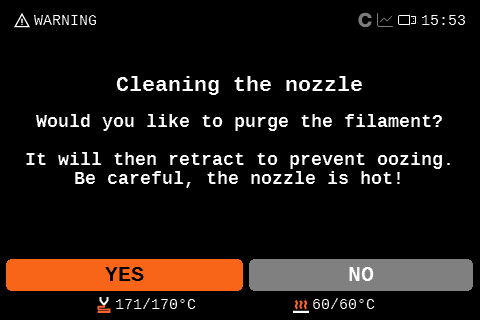
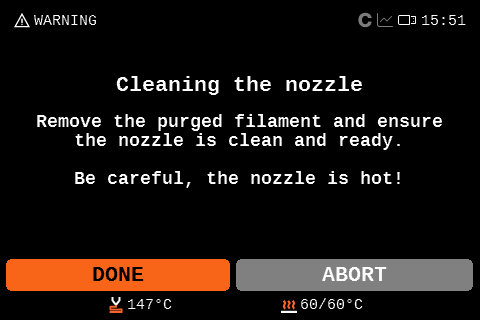
                  Once the message appears, you have the option to abort the print, ignore the nozzle cleaning and start the print, or retry the nozzle cleaning.
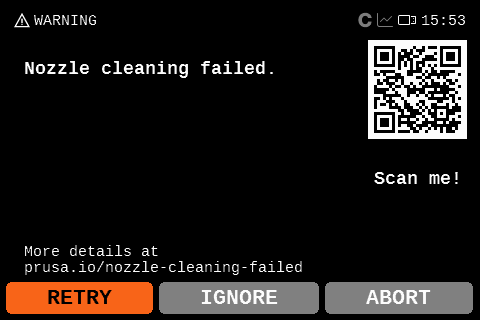
                  For redoing the nozzle cleaning, you can choose to purge filament to clean the nozzle of debris. This will purge the filament and retract it so it does not ooze. After that, the printer will redo the nozzle cleaning. If it does not solve the issue, try checking the items below.

                  Nozzle cleaning

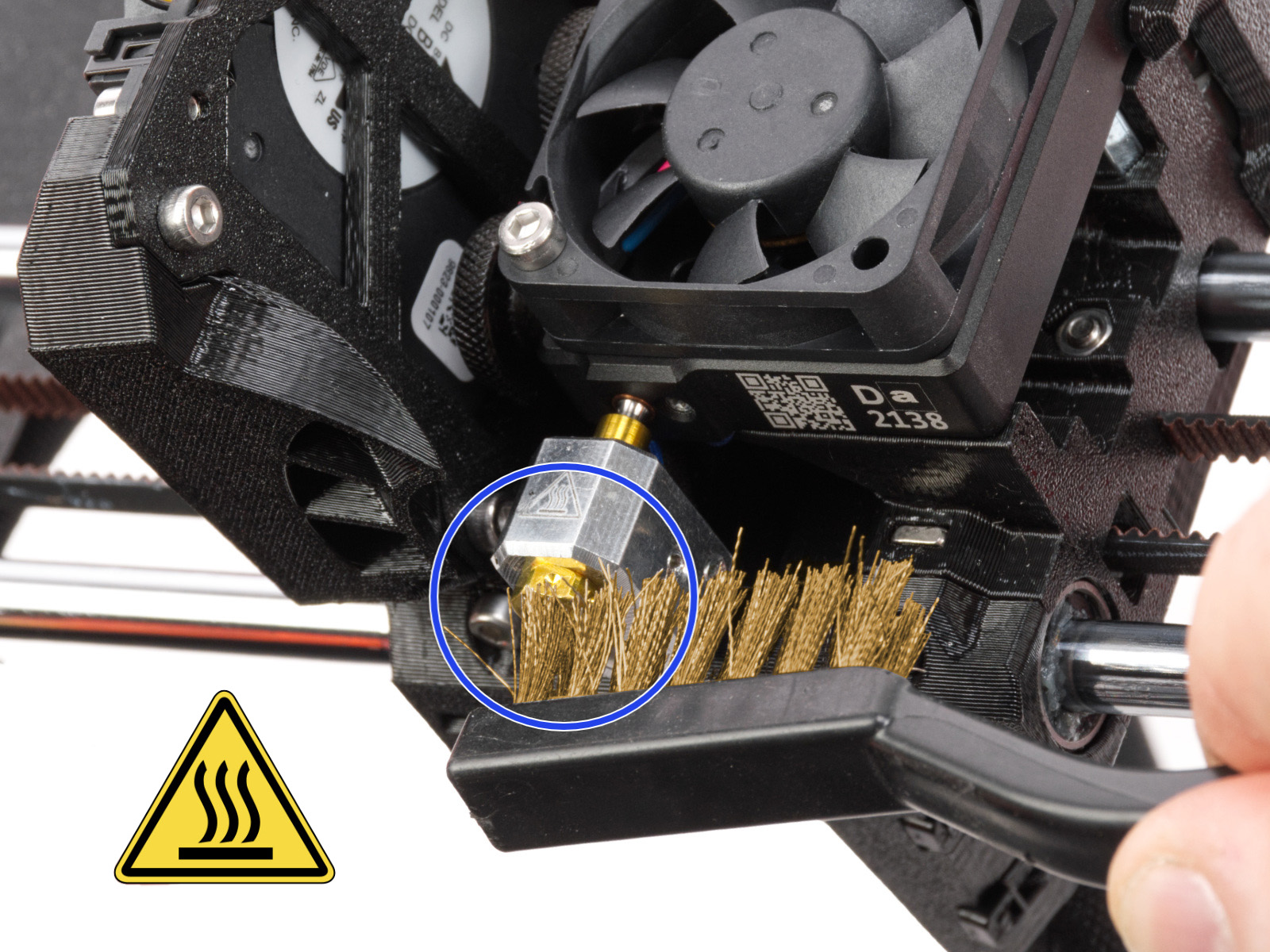
                  Check if the nozzle has residue. Debris on the nozzle or heater block can affect its thermal properties. To clean it, go to the printer menu in Control -> Temperature -> Nozzle, and heat the nozzle for three to five minutes at 250 °C, as the remains of the filament must be melted slightly so they can be removed easily.

                  Use a small brass brush to remove any old plastic stuck on the nozzle and heaterblock.

                  Avoid contact of the brush with the hotend cables, as this could cause a short circuit.

                  Caution: the printer is still at a hot temperature! Wait until the hot parts are cooled down to ambient temperature. It takes approximately 10 minutes. Do not touch it! Always check the values on the display.
                  INDX

                  The CORE One that is equipped with INDX has a tool that is passively heated. To clean it, first pick up the tool on the printer menu in Control -> Pick/park tool, then heat the nozzle normally.

                  Be careful not to damage the induction components.

                  Steel sheet cleaning

                  Make sure that the steel sheet is clean of any residue. For the smooth, textured, or satin sheet, clean with 90% or higher isopropyl alcohol (IPA).

                  Also, make sure that there is nothing between the steel sheet and the heatbed.

                  Filament spool

                  If the extruder needs to make too much effort to pull the filament, the nozzle cleaning error can be triggered. If this error is being shown when you are using a spool heavier than 2 kg, try changing to a smaller one for testing. Also, if you have a custom setup for your filament path, make sure that the filament is not getting caught anywhere.

                  If using a printer with multiple spools loaded, check if the issue is triggered when a specific tool is loaded. If this happens, the spool might be tangled.

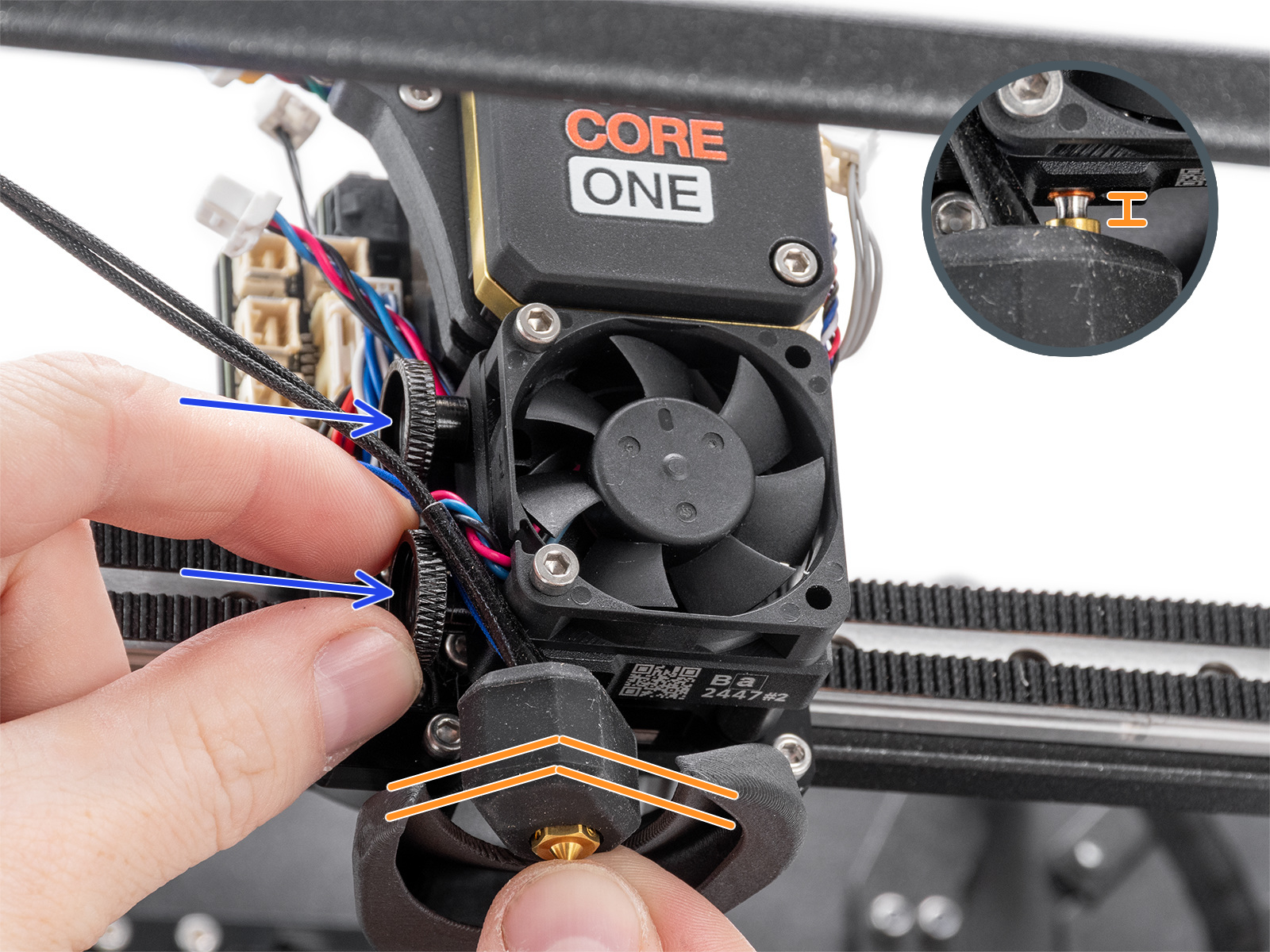
                  Check if the nozzle is not loose

                  The nozzle on the Nextruder must be at the correct height and securely tightened. Before proceeding to the next steps, ensure that the nozzle is cooled down.

                  XL

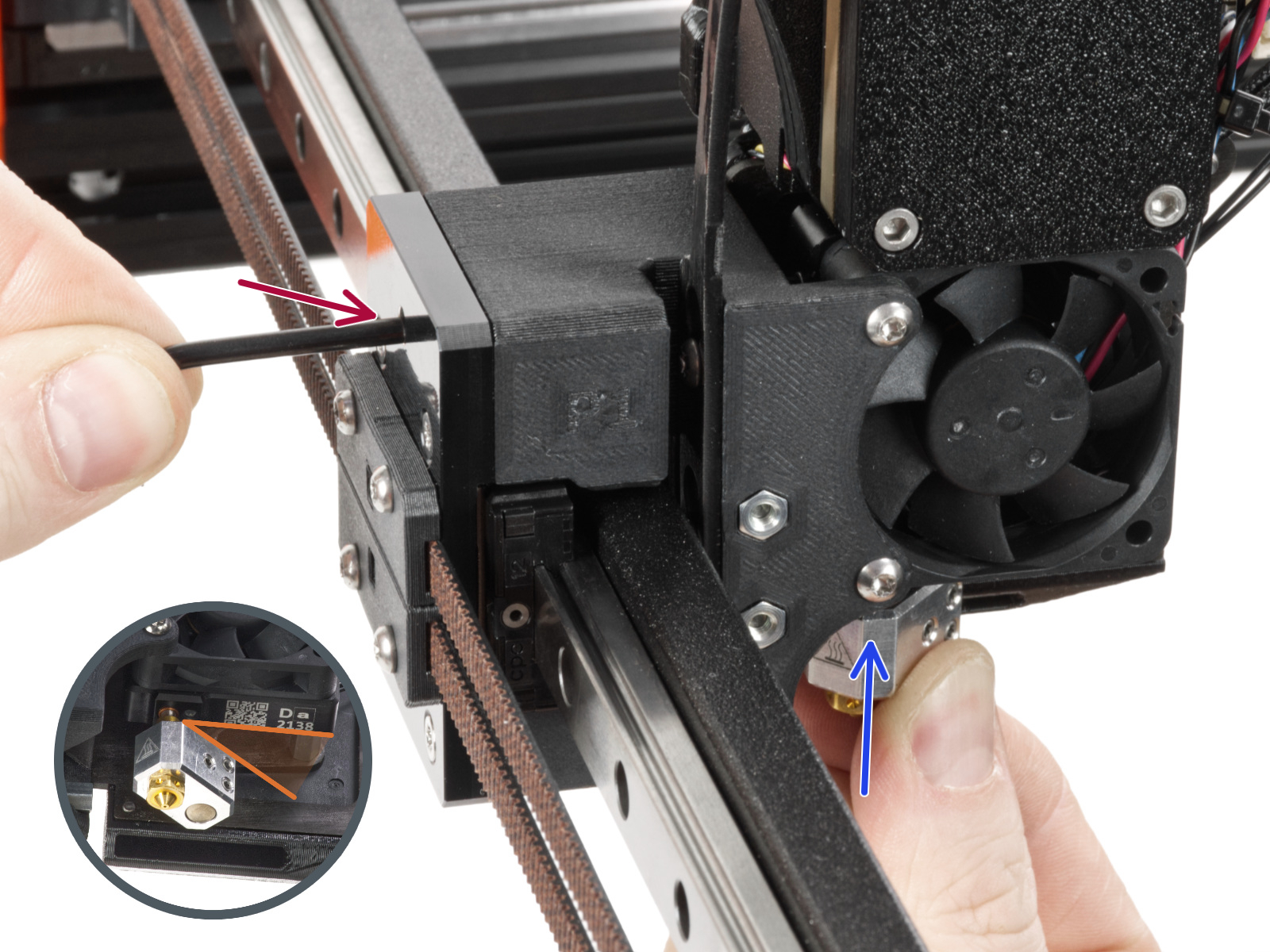
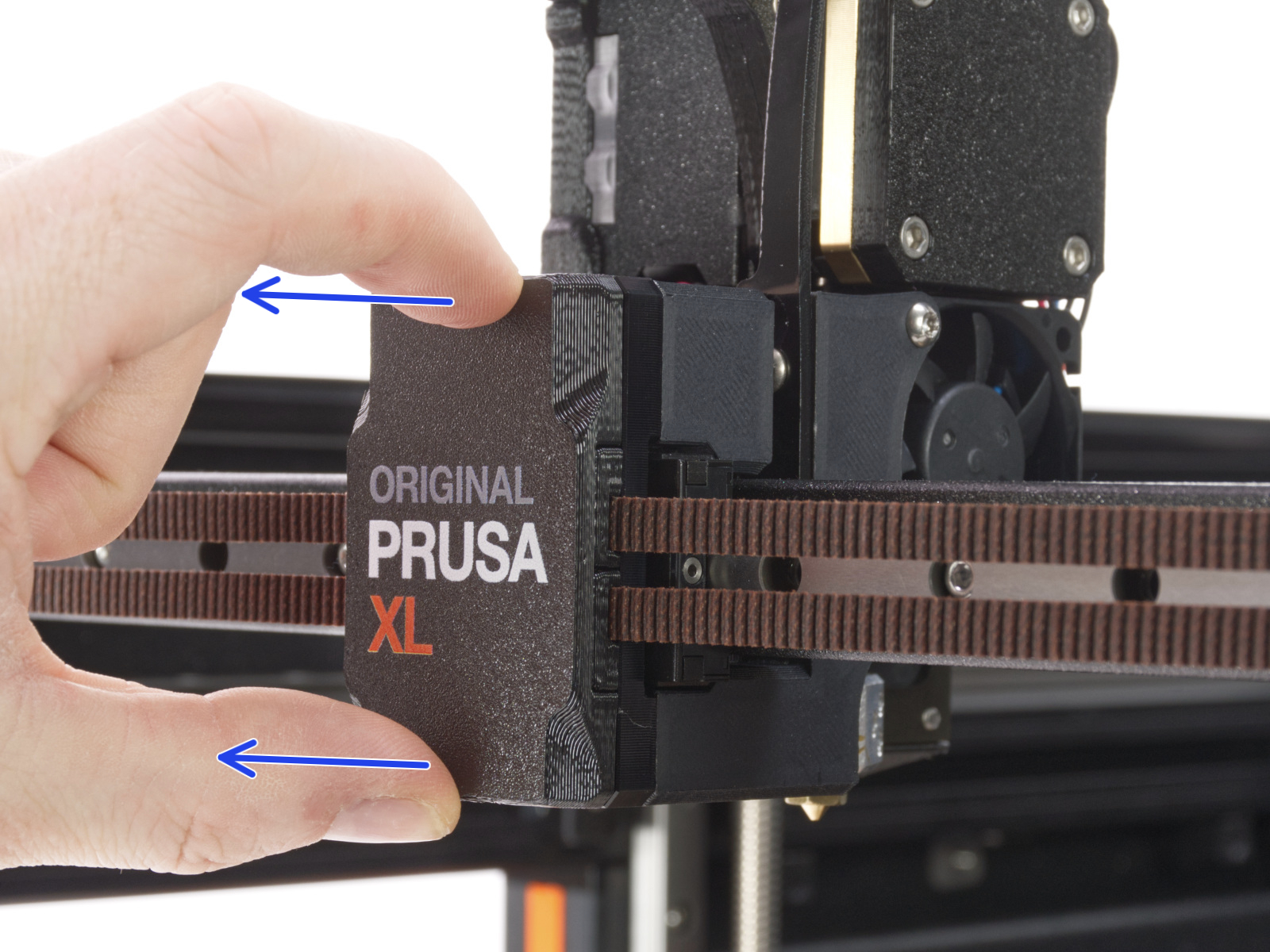
                  On single-tool XL, after removing the x-carriage cover, hold the heater block (make sure that the nozzle is not heated!), and use the Torx TX8 key as shown in the picture to tighten the set screw. Do not use extra force while tightening, as it may damage the hotend tube. The nozzle must be approximately at a 35°-40° angle to avoid damaging the hotend cables.
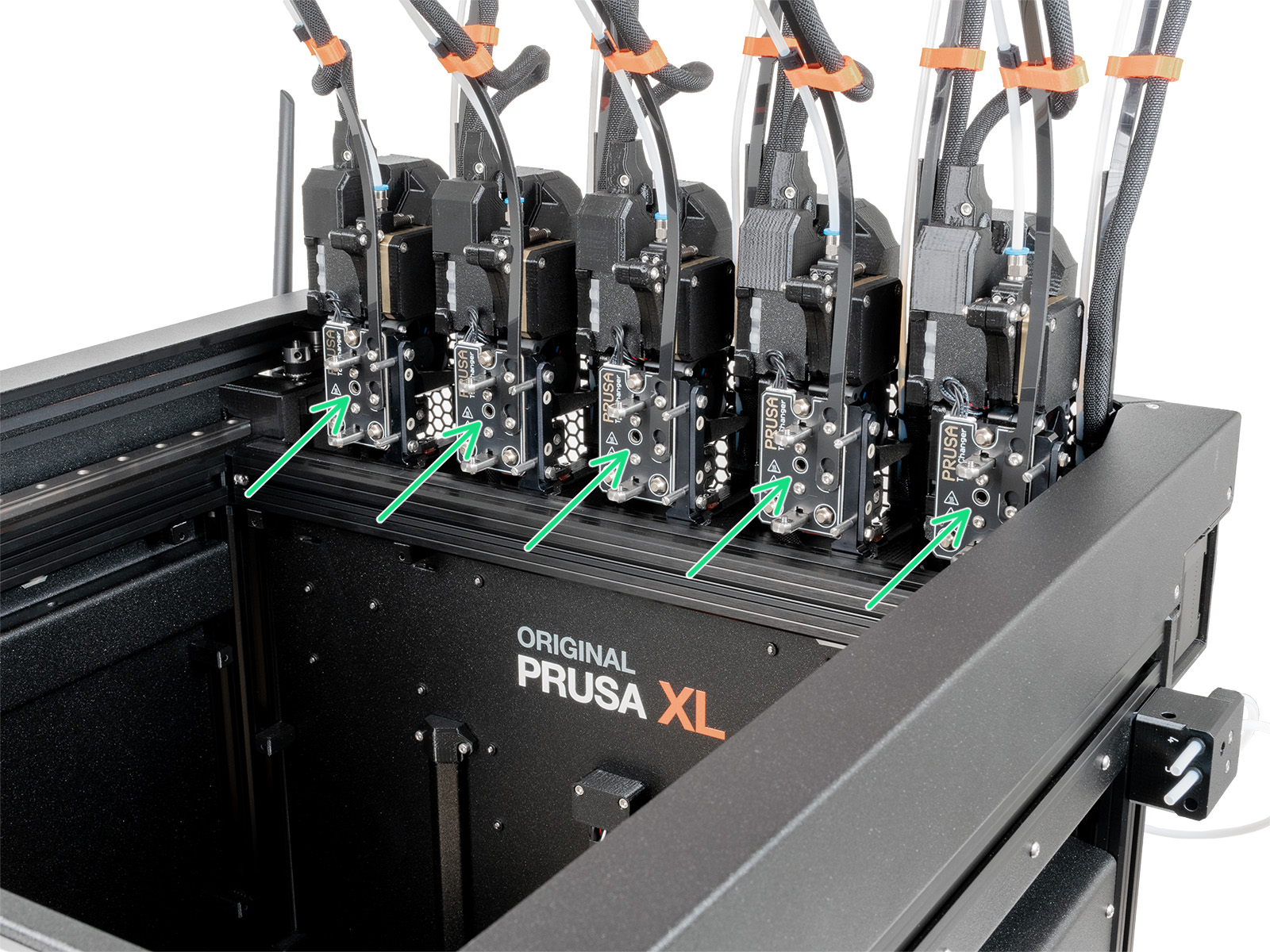
                  On the multi-tool XL, identify the tool that has the nozzle to be checked, and park it. Hold the heater block (make sure that the nozzle is not heated!), and use the Torx TX8 key in the part shown in the picture to tighten the set screw. Do not use extra force while tightening, as it may damage the hotend tube. The nozzle must be approximately at a 35°-40° angle to avoid damaging the hotend cables.
                  Once this is done, with the printer still cold and off, check whether the heater block has any rotational play. If the heater block can rotate:

                  • Check nozzle tightening from the previous steps once more.
                  • Check whether the nozzle and heater block have a loose joint. If needed, follow the nozzle replacement guide as a reference for temporarily extracting the hotend and retightening the nozzle.
                    • Single-tool
                    • Multi-tool

                  MK3.9/S, MK4/S, CORE One/+, CORE One L

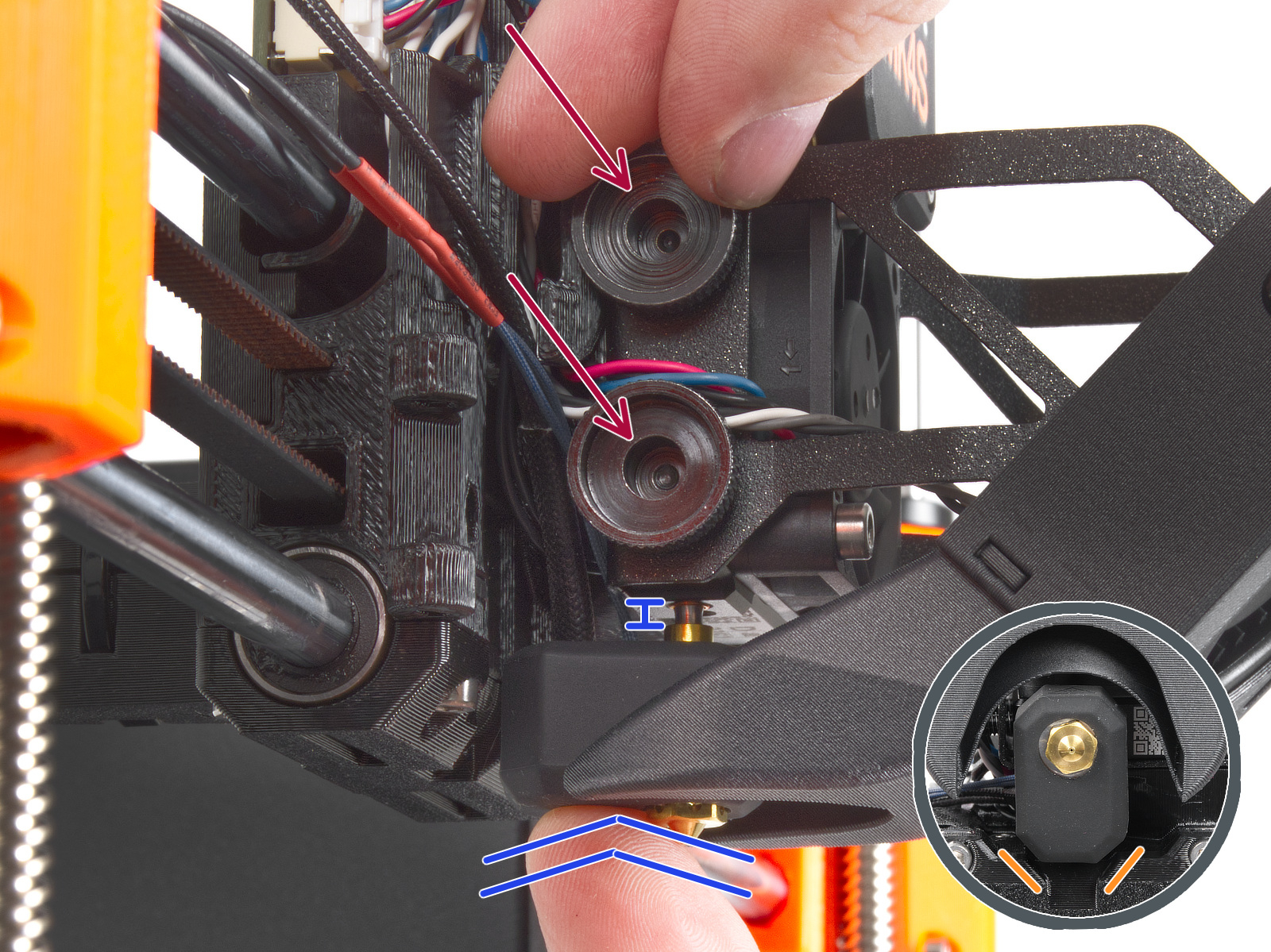
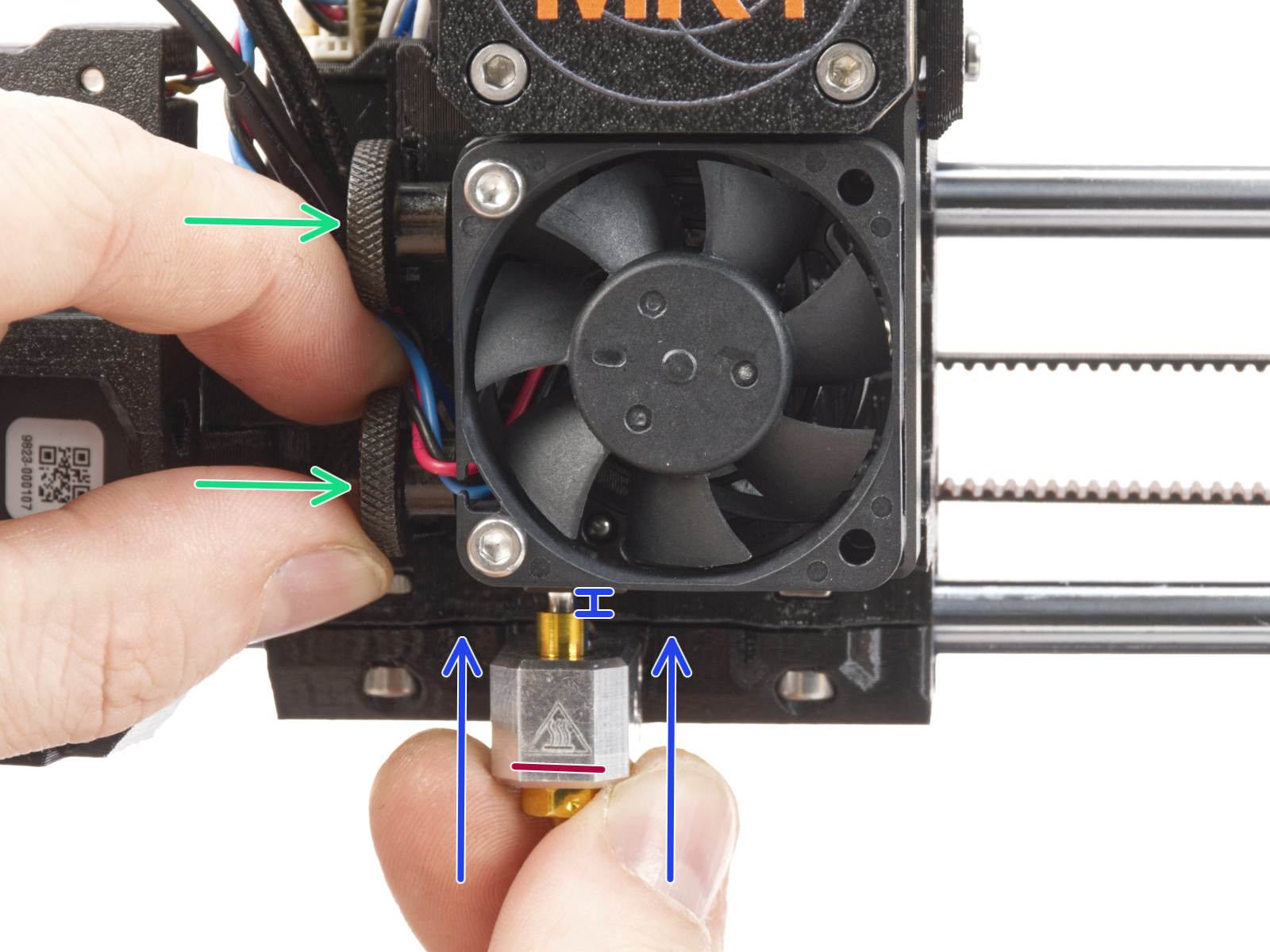
                  Then, loosen the thumb screws (do not completely remove the screws, a few turns are enough) on the side of the heatbreak, and push the nozzle up. Tighten the thumb screws just by hand, do not use any tools. After tightening the thumb screws, try moving the hotend to the sides and make sure it does not move.

                  If you have a Nozzle Adapter, check the installation again to make sure that the nozzle has not been lowered or loosened with the installation of the adapter.
                  MK4, MK3.9MK4S, MK3.9S
                  CORE One, CORE One L

                  INDX

                  If the issue happens multiple times, go to the printer menu in Control - Calibrations & Tests - 7. Dock Calibration. Make sure to push the toolchanger completely into the tool during the calibration.

                  Check the Z-axis bearing housing (XL)

                  The Z-axis bearing housings serve as the end stops for the Z-axis. It is essential to maintain a slight clearance between the Z-axis bearing housings and the heatbed frame when the printer is in its top position.

                  This way, during the mesh bed leveling and the autohome procedures, there can be an ideal amount of tiny contact between the nozzle and the print surface. 

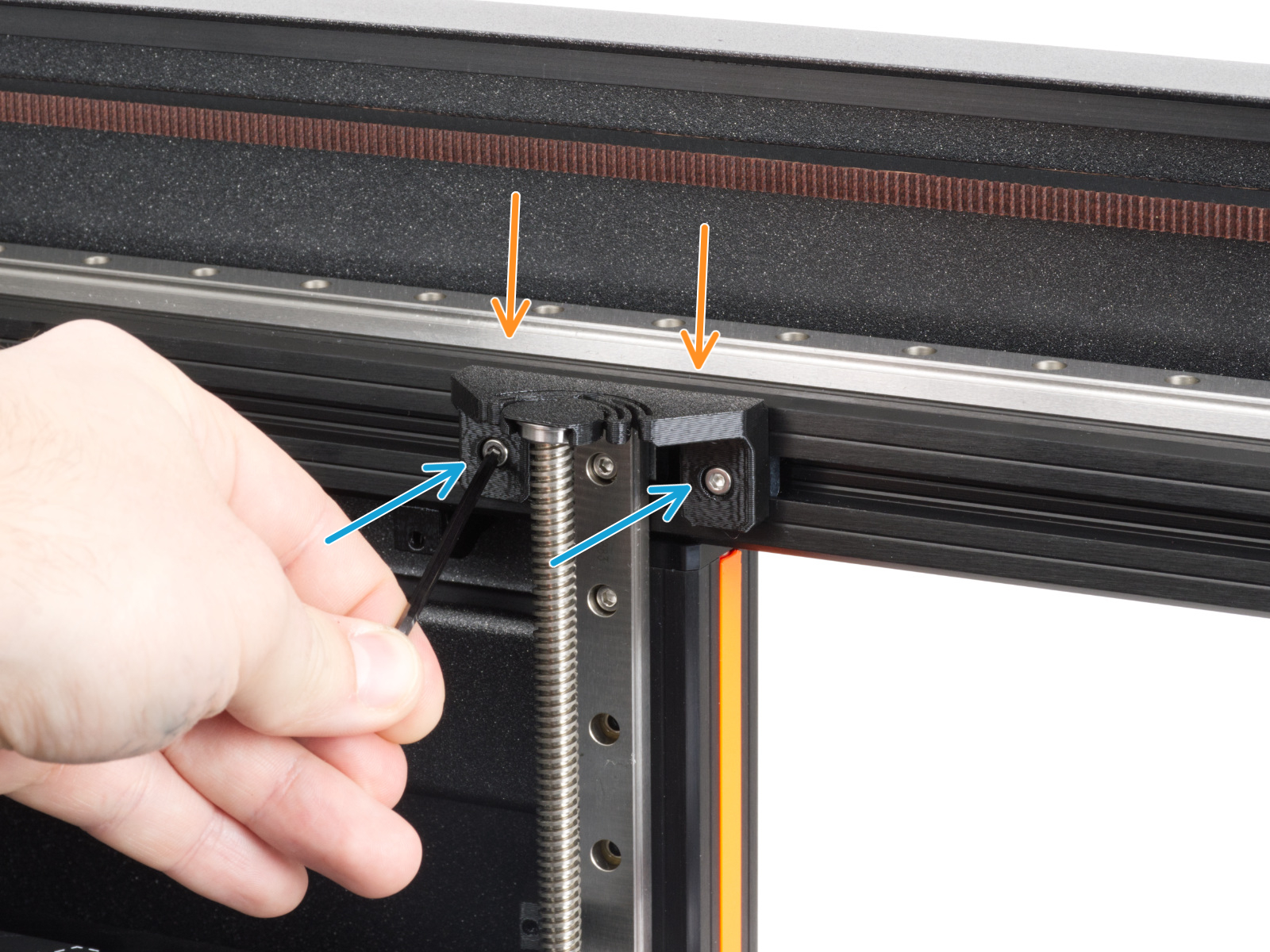
                  A clearance that is too small can cause the "Nozzle Cleaning Failed" warning message to appear. In this case, to achieve the ideal clearance, slightly loosen the bolts securing the bearing housings. 

                  If the warning message still appears, slightly loosen the mentioned bolts once again, keeping in mind to still have the Z-axis bearing housings reasonably tight and held in place. 

                  Once you find an ideal tightness for the bolts that works and holds the Z-axis bearing housings in place, keep the change permanent.
                  Do not remove the bearing housings from their place! This will cause damage to the printer. 
                   

                  Check the bolts that interact with the loadcell (MK3.9/S, MK4/S, CORE One/+, CORE One L)

                  Ensure that the printer is cooled down to room temperature and switched off before manipulating its components. 

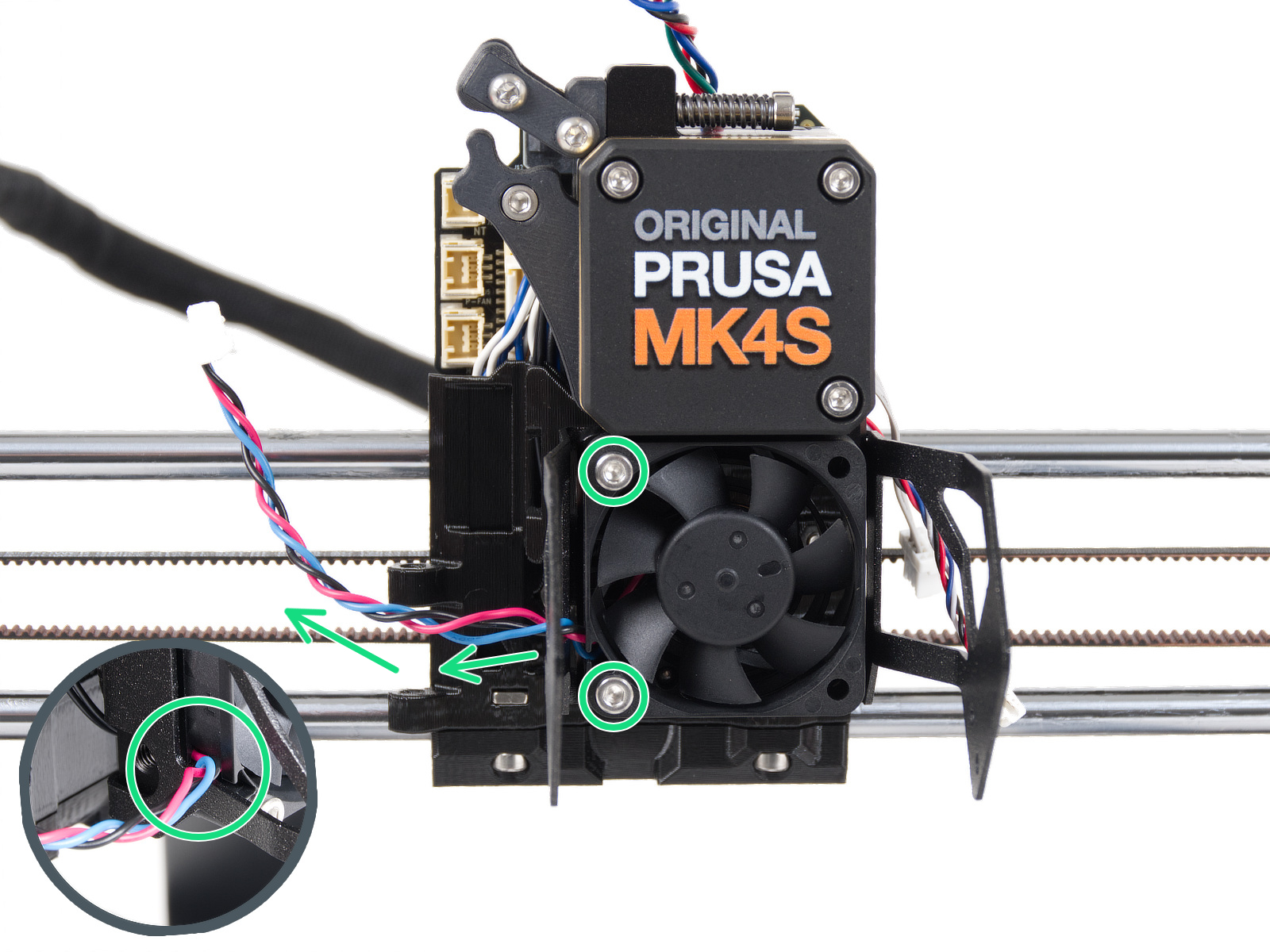
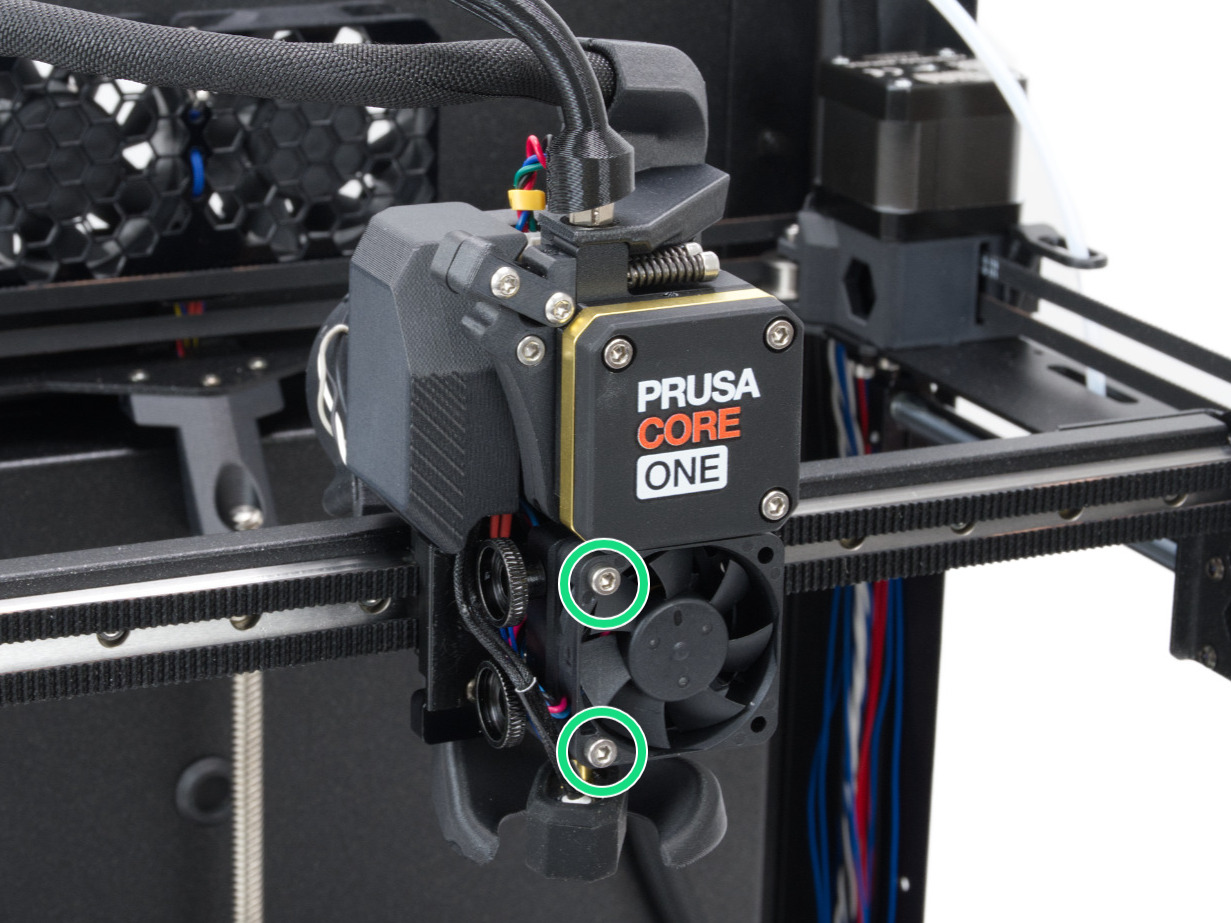
                  Some of the Nextruder bolts, if too tight, might generate extra forces that can be sensed by the loadcell, skewing its readings, hence potentially causing the issue. Check if slightly loosening the following bolts, while having the parts still tight and secured in place, can solve the issue.

                  Hotend fan

                  Check if the hotend fan is not overtightened. You can loosen the screws by 1/2 a turn.
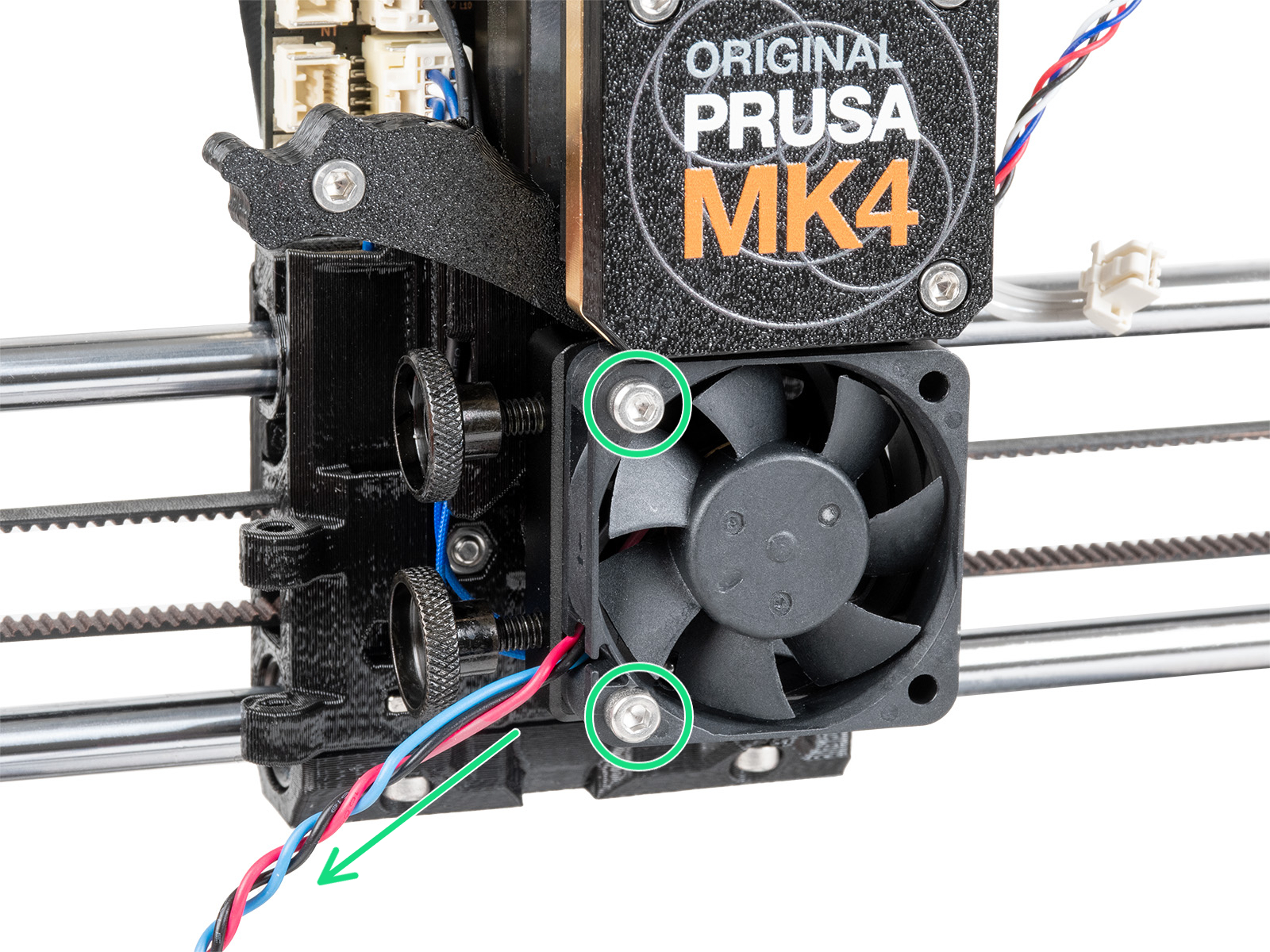
                  MK4, MK3.9MK4S, MK3.9S
                  CORE One, CORE One L

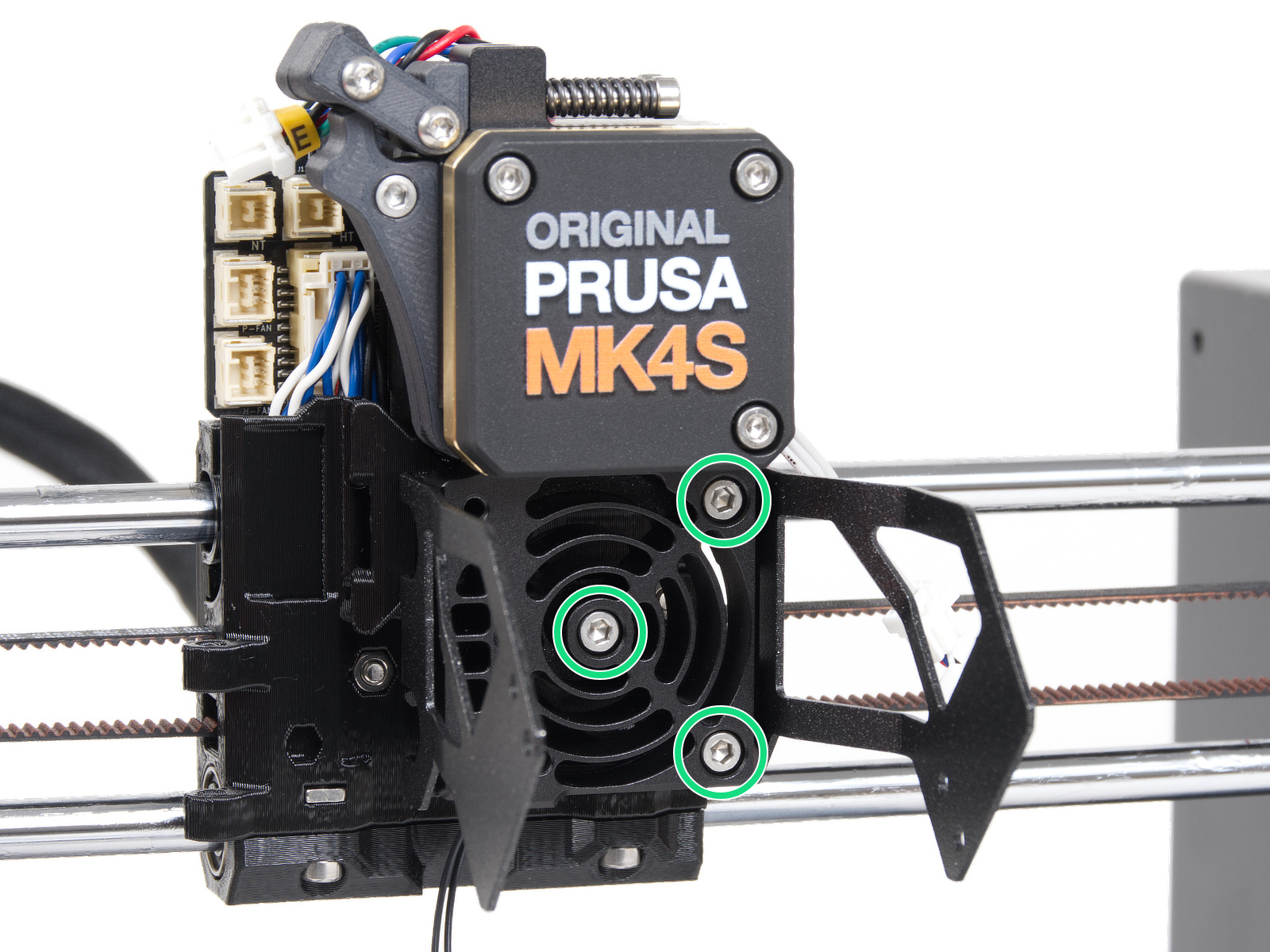
                  Heatsink

                  Temporarily remove the hotend fan by removing the previously adjusted bolts. This will expose the heatsink/loadcell. Then, loosen very slightly the three bolts that hold the heatsink/loadcell in place.
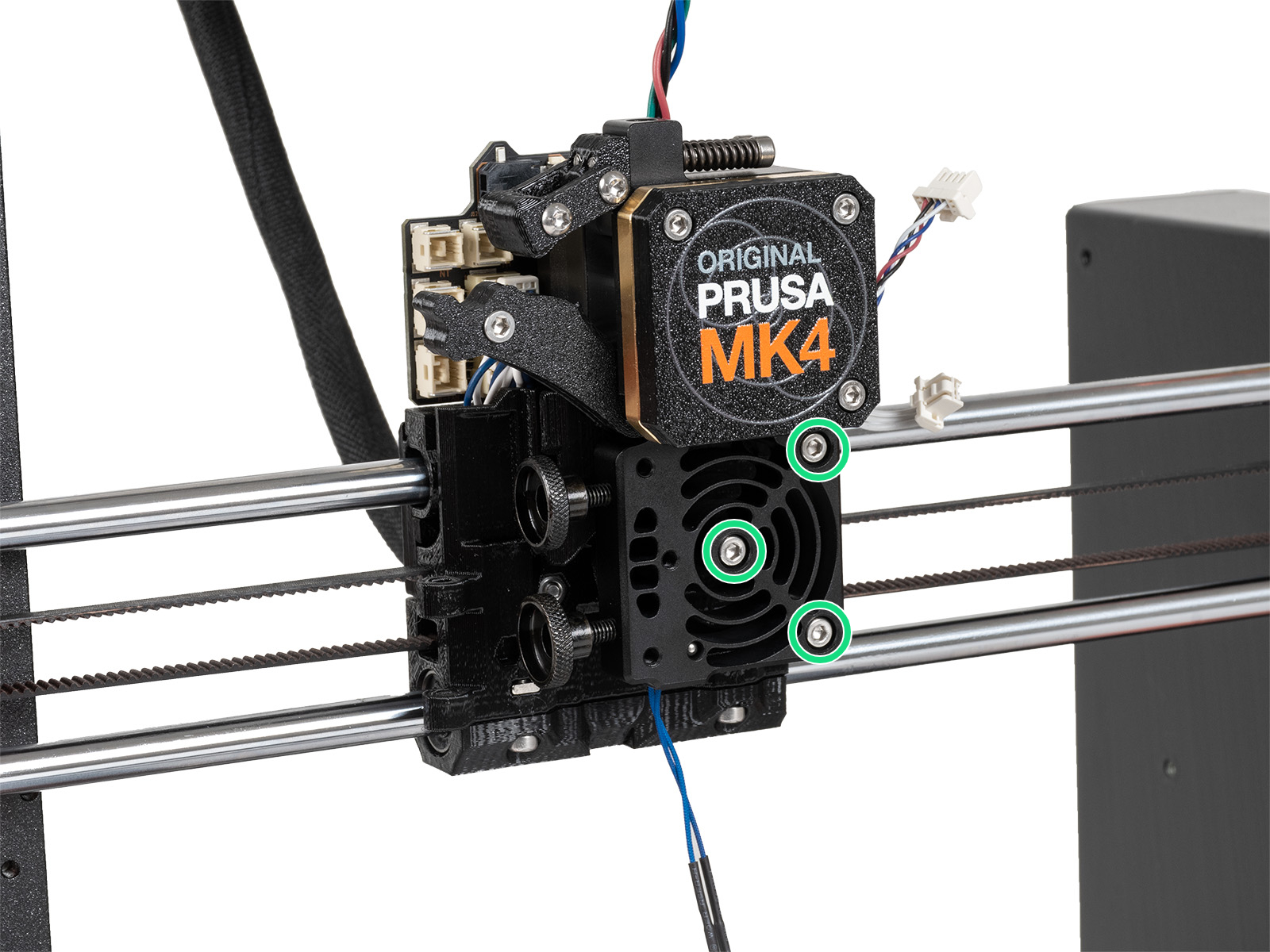
                  MK4, MK3.9MK4S, MK3.9S
                  CORE One, CORE One L

                  Loadcell seal

                  The loadcell wires are in the printer's heatsink. The wires and the seal that protects them may get damaged. To access the seal, remove the four screws that hold the front case. Then remove the front case, together with the PG-ring, gearbox, and main plate in one piece. Note that the seal might be white or black.
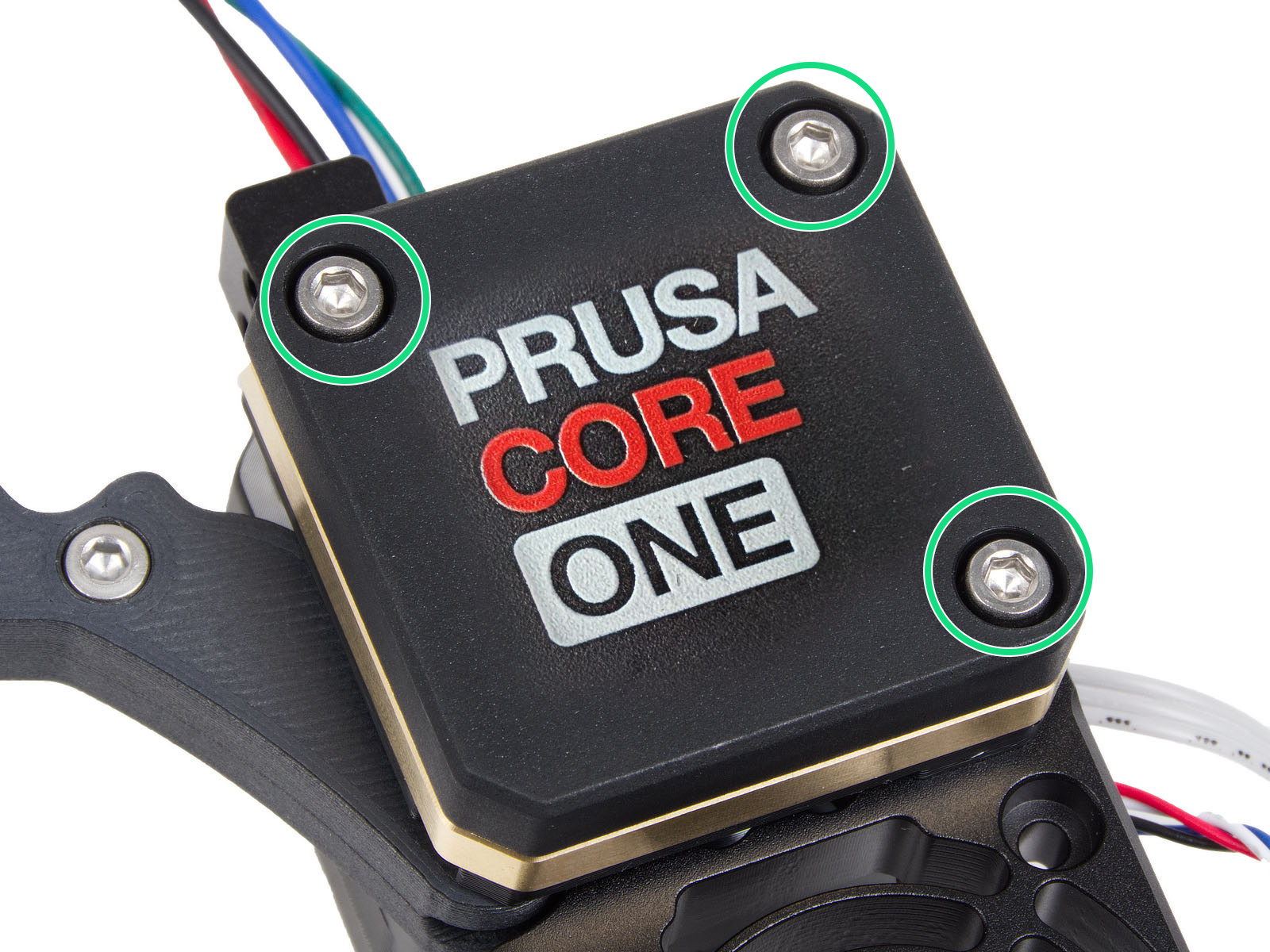
                  Expansion joints (CORE One/+, MK4/S, MK3.9/S)

                  Having the expansion joints in the wrong orientation can cause multiple errors, including the Nozzle cleaning failed. Make sure that all of them have the full side facing the center of the carriage.
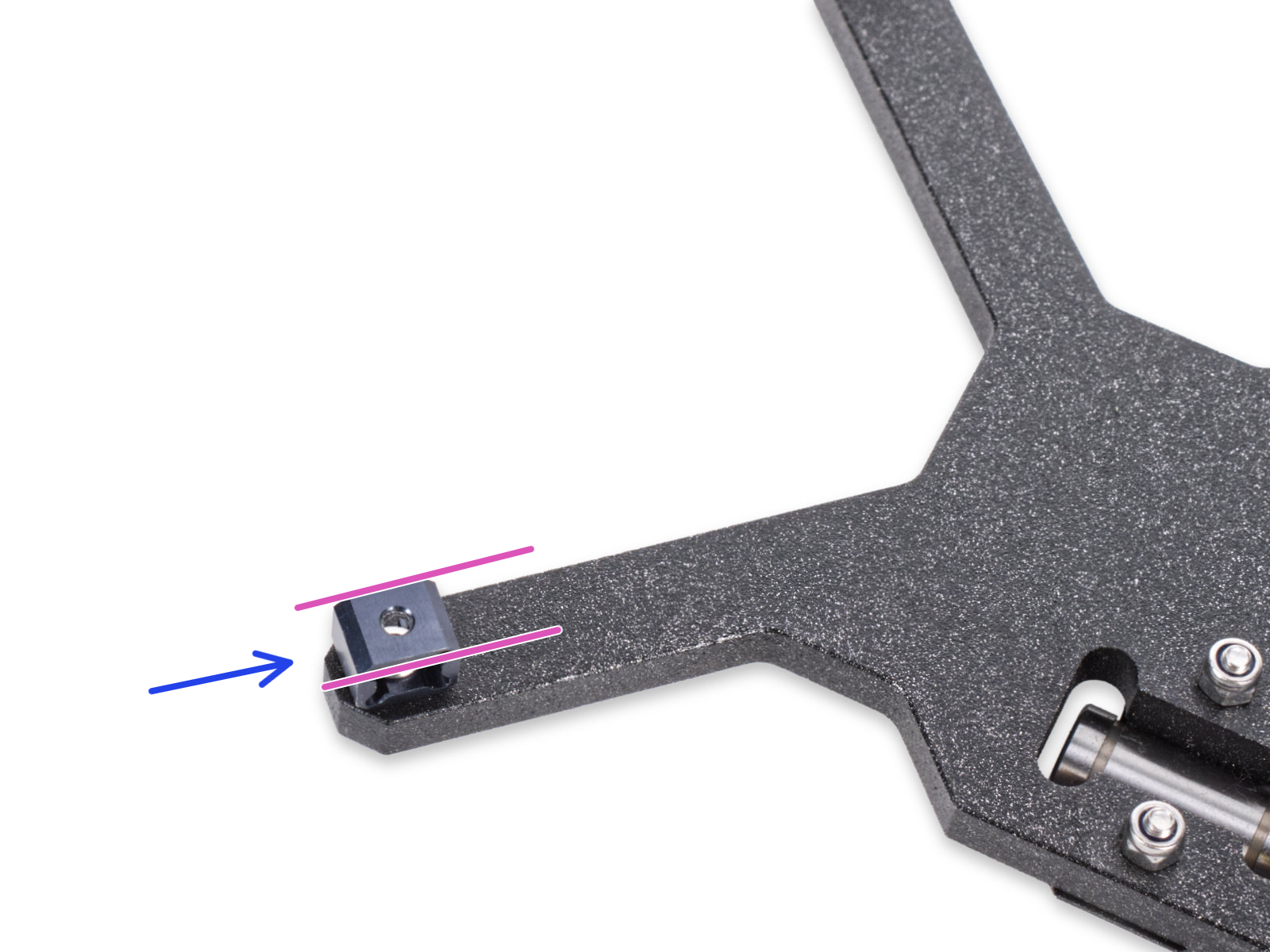
                   

                  この記事は役に立ちましたか?
                  この操作は登録ユーザーのみが利用できます。ログインしてください。
                  ログイン してコメントを投稿する
                  コメントなし

                  トピックス

                  • トラブルシューティング
                    • QR Error codes [進行中の翻訳]
                      • QRエラーコード
                      • Zホーミングエラー #17301 (XL)
                      • Modular bed error #17501 (XL)
                      • Dwarfボードエラー #17502 (XL)
                      • ノズルクリーニングの失敗 (XL)
                      • エクストルーダー プリヒートエラー #17202 (XL)
                      • エクストルーダーの熱暴走 #17204 (XL)
                      • Extruder Mintemp error #17208 (XL)
                      • Extruder Maxtemp error #17206 (XL)
                      • パピーエラー #17514 (XL)
                      • No FW on USB flash drive #17604 (XL)
                      • Unsupported printer model #17610 (XL)
                      • Unsupported Buddy FW #17611 (XL)
                      • USB flash error #17613 (XL)
                      • Invalid FW size on USB flash drive #17603 (XL)
                      • USB flash drive not connected #17602 (XL)
                      • Firmware missing #17612 (XL)
                      • FW in internal flash corrupted #17608 (XL)
                      • Hash verification failed #17607 (XL)
                      • Imposter! Fake signature #17606 (XL)
                      • Flash erase error #17605 (XL)
                      • Unsupported firmware BBF file #17614 (XL)
                      • Modular bed error #17250 (XL)
                      • ツールチェンジャーエラー #17101 (XL)
                      • Extruder temp not matching #17210 (XL)
                      • Modular bed error #17251 (XL)
                      • Modular bed error #17252 (XL)
                      • Modular bed error #17253 (XL)
                      • Modular bed error #17254 (XL)
                      • モジュラーベッド エラー #17255 (XL)
                      • Modular bed error #17256 (XL)
                      • Modular bed error #17257 (XL)
                      • Modular bed error #17302 (XL)
                      • Modular bed error #17303 (XL)
                      • Dwarfボードエラー #17503 (XL)
                      • ESP error #17505 (XL)
                      • ESP error #17506 (XL)
                      • ESP error #17504 (XL)
                      • Emergency stop #17510 (XL)
                      • Puppy error #17511 (XL)
                      • Puppy error #17512 (XL)
                      • パピーエラー #17513 (XL)
                      • Puppy error #17515 (XL)
                      • Puppy error #17516 (XL)
                      • Puppyボードエラー #17517 (XL)
                      • Puppyボードエラー #17518 (XL)
                      • Puppy error #17519 (XL)
                      • Puppy error #17520 (XL)
                      • Puppy error #17521 (XL)
                      • Puppy error #17522 (XL)
                      • ベッドプリヒートエラー #26201 (MK4S) #13201 (MK4) # 27201 (MK3.9S) #21201 (MK3.9) #28201 (MK3.5S) #23201 (MK3.5) #31201 (CORE One)
                      • 緊急停止 #26510 (MK4S) #13510 (MK4) #27510 (MK3.9S) #21510 (MK3.9) #28510 (MK3.5S) #23510 (MK3.5) #31510 (CORE One)
                      • ホットエンドプリヒートエラー #26201 (MK4S) #13201 (MK4) # 27201 (MK3.9S) #21201 (MK3.9) #31201 (CORE One)
                      • ヒートベッドの熱暴走 #26203 (MK4S) #13203 (MK4) #27203 (MK3.9S) #21203 (MK3.9) #28203 (MK3.5S) #23203 (MK3.5) #31203 (CORE One)
                      • ホットエンドの熱暴走 #26204 (MK4S) #13204 (MK4) #27204 (MK3.9S) #21204 (MK3.9) #31204 (CORE One)
                      • USBメモリが接続されていません #26602 (MK4S) #13602 (MK4) #21602 (MK3.9) #23602 (MK3.5)
                      • USBのFWサイズが無効 #26603 (MK4S) #13603 (MK4) #27603 (MK3.9S) #21603 (MK3.9) #28603 (MK3.5S) #23603 (MK3.5) #31603 (CORE One)
                      • USBにファームウェアがありません #26604 (MK4S) #13604 (MK4) #27604 (MK3.9S) #21604 (MK3.9) #28604 (MK3.5S) #23604 (MK3.5) #31604 (CORE One)
                      • 署名の検証に失敗 #26606 (MK4S) #13606 (MK4) #27606 (MK3.9S) #21606 (MK3.9) #28606 (MK3.5S) #23606 (MK3.5) #31606 (CORE One)
                      • ハッシュの検証に失敗 #26607 (MK4S) #13607 (MK4) #27607 (MK3.9S) #21607 (MK3.9) #28607 (MK3.5S) #23607 (MK3.5) #31607 (CORE One)
                      • 内蔵メモリ内のFWが破損しています #26608 (MK4S) #13608 (MK4) #27608 (MK3.9S) #21608 (MK3.9) #28608 (MK3.5S) #23608 (MK3.5) #31608 (CORE One)
                      • サポートされていないプリンタタイプ #26610 (MK4S) #13610 (MK4) #27610 (MK3.9S) #21610 (MK3.9) #28610 (MK3.5S) #23610 (MK3.5) #31610 (CORE One)
                      • サポートされていないプリンタバージョン #26611 (MK4S) #13611 (MK4) #27611 (MK3.9S) #21611 (MK3.9) #28611 (MK3.5S) #23611 (MK3.5) #31611 (CORE One)
                      • 内蔵フラッシュ内にFWが存在しない #26612 (MK4S) #13612 (MK4) #27612 (MK3.9S) #21612 (MK3.9) #28612 (MK3.5S) #23612 (MK3.5) #31612 (CORE One)
                      • ファイルシステムエラー #26613 (MK4S) #13613 (MK4) #27613 (MK3.9S) #21613 (MK3.9) #28613 (MK3.5S) #23613 (MK3.5) #31613 (CORE One)
                      • サポートされていないBBFバージョン #26614 (MK4S) #13614 (MK4) #27614 (MK3.9S) #21614 (MK3.9) #28614 (MK3.5S) #23614 (MK3.5) #31614 (CORE One)
                      • フラッシュ消去エラー #26605 (MK4S) #13605 (MK4) #27605 (MK3.9S) #21605 (MK3.9) #28605 (MK305S) #23605 (MK3.5) #31605 (CORE One)
                      • ホットエンド最低温度エラー #26208 (MK4S) #13208 (MK4) # 27208 (MK3.9S) #21208 (MK3.9) #31208 (CORE One)
                      • ホットエンド最高温度エラー #26206 (MK4S) #13206 (MK4) # 27206 (MK3.9S) #21206 (MK3.9) #28206 (MK3.5S) #23206 (MK3.5) #31206 (CORE One)
                      • Z軸ホーミングエラー #31301 (CORE One) #26301 (MK4S) #13301 (MK4) #28301 (MK3.9S) #21301 (MK3.9)
                      • ヒートベッド最低温度エラー #26207 (MK4S) #13207 (MK4) #27207 (MK3.9S) #21207 (MK3.9) #28207 (MK3.5S) #23207 (MK3.5)
                      • ヒートベッド最高温度エラー #26205 (MK4S) #13205 (MK4) #27205(MK3.9S) #21205 (MK3.9) #28205 (MK3.5S) #23205 (MK3.5) #31205 (CORE One)
                      • Heatbreak Mintemp error #17211 (XL)
                      • Heatbreak Maxtemp error #17212 (XL)
                      • Homing error X #17304 (XL)
                      • Homing error Y #31305 (CORE One) #35305 (CORE One L) #36305 (CORE One INDX) #17305 (XL)
                      • USB Port Overcurrent #17306 (XL)
                      • USB Device Overcurrent #17307 (XL)
                      • I2C Send Failed #17311 (XL)
                      • I2C Send Busy #17312 (XL)
                      • I2C Send Timeout #17313 (XL)
                      • I2C Send Undefined #17314 (XL)
                      • I2C Receive failed #17315 (XL)
                      • EEPROM I2C Receive Busy #17316 (XL)
                      • I2C Receive Timeout #17317 (XL)
                      • I2C Receive undefined #17318 (XL)
                      • Modular Bed Error #17319 (XL)
                      • Out of memory #17507 (XL)
                      • PNG Buffer Full #17508 (XL)
                      • Loadcell not calibrated #17523 (XL)
                      • Loadcell tare error #17524 (XL)
                      • Loadcell tare failed #17525 (XL)
                      • Loadcell measure failed #17526 (XL)
                      • Loadcell Bad Configuration #17527 (XL)
                      • Loadcell timeout #17528 (XL)
                      • LED Memory Error #17529 (XL)
                      • Marlin Request Timeout #17530 (XL)
                      • BBF Allocation Failed #17531 (XL)
                      • BBF Initialization failed #17532 (XL)
                      • USBポートの過電流 #26306 (MK4S) #13306 (MK4) #27306 (MK3.9S) #21306 (MK3.9) #28306 (MK3.5S) #23306 (MK3.5) #31306 (CORE One)
                      • USBデバイスの過電流 #26307 (MK4S) #13307 (MK4) #27307 (Mk3.9S) #21307 (MK3.9) #28307 (MK3.5S) #23307 (MK3.5) #31307 (CORE One)
                      • ノズルヒーターへの過電流 #26308 (MK4S) #13308 (MK4) #21308 (MK3.9)
                      • ヒートベッドポートの過電流 #26309 (MK4S) #13309 (MK4) #27309 (MK3.9S) #21309 (MK3.9) #28309 (MK3.5S) #23309 (MK3.5) #31309 (CORE One)
                      • MMU Overcurrent #31310 (CORE One) #35310 (CORE One L) #26310 (MK4S) #13310 (MK4) #27310 (MK3.9S) #21310 (MK3.9) #28310 (MK3.5S) #23310 (MK3.5)
                      • メモリー切れ #26507 (MK4S) #13507 (MK4) #27507 (MK3.9S) #21507 (MK3.9) #28507 (MK3.5S) #23507 (MK3.5) #31507 (CORE One)
                      • PNGバッファのメモリ不足 #26508 (MK4S) #13508 (MK4) #27508 (MK3.9S) #21508 (MK3.9) #28508 (MK3.5S) #23508 (MK3.5) #31508 (CORE One)
                      • I2C送信の失敗 #26311 (MK4S) #13311(MK4) #21311 (MK3.9) #23311 (MK3.5)
                      • I2C 送信ビジー #26312 (MK4S) #13312 (MK4) #21312 (MK3.9) #23312 (MK3.5)
                      • I2C送信のタイムアウト #26313 (MK4S) #13313(MK4) #21313 (MK3.9) #23313 (MK3.5)
                      • I2C送信の未定義 #26314 (MK4S) #13314 (MK4) #21314 (MK3.9) #23314 (MK3.5)
                      • I2C受信の失敗 #13315 #26315 (MK4S)(MK4) #21315 (MK3.9) #23315 (MK3.5)
                      • EEPROM I2C 受信ビジー #26316 (MK4S) #13316 (MK4) #21316 (MK3.9) #23316 (MK3.5)
                      • I2C受信のタイムアウト #26317 (MK4S) #13317 (MK4) #21317 (MK3.9) #23317 (MK3.5)
                      • I2C受信の未定義 #26318 (MK4S) #13318 (MK4) #21318 (MK3.9) #23318 (MK3.5)
                      • ロードセル未キャリブレーション #31523 (CORE One) #26523 (MK4S) #13523 (MK4) #27523 (MK3.9S) #21523 (MK3.9)
                      • Loadcell Tare Error #31524 (CORE One) #35524 (CORE One L) #26524 (MK4S) #13524 (MK4) #27524 (MK3.9S) #21524 (MK3.9)
                      • ロードセル基準値の設定失敗 #31525 (CORE One) #26525 (MK4S) #13525 (MK4) #27525 (MK3.9S) #21525 (MK3.9)
                      • ロードセル測定の失敗 #31526 (CORE One) #26526 (MK4S) #13526 (MK4) #27526 (MK3.9S) #21526 (MK3.9)
                      • ロードセルのキャリブレーション不良 #31527 (CORE One) #26527 (MK4S) #13527 (MK4) #27527 (MK3.9S) #21527 (MK3.9)
                      • ロードセルのタイムアウト #31528 (CORE One) #26528 (MK4S) #13528 (MK4) #27528 (MK3.9S) #21528 (MK3.9)
                      • Marlin Request Timeout #31530 (CORE One) #35530 (CORE One L) #36530 (CORE One INDX) #26530 (MK4S) #13530 (MK4) #27530 (MK3.9S) #21530 (MK3.9) #28530 (MK3.5S) #23530 (MK3.5)
                      • LEDメモリーエラー #31529 (CORE One) #26529 (MK4S) #13529 (MK4) #27529 (MK3.9S) #21529 (MK3.9) #28529 (MK3.5S) #23529 (MK3.5)
                      • BBFの割当に失敗しました #26531 (MK4S) #13531 (MK4) #27531 (MK3.9S) #21531 (MK3.9) #28531 (MK3.5S) #23531 (MK3.5) #31531 (CORE One)
                      • BBFの初期化に失敗しました #26532 (MK4S) #13532 (MK4) #27532 (MK3.9S) #21532 (MK3.9) #28532 (MK3.5S) #23532 (MK3.5) #31532 (CORE One)
                      • ESPエラー #26504 (MK4S) #13504 (MK4) #27504 (MK3.9S) #21504 (MK3.9) #28504 (MK3.5S) #23504 (MK3.5) #31504 (CORE One)
                      • ESPエラー #26505 (MK4S) #13505 (MK4) #27505 (MK3.9S) #21505 (MK3.9) #28505 (MK3.9S) #23505 (MK3.5) #31505 (CORE One)
                      • ESPエラー #26506 (MK4S) #13506 (MK4) #27506 (MK3.9S) #21506 (MK3.9) #28506 (MK3.5S) #23506 (MK3.5) #31506 (CORE One)
                      • ヒートブレイク最低温度エラー #26211 (MK4S) #13211 (MK4) #27211 (MK3.9S) #21211 (MK3.9)
                      • ヒートブレイク最高温度エラー #26212 (MK4S) #13212 (MK4) #27212 (MK3.9S) #21212 (MK3.9) #31212 (CORE One)
                      • Modular Bed Error #17320 (XL)
                      • X軸ホーミングエラー #26304 (MK4S) #13304 (MK4) #21304 (MK3.9) #23304 (MK3.5)
                      • XY probe unstable #17105 (XL)
                      • XY position invalid #17106 (XL)
                      • ピンが未到達 #17107 (XL)
                      • 正確なリファインメントに失敗 #17102 (XL)
                      • ドック位置が不整合 #17103 (XL)
                      • ツールオフセットが不整合 #17104 (XL)
                      • Power Panic #17321 (XL)
                      • ESP not connected #17533 (XL)
                      • パワーパニック #26321 (MK4S) #13321 (MK4) #27321 (MK3.9S) #21321 (MK3.9) #28321 (MK3.5S) #23321 (MK3.5) #31321 (CORE One)
                      • MCU Maxtemp Error #31213 (CORE One) #35213 (CORE One L) #26213 (MK4S) #13213 (MK4) #27213 (MK3.9S) #21213 (MK3.9) #17213 (XL) #12213 (MINI/+)
                      • Firmware Update Required #31701 (CORE One) #35701 (CORE One L) #36701 (CORE One INDX) #26701 (MK4S) #13701 (MK4) #27701 (MK3.9S) #21701 (MK3.9) #28701 (MK3.5S) #23701 (MK3.5)
                      • 接続認証の失敗
                      • Connect Registration Failed #31401 (CORE One) #35401 (CORE One L) #36401 (CORE One INDX) #17401 (XL) #26401 (MK4S) #13401 (MK4) #27401 (MK3.9S) #21401 (MK3.9) #28401 (MK3.5S) #23401 (MK3.5) #12401 (MINI)
                      • 接続認証の失敗 #17401 (XL)
                      • Nozzle Cleaning Failed #31834 (CORE One) #35834 (CORE One L) #26834 (MK4S) #13834 (MK4) #27834 (MK3.9S) #21834 (MK3.9) #17834 (XL)
                      • フィラメントスタックの検出 #31101 (CORE One) #26101 (MK4S) #13101 (MK4) #27101 (MK3.9S) #21101 (MK3.9) #17108 (XL)
                      • Heatbed temp not matching #31209 (CORE One) #35209 (CORE One L) #26209 (MK4S) #13209 (MK4) #27209 (MK3.9S) #21209 (MK3.9) #28209 (MK3.5S) #23209 (MK3.5)
                      • Hotend Heater Overcurrent #17322
                      • Unknown error #31601 (CORE One) #35601 (CORE One L) #36601 (CORE One INDX) #26601 (MK4S) #13601 (MK4) #27601 (MK3.9S) #21601 (MK3.9) #28601 (MK3.5S) #23601 (MK3.5) #17601 (XL) #12601 (MINI)
                      • Extruder not detected #31615 (CORE One) #35615 (CORE One L) #36615 (CORE One INDX) #26615 (MK4S) #13615 (MK4) #27615 (MK3.9S) #21615 (MK3.9) #28615 (MK3.5S) #23615 (MK3.5)
                      • EXTRUDER ERROR #17536 (XL)
                      • Steel sheet not detected #31109 (CORE One) #35109 (CORE One L) #36109 (CORE One INDX)
                      • Door Open #31110 (CORE One) #35110 (CORE One L) #36110 (CORE One INDX)
                      • Firmware x printer mismatch #31609 (CORE One) #35609 (CORE One L) #36609 (CORE One INDX) #17609 (XL) #26609 (MK4S) #13609 (MK4) #27609 (MK3.9S) #21609 (MK3.9) #28609 (MK3.5S) #23609 (MK3.5) #12609 (MINI)
                      • Heaters Timeout #31817 (CORE One) #35817 (CORE One L) #36817 (CORE One INDX) #26817 (MK4S) #13817 (MK4) #27817 (MK3.9S) #21817 (MK3.9) #28817 (MK3.5S) #23817 (MK3.5) #17817 (XL) #12817 (MINI)
                      • Nozzle Timeout #31819 (CORE One) #35819 (CORE One L) #36819 (CORE One INDX) #26819 (MK4S) #13819 (MK4) #27819 (MK3.9S) #21819 (MK3.9) #28819 (MK3.5S) #23819 (MK3.5) #17819 (XL) #12819 (MINI)
                      • Uneven bed #31111 (CORE One) #35111 (CORE One L) #36111 (CORE One INDX)
                      • Ceiling clearance violation #31112 (CORE One) #35112 (CORE One L) #36112 (CORE One INDX)
                      • Filament sensor stuck #31113 (CORE One) #35113 (CORE One L) #36113 (CORE One INDX) #17113 (XL) #26113 (MK4S) #13113 (MK4) #27113 (MK3.9S) #21113 (MK3.9) #28113 (MK3.5S) #23113 (MK3.5) #12113 (MINI/+)
                      • Filament Sensors Disabled #31115 (CORE One) #35115 (CORE One L) #36102 (CORE One INDX) #17115 (XL) #26115 (MK4S) #13115 (MK4) #27115 (MK3.9S) #21115 (MK3.9) #28115 (MK3.5S) #23115 (MK3.5) #12115 (MINI/+)
                      • Chamber MAXTEMP error #31214 (CORE One) #35214 (CORE One L) #36214 (CORE One INDX)
                      • Homing error X #31304 (CORE One) #35304 (CORE One L) #36304 (CORE One INDX) #17304 (XL)
                      • Failed to Reach Chamber Temperature #31259 (CORE One) #35259 (CORE One L) #36259 (CORE One INDX)
                      • Puppy error #31511 (CORE One) #35511 (CORE One L) #36511 (CORE One INDX)
                      • Puppy error #31512 (CORE One) #35512 (CORE One L) #36512 (CORE One INDX)
                      • Puppy error #31513 (CORE One) #35513 (CORE One L) #36513 (CORE One INDX)
                      • Puppy error #31514 (CORE One) #35514 (CORE One L) #36514 (CORE One INDX)
                      • Puppy error #31515 (CORE One) #35515 (CORE One L) #36515 (CORE One INDX)
                      • Puppy error #31516 (CORE One) #35516 (CORE One L) #36516 (CORE One INDX)
                      • Puppy error #31517 (CORE One) #35517 (CORE One L) #36517 (CORE One INDX)
                      • Puppy error #31518 (CORE One) #35518 (CORE One L) #36518 (CORE One INDX)
                      • Puppy error #31519 (CORE One) #35519 (CORE One L) #36519 (CORE One INDX)
                      • Puppy error #31520 (CORE One) #35520 (CORE One L) #36520 (CORE One INDX)
                      • Puppy error #31521 (CORE One) #35521 (CORE One L) #36521 (CORE One INDX)
                      • Puppy error #31522 (CORE One) #35522 (CORE One L) #36522 (CORE One INDX)
                      • Chamber overheating #31260 (CORE One) #35260 (CORE One L) #36260 (CORE One INDX) #17260 (XL)
                      • Chamber temperature is critical #31261 (CORE One) #35261 (CORE One L) #36261 (CORE One INDX) #17261 (XL)
                      • Fil. sensor troubleshooting #31114 (CORE One) #26114 (MK4S) #13114 (MK4) #27114 (MK3.9S) #21114 (MK3.9) #28114 (MK3.5S) #23114 (MK3.5)
                      • Chamber Mintemp error #31215 (CORE One) #35215 (CORE One L) #36215 (CORE One INDX)
                      • Accelerometer communication failed #31323 (CORE One) #35323 (CORE One L) #26323 (MK4S) #13323 (MK4) #27323 (MK3.9S) #21323 (MK3.9) #28323 (MK3.5S) #23323 (MK3.5)
                      • ESP not connected #31533 (CORE One) #35533 (CORE One L) #26533 (MK4S) #13533 (MK4) #27533 (MK3.9S) #21533 (MK3.9) #28533 (MK3.5S) #23533 (MK3.5)
                      • Unknown file system #31703 (CORE One) #35703 (CORE One L) #36703 (CORE One INDX) #26703 (MK4S) #13703 (MK4) #27703 (MK3.9S) #21703 (MK3.9) 
                      • MCU in Buddy is overheated #31825 (CORE One) #35825 (CORE One L) #26825 (MK4S) #27825 (MK3.9S) #28825 (MK3.5S) #13825 (MK4) #21825 (MK3.9) #23825 (MK3.5) #17825 (XL) #12825 (MINI)
                      • The heatbed cooled down during the power outage #31808 (CORE One) #35808 (CORE One L) #26808 (MK4S) #27808 (MK3.9S) #28808 (MK3.5S) #13808 (MK4) #21808 (MK3.9) #23808 (MK3.5) #17808 (XL) 
                      • The G-code isn't fully compatible #31803 (CORE One) #26803 (MK4S) #27803 (MK3.9S) #28803 (MK3.5S) #13803 (MK4) #21803 (MK3.9) #23803 (MK3.5) #17803 (XL) #12803 (MINI)
                      • Print preview wrong filament #31805 (CORE One/+) #35805 (CORE One L) #36805 (CORE One INDX) #26805 (MK4S) #27805 (MK3.9S) #28805 (MK3.5S) #13805 (MK4) #21805 (MK3.9) #23805 (MK3.5) #17805 (XL) #12805 (MINI)
                      • Filament not detected #31804 (CORE One) #35804 (CORE One L) #26804 (MK4S) #27804 (MK3.9S) #28804 (MK3.5S) #13804 (MK4) #21804 (MK3.9) #23804 (MK3.5) #17804 (XL) #12804 (MINI)
                      • Print preview unfinished selftest #31801 (CORE One) #35801 (CORE One L) #26801 (MK4S) #27801 (MK3.9S) #28801 (MK3.5S) #13801 (MK4) #21801 (MK3.9) #23801 (MK3.5) #17801 (XL) #12801 (MINI)
                      • Open chamber ventilation #31837 (CORE One) #36837 (CORE One INDX)
                      • Close chamber ventilation #31838 (CORE One) #36838 (CORE One INDX)
                      • Print fan error #31816 (CORE One) #26816 (MK4S) #27816 (MK3.9S) #13816 (MK4) #21816 (MK3.9) #17816 (XL)
                      • Print preview MMU filament inserted #31806 (CORE One) #26806 (MK4S) #13806 (MK4) #27806 (MK3.9S) #21806 (MK3.9) #28806 (MK3.5S) #23806 (MK3.5)
                      • Crash recovery axis long #31809 (CORE One) #35809 (CORE One L) #26809 (MK4S) #13809 (MK4) #27809 (MK3.9S) #21809 (MK3.9) #28809 (MK3.5S) #23809 (MK3.5) #17809 (XL) #12809 (MINI)
                      • Crash recovery repeated crash #31811 (CORE One) #35811 (CORE One L) #26811 (MK4S) #13811 (MK4) #27811 (MK3.9S) #21811 (MK3.9) #28811 (MK3.5S) #23811 (MK3.5) #17811 (XL) #12811 (MINI)
                      • Crash recovery axis short #31810 (CORE One) #35810 (CORE One L) #26810 (MK4S) #13810 (MK4) #27810 (MK3.9S) #21810 (MK3.9) #28810 (MK3.5S) #23810 (MK3.5) #17810 (XL) #12810 (MINI)
                      • Crash recovery home fail #31812 (CORE One) #35812 (CORE One L) #26812 (MK4S) #13812 (MK4) #27812 (MK3.9S) #21812 (MK3.9) #28812 (MK3.5S) #23812 (MK3.5) #17812 (XL) #12812 (MINI)
                      • Hotend fan error #31828 (CORE One) #35828 (CORE One L) #26828 (MK4S) #27828 (MK3.9S) #13828 (MK4) #21828 (MK3.9) #17828 (XL)
                      • New firmware available #31802 (CORE One) #35802 (CORE One L) #26802 (MK4S) #13802 (MK4) #27802 (MK3.9S) #21802 (MK3.9) #28802 (MK3.5S) #23802 (MK3.5) #17802 (XL) #12802 (MINI)
                      • Chamber filtration fan is not spinning #31840 (CORE One) #35840 (CORE One L) #36840 (CORE One INDX)
                      • USB flash disk error #31821 (CORE One) #35821 (CORE One L) #26821 (MK4S) #13821 (MK4) #27821 (MK3.9S) #21821 (MK3.9) #28821 (MK3.5S) #23821 (MK3.5) #17821 (XL) #12821 (MINI)
                      • Hotend temp discrepancy #31818 (CORE One) #17818 (XL) #26818 (MK4S) #13818 (MK4) #27818 (MK3.9S) #21818 (MK3.9) #28818 (MK3.5S) #23818 (MK3.5) #12818 (MINI)
                      • Steppers timeout #31820 (CORE One) #35820 (CORE One L) #17820 (XL) #26820 (MK4S) #13820 (MK4) #27820 (MK3.9S) #21820 (MK3.9) #28820 (MK3.5S) #23820 (MK3.5) #12820 (MINI)
                      • Heatbreak thermistor fail #31822 (CORE One) #35822 (CORE One L) #17822 (XL) #26822 (MK4S) #13822 (MK4) #27822 (MK3.9S) #21822 (MK3.9)
                      • Print preview tools mapping #31814 (CORE One) #36814 (CORE One INDX) #17814 (XL) #26814 (MK4S) #13814 (MK4) #27814 (MK3.9S) #21814 (MK3.9) #28814 (MK3.5S) #23814 (MK3.5)
                      • Quick pause #31835 (CORE One) #35835 (CORE One L) #36835 (CORE One INDX) #17835 (XL) #26835 (MK4S) #13835 (MK4) #27835 (MK3.9S) #21835 (MK3.9) #28835 (MK3.5S) #23835 (MK3.5) #12835 (MINI)
                      • Not downloaded #31824 (CORE One) #35824 (CORE One L) #17824 (XL) #26824 (MK4S) #13824 (MK4) #27824 (MK3.9S) #21824 (MK3.9) #28824 (MK3.5S) #23824 (MK3.5) #12824 (MINI)
                      • Filament runout #31829 (CORE One) #35829 (CORE One L) #17829 (XL) #26829 (MK4S) #13829 (MK4) #27829 (MK3.9S) #21829 (MK3.9) #28829 (MK3.5S) #23829 (MK3.5) #12829 (MINI)
                      • MMU load unload error #31815 (CORE One) #26815 (MK4S) #13815 (MK4) #27815 (MK3.9S) #21815 (MK3.9) #28815 (MK3.5S) #23815 (MK3.5)
                      • Probing failed #31833 (CORE One) #35833 (CORE One L) #36833 (CORE One INDX) #17833 (XL) #26833 (MK4S) #13833 (MK4) #27833 (MK3.9S) #21833 (MK3.9) #28833 (MK3.5S) #23833 (MK3.5) #12833 (MINI)
                      • Loading timeout #31836 (CORE One) #35836 (CORE One L) #17836 (XL) #26836 (MK4S) #13836 (MK4) #27836 (MK3.9S) #21836 (MK3.9) #28836 (MK3.5S) #23836 (MK3.5) #12836 (MINI)
                      • Selftest not passed #31537 (CORE One) #35537 (CORE One L) #36537 (CORE One INDX) #17537 (XL) #26537 (MK4S) #13537 (MK4) #27537 (MK3.9S) #21537 (MK3.9) #28537 (MK3.5S) #23537 (MK3.5) #12537 (MINI)
                      • G-code cropped #31535 (CORE One) #35535 (CORE One L) #36535 (CORE One INDX) #17535 (XL) #26535 (MK4S) #13535 (MK4) #27535 (MK3.9S) #21535 (MK3.9) #28535 (MK3.5S) #23535 (MK3.5) #12535 (MINI)
                      • G-code corruption #31534 (CORE One) #35534 (CORE One L) #36534 (CORE One INDX) #17534 (XL) #26534 (MK4S) #13534 (MK4) #27534 (MK3.9S) #21534 (MK3.9) #28534 (MK3.5S) #23534 (MK3.5) #12534 (MINI)
                      • G-code metrics config change #31403 (CORE One) #35403 (CORE One L) #36403 (CORE One INDX) #17403 (XL) #26403 (MK4S) #13403 (MK4) #27403 (MK3.9S) #21403 (MK3.9) #28403 (MK3.5S) #23403 (MK3.5) #12403 (MINI)
                      • Display problem detected #36324 (INDX) #31324 (CORE One) #35324 (CORE One L) #17324 (XL) #26324 (MK4S) #13324 (MK4) #27324 (MK3.9S) #21324 (MK3.9) #28324 (MK3.5S) #23324 (MK3.5)
                      • Loading obstruction #31119 (CORE One) #35119 (CORE One L) #17119 (XL)
                      • Homing calibration needed #31118 (CORE One) #35118 (CORE One L) #36118 (CORE One INDX)#17118 (XL)
                      • Calibrate homing from menu #31120 (CORE One) #35120 (CORE One L) #36120 (CORE One INDX) #17120 (XL)
                      • Enclosure filter expiration warning #31831 (CORE One) #35831 (CORE One L) #36831 (CORE One INDX) #17831 (XL)
                      • Enclosure filter expiration #31832 (CORE One) #35832 (CORE One L) #36832 (CORE One INDX) #17832 (XL)
                      • File error #31807 (CORE One/+) #35807 (CORE One L) #17807 (XL) #26807 (MK4S) #13807 (MK4) #27807 (MK3.9S) #21807 (MK3.9) #28807 (MK3.5S) #23807 (MK3.5) #12807 (MINI/+)
                      • Chamber Cooling Fan Error #31839 (CORE One) #35839 (CORE One L) #36839 (CORE One INDX)
                      • Calibrate dock from menu #17136 (XL) #36136 (CORE One INDX)
                      • Toolchanger error #36135 (CORE One INDX) #17135 (XL)
                      • Occupied dock #36123 (CORE One INDX)
                      • Tool lost #36124 (CORE One INDX)
                      • Retry pickup 36126 (CORE One INDX)
                      • Tool Pickup Failed #36125 (CORE One INDX)
                      • Hotend thermal runaway #36204 (INDX)
                      • Hotend mintemp error #36208 (INDX)
                      • Hotend maxtemp error #36206 (INDX)
                      • Tool offset failed #36130 (CORE One INDX)
                      • Chamber overheating #36260 (INDX) #31260 (CORE One) #35260 (CORE One L) #17260 (XL)
                      • Chamber temperature is critical #36261 (INDX) #31261 (CORE One L) #35261 (CORE One) #17261 (XL)
                      • Unsafe Z tool offset #36131 (CORE One INDX)
                      • Hotend burn risk #31140 (CORE One) #35140 (CORE One L)
                      • Maintenance warning #31117 (CORE One) #26117 (MK4S) #13117 (MK4) #27117 (MK3.9S) #21117 (MK3.9) #28117 (MK3.5S) #23117 (MK3.5)
                      • Maintenance failure warning #31116 (CORE One) #26116 (MK4S) #13116 (MK4) #27116 (MK3.9S) #21116 (MK3.9)
                    • Diagnostics [進行中の翻訳]
                    • プリント品質のトラブルシューティング
                    • プリンタートラブルシューティング
                    • プリントエラーメッセージ