Prusa
  • SHOP
    • Latest products
    BY CATEGORY
    • 3D printersnew
    • 3D printer upgradesnew
    • Materials
    • Accessories
    • Spare parts
    • Courses
    • Merch
    • Get a price quote
    QUICK LINKS
    • Shipping & delivery
    • Returns & refunds
    • Payment & financing
    • Warranty
    • VAT & Customs fees
    • FAQ

    0 item in your cartitems in your cart

    Your cart is empty

    Go to cartShop 3D printers

    My profile

    Log in to see orders, saved items

    My profile

    Signed in as

    • Orders
    • Logout
  • 3D PRINTING
    • Explore 3D printing
    FOR BEGINNERS
    • 3D printing 101
    • How FDM printing works
    • Buying your first printer
    • 3D model catalog
    BY APPLICATION
    • Rapid prototyping
    • Manufacturing
    • Engineering
    • Research
    • Arts & design
    GO DEEPER
    • Materials guide
    • Courses
    • Webinars
    • Case studies
    • Custom 3D printing
  • 3D PRINTERS
    • All 3D printers
    FOR
    • Home or garageHobbyists, tinkerers and home printing
    • BusinessIn-house production for small teams
    • EnterpriseFleets, security and scale
    • Which Prusa is right for me
    SHOP & BROWSE
    • CORE One+new
    • CORE One+ INDXnew
    • CORE One L+new
    • CORE One L+ INDXnew
    • XL+new
    • MK4S
    • Prusa Pro HT90
    • Prusa Pro AFS
    • Prusa Pro SLX
    MORE FROM PRINTERS
    • Parts & upgradesnew
    • Spare parts
    • Critical infrastructure
    • Case studies
    • Signature Oak
    • Kits
  • MATERIALS
    • All materials
    BY USE
    • Every-day & design
    • Functional engineering
    • Composites
    • Pro speciality
    • SLA resins
    PRUSAMENT
    • PLA
    • PETG
    • ASA
    • PC
    • PA11
    • Flex
    • TPU
    MORE FROM MATERIALS
    • Materials guide
    • We make material in house
    • Sustainability
    • Order on the store
  • SOFTWARE
    • All software
    PREPARE THE PRINT
    • PrusaSlicer 3.0New
    PRINT & MONITOR
    • Prusa Connect
    • EasyPrint
    • iOS & Android app
    • Prusa Farm
    GET STARTED
    • Download & install
    • Knowledge base
    MORE FROM SOFTWARE
    • 3D model catalog
  • SUPPORT
    • Explore support
    FIND ANSWERS
    • Knowledge base
    • Troubleshooting
    • Courses
    • Webinars
    GET HELP
    • Contact us
    • Livechat
    • Shipping & delivery
    • Warranty
    • Returns & refunds
    • Service & spare parts
    • Service & Repair
    COMMUNITY
    • Forum
    • Reddit
    • Printables
  • TRUST CENTER
    • Trust Center overview
    BY TOPIC
    • GDPR
    • Certificates
    • Security
    • Compliance
    COMMITMENTS
    • Sustainability report
    TALK TO US
    • Contact the security team
  • COMPANY
    • About Prusa
    GET TO KNOW US
    • Our story
    • How we make printers
    • Open source
    • Brand & media kit
    NEWS
    • Blog
    • Newsroom
    • Events
    TRUST & PARTNERS
    • Sustainability
    • Resellers & distributors
    • Affiliate program
    • Contact
    • English
    • Čeština
    • Deutsch
    • Español
    • Français
    • Italiano
    • Polski
    • 日本語
  • Signed in as

    • Orders
    • Address
    • In-stock Alerts
    • My Courses
    • Subscription
    • Edit Account
    • Logout

Log in to see orders, saved items

Signed in as
  • Orders
  • Address
  • In-stock Alerts
  • My Courses
  • Subscription
  • Edit Account
  • English
  • Čeština
  • Deutsch
  • Español
  • Français
  • Italiano
  • Polski
  • 日本語
Shop

0 item in your cartitems in your cart

Your cart is empty

Go to cartShop 3D printers

My profile

Log in to see orders, saved items

My profile

Signed in as

  • Orders
  • Logout
SHOP
  • Latest products
BY CATEGORY
  • 3D printersnew
  • 3D printer upgradesnew
  • Materials
  • Accessories
  • Spare parts
  • Courses
  • Merch
  • Get a price quote
QUICK LINKS
  • Shipping & delivery
  • Returns & refunds
  • Payment & financing
  • Warranty
  • VAT & Customs fees
  • FAQ

Featured products

    Popular categories

      Trending searches

        Articles

          Blog

            Products

              Categories

                Suggested searches

                  Searching…
                  No results
                  Something went wrong.
                  ↑↓ Select↵ OpenEsc Close search
                  1. Support
                  2. Printer troubleshooting
                  3. Extruder Mintemp error #17208 (XL)
                   

                  Contents

                  • What happened?
                  • How to fix it?

                  Blog

                  • Prusament Pellets: Raw material batches for large-format 3D printing or small-scale polymer research & development
                  • Print colorful and glowing Halloween decorations with our spooky offer
                  • Factorio Has Arrived on Printables

                  Newsletter

                  Signup and get our monthly squeeze on updates, blog, printables and much more.

                  By clicking, you agree to receive our newsletter.

                  This site is protected by reCAPTCHA Enterprise and the Google Privacy Policy and Terms of Service apply.

                  Heavy Duty Keyboard Holder (No Supports)
                  E-shop
                  • 3D Printers
                  • Printer Upgrades
                  • Filaments
                  • Accessories
                  • Prusa Merchandise
                  Prusa

                  © Prusa Research a.s.

                  Printables
                  • 3D Models
                  • Store
                  • Clubs
                  • 3D Design Contests
                  • Brands
                  Community
                  • World Map
                  • Forum
                  • User Groups
                  • Events
                  Help
                  • Prusa Help
                  • Prusa Academy
                  • 3D Printing Calculators
                  Software
                  • PrusaSlicer
                  • Prusa.app
                  • Prusa Connect
                  • Drivers and Software
                  Company
                  • About Us
                  • Blog
                  • Official Prusa Resellers
                  • Contact Us
                  • Certified for ISO 9001, ISO 14001, ISO 45001
                  • General Terms and Conditions
                  • General Terms and Conditions of Use of the PRUSA Websites
                  • Privacy Policy
                  • Information about cookies
                  • Customer Complaints Policy
                  • Status Page
                  • Do Not Sell or Share My Personal Information
                  • Supplemental Statements
                  Prusa
                  • General Terms and Conditions
                  • General Terms and Conditions of Use of the PRUSA Websites
                  • Privacy Policy
                  • Information about cookies
                  • Customer Complaints Policy
                  • Status Page
                  • Do Not Sell or Share My Personal Information
                  • Supplemental Statements

                  © Prusa Research a.s.

                  JOSEF PRUSA®, PRUSA RESEARCH®, PRUSA POLYMERS®, PRUSA ORANGE®, PRUSA 3D ® AND PRUSAMENT® are registered trademarks of Prusa Development a.s. used by Prusa Research a.s. under licence from Prusa Development a.s.

                  Extruder Mintemp error

                  #17208 (XL)

                  Relevant for

                  XL
                  9 comments
                  Article is also available in following languages
                  English
                  Čeština
                  Polski
                  Deutsch
                  Français
                  Español
                  Italiano
                  日本語

                  What happened?

                  The printer will display the message "Extruder Mintemp error: Check the thermistor wiring for potential damage" if the printer's nozzle temperature goes below 15 ºC at any point. In this case, the printer will stop the heating and display the message on the screen. The printer then waits for the user to inspect all parts and if needed fix the issue.

                  Error name: Hotend mintemp error

                  Error code: #17208

                  How to fix it?

                  Most often, this error happens due to wiring damage or connection issue on the hotend thermistor cable. Less often, it might be caused by the hotend heater wiring and connection. 

                  A visual inspection

                  Before breaking out the multimeter you should check the Dwarf board, where the thermistor and heater reside, to ensure that no wires have broken off, or are disconnected. 

                  Before you start, make sure:

                  • the filament is unloaded from the extruder
                  • the printer is turned OFF and unplugged from electricity
                  • the hotend and the heatbed are cooled down to ambient temperature
                  Since we will handle tools and work with the extruder high above the heatbed, it is necessary to protect it.

                  Place an empty Prusament cardboard box approximately to the front center part of the heated. Move the X-axis all the way to the front side of the printer, and move the extruder approximately to the center of the X-axis.

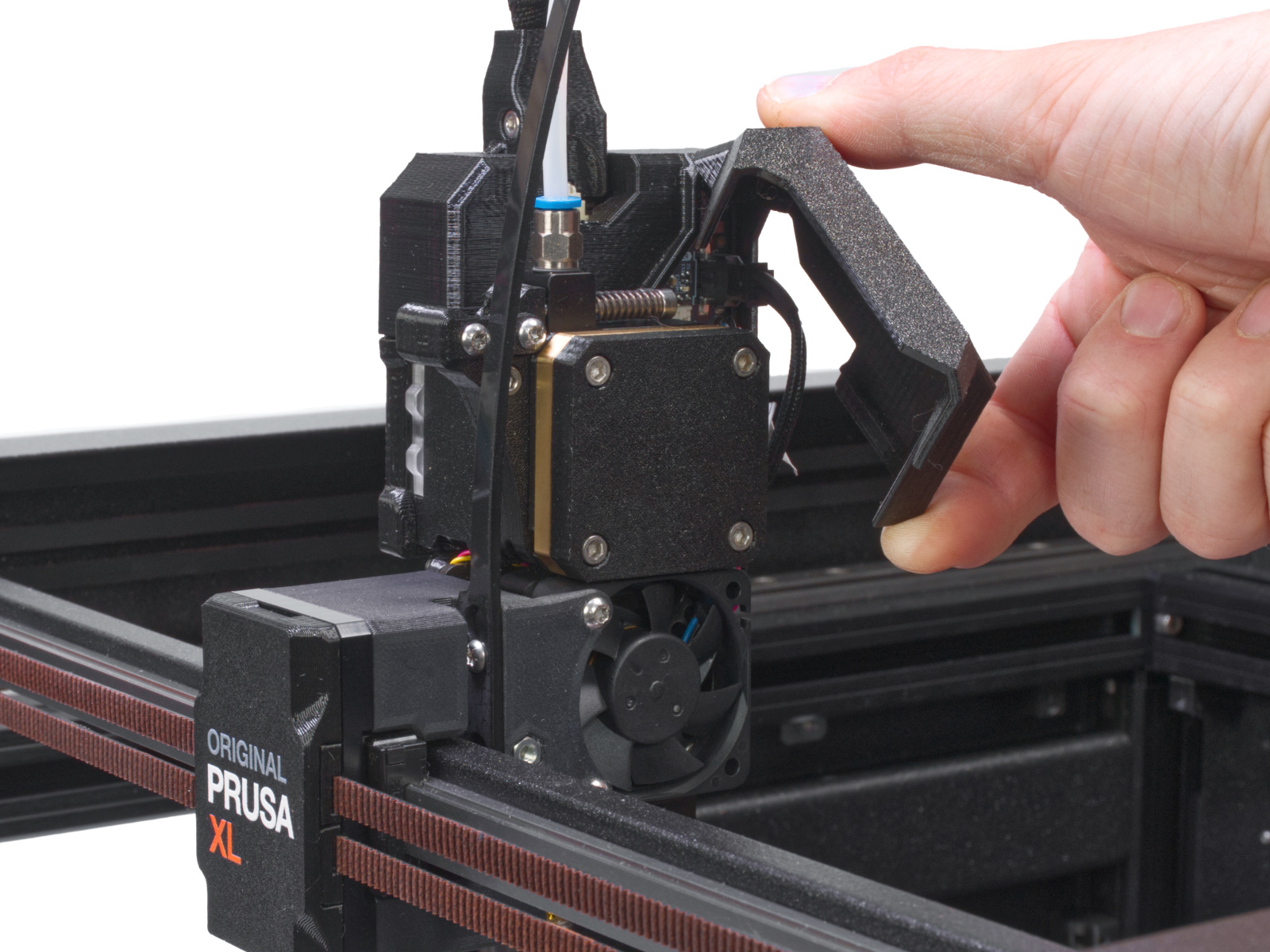
                  Open the dwarf-cover-door to access the Dwarf board.
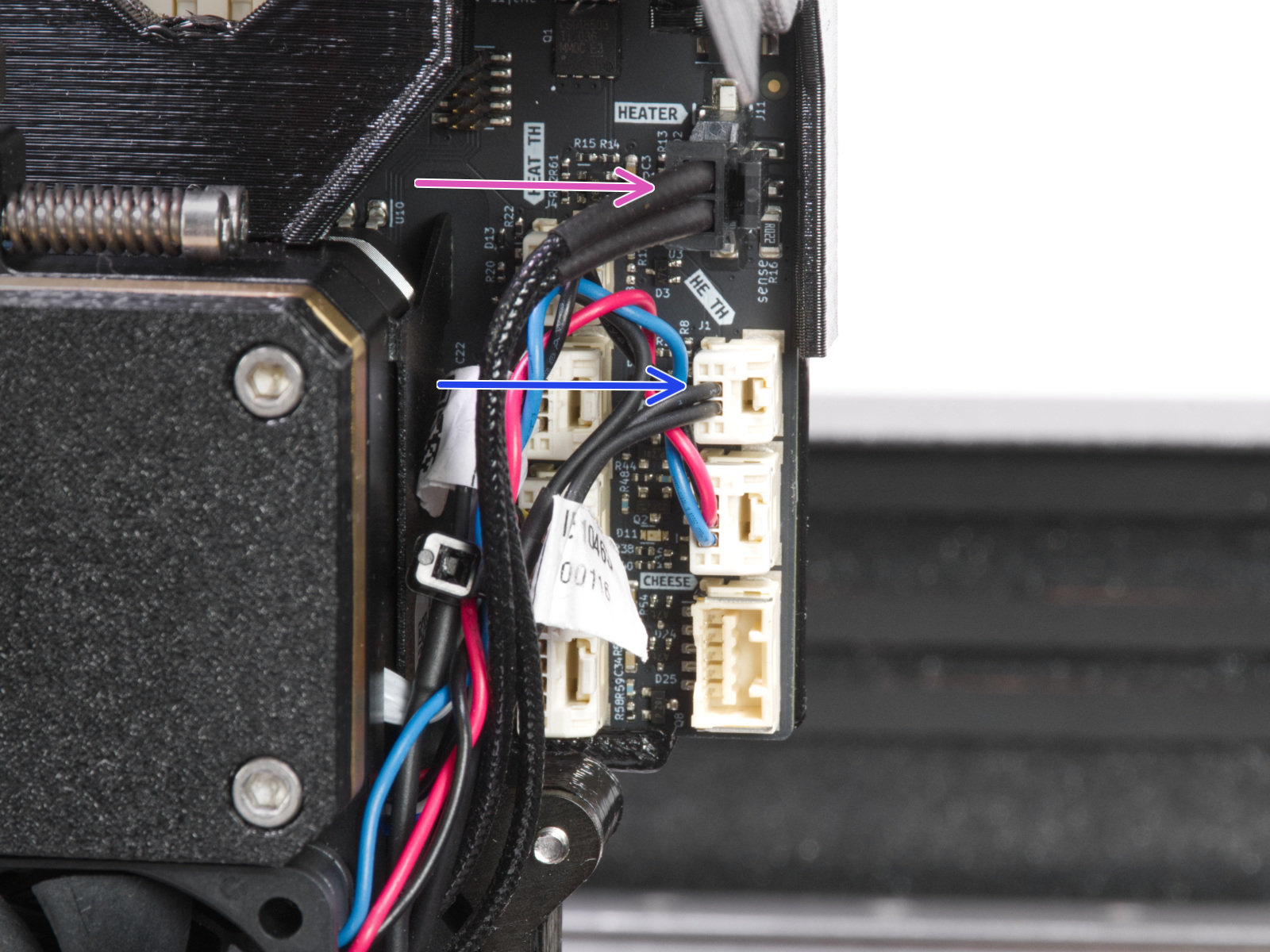
                  Check that all the connectors are secure in their sockets, according to the picture below. Focus on the thermistor and heater cables. Though unlikely, rough shipping or handling could have shaken the heater or thermistor cables loose. 
                  Checking the resistance

                  The table below describes the correct resistance for each part, as well as what scale you should set your meter to. The hotend thermistor is rated to be 100 kΩ at 25 °C. To be realistic, with a varying temperature between 20 °C and 30 °C, you can expect a wider range of readings (~85-125 kΩ).

                  There can be micro-fractures in the cable, breaking the connections only at certain positions. Therefore, try to move the cable a bit while doing the measurement and see if the value changes drastically.

                  Part
                  Resistance
                  Multimeter scale

                  Hotend thermistor 

                  [80 kΩ - 125 kΩ]

                  200 kΩ

                  Hotend heater

                  [12.3 Ω - 15.1 Ω]

                  200 Ω

                  The part should be cold (room temperature) and unplugged when measuring the resistance!
                  Was this article helpful?
                  This action is available only to registered users. Please log-in.

                  Topics

                  • Troubleshooting
                    • Printer troubleshooting
                      • Extruder blob
                      • Multimeter usage
                      • PrusaLink Troubleshooting
                      • Homing error Z #17301 (XL)
                      • Modular bed error #17501 (XL)
                      • Dwarf error #17502 (XL)
                      • Nozzle Cleaning Failed #17834 (XL)
                      • Extruder preheat error #17202 (XL)
                      • Extruder thermal runaway #17204 (XL)
                      • Extruder Mintemp error #17208 (XL)
                      • Extruder Maxtemp error #17206 (XL)
                      • Puppy error #17514 (XL)
                      • No FW on USB flash drive #17604 (XL)
                      • Unsupported printer model #17610 (XL)
                      • Unsupported Buddy FW #17611 (XL)
                      • USB flash error #17613 (XL)
                      • Invalid FW size on USB flash drive #17603 (XL)
                      • USB flash drive not connected #17602 (XL)
                      • Firmware missing #17612 (XL)
                      • FW in internal flash corrupted #17608 (XL)
                      • Hash verification failed #17607 (XL)
                      • Imposter! Fake signature #17606 (XL)
                      • Flash erase error #17605 (XL)
                      • Unsupported firmware BBF file #17614 (XL)
                      • Modular bed error #17250 (XL)
                      • Toolchanger error #17135 (XL) #36135 (CORE One INDX)
                      • Extruder temp not matching #17210 (XL)
                      • Modular bed error #17251 (XL)
                      • Modular bed error #17252 (XL)
                      • Modular bed error #17253 (XL)
                      • Modular bed error #17254 (XL)
                      • Modular bed error #17256 (XL)
                      • Modular bed error #17257 (XL)
                      • Modular bed error #17302 (XL)
                      • Modular bed error #17303 (XL)
                      • Dwarf error #17503 (XL)
                      • ESP error #17505 (XL)
                      • ESP error #17506 (XL)
                      • ESP error #17504 (XL)
                      • Emergency stop #17510 (XL)
                      • Puppy error #17511 (XL)
                      • Puppy error #17512 (XL)
                      • Puppy error #17513 (XL)
                      • Puppy error #17515 (XL)
                      • Puppy error #17516 (XL)
                      • Puppy error #17517 (XL)
                      • Puppy error #17518 (XL)
                      • Puppy error #17519 (XL)
                      • Puppy error #17520 (XL)
                      • Puppy error #17521 (XL)
                      • Puppy error #17522 (XL)
                      • Selftest failed (XL single-tool)
                      • Filament not loading (XL)
                      • Clogged hotend (XL)
                      • Heatbreak Mintemp error #17211 (XL)
                      • Heatbreak Maxtemp error #17212 (XL)
                      • Homing error X #17304 (XL)
                      • Homing error Y #31305 (CORE One) #35305 (CORE One L) #36305 (CORE One INDX) #17305 (XL)
                      • USB Port Overcurrent #17306 (XL)
                      • USB Device Overcurrent #17307 (XL)
                      • I2C Send Failed #17311 (XL)
                      • I2C Send Busy #17312 (XL)
                      • I2C Send Timeout #17313 (XL)
                      • I2C Send Undefined #17314 (XL)
                      • I2C Receive failed #17315 (XL)
                      • EEPROM I2C Receive Busy #17316 (XL)
                      • I2C Receive Timeout #17317 (XL)
                      • I2C Receive undefined #17318 (XL)
                      • Modular Bed Error #17319 (XL)
                      • Out of memory #17507 (XL)
                      • PNG Buffer Full #17508 (XL)
                      • Loadcell not calibrated #17523 (XL)
                      • Loadcell tare error #17524 (XL)
                      • Loadcell tare failed #17525 (XL)
                      • Loadcell measure failed #17526 (XL)
                      • Loadcell Bad Configuration #17527 (XL)
                      • Loadcell timeout #17528 (XL)
                      • LED Memory Error #17529 (XL)
                      • Marlin Request Timeout #17530 (XL)
                      • BBF Allocation Failed #17531 (XL)
                      • BBF Initialization failed #17532 (XL)
                      • Modular Bed Error #17320 (XL)
                      • Tangled filament
                      • Factory reset (CORE One L, CORE One, MK4/S, MK3.9/S, MK3.5/S, MINI/+, XL)
                      • Nextruder filament sensor (CORE One, CORE One L, MK4/S, MK3.9/S, XL/+)
                      • XY probe unstable #17105 (XL)
                      • XY position invalid #17106 (XL)
                      • Pin not reached #17107 (XL)
                      • Dock position out of bounds #17103 (XL)
                      • Tool offset out of bounds #17104 (XL)
                      • ESP not connected #17533 (XL)
                      • Connect Registration Failed
                      • Connect Registration Failed #17401 (XL)
                      • Selftest failed (XL multi-tool)
                      • Blue Screen of Death (BSOD) #31538 (CORE One) #35538 (CORE One L) #36538 (CORE One INDX) #26538 (MK4S) #13538 (MK4) #27538 (MK3.9S) #17538 (XL) #21538 (MK3.9) #28538 (MK3.5S) #23538 (MK3.5) #12538 (MINI)
                      • Stuck filament detection #31101 (CORE One) #35101 (CORE One L) #26101 (MK4S) #13101 (MK4) #27101 (MK3.9S) #21101 (MK3.9) #17108 (XL)
                      • Hotend Heater Overcurrent #17322
                      • Heatbed temp not matching #17209 (XL)
                      • Toolchanger problem #17813 (XL multi-tool)
                      • Under-extrusion (Nextruder printers)
                      • EXTRUDER ERROR #17536 (XL)
                      • Filament sensor stuck #31113 (CORE One) #35113 (CORE One L) #36113 (CORE One INDX) #17113 (XL) #26113 (MK4S) #13113 (MK4) #27113 (MK3.9S) #21113 (MK3.9) #28113 (MK3.5S) #23113 (MK3.5) #12113 (MINI/+)
                      • Homing error X #31304 (CORE One) #35304 (CORE One L) #36304 (CORE One INDX) #17304 (XL)
                      • Crash recovery repeated crash #31811 (CORE One) #35811 (CORE One L) #26811 (MK4S) #13811 (MK4) #27811 (MK3.9S) #21811 (MK3.9) #28811 (MK3.5S) #23811 (MK3.5) #17811 (XL) #12811 (MINI)
                      • Clogged nozzle (CORE One, CORE One L, XL, MK4/S, MK3.9/S)
                    • Diagnostics
                    • Print Quality Troubleshooting
                    • QR Error codes
                    • Print Error Messages

                  6 comments

                  Log in  to post a comment
                  Jesse
                  •
                  I was having the "#17208 Mintemp Error" with my brand-new hotend assembly, (I purchased the 2T upgrade kit.)
                  No matter what I did to try to fix this problem it would still give the error. Upon taking the thermistor out of the hot-end, I found that the actual thermistor was DENTED near the tip, from the factory due to the grub screw being over-tightened.

                  Luckily, I had purchased a new thermistor last year as a spare and swapped out the defective one. I went to "control" option and manually set the temperature to 190 degrees C. The hotend with the installed new thermistor heated up to the set temperature and did NOT give any errors.

                  I started an actual print, and the error seems to have disappeared. The fix was swapping out the defective and dented from the factory thermistor.

                  I took a picture of the damaged thermistor, but do not know how to post or give this picture out for viewing or review.

                  I hope this manages to help others out experiencing this same problem.
                  Reply
                  Avinash
                  •
                  Thank you for your help. The exact same issue occurred for ALL of the tools on the XL 5T that was bought assembled. In instructions to replace the thermistor, they specifically stated that we must not over tighten it or we will get permanent damage, and they themselves have over tightened it!
                  Reply
                  Rich
                  •
                  Any suggestions if one doesn’t own a multimeter? I swapped DWARF 1 and 2, and the error stayed at the same position. Plugs at the top look good, plugged in tight.
                  Reply
                  Jesse
                  •
                  Please see my newly posted comment as to what actually solved my same problem.
                  Reply
                  pkums
                  •
                  I found this page helpful to find out how to measure the resistance of the thermistor and heater cable on the XL extruder :

                  https://help.prusa3d.com/article/multimeter-usage_2117
                  Reply
                  Chico Barretto
                  •
                  I was simply changing nozzle's and the thermistor starts becoming sensitive? I detached and re-assembled all parts carefully. And re-assembled them again to ensure contacts and no wiring stresses. Why are these parts so prone to damage?
                  Reply
                  chaolin1213
                  •
                  agree with vakil. Where should we measure the resistances? If resistance is incorrect, is the wire damaged or thermistor damaged? How to change?
                  Reply
                  DKAS
                  •
                  Hi, you can measure values on the cable connectors with multimeter when you unplug them from board. If you measure values in range somewhere around noted numbers, the termistor will be probably functional but not in desired range. If the cable is damaged, you will not be able to measure nothing at all.
                  Reply