Prusa
  • ショップ
    • 最新製品
    カテゴリー別
    • 3Dプリンター新着
    • 3Dプリンターアップグレード新着
    • 材料
    • アクセサリー
    • スペアパーツ
    • コース
    • グッズ
    • 見積もりを取得
    クイックリンク
    • 配送と配達
    • 返品と返金
    • 支払いと融資
    • 保証
    • VATと関税
    • よくある質問

    0 点の商品がカートに入っています点の商品がカートに入っています

    カートは空です

    カートを見る3Dプリンターを購入

    マイプロフィール

    ログイン すると注文や保存した商品を確認できます

    マイプロフィール

    ログイン中:

    • 注文
    • ログアウト
  • 3Dプリント
    • 3Dプリントを探る
    初心者向け
    • 3Dプリントの基礎
    • FDM印刷の仕組み
    • 初めてのプリンターを購入する
    • 3Dモデルカタログ
    用途別
    • ラピッドプロトタイピング
    • 製造
    • エンジニアリング
    • 研究
    • アートとデザイン
    さらに深く
    • 材料ガイド
    • コース
    • ウェビナー
    • 導入事例
    • カスタム3Dプリンティング
  • 3Dプリンター
    • すべての3Dプリンター
    用途
    • 自宅またはガレージ愛好家、改造愛好家、ホームプリンティング
    • ビジネス小規模チーム向けの社内生産
    • エンタープライズフリート、セキュリティ、大規模生産
    • どのPrusaが私に適していますか
    ショップと閲覧
    • CORE One+新着
    • CORE One+ INDX新着
    • CORE One L+新着
    • CORE One L+ INDX新着
    • XL+新着
    • MK4S
    • Prusa Pro HT90
    • Prusa Pro AFS
    • Prusa Pro SLX
    プリンターからさらに
    • 部品とアップグレード新着
    • 重要インフラ
    • 導入事例
    • シグネチャーオーク
    • キット
  • 材料
    • すべての材料
    用途別
    • 日常とデザイン
    • 機能工学
    • 複合材料
    • プロフェッショナル向け特殊材料
    • SLAレジン
    Prusament
    • PLA
    • PETG
    • ASA
    • PC
    • PA11
    • Flex
    • TPU
    材料からさらに
    • 材料ガイド
    • 自社製材料
    • サステナビリティ
    • ストアで注文
  • ソフトウェア
    • すべてのソフトウェア
    印刷の準備
    • PrusaSlicer 3.0新着
    印刷と監視
    • Prusa Connect
    • EasyPrint
    • iOS & Androidアプリ
    • Prusaファーム
    始める
    • ダウンロードとインストール
    • ナレッジベース
    その他のソフトウェア
    • 3Dモデルカタログ
  • サポート
    • サポートを探す
    回答を探す
    • ナレッジベース
    • トラブルシューティング
    • コース
    • ウェビナー
    ヘルプ
    • お問い合わせ
    • ライブチャット
    • 配送と配達
    • 保証
    • 返品と返金
    • サービスとスペアパーツ
    • サービスと修理
    コミュニティ
    • フォーラム
    • Reddit
    • Printables
  • トラストセンター
    • トラストセンター概要
    トピック別
    • GDPR
    • 証明書
    • セキュリティ
    • コンプライアンス
    コミットメント
    • サステナビリティレポート
    お問い合わせ
    • セキュリティチームに連絡
  • 会社
    • Prusaについて
    私たちについて
    • 私たちのストーリー
    • プリンターの製造方法
    • オープンソース
    • ブランド&メディアキット
    ニュース
    • ブログ
    • ニュースルーム
    • イベント
    信頼とパートナー
    • サステナビリティ
    • 再販業者と販売代理店
    • アフィリエイトプログラム
    • お問い合わせ
    • English
    • Čeština
    • Deutsch
    • Español
    • Français
    • Italiano
    • Polski
    • 日本語
  • ログイン中:

    • 注文
    • 住所
    • 在庫アラート
    • マイコース
    • サブスクリプション
    • アカウントを編集
    • ログアウト

ログイン すると注文や保存した商品を確認できます

ログイン中:
  • 注文
  • 住所
  • 在庫アラート
  • マイコース
  • サブスクリプション
  • アカウントを編集
  • English
  • Čeština
  • Deutsch
  • Español
  • Français
  • Italiano
  • Polski
  • 日本語
ショップ

0 点の商品がカートに入っています点の商品がカートに入っています

カートは空です

カートを見る3Dプリンターを購入

マイプロフィール

ログイン すると注文や保存した商品を確認できます

マイプロフィール

ログイン中:

  • 注文
  • ログアウト
ショップ
  • 最新製品
カテゴリー別
  • 3Dプリンター新着
  • 3Dプリンターアップグレード新着
  • 材料
  • アクセサリー
  • スペアパーツ
  • コース
  • グッズ
  • 見積もりを取得
クイックリンク
  • 配送と配達
  • 返品と返金
  • 支払いと融資
  • 保証
  • VATと関税
  • よくある質問

おすすめ製品

    人気のカテゴリー

      急上昇ワード

        記事

          ブログ

            製品

              カテゴリー

                検索候補

                  検索中…
                  結果がありません
                  エラーが発生しました。
                  ↑↓ 選択↵ 開くEsc 検索を閉じる
                  1. サポート
                  2. Prusa CORE One L+
                  3. プリンタートラブルシューティング
                  4. Under-extrusion (Nextruder printers)
                   

                  内容

                  • Nozzle
                  • Slicer settings
                  • Gearbox alignment
                  • Filament

                  ブログ

                  • Prusament PLA ColorMix:わずか5巻のフィラメントで45色以上をプリント
                  • PrusaSlicer 3.0プレビュー版 — 3Dプリントの未来を見据えた仕様
                  • より高品質なプリントを、もっと簡単に:Prusa XL+、CORE One L+、CORE One+(Gen 2)― 大規模製品アップグレード

                  ニュースレター

                  ご登録いただくと、毎月 新しいファームウェア、PrusaSlicerの新バージョン、3Dプリントプロジェクトの一般的なヒントなど、役立つ情報をお届けします。

                  クリックして、ニュースレターを受け取る。

                  このサイトはreCAPTCHA Enterpriseによって保護されており、Googleのプライバシーポリシーと利用規約が適用されます。

                  Factorio Transport Belts
                  E-shop
                  • 3Dプリンター
                  • プリンターのアップグレード
                  • フィラメント
                  • アクセサリー
                  • Prusa 商品

                  © Prusa Research a.s.

                  Printables
                  • 3Dモデル
                  • Store
                  • Clubs
                  • 3Dデザインコンテスト
                  • Brands
                  コミュニティ
                  • ワールドマップ
                  • フォーラム
                  • ユーザーグループ
                  • イベント
                  ヘルプ
                  • Prusa ヘルプ
                  • Prusa アカデミー
                  • 3Dプリンティング計算機
                  ソフトウェア
                  • PrusaSlicer
                  • Prusa.app
                  • Prusa Connect
                  • ドライバーとソフトウェア
                  会社概要
                  • 私たちについて
                  • Blog
                  • プルサ正規販売代理店
                  • お問い合わせ
                  • ISO 9001・ISO 14001・ISO 45001 認証取得済み
                  • 一般利用規約
                  • PRUSAウェブサイト利用のための一般利用規約
                  • プライバシーポリシー
                  • クッキーに関する情報
                  • お客様の苦情対応に関する方針
                  • Webサイトのステータスページ
                  • Cookie 設定
                  • 一般利用規約
                  • PRUSAウェブサイト利用のための一般利用規約
                  • プライバシーポリシー
                  • クッキーに関する情報
                  • お客様の苦情対応に関する方針
                  • Webサイトのステータスページ
                  • Cookie 設定

                  © Prusa Research a.s.

                  JOSEF PRUSA®、PRUSA RESEARCH®、PRUSA POLYMERS®、PRUSA ORANGE®、PRUSA 3D ® および PRUSAMENT® は、Prusa Development a.s. の登録商標であり、Prusa Research a.s. が Prusa Development a.s. からのライセンスに基づき使用しています。

                  Under-extrusion

                  (Nextruder printers)

                  関連するもの

                  CORE One family
                  MK4 family
                  XL family
                  MK3.9 family
                  記事 他の言語でもご覧になれます。
                  English
                  Čeština
                  Polski
                  Deutsch
                  Français
                  Español
                  Italiano
                  日本語

                  You can recognize under extrusion when there is material missing in your print’s layers. Printed objects with under extruded layers can be fragile and tend to break apart. There could be several causes to under-extrusion and you should also think if you recently did any changes to your printer (or perhaps no maintenance for a long period), as you might find the culprit there.
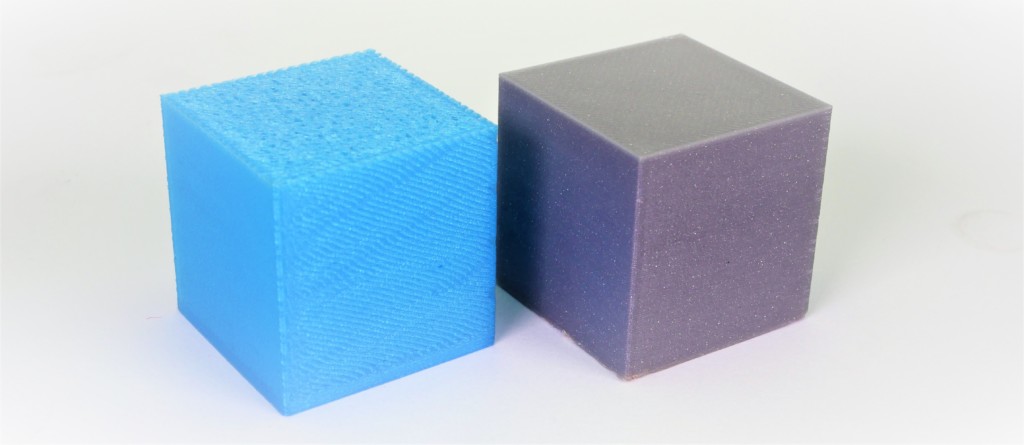
                  Example of severe under extrusion (left cube) and a normal print (right cube).

                  Common factors in under extrusions on printers equipped with Nextruder are:

                  • Nozzle
                  • Slicer settings
                  • Gearbox
                  • Filament

                  Nozzle

                  Before proceeding further, make sure that the printer is FULLY COOLED DOWN AT ROOM TEMPERATURE, and switched OFF! 

                  The nozzle on the Nextruder has to be at the correct height and tightened.

                  CORE One, MK4/S, MK3.9/S

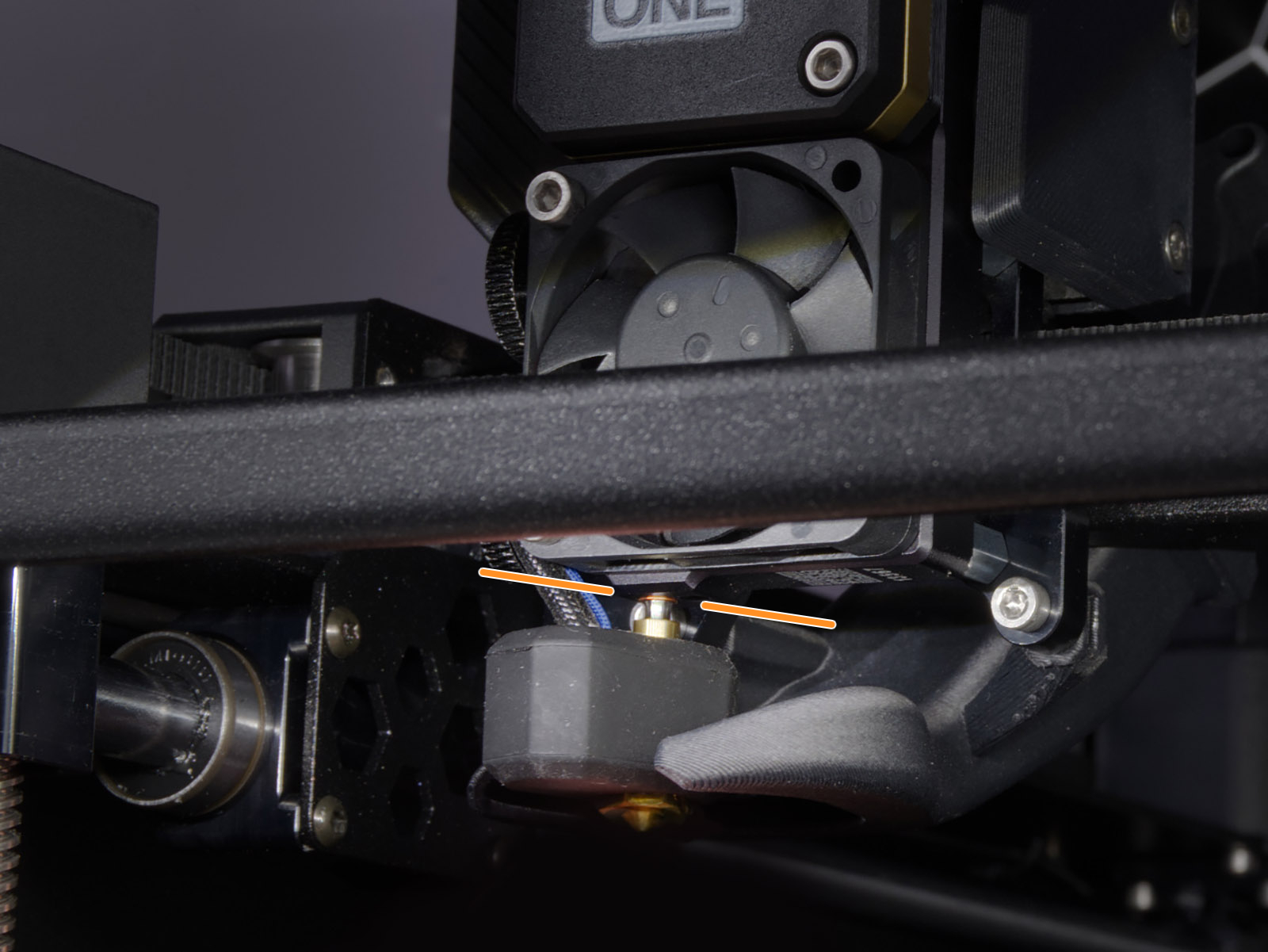
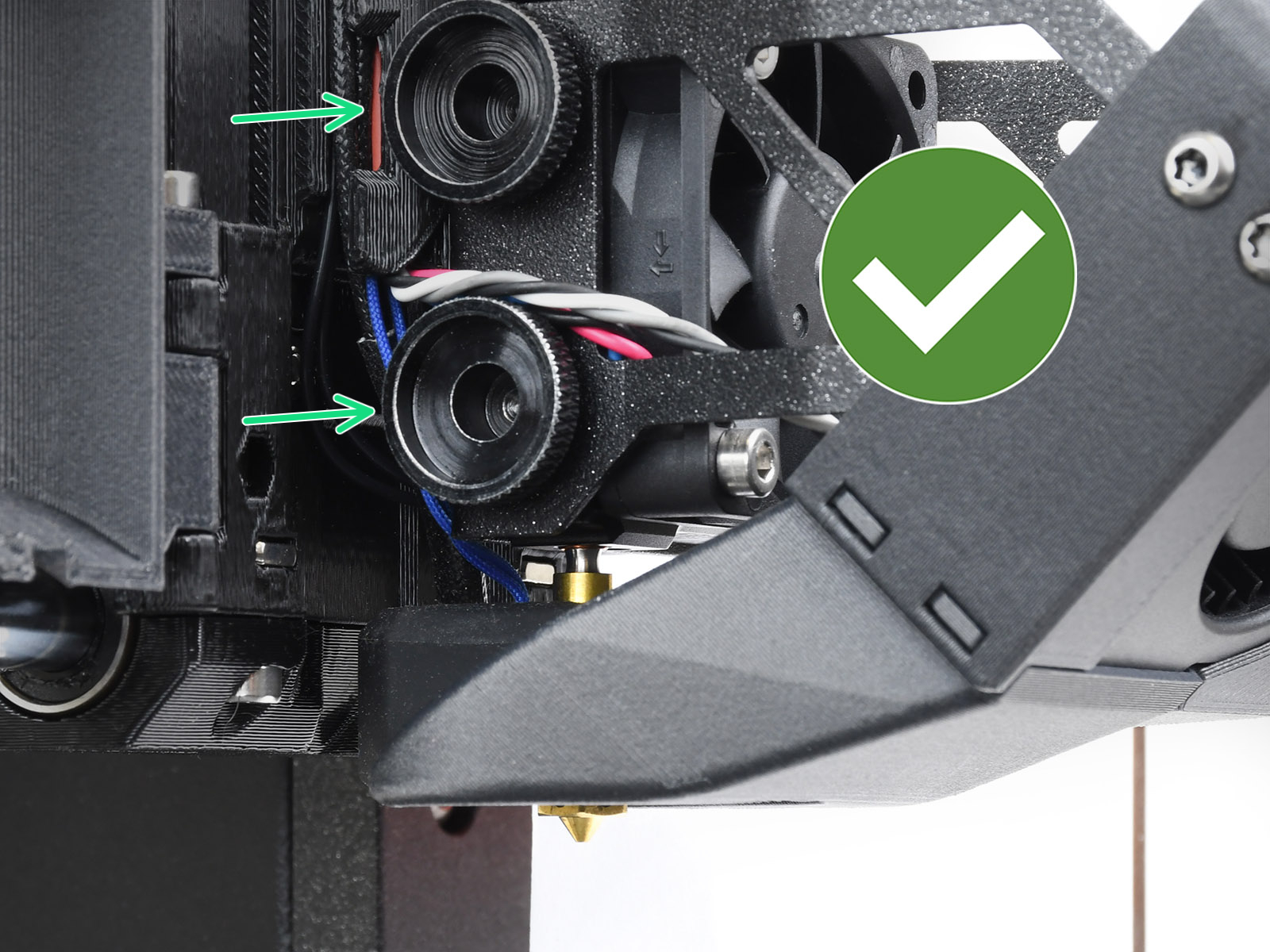
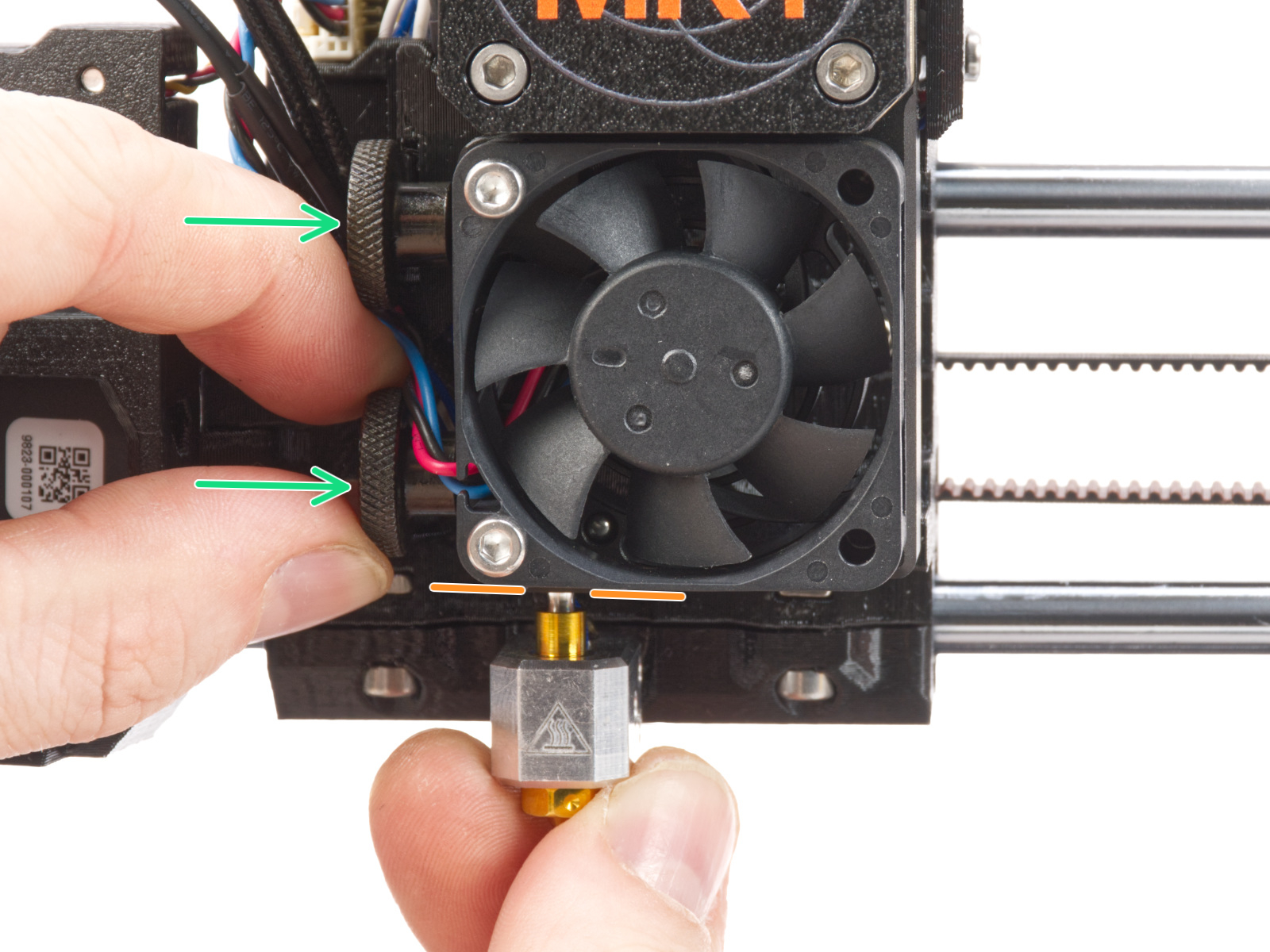
                  To check this aspect, loosen the thumb screws (do not completely remove the screws, a few turns are enough) on the side of the heatbreak, and push the nozzle up. The copper ring on the tube should not be visible.

                  Tighten the thumb screws just by hand, do not use any tools. 

                  If you have a Nozzle Adapter, check the installation again to make sure that the nozzle has not been lowered or loosened with the installation of the adapter. 
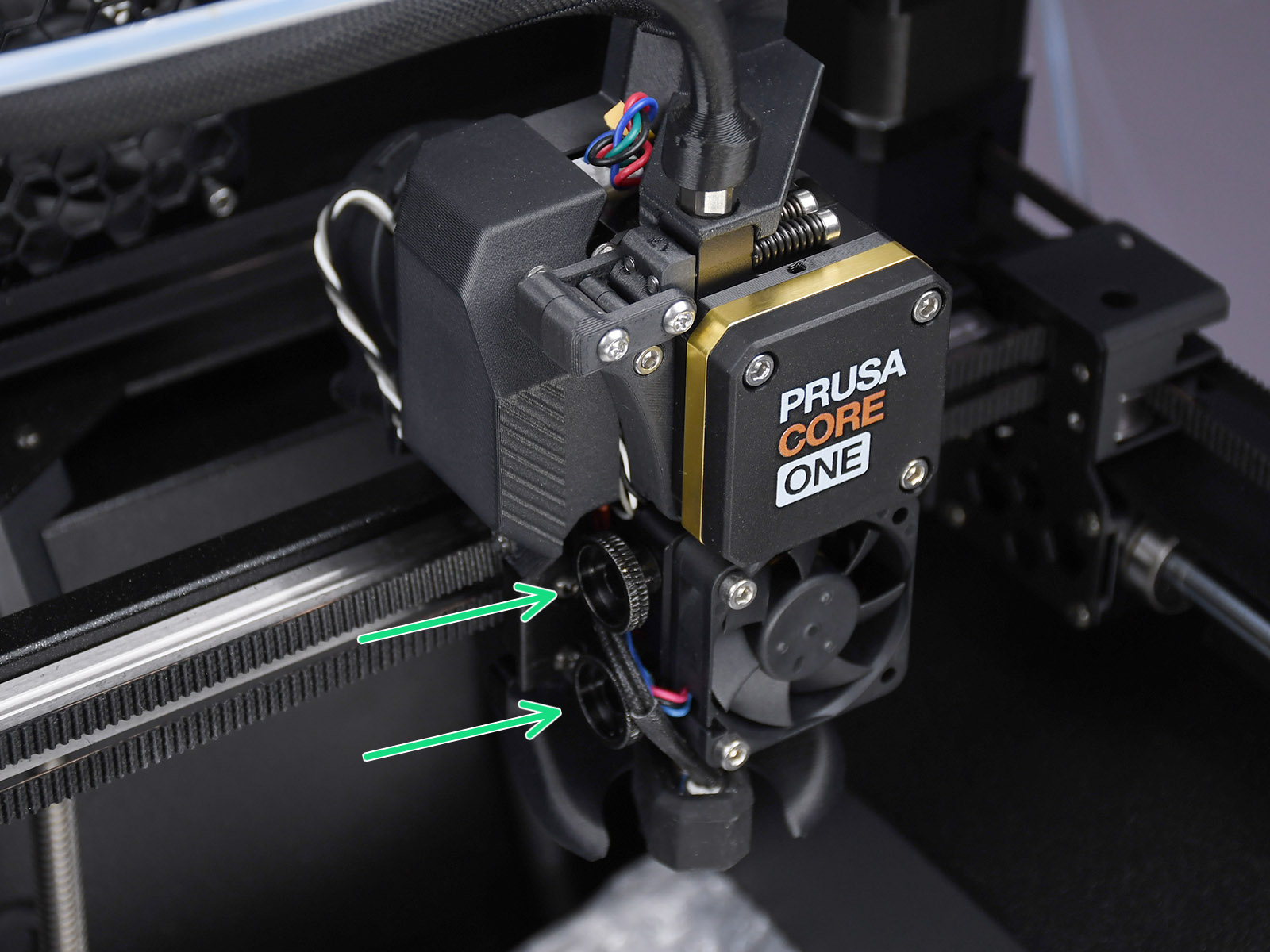
                  Prusa CORE One
                   
                  MK4S, MK3.9SMK4, MK3.9

                  XL

                  For the following procedure, where the hotend is temporarily extracted and reassembled, you can refer to the hotend replacement guide. 

                  • XL single-tool
                  • XL multi-tool

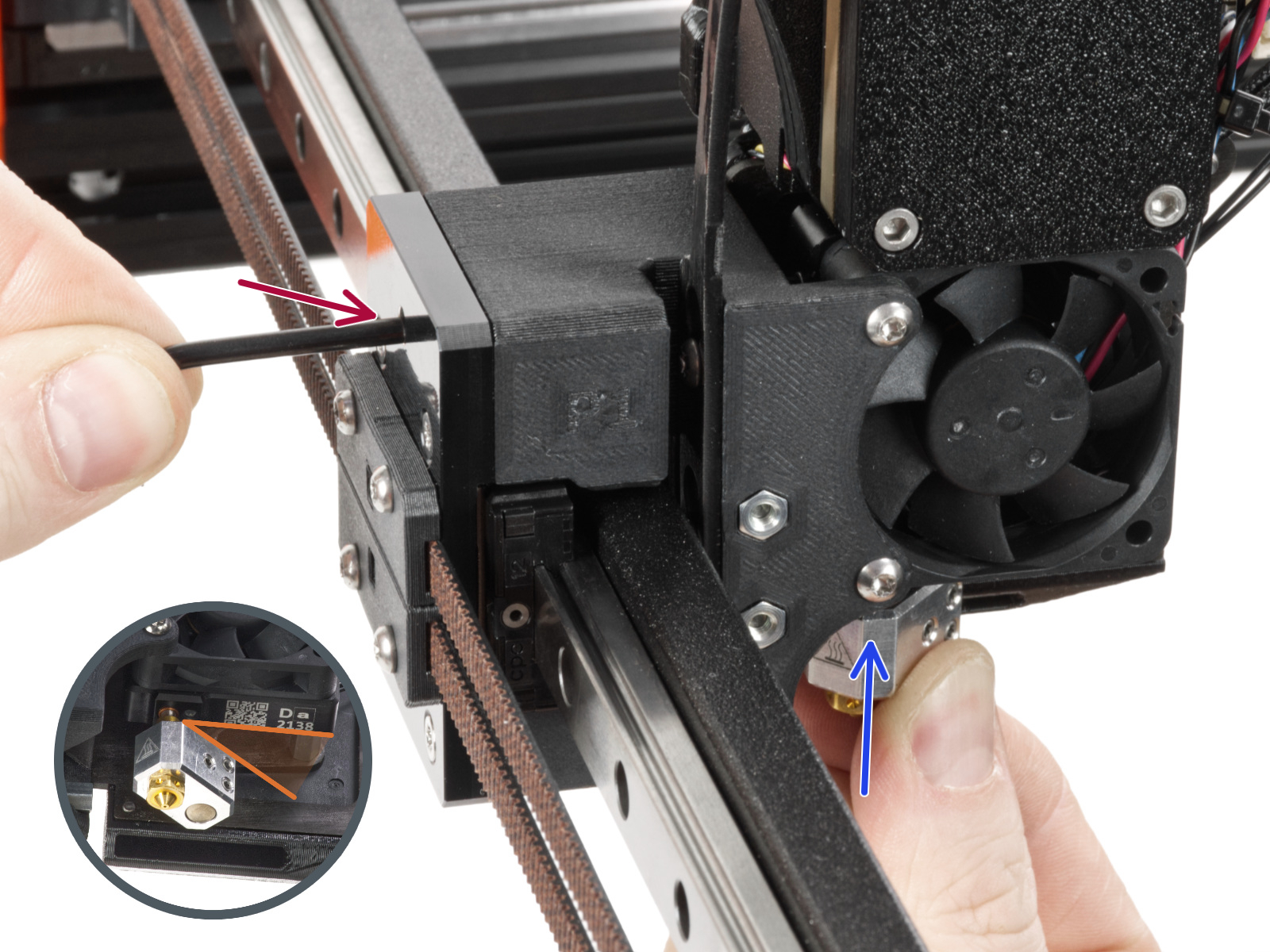
                  Temporarily extract the nozzle and check whether the metal nozzle tube has a dent. If it has, the nozzle needs to be replaced. 

                  The cause of a dented Nozzle tube is overtightening of the grub screw, hence this is not covered by our warranty, unless it arrived like this from our factory. 
                  After this check, if the nozzle tube was in good visible status, reassemble the hotend. This will ensure the correct positioning of the nozzle. 

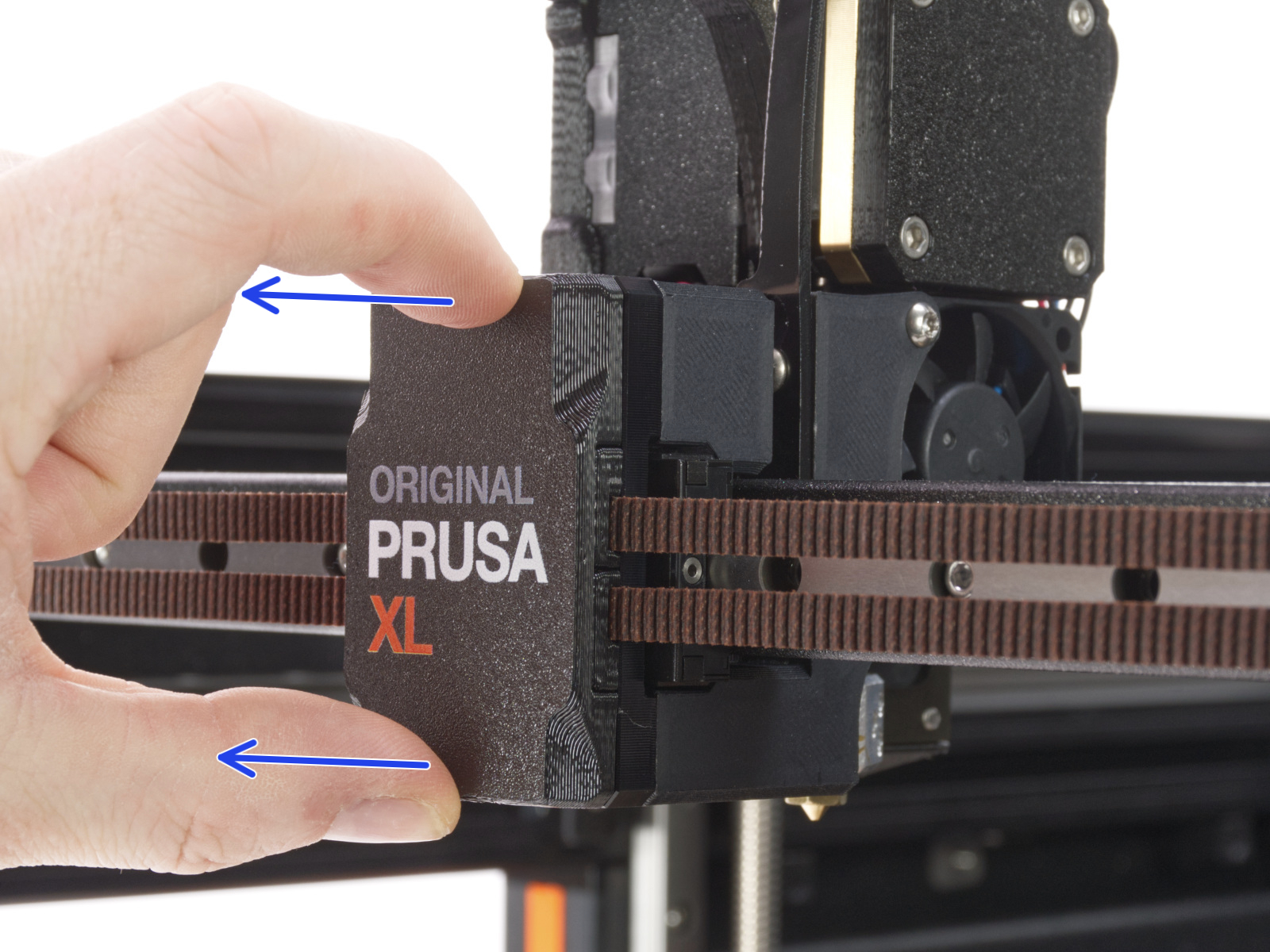
                  On single-tool XL, use the Torx TX8 key as shown in the picture to adjust the set screw. Do not use extra force while tightening, it may damage the hotend tube. The nozzle must be approximately at a 35°-40° angle to avoid damaging the hotend cables.
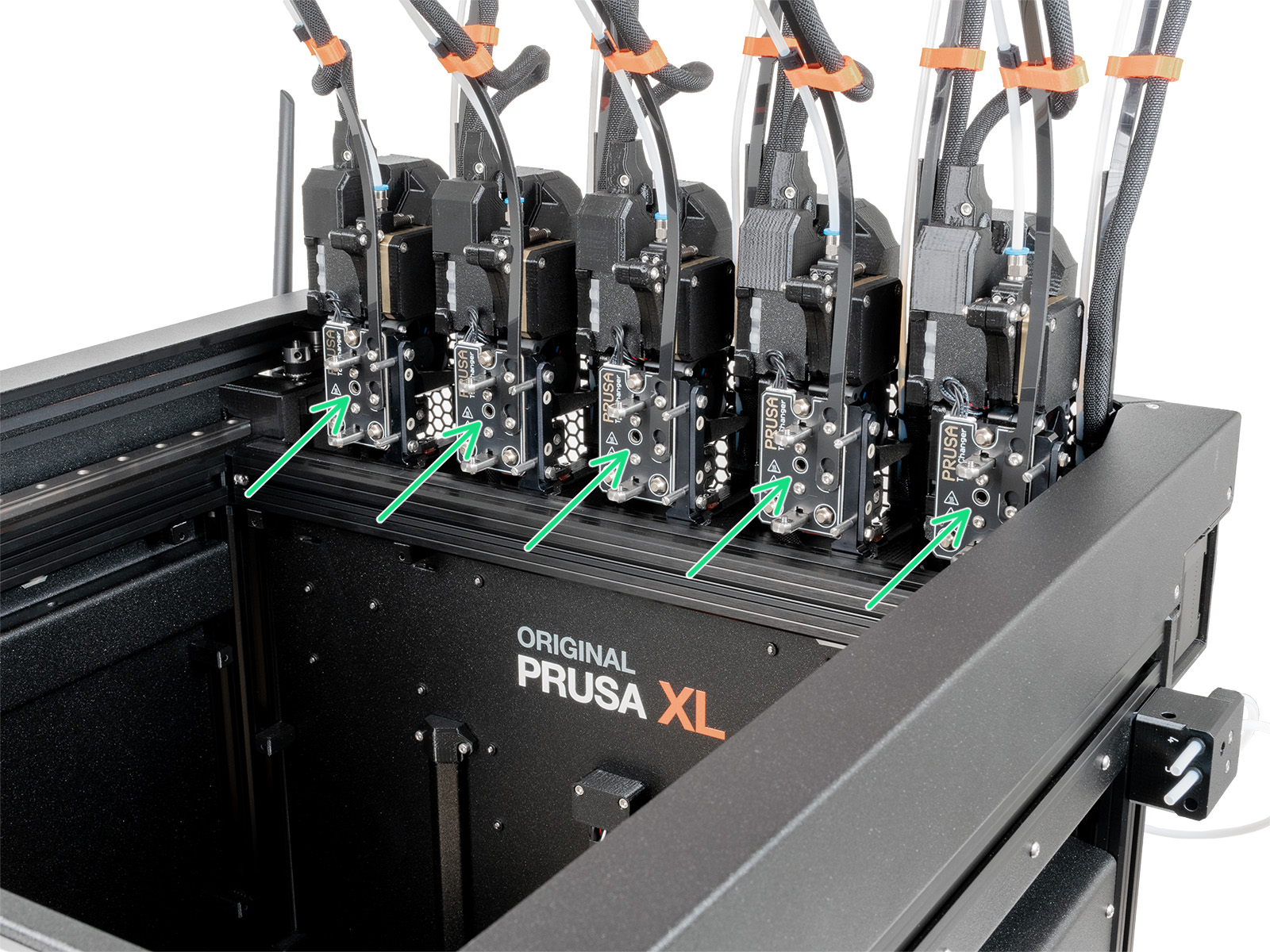
                  On multi-tool XL, use the Torx TX8 key in the part shown in the picture to adjust the set screw. Do not use extra force while tightening, it may damage the hotend tube. The nozzle must be approximately at a 35°-40° angle to avoid damaging the hotend cables.
                  Slicer settings

                  Each profile in the PrusaSlicer contains settings that determine temperature, speeds, and how much filament the 3D printer should extrude. The printer does not provide any feedback on how much filament actually leaves the nozzle. It can be that less filament is extruded than the firmware expects. If that happens, you may notice gaps in and/or in between printed layers.

                  Make sure you have set up your printer in PrusaSlicer by running the Configuration Wizard and as a starting point you should use the stock filament profiles which are tailored for your machine, filament type, and nozzle size. 

                  Gearbox alignment

                  It is possible, especially after interventions that involve the opening of the gearbox cover, that the gearbox is not fully aligned, causing an under-extrusion issue. Below are the procedures to align the gearbox. 

                  CORE One, MK4/S, MK3.9/S

                  Follow the dedicated gearbox alignment article for these printer models. 

                  XL 

                  The Original Prusa XL does not have an automatic gearbox alignment procedure. Perform these steps to reproduce the same movement. If loaded, unload the filament from the printer before proceeding. 
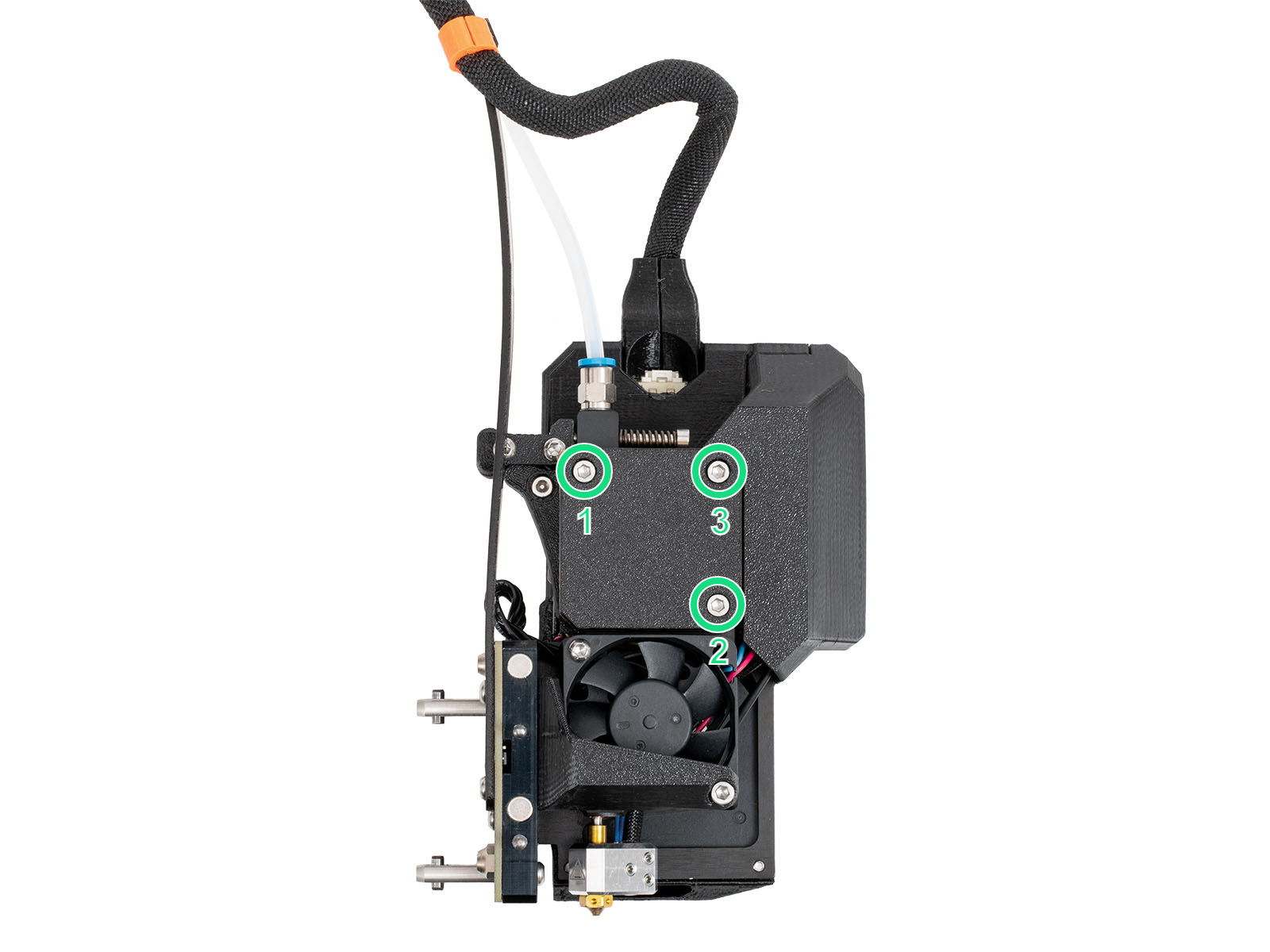
                  1. Slightly loosen the three bolts on the gearbox cover, by one turn and a half. 

                  1. On the LCD Menu, navigate to Filament -> Unload Filament.
                  2. As soon as the extruder's movement finishes, tighten the three M3x25 screws on the gearbox cover, in the order specified in the picture. 

                  Filament

                  A printing temperature that is too low or too high can cause print issues as well. If your filament brand and type are not listed in PrusaSlicer, you can try to adjust the print temperature by +/- 5-15°C to see if this resolves the issue.

                  Some specialty materials, like 柔軟な材料, may require many adjustments and tweaks to print them successfully. Composite materials, like Woodfill filament, may require at minimum a 0.6 mm nozzle, and 0.2 mm layer height to prevent clogging. If there are composite materials like kevlar or carbon fiber, a hardened nozzle is required.

                  Be sure to see our extensive material table, where most types of filament and their considerations are covered.

                  Some filaments can also have varying thickness, due to quality or infused materials like wood, which will cause unexpected changes in the volume of extruded filament. The industry standard for variations in diameter is +/- 0.05 mm.

                  Keep your filament dry, and free of moisture because damp filaments have a negative impact on printing, especially soluble filament, PETG, and ABS. We highly recommend putting spools back inside their original bag when it’s not in use, along with a silica gel. We recommend storing your filaments in a dry area or ideally in a “dry box”.

                  Incorrect loading/unloading

                  When loading a new filament with a lower specified temperature, preheat the nozzle to the temperature required by the previous filament type you have used. In other words, always to the highest temperature filament, as its remnants are most likely still in the hotend. For example, if you have printed with ABS or PETG and want to print with PLA now, load the PLA filament at the ABS or PETG temperature. This way, the newly introduced filament can push the old one out.

                  Low-temperature materials and enclosure

                  Printing PLA or a similar material in an enclosed printer can cause under-extrusion. 

                  For example, on our Original Prusa Enclosure with closed doors, if the ambient temperature is over 27°C, the temperature inside the enclosure may be too high for printing PLA or similar materials, causing under-extrusion or clogging. 

                  この記事は役に立ちましたか?
                  この操作は登録ユーザーのみが利用できます。ログインしてください。
                  ログイン してコメントを投稿する
                  コメントなし

                  トピックス

                  • トラブルシューティング
                    • プリンタートラブルシューティング
                      • スパゲッティモンスター
                      • エクストルーダーのブロブ
                      • マルチメーターの使い方
                      • PrusaLinkのトラブルシューティング
                      • Zホーミングエラー #17301 (XL)
                      • Modular bed error #17501 (XL)
                      • Dwarfボードエラー #17502 (XL)
                      • ノズルクリーニングの失敗 (XL)
                      • エクストルーダー プリヒートエラー #17202 (XL)
                      • エクストルーダーの熱暴走 #17204 (XL)
                      • Extruder Mintemp error #17208 (XL)
                      • Extruder Maxtemp error #17206 (XL)
                      • パピーエラー #17514 (XL)
                      • No FW on USB flash drive #17604 (XL)
                      • Unsupported printer model #17610 (XL)
                      • Unsupported Buddy FW #17611 (XL)
                      • USB flash error #17613 (XL)
                      • Invalid FW size on USB flash drive #17603 (XL)
                      • USB flash drive not connected #17602 (XL)
                      • Firmware missing #17612 (XL)
                      • FW in internal flash corrupted #17608 (XL)
                      • Hash verification failed #17607 (XL)
                      • Imposter! Fake signature #17606 (XL)
                      • Flash erase error #17605 (XL)
                      • Unsupported firmware BBF file #17614 (XL)
                      • Modular bed error #17250 (XL)
                      • ツールチェンジャーエラー #17101 (XL)
                      • Extruder temp not matching #17210 (XL)
                      • Modular bed error #17251 (XL)
                      • Modular bed error #17252 (XL)
                      • Modular bed error #17253 (XL)
                      • Modular bed error #17254 (XL)
                      • Modular bed error #17256 (XL)
                      • Modular bed error #17257 (XL)
                      • Modular bed error #17302 (XL)
                      • Modular bed error #17303 (XL)
                      • Dwarfボードエラー #17503 (XL)
                      • ESP error #17505 (XL)
                      • ESP error #17506 (XL)
                      • ESP error #17504 (XL)
                      • Emergency stop #17510 (XL)
                      • Puppy error #17511 (XL)
                      • Puppy error #17512 (XL)
                      • パピーエラー #17513 (XL)
                      • Puppy error #17515 (XL)
                      • Puppy error #17516 (XL)
                      • Puppyボードエラー #17517 (XL)
                      • Puppyボードエラー #17518 (XL)
                      • Puppy error #17519 (XL)
                      • Puppy error #17520 (XL)
                      • Puppy error #17521 (XL)
                      • Puppy error #17522 (XL)
                      • ホットエンドプリヒートエラー #26201 (MK4S) #13201 (MK4) # 27201 (MK3.9S) #21201 (MK3.9) #31201 (CORE One)
                      • ヒートベッドの熱暴走 #26203 (MK4S) #13203 (MK4) #27203 (MK3.9S) #21203 (MK3.9) #28203 (MK3.5S) #23203 (MK3.5) #31203 (CORE One)
                      • ホットエンドの熱暴走 #26204 (MK4S) #13204 (MK4) #27204 (MK3.9S) #21204 (MK3.9) #31204 (CORE One)
                      • ホットエンド最低温度エラー #26208 (MK4S) #13208 (MK4) # 27208 (MK3.9S) #21208 (MK3.9) #31208 (CORE One)
                      • ヒートベッド最低温度エラー #26207 (MK4S) #13207 (MK4) #27207 (MK3.9S) #21207 (MK3.9) #28207 (MK3.5S) #23207 (MK3.5)
                      • ヒートベッド最高温度エラー #26205 (MK4S) #13205 (MK4) #27205(MK3.9S) #21205 (MK3.9) #28205 (MK3.5S) #23205 (MK3.5) #31205 (CORE One)
                      • セルフテストの失敗 (XL)
                      • フィラメントがロードされていかない (XL)
                      • ホットエンドの詰まり (XL)
                      • Heatbreak Mintemp error #17211 (XL)
                      • Heatbreak Maxtemp error #17212 (XL)
                      • Homing error X #17304 (XL)
                      • Homing error Y #31305 (CORE One) #35305 (CORE One L) #36305 (CORE One INDX) #17305 (XL)
                      • USB Port Overcurrent #17306 (XL)
                      • USB Device Overcurrent #17307 (XL)
                      • I2C Send Failed #17311 (XL)
                      • I2C Send Busy #17312 (XL)
                      • I2C Send Timeout #17313 (XL)
                      • I2C Send Undefined #17314 (XL)
                      • I2C Receive failed #17315 (XL)
                      • EEPROM I2C Receive Busy #17316 (XL)
                      • I2C Receive Timeout #17317 (XL)
                      • I2C Receive undefined #17318 (XL)
                      • Modular Bed Error #17319 (XL)
                      • Out of memory #17507 (XL)
                      • PNG Buffer Full #17508 (XL)
                      • Loadcell not calibrated #17523 (XL)
                      • Loadcell tare error #17524 (XL)
                      • Loadcell tare failed #17525 (XL)
                      • Loadcell measure failed #17526 (XL)
                      • Loadcell Bad Configuration #17527 (XL)
                      • Loadcell timeout #17528 (XL)
                      • LED Memory Error #17529 (XL)
                      • Marlin Request Timeout #17530 (XL)
                      • BBF Allocation Failed #17531 (XL)
                      • BBF Initialization failed #17532 (XL)
                      • I2C送信の失敗 #26311 (MK4S) #13311(MK4) #21311 (MK3.9) #23311 (MK3.5)
                      • ロードセル未キャリブレーション #31523 (CORE One) #26523 (MK4S) #13523 (MK4) #27523 (MK3.9S) #21523 (MK3.9)
                      • ロードセル測定の失敗 #31526 (CORE One) #26526 (MK4S) #13526 (MK4) #27526 (MK3.9S) #21526 (MK3.9)
                      • ロードセルのキャリブレーション不良 #31527 (CORE One) #26527 (MK4S) #13527 (MK4) #27527 (MK3.9S) #21527 (MK3.9)
                      • ロードセルのタイムアウト #31528 (CORE One) #26528 (MK4S) #13528 (MK4) #27528 (MK3.9S) #21528 (MK3.9)
                      • ヒートブレイク最低温度エラー #26211 (MK4S) #13211 (MK4) #27211 (MK3.9S) #21211 (MK3.9)
                      • Modular Bed Error #17320 (XL)
                      • 飛んだヒューズ (MK4/S, MK3.9/S)
                      • フィラメントがロードされない (MK4/S, MK3.9/S)
                      • Y軸ホーミングエラー #26305 (MK4S) #13305 (MK4) #21305 (MK3.9) #23305 (MK3.5)
                      • Tangled filament
                      • 工場出荷時の状態へのリセット (CORE One, MK4/S, MK3.9/S, MK3.5/S, MINI/+, XL)
                      • Nextruder フィラメントセンサー (CORE One, MK4/S, MK3.9/S, XL)
                      • XY probe unstable #17105 (XL)
                      • XY position invalid #17106 (XL)
                      • ピンが未到達 #17107 (XL)
                      • ドック位置が不整合 #17103 (XL)
                      • ツールオフセットが不整合 #17104 (XL)
                      • ESP not connected #17533 (XL)
                      • 接続認証の失敗
                      • Connect Registration Failed #21401 (MK3.9)
                      • 接続認証の失敗 #17401 (XL)
                      • Selftest failed (XL multi-tool)
                      • Blue Screen of Death (BSOD) #31538 (CORE One) #35538 (CORE One L) #36538 (CORE One INDX) #26538 (MK4S) #13538 (MK4) #27538 (MK3.9S) #17538 (XL) #21538 (MK3.9) #28538 (MK3.5S) #23538 (MK3.5) #12538 (MINI)
                      • フィラメントスタックの検出 #31101 (CORE One) #26101 (MK4S) #13101 (MK4) #27101 (MK3.9S) #21101 (MK3.9) #17108 (XL)
                      • Hotend temp not matching #31210 (CORE One) #35210 (CORE One L) #26210 (MK4S) #13210 (MK4) #27210 (MK3.9S) #21210 (MK3.9)
                      • Hotend Heater Overcurrent #17322
                      • Heatbed temp not matching #17209 (XL)
                      • Toolchanger problem #17813 (XL multi-tool)
                      • Under-extrusion (Nextruder printers)
                      • EXTRUDER ERROR #17536 (XL)
                      • Nozzle Timeout #31819 (CORE One) #35819 (CORE One L) #36819 (CORE One INDX) #26819 (MK4S) #13819 (MK4) #27819 (MK3.9S) #21819 (MK3.9) #28819 (MK3.5S) #23819 (MK3.5) #17819 (XL) #12819 (MINI)
                      • Uneven bed #31111 (CORE One) #35111 (CORE One L) #36111 (CORE One INDX)
                      • Filament sensor stuck #31113 (CORE One) #35113 (CORE One L) #36113 (CORE One INDX) #17113 (XL) #26113 (MK4S) #13113 (MK4) #27113 (MK3.9S) #21113 (MK3.9) #28113 (MK3.5S) #23113 (MK3.5) #12113 (MINI/+)
                      • Chamber MAXTEMP error #31214 (CORE One) #35214 (CORE One L) #36214 (CORE One INDX)
                      • Homing error X #31304 (CORE One) #35304 (CORE One L) #36304 (CORE One INDX) #17304 (XL)
                      • Puppy error #31511 (CORE One) #35511 (CORE One L) #36511 (CORE One INDX)
                      • Puppy error #31513 (CORE One) #35513 (CORE One L) #36513 (CORE One INDX)
                      • Fil. sensor troubleshooting #31114 (CORE One) #26114 (MK4S) #13114 (MK4) #27114 (MK3.9S) #21114 (MK3.9) #28114 (MK3.5S) #23114 (MK3.5)
                      • Chamber Mintemp error #31215 (CORE One) #35215 (CORE One L) #36215 (CORE One INDX)
                      • The heatbed cooled down during the power outage #31808 (CORE One) #35808 (CORE One L) #26808 (MK4S) #27808 (MK3.9S) #28808 (MK3.5S) #13808 (MK4) #21808 (MK3.9) #23808 (MK3.5) #17808 (XL) 
                      • The G-code isn't fully compatible #31803 (CORE One) #26803 (MK4S) #27803 (MK3.9S) #28803 (MK3.5S) #13803 (MK4) #21803 (MK3.9) #23803 (MK3.5) #17803 (XL) #12803 (MINI)
                      • Filament not detected #31804 (CORE One) #35804 (CORE One L) #26804 (MK4S) #27804 (MK3.9S) #28804 (MK3.5S) #13804 (MK4) #21804 (MK3.9) #23804 (MK3.5) #17804 (XL) #12804 (MINI)
                      • Print preview unfinished selftest #31801 (CORE One) #35801 (CORE One L) #26801 (MK4S) #27801 (MK3.9S) #28801 (MK3.5S) #13801 (MK4) #21801 (MK3.9) #23801 (MK3.5) #17801 (XL) #12801 (MINI)
                      • Crash recovery repeated crash #31811 (CORE One) #35811 (CORE One L) #26811 (MK4S) #13811 (MK4) #27811 (MK3.9S) #21811 (MK3.9) #28811 (MK3.5S) #23811 (MK3.5) #17811 (XL) #12811 (MINI)
                      • Crash recovery home fail #31812 (CORE One) #35812 (CORE One L) #26812 (MK4S) #13812 (MK4) #27812 (MK3.9S) #21812 (MK3.9) #28812 (MK3.5S) #23812 (MK3.5) #17812 (XL) #12812 (MINI)
                      • Loading obstruction #31119 (CORE One) #35119 (CORE One L) #17119 (XL)
                      • Homing calibration needed #31118 (CORE One) #35118 (CORE One L) #36118 (CORE One INDX)#17118 (XL)
                      • Calibrate homing from menu #31120 (CORE One) #35120 (CORE One L) #36120 (CORE One INDX) #17120 (XL)
                      • MCU overheat #35270
                      • PCB overheat #35271
                      • Data Timeout #35330
                      • AC Controller Fault #35273
                      • AC controller fault #35333 (CORE One L)
                      • AC controller fault #35335 (CORE One L)
                      • AC controller fault #35336 (CORE One L)
                      • セルフテスト失敗(CORE One L)
                      • Bed fan is not spinning #35849 (CORE One L)
                      • PSU fan is not spinning #35850 (CORE One L)
                      • Selftest failed (CORE One/+)
                      • ホットエンドの詰まり (MK4)
                      • ベルトテンションの調整(CORE One L/CORE One)
                      • SDカード・USBメモリ
                    • Diagnostics [進行中の翻訳]
                    • プリント品質のトラブルシューティング
                    • QR Error codes [進行中の翻訳]
                    • プリントエラーメッセージ