Prusa
  • SHOP
    • Latest products
    BY CATEGORY
    • 3D printersnew
    • 3D printer upgradesnew
    • Materials
    • Accessories
    • Spare parts
    • Courses
    • Merch
    • Get a price quote
    QUICK LINKS
    • Shipping & delivery
    • Returns & refunds
    • Payment & financing
    • Warranty
    • VAT & Customs fees
    • FAQ

    0 item in your cartitems in your cart

    Your cart is empty

    Go to cartShop 3D printers

    My profile

    Log in to see orders, saved items

    My profile

    Signed in as

    • Orders
    • Logout
  • 3D PRINTING
    • Explore 3D printing
    FOR BEGINNERS
    • 3D printing 101
    • How FDM printing works
    • Buying your first printer
    • 3D model catalog
    BY APPLICATION
    • Rapid prototyping
    • Manufacturing
    • Engineering
    • Research
    • Arts & design
    GO DEEPER
    • Materials guide
    • Courses
    • Webinars
    • Case studies
    • Custom 3D printing
  • 3D PRINTERS
    • All 3D printers
    FOR
    • Home or garageHobbyists, tinkerers and home printing
    • BusinessIn-house production for small teams
    • EnterpriseFleets, security and scale
    • Which Prusa is right for me
    SHOP & BROWSE
    • CORE One+new
    • CORE One+ INDXnew
    • CORE One L+new
    • CORE One L+ INDXnew
    • XL+new
    • MK4S
    • Prusa Pro HT90
    • Prusa Pro AFS
    • Prusa Pro SLX
    MORE FROM PRINTERS
    • Parts & upgradesnew
    • Critical infrastructure
    • Case studies
    • Signature Oak
    • Kits
  • MATERIALS
    • All materials
    BY USE
    • Every-day & design
    • Functional engineering
    • Composites
    • Pro speciality
    • SLA resins
    PRUSAMENT
    • PLA
    • PETG
    • ASA
    • PC
    • PA11
    • Flex
    • TPU
    MORE FROM MATERIALS
    • Materials guide
    • We make material in house
    • Sustainability
    • Order on the store
  • SOFTWARE
    • All software
    PREPARE THE PRINT
    • PrusaSlicer 3.0New
    PRINT & MONITOR
    • Prusa Connect
    • EasyPrint
    • iOS & Android app
    • Prusa Farm
    GET STARTED
    • Download & install
    • Knowledge base
    MORE FROM SOFTWARE
    • 3D model catalog
  • SUPPORT
    • Explore support
    FIND ANSWERS
    • Knowledge base
    • Troubleshooting
    • Courses
    • Webinars
    GET HELP
    • Contact us
    • Livechat
    • Shipping & delivery
    • Warranty
    • Returns & refunds
    • Service & spare parts
    • Service & Repair
    COMMUNITY
    • Forum
    • Reddit
    • Printables
  • TRUST CENTER
    • Trust Center overview
    BY TOPIC
    • GDPR
    • Certificates
    • Security
    • Compliance
    COMMITMENTS
    • Sustainability report
    TALK TO US
    • Contact the security team
  • COMPANY
    • About Prusa
    GET TO KNOW US
    • Our story
    • How we make printers
    • Open source
    • Brand & media kit
    NEWS
    • Blog
    • Newsroom
    • Events
    TRUST & PARTNERS
    • Sustainability
    • Resellers & distributors
    • Affiliate program
    • Contact
    • English
    • Čeština
    • Deutsch
    • Español
    • Français
    • Italiano
    • Polski
    • 日本語
  • Signed in as

    • Orders
    • Address
    • In-stock Alerts
    • My Courses
    • Subscription
    • Edit Account
    • Logout

Log in to see orders, saved items

Signed in as
  • Orders
  • Address
  • In-stock Alerts
  • My Courses
  • Subscription
  • Edit Account
  • English
  • Čeština
  • Deutsch
  • Español
  • Français
  • Italiano
  • Polski
  • 日本語
Shop

0 item in your cartitems in your cart

Your cart is empty

Go to cartShop 3D printers

My profile

Log in to see orders, saved items

My profile

Signed in as

  • Orders
  • Logout
SHOP
  • Latest products
BY CATEGORY
  • 3D printersnew
  • 3D printer upgradesnew
  • Materials
  • Accessories
  • Spare parts
  • Courses
  • Merch
  • Get a price quote
QUICK LINKS
  • Shipping & delivery
  • Returns & refunds
  • Payment & financing
  • Warranty
  • VAT & Customs fees
  • FAQ

Featured products

    Popular categories

      Trending searches

        Articles

          Blog

            Products

              Categories

                Suggested searches

                  Searching…
                  No results
                  Something went wrong.
                  ↑↓ Select↵ OpenEsc Close search
                  1. Support
                  2. Original Prusa i3 MK2S
                  3. General Information
                  4. Types of printers and their differences
                   

                  Contents

                  • FDM/FFF printers
                  • SLA
                  • SLS

                  Blog

                  • Print colorful and glowing Halloween decorations with our spooky offer
                  • Factorio Has Arrived on Printables
                  • Prusament PLA Lightweight: 65% lighter than regular PLA. Perfect choice for aircraft, cosplay, and more.

                  Newsletter

                  Signup and get our monthly squeeze on updates, blog, printables and much more.

                  By clicking, you agree to receive our newsletter.

                  This site is protected by reCAPTCHA Enterprise and the Google Privacy Policy and Terms of Service apply.

                  Factorio Transport Belts
                  E-shop
                  • 3D Printers
                  • Printer Upgrades
                  • Filaments
                  • Accessories
                  • Prusa Merchandise

                  © Prusa Research a.s.

                  Printables
                  • 3D Models
                  • Store
                  • Clubs
                  • 3D Design Contests
                  • Brands
                  Community
                  • World Map
                  • Forum
                  • User Groups
                  • Events
                  Help
                  • Prusa Help
                  • Prusa Academy
                  • 3D Printing Calculators
                  Software
                  • PrusaSlicer
                  • Prusa.app
                  • Prusa Connect
                  • Drivers and Software
                  Company
                  • About Us
                  • Blog
                  • Official Prusa Resellers
                  • Contact Us
                  • Certified for ISO 9001, ISO 14001, ISO 45001
                  • General Terms and Conditions
                  • General Terms and Conditions of Use of the PRUSA Websites
                  • Privacy Policy
                  • Information about cookies
                  • Customer Complaints Policy
                  • Status Page
                  • Do Not Sell or Share My Personal Information
                  • Supplemental Statements
                  • General Terms and Conditions
                  • General Terms and Conditions of Use of the PRUSA Websites
                  • Privacy Policy
                  • Information about cookies
                  • Customer Complaints Policy
                  • Status Page
                  • Do Not Sell or Share My Personal Information
                  • Supplemental Statements

                  © Prusa Research a.s.

                  JOSEF PRUSA®, PRUSA RESEARCH®, PRUSA POLYMERS®, PRUSA ORANGE®, PRUSA 3D ® AND PRUSAMENT® are registered trademarks of Prusa Development a.s. used by Prusa Research a.s. under licence from Prusa Development a.s.

                  Types of printers and their differences

                  Relevant for

                  MK4 family
                  XL family
                  MMU family
                  MINI family
                  MK3 family
                  +
                  2 comments
                  Article is also available in following languages
                  English
                  Čeština
                  Polski
                  Deutsch
                  Français
                  Español
                  Italiano
                  日本語

                  3D printing is an automated additive manufacturing process, where a 3D printer creates a physical model based on digital data (a 3D object). All types of 3D printing are based on the same principle: creating objects by adding layers on top of (or below) existing layers. As of this moment, there is no 3D printing technology that would be completely universal and suitable for every purpose. This is why it's important to decide how and for what purpose you are going to use the printer.

                  • FFF printers
                    • Cartesian printers
                    • CoreXY printers
                    • Delta printers
                    • Polar printers
                  • SLA (Stereolithography)
                    • Masked Stereolithography (MSLA)
                    • Stereolithography (SLA)
                    • Direct/digital Light Processing (DLP)
                  • SLS (Selective Laser Sintering)

                  FDM/FFF printers

                  FDM is an acronym for Fused Deposition Modeling (trademark by Stratasys) and FFF stands for Fused Filament Fabrication (open source). It encompasses all 3D printers, which heat/melt polymers and push them through a nozzle/extruder/print head onto a platform, where the model is built. The material for printing is provided as filament spools of 1.75 mm or occasionally 2.85 mm in diameter. The differences in the types of printers out there lay in how the extruder and the print platform move to create the models.

                  Cartesian printers

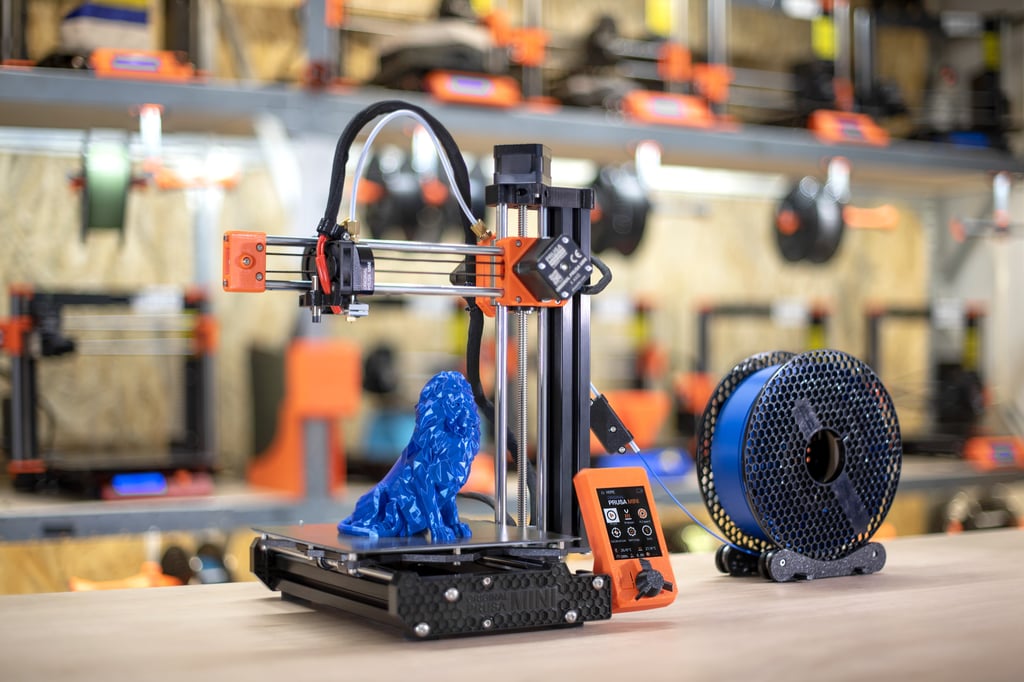
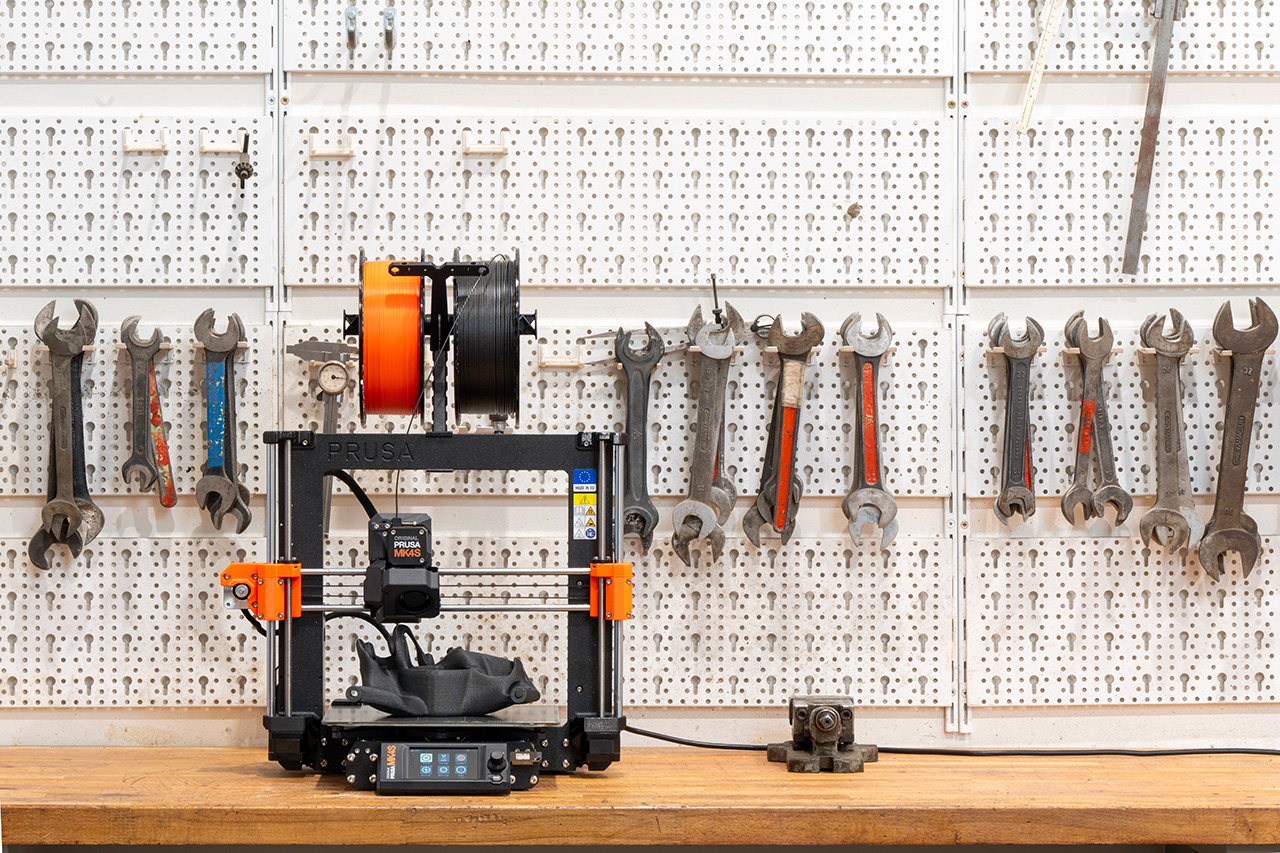
                  The Original Prusa MK4S, our other Original Prusa MK-series printers, and the Original Prusa MINI/+ are Cartesian printers.

                  Cartesian printers are characterized by at least three motors moving the parts of the printer along the axes of the Cartesian coordinate system: Y (back and forth), X (left and right), and Z (up and down). Most personal desktop printers are Cartesian printers due to them being very widespread and low-cost.

                  The model to be printed needs to be sliced into layers for the print. The Y-axis and X-axis will define the coordinates to be printed in one layer, and once the layer is ready the Z-axis will make the nozzle move one layer up, either by moving the print-bed or by moving the extruder. If overhangs are present, supports can be added below them.

                  The biggest advantage of the Cartesian printers is how common they are. There are a lot of tips, tricks, and solutions for issues online. The parts for the printer can also be found easily.

                  On the downside, Cartesian printers, if used for faster prints, will have a lower quality of printing due to the weight of the axes. Also, usually, the printer volume is a lot larger than the build volume due to the movement of all of the axes.
                  CoreXY printers

                  Like the Cartesian printers, the CoreXY design also has the latitudinal and longitudinal coordinates determined by two motors and timing belts on the Y-axis and X-axis, and the print height determined by the Z-axis. The difference of the Core XY is that the XY movement is dependent on each other, done by a very specific belt design. The print surface, in this case, will be lifted to meet the extruder. Note that not only the movable print surface makes a CoreXY printer. The defining trait of the printer type is the design of the XY-belts and their movement.

                  Since the X and Y axes are a lot lighter, faster prints will not have the artifacts that may appear on fast prints on Cartesian printers. The design also allows for a lot larger part of its overall volume to be the build volume, since there is no need for the print surface to move sideways.

                  The belts used in CoreXY printers are a lot longer, which makes all belt issues bigger than with Cartesian printers. Their complicated path also makes these issues harder to repair. The frame needs to be very stable and perfectly square, or else the dimensional accuracy will be smaller.
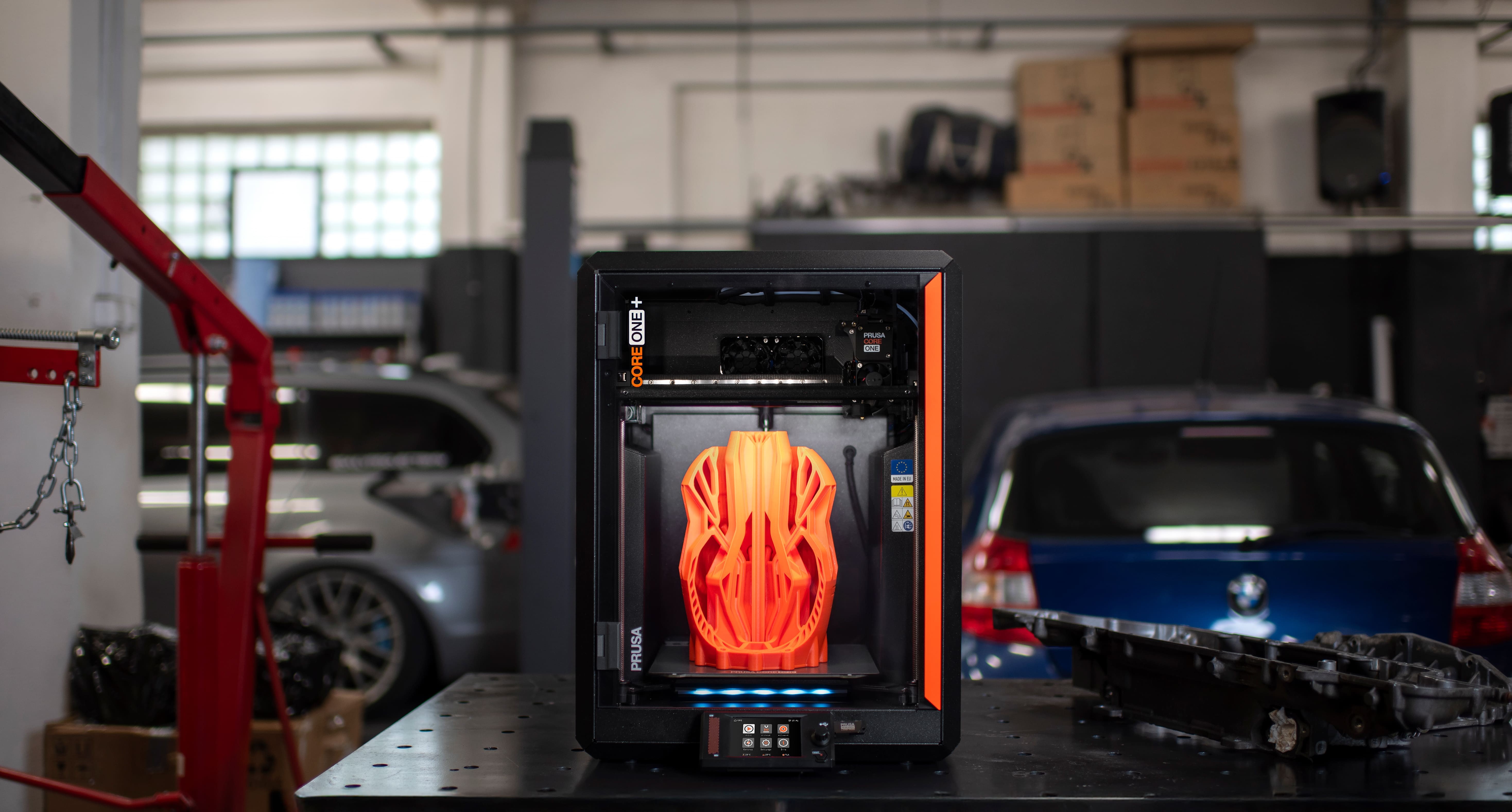
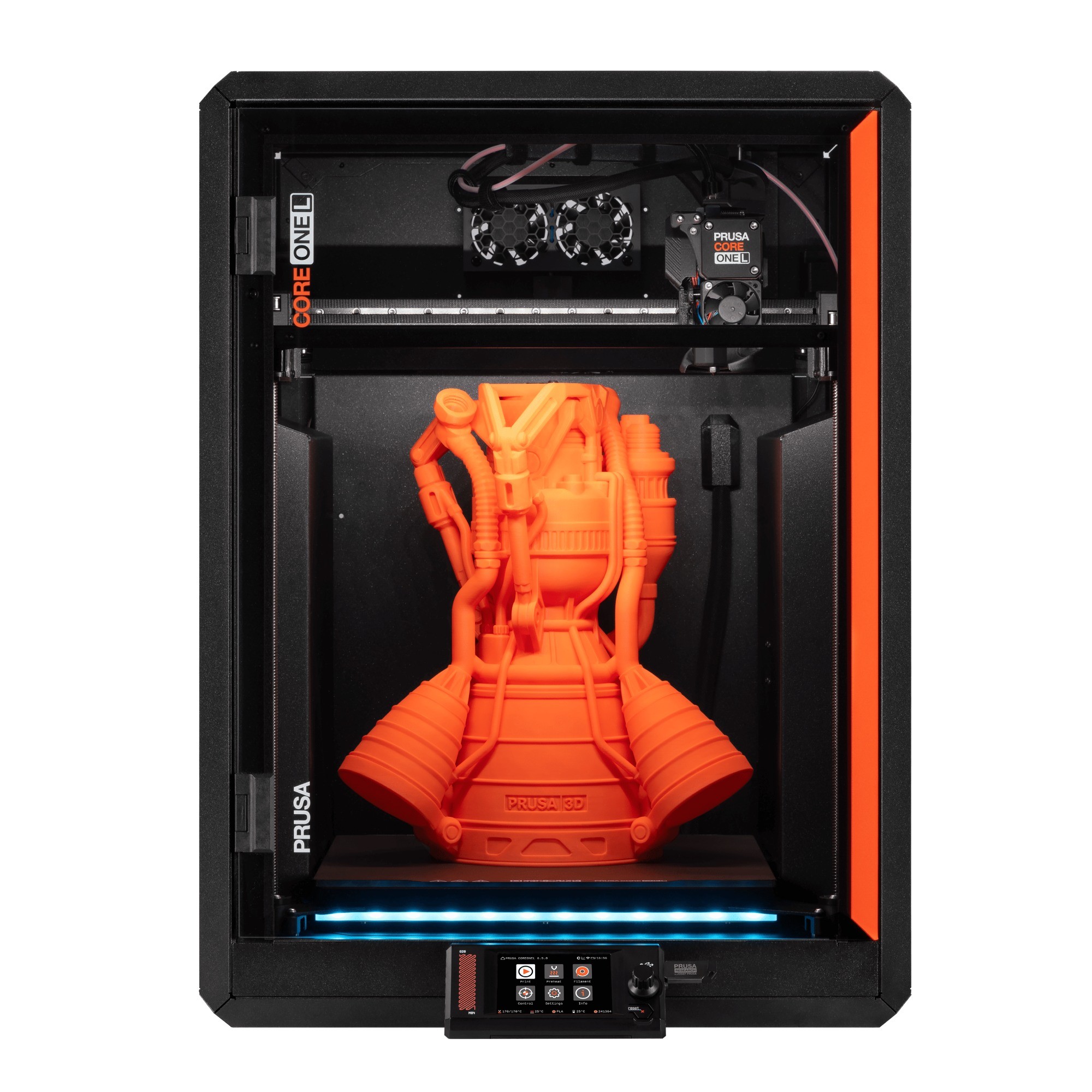
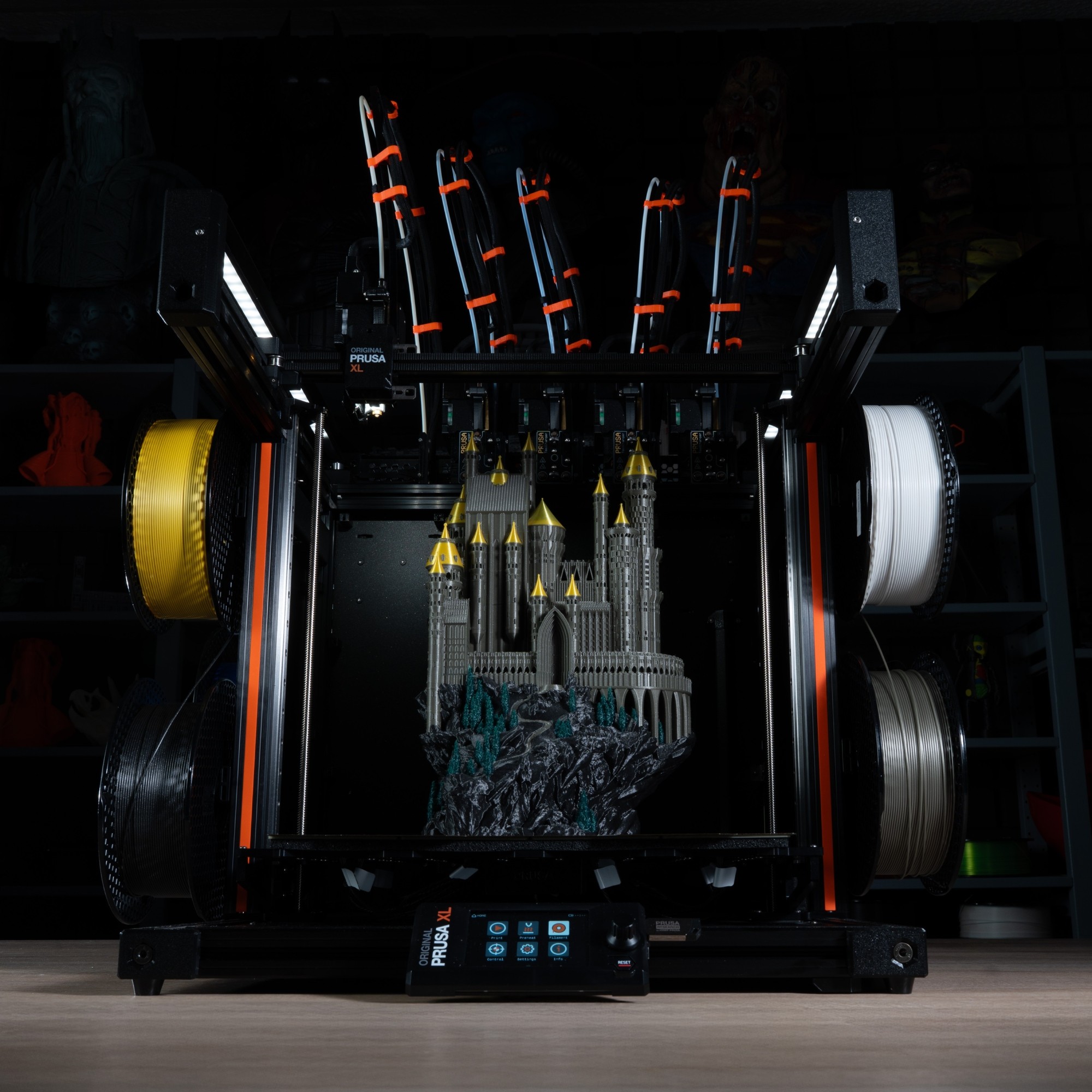
                  Our Prusa CORE One, Prusa CORE One L, and Original Prusa XL are CoreXY printers.
                   

                  Delta printers

                  In Delta printers, the print surface stands still, and three motors work together to meet in the hotend and move it with the latitudinal and longitudinal coordinates, as well as the height of it. These motors control three posts, and these posts are connected to the extruder by arms that will move the hotend. The name of the printer style (delta = Δ) comes from the triangular shape of the arms holding the hotend. This type of printer was designed to make faster prints.

                  The Delta printer extruder is very light. That combined with the 3 motors controlling it, makes this printer ideal for fast prints. This printer was an early adopter of the 32-bit system due to the complex calculation it takes to make the movements. Some of the attraction of the printer is also how cool it looks while it is working.

                  The Delta printers all have a relatively small and circular print surface. This limits the build-space significantly. The high speed of the printer makes the prints less precise. Also, it is uncommon to be used as a desktop printer, as any issues that the printer has can be extremely difficult to troubleshoot and fix, not only due to complex working and lack of information but the overall lack and cost of parts. The printer also needs to work with a Bowden extruder to make the extruder light, which can limit the number of filaments that can be used.
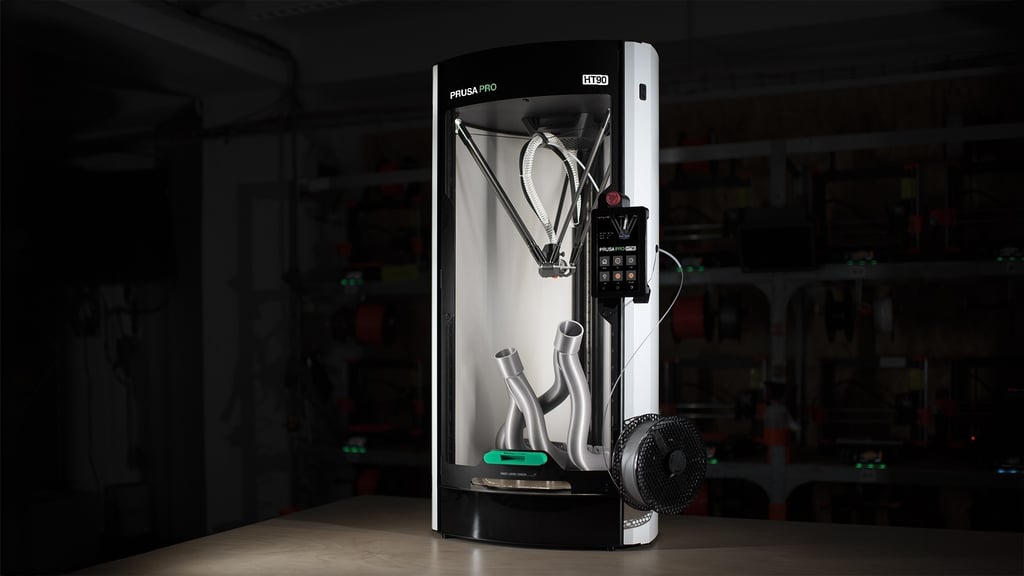
                  Our Prusa Pro HT90 is a Delta printer.

                  Polar printers

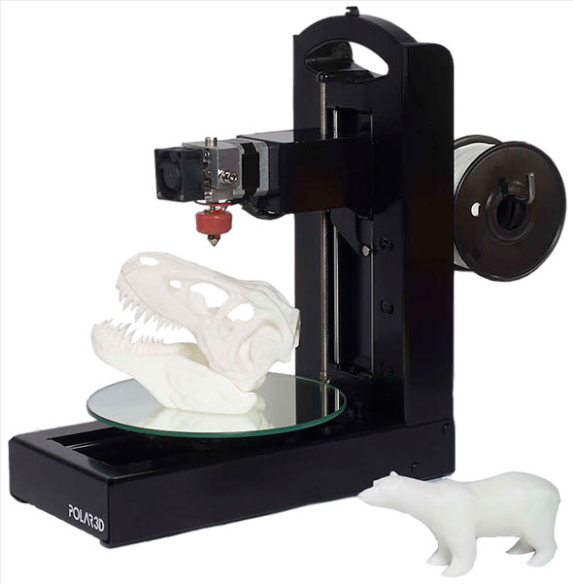
                  This printer uses the Polar coordinate system, which has the points on a circular grid instead of the square as the Cartesian system. The printing platform not only moves sideways but it also rotates. This allows the extruder to only move up and down, and also for a large build area. This printer has a very light frame.

                  This technology is still being developed. That makes the printer very expensive, and it makes parts and technical support hard to find when you have problems.
                  SLA

                  (Stereolithography)

                  The basic principle of vat polymerization printing is that a vat containing photosensitive liquid (resin) is cured layer by layer, by a heat source to make the object.

                  Printed objects are almost perfectly smooth, and incredibly detailed and layers are nearly invisible to the human eye, with the minimal layer height going from 25 – 100 microns. The biggest disadvantage of this technology can be a smaller print surface area and also the toxicity of liquid resins. You should try to prevent resins from touching your skin and avoid inhaling resin vapors.

                  Printed objects are not fit for immediate use after the print job finishes since they tend to be a bit soft and sticky - which is caused by the leftover unsolidified resin on the surface of the object. It is recommended to wash the object in isopropyl alcohol and to cure it further using UV light.
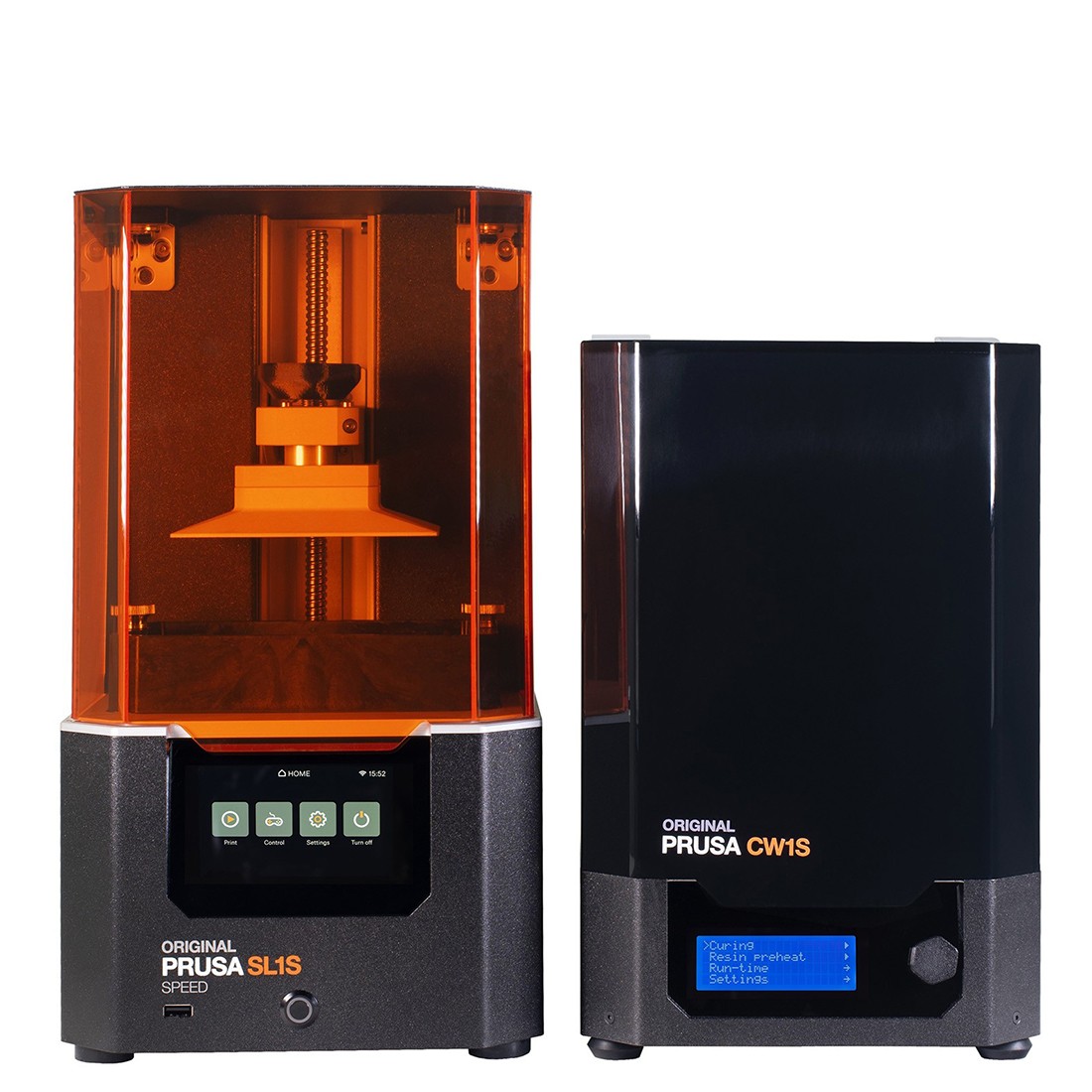
                  Our Curing and Washing Machine (CW1S) is an optional accessory for our Original Prusa SL1S Speed.
                  It is used to wash, dry, and cure a print quickly and easily.

                  Masked Stereolithography (MSLA)

                  Each layer's shape is displayed as a semi-transparent mask on an LCD screen, and the exposure is performed employing a high-performance UV LED. UV light can pass only through white pixels on the display. Due to the fixed resolution of the LCD display, the printed objects have a fixed XY resolution. This method also cures a whole layer at a time, meaning it doesn’t matter how many objects there are on the printing platform.
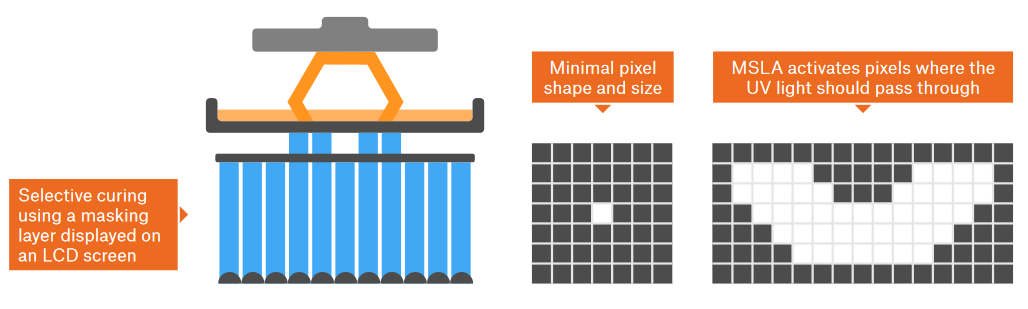
                  The Original Prusa SL1S Speed uses this method.

                  Stereolithography (SLA)

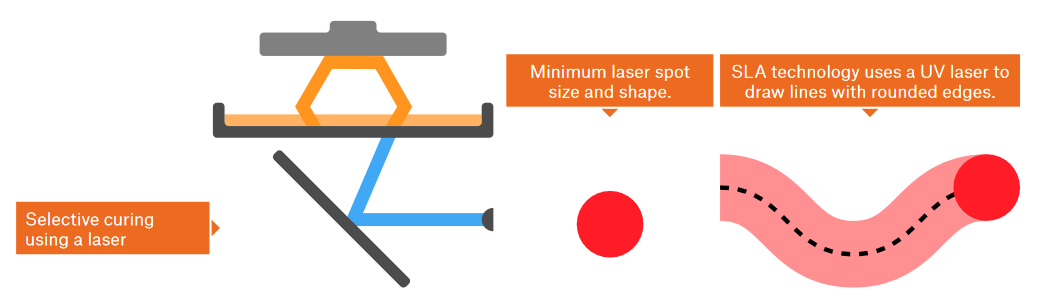
                  Exposure is performed by a UV laser ray. The ray is controlled by two mirrors and it “draws” each layer gradually. The time required to solidify a single layer depends on the size of the area which needs to be solidified. Simply put, the more objects there are on the print platform, the longer the print takes.
                  Direct/digital Light Processing (DLP)

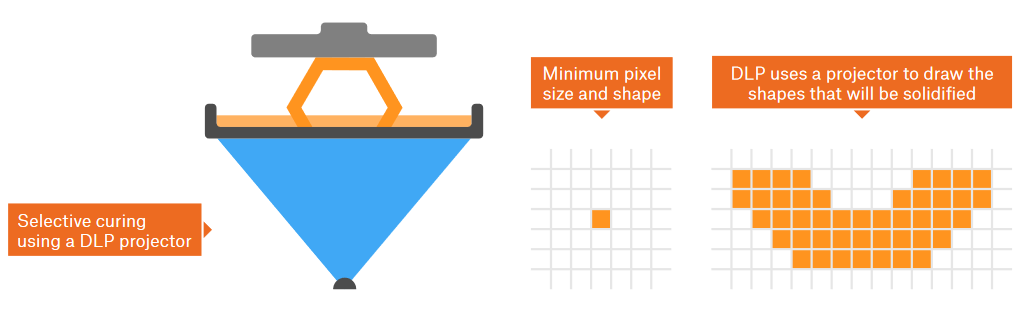
                  The whole layer is solidified at once thanks to a digital projector. The areas that receive exposure from the projector are solidified. The advantage of this method is obvious - each layer is solidified in the same amount of time, no matter how many objects there are on the print platform.
                  SLS

                  Selective Laser Sintering

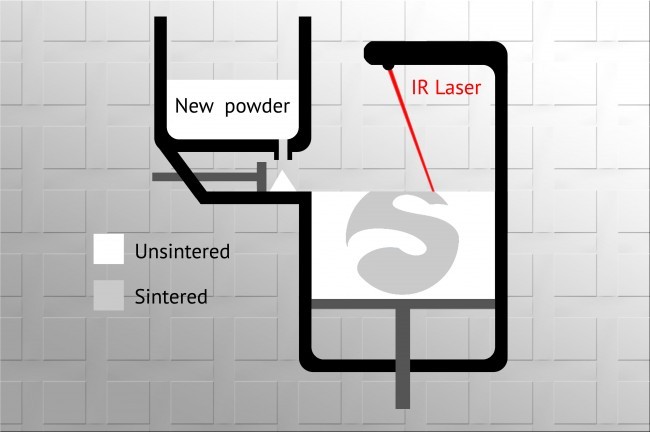
                  Another type of 3D printing technology is SLS and DMLS, which use a process called sintering. Essentially, every time a new layer is printed, a cylinder spreads a thin layer of fine powder across the platform, which is then sintered with a laser into the required shape. When the print is finished, the whole object is covered with the printing powder. Due to how this method works, the printed objects must have holes, through which the excessive powder is poured out. Unsintered material can be reused for the next prints, which means that very little material is wasted. Another advantage is the fact that the layers are nearly invisible. These printers are not massively widespread among the common public. Due to their main use in various industries, the prices are noticeably higher - the cheapest machines start at around 6000 USD.
                  There are other types of technology and designs out there, like "Jetting" or concrete and metal printers, using various methods. Since those are mostly reserved for industrial applications due to price and patents, they are not included here.

                  Was this article helpful?
                  This action is available only to registered users. Please log-in.

                  2 comments

                  Log in  to post a comment
                  Giulio S
                  •
                  It must be noted that not all polar printers have a moving bed. In some polar printers the bed only rotates and the nozzle moves in the X direction.
                  Reply
                  Snuffle
                  •
                  Great brief on all the 3d printer technologies.
                  Reply

                  Topics

                  • About your printer
                    • General Information
                      • VAT (Value Added Tax) & Customs fees
                      • FAQ - Frequently Asked Questions
                      • Unpacking an assembled i3 printer
                      • Prusa Account creation
                      • Assembly manuals
                      • Packing i3 printer for return
                      • Refunds & returns
                      • Customer support
                      • Warranty
                      • Using the HT Hotend
                      • Packing SL1/CW1 for return
                      • Packing the Prusa MINI for return
                      • Unpacking a CW1
                      • Photo and video documentation
                      • Food safe FDM printing
                      • Types of printers and their differences
                      • FAQ - Extended buyers-guide
                      • Printer Handbooks
                      • Glossary i3-Series
                      • Glossary MMU2S
                      • Glossary MINI
                      • Glossary SL1/CW1
                      • Original Prusa Serial Number
                      • Payment options
                      • Packing Multi Material upgrade for return
                      • Orders to the UK
                      • Packing i3 printer for return - Custom Packing Material
                      • Packing i3 printer for return - Original Packing Material
                      • UPS backup for your printer
                      • Factory repair
                      • Order status
                      • Prusa Academy
                      • How do Prusameters on Printables work?
                      • E-shop order creation
                      • FAQ - Orders
                      • Supplemental Statements valid on Prusa websites
                      • Packing the Original Prusa MK4 for return - Original Packing Material
                      • MMU3 Compatibility
                      • LoveBoard status LEDs (MK4)
                      • Printed Solid Service center USA
                      • Purchasing and managing licenses for Prusa Academy courses
                      • Payment error
                      • Vouchers/Discounts
                      • Prusa Printer Upgrades
                      • Printer repair centers
                      • Buddy3D brand
                      • Upgrade to Prusa CORE One
                      • Product certifications
                      • Global-e
                      • OpenPrintTag
                      • MK4S glossary
                      • Prusa USS Drybox
                      • MMU3 glossary
                      • Shipping information
                      • Packing MINI printer for return - Custom Packing Material
                      • SD cards and USB drives
                    • Printer description
                    • Printer features