Prusa
  • SHOP
    • Latest products
    BY CATEGORY
    • 3D printersnew
    • 3D printer upgradesnew
    • Materials
    • Accessories
    • Spare parts
    • Courses
    • Merch
    • Get a price quote
    QUICK LINKS
    • Shipping & delivery
    • Returns & refunds
    • Payment & financing
    • Warranty
    • VAT & Customs fees
    • FAQ

    0 item in your cartitems in your cart

    Your cart is empty

    Go to cartShop 3D printers

    My profile

    Log in to see orders, saved items

    My profile

    Signed in as

    • Orders
    • Logout
  • 3D PRINTING
    • Explore 3D printing
    FOR BEGINNERS
    • 3D printing 101
    • How FDM printing works
    • Buying your first printer
    • 3D model catalog
    BY APPLICATION
    • Rapid prototyping
    • Manufacturing
    • Engineering
    • Research
    • Arts & design
    GO DEEPER
    • Materials guide
    • Courses
    • Webinars
    • Case studies
    • Custom 3D printing
  • 3D PRINTERS
    • All 3D printers
    FOR
    • Home or garageHobbyists, tinkerers and home printing
    • BusinessIn-house production for small teams
    • EnterpriseFleets, security and scale
    • Which Prusa is right for me
    SHOP & BROWSE
    • CORE One+new
    • CORE One+ INDXnew
    • CORE One L+new
    • CORE One L+ INDXnew
    • XL+new
    • MK4S
    • Prusa Pro HT90
    • Prusa Pro AFS
    • Prusa Pro SLX
    MORE FROM PRINTERS
    • Parts & upgradesnew
    • Spare parts
    • Critical infrastructure
    • Case studies
    • Signature Oak
    • Kits
  • MATERIALS
    • All materials
    BY USE
    • Every-day & design
    • Functional engineering
    • Composites
    • Pro speciality
    • SLA resins
    PRUSAMENT
    • PLA
    • PETG
    • ASA
    • PC
    • PA11
    • Flex
    • TPU
    MORE FROM MATERIALS
    • Materials guide
    • We make material in house
    • Sustainability
    • Order on the store
  • SOFTWARE
    • All software
    PREPARE THE PRINT
    • PrusaSlicer 3.0New
    PRINT & MONITOR
    • Prusa Connect
    • EasyPrint
    • iOS & Android app
    • Prusa Farm
    GET STARTED
    • Download & install
    • Knowledge base
    MORE FROM SOFTWARE
    • 3D model catalog
  • SUPPORT
    • Explore support
    FIND ANSWERS
    • Knowledge base
    • Troubleshooting
    • Courses
    • Webinars
    GET HELP
    • Contact us
    • Livechat
    • Shipping & delivery
    • Warranty
    • Returns & refunds
    • Service & spare parts
    • Service & Repair
    COMMUNITY
    • Forum
    • Reddit
    • Printables
  • TRUST CENTER
    • Trust Center overview
    BY TOPIC
    • GDPR
    • Certificates
    • Security
    • Compliance
    COMMITMENTS
    • Sustainability report
    TALK TO US
    • Contact the security team
  • COMPANY
    • About Prusa
    GET TO KNOW US
    • Our story
    • How we make printers
    • Open source
    • Brand & media kit
    NEWS
    • Blog
    • Newsroom
    • Events
    TRUST & PARTNERS
    • Sustainability
    • Resellers & distributors
    • Affiliate program
    • Contact
    • English
    • Čeština
    • Deutsch
    • Español
    • Français
    • Italiano
    • Polski
    • 日本語
  • Signed in as

    • Orders
    • Address
    • In-stock Alerts
    • My Courses
    • Subscription
    • Edit Account
    • Logout

Log in to see orders, saved items

Signed in as
  • Orders
  • Address
  • In-stock Alerts
  • My Courses
  • Subscription
  • Edit Account
  • English
  • Čeština
  • Deutsch
  • Español
  • Français
  • Italiano
  • Polski
  • 日本語
Shop

0 item in your cartitems in your cart

Your cart is empty

Go to cartShop 3D printers

My profile

Log in to see orders, saved items

My profile

Signed in as

  • Orders
  • Logout
SHOP
  • Latest products
BY CATEGORY
  • 3D printersnew
  • 3D printer upgradesnew
  • Materials
  • Accessories
  • Spare parts
  • Courses
  • Merch
  • Get a price quote
QUICK LINKS
  • Shipping & delivery
  • Returns & refunds
  • Payment & financing
  • Warranty
  • VAT & Customs fees
  • FAQ

Featured products

    Popular categories

      Trending searches

        Articles

          Blog

            Products

              Categories

                Suggested searches

                  Searching…
                  No results
                  Something went wrong.
                  ↑↓ Select↵ OpenEsc Close search
                  1. Support
                  2. General Information
                  3. Glossary MINI
                   

                  Blog

                  • Prusament Pellets: Raw material batches for large-format 3D printing or small-scale polymer research & development
                  • Print colorful and glowing Halloween decorations with our spooky offer
                  • Factorio Has Arrived on Printables

                  Newsletter

                  Signup and get our monthly squeeze on updates, blog, printables and much more.

                  By clicking, you agree to receive our newsletter.

                  This site is protected by reCAPTCHA Enterprise and the Google Privacy Policy and Terms of Service apply.

                  Heavy Duty Keyboard Holder (No Supports)
                  E-shop
                  • 3D Printers
                  • Printer Upgrades
                  • Filaments
                  • Accessories
                  • Prusa Merchandise
                  Prusa

                  © Prusa Research a.s.

                  Printables
                  • 3D Models
                  • Store
                  • Clubs
                  • 3D Design Contests
                  • Brands
                  Community
                  • World Map
                  • Forum
                  • User Groups
                  • Events
                  Help
                  • Prusa Help
                  • Prusa Academy
                  • 3D Printing Calculators
                  Software
                  • PrusaSlicer
                  • Prusa.app
                  • Prusa Connect
                  • Drivers and Software
                  Company
                  • About Us
                  • Blog
                  • Official Prusa Resellers
                  • Contact Us
                  • Certified for ISO 9001, ISO 14001, ISO 45001
                  • General Terms and Conditions
                  • General Terms and Conditions of Use of the PRUSA Websites
                  • Privacy Policy
                  • Information about cookies
                  • Customer Complaints Policy
                  • Status Page
                  • Do Not Sell or Share My Personal Information
                  • Supplemental Statements
                  Prusa
                  • General Terms and Conditions
                  • General Terms and Conditions of Use of the PRUSA Websites
                  • Privacy Policy
                  • Information about cookies
                  • Customer Complaints Policy
                  • Status Page
                  • Do Not Sell or Share My Personal Information
                  • Supplemental Statements

                  © Prusa Research a.s.

                  JOSEF PRUSA®, PRUSA RESEARCH®, PRUSA POLYMERS®, PRUSA ORANGE®, PRUSA 3D ® AND PRUSAMENT® are registered trademarks of Prusa Development a.s. used by Prusa Research a.s. under licence from Prusa Development a.s.

                  Glossary MINI

                  Relevant for

                  MINI
                  MINI+
                  2 comments
                  Article is also available in following languages
                  English
                  Čeština
                  Polski
                  Deutsch
                  Français
                  Español
                  Italiano
                  日本語

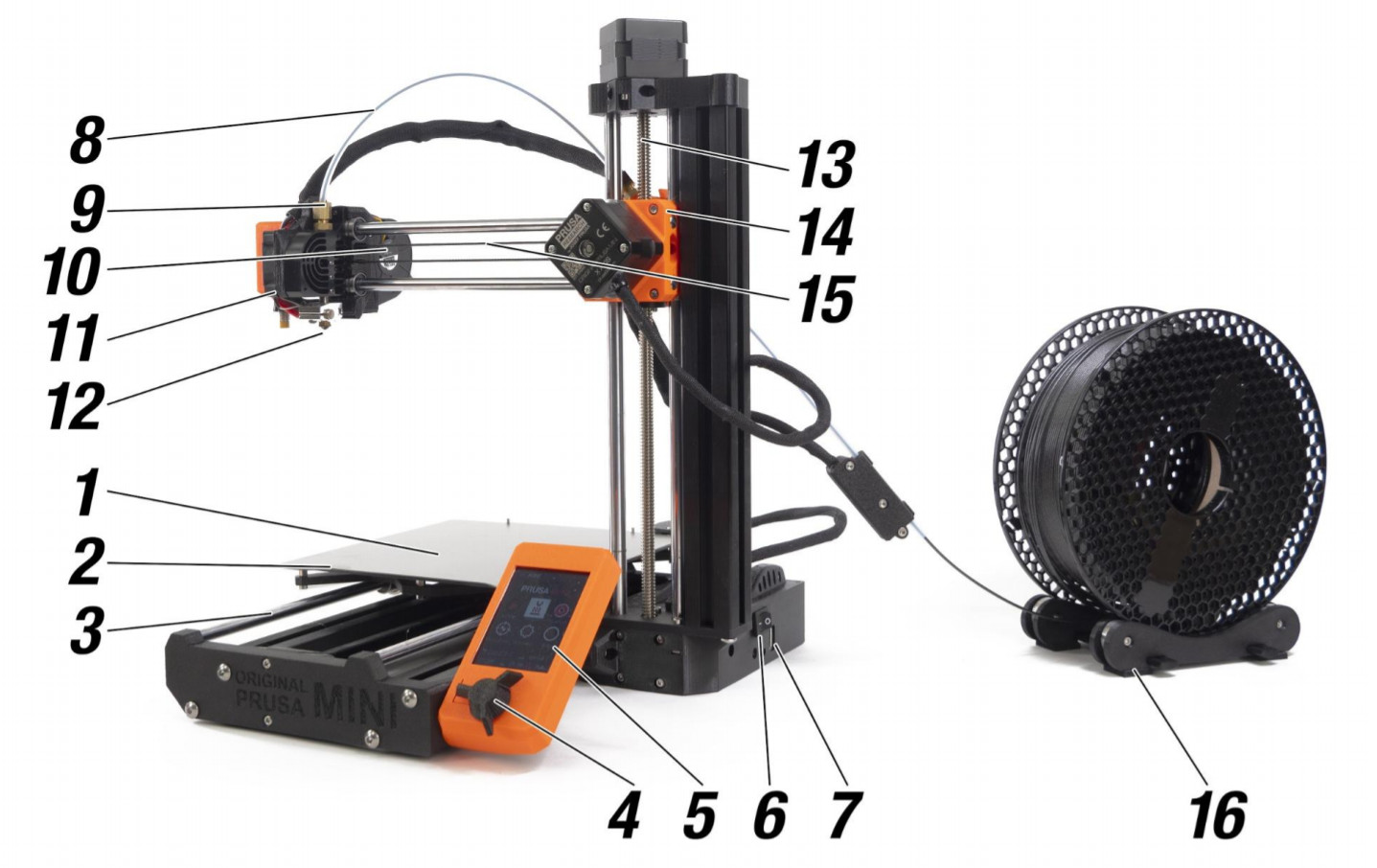
                  3D printers have their own vocabulary and words for describing their various parts and functions. If you are doing maintenance or about to seek help online, it is necessary to have the right words to describe your issue or problem. We have put together a list of words with explanations, covering most parts on the printer.

                  Be aware that there are some differences in terminology between the MINI and the MK3/S
                  1. Spring steel sheet - comes in two variants, smooth and textured. This is where the printed
                    object appears. Please read the maintenance instructions carefully to ensure optimal conditions
                    for 3D printing.
                  2. Heatbed - located directly under the spring steel sheet. Heatbed ensures good adhesion of the
                    printed object. Warning: do not touch the heatbed when it’s hot!
                  3. Y-Axis - the general name for the entire heatbed assembly (smooth rods, belt, heatbed…).
                  4. Knob - main control of the Original Prusa MINI 3D printer: rotate left/right to scroll through options and press the knob to confirm your selection. There’s a reset switch directly next to the
                    knob. Press it to perform a hard reset.
                  5. LCD screen - the display is used for the configuration of the 3D printer.
                  6. Power switch - when the printer is not in use, turn it off using the power switch.
                  7. USB port - compatible with USB 2.0/3.0 flash drives (FAT32 filesystem). Used for reading
                    print files (G-Codes) from the inserted drive and flashing the firmware.
                  8. Main PTFE tube (Bowden-tube) - leads the filament strand from the extruder into the print head/nozzle.
                    Inspect it from time to time to make sure there is no debris inside that would prevent the
                    filament strand from reaching the nozzle.
                  9. Tube fitting - on both ends of the main PTFE tube. In case filament gets stuck in the PTFE
                    tube, use a spanner (included with the printer) to remove the fittings and the PTFE tube to get
                    access to the filament strand.
                  10. Print fan - cools the printed object, and improves print quality. Comes with RPM monitoring.
                  11. Print head - Lightweight print head consisting of the hotend (printing nozzle), M.I.N.D.A. sensor, and two fans. The heaviest parts of the extruder were moved onto the Z-axis tower to improve
                    print quality.
                  12. Nozzle - 0.4mm nozzle, can be replaced with e.g. 0.25mm or 0.6mm E3D-compatible nozzles
                    to achieve various effects.
                  13. Z-Axis - the entire vertical axis assembly (smooth rods, Z-axis motor…).
                  14. Extruder / Extruder motor - as opposed to 3D printers like MK2 or MK3S, the extruder motor
                    is not moving along the X-axis. Instead, it’s fixed on the side and pushes filament through the
                    PTFE tube towards the print head.
                  15. X-Axis - allows the movement of the belt-driven print head from left to right.
                  16. Spool holder - should be placed near the printer, so the filament strand can enter the PTFE
                    tube from below. The filament must not bend at an acute angle.

                  Additional terms

                  M.I.N.D.A. sensor - Induction sensor for auto-leveling.

                  You can identify all parts of the Original Prusa MINI using the 360 viewer.
                  Was this article helpful?
                  This action is available only to registered users. Please log-in.

                  1 comment

                  Log in  to post a comment
                  Suso
                  •
                  Is the Mini+ power fail tolerant?
                  Reply
                  Giuliano - Official Prusa CS
                  •
                  Hello. No, the MINI+ doesn't have the power panic function.
                  Reply

                  Topics

                  • About your printer
                    • General Information
                      • VAT (Value Added Tax) & Customs fees
                      • Prusa Account creation
                      • Assembly manuals
                      • Packing the Prusa MINI for return
                      • Photo and video documentation
                      • Food safe FDM printing
                      • Types of printers and their differences
                      • FAQ - Extended buyers-guide
                      • Printer Handbooks
                      • Glossary MINI
                      • Original Prusa Serial Number
                      • UPS backup for your printer
                      • Order status
                      • Prusa Academy
                      • How do Prusameters on Printables work?
                      • E-shop order creation
                      • FAQ - Orders
                      • Supplemental Statements valid on Prusa websites
                      • Printed Solid Service center USA
                      • Purchasing and managing licenses for Prusa Academy courses
                      • Prusa Printer Upgrades
                      • Printer repair centers
                      • Buddy3D brand
                      • Packing MINI printer for return - Custom Packing Material
                      • SD cards and USB drives
                    • Printer description
                    • Printer features