Prusa
  • SHOP
    • Latest products
    BY CATEGORY
    • 3D printersnew
    • Upgradesnew
    • Materials
    • Accessories
    • Spare parts
    • Courses
    • Merch
    • Sales inquiry & Price quote
    QUICK LINKS
    • Shipping information
    • Refunds & returns
    • Payment options
    • Warranty
    • VAT & Customs fees
    • FAQ

    0 item in your cartitems in your cart

    Your cart is empty

    Go to cartShop 3D printers

    My profile

    Log in to see orders, saved items

    My profile

    Signed in as

    • Orders
    • Logout
  • 3D PRINTING
    • Explore 3D printing
    FOR BEGINNERS
    • 3D printing 101
    • Types of printers (FDM/SLA)
    • How to choose a 3D Printer
    • Printables (3D models)
    BY APPLICATION
    • Rapid prototyping
    • Manufacturing
    • Engineering
    • Research
    • Arts & design
    GO DEEPER
    • Materials guide
    • Courses
    • Webinars
    • Case studies
    • Custom 3D printing
  • 3D PRINTERS
    • All 3D printers
    FOR
    • Home or garageHobbyists, tinkerers and home printing
    • Shop or studioIn-house production for small teams
    • EnterpriseFleets, security and scale
    • How to choose a 3D Printer
    SHOP & BROWSE
    • CORE One+new
    • CORE One+ INDXnew
    • CORE One L+new
    • CORE One L+ INDXnew
    • XL+new
    • MK4S
    • Prusa Pro HT90
    • Prusa Pro AFS
    • Prusa Pro SLX
    MORE FROM PRINTERS
    • Upgradesnew
    • Spare parts
    • Critical infrastructure
    • Case studies
    • Signature Oak
    • Kits
  • MATERIALS
    • All materials
    BY USE
    • Every-day & design
    • Functional engineering
    • Composites
    • Pro speciality
    • SLA resins
    PRUSAMENT
    • PLA
    • PETG
    • ASA
    • PC
    • PA11
    • Flex
    • TPU
    MORE FROM MATERIALS
    • Materials guide
    • We make material in house
    • Sustainability
    • Order on the store
  • SOFTWARE
    • All software
    PREPARE THE PRINT
    • PrusaSlicer 3.0New
    PRINT & MONITOR
    • Prusa Connect
    • EasyPrint
    • iOS & Android app
    • Prusa Farm
    GET STARTED
    • Download & install
    • Knowledge base
    MORE FROM SOFTWARE
    • Printables (3D models)
  • SUPPORT
    • Explore support
    FIND ANSWERS
    • Knowledge base
    • Troubleshooting
    • Courses
    • Webinars
    GET HELP
    • Contact us
    • Livechat
    • Shipping information
    • Warranty
    • Refunds & returns
    • Spare parts
    • Factory repair
    COMMUNITY
    • Forum
    • Reddit
    • Printables
  • TRUST CENTER
    • Trust Center overview
    BY TOPIC
    • GDPR
    • Certificates
    • Security
    • Compliance
    COMMITMENTS
    • Sustainability report
    TALK TO US
    • Contact the security team
  • COMPANY
    • About Prusa
    GET TO KNOW US
    • Our story
    • How we make printers
    • Open source
    • Brand & media kit
    NEWS
    • Blog
    • Newsroom
    • Events
    TRUST & PARTNERS
    • Sustainability
    • Resellers & distributors
    • Affiliate program
    • Contact
    • English
    • Čeština
    • Deutsch
    • Español
    • Français
    • Italiano
    • Polski
    • 日本語
  • Signed in as

    • Orders
    • Address
    • In-stock Alerts
    • My Courses
    • Subscription
    • Edit Account
    • Logout

Log in to see orders, saved items

Signed in as
  • Orders
  • Address
  • In-stock Alerts
  • My Courses
  • Subscription
  • Edit Account
  • English
  • Čeština
  • Deutsch
  • Español
  • Français
  • Italiano
  • Polski
  • 日本語
Shop

0 item in your cartitems in your cart

Your cart is empty

Go to cartShop 3D printers

My profile

Log in to see orders, saved items

My profile

Signed in as

  • Orders
  • Logout
SHOP
  • Latest products
BY CATEGORY
  • 3D printersnew
  • Upgradesnew
  • Materials
  • Accessories
  • Spare parts
  • Courses
  • Merch
  • Sales inquiry & Price quote
QUICK LINKS
  • Shipping information
  • Refunds & returns
  • Payment options
  • Warranty
  • VAT & Customs fees
  • FAQ

Featured products

    Popular categories

      Trending searches

        Articles

          Blog

            Products

              Categories

                Suggested searches

                  Searching…
                  No results
                  Something went wrong.
                  ↑↓ Select↵ OpenEsc Close search
                  1. Support
                  2. Original Prusa MMU2S
                  3. Printer features
                  4. Print statistics
                   

                  Blog

                  • Blender for 3D Printing: The 5-Minute Guide to STL Editing
                  • Prusament Pellets: Raw material batches for large-format 3D printing or small-scale polymer research & development
                  • Print colorful and glowing Halloween decorations with our spooky offer

                  Newsletter

                  Signup and get our monthly squeeze on updates, blog, printables and much more.

                  By clicking, you agree to receive our newsletter.

                  This site is protected by reCAPTCHA Enterprise and the Google Privacy Policy and Terms of Service apply.

                  Heavy Duty Keyboard Holder (No Supports)
                  E-shop
                  • 3D Printers
                  • Printer Upgrades
                  • Filaments
                  • Accessories
                  • Prusa Merchandise
                  Prusa

                  © Prusa Research a.s.

                  Printables
                  • 3D Models
                  • Store
                  • Clubs
                  • 3D Design Contests
                  • Brands
                  Community
                  • World Map
                  • Forum
                  • User Groups
                  • Events
                  Help
                  • Prusa Help
                  • Prusa Academy
                  • 3D Printing Calculators
                  Software
                  • PrusaSlicer
                  • Prusa.app
                  • Prusa Connect
                  • Drivers and Software
                  Company
                  • About Us
                  • Blog
                  • Official Prusa Resellers
                  • Contact Us
                  • Certified for ISO 9001, ISO 14001, ISO 45001
                  • General Terms and Conditions
                  • General Terms and Conditions of Use of the PRUSA Websites
                  • Privacy Policy
                  • Information about cookies
                  • Customer Complaints Policy
                  • Status Page
                  • Do Not Sell or Share My Personal Information
                  • Supplemental Statements
                  Prusa
                  • General Terms and Conditions
                  • General Terms and Conditions of Use of the PRUSA Websites
                  • Privacy Policy
                  • Information about cookies
                  • Customer Complaints Policy
                  • Status Page
                  • Do Not Sell or Share My Personal Information
                  • Supplemental Statements

                  © Prusa Research a.s.

                  JOSEF PRUSA®, PRUSA RESEARCH®, PRUSA POLYMERS®, PRUSA ORANGE®, PRUSA 3D ® AND PRUSAMENT® are registered trademarks of Prusa Development a.s. used by Prusa Research a.s. under licence from Prusa Development a.s.

                  Print statistics

                  Relevant for

                  MMU family
                  MK3 family
                  OLD PRODUCTS
                  12 comments
                  Article is also available in following languages
                  English
                  Čeština
                  Polski
                  Deutsch
                  Français
                  Español
                  Italiano
                  日本語

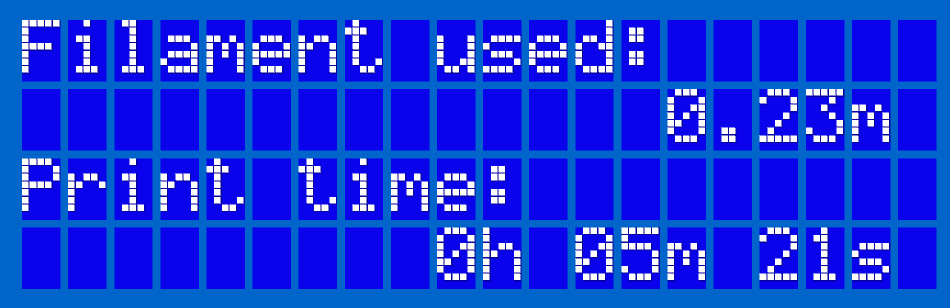
                  The printer tracks printing statistics. When you access this option during a print, you will see statistics for the running print. If you do so while the printer is idle, you will see the total statistics. Both filament usage and print time are tracked.

                  You can find this menu in the LCD Menu -> Statistics. The data can be easily reset once you do a Factory reset (MK2S/MK2.5S/MK3S).
                  Was this article helpful?
                  This action is available only to registered users. Please log-in.

                  8 comments

                  Log in  to post a comment
                  Okojo
                  •
                  Print time still isn't recorded correctly on the Mk4. I did 7 hrs of printing and the stats increased by 21 hrs.
                  Reply
                  Pontus K
                  •
                  Hi, Is there a way to edit the statistics? I had to do a factory reset today in order to get the TM calibration working with the E3D Revo i just installed, and i would like to get the statistics back to what it was. Kind of proud of my +10000 hours or print time on my MK3S.
                  Reply
                  Shane
                  •

                  unfortunately not without going into the firmware and make changes and we don't offer support with that Im affraid. 

                  Reply
                  Tara_H
                  •
                  Doesn't seem to be working right for me either - it reports 112 days, 6 hours and 50 mins print time, but I only got it less than 80 days ago and then took a couple of days to build it...
                  That's disappointing since it's recommended to use print hours to judge when it's time for maintenance.
                  Reply
                  Shaun B
                  •
                  I use USB octoprint and have printed well over 40 hours but my printer only shows 4 hours total print time.  This seems like a wasted feature as it only tracks the SD card print times.  Would be nice if Prusa would update to track ALL print times so you can keep track for maintenance purposes.
                  Reply
                  David
                  •

                  Hi Shaun! This should be solved in the last 3.10 firmware already :)

                  Reply
                  tardigrade
                  •
                  Unfortunately no. My Mks3+ has only ever used firmware 3.11, and shows much less time and filament usage than I've actually used it for (it says only 125m of filament, but I've used _at least_ 900 m). I agree that the statistics appear to only be collected for SD card prints, not prints over USB.
                  Reply
                  Philippnj
                  •
                  any reactions here? Is it correct statistics are not shown correctly? Or in other words: is statistics only showing print data about SD card prints (actually this seems to be the case for me). AS I am doing most prints from octoprint, it seems statistics option in printer is useless for me. Am I right?
                  Reply
                  Official Prusa CS
                  •
                  Hi! Sometimes, the statistics might be wrong, but there's no need to worry.
                  Reply

                  Topics

                  • About your printer
                    • Printer features
                      • HW setup (MK2.5/S & MK3/S/+)
                      • Steel sheet profiles
                      • Crash detection
                      • Filament sensor MK3 (non-S)
                      • Flexible steel sheets (guidepost)
                      • Print statistics
                      • Power-modes
                      • SD card sorting
                      • Pronterface and USB cable
                      • Prusa firmware-specific G-code commands
                      • IR Filament Sensor (MK2.5S, MK3S/+, MK3.5/S)
                      • LCD brightness adjustment (MK3S)
                      • SpoolJoin (MMU2S)
                      • Tune Menu
                      • LCD screen contrast adjustment (i3)
                      • IR Filament sensor detection (MK3S)
                      • Experimental menu (MK3/S/+)
                      • Water-soluble materials (PVA/BVOH)
                      • Satin steel sheet
                      • Textured steel sheet
                      • Smooth Steel Sheet
                      • Support menu (MK3/S/+)
                      • Dump memory (MK3/S/+ and MK2.5/S)
                      • Special PA Nylon steel sheet
                      • Crash dump (MK3/S/+, MK2.5/S)
                      • Thermal model calibration
                      • Sample G-codes
                      • Buddy firmware-specific G-code commands
                      • Tools Mapping and Filament Mapping (XL/+, INDX, MMU3)
                      • MMU3 Prusa Nozzle vs. CHT nozzle
                      • PP steel sheet
                      • List of parts for MMU upgrades
                      • MMU3 for CORE One L
                    • Printer description
                    • General Information