Prusa
  • SHOP
    • Latest products
    BY CATEGORY
    • 3D printersnew
    • 3D printer upgradesnew
    • Materials
    • Accessories
    • Spare parts
    • Courses
    • Merch
    • Get a price quote
    QUICK LINKS
    • Shipping & delivery
    • Returns & refunds
    • Payment & financing
    • Warranty
    • VAT & Customs fees
    • FAQ

    0 item in your cartitems in your cart

    Your cart is empty

    Go to cartShop 3D printers

    My profile

    Log in to see orders, saved items

    My profile

    Signed in as

    • Orders
    • Logout
  • 3D PRINTING
    • Explore 3D printing
    FOR BEGINNERS
    • 3D printing 101
    • How FDM printing works
    • Buying your first printer
    • 3D model catalog
    BY APPLICATION
    • Rapid prototyping
    • Manufacturing
    • Engineering
    • Research
    • Arts & design
    GO DEEPER
    • Materials guide
    • Courses
    • Webinars
    • Case studies
    • Custom 3D printing
  • 3D PRINTERS
    • All 3D printers
    FOR
    • Home or garageHobbyists, tinkerers and home printing
    • BusinessIn-house production for small teams
    • EnterpriseFleets, security and scale
    • Which Prusa is right for me
    SHOP & BROWSE
    • CORE One+new
    • CORE One+ INDXnew
    • CORE One L+new
    • CORE One L+ INDXnew
    • XL+new
    • MK4S
    • Prusa Pro HT90
    • Prusa Pro AFS
    • Prusa Pro SLX
    MORE FROM PRINTERS
    • Parts & upgradesnew
    • Spare parts
    • Critical infrastructure
    • Case studies
    • Signature Oak
    • Kits
  • MATERIALS
    • All materials
    BY USE
    • Every-day & design
    • Functional engineering
    • Composites
    • Pro speciality
    • SLA resins
    PRUSAMENT
    • PLA
    • PETG
    • ASA
    • PC
    • PA11
    • Flex
    • TPU
    MORE FROM MATERIALS
    • Materials guide
    • We make material in house
    • Sustainability
    • Order on the store
  • SOFTWARE
    • All software
    PREPARE THE PRINT
    • PrusaSlicer 3.0New
    PRINT & MONITOR
    • Prusa Connect
    • EasyPrint
    • iOS & Android app
    • Prusa Farm
    GET STARTED
    • Download & install
    • Knowledge base
    MORE FROM SOFTWARE
    • 3D model catalog
  • SUPPORT
    • Explore support
    FIND ANSWERS
    • Knowledge base
    • Troubleshooting
    • Courses
    • Webinars
    GET HELP
    • Contact us
    • Livechat
    • Shipping & delivery
    • Warranty
    • Returns & refunds
    • Service & spare parts
    • Service & Repair
    COMMUNITY
    • Forum
    • Reddit
    • Printables
  • TRUST CENTER
    • Trust Center overview
    BY TOPIC
    • GDPR
    • Certificates
    • Security
    • Compliance
    COMMITMENTS
    • Sustainability report
    TALK TO US
    • Contact the security team
  • COMPANY
    • About Prusa
    GET TO KNOW US
    • Our story
    • How we make printers
    • Open source
    • Brand & media kit
    NEWS
    • Blog
    • Newsroom
    • Events
    TRUST & PARTNERS
    • Sustainability
    • Resellers & distributors
    • Affiliate program
    • Contact
    • English
    • Čeština
    • Deutsch
    • Español
    • Français
    • Italiano
    • Polski
    • 日本語
  • Signed in as

    • Orders
    • Address
    • In-stock Alerts
    • My Courses
    • Subscription
    • Edit Account
    • Logout

Log in to see orders, saved items

Signed in as
  • Orders
  • Address
  • In-stock Alerts
  • My Courses
  • Subscription
  • Edit Account
  • English
  • Čeština
  • Deutsch
  • Español
  • Français
  • Italiano
  • Polski
  • 日本語
Shop

0 item in your cartitems in your cart

Your cart is empty

Go to cartShop 3D printers

My profile

Log in to see orders, saved items

My profile

Signed in as

  • Orders
  • Logout
SHOP
  • Latest products
BY CATEGORY
  • 3D printersnew
  • 3D printer upgradesnew
  • Materials
  • Accessories
  • Spare parts
  • Courses
  • Merch
  • Get a price quote
QUICK LINKS
  • Shipping & delivery
  • Returns & refunds
  • Payment & financing
  • Warranty
  • VAT & Customs fees
  • FAQ

Featured products

    Popular categories

      Trending searches

        Articles

          Blog

            Products

              Categories

                Suggested searches

                  Searching…
                  No results
                  Something went wrong.
                  ↑↓ Select↵ OpenEsc Close search
                  1. Support
                  2. Printer features
                  3. Crash detection
                   

                  Contents

                  • How to fix it
                  • Power mode
                  • Rods and bearings
                  • Check the tension of your belts
                  • Check your X/Y axis motors and pulleys
                  • Print geometry and settings
                  • None of this solved the problem?

                  Blog

                  • Prusament Pellets: Raw material batches for large-format 3D printing or small-scale polymer research & development
                  • Print colorful and glowing Halloween decorations with our spooky offer
                  • Factorio Has Arrived on Printables

                  Newsletter

                  Signup and get our monthly squeeze on updates, blog, printables and much more.

                  By clicking, you agree to receive our newsletter.

                  This site is protected by reCAPTCHA Enterprise and the Google Privacy Policy and Terms of Service apply.

                  Heavy Duty Keyboard Holder (No Supports)
                  E-shop
                  • 3D Printers
                  • Printer Upgrades
                  • Filaments
                  • Accessories
                  • Prusa Merchandise
                  Prusa

                  © Prusa Research a.s.

                  Printables
                  • 3D Models
                  • Store
                  • Clubs
                  • 3D Design Contests
                  • Brands
                  Community
                  • World Map
                  • Forum
                  • User Groups
                  • Events
                  Help
                  • Prusa Help
                  • Prusa Academy
                  • 3D Printing Calculators
                  Software
                  • PrusaSlicer
                  • Prusa.app
                  • Prusa Connect
                  • Drivers and Software
                  Company
                  • About Us
                  • Blog
                  • Official Prusa Resellers
                  • Contact Us
                  • Certified for ISO 9001, ISO 14001, ISO 45001
                  • General Terms and Conditions
                  • General Terms and Conditions of Use of the PRUSA Websites
                  • Privacy Policy
                  • Information about cookies
                  • Customer Complaints Policy
                  • Status Page
                  • Do Not Sell or Share My Personal Information
                  • Supplemental Statements
                  Prusa
                  • General Terms and Conditions
                  • General Terms and Conditions of Use of the PRUSA Websites
                  • Privacy Policy
                  • Information about cookies
                  • Customer Complaints Policy
                  • Status Page
                  • Do Not Sell or Share My Personal Information
                  • Supplemental Statements

                  © Prusa Research a.s.

                  JOSEF PRUSA®, PRUSA RESEARCH®, PRUSA POLYMERS®, PRUSA ORANGE®, PRUSA 3D ® AND PRUSAMENT® are registered trademarks of Prusa Development a.s. used by Prusa Research a.s. under licence from Prusa Development a.s.

                  Crash detection

                  Relevant for

                  MK3
                  MK3S
                  MK3S+
                  27 comments
                  Article is also available in following languages
                  English
                  Čeština
                  Polski
                  Deutsch
                  Français
                  Español
                  Italiano
                  日本語

                  Trinamic drivers on the EINSY board can detect skipped steps and prevent layer shifting caused by a nozzle crash. It works only in the Normal mode (not in the Stealth mode). The thresholds for crash detection are set for higher speeds because layer shifting usually happens when the extruder moves quickly between objects and hits a piece of a curled-up print. 

                  Crash detection doesn’t work if you push the extruder in the direction of its movement. That’s not a real-world scenario and it usually never happens during printing.

                  How to fix it

                  When you find out that the crash detection does not work, it is most likely going to be a hardware problem within the printer, which is quite easy to fix. Simply follow these instructions:

                  Power mode

                  Make sure that the printer is running in Normal mode, not Stealth mode where crash detection is not available. The current mode can be checked in the LCD Menu - Settings - Mode [Stealth/Normal]. For more information on Power modes, please see Power-modes.

                  Rods and bearings

                  Clean the smooth rods with a dry paper towel. Then apply a little bit of lubricant on the smooth rods.

                  If you feel the heatbed or the extruder is not moving smoothly when pushing it by hand, you can dismount the Y or X-axis, remove the bearings from their smooth rods, and lubricate them on the inside. Be careful not to damage the bearings when inserting the smooth rod back.

                  Please refer to this guide for more information about how to apply the lubricant.

                  Check the tension of your belts

                  Make sure that your printer's belts and pulleys are properly tightened and that the belts cannot jump over the pulleys. If you have an MK3 or MK3S, check the Belt Status numbers via LCD menu -> Support -> Belt Status. The values should not be under 240 and above 300, but there is no single ideal value. The number does not represent any quantity.

                  • If your value is under (or close to) 240, you need to loosen the belt
                  • If your value over (or close to) 300 -> you need to tighten the belt
                  • The values are updated every time you run the Selftest.
                  For more information on adjusting the belt tension, please see Adjusting belt tension (MK4/S, MK3.9/S, MK3.5/S, MK3/S/+).

                  The MK2.5, MK2/S, and lower models do not have the belt status option. The clue we can give you is that the belt should sound roughly like a low bass string when plucked. It should be possible to pinch the two sides together with your thumb and index finger, but you should feel a little bit of resistance.

                  The belts can stretch and get more lose over time or during shipping (in the case of an assembled printer).

                  Check your X/Y axis motors and pulleys

                  Make sure the pulleys are not spinning around the motor shaft. The X and Y motor have to be tightened in the motor mount, the pulley has to be secured on the motor shaft and aligned with the pulley on the opposite end, and the pulley has to move freely. Both grub screws need to be tight, one of them has to be tightened against the flat part of the motor shaft. A loose pulley is usually the main cause of staircase layer shifts.
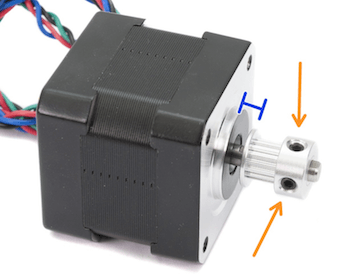
                  Both pulleys on both axes also have to be aligned, meaning the motor pulley has to be well centered. The belt should not travel from right to left while the pulley is turning.

                  Connectors

                  After inspecting the motors, open the einsyRAMBO case and re-seat the connectors for the motors, so you are sure they are plugged in properly.

                  Print geometry and settings

                  Objects with overhangs are generally harder to print. Some overhangs might even warp upwards during the print, and the nozzle might crash into them. The same can happen in some cases if you choose too small infill percentage when slicing the 3D model.

                  To prevent printing overhangs, you can cut the object (check out our article on the Cut tool). You can also try to increase the print fan speed or increase the Z-hop distance in PrusaSlicer. Print fan speed in Filament settings -> Cooling and Z-hop distance in Printer Settings -> Extruder 1.

                  None of this solved the problem?

                  No worries, at least you have checked some of the most important parts of the printer, and you can now be sure they are OK. Please try to print one of the G-codes that were on the SD card when you first used it. If you have deleted them, download them again at Printables.com.

                  You may also try to toggle the Crash Detection off (LCD Menu - Settings - Crash. det. [on/off] or, during the print LCD menu - Tune - Crash Detection). It also usually helps if you slow down the print speed (in the PrusaSlicer or during the print by turning the knob counterclockwise).

                  Was this article helpful?
                  This action is available only to registered users. Please log-in.

                  16 comments

                  Log in  to post a comment
                  aidtopia
                  •
                  What is the printer supposed to do when it detects a crash?  I expected it would pause the print.  Instead, it appears to briefly show a message and momentarily move the print head away from the print.  After that, it just starts printing again, making an even bigger mess.  Is that the intended behavior?
                  Reply
                  Jan Kratochvíl
                  •

                  Hello. Crash detection should pause the print, home the printer (moving the printhead away to its home position), and then return to printing.

                  Reply
                  3DPC
                  •
                  I believe it is often the case that the Y-motor is failing. If you print a lot of high temperature materials, the motor will be subject to radiated heat from the bed above, especially if you have an enclosure, and over time that degrades the magnets. I have two Mk3S printers and I had to replace a Y-motor on one last year. Now the second machine is 'Y-crashing' also. All checks and tests above are a good idea and have been done but in the end I need a new Y-motor. This time I will add some kind of cooling fan to each motor so I can forget the problem in future.
                  Reply
                  Print
                  •
                  I solved y crash pretty simple. When you print high temperature filaments the y belt is situated in a narrow space where it overheats. By result it slightly prolongues, the printer register a different value for the y belt and crashes. I used the simplest home fan directed it towards the bottom part of the printer. No more y crash. This is a design flaw of the printer MK 3s 
                  Reply
                  JDC
                  •
                  I got so frustrated with the Crash Detection false triggering that I have now disabled it!
                  I have re-printed all of the prints that suffered from Crash Detection in the past without any issues whatsoever since I disabled it.
                  I can't figure out what is causing the false Crash Detections, but after a false detection I found that it was impossible to complete the print as there were disturbances and/or thick strings deposited while the MK3S+ returned to X, Y, home position and these disturbances were enough to trigger genuine Crash Detection.
                  Reply
                  Alessandro Pantaleo
                  •

                  Hello, thank you for the comment and sorry for the late response here. If this is still an issue, I'd recommend contacting our Customer Support, since the prints go well without the crash detection, it is less probable that we have the mechanical causes that we listed in the article, there might be some firmware or electrical related causes. By contacting our Support, we can check the situation in more detail individually, having the printer info, some pictures and videos, and see a possible solution from there. 

                  Reply
                  pjgent
                  •
                  Halfway thru the print, my MK3s + started to give a crash indication. It auto-restarted twice. It was not a false indication, I could hear it hit some of the already-printed plastic. Afterward it continued to print OK. What should I be checking?
                  Reply
                  Giuliano - Official Prusa CS
                  •
                  Hello. If you heard it hit the print, then there might have been an ooze of extruded filament on it and the nozzle could have bumped on it.
                  Reply

                  Topics

                  • About your printer
                    • Printer features
                      • HW setup (MK2.5/S & MK3/S/+)
                      • Steel sheet profiles
                      • Crash detection
                      • Filament sensor MK3 (non-S)
                      • Flexible steel sheets (guidepost)
                      • Print statistics
                      • Power-modes
                      • SD card sorting
                      • Pronterface and USB cable
                      • Prusa firmware-specific G-code commands
                      • IR Filament Sensor (MK2.5S, MK3S/+, MK3.5/S)
                      • LCD brightness adjustment (MK3S)
                      • Tune Menu
                      • LCD screen contrast adjustment (i3)
                      • IR Filament sensor detection (MK3S)
                      • Experimental menu (MK3/S/+)
                      • Support menu (MK3/S/+)
                      • Dump memory (MK3/S/+ and MK2.5/S)
                      • Crash dump (MK3/S/+, MK2.5/S)
                      • Thermal model calibration
                    • Printer description
                    • General Information