Prusa
  • SHOP
    • Latest products
    BY CATEGORY
    • 3D printersnew
    • 3D printer upgradesnew
    • Materials
    • Accessories
    • Spare parts
    • Courses
    • Merch
    • Get a price quote
    QUICK LINKS
    • Shipping & delivery
    • Returns & refunds
    • Payment & financing
    • Warranty
    • VAT & Customs fees
    • FAQ

    0 item in your cartitems in your cart

    Your cart is empty

    Go to cartShop 3D printers

    My profile

    Log in to see orders, saved items

    My profile

    Signed in as

    • Orders
    • Logout
  • 3D PRINTING
    • Explore 3D printing
    FOR BEGINNERS
    • 3D printing 101
    • How FDM printing works
    • Buying your first printer
    • 3D model catalog
    BY APPLICATION
    • Rapid prototyping
    • Manufacturing
    • Engineering
    • Research
    • Arts & design
    GO DEEPER
    • Materials guide
    • Courses
    • Webinars
    • Case studies
    • Custom 3D printing
  • 3D PRINTERS
    • All 3D printers
    FOR
    • Home or garageHobbyists, tinkerers and home printing
    • BusinessIn-house production for small teams
    • EnterpriseFleets, security and scale
    • Which Prusa is right for me
    SHOP & BROWSE
    • CORE One+new
    • CORE One+ INDXnew
    • CORE One L+new
    • CORE One L+ INDXnew
    • XL+new
    • MK4S
    • Prusa Pro HT90
    • Prusa Pro AFS
    • Prusa Pro SLX
    MORE FROM PRINTERS
    • Parts & upgradesnew
    • Critical infrastructure
    • Case studies
    • Signature Oak
    • Kits
  • MATERIALS
    • All materials
    BY USE
    • Every-day & design
    • Functional engineering
    • Composites
    • Pro speciality
    • SLA resins
    PRUSAMENT
    • PLA
    • PETG
    • ASA
    • PC
    • PA11
    • Flex
    • TPU
    MORE FROM MATERIALS
    • Materials guide
    • We make material in house
    • Sustainability
    • Order on the store
  • SOFTWARE
    • All software
    PREPARE THE PRINT
    • PrusaSlicer 3.0New
    PRINT & MONITOR
    • Prusa Connect
    • EasyPrint
    • iOS & Android app
    • Prusa Farm
    GET STARTED
    • Download & install
    • Knowledge base
    MORE FROM SOFTWARE
    • 3D model catalog
  • SUPPORT
    • Explore support
    FIND ANSWERS
    • Knowledge base
    • Troubleshooting
    • Courses
    • Webinars
    GET HELP
    • Contact us
    • Livechat
    • Shipping & delivery
    • Warranty
    • Returns & refunds
    • Service & spare parts
    • Service & Repair
    COMMUNITY
    • Forum
    • Reddit
    • Printables
  • TRUST CENTER
    • Trust Center overview
    BY TOPIC
    • GDPR
    • Certificates
    • Security
    • Compliance
    COMMITMENTS
    • Sustainability report
    TALK TO US
    • Contact the security team
  • COMPANY
    • About Prusa
    GET TO KNOW US
    • Our story
    • How we make printers
    • Open source
    • Brand & media kit
    NEWS
    • Blog
    • Newsroom
    • Events
    TRUST & PARTNERS
    • Sustainability
    • Resellers & distributors
    • Affiliate program
    • Contact
    • English
    • Čeština
    • Deutsch
    • Español
    • Français
    • Italiano
    • Polski
    • 日本語
  • Signed in as

    • Orders
    • Address
    • In-stock Alerts
    • My Courses
    • Subscription
    • Edit Account
    • Logout

Log in to see orders, saved items

Signed in as
  • Orders
  • Address
  • In-stock Alerts
  • My Courses
  • Subscription
  • Edit Account
  • English
  • Čeština
  • Deutsch
  • Español
  • Français
  • Italiano
  • Polski
  • 日本語
Shop

0 item in your cartitems in your cart

Your cart is empty

Go to cartShop 3D printers

My profile

Log in to see orders, saved items

My profile

Signed in as

  • Orders
  • Logout
SHOP
  • Latest products
BY CATEGORY
  • 3D printersnew
  • 3D printer upgradesnew
  • Materials
  • Accessories
  • Spare parts
  • Courses
  • Merch
  • Get a price quote
QUICK LINKS
  • Shipping & delivery
  • Returns & refunds
  • Payment & financing
  • Warranty
  • VAT & Customs fees
  • FAQ

Featured products

    Popular categories

      Trending searches

        Articles

          Blog

            Products

              Categories

                Suggested searches

                  Searching…
                  No results
                  Something went wrong.
                  ↑↓ Select↵ OpenEsc Close search
                  1. Support
                  2. Printer maintenance
                  3. Regular maintenance (MINI/MINI+)
                   

                  Contents

                  • Clean the sheet
                  • Bearings maintenance
                  • Fans
                  • Extruder driver gear cleanup
                  • PTFE tubes
                  • Nozzle
                  • Updating the firmware

                  Blog

                  • Print colorful and glowing Halloween decorations with our spooky offer
                  • Factorio Has Arrived on Printables
                  • Prusament PLA Lightweight: 65% lighter than regular PLA. Perfect choice for aircraft, cosplay, and more.

                  Newsletter

                  Signup and get our monthly squeeze on updates, blog, printables and much more.

                  By clicking, you agree to receive our newsletter.

                  This site is protected by reCAPTCHA Enterprise and the Google Privacy Policy and Terms of Service apply.

                  Factorio Transport Belts
                  E-shop
                  • 3D Printers
                  • Printer Upgrades
                  • Filaments
                  • Accessories
                  • Prusa Merchandise

                  © Prusa Research a.s.

                  Printables
                  • 3D Models
                  • Store
                  • Clubs
                  • 3D Design Contests
                  • Brands
                  Community
                  • World Map
                  • Forum
                  • User Groups
                  • Events
                  Help
                  • Prusa Help
                  • Prusa Academy
                  • 3D Printing Calculators
                  Software
                  • PrusaSlicer
                  • Prusa.app
                  • Prusa Connect
                  • Drivers and Software
                  Company
                  • About Us
                  • Blog
                  • Official Prusa Resellers
                  • Contact Us
                  • Certified for ISO 9001, ISO 14001, ISO 45001
                  • General Terms and Conditions
                  • General Terms and Conditions of Use of the PRUSA Websites
                  • Privacy Policy
                  • Information about cookies
                  • Customer Complaints Policy
                  • Status Page
                  • Do Not Sell or Share My Personal Information
                  • Supplemental Statements
                  • General Terms and Conditions
                  • General Terms and Conditions of Use of the PRUSA Websites
                  • Privacy Policy
                  • Information about cookies
                  • Customer Complaints Policy
                  • Status Page
                  • Do Not Sell or Share My Personal Information
                  • Supplemental Statements

                  © Prusa Research a.s.

                  JOSEF PRUSA®, PRUSA RESEARCH®, PRUSA POLYMERS®, PRUSA ORANGE®, PRUSA 3D ® AND PRUSAMENT® are registered trademarks of Prusa Development a.s. used by Prusa Research a.s. under licence from Prusa Development a.s.

                  Regular maintenance

                  (MINI/MINI+)

                  Relevant for

                  MINI
                  MINI+
                  1 comment
                  Article is also available in following languages
                  English
                  Čeština
                  Polski
                  Deutsch
                  Français
                  Español
                  Italiano
                  日本語

                  It is recommended to take some time to maintain your Original Prusa MINI/+ regularly. This should be done even if the printer is working perfectly. 

                  Clean the sheet

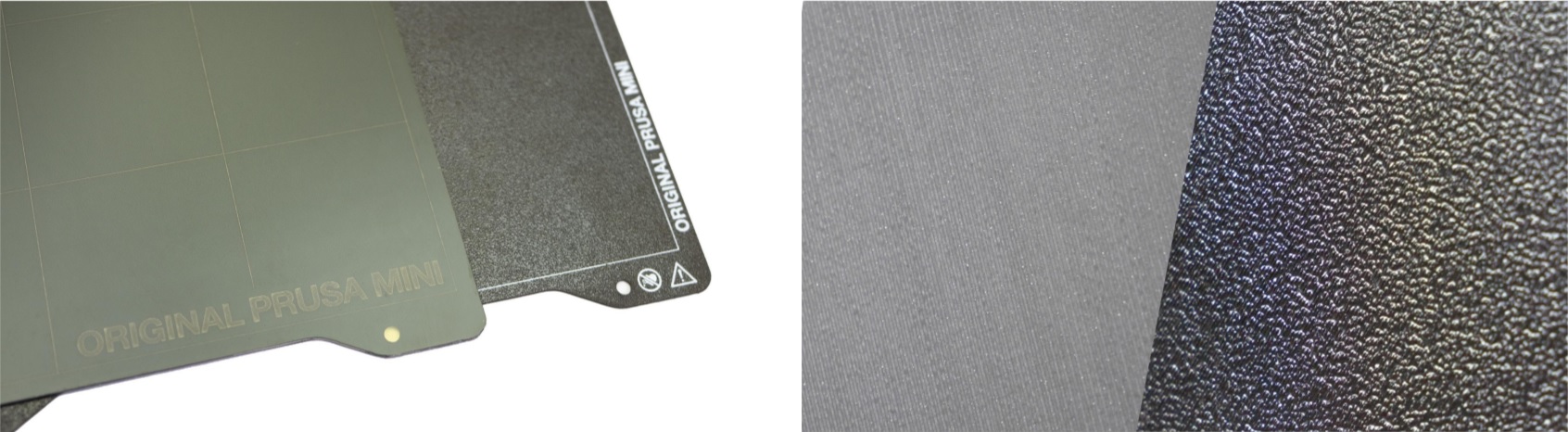
                  If the printed objects have trouble adhering to the print sheet surface, you need to wipe the sheet clean. Choose the right cleaning product for your sheet (IPA, Windex, etc.), pour a small amount of it onto an unscented paper towel, and wipe the print surface. 

                  Never clean the textured and satin powder-coated sheets with acetone! Doing so will create microfractures in the PEI texture, which will cause the surface to deteriorate over time. 

                  The sheet should be cleaned while cold to achieve the best results - cleaning it when hot can lead to potential injury, either from the heated bed or nozzle. When cleaning at higher temperatures, the alcohol will also evaporate before it can clean anything. More details can be found in the First layer issues. 
                  Bearings maintenance

                  After ~200 hours of printing, the smooth rods should be cleaned with a paper towel. You can buy a lubricant (any good super lube will do) and apply it onto the smooth rods (XYZ axes). MINI/+ is supplied with a tube of Prusa lubricant and it is also available in our eshop. 

                  Do not apply lubricant on the trapezoid nut or the threaded lead screw of the Z-axis! 

                  With the printer turned off, move the X-axis (extruder) and Y-axis (heatbed) by hand back and forth a couple of times. If you feel that one of the axes doesn’t move smoothly anymore, the bearings can be taken out and greased on the inside (they should be removed from the axis because the plastic lip-seal will prevent most of the grease from getting inside). 

                  For our detailed maintenance guide, please see Maintenance tips. 

                  Fans

                  Both fans should be checked and cleaned every couple hundred hours. Computer cleaner spray (compressed air) will get the dust away and tweezers can be used for little plastic strands. Always hold the blades when cleaning the fan with compressed air. 

                  Extruder driver gear cleanup

                  The extruder gears do not need any lubrication. However, over time they can suffer from a build-up of filament shavings in the grooves, and loose gripping force that can cause under-extrusion. Use compressed air to blow the debris out or use a small brass brush to clean the grooves, a regular toothpick will do the job as well. Check and clean from the access window on the top of the extruder assembly. Clean what you can, then rotate the gear and repeat. A very small amount of lubricant on only the drive teeth does not hurt but can cause problems if it reaches the filament teeth or starts to collect debris. 

                  For more extensive disassembly, see How to access and clean the extruder-pulley (MINI/MINI+)
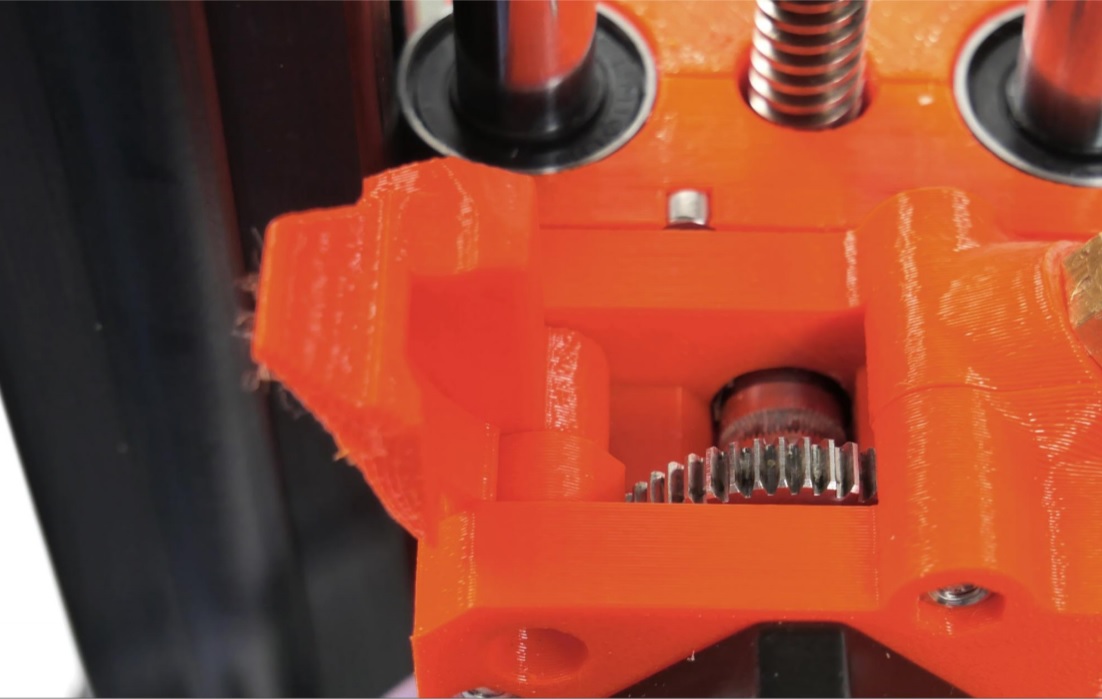
                  Opening the idler will enable you to clean both gears and/or remove any filament leftovers caught in the extruder gears. It’s advised to inspect the gears from time to time and remove any debris caught in the extruder. 
                  PTFE tubes

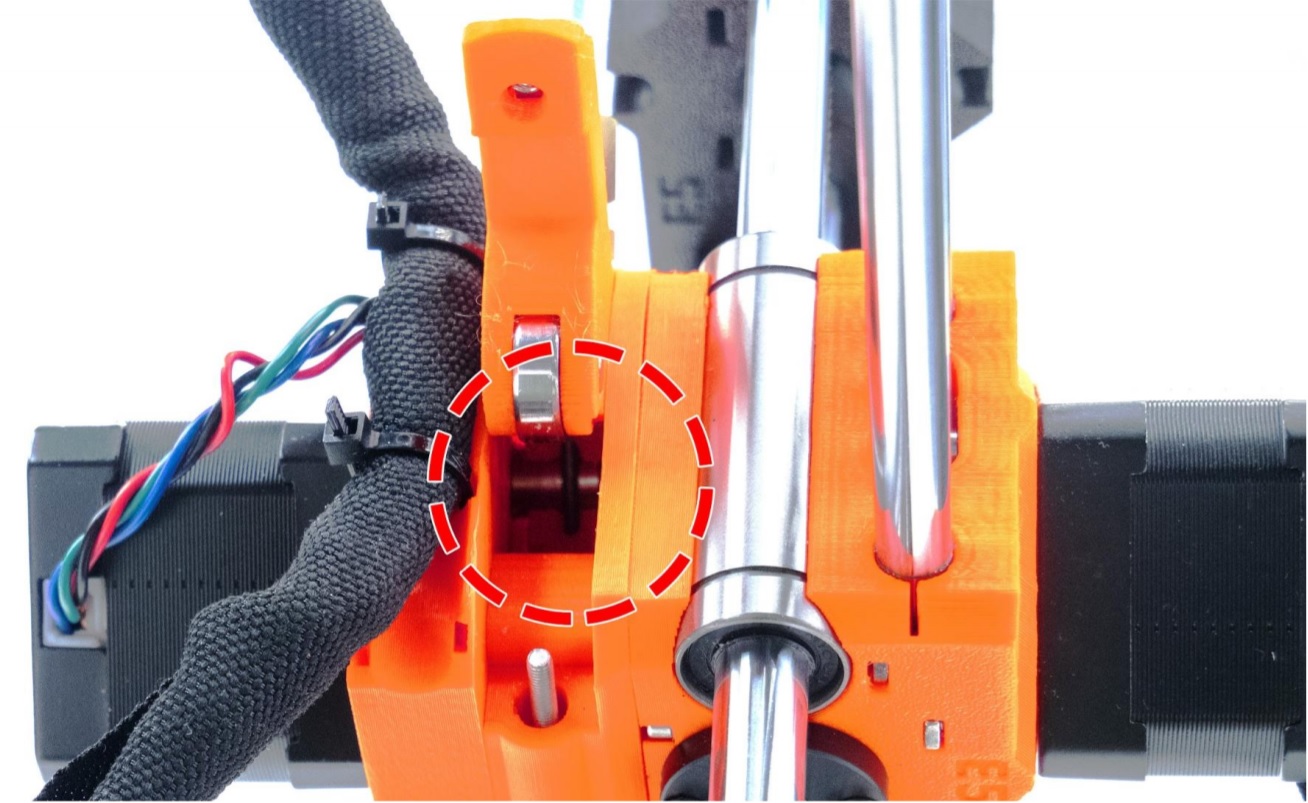
                  The MINI has four PTFE tubes, two external and two internal, that may need a basic level of attention from time to time. PTFE tubes are used to lead the filament strand from the spool, through the extruder, all the way to the nozzle. Over time, filament debris can accumulate in the PTFE tubes. 

                  These tubes should be clean and uniform. If they are deformed or look worn they should be replaced. Use a can of compressed air to clean them. Using a piece of solid wire can damage them on the inside. 

                  The leftmost tube has a regular inner diameter, while the rightmost tube has a deformed, worn tip. 

                  Accessing the PTFE tubes:

                  External tubes

                  1. The first tube where you load filament, which leads to the extruder, can be pulled out by hand. If you are unable to pull out the first tube by hand, please follow How to access and clean the extruder-pulley (MINI/MINI+) to Step 8 to release the M3x12 screw securing it. 
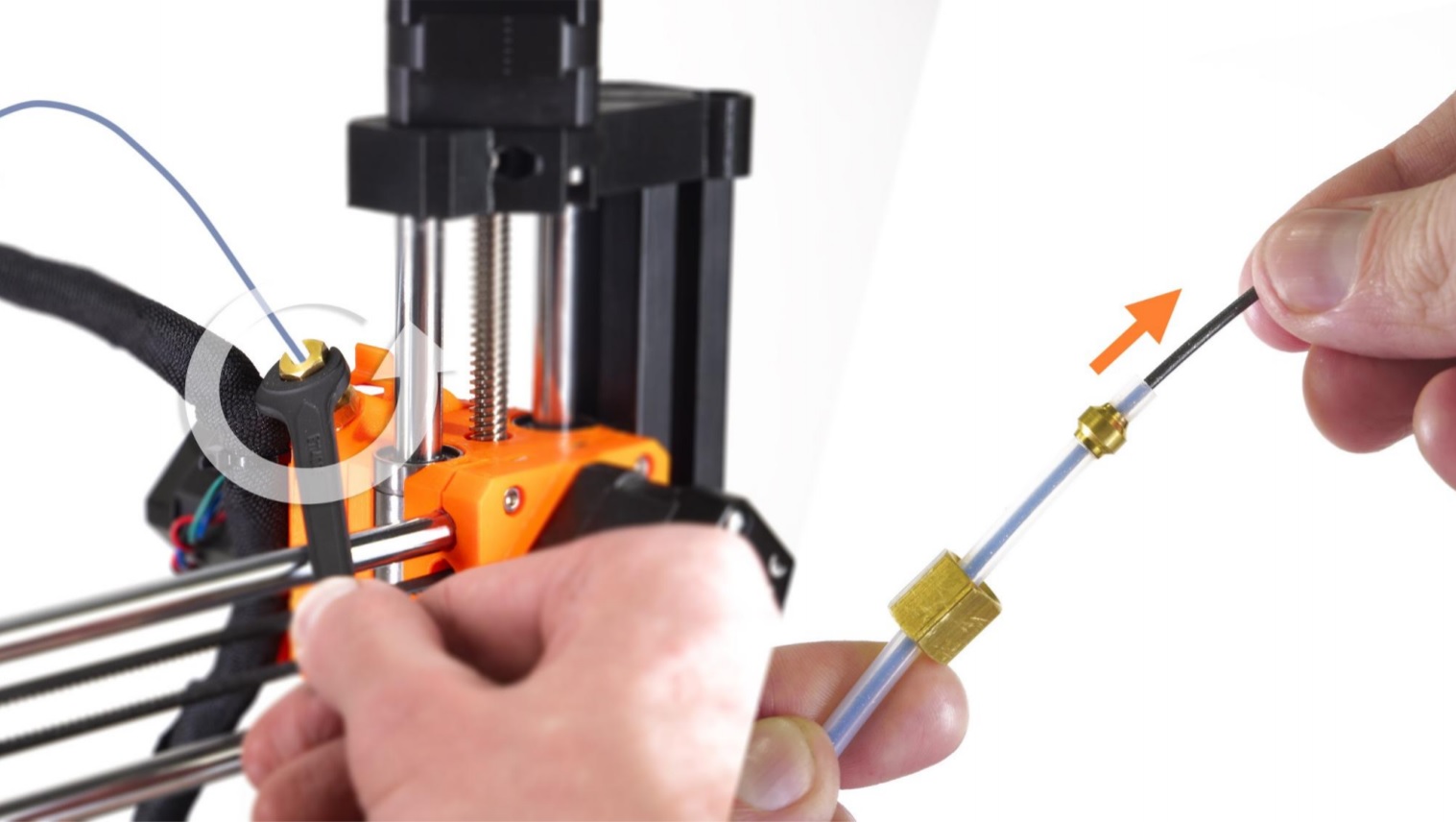
                  2. The second, longer, main Bowden tube leads from the extruder to the print head. Use a spanner (size 10) to loosen the nuts securing it to the fittings, found at each end of it. 
                  This is also useful if the filament failed to load/unload and got stuck in this tube. 
                  Internal tubes
                  1. Below each fitting of the main Bowden tube, you will find a PTFE tube. Both should be inspected if you have loading issues. The one located in the extruder is a short tube that assists the filament exiting the extruder. 
                  2. The hotend/print head PTFE-tube needs to be clean and slightly compressed when installed inside the heat break. Please see our comprehensive illustrated guide on replacing the PTFE-tube in the MINI. 
                  For any extrusion issue on the MINI be sure to check out Clogged nozzle/hotend (MINI/MINI+). 

                  Nozzle

                  Inside

                  If you have a clog or print failure you may need to do a couple of Cold pulls. Also, changing from PLA to PETG, at PLA temperatures can cause issues. Cold pulls should clear any partial or full clog and get you printing again. See our guide on doing a cold pull on the Prusa MINI. When heated, it can also help to use an acupuncture needle (one is included with the kit), to clean the inside of the nozzle. 

                  Outside

                  If your nozzle is covered with plastic on the outside it can affect its thermal properties. To clean it, heat the nozzle for 5 minutes, and press the reset button. 

                  Immediately after that use a small brass brush to clear away any old plastic stuck on the nozzle and heater block. Be extra careful around the fragile hotend heater and thermistor wires! 

                  Replacement

                  Nozzles do wear out over time, even when only printing PLA and PETG. If you attempt to print abrasive filaments, like steel-fill, using the stock brass nozzle, the nozzle will be ruined quickly. 

                  Should you need to change the nozzle, you will find a complete guide here, covering the whole procedure, as well as some common mistakes you want to avoid. 

                  Updating the firmware

                  Keeping your system fresh and up to date is important. The firmware is continuously being developed and new features and operational improvements are implemented regularly, based on testing and feedback from our users. For a complete guide on flashing the firmware, please see Firmware updating (MINI/MINI+). 

                  Was this article helpful?
                  This action is available only to registered users. Please log-in.

                  1 comment

                  Log in  to post a comment
                  Cheese
                  •
                  *lose (not loose)
                  Reply

                  Topics

                  • Using the printer
                    • Printer maintenance
                      • How to remove a stripped screw
                      • SD cards and USB drives
                      • How to replace a M.I.N.D.A. sensor (MINI)
                      • How to replace a print fan (MINI)
                      • How to replace a hotend PTFE tube (MINI/MINI+)
                      • How to replace a hotend fan (MINI)
                      • How to replace a heatsink (MINI/MINI+)
                      • How to replace a heaterblock/heatbreak (MINI/MINI+)
                      • How to replace a Buddy control board (MINI)
                      • Firmware updating (MINI/MINI+)
                      • Cold pull (MINI)
                      • How to access and clean the extruder-pulley (MINI/MINI+)
                      • Buddy electronics Wiring (MINI)
                      • How to update firmware (MINI/MINI+)
                      • Regular maintenance (MINI/MINI+)
                      • Changing/replacing the nozzle (MINI)
                      • How to replace a print head PTFE tube (MINI/MINI+)
                      • How to replace a heatbed thermistor (MINI/MINI+)
                      • How to replace a hotend thermistor (MINI/MINI+)
                      • Height adjustment of M.I.N.D.A./SuperPINDA sensor (MINI/+)
                      • How to replace a hotend heater (MINI/MINI+)
                      • How to replace a heatbed (MINI/MINI+)
                      • Adjusting belt tension (MINI/MINI+)
                      • How to replace an extruder motor (MINI/MINI+)
                      • How to replace SuperPINDA (MINI/MINI+)
                      • How to replace bearings on the X-axis (MINI/MINI+)
                      • How to replace bearings on the Y-axis (MINI/MINI+)
                      • Vibration/noise when printing (MINI/MINI+)
                      • How to replace a heatbed set (MINI/MINI+)
                      • How to post-process the printed parts
                      • How to trim PTFE tube - Original Prusa printers
                      • Replacing the PEI sheet on the (MK3S/MK3/MK2.5S/MK2.5)
                    • 3D models
                    • Material guide
                    • Slicing
                    • Prusa Connect & PrusaLink