Prusa
  • SHOP
    • Latest products
    BY CATEGORY
    • 3D printersnew
    • 3D printer upgradesnew
    • Materials
    • Accessories
    • Spare parts
    • Courses
    • Merch
    • Get a price quote
    QUICK LINKS
    • Shipping & delivery
    • Returns & refunds
    • Payment & financing
    • Warranty
    • VAT & Customs fees
    • FAQ

    0 item in your cartitems in your cart

    Your cart is empty

    Go to cartShop 3D printers

    My profile

    Log in to see orders, saved items

    My profile

    Signed in as

    • Orders
    • Logout
  • 3D PRINTING
    • Explore 3D printing
    FOR BEGINNERS
    • 3D printing 101
    • How FDM printing works
    • Buying your first printer
    • 3D model catalog
    BY APPLICATION
    • Rapid prototyping
    • Manufacturing
    • Engineering
    • Research
    • Arts & design
    GO DEEPER
    • Materials guide
    • Courses
    • Webinars
    • Case studies
    • Custom 3D printing
  • 3D PRINTERS
    • All 3D printers
    FOR
    • Home or garageHobbyists, tinkerers and home printing
    • BusinessIn-house production for small teams
    • EnterpriseFleets, security and scale
    • Which Prusa is right for me
    SHOP & BROWSE
    • CORE One+new
    • CORE One+ INDXnew
    • CORE One L+new
    • CORE One L+ INDXnew
    • XL+new
    • MK4S
    • Prusa Pro HT90
    • Prusa Pro AFS
    • Prusa Pro SLX
    MORE FROM PRINTERS
    • Parts & upgradesnew
    • Critical infrastructure
    • Case studies
    • Signature Oak
    • Kits
  • MATERIALS
    • All materials
    BY USE
    • Every-day & design
    • Functional engineering
    • Composites
    • Pro speciality
    • SLA resins
    PRUSAMENT
    • PLA
    • PETG
    • ASA
    • PC
    • PA11
    • Flex
    • TPU
    MORE FROM MATERIALS
    • Materials guide
    • We make material in house
    • Sustainability
    • Order on the store
  • SOFTWARE
    • All software
    PREPARE THE PRINT
    • PrusaSlicer 3.0New
    PRINT & MONITOR
    • Prusa Connect
    • EasyPrint
    • iOS & Android app
    • Prusa Farm
    GET STARTED
    • Download & install
    • Knowledge base
    MORE FROM SOFTWARE
    • 3D model catalog
  • SUPPORT
    • Explore support
    FIND ANSWERS
    • Knowledge base
    • Troubleshooting
    • Courses
    • Webinars
    GET HELP
    • Contact us
    • Livechat
    • Shipping & delivery
    • Warranty
    • Returns & refunds
    • Service & spare parts
    • Service & Repair
    COMMUNITY
    • Forum
    • Reddit
    • Printables
  • TRUST CENTER
    • Trust Center overview
    BY TOPIC
    • GDPR
    • Certificates
    • Security
    • Compliance
    COMMITMENTS
    • Sustainability report
    TALK TO US
    • Contact the security team
  • COMPANY
    • About Prusa
    GET TO KNOW US
    • Our story
    • How we make printers
    • Open source
    • Brand & media kit
    NEWS
    • Blog
    • Newsroom
    • Events
    TRUST & PARTNERS
    • Sustainability
    • Resellers & distributors
    • Affiliate program
    • Contact
    • English
    • Čeština
    • Deutsch
    • Español
    • Français
    • Italiano
    • Polski
    • 日本語
  • Signed in as

    • Orders
    • Address
    • In-stock Alerts
    • My Courses
    • Subscription
    • Edit Account
    • Logout

Log in to see orders, saved items

Signed in as
  • Orders
  • Address
  • In-stock Alerts
  • My Courses
  • Subscription
  • Edit Account
  • English
  • Čeština
  • Deutsch
  • Español
  • Français
  • Italiano
  • Polski
  • 日本語
Shop

0 item in your cartitems in your cart

Your cart is empty

Go to cartShop 3D printers

My profile

Log in to see orders, saved items

My profile

Signed in as

  • Orders
  • Logout
SHOP
  • Latest products
BY CATEGORY
  • 3D printersnew
  • 3D printer upgradesnew
  • Materials
  • Accessories
  • Spare parts
  • Courses
  • Merch
  • Get a price quote
QUICK LINKS
  • Shipping & delivery
  • Returns & refunds
  • Payment & financing
  • Warranty
  • VAT & Customs fees
  • FAQ

Featured products

    Popular categories

      Trending searches

        Articles

          Blog

            Products

              Categories

                Suggested searches

                  Searching…
                  No results
                  Something went wrong.
                  ↑↓ Select↵ OpenEsc Close search
                  1. Support
                  2. Prusa Pro HT90
                  3. General Information
                  4. Prusa USS Drybox
                   

                  Contents

                  • Components
                  • Managing humidity
                  • Setup and first use
                  • Installation on printer and PTFE tube cutting
                  • Maintenance
                  • Compatible filament spools

                  Blog

                  • Prusament Pellets: Raw material batches for large-format 3D printing or small-scale polymer research & development
                  • Print colorful and glowing Halloween decorations with our spooky offer
                  • Factorio Has Arrived on Printables

                  Newsletter

                  Signup and get our monthly squeeze on updates, blog, printables and much more.

                  By clicking, you agree to receive our newsletter.

                  This site is protected by reCAPTCHA Enterprise and the Google Privacy Policy and Terms of Service apply.

                  Heavy Duty Keyboard Holder (No Supports)
                  E-shop
                  • 3D Printers
                  • Printer Upgrades
                  • Filaments
                  • Accessories
                  • Prusa Merchandise
                  Prusa

                  © Prusa Research a.s.

                  Printables
                  • 3D Models
                  • Store
                  • Clubs
                  • 3D Design Contests
                  • Brands
                  Community
                  • World Map
                  • Forum
                  • User Groups
                  • Events
                  Help
                  • Prusa Help
                  • Prusa Academy
                  • 3D Printing Calculators
                  Software
                  • PrusaSlicer
                  • Prusa.app
                  • Prusa Connect
                  • Drivers and Software
                  Company
                  • About Us
                  • Blog
                  • Official Prusa Resellers
                  • Contact Us
                  • Certified for ISO 9001, ISO 14001, ISO 45001
                  • General Terms and Conditions
                  • General Terms and Conditions of Use of the PRUSA Websites
                  • Privacy Policy
                  • Information about cookies
                  • Customer Complaints Policy
                  • Status Page
                  • Do Not Sell or Share My Personal Information
                  • Supplemental Statements
                  Prusa
                  • General Terms and Conditions
                  • General Terms and Conditions of Use of the PRUSA Websites
                  • Privacy Policy
                  • Information about cookies
                  • Customer Complaints Policy
                  • Status Page
                  • Do Not Sell or Share My Personal Information
                  • Supplemental Statements

                  © Prusa Research a.s.

                  JOSEF PRUSA®, PRUSA RESEARCH®, PRUSA POLYMERS®, PRUSA ORANGE®, PRUSA 3D ® AND PRUSAMENT® are registered trademarks of Prusa Development a.s. used by Prusa Research a.s. under licence from Prusa Development a.s.

                  Prusa USS Drybox

                  Relevant for

                  XL family
                  PRO family
                  ENCLOSURE family
                  MK4 family
                  MK3.9 family
                  +
                  29 comments
                  Article is also available in following languages
                  English
                  Čeština
                  Polski
                  Deutsch
                  Français
                  Español
                  Italiano
                  日本語

                  The Prusa USS Drybox is designed to keep filament in a low-humidity environment during printing. It is designed to slow moisture absorption by the inserted filament spool, using desiccant silica gel packets.  

                  Note: The Drybox does not dry filament. If the filament is already moist, it must be pre-dried in a professional drying oven first. For more detailed information, visit the Drying filament article.

                  The Drybox is a transparent, sealable polypropylene container compatible with the Prusa printers (except MINI/+ and MMU). Its main advantages are simplicity, lightweight design, secure sealing, and the option to mount it directly onto the printer.  

                  For more demanding materials, especially highly hygroscopic engineering polymers (such as PEEK, PEKK, PSU, and similar), a more controlled storage solution may be appropriate. In such cases, the Prusa Pro Filament Drybox provides a fully sealed system designed for long-term low-humidity conditions during printing. More information is available in the Prusa Pro Filament Drybox article.
                  Before you start unboxing, check the Printables page to download and print the required or recommended Drybox accessories.

                  Components

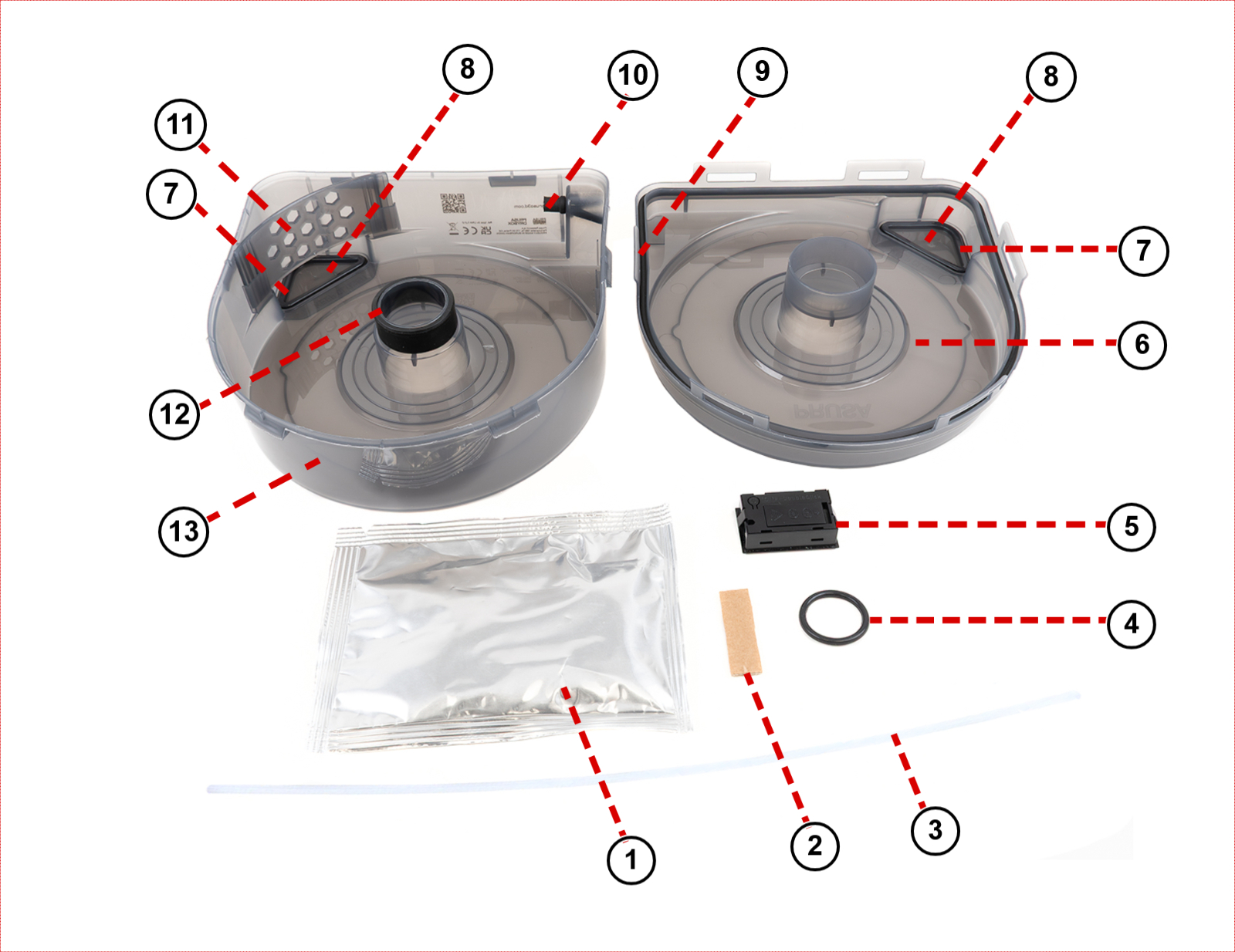
                  The drybox is made of the following parts:

                  1. Dessicant in an aluminium sealed pack   8. Removable caps   
                  2. Material labels   9. Outer seal (do not remove)   
                  3. PTFE tube   10. Grommet (do not remove)   
                  4. O-ring for printed spoolholder   11. Rib (do not remove)   
                  5. TPM40 hygrometer   12. Inside seal (do not remove)   
                  6. Top   13. Bottom
                  7. O-ring seal for caps    

                  Managing humidity

                  The Prusa USS Drybox uses silica gel to maintain low internal humidity. You can monitor the humidity level using the built-in digital hygrometer or an optional indicator card (purchased separately).

                  • Monitoring: The hygrometer shows internal temperature and relative humidity (RH).
                  • Maintenance: Silica gel absorbs moisture and should be replaced or regenerated if the relative humidity (RH) exceeds the maximum recommended value for the material. 
                  • Stabilization: Note that the humidity value may take some time to decrease and stabilize (up to 1 hour). 
                  • Manual rotation: There are small covers on both sides of the Prusa USS Drybox that allow manual spool rotation without opening the lid. Use them only when necessary and avoid keeping them open for extended periods. Always ensure they are properly closed afterward, as improper or frequent opening increases internal humidity.
                  • Sealing: Improper sealing can lead to increased internal humidity. We recommend visually inspecting the seal each time. Avoid unnecessary opening to maintain stable humidity.  
                  Filament type Maximum recommended RH (%) (measured on the hygrometer)
                  PLABelow 30% RH (short-term tolerance up to 40%)
                  ABSBelow 30% RH (ideally below 15%)
                  ASABelow 30% RH (ideally below 10%)
                  PETGBelow 20% RH
                  TPUBelow 20% RH (ideally <15%)
                  PVABelow 20% RH
                  PCBelow 20% RH
                  BVOHBelow 20% RH

                  Setup and first use

                  To assemble the USS Drybox, follow the instructions in the dedicated article First setup and filament loading (USS Drybox).

                  Always make sure that the  PTFE tube does not have a lot of slack, or it can go into the drybox and prevent the spool from spinning.

                  When the filament is not in use, seal the filament guide using the included grommet.

                  Installation on printer and PTFE tube cutting

                  Before starting, adjust the PTFE tube length to the size recommended for your printer.

                  To cut the PTFE tube, we recommend using any tool that slices cleanly. Avoid tools that crush, deform, or slip during cutting, such as scissors or cutting pliers, as they may deform the tube and increase filament friction. We recommend using a sharp box cutter or knife for a clean, straight cut.

                  If you are unable to make a straight cut manually, you can use a dedicated PTFE cutting guide available on Printables.com.

                  The Prusa USS Drybox should be mounted directly on the printer using dedicated holders available on Printables. These holders are specific to various printer models and utilize a puck-and-bayonet system for easy attachment.

                  Choose your printer for specific installation instructions:

                  • CORE One L and CORE One+ (identical installation procedure)
                  • CORE One
                  • XL
                  • HT90 
                  • MK series
                  Note: Installation of the Prusa USS Drybox inside the Original Prusa Enclosure is not supported for MK series printers (including MK4 and MK4S).

                  Maintenance

                  • Replace silica gel when needed.
                  • Clean with low-pressure compressed air only.
                  • Inspect seals before each use.
                  • Do not expose components to extreme conditions or sunlight.
                  • Remove batteries if unused for long periods.
                  • Replace batteries (2x LR44) if the hygrometer stops working.

                  TPM40 Hygrometer specifications

                  • Temperature range: -50 °C to +70 °C
                  • Humidity range: 10%–99% RH
                  • Accuracy: +/-1 °C, +/-3% RH
                  • Power: 2x LR44 batteries
                  • Battery life: ~2 years

                  Battery installation:

                  1. Open battery cover.
                  2. Insert 2x LR44 batteries (correct polarity).
                  3. Device powers on automatically.

                  Compatible filament spools

                  Prusament spools are fully compatible with the Prusa USS Drybox out of the box. This includes both the new spool design featuring the Open Print Tag and the older design without it.

                  Buddy3D spools are also fully compatible and require no adjustments.

                  Spools from third-party manufacturers (such as Polymaker, Elegoo, Sunlu, Hatchbox, Fillamentum, and others) may require adapters, especially cardboard spools. For these cases, we recommend the printable parametric spool adapters created by community member Dave G., available on Printables.


                  Was this article helpful?
                  This action is available only to registered users. Please log-in.

                  15 comments

                  Log in  to post a comment
                  kuzu
                  •
                  is the drybox compact enough to install eight of them on my core one indx?
                  Reply
                  Kalitian
                  •
                  Hi! Can you update the article with instructions for installing the dryboxes on the INDX?
                  Reply
                  matthew611
                  •
                  Hi Prusa team, I have an MK4S and would like to know if it's possible to mount only one side of the top arm with the spoolholder for Drybox, and keep the other one as-is for placing my PLA spools ... or do I lose the ability to "mix and match", and would then need 2x Dryboxes?
                  Reply
                  Jan Kratochvíl
                  •
                  Hello. The updated spoolholder supports the spools without the USS drybox too. You are free to put the drybox on one side and the second use as always.
                  Reply
                  rpgweb
                  •
                  There is an O-ring in each drybox...but it does not go with the drybox. It seems to go with the spoolholder.
                  I ordered a spoolholder, but there is no O-Ring with the spoolholder...instead the o-ring is included with the drybox...which does not need the O-Ring.

                  Quite confusing and strange choice from Prusa.

                  As for the PTFE TUBE, it comes with each Drybox and it needs quickconnects which are not included in the drybox kit. In my opinion Prusa, Put the O-Ring in the spoolholder kit and the quickconnects in the drybox kit.

                  So i ended up downloading the quickconnects stls and printed them myself. They are not quickconnect, you need to be the incredible Hulk to twist them easily. Once they are attached to the Core One you simply have no space to apply strenght to "Un-Quickconnect" the PTFE tube.
                  Maybe a quickconnect with magnets would be a better fit because i ended up simply discarding them and the PTFE tube.

                  I use the drybox without PTFE/Quickconnect because they are just clumsy and not practical. Plus the Drybox PTFE HOLE and the Printer PTFE Hole are at a weird angle which make it hard to use the quickconnect.

                  Nope, not my best upgrade.
                  Reply
                  Jan Kratochvíl
                  •
                  Hello. We are sorry, you have this experience.

                  The O-ring is included for people that printed the new spoolholder. Ordering a spoolholder you are buying just a plastic part and in the description is stated, what you are recieving.

                  Quick connect is not necessity and is most useful for CORE series printers, but if you decide to purchase the Drybox for different printer, you might not need it. But it is a few minutes print if you want it :-)

                  The locking mechanism should be firm, but not hard to lock/unlock. Try checking your printer settings. We liked that design, because it does not need anything else (like the mentioned magnets) and you can just print it within a few minutes.
                  Reply
                  AK84
                  •
                  Can the quick connect be printed with PLA?
                  Reply
                  Jan Kratochvíl
                  •
                  Sure
                  Reply
                  pfelecan
                  •
                  Still not very helpful to understanding what to do with the O-ring, number 4 in your diagram. Instructions or a photo of this O-ring installed would be very helpful.
                  TIA
                  Reply
                  David R. Campbell
                  •
                  What am I supposed to do with the O-Ring?
                  Reply
                  David
                  •
                  It is used to make the Universal Spool Holder (Comes with the Core One +/L), as the USS Drybox is designed to fit onto that (Described here: https://www.printables.com/model/1605113-prusa-uss-drybox-printable-accessories#universal-spoolholder-).

                  They state that each USS comes with one so you don't need to hunt around hardware stores if you need to make the spool holder. Useful for MK/XL owners, or Core One owners who have the MMU/INDX.

                  It connects the two halves of the spool holder and acts as both a friction fit to stop it coming loose and to stop any vibrations between the parts
                  Reply

                  Topics

                  • About your printer
                    • General Information
                      • VAT (Value Added Tax) & Customs fees
                      • FAQ - Frequently Asked Questions
                      • Prusa Account creation
                      • Refunds & returns
                      • Customer support
                      • Warranty
                      • CORE One upgrade paths
                      • Photo and video documentation
                      • Incompatible filament #13854 (MK4) #26854 (MK4S) #31854 (CORE One) #36854 (CORE One INDX) #35854 (CORE One L) #37854 (CORE One L INDX) #23854 (MK3.5) #28854 (MK3.5S) #12854 (MINI) #17854 (XL) #41854 (XL+)
                      • Types of printers and their differences
                      • FAQ - Extended buyers-guide
                      • Printer Handbooks
                      • Original Prusa Serial Number
                      • Payment options
                      • Orders to the UK
                      • Using the HT Hotend
                      • UPS backup for your printer
                      • Factory repair
                      • Order status
                      • Original Prusa Enclosure
                      • How do Prusameters on Printables work?
                      • Enclosure guidepost
                      • E-shop order creation
                      • FAQ - Orders
                      • Supplemental Statements valid on Prusa websites
                      • Packing the Enclosure for return - Original Packing material
                      • Input Shaper (CORE One, MK4/S, MK3.9/S, MK3.5/S, XL, MINI/+)
                      • Packing the Enclosure for return - Custom Packing material
                      • Printed Solid Service center USA
                      • Purchasing and managing licenses for Prusa Academy courses
                      • Payment error
                      • Vouchers/Discounts
                      • Prusa Printer Upgrades
                      • Printer repair centers
                      • Buddy3D brand
                      • Upgrade to Prusa CORE One
                      • Product certifications
                      • Global-e
                      • OpenPrintTag
                      • Prusa USS Drybox
                      • Shipping information
                    • Printer description
                    • Printer features