Prusa
  • SHOP
    • Latest products
    BY CATEGORY
    • 3D printersnew
    • 3D printer upgradesnew
    • Materials
    • Accessories
    • Spare parts
    • Courses
    • Merch
    • Get a price quote
    QUICK LINKS
    • Shipping & delivery
    • Returns & refunds
    • Payment & financing
    • Warranty
    • VAT & Customs fees
    • FAQ

    0 item in your cartitems in your cart

    Your cart is empty

    Go to cartShop 3D printers

    My profile

    Log in to see orders, saved items

    My profile

    Signed in as

    • Orders
    • Logout
  • 3D PRINTING
    • Explore 3D printing
    FOR BEGINNERS
    • 3D printing 101
    • How FDM printing works
    • Buying your first printer
    • 3D model catalog
    BY APPLICATION
    • Rapid prototyping
    • Manufacturing
    • Engineering
    • Research
    • Arts & design
    GO DEEPER
    • Materials guide
    • Courses
    • Webinars
    • Case studies
    • Custom 3D printing
  • 3D PRINTERS
    • All 3D printers
    FOR
    • Home or garageHobbyists, tinkerers and home printing
    • BusinessIn-house production for small teams
    • EnterpriseFleets, security and scale
    • Which Prusa is right for me
    SHOP & BROWSE
    • CORE One+new
    • CORE One+ INDXnew
    • CORE One L+new
    • CORE One L+ INDXnew
    • XL+new
    • MK4S
    • Prusa Pro HT90
    • Prusa Pro AFS
    • Prusa Pro SLX
    MORE FROM PRINTERS
    • Parts & upgradesnew
    • Critical infrastructure
    • Case studies
    • Signature Oak
    • Kits
  • MATERIALS
    • All materials
    BY USE
    • Every-day & design
    • Functional engineering
    • Composites
    • Pro speciality
    • SLA resins
    PRUSAMENT
    • PLA
    • PETG
    • ASA
    • PC
    • PA11
    • Flex
    • TPU
    MORE FROM MATERIALS
    • Materials guide
    • We make material in house
    • Sustainability
    • Order on the store
  • SOFTWARE
    • All software
    PREPARE THE PRINT
    • PrusaSlicer 3.0New
    PRINT & MONITOR
    • Prusa Connect
    • EasyPrint
    • iOS & Android app
    • Prusa Farm
    GET STARTED
    • Download & install
    • Knowledge base
    MORE FROM SOFTWARE
    • 3D model catalog
  • SUPPORT
    • Explore support
    FIND ANSWERS
    • Knowledge base
    • Troubleshooting
    • Courses
    • Webinars
    GET HELP
    • Contact us
    • Livechat
    • Shipping & delivery
    • Warranty
    • Returns & refunds
    • Service & spare parts
    • Service & Repair
    COMMUNITY
    • Forum
    • Reddit
    • Printables
  • TRUST CENTER
    • Trust Center overview
    BY TOPIC
    • GDPR
    • Certificates
    • Security
    • Compliance
    COMMITMENTS
    • Sustainability report
    TALK TO US
    • Contact the security team
  • COMPANY
    • About Prusa
    GET TO KNOW US
    • Our story
    • How we make printers
    • Open source
    • Brand & media kit
    NEWS
    • Blog
    • Newsroom
    • Events
    TRUST & PARTNERS
    • Sustainability
    • Resellers & distributors
    • Affiliate program
    • Contact
    • English
    • Čeština
    • Deutsch
    • Español
    • Français
    • Italiano
    • Polski
    • 日本語
  • Signed in as

    • Orders
    • Address
    • In-stock Alerts
    • My Courses
    • Subscription
    • Edit Account
    • Logout

Log in to see orders, saved items

Signed in as
  • Orders
  • Address
  • In-stock Alerts
  • My Courses
  • Subscription
  • Edit Account
  • English
  • Čeština
  • Deutsch
  • Español
  • Français
  • Italiano
  • Polski
  • 日本語
Shop

0 item in your cartitems in your cart

Your cart is empty

Go to cartShop 3D printers

My profile

Log in to see orders, saved items

My profile

Signed in as

  • Orders
  • Logout
SHOP
  • Latest products
BY CATEGORY
  • 3D printersnew
  • 3D printer upgradesnew
  • Materials
  • Accessories
  • Spare parts
  • Courses
  • Merch
  • Get a price quote
QUICK LINKS
  • Shipping & delivery
  • Returns & refunds
  • Payment & financing
  • Warranty
  • VAT & Customs fees
  • FAQ

Featured products

    Popular categories

      Trending searches

        Articles

          Blog

            Products

              Categories

                Suggested searches

                  Searching…
                  No results
                  Something went wrong.
                  ↑↓ Select↵ OpenEsc Close search
                  1. Support
                  2. Printer troubleshooting
                  3. Firmware updating issues (MK2.5S/MK3S+/MMU2S/MMU3)
                   

                  Contents

                  • Initial checks
                  • Common updating & flashing problems
                  • None of the problems are permanent

                  Blog

                  • Prusament Pellets: Raw material batches for large-format 3D printing or small-scale polymer research & development
                  • Print colorful and glowing Halloween decorations with our spooky offer
                  • Factorio Has Arrived on Printables

                  Newsletter

                  Signup and get our monthly squeeze on updates, blog, printables and much more.

                  By clicking, you agree to receive our newsletter.

                  This site is protected by reCAPTCHA Enterprise and the Google Privacy Policy and Terms of Service apply.

                  Heavy Duty Keyboard Holder (No Supports)
                  E-shop
                  • 3D Printers
                  • Printer Upgrades
                  • Filaments
                  • Accessories
                  • Prusa Merchandise
                  Prusa

                  © Prusa Research a.s.

                  Printables
                  • 3D Models
                  • Store
                  • Clubs
                  • 3D Design Contests
                  • Brands
                  Community
                  • World Map
                  • Forum
                  • User Groups
                  • Events
                  Help
                  • Prusa Help
                  • Prusa Academy
                  • 3D Printing Calculators
                  Software
                  • PrusaSlicer
                  • Prusa.app
                  • Prusa Connect
                  • Drivers and Software
                  Company
                  • About Us
                  • Blog
                  • Official Prusa Resellers
                  • Contact Us
                  • Certified for ISO 9001, ISO 14001, ISO 45001
                  • General Terms and Conditions
                  • General Terms and Conditions of Use of the PRUSA Websites
                  • Privacy Policy
                  • Information about cookies
                  • Customer Complaints Policy
                  • Status Page
                  • Do Not Sell or Share My Personal Information
                  • Supplemental Statements
                  Prusa
                  • General Terms and Conditions
                  • General Terms and Conditions of Use of the PRUSA Websites
                  • Privacy Policy
                  • Information about cookies
                  • Customer Complaints Policy
                  • Status Page
                  • Do Not Sell or Share My Personal Information
                  • Supplemental Statements

                  © Prusa Research a.s.

                  JOSEF PRUSA®, PRUSA RESEARCH®, PRUSA POLYMERS®, PRUSA ORANGE®, PRUSA 3D ® AND PRUSAMENT® are registered trademarks of Prusa Development a.s. used by Prusa Research a.s. under licence from Prusa Development a.s.

                  Firmware updating issues

                  (MK2.5S/MK3S+/MMU2S/MMU3)

                  Relevant for

                  MMU family
                  MK3 family
                  OLD PRODUCTS
                  57 comments
                  Article is also available in following languages
                  English
                  Čeština
                  Polski
                  Deutsch
                  Français
                  Español
                  Italiano
                  日本語

                  Flashing the firmware can sometimes fail, but most of the time it is nothing major. Before going deeper into issues related to flashing your printer, there are some initial steps and prerequisites that should be tested.

                  Initial checks

                  • Read the article again. Verify that you have followed all instructions in the How to update firmware (MK3S+/MK3S/MK3) article word by word.
                  • There is always a small chance that the problem was just a "one time bug". Therefore, we suggest always trying to do the normal firmware update again, just to make sure. 
                  • Make sure that the latest DRIVERS & APPS package is installed on your computer before flashing the firmware. Sometimes, uninstalling all programs from Prusa, downloading the Drivers, and installing them again solves the problem.
                  • PrusaSlicer will detect the USB-connected printer even when it is powered off, but in order to upgrade the firmware, the printer has to be powered on!
                  • When flashing both MMU unit and a printer, do not connect both USB cables at the same time! Each firmware must be flashed separately and only one logic board can be connected at a time.
                  • Make sure you have no other serial-connection running on your printer at the time of flashing. This includes Arduino IDE, Serial bridges, or other COM devices running.
                  • FOR MMU - If the signal cable to the MMU unit is plugged incorrectly you can have issues flashing.

                  Common updating & flashing problems

                  Another cable and USB port

                  First of all, please try to use another USB port of your computer. Then hit the Rescan button in the Firmware flasher tool in PrusaSlicer.

                  Make sure the USB cable is inserted all the way on both sides, and maybe try another cable as well.

                  Make sure you are using a USB cable that supports data transfer. Some microUSB cables only provide power and do not support data connections.

                  Do not unplug the USB cable before the Firmware Updater tool in PrusaSlicer confirms that the process was successfully completed.

                  Timeout error

                  The Firmware Updater tool is not getting a response from the mini RAMBo or EINSY RAMBo board. Check that your printer is powered on. The next step is to check your fuses, you can visit these articles for more information: Blown Fuse (MK2S/MK2.5/MK2.5S) or Blown Fuse (MK3/MK3S/MK3S+).

                  Permission denied

                  On a Unix/Linux-based system, If you encounter a "Permission denied" error when flashing, this might be due to port access issues. Ensure your user account is added to the "dialout" group to access the serial port: Add your user account to the group using  or  depending on the distribution you use. Then, either reboot or log out and back in to apply the changes.

                  Uploading different file

                  "Wrong file has been selected for flashing". Make sure to unpack the .zip archive with the firmware and select the .hex file for your printer model.

                  Flashing failed error

                  When you see a status message “Flashing failed. Please see the avrdude log below.”, click the “Advanced: Output log” button to see the full flashing log. This log can provide more information about the reason for the failure.
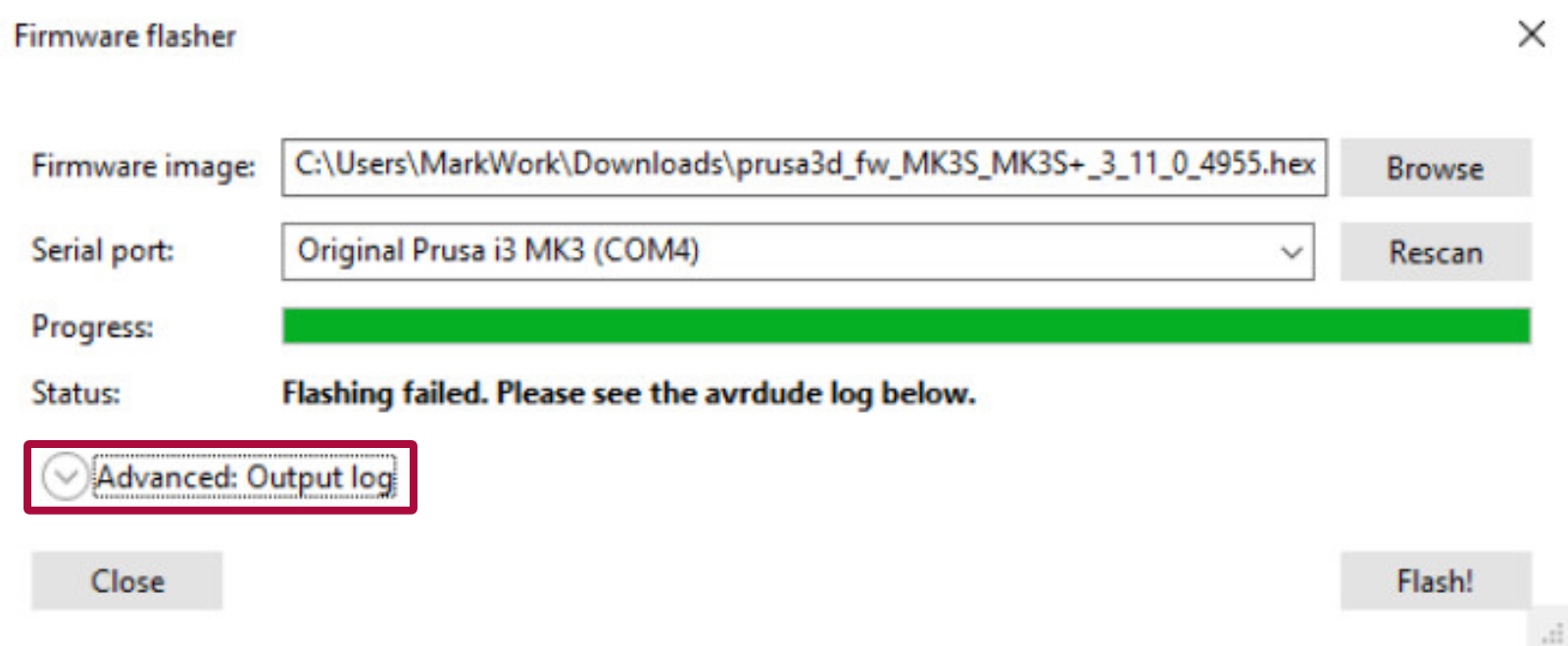
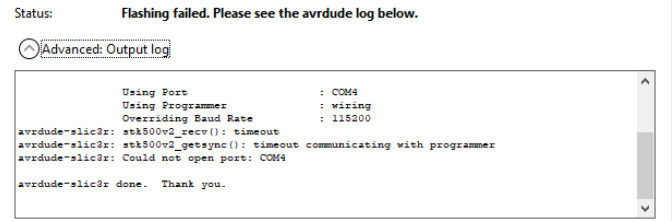
                  In case you see at the end of the log a message “Could not open port: COM4” (or another COM port number), this can have multiple causes.

                  The above error can be accompanied by an error “stk500v2_getsync(): timeout communicating with programmer” (as in the picture above). When that’s the case, check if:

                  • Another software like Cura or Pronterface is not running and is not connected to that port. When unsure, try to close all open programs or restart your computer.
                  • You are not trying to flash the Einsy firmware .hex file to the MMU2S board or the MMU2S firmware .hex file to the Einsy board.
                  • Your printer is powered on. If it’s powered on, the next step is to check your fuses. You can visit these articles for more information: Blown Fuse (MK2S/MK2.5/MK2.5S) or Blown Fuse (MK3/MK3S/MK3S+).

                  When the error  “Could not open port: COM4” is accompanied by the error “arduino_open(): Failed to initialize MK3 external flash programming mode”, check your LCD screen for any further error messages.

                  COM port/device

                  Check if the printer is showing up in the Device Manager as a COM device.

                  Sometimes, the printer shows up in the Device Manager, but not among COM devices - If you can find the printer in the Device Manager, but not as a COM device, follow these steps:

                  1. Reinstall the drivers from the installation folder:
                      • C: Program Files Prusa3D Rambo dpinstx64.exe (64-bit systems) or
                      • C:Program Files Prusa3D Rambo dpinstx86.exe (32-bit systems)
                  2. Restart your PC after you do so.
                  3. Check if the printer is showing up in Device Manager as a COM device. Use that COM port and manually fill it in the port section in the software.

                  If the Firmware flasher gives you an error saying it is not able to communicate on COM3 or another port, check your Port settings - some other device may be using that port. Eject that device, or change its com port to another number, and restart your computer.

                  Squares on the LCD

                  After flashing the firmware, does your LCD show only squares? If the LCD and menu were working correctly before the firmware update, then firmware for different a printer model was flashed. Make sure you selected the correct one (MK2.5S/ MK3S/ Multimaterial).

                  The firmware for the MK3(S) does not have different HEX-files for different revisions of the Einsy Rambo, as you will find for the MK2S and the miniRAMBO.

                  None of the problems are permanent 

                  The core of the printer's system (bootloader) is "read-only" which means that even if you upload an incorrect firmware or make any other mistake, there is always a way to make things right. The best practice when uploading or flashing simply does not work is to follow the steps for a Factory reset (MK2S/MK2.5S/MK3S) of all data.

                  Was this article helpful?
                  This action is available only to registered users. Please log-in.

                  Topics

                  • Troubleshooting
                    • Printer troubleshooting
                      • Factory reset (MMU2S pre firmware 1.0.6)
                      • Blown Fuse (MK3/MK3S/MK3S+)
                      • Extrusion stopped mid-print (Heat creep)
                      • MMU2S idler unable to move freely
                      • MMU2S Selector not moving
                      • Spaghetti monster
                      • Extruder blob
                      • Clogged nozzle/hotend (MK3.5/S, MK3S+, MK2.5S)
                      • Extruder noises
                      • Filament Not Loading
                      • Misaligned PINDA Sensor (MK2/S)
                      • Print fan is not spinning
                      • Hotend fan is not spinning
                      • Heatbed not heating up properly
                      • P.I.N.D.A./SuperPINDA Sensor testing
                      • SD card not working
                      • LCD screen not working
                      • Printer does not turn on or keeps turning off
                      • Blown Fuse (MK2S/MK2.5/MK2.5S)
                      • MK3S keeps prompting filament change
                      • Vibration when printing (MK3S+/MK2.5S)
                      • MMU2S LEDs meaning
                      • Live Z adjust not saving
                      • Factory reset (MK2S/MK2.5S/MK3S)
                      • Firmware updating issues (MK2.5S/MK3S+/MMU2S/MMU3)
                      • IR filament sensor calibration (MMU3, MMU2S)
                      • FINDA setup and troubleshooting
                      • Filament jam (MMU2S)
                      • Nozzle crashed into the heatbed
                      • External SPI flash W25X20CL/xFLASH not responding - error
                      • IR Filament Sensor Troubleshooting (MK2.5S, MK3S)
                      • Failing Z calibration (MK3S/MK2.5S)
                      • Ambient temperature check (MK3/MK3S)
                      • PrusaLink Troubleshooting
                      • Logging data over serial line (MMU2S)
                      • FINDA: Filament Stuck #04102 (MMU)
                      • MMU Overcurrent #31310 (CORE One) #35310 (CORE One L) #26310 (MK4S) #13310 (MK4) #27310 (MK3.9S) #21310 (MK3.9) #28310 (MK3.5S) #23310 (MK3.5)
                      • Tangled filament
                      • Status LED explained (MMU3)
                      • Factory Reset (MMU)
                      • TMC driver shorted #04304 (MMU)
                      • TMC driver shorted #04314 (MMU)
                      • TMC driver shorted #04324 (MMU)
                      • Blue Screen of Death (BSOD) #31538 (CORE One) #35538 (CORE One L) #36538 (CORE One INDX) #26538 (MK4S) #13538 (MK4) #27538 (MK3.9S) #17538 (XL) #21538 (MK3.9) #28538 (MK3.5S) #23538 (MK3.5) #12538 (MINI)
                      • Service menu - Factory Reset
                      • Service menu - Individual Filament Calibration
                      • SD cards and USB drives
                    • Diagnostics
                    • Print Quality Troubleshooting
                    • QR Error codes
                    • Print Error Messages

                  30 comments

                  Log in  to post a comment
                  Markov
                  •
                  The flashing of MMU3 under Linux didn't work due to permissions. But the instructions here didn't solve the problem. I followed what was outlined in the following link and it worked.

                  https://a-gavin.github.io/blog/linux-usb-serial/

                  I created a udev rule, contents below:

                  #Contents of udev rule
                  SUBSYSTEM=="tty", ENV{ID_VENDOR_ID}=="2c99", ENV{ID_MODEL_ID}="0004", MODE="0666"


                  It flashed.
                  Reply
                  maxminh
                  •
                  If you are getting the error messages "can't communicate with device", like the one below:

                  avrdude-slic3r: ser_send(): size/send mismatch
                  avrdude-slic3r: stk500v2_send(): failed to send command to serial port
                  avrdude-slic3r: stk500v2_getsync(): can't communicate with device
                  avrdude-slic3r: Could not open port: COM3

                  I got the same error messages and did what the link below suggested:

                  https://www.reddit.com/r/Artillery3D/comments/gylc7x/firmware_update_error_timeout_communicating_with/

                  Short and sweet version. Press the flash button then turn your printer on immediately right after.
                  Reply
                  Brodde
                  •
                  Hello.
                  I have just upgraded an MMU2s to MMU3 and was thinking of upgrading the firmware on my MK3s+ printer to version 3.14.1 according to the instructions.
                  But I am unable to upgrade the printer's firmware via PrusaSlicer.

                  I get the following error message in the Output log:

                  -------
                  avrdude-slic3r -v -p atmega2560 -c wiring -P COM3 -b 115200 -D -U flash:w:0:C:\Users\Brodde\Downloads\prusa3d_fw_3_14_1_MK3S_3_0_3_MMU3\prusa3d_fw_3_14_1_MK3S_3_0_3_MMU3\MK3S_MK3S+_FW_3.14.1_MULTILANG.hex:i

                  avrdude-slic3r: Version 6.3-20160220-prusa3d, compiled on Apr 10 2025 at 13:39:24
                  Copyright (c) 2000-2005 Brian Dean, http://www.bdmicro.com/
                  Copyright (c) 2007-2014 Joerg Wunsch


                  Using Port : COM3
                  Using Programmer : wiring
                  Overriding Baud Rate : 115200
                  avrdude-slic3r: stk500v2_getsync(): got response from unknown programmer , assuming STK500
                  AVR Part : ATmega2560
                  Chip Erase delay : 9000 us
                  PAGEL : PD7
                  BS2 : PA0
                  RESET disposition : dedicated
                  RETRY pulse : SCK
                  serial program mode : yes
                  parallel program mode : yes
                  Timeout : 200
                  StabDelay : 100
                  CmdexeDelay : 25
                  SyncLoops : 32
                  ByteDelay : 0
                  PollIndex : 3
                  PollValue : 0x53
                  Memory Detail :

                  Block Poll Page Polled
                  Memory Type Mode Delay Size Indx Paged Size Size #Pages MinW MaxW ReadBack
                  ----------- ---- ----- ----- ---- ------ ------ ---- ------ ----- ----- ---------
                  eeprom 65 10 8 0 no 4096 8 0 9000 9000 0x00 0x00
                  flash 65 10 256 0 yes 262144 256 1024 4500 4500 0x00 0x00
                  lfuse 0 0 0 0 no 1 0 0 9000 9000 0x00 0x00
                  hfuse 0 0 0 0 no 1 0 0 9000 9000 0x00 0x00
                  efuse 0 0 0 0 no 1 0 0 9000 9000 0x00 0x00
                  lock 0 0 0 0 no 1 0 0 9000 9000 0x00 0x00
                  calibration 0 0 0 0 no 1 0 0 0 0 0x00 0x00
                  signature 0 0 0 0 no 3 0 0 0 0 0x00 0x00

                  Programmer Type : Wiring
                  Description : Wiring
                  Programmer Model: STK500
                  avrdude-slic3r: stk500v2_command(): warning: unknown, code 0x90
                  avrdude-slic3r: stk500v2_getparm(): failed to get parameter 0x90
                  avrdude-slic3r: stk500v2_command(): warning: unknown, code 0x91
                  avrdude-slic3r: stk500v2_getparm(): failed to get parameter 0x91
                  avrdude-slic3r: stk500v2_command(): warning: unknown, code 0x92
                  avrdude-slic3r: stk500v2_getparm(): failed to get parameter 0x92
                  Hardware Version: 0
                  Firmware Version Master : 0.00
                  avrdude-slic3r: stk500v2_command(): warning: unknown, code 0x9a
                  avrdude-slic3r: stk500v2_getparm(): failed to get parameter 0x9a
                  Topcard : Unknown
                  avrdude-slic3r: stk500v2_command(): warning: unknown, code 0x94
                  avrdude-slic3r: stk500v2_getparm(): failed to get parameter 0x94
                  Vtarget : 0.0 V
                  avrdude-slic3r: stk500v2_command(): warning: unknown, code 0x98
                  avrdude-slic3r: stk500v2_getparm(): failed to get parameter 0x98
                  avrdude-slic3r: stk500v2_command(): warning: unknown, code 0x95
                  avrdude-slic3r: stk500v2_getparm(): failed to get parameter 0x95
                  avrdude-slic3r: stk500v2_command(): warning: unknown, code 0x96
                  avrdude-slic3r: stk500v2_getparm(): failed to get parameter 0x96
                  avrdude-slic3r: stk500v2_command(): warning: unknown, code 0x97
                  avrdude-slic3r: stk500v2_getparm(): failed to get parameter 0x97
                  SCK period : 0.5 us
                  Varef : 0.0 V
                  Oscillator : Off

                  avrdude-slic3r: stk500v2_command(): warning: unknown, code 0x9e

                  avrdude-slic3r: stk500v2_setparm(): failed to set parameter 0x9e
                  avrdude-slic3r: stk500v2_command(): unknown status 0xc8
                  avrdude-slic3r: initialization failed, rc=-1
                  Double check connections and try again, or use -F to override
                  this check.

                  avrdude-slic3r: stk500v2_command(): unknown status 0x01
                  avrdude-slic3r: stk500v2_disable(): failed to leave programming mode

                  avrdude-slic3r done. Thank you.
                  ------


                  I can connect to the printer via USB and the COM3 port but the Flashing is not completed successfully...

                  Is there anyone who can guide me on what I should do to proceed?
                  Reply
                  maxminh
                  •
                  I got the same error messages and did what the link below suggested:

                  https://www.reddit.com/r/Artillery3D/comments/gylc7x/firmware_update_error_timeout_communicating_with/

                  Short and sweet version. Press the flash button then turn your printer on immediately right after.
                  Reply
                  3DWizard
                  •
                  Trying to update my MK3S (having put it off for ages) but will not work, just get this error log, no idea what to do now.

                  Error log:
                  avrdude-slic3r -v -p atmega2560 -c wiring -P COM8 -b 115200 -D -U flash:w:0:C:\Users\Admin\OneDrive\Documents\Prusa\prusa3d_fw_3_14_1_MK3S\prusa3d_fw_3_14_1_MK3S\MK3S_MK3S+_FW_3.14.1_MULTILANG.hex:i

                  avrdude-slic3r: Version 6.3-20160220-prusa3d, compiled on Apr 10 2025 at 13:39:24
                  Copyright (c) 2000-2005 Brian Dean, http://www.bdmicro.com/
                  Copyright (c) 2007-2014 Joerg Wunsch


                  Using Port : COM8
                  Using Programmer : wiring
                  Overriding Baud Rate : 115200
                  AVR Part : ATmega2560
                  Chip Erase delay : 9000 us
                  PAGEL : PD7
                  BS2 : PA0
                  RESET disposition : dedicated
                  RETRY pulse : SCK
                  serial program mode : yes
                  parallel program mode : yes
                  Timeout : 200
                  StabDelay : 100
                  CmdexeDelay : 25
                  SyncLoops : 32
                  ByteDelay : 0
                  PollIndex : 3
                  PollValue : 0x53
                  Memory Detail :

                  Block Poll Page Polled
                  Memory Type Mode Delay Size Indx Paged Size Size #Pages MinW MaxW ReadBack
                  ----------- ---- ----- ----- ---- ------ ------ ---- ------ ----- ----- ---------
                  eeprom 65 10 8 0 no 4096 8 0 9000 9000 0x00 0x00
                  flash 65 10 256 0 yes 262144 256 1024 4500 4500 0x00 0x00
                  lfuse 0 0 0 0 no 1 0 0 9000 9000 0x00 0x00
                  hfuse 0 0 0 0 no 1 0 0 9000 9000 0x00 0x00
                  efuse 0 0 0 0 no 1 0 0 9000 9000 0x00 0x00
                  lock 0 0 0 0 no 1 0 0 9000 9000 0x00 0x00
                  calibration 0 0 0 0 no 1 0 0 0 0 0x00 0x00
                  signature 0 0 0 0 no 3 0 0 0 0 0x00 0x00

                  Programmer Type : Wiring
                  Description : Wiring
                  Programmer Model: AVRISP
                  Hardware Version: 15
                  Firmware Version Master : 2.10
                  Vtarget : 0.0 V
                  SCK period : 0.1 us

                  avrdude-slic3r: AVR device initialized and ready to accept instructions

                  Reading | ################################################## | 100% 0.01s

                  avrdude-slic3r: Device signature = 0x1e9801 (probably m2560)
                  avrdude-slic3r: safemode: hfuse reads as D0
                  avrdude-slic3r: safemode: efuse reads as FD
                  avrdude-slic3r: reading input file "C:\Users\Admin\OneDrive\Documents\Prusa\prusa3d_fw_3_14_1_MK3S\prusa3d_fw_3_14_1_MK3S\MK3S_MK3S+_FW_3.14.1_MULTILANG.hex"
                  avrdude-slic3r: writing flash (248024 bytes):

                  Writing | avrdude-slic3r: ser_send(): write error: A device attached to the system is not functioning.

                  avrdude-slic3r: stk500v2_send(): failed to send command to serial port
                  avrdude-slic3r: stk500v2_command(): can't communicate with device
                  avrdude-slic3r: stk500v2_paged_write: write command failed
                  avrdude-slic3r: ser_send(): write error: The I/O operation has been aborted because of either a thread exit or an application request.

                  etc. etc....
                  Reply
                  Dallphens
                  •
                  Turn off Bluetooth!
                  Just thought I would mention this here as it took me forever, and a factory reset, to just find out that I needed to turn off Bluetooth to get the Firmware flash to work on my MK3S+.I was getting this error:
                  avrdude-slic3r: ser_send(): size/send mismatch
                  avrdude-slic3r: stk500v2_send(): failed to send command to serial port
                  avrdude-slic3r: stk500v2_getsync(): can't communicate with device
                  avrdude-slic3r: Could not open port: COM3
                  And all I had to do to turn off bluetooth! I had no idea this would be an issue.
                   
                  Reply
                  maxminh
                  •
                  I got the same error messages and did what the link below suggested:

                  https://www.reddit.com/r/Artillery3D/comments/gylc7x/firmware_update_error_timeout_communicating_with/

                  Short and sweet version. Press the flash button then turn your printer on immediately right after.
                  Reply