Prusa
  • SHOP
    • Latest products
    BY CATEGORY
    • 3D printersnew
    • 3D printer upgradesnew
    • Materials
    • Accessories
    • Spare parts
    • Courses
    • Merch
    • Get a price quote
    QUICK LINKS
    • Shipping & delivery
    • Returns & refunds
    • Payment & financing
    • Warranty
    • VAT & Customs fees
    • FAQ

    0 item in your cartitems in your cart

    Your cart is empty

    Go to cartShop 3D printers

    My profile

    Log in to see orders, saved items

    My profile

    Signed in as

    • Orders
    • Logout
  • 3D PRINTING
    • Explore 3D printing
    FOR BEGINNERS
    • 3D printing 101
    • How FDM printing works
    • Buying your first printer
    • 3D model catalog
    BY APPLICATION
    • Rapid prototyping
    • Manufacturing
    • Engineering
    • Research
    • Arts & design
    GO DEEPER
    • Materials guide
    • Courses
    • Webinars
    • Case studies
    • Custom 3D printing
  • 3D PRINTERS
    • All 3D printers
    FOR
    • Home or garageHobbyists, tinkerers and home printing
    • BusinessIn-house production for small teams
    • EnterpriseFleets, security and scale
    • Which Prusa is right for me
    SHOP & BROWSE
    • CORE One+new
    • CORE One+ INDXnew
    • CORE One L+new
    • CORE One L+ INDXnew
    • XL+new
    • MK4S
    • Prusa Pro HT90
    • Prusa Pro AFS
    • Prusa Pro SLX
    MORE FROM PRINTERS
    • Parts & upgradesnew
    • Critical infrastructure
    • Case studies
    • Signature Oak
    • Kits
  • MATERIALS
    • All materials
    BY USE
    • Every-day & design
    • Functional engineering
    • Composites
    • Pro speciality
    • SLA resins
    PRUSAMENT
    • PLA
    • PETG
    • ASA
    • PC
    • PA11
    • Flex
    • TPU
    MORE FROM MATERIALS
    • Materials guide
    • We make material in house
    • Sustainability
    • Order on the store
  • SOFTWARE
    • All software
    PREPARE THE PRINT
    • PrusaSlicer 3.0New
    PRINT & MONITOR
    • Prusa Connect
    • EasyPrint
    • iOS & Android app
    • Prusa Farm
    GET STARTED
    • Download & install
    • Knowledge base
    MORE FROM SOFTWARE
    • 3D model catalog
  • SUPPORT
    • Explore support
    FIND ANSWERS
    • Knowledge base
    • Troubleshooting
    • Courses
    • Webinars
    GET HELP
    • Contact us
    • Livechat
    • Shipping & delivery
    • Warranty
    • Returns & refunds
    • Service & spare parts
    • Service & Repair
    COMMUNITY
    • Forum
    • Reddit
    • Printables
  • TRUST CENTER
    • Trust Center overview
    BY TOPIC
    • GDPR
    • Certificates
    • Security
    • Compliance
    COMMITMENTS
    • Sustainability report
    TALK TO US
    • Contact the security team
  • COMPANY
    • About Prusa
    GET TO KNOW US
    • Our story
    • How we make printers
    • Open source
    • Brand & media kit
    NEWS
    • Blog
    • Newsroom
    • Events
    TRUST & PARTNERS
    • Sustainability
    • Resellers & distributors
    • Affiliate program
    • Contact
    • English
    • Čeština
    • Deutsch
    • Español
    • Français
    • Italiano
    • Polski
    • 日本語
  • Signed in as

    • Orders
    • Address
    • In-stock Alerts
    • My Courses
    • Subscription
    • Edit Account
    • Logout

Log in to see orders, saved items

Signed in as
  • Orders
  • Address
  • In-stock Alerts
  • My Courses
  • Subscription
  • Edit Account
  • English
  • Čeština
  • Deutsch
  • Español
  • Français
  • Italiano
  • Polski
  • 日本語
Shop

0 item in your cartitems in your cart

Your cart is empty

Go to cartShop 3D printers

My profile

Log in to see orders, saved items

My profile

Signed in as

  • Orders
  • Logout
SHOP
  • Latest products
BY CATEGORY
  • 3D printersnew
  • 3D printer upgradesnew
  • Materials
  • Accessories
  • Spare parts
  • Courses
  • Merch
  • Get a price quote
QUICK LINKS
  • Shipping & delivery
  • Returns & refunds
  • Payment & financing
  • Warranty
  • VAT & Customs fees
  • FAQ

Featured products

    Popular categories

      Trending searches

        Articles

          Blog

            Products

              Categories

                Suggested searches

                  Searching…
                  No results
                  Something went wrong.
                  ↑↓ Select↵ OpenEsc Close search
                  1. Support
                  2. Printer troubleshooting
                  3. Misaligned PINDA Sensor (MK2/S)
                   

                  Contents

                  • Side shift
                  • Front shift
                  • Twist shift

                  Blog

                  • Print colorful and glowing Halloween decorations with our spooky offer
                  • Factorio Has Arrived on Printables
                  • Prusament PLA Lightweight: 65% lighter than regular PLA. Perfect choice for aircraft, cosplay, and more.

                  Newsletter

                  Signup and get our monthly squeeze on updates, blog, printables and much more.

                  By clicking, you agree to receive our newsletter.

                  This site is protected by reCAPTCHA Enterprise and the Google Privacy Policy and Terms of Service apply.

                  Factorio Transport Belts
                  E-shop
                  • 3D Printers
                  • Printer Upgrades
                  • Filaments
                  • Accessories
                  • Prusa Merchandise

                  © Prusa Research a.s.

                  Printables
                  • 3D Models
                  • Store
                  • Clubs
                  • 3D Design Contests
                  • Brands
                  Community
                  • World Map
                  • Forum
                  • User Groups
                  • Events
                  Help
                  • Prusa Help
                  • Prusa Academy
                  • 3D Printing Calculators
                  Software
                  • PrusaSlicer
                  • Prusa.app
                  • Prusa Connect
                  • Drivers and Software
                  Company
                  • About Us
                  • Blog
                  • Official Prusa Resellers
                  • Contact Us
                  • Certified for ISO 9001, ISO 14001, ISO 45001
                  • General Terms and Conditions
                  • General Terms and Conditions of Use of the PRUSA Websites
                  • Privacy Policy
                  • Information about cookies
                  • Customer Complaints Policy
                  • Status Page
                  • Do Not Sell or Share My Personal Information
                  • Supplemental Statements
                  • General Terms and Conditions
                  • General Terms and Conditions of Use of the PRUSA Websites
                  • Privacy Policy
                  • Information about cookies
                  • Customer Complaints Policy
                  • Status Page
                  • Do Not Sell or Share My Personal Information
                  • Supplemental Statements

                  © Prusa Research a.s.

                  JOSEF PRUSA®, PRUSA RESEARCH®, PRUSA POLYMERS®, PRUSA ORANGE®, PRUSA 3D ® AND PRUSAMENT® are registered trademarks of Prusa Development a.s. used by Prusa Research a.s. under licence from Prusa Development a.s.

                  Misaligned PINDA Sensor (MK2/S)

                  Relevant for

                  MK2.5
                  MK2.5S
                  7 comments
                  Article is also available in following languages
                  English
                  Čeština
                  Polski
                  Deutsch
                  Français
                  Español
                  Italiano
                  日本語

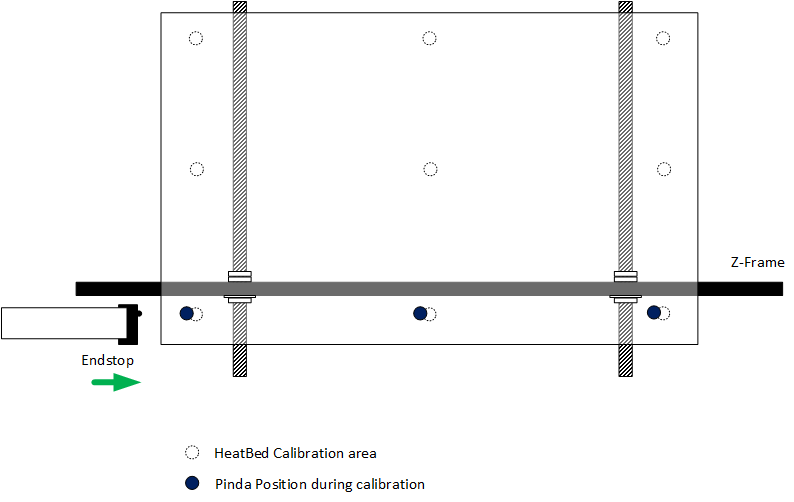
                  A misaligned P.I.N.D.A. Sensor is an issue that can be fixed by fine-tuning the printer. To do that, you need to calibrate the P.I.N.D.A. sensor position on multiple spots around the heated bed. Once we get the first three right, then you should not experience any calibration errors at all. 
                  Before you proceed with the checks and procedures outlined below, go through your assembly and make sure bearings/rods are lubricated, belt tension is good and that pulleys are properly secured, aligned, and free of any filament debris.

                  Side shift

                  Side shift is not very common due to the printer's design. However, the endstop can be misaligned during the assembly. To fix it, you must unscrew the Endstop and push it to its proper place. Then tighten the screws again and secure it with screws again, while holding it.
                  Front shift

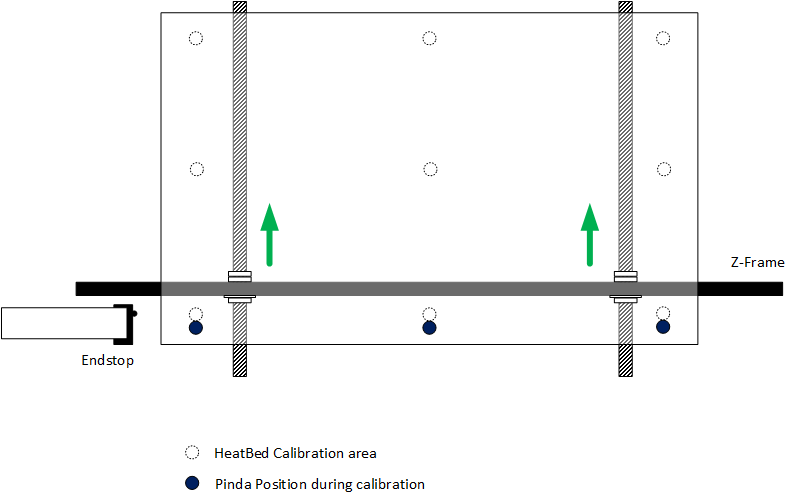
                  The front shift can happen if the frame is not perfectly perpendicular to the Front and the Rear of the printer. In order to fix it, simply unscrew the M12 nuts holding it and move the frame to its designed position (either to the front or back, depending on the relative position of the P.I.N.D.A. sensor). 

                  Make sure the Y-axis is perfectly level - all four corners of the frame must touch the ground.
                  Twist shift

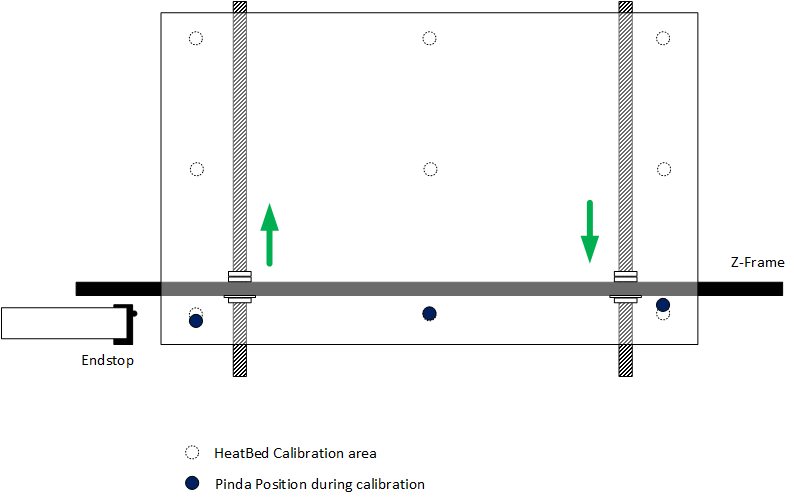
                  This is probably the most common issue with the Y-axis. Just like with the Front shift, simply unscrew the M12 bolts holding it and move the frame to the correct position.

                  Usually, it will be a combination of two problems. Take your time with fine-tuning, as it is crucial to achieving a proper calibration of your printer.

                  Was this article helpful?
                  This action is available only to registered users. Please log-in.

                  4 comments

                  Log in  to post a comment
                  Jonas Speckauskas
                  •
                  Does is possible to order PINDA sensor for MK2S?
                  Reply
                  Jan Kratochvíl
                  •

                  Hello. Please contact our support team for that.

                  Reply
                  beetleboo
                  •
                  For fixing side shift: 'you must unscrew the Endstop and push it to its proper place.' this is not actually possible on my mk2s? It is installed in a way that it cannot be moved.
                  Reply
                  OSCAR JAVIER CORREA JIMENEZ
                  •
                  Hola. Intento iniciar la calibración de la primera capa para fijar la distancia óptima entre la boquilla y la cama. Desafortunadamente, cuando me pregunta en el menú si el filamento está Cargado , le sigo si y no pasa nada, se va directamente a No. ¿Que podría estar pasando? Gracias 
                  Reply
                  Blas Palencia - Prusa Research
                  •
                  Hola. Parece que el sensor de filamento no está funcionando correctamente. Echa un ojo a los siguientes artículos que explican como resolver esto para el modelo MK3S/MK3S+.
                  https://help.prusa3d.com/es/article/resolucion-de-problemas-del-sensor-de-filamento-ir-mk2-5s-mk3s_112226
                  Si esto no te ayuda, o tienes otro modelo de impresora, contacta a nuestro equipo de Soporte Técnico.
                  https://help.prusa3d.com/es/article/atencion-al-cliente_2287
                  Un saludo,
                  Reply
                  Pabbo
                  •
                  Side Shift How can endstop adjustment help? My endstop has no play with which to set it further back -- it's always flush with the X-axis it's mounted under. PINDA is 1.5mm to the right of the heatbed calibration area -- it must be coming from somewhere else.What else can we check to fix side shift?
                  Reply
                  Pabbo
                  •
                  I somehow resolved this when I raised the PINDA probe. I'd incrementally lowered it more and more, until it was lower than the nozzle.
                  Reply

                  Topics

                  • Troubleshooting
                    • Printer troubleshooting
                      • Extrusion stopped mid-print (Heat creep)
                      • Spaghetti monster
                      • Extruder blob
                      • Clogged nozzle/hotend (MK3.5/S, MK3S+, MK2.5S)
                      • Extruder noises
                      • Filament Not Loading
                      • Misaligned PINDA Sensor (MK2/S)
                      • Print fan is not spinning
                      • Hotend fan is not spinning
                      • Heatbed not heating up properly
                      • P.I.N.D.A./SuperPINDA Sensor testing
                      • SD card not working
                      • LCD screen not working
                      • Printer does not turn on or keeps turning off
                      • Blown Fuse (MK2S/MK2.5/MK2.5S)
                      • MK3S keeps prompting filament change
                      • Vibration when printing (MK3S+/MK2.5S)
                      • Factory reset (MK2S/MK2.5S/MK3S)
                      • Firmware updating issues (MK2.5S/MK3S+/MMU2S/MMU3)
                      • Nozzle crashed into the heatbed
                      • IR Filament Sensor Troubleshooting (MK2.5S, MK3S)
                      • Failing Z calibration (MK3S/MK2.5S)
                      • PrusaLink Troubleshooting
                      • Tangled filament
                      • SD cards and USB drives
                    • Diagnostics
                    • Print Quality Troubleshooting
                    • QR Error codes
                    • Print Error Messages