Prusa
  • SHOP
    • Learn more
    • All deals
    3D printers
    • CORE One+ (Gen2)
    • CORE One L+
    • XL+
    • MK4S
    • Mini+
    • HT90
    Consumables and Merch
    • Prusament
    • Resin
    • Buddy filament
    • Merch
    • Accessories
  • SHOP
    • Latest products
    BY CATEGORY
    • 3D printersnew
    • Upgradesnew
    • Materials
    • Accessories
    • Spare parts
    • Courses
    • Merch
    • Sales inquiry & Price quote
    QUICK LINKS
    • Shipping information
    • Refunds & returns
    • Payment options
    • Warranty
    • VAT & Customs fees
    • FAQ

    0 item in your cartitems in your cart

    Your cart is empty

    Go to cartShop 3D printers

    My profile

    Log in to see orders, saved items

    My profile

    Signed in as

    • Orders
    • Logout
  • 3D PRINTING
    • Explore 3D printing
    FOR BEGINNERS
    • 3D printing 101
    • Types of printers (FDM/SLA)
    • How to choose a 3D Printer
    • Printables (3D models)
    BY APPLICATION
    • Rapid prototyping
    • Manufacturing
    • Engineering
    • Research
    • Arts & design
    GO DEEPER
    • Materials guide
    • Courses
    • Webinars
    • Case studies
    • Custom 3D printing
  • 3D PRINTERS
    • All 3D printers
    FOR
    • Home or garageHobbyists, tinkerers and home printing
    • Shop or studioIn-house production for small teams
    • EnterpriseFleets, security and scale
    • How to choose a 3D Printer
    SHOP & BROWSE
    • CORE One+new
    • CORE One+ INDXnew
    • CORE One L+new
    • CORE One L+ INDXnew
    • XL+new
    • MK4S
    • Prusa Pro HT90
    • Prusa Pro AFS
    • Prusa Pro SLX
    MORE FROM PRINTERS
    • Upgradesnew
    • Spare parts
    • Critical infrastructure
    • Case studies
    • Signature Oak
    • Kits
  • MATERIALS
    • All materials
    BY USE
    • Every-day & design
    • Functional engineering
    • Composites
    • Pro speciality
    • SLA resins
    PRUSAMENT
    • PLA
    • PETG
    • ASA
    • PC
    • PA11
    • Flex
    • TPU
    MORE FROM MATERIALS
    • Materials guide
    • We make material in house
    • Sustainability
    • Order on the store
  • SOFTWARE
    • All software
    PREPARE THE PRINT
    • PrusaSlicer 3.0New
    PRINT & MONITOR
    • Prusa Connect
    • EasyPrint
    • iOS & Android app
    • Prusa Farm
    GET STARTED
    • Download & install
    • Knowledge base
    MORE FROM SOFTWARE
    • Printables (3D models)
  • SUPPORT
    • Explore support
    FIND ANSWERS
    • Knowledge base
    • Troubleshooting
    • Courses
    • Webinars
    GET HELP
    • Contact us
    • Livechat
    • Shipping information
    • Warranty
    • Refunds & returns
    • Spare parts
    • Factory repair
    COMMUNITY
    • Forum
    • Reddit
    • Printables
  • TRUST CENTER
    • Trust Center overview
    BY TOPIC
    • GDPR
    • Certificates
    • Security
    • Compliance
    COMMITMENTS
    • Sustainability report
    TALK TO US
    • Contact the security team
  • COMPANY
    • About Prusa
    GET TO KNOW US
    • Our story
    • How we make printers
    • Open source
    • Brand & media kit
    NEWS
    • Blog
    • Newsroom
    • Events
    TRUST & PARTNERS
    • Sustainability
    • Resellers & distributors
    • Affiliate program
    • Contact
    • English
    • Čeština
    • Deutsch
    • Español
    • Français
    • Italiano
    • Polski
    • 日本語
  • Signed in as

    • Orders
    • Address
    • In-stock Alerts
    • My Courses
    • Subscription
    • Edit Account
    • Logout

Log in to see orders, saved items

Signed in as
  • Orders
  • Address
  • In-stock Alerts
  • My Courses
  • Subscription
  • Edit Account
  • English
  • Čeština
  • Deutsch
  • Español
  • Français
  • Italiano
  • Polski
  • 日本語
Shop

0 item in your cartitems in your cart

Your cart is empty

Go to cartShop 3D printers

My profile

Log in to see orders, saved items

My profile

Signed in as

  • Orders
  • Logout
SHOP
  • Latest products
BY CATEGORY
  • 3D printersnew
  • Upgradesnew
  • Materials
  • Accessories
  • Spare parts
  • Courses
  • Merch
  • Sales inquiry & Price quote
QUICK LINKS
  • Shipping information
  • Refunds & returns
  • Payment options
  • Warranty
  • VAT & Customs fees
  • FAQ

Featured products

    Popular categories

      Trending searches

        Articles

          Blog

            Products

              Categories

                Suggested searches

                  Searching…
                  No results
                  Something went wrong.
                  ↑↓ Select↵ OpenEsc Close search
                  1. Support
                  2. Original Prusa MMU2S
                  3. QR Error codes
                  4. MMU MCU Error #04306 (MMU)
                   

                  Contents

                  • What happened?
                  • How to fix it?

                  Blog

                  • 400°C HT Hotend is out! Plus: New Materials and HighTemp Sheets for CORE One+/L+.
                  • Blender for 3D Printing: The 5-Minute Guide to STL Editing
                  • Prusament Pellets: Raw material batches for large-format 3D printing or small-scale polymer research & development

                  Newsletter

                  Signup and get our monthly squeeze on updates, blog, printables and much more.

                  By clicking, you agree to receive our newsletter.

                  This site is protected by reCAPTCHA Enterprise and the Google Privacy Policy and Terms of Service apply.

                  Heavy Duty Keyboard Holder (No Supports)
                  E-shop
                  • 3D Printers
                  • Printer Upgrades
                  • Filaments
                  • Accessories
                  • Prusa Merchandise
                  Prusa

                  © Prusa Research a.s.

                  Printables
                  • 3D Models
                  • Store
                  • Clubs
                  • 3D Design Contests
                  • Brands
                  Community
                  • World Map
                  • Forum
                  • User Groups
                  • Events
                  Help
                  • Prusa Help
                  • Prusa Academy
                  • 3D Printing Calculators
                  Software
                  • PrusaSlicer
                  • Prusa.app
                  • Prusa Connect
                  • Drivers and Software
                  Company
                  • About Us
                  • Blog
                  • Official Prusa Resellers
                  • Contact Us
                  • Certified for ISO 9001, ISO 14001, ISO 45001
                  • General Terms and Conditions
                  • General Terms and Conditions of Use of the PRUSA Websites
                  • Privacy Policy
                  • Information about cookies
                  • Customer Complaints Policy
                  • Status Page
                  • Do Not Sell or Share My Personal Information
                  • Supplemental Statements
                  Prusa
                  • General Terms and Conditions
                  • General Terms and Conditions of Use of the PRUSA Websites
                  • Privacy Policy
                  • Information about cookies
                  • Customer Complaints Policy
                  • Status Page
                  • Do Not Sell or Share My Personal Information
                  • Supplemental Statements

                  © Prusa Research a.s.

                  JOSEF PRUSA®, PRUSA RESEARCH®, PRUSA POLYMERS®, PRUSA ORANGE®, PRUSA 3D ® AND PRUSAMENT® are registered trademarks of Prusa Development a.s. used by Prusa Research a.s. under licence from Prusa Development a.s.

                  MMU MCU Error

                  #04306 (MMU)

                  Relevant for

                  MMU2S
                  MMU3
                  19 comments
                  Article is also available in following languages
                  English
                  Čeština
                  Polski
                  Deutsch
                  Français
                  Español
                  Italiano
                  日本語

                  What happened?

                  The Main Control Unit on the MMU control board has detected a power-related issue.

                  How to fix it?

                  Do not touch, move, connect, or disconnect any cables or electronic components while the printer is on. This can result in irreversible damage! 

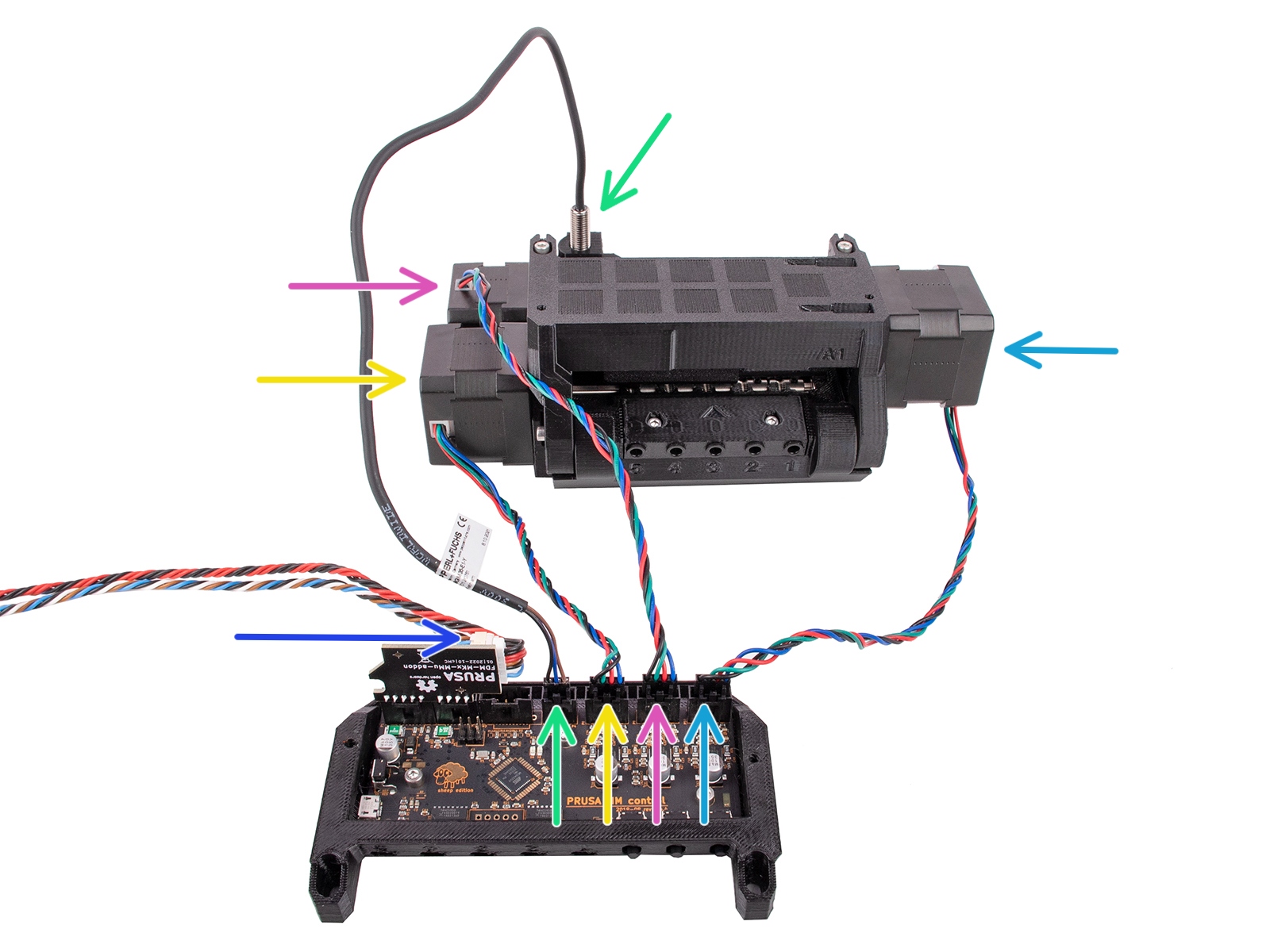
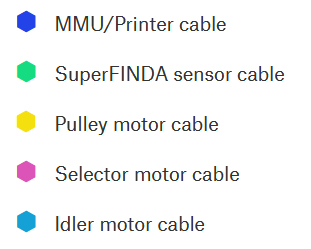
                  Access the MMU control board, and inspect it visually to spot any incorrect assembly or damage on its surface, on the cables, and attempt reseating the cables to ensure their connection. In particular, make sure that the PD-board add-on is attached to the control board.
                  If the issue is not solved with these checks, please contact our customer support. 

                  Was this article helpful?
                  This action is available only to registered users. Please log-in.

                  Topics

                  • Troubleshooting
                    • QR Error codes
                      • FINDA didn't trigger #04101 (MMU)
                      • FINDA: Filament Stuck #04102 (MMU)
                      • Filament sensor didn't trigger #04103 (MMU)
                      • Filament sensor: Fil. stuck #04104 (MMU)
                      • Pulley cannot move #04105 (MMU)
                      • Idler cannot home #04125 (MMU)
                      • Selector cannot home #04115 (MMU)
                      • Selector cannot move #04116 (MMU)
                      • Filament sensor too early #04106 (MMU)
                      • Inspect FINDA #04107 (MMU)
                      • MMU Overcurrent #31310 (CORE One) #35310 (CORE One L) #26310 (MK4S) #13310 (MK4) #27310 (MK3.9S) #21310 (MK3.9) #28310 (MK3.5S) #23310 (MK3.5)
                      • Load to extruder failed #04108 (MMU)
                      • Unload manually #04506 (MMU)
                      • Filament ejected #04507 (MMU)
                      • MMU Selftest failed #04305 (MMU)
                      • MMU not responding #04401 (MMU)
                      • Communication error #04402 (MMU)
                      • Firmware update needed #04504 (MMU)
                      • Firmware runtime error #04505 (MMU)
                      • TMC driver error #04301 (MMU)
                      • Invalid tool #04502 (MMU)
                      • Filament already loaded #04501 (MMU)
                      • Queue full #04503 (MMU)
                      • Unknown error #04900 (MMU)
                      • Warning: TMC too hot #04201 (MMU)
                      • Warning: TMC too hot #04211 (MMU)
                      • Warning: TMC too hot #04221 (MMU)
                      • TMC overheat error #04202 (MMU)
                      • TMC overheat error #04212 (MMU)
                      • TMC overheat error #04222 (MMU)
                      • TMC Driver reset #04302 (MMU)
                      • TMC Driver reset #04312 (MMU)
                      • TMC Driver reset #04322 (MMU)
                      • TMC Undervoltage error #04303 (MMU)
                      • TMC Undervoltage error #04313 (MMU)
                      • TMC Undervoltage error #04323 (MMU)
                      • MMU MCU Error #04306 (MMU)
                      • TMC driver error #04311 (MMU)
                      • TMC driver error #04321 (MMU)
                      • MMU Selftest failed #04315 (MMU)
                      • MMU Selftest failed #04325 (MMU)
                      • Filament change #04508 (MMU)
                      • MMU MCU Underpower #04307 (MMU)
                      • TMC driver shorted #04304 (MMU)
                      • TMC driver shorted #04314 (MMU)
                      • TMC driver shorted #04324 (MMU)
                      • Print preview MMU filament inserted #31806 (CORE One) #26806 (MK4S) #13806 (MK4) #27806 (MK3.9S) #21806 (MK3.9) #28806 (MK3.5S) #23806 (MK3.5)
                      • Print preview tools mapping #31814 (CORE One) #36814 (CORE One INDX) #17814 (XL) #26814 (MK4S) #13814 (MK4) #27814 (MK3.9S) #21814 (MK3.9) #28814 (MK3.5S) #23814 (MK3.5)
                      • MMU load unload error #31815 (CORE One) #26815 (MK4S) #13815 (MK4) #27815 (MK3.9S) #21815 (MK3.9) #28815 (MK3.5S) #23815 (MK3.5)
                      • Maintenance warning #31117 (CORE One) #26117 (MK4S) #13117 (MK4) #27117 (MK3.9S) #21117 (MK3.9) #28117 (MK3.5S) #23117 (MK3.5)
                      • Maintenance failure warning #28116 (MK3.5S) #23116 (MK3.5)
                      • Maintenance failure warning #31116 (CORE One) #26116 (MK4S) #13116 (MK4) #27116 (MK3.9S) #21116 (MK3.9)
                    • Diagnostics
                    • Print Quality Troubleshooting
                    • Printer troubleshooting
                    • Print Error Messages

                  9 comments

                  Log in  to post a comment
                  Pj Brennnan
                  •
                  Watch the video posted above about swapping the pins, it works and takes 5 minutes. Thank you
                  Reply
                  VBauerova
                  •
                  This error occured on my MMU2S after cca 2 years of printing, it was coming back even after separating the two cables and cleaning the contacts. Just came across this "hack" and I'm dropping it here for future fellow-sufferers:https://youtu.be/JAWqIH_U66s?si=LUZmsJ8fk_z3WLc2&t=1136
                  Reply
                  Juraj Rojko
                  •
                  Fixed my problem, thank you.
                  Reply
                  HarrySatt
                  •
                  I get the MMU MCU Error #04306. It occures frequently after update to last revision of MMU firmware (MMU2S). I see that I have to fidle around with some wires but is that real. Nothing had changend in the hardware only the firmware was updated. Is there a fix on the way or do I have to live with that. It is a bit annoying, by the best.
                  Now I am told I have to upgrade to MMU3 because of firmware not working. Curious.
                  Reply
                  David B.
                  •

                  Hi! There is no fix on the way. It is a hardware issue. MMU3 upgrade solves it. Prusa used to offer a free MMU3 upgrade voucher to the users having this issue persisting, till the end of the last year. You can try to reach out to the support to see if they might somehow help you - but fidding with the cable usually is not a proper long-term solution.

                  Reply
                  cschmehr
                  •
                  Same error here. Separating the cables as shown above solved the problem. I'm a bit frustrated that this error occurred after a firmware update and you need to dig into the comments section to find out that it is an known issue. Would be nice to highlight this directly in the help article. Would have saved me a lot of time figuring out what's going on. 
                  Reply
                  AudienceOfOne
                  •
                  I will try to post the picture here.  When i tired to add in my post above, it took over the entire post: (sorry the picture did not post, but if you chat with tech support i would assume you can get the picture.  will mostmaybe this link will work:https://na01.safelinks.protection.outlook.com/?url=https%3A%2F%2Fcdn.livechat-files.com%2Fapi%2Ffile%2Flc%2Fatt%2F9644675%2F4ade6ef91d2dec99186d9be61b40aa53%2Fimage.png&data=05%7C02%7C%7Ce0938bff70634118d7be08dc01d9ed56%7C84df9e7fe9f640afb435aaaaaaaaaaaa%7C1%7C0%7C638387282703523549%7CUnknown%7CTWFpbGZsb3d8eyJWIjoiMC4wLjAwMDAiLCJQIjoiV2luMzIiLCJBTiI6Ik1haWwiLCJXVCI6Mn0%3D%7C3000%7C%7C%7C&sdata=2391nnJd%2BJWGbgH6Zc4bEsO4p2mwrcSKXwq5Q%2Bvi0Ew%3D&reserved=0
                  Reply
                  David B.
                  •

                  Hi! This might work because you "refreshed" the loose connection in the cables by moving them. This is probably not a good long-term solution though. In case the MCU error comes back, try to clean the connectors. If nothing helps to get rid of the issue entirely, contact support. They might be able to provide you with a MMU3 upgrade voucher till the end of this year.

                  Reply
                  AudienceOfOne
                  •
                  Could be, but i have been successfully printing for 2 days without issue.  I had wiggled / adjusted the two connectors prior to seperating the wires and still encountered the issue - IIRC.BTW, the latest MMU2 firmware is awesome.  I had all sorts of issues with my MMU2s with the old firmware.  It worked for a few months, then I encountered all sorts of issue getting filament to load where i mainly encountered the filament grinding at the MMU2.  After the upgrade I have not encountered this issue at all.
                  Reply