Prusa
  • SHOP
    • Latest products
    BY CATEGORY
    • 3D printersnew
    • 3D printer upgradesnew
    • Materials
    • Accessories
    • Spare parts
    • Courses
    • Merch
    • Get a price quote
    QUICK LINKS
    • Shipping & delivery
    • Returns & refunds
    • Payment & financing
    • Warranty
    • VAT & Customs fees
    • FAQ

    0 item in your cartitems in your cart

    Your cart is empty

    Go to cartShop 3D printers

    My profile

    Log in to see orders, saved items

    My profile

    Signed in as

    • Orders
    • Logout
  • 3D PRINTING
    • Explore 3D printing
    FOR BEGINNERS
    • 3D printing 101
    • How FDM printing works
    • Buying your first printer
    • 3D model catalog
    BY APPLICATION
    • Rapid prototyping
    • Manufacturing
    • Engineering
    • Research
    • Arts & design
    GO DEEPER
    • Materials guide
    • Courses
    • Webinars
    • Case studies
    • Custom 3D printing
  • 3D PRINTERS
    • All 3D printers
    FOR
    • Home or garageHobbyists, tinkerers and home printing
    • BusinessIn-house production for small teams
    • EnterpriseFleets, security and scale
    • Which Prusa is right for me
    SHOP & BROWSE
    • CORE One+new
    • CORE One+ INDXnew
    • CORE One L+new
    • CORE One L+ INDXnew
    • XL+new
    • MK4S
    • Prusa Pro HT90
    • Prusa Pro AFS
    • Prusa Pro SLX
    MORE FROM PRINTERS
    • Parts & upgradesnew
    • Spare parts
    • Critical infrastructure
    • Case studies
    • Signature Oak
    • Kits
  • MATERIALS
    • All materials
    BY USE
    • Every-day & design
    • Functional engineering
    • Composites
    • Pro speciality
    • SLA resins
    PRUSAMENT
    • PLA
    • PETG
    • ASA
    • PC
    • PA11
    • Flex
    • TPU
    MORE FROM MATERIALS
    • Materials guide
    • We make material in house
    • Sustainability
    • Order on the store
  • SOFTWARE
    • All software
    PREPARE THE PRINT
    • PrusaSlicer 3.0New
    PRINT & MONITOR
    • Prusa Connect
    • EasyPrint
    • iOS & Android app
    • Prusa Farm
    GET STARTED
    • Download & install
    • Knowledge base
    MORE FROM SOFTWARE
    • 3D model catalog
  • SUPPORT
    • Explore support
    FIND ANSWERS
    • Knowledge base
    • Troubleshooting
    • Courses
    • Webinars
    GET HELP
    • Contact us
    • Livechat
    • Shipping & delivery
    • Warranty
    • Returns & refunds
    • Service & spare parts
    • Service & Repair
    COMMUNITY
    • Forum
    • Reddit
    • Printables
  • TRUST CENTER
    • Trust Center overview
    BY TOPIC
    • GDPR
    • Certificates
    • Security
    • Compliance
    COMMITMENTS
    • Sustainability report
    TALK TO US
    • Contact the security team
  • COMPANY
    • About Prusa
    GET TO KNOW US
    • Our story
    • How we make printers
    • Open source
    • Brand & media kit
    NEWS
    • Blog
    • Newsroom
    • Events
    TRUST & PARTNERS
    • Sustainability
    • Resellers & distributors
    • Affiliate program
    • Contact
    • English
    • Čeština
    • Deutsch
    • Español
    • Français
    • Italiano
    • Polski
    • 日本語
  • Signed in as

    • Orders
    • Address
    • In-stock Alerts
    • My Courses
    • Subscription
    • Edit Account
    • Logout

Log in to see orders, saved items

Signed in as
  • Orders
  • Address
  • In-stock Alerts
  • My Courses
  • Subscription
  • Edit Account
  • English
  • Čeština
  • Deutsch
  • Español
  • Français
  • Italiano
  • Polski
  • 日本語
Shop

0 item in your cartitems in your cart

Your cart is empty

Go to cartShop 3D printers

My profile

Log in to see orders, saved items

My profile

Signed in as

  • Orders
  • Logout
SHOP
  • Latest products
BY CATEGORY
  • 3D printersnew
  • 3D printer upgradesnew
  • Materials
  • Accessories
  • Spare parts
  • Courses
  • Merch
  • Get a price quote
QUICK LINKS
  • Shipping & delivery
  • Returns & refunds
  • Payment & financing
  • Warranty
  • VAT & Customs fees
  • FAQ

Featured products

    Popular categories

      Trending searches

        Articles

          Blog

            Products

              Categories

                Suggested searches

                  Searching…
                  No results
                  Something went wrong.
                  ↑↓ Select↵ OpenEsc Close search
                  1. Support
                  2. Printer maintenance
                  3. Firmware updating (MINI/MINI+)
                   

                  Contents

                  • Updating from firmware pre-4.4.0
                  • Alternative method - older firmware release

                  Blog

                  • Prusament Pellets: Raw material batches for large-format 3D printing or small-scale polymer research & development
                  • Print colorful and glowing Halloween decorations with our spooky offer
                  • Factorio Has Arrived on Printables

                  Newsletter

                  Signup and get our monthly squeeze on updates, blog, printables and much more.

                  By clicking, you agree to receive our newsletter.

                  This site is protected by reCAPTCHA Enterprise and the Google Privacy Policy and Terms of Service apply.

                  Heavy Duty Keyboard Holder (No Supports)
                  E-shop
                  • 3D Printers
                  • Printer Upgrades
                  • Filaments
                  • Accessories
                  • Prusa Merchandise
                  Prusa

                  © Prusa Research a.s.

                  Printables
                  • 3D Models
                  • Store
                  • Clubs
                  • 3D Design Contests
                  • Brands
                  Community
                  • World Map
                  • Forum
                  • User Groups
                  • Events
                  Help
                  • Prusa Help
                  • Prusa Academy
                  • 3D Printing Calculators
                  Software
                  • PrusaSlicer
                  • Prusa.app
                  • Prusa Connect
                  • Drivers and Software
                  Company
                  • About Us
                  • Blog
                  • Official Prusa Resellers
                  • Contact Us
                  • Certified for ISO 9001, ISO 14001, ISO 45001
                  • General Terms and Conditions
                  • General Terms and Conditions of Use of the PRUSA Websites
                  • Privacy Policy
                  • Information about cookies
                  • Customer Complaints Policy
                  • Status Page
                  • Do Not Sell or Share My Personal Information
                  • Supplemental Statements
                  Prusa
                  • General Terms and Conditions
                  • General Terms and Conditions of Use of the PRUSA Websites
                  • Privacy Policy
                  • Information about cookies
                  • Customer Complaints Policy
                  • Status Page
                  • Do Not Sell or Share My Personal Information
                  • Supplemental Statements

                  © Prusa Research a.s.

                  JOSEF PRUSA®, PRUSA RESEARCH®, PRUSA POLYMERS®, PRUSA ORANGE®, PRUSA 3D ® AND PRUSAMENT® are registered trademarks of Prusa Development a.s. used by Prusa Research a.s. under licence from Prusa Development a.s.

                  Firmware updating

                  (MINI/MINI+)

                  Relevant for

                  MINI
                  MINI+
                  54 comments
                  Article is also available in following languages
                  English
                  Čeština
                  Polski
                  Deutsch
                  Français
                  Español
                  Italiano
                  日本語

                  On the MINI you flash the firmware using a USB flash drive.

                  1. Download the Zip file for the firmware and extract it on your computer.
                  2. Copy the .bbf file in your chosen language to the root directory of a USB flash drive (Not within a folder). All files have the English language, and if all files are added, the chosen languages will be English and Czech.
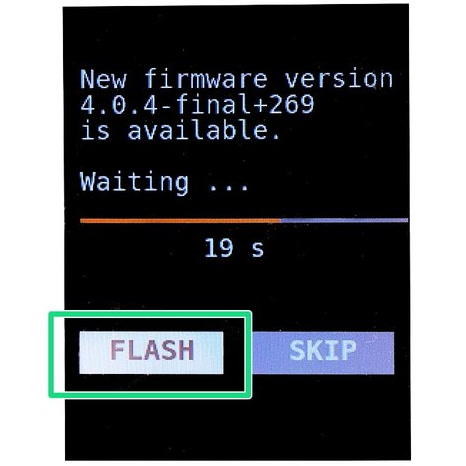
                  3. Insert the USB flash drive and push the reset button. The bootloader will automatically compare the installed version with the one on the drive and, if newer, will automatically offer you to flash it.
                  4. Confirm the update by selecting the "FLASH" button and pressing the knob.
                  If you have received the error "Firmware in the internal flash corrupted" use the alternative method below.

                  Updating from firmware pre-4.4.0

                  Starting from firmware, 4.4.0, the MINI+ has a new bootloader. This might cause some trouble when updating the firmware to version 5.1.0 and above. In this case, download firmware 4.4.0 or 4.4.1. The downloaded folder will have two files. Flash the printer firmware with the two files in the USB drive. After that, flash the latest firmware as usual.

                  Alternative method - older firmware release

                  It is not possible to flash to the same, or an older version of the firmware release, using the method above. To flash an older firmware the procedure is as follows:

                  1. Push the reset button, immediately followed by double-pressing the selector knob.
                  2. On the new screen, confirm the update by selecting the "FLASH" button and pressing the knob. 
                  If it repeatedly only boots the printer and gives you the home screen try to format your USB flash-drive or try a different one. Even if the flash drive works with G-Codes and printing, it may not work for flashing the firmware.
                  Was this article helpful?
                  This action is available only to registered users. Please log-in.

                  Topics

                  • Using the printer
                    • Printer maintenance
                      • How to remove a stripped screw
                      • SD cards and USB drives
                      • How to replace a M.I.N.D.A. sensor (MINI)
                      • How to replace a print fan (MINI)
                      • How to replace a hotend PTFE tube (MINI/MINI+)
                      • How to replace a hotend fan (MINI)
                      • How to replace a heatsink (MINI/MINI+)
                      • How to replace a heaterblock/heatbreak (MINI/MINI+)
                      • How to replace a Buddy control board (MINI)
                      • Firmware updating (MINI/MINI+)
                      • Cold pull (MINI)
                      • How to access and clean the extruder-pulley (MINI/MINI+)
                      • Buddy electronics Wiring (MINI)
                      • How to update firmware (MINI/MINI+)
                      • Regular maintenance (MINI/MINI+)
                      • Changing/replacing the nozzle (MINI)
                      • How to replace a print head PTFE tube (MINI/MINI+)
                      • How to replace a heatbed thermistor (MINI/MINI+)
                      • How to replace a hotend thermistor (MINI/MINI+)
                      • Height adjustment of M.I.N.D.A./SuperPINDA sensor (MINI/+)
                      • How to replace a hotend heater (MINI/MINI+)
                      • How to replace a heatbed (MINI/MINI+)
                      • Adjusting belt tension (MINI/MINI+)
                      • How to replace an extruder motor (MINI/MINI+)
                      • How to replace SuperPINDA (MINI/MINI+)
                      • How to replace bearings on the X-axis (MINI/MINI+)
                      • How to replace bearings on the Y-axis (MINI/MINI+)
                      • Vibration/noise when printing (MINI/MINI+)
                      • How to replace a heatbed set (MINI/MINI+)
                      • How to post-process the printed parts
                      • How to trim PTFE tube - Original Prusa printers
                      • Replacing the PEI sheet on the (MK3S/MK3/MK2.5S/MK2.5)
                    • 3D models
                    • Material guide
                    • Slicing
                    • Prusa Connect & PrusaLink

                  27 comments

                  Log in  to post a comment
                  Taylor Ketterling
                  •
                  Hi, just had to deal with updating my Prusa Mini (original). I had 4.3.4 with boot loader 1.0.0.

                  Leaving a comment to maybe help others. As the latest PrusaSlicer is not compatible with the older firmware.

                  Using this page : https://help.prusa3d.com/downloads/mini?versions=all
                  I downloaded the 4.4.0, unzipped and dragged and dropped the two .bbf files onto a flash drive.

                  I flashed the update, the bootloader installed successfully but then immediately went into an error state saying the files were corrupted on the drive and to retry the flash process(red screen saying retry). I took the chance to then put install 4.4.1 (both files) onto the same drive, and click retry(leaving the system powered on in the error state while i downloaded the 4.4.1 files). This successfully installed FW 4.4.1

                  With FW 4.4.1 and boot loader 2.0.2 successfully installed I was able to download the latest FW, 6.4.0 onto the flash drive and flash the latest FW without a hitch.

                  this guide helps explain a bit: https://help.prusa3d.com/article/firmware-updating-mini-mini_124784

                  Biggest issue i had was my original flash drive I was try to use I guess is slow or something as the FW was never recognized and the system would boot straight to home screen. Searching around the house i found an old flash drive and tried the above steps and it worked fine. so if you are having the issue of the system not going through the Firmware update steps, despite having having both 4.4.1 .bbf files, it may simply be the speed of the drive you are using is too slow and is not recognized before the bootup process completes.
                  Reply
                  David Stewart
                  •
                  THANK YOU! This worked for me.
                  Reply
                  DianaP
                  •
                  It helped a lot. Thanks
                  Reply
                  Marc3D
                  •
                  Ondertussen is het gelukt om update 4.4.1 te plaatsen, na deze te downloaden op de laptop, de update-map geopend en de twee verschillende bladen AFZONDERLIJK te kopieëren naar een nieuwe en geformateerde Usb-stick(8GB). De stick in de printer geplaatst, printer aangezet en het scherm met flach-knop verscheen knop vlug ingedrukt en de update starte.Instalatie gelukt(dit duurt wel even). Nadien de nieuwste firmware gedownload op de computer. nu enkel blad met Engels- tsechisch gekopieerd naar zelfde usb stick .Stick geplaatst in de printer, printer aangezet en weer de knop flach ingedrukt, deze update ging sneller.
                  Reply
                  Marc3D
                  •
                  Geeft iemand een duidelijke werkwijze om de prusa mini up te daten ? Heb al de hele dag vanalles ( nieuwe usb-stick, geformateerd, gereset, ook ubdate naar 4.4.1 lukt niet )geprobeerd, niets blijkt te werken, ook met de live chat geraak ik er niet uit. Graag had ik de printer nog gebruikt, nog maar 70uur mee geprint.
                  Reply
                  rtorstrick
                  •
                  I've tried at least 20 times using 3 different USB drives, and all I ever get is the normal startup screen. Is there anything else I can try?
                  Reply
                  ceallachan
                  •
                  Sorry to tack myself on, but same. Bootloader 1.0.0, Mini version 4.3.1
                  Reply
                  Daniel Glauber
                  •
                  I'm having the same problem. I have version 4.3.4 and have tried updating to 4.4.0 and 4.4.1 with the new bootloader, but it has no effect. I reformatted the flash drive, removed all files except the 4.4.0 bootloader and the latest 4.4.0 firmware, and it still won't detect the bootloader file or the 4.4.0 firmware. It's very frustrating. Can someone help please?
                  Reply
                  DKAS
                  •
                  Have you tried the alternative method reset button + 2x pushing selector knob?

                  If you do and printer still won't perform flashing sequence, please contact our customer support.
                  Reply
                  statusfailed
                  •
                  I had exactly the same problem: version 4.3.4 wouldn't update to 4.4.1.

                  I tried David Kašpar's solution, but it didn't work: I would get a red "wrong size" error at boot.

                  Here is what worked for me:

                  - Blank 8GB USB formatted to FAT32
                  - Add ONLY the file `Buddy_update_pre_4.4_4.4.1+4194.bbf` from the 4.4.1 update
                  - Boot MINI+ (I didn't need the 2x selector knob trick)
                  - Wait until MINI+ starts showing "Updating bootloader" and "looking for BBF..." one after the other
                  - Turn off the MINI+
                  - Add the other file `Buddy_4.4.1+4194.bbf`
                  - Reboot again
                  - Update should complete

                  Hope this helps!
                  Reply
                  tmoneyru1z
                  •
                  This is the way
                  Reply
                  JQLN
                  •
                  This is precisely what worked for me on an original MINI, same issues.
                  Reply
                  Observatus
                  •
                  The reset button plus press the button twice quickly worked for me. I went from my first generation firmware to 6.2.2. But the temperatures seem to be the same that they were before but now the filament is not adhering to the platinum or the print sheet. I checked the temperatures in the slicer, G code, and printer settings, and the temperatures look right on the display as it's preparing to print. But still the same filament that worked before does not work now. Any advice would be greatly appreciated. I've tried three different brands of PLA filament also.
                  Reply