AA

Productos destacados

    Categorías populares

      Búsquedas populares

        Artículos

          Blog

            Productos

              Categorías

                Búsquedas sugeridas

                  Buscando…
                  Sin resultados
                  Algo salió mal.
                  ↑↓ Seleccionar↵ AbrirEsc Cerrar búsqueda
                  • English
                  • Čeština
                  • Deutsch
                  • Español
                  • Français
                  • Italiano
                  • Polski
                  • 日本語
                  • Pedidos
                  • Dirección
                  • Alertas de Stock
                  • Cursos
                  • Subscripción
                  • Editar Cuenta
                  • Impresoras 3D9+▾

                    Impresoras 3Dnueva

                    nuevaPrusa CORE One L+Conoce más
                    nuevaPrusa CORE One+ (Gen 2)Conoce más
                    newPrusa CORE One L+ INDX 8-ToolnuevaPrusa CORE One+ (Gen 2) INDX 8 HerramientasPrusa CORE One L+: Critical InfrastructureOriginal Prusa MK4SnuevaOriginal Prusa XL+Original Prusa XL+: Critical Infrastructure

                    Actualizaciones de impresoras

                    newKit de Conversión CORE One/+ INDXnuevaActualizació Prusa CORE One L a CORE One L+nuevaPrusa CORE One+ a Prusa CORE One+ (Gen 2)nuevaActualización Prusa XL a Prusa XL+
                    Programa de Recompensas PrusaComparte. Recomienda. Gana.
                    ¿Cómo Elegir Una Impresora 3D?Te guiaremos paso a paso por los aspectos básicos para que encuentres la máquina ideal para tu espacio, presupuesto e ideas.
                    Libro electrónico gratuitoDescarga gratis el libro electrónico Fundamentos de la Impresión 3D con Josef Prusa y da tus primeros pasos en el mundo de la impresión 3D
                    Piezas Imprimibles Original PrusaColecciones de piezas de repuesto imprimibles para impresoras 3D Original Prusa y mejoras.
                    Información de envíoInformación actualizada periódicamente sobre la capacidad de fabricación actual y los plazos de entrega de nuestras impresoras.
                    Impresión 3D PersonalizadaImpresión 3D personalizada profesional con diversos materiales según sus requisitos.
                  • Materiales▾

                    Filamentos

                    PrusamentPLAPETGASA / ABSPC BlendPA (Nylon)FlexCompositesEspecialLiquidación de materiales

                    Resinas

                    ResinaLimpiador Resina
                    Guía de FilamentoComprobar Mi Bobina Prusament
                    Prusament.com
                  • Piezas y Accesorios▾

                    Accesorios

                    EnclosureBoquillasLáminas de ImpresiónAccesorios EsencialesCámaras y ComplementosHerramientas y ManualidadesAdhesivos

                    Piezas de recambio

                    Merchandising

                    Piezas de recambio - Todas las ImpresorasCORE OneMK4/S y MK3.9/SMK3/MK3S/MK3S+XL
                    Merch
                  • Para Empresas▾
                    Prusa Pro HT90Prusa Pro SLXPrusa Pro AFSPrusa Pro Medical OneOriginal Prusa XLOriginal Prusa XL: Critical Infrastructure
                    Prusa CORE One+Conoce más
                    Prusa CORE One LConoce más
                    Prusa CORE One L: Critical Infrastructure Edition

                    Impresión 3D para

                    Fabricación e I+DIndustria AutomotrizSanidadEducación e Investigación AcadémicaArquitectos y DiseñadoresIndustria del CineInfraestructuras Críticas

                    Stories de Impresión 3D

                    • Cómo comenzó la impresión 3D: Sobre Rep-rap y el código abierto con Adrian Bowyer
                    • La enseñanza de las matemáticas redefinida con la impresión 3D en JKU Linz
                    • La historia detrás del destornillador de LTT
                    • Victoria Hand Project: Cambiando la Atención Protésica con la Impresión 3D
                    Distribuidores Oficiales de Prusa
                    Sostenibilidad
                    Prusa Education
                    Contactar y Consultar
                    Impresión 3D personalizada
                    Certificado ISO
                  • Software▾
                    PrusaSlicer

                    PrusaSlicerPrusaSlicer

                    PrusaSlicer es una herramienta de código abierto, con numerosas funciones y que se actualiza con frecuencia, que incluye todo lo necesario para exportar los archivos de impresión perfectos para tu impresora 3D.

                    WindowsMacOSLinux
                    Prusa Connect

                    Prusa Connect

                    Prusa Connect es un servicio en la nube que permite controlar y supervisar de forma remota tus impresoras 3D, y que ofrece un tratamiento seguro de los datos, una configuración sencilla y la posibilidad de gestionar varias impresoras desde cualquier lugar.

                    Inicia Sesión en Connect
                    Prusa.app

                    Prusa.app

                    Controla tu(s) impresora(s) de forma remota desde cualquier lugar gracias a la tecnología Prusa Connect. Prusa.app ofrece una experiencia totalmente nueva con las impresoras Prusa en teléfonos Android e iOS.

                    ¡Pruébalo ya!
                    Controladores y firmwareDescarga el firmware y los controladores más recientes para tu impresora 3D.
                    Soporte para PrusaSlicer
                    Soporte para Prusa Connect
                  • Modelos 3D▾
                    Impresoras 3DArte y DiseñoHobby y MakersHogarMiniaturas de EscritorioJuguetes y JuegosTienda de Printables

                    Modelos 3D populares

                    • Strong garden hose holder
                    • Prusa Spool Bot
                    • Build Tray — Modular Organizer for Assembly, Disassembly and Maintenance
                    • Broom Holder
                    • Octagon Fabric
                    • Prusa CORE One ? (Mimic Skin)

                    Concursos de Diseño

                    • Framework Laptop 12 Mainboard Wiederverwendung1/9/2026 – 30/9/2026
                    • 🏆 Designer Herausforderung: Zaubertricks!1/9/2026 – 22/9/2026
                    • Make-up Aufbewahrungslösungen4/9/2026 – 20/9/2026
                  • Comunidad▾

                    Próximos eventos

                    • IFA 20264/9/2026 – 8/9/2026 · Berlin, Germany · Prusa Team
                    • Maker Faire Bay Area25/9/2026 – 27/9/2026 · Kalifornie, United States · Prusa Team
                    • 3D Printopia 202626/9/2026 – 27/9/2026 · Pennsylvania, United States · Prusa Team
                    • Hobby Messe2/10/2026 – 4/10/2026 · Sachsen, Germany · Prusa Team

                    Prusa Forum

                    • Perfil para prusaslicer de MK4 con MMU3 y boquilla de 0,25 para cuando?
                    • Casi convencido de pulsar sobre comprar... convenceme
                    • Core One+: Fallo en calibración del sensor de filamento (Valores ADC fuera de rango / Error 2147483647)
                    Mapamundi de PrusaMapamundi de PrusaEncuentra usuarios de impresión 3D de tu zona y descubre la comunidad que te rodea.
                  • Ayuda▾
                    Guías y TutorialesPrusaSlicerPrusa ConnectMateriales

                    Modelo de Impresora

                    CORE One INDXCORE One LCORE One+CORE One

                    Resolución de Problemas de Hardware

                    • Fallo Selftest (CORE One/+)
                    • Hotend atascado (MK4)
                    • Ajustando la tensión de la correa (CORE One L, CORE One)
                    • Prusa Connect y PrusaLink explicado

                    Drivers & Firmware

                    Familia INDXFamilia CORE OneFamilia MK4Familia XLFamilia MMUFamilia PRO
                  • Cursos▾

                    Conviértete en un experto en impresión 3D

                    Prusa Academy ofrece cursos en línea sobre diversos temas relacionados con la impresión 3D. Cada curso incluye: textos fáciles de leer con numerosas imágenes y vídeos breves; enlaces para inspirarse y profundizar en el tema; cuestionarios para poner a prueba tus conocimientos a lo largo del curso; y un certificado de finalización.

                    Ver todos los cursosMi biblioteca de cursos
                    • Modelado 3D en Autodesk Fusion
                    • Masterclass de PrusaSlicer – De Principiante a Experto
                    • Complete Guide to 3D Print Postprocessing, Painting, and Detailing
                    • Airbrush Your 3D Prints: From Basics to Advanced Tricks
                  • Blog▾
                    • ¡Las Ofertas de la Vuelta al Cole 2026 Han Llegado!
                    • Preview de PrusaSlicer 3.0 – Diseñado para el Futuro de la Impresión 3D
                    • Prusa CORE One+ (Gen 2) INDX, Envíos Iniciados, Impresoras Completas Abiertas a Pedidos
                    E-Book: Fundamentos de la impresión 3D
                  • Empresa▾

                    Sobre Prusa Research

                    Somos el mayor fabricante de impresoras 3D de Europa y Estados Unidos. La empresa fue fundada en 2012 como una startup unipersonal por Josef Prusa, un aficionado, creador e inventor checo. En solo 15 años, hemos crecido hasta convertirnos en una empresa con más de 1.200 empleados. Cada mes, diseñamos, fabricamos y enviamos más de 10000 impresoras 3D innovadoras y seguras desde nuestras sedes de Praga (República Checa) y Delaware (EE. UU.) a usuarios de más de 160 países. ¡Mira el vídeo y descubre cómo nació Prusa Research y lo que hemos logrado en tan solo 10 años!

                    Sobre NosotrosLínea temporalSostenibilidadOpen-source
                    Sobre nosotros
                    Contacta con Nosotros
                    Logo e Imágenes
                    Certificado ISO
                  1. Soporte
                  2. Original Prusa MK3.9S
                  3. Resolución de problemas
                  4. Under-extrusion (Nextruder printers)
                   

                  Contenidos

                  • Nozzle
                  • Slicer settings
                  • Gearbox alignment
                  • Filament

                  Blog

                  • ¡Las Ofertas de la Vuelta al Cole 2026 Han Llegado!
                  • Preview de PrusaSlicer 3.0 – Diseñado para el Futuro de la Impresión 3D
                  • Prusa CORE One+ (Gen 2) INDX, Envíos Iniciados, Impresoras Completas Abiertas a Pedidos

                  Newsletter

                  Regístrate y obtén nuestro dosier mensual de información útil sobre nuevos firmwares, nuevas versiones de PrusaSlicer y consejos generales para proyectos de impresión 3D.

                  Al hacer clic, aceptas recibir nuestra newsletter.

                  Este sitio está protegido por reCAPTCHA Enterprise y se aplican la Política de Privacidad y los Condiciones del servicio de Google.

                  Strong garden hose holder
                  Tienda
                  • Impresoras 3D
                  • Mejoras de Impresoras
                  • Filamentos
                  • Accesorios
                  • Merchandising Prusa

                  © Prusa Research a.s.

                  Printables
                  • Modelos 3D
                  • Store
                  • Clubs
                  • Concursos de Diseño 3D
                  • Brands
                  Comunidad
                  • Mapa Mundial
                  • Foro
                  • Grupos de Usuarios
                  • Eventos
                  Ayuda
                  • Ayuda Prusa
                  • Prusa Academy
                  • Calculadoras de Impresión 3D
                  Software
                  • PrusaSlicer
                  • Prusa.app
                  • Prusa Connect
                  • Drivers y Software
                  Empresa
                  • Sobre nosotros
                  • Blog
                  • Distribuidores Oficiales de Prusa
                  • Contacto
                  • Certificado conforme a las normas ISO 9001, ISO 14001 e ISO 45001
                  • Términos y Condiciones generales
                  • Términos Generales y Condiciones de Uso de los sitios Web PRUSA
                  • Política de privacidad
                  • Información sobre las cookies
                  • Política de Reclamaciones de los Clientes
                  • Página de Estado de los Sitios Web
                  • Configuración de las cookies
                  • Términos y Condiciones generales
                  • Términos Generales y Condiciones de Uso de los sitios Web PRUSA
                  • Política de privacidad
                  • Información sobre las cookies
                  • Política de Reclamaciones de los Clientes
                  • Página de Estado de los Sitios Web
                  • Configuración de las cookies

                  © Prusa Research a.s.

                  JOSEF PRUSA®, PRUSA RESEARCH®, PRUSA POLYMERS®, PRUSA ORANGE®, PRUSA 3D ® Y PRUSAMENT® son marcas registradas de Prusa Development a.s. utilizadas por Prusa Research a.s. bajo licencia de Prusa Development a.s.

                  Under-extrusion

                  (Nextruder printers)

                  Relevante para

                  CORE One family
                  MK4 family
                  XL family
                  MK3.9 family
                  Artículo está también disponible en los siguientes idiomas
                  English
                  Čeština
                  Polski
                  Deutsch
                  Français
                  Español
                  Italiano
                  日本語

                  You can recognize under extrusion when there is material missing in your print’s layers. Printed objects with under extruded layers can be fragile and tend to break apart. There could be several causes to under-extrusion and you should also think if you recently did any changes to your printer (or perhaps no maintenance for a long period), as you might find the culprit there.
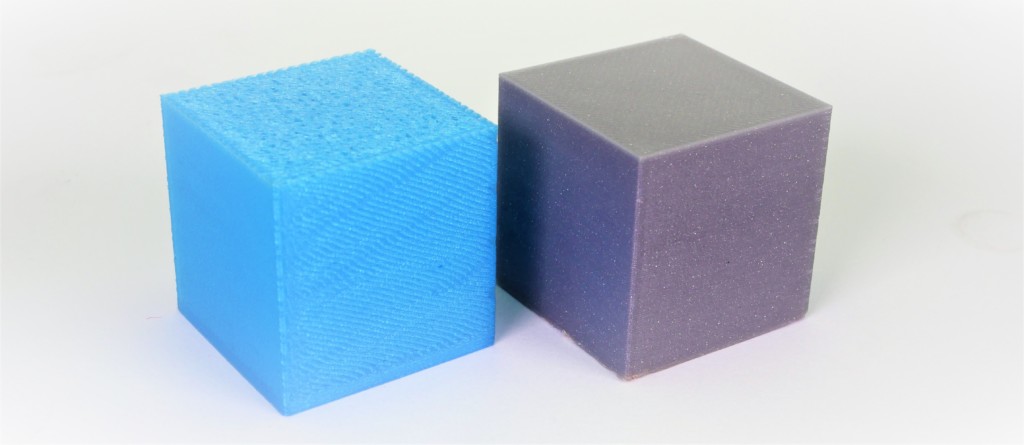
                  Example of severe under extrusion (left cube) and a normal print (right cube).

                  Common factors in under extrusions on printers equipped with Nextruder are:

                  • Nozzle
                  • Slicer settings
                  • Gearbox
                  • Filament

                  Nozzle

                  Before proceeding further, make sure that the printer is FULLY COOLED DOWN AT ROOM TEMPERATURE, and switched OFF! 

                  The nozzle on the Nextruder has to be at the correct height and tightened.

                  CORE One, MK4/S, MK3.9/S

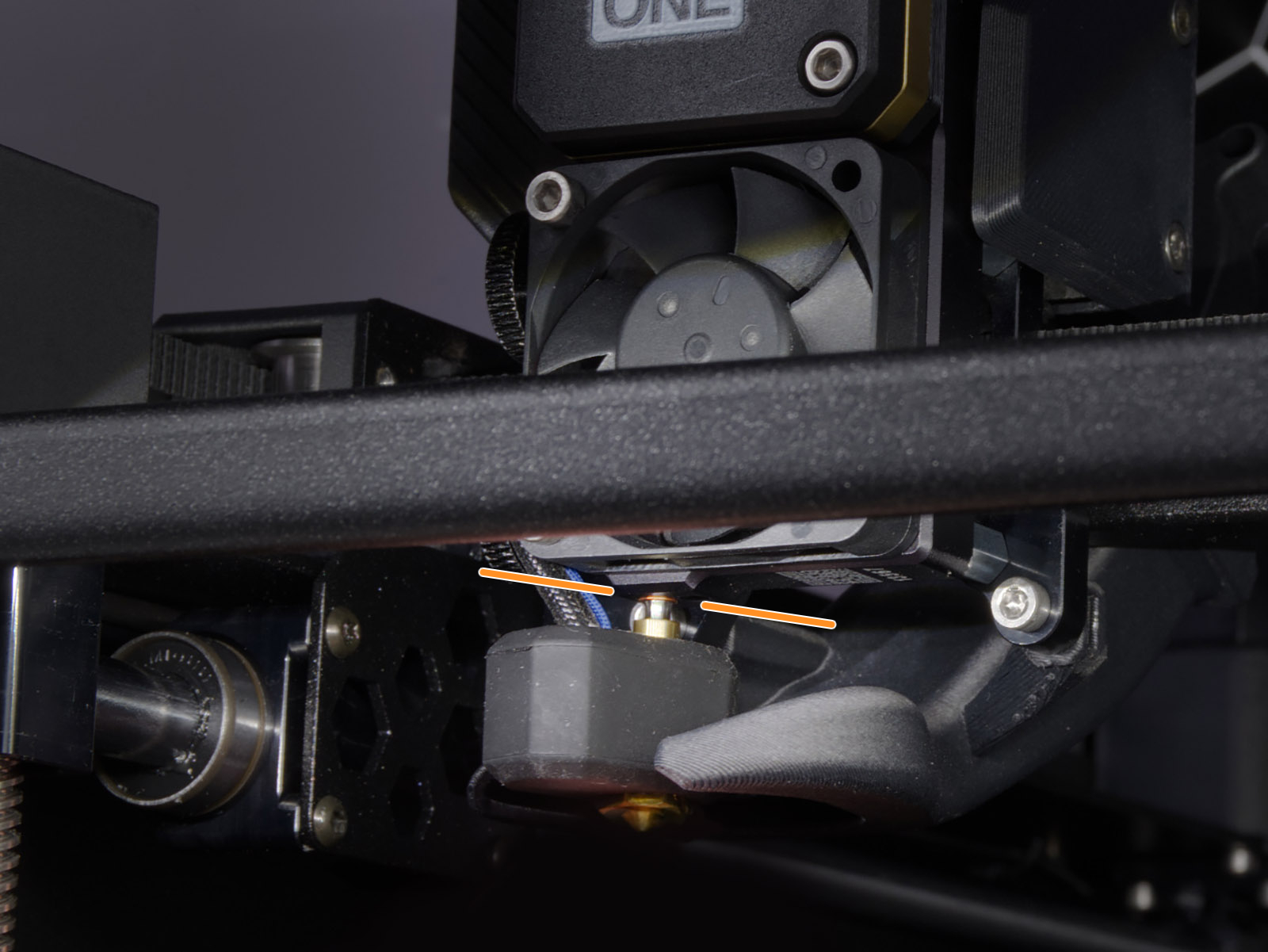
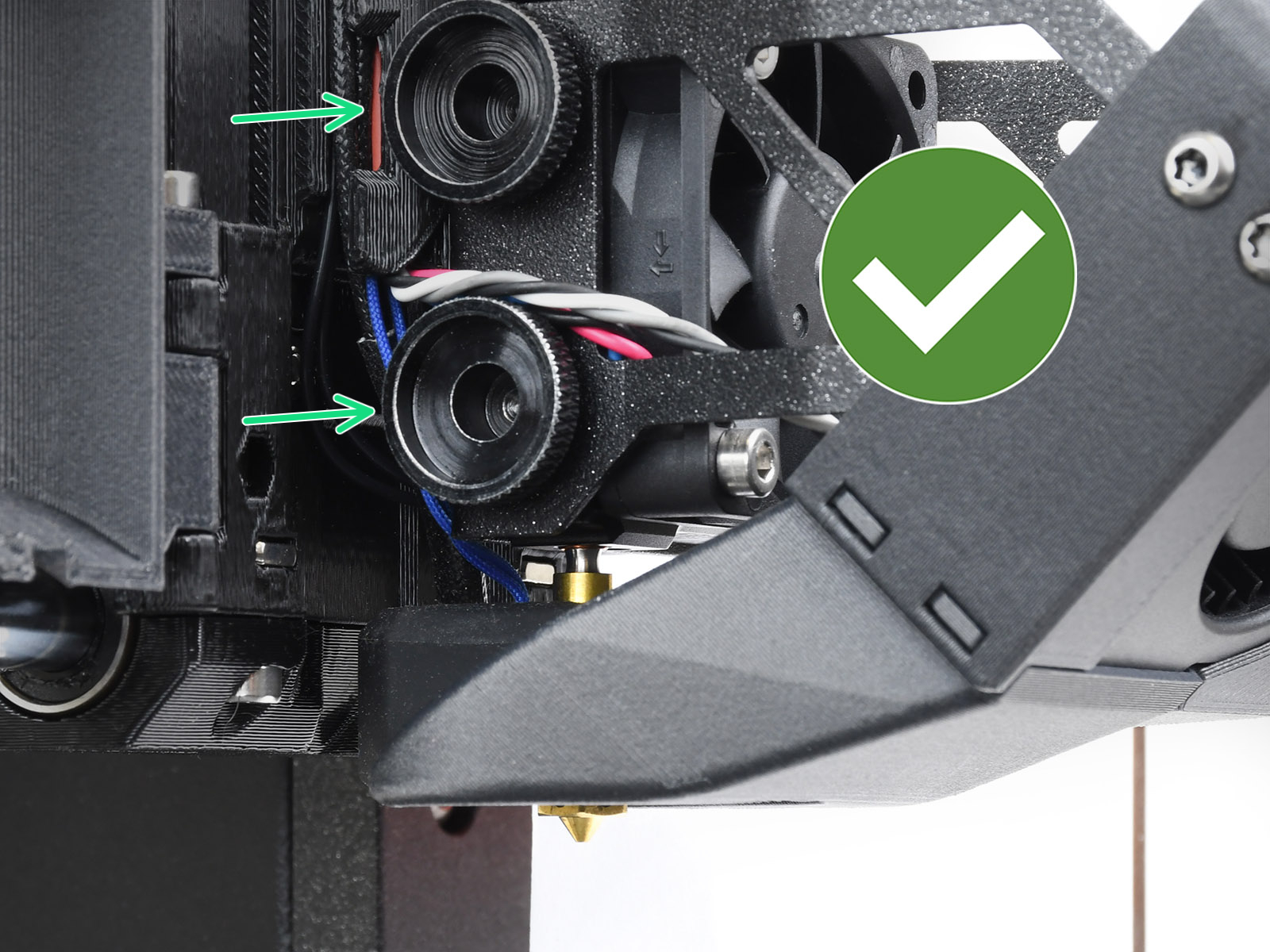
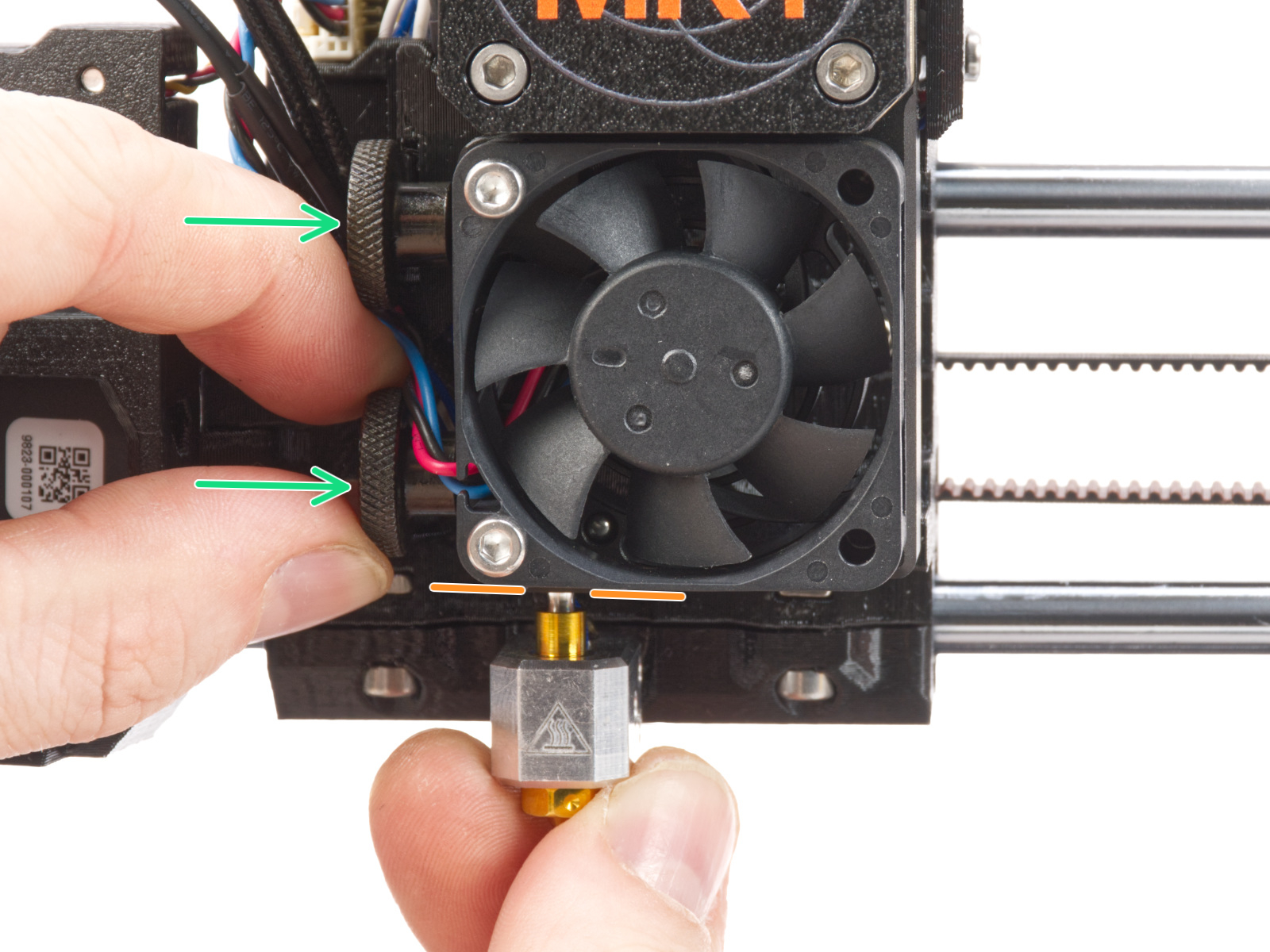
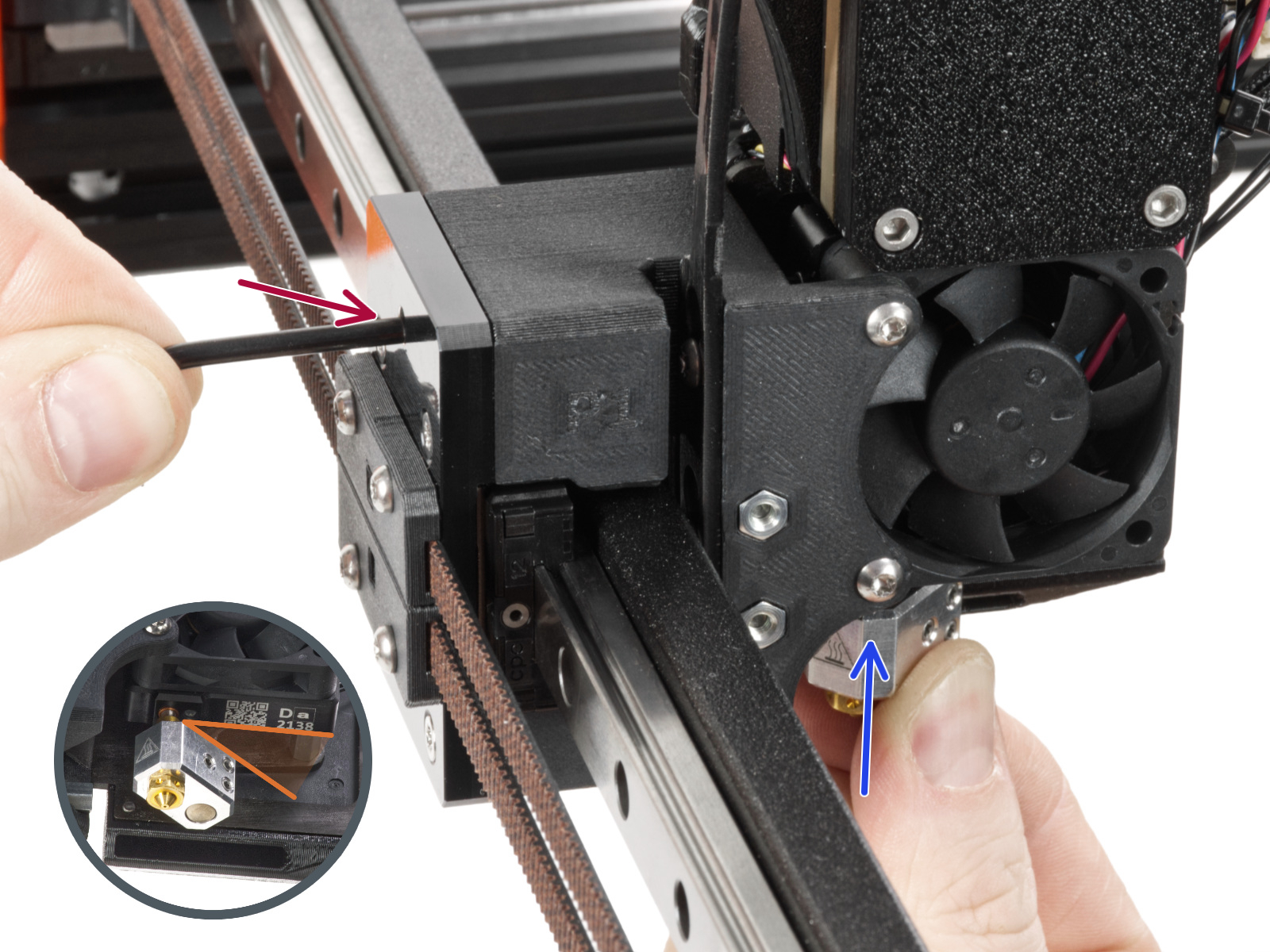
                  To check this aspect, loosen the thumb screws (do not completely remove the screws, a few turns are enough) on the side of the heatbreak, and push the nozzle up. The copper ring on the tube should not be visible.

                  Tighten the thumb screws just by hand, do not use any tools. 

                  If you have a Nozzle Adapter, check the installation again to make sure that the nozzle has not been lowered or loosened with the installation of the adapter. 
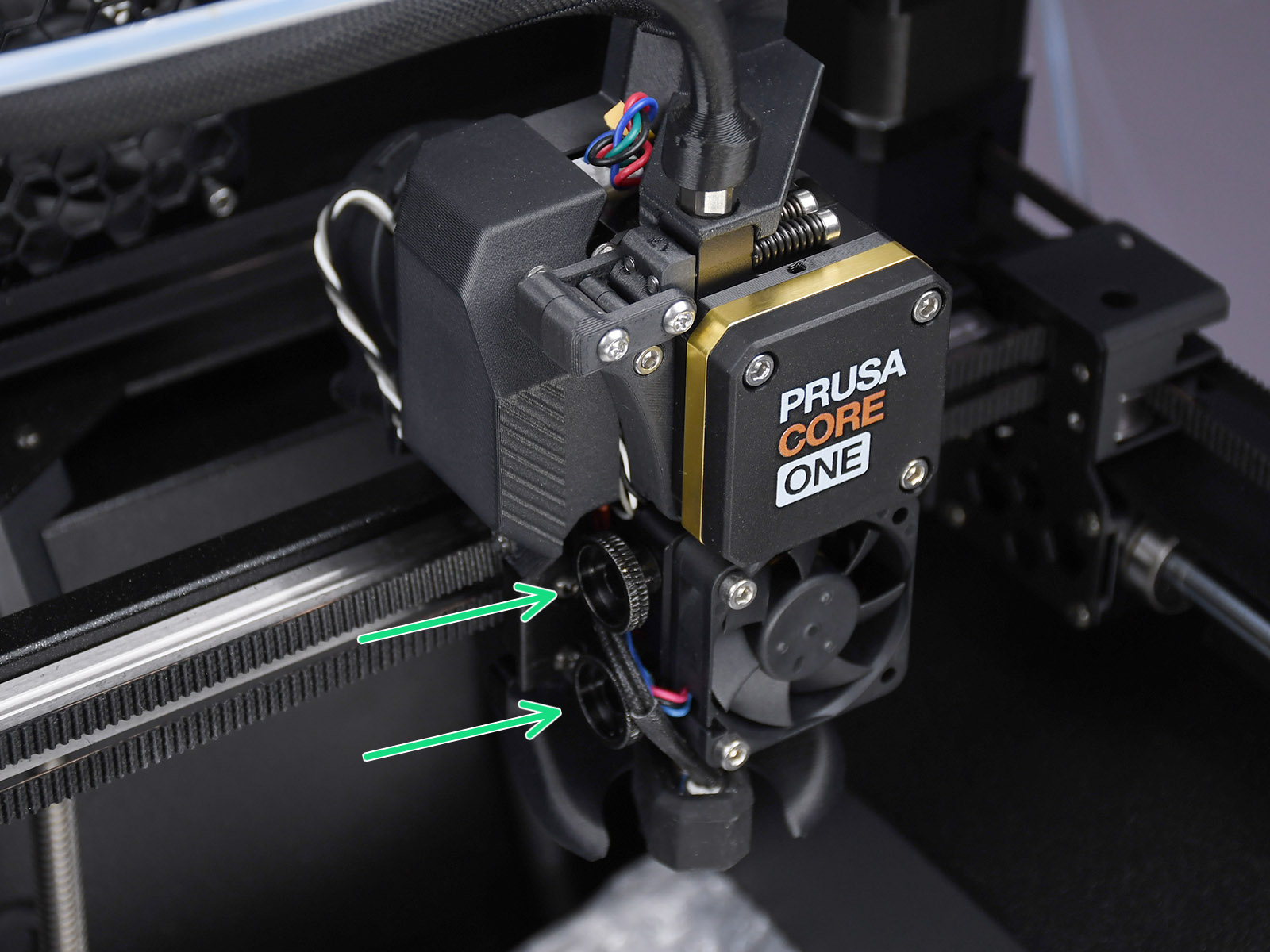
                  Prusa CORE One
                   
                  MK4S, MK3.9SMK4, MK3.9

                  XL

                  For the following procedure, where the hotend is temporarily extracted and reassembled, you can refer to the hotend replacement guide. 

                  • XL single-tool
                  • XL multi-tool

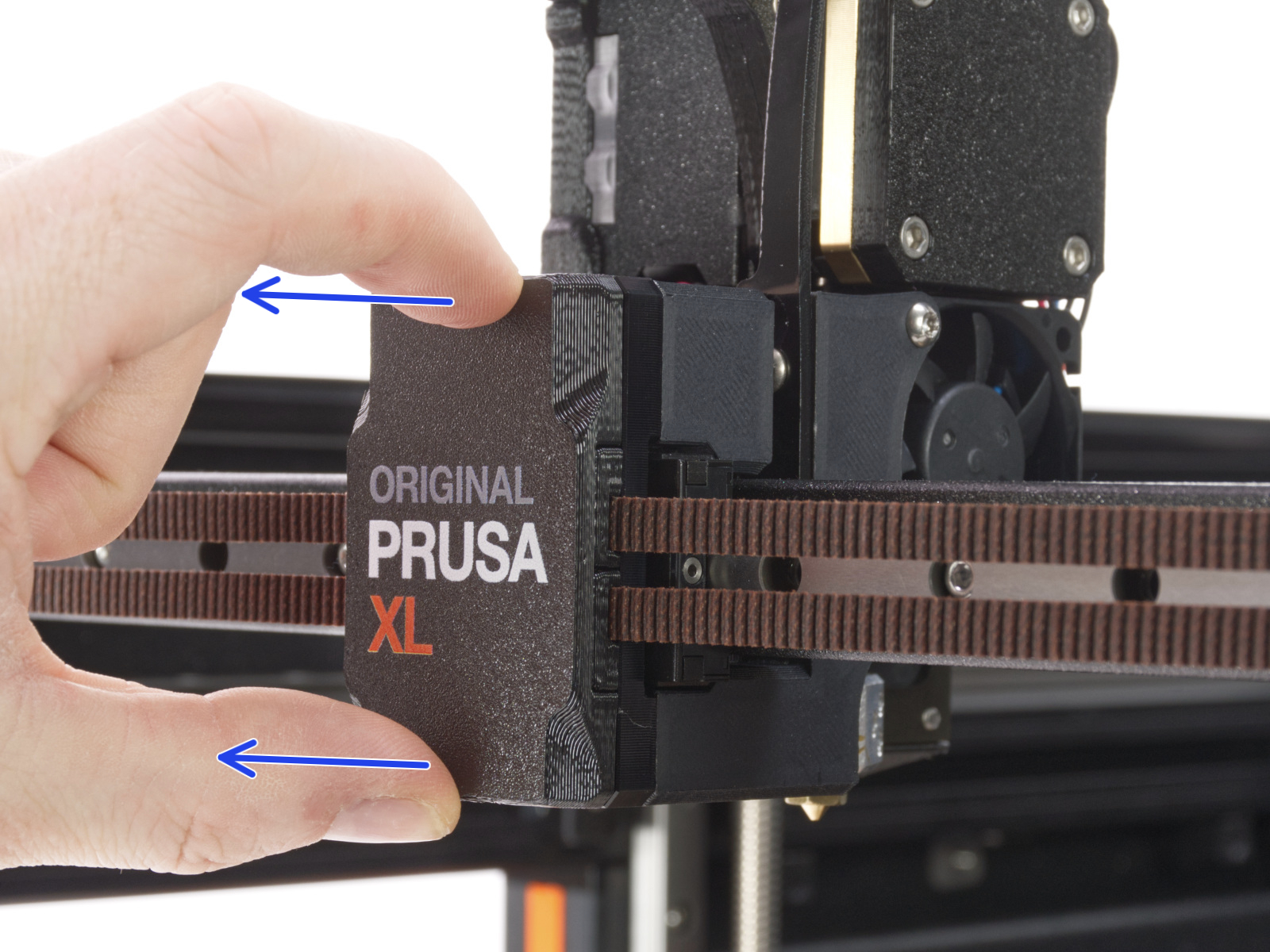
                  Temporarily extract the nozzle and check whether the metal nozzle tube has a dent. If it has, the nozzle needs to be replaced. 

                  The cause of a dented Nozzle tube is overtightening of the grub screw, hence this is not covered by our warranty, unless it arrived like this from our factory. 
                  After this check, if the nozzle tube was in good visible status, reassemble the hotend. This will ensure the correct positioning of the nozzle. 

                  On single-tool XL, use the Torx TX8 key as shown in the picture to adjust the set screw. Do not use extra force while tightening, it may damage the hotend tube. The nozzle must be approximately at a 35°-40° angle to avoid damaging the hotend cables.
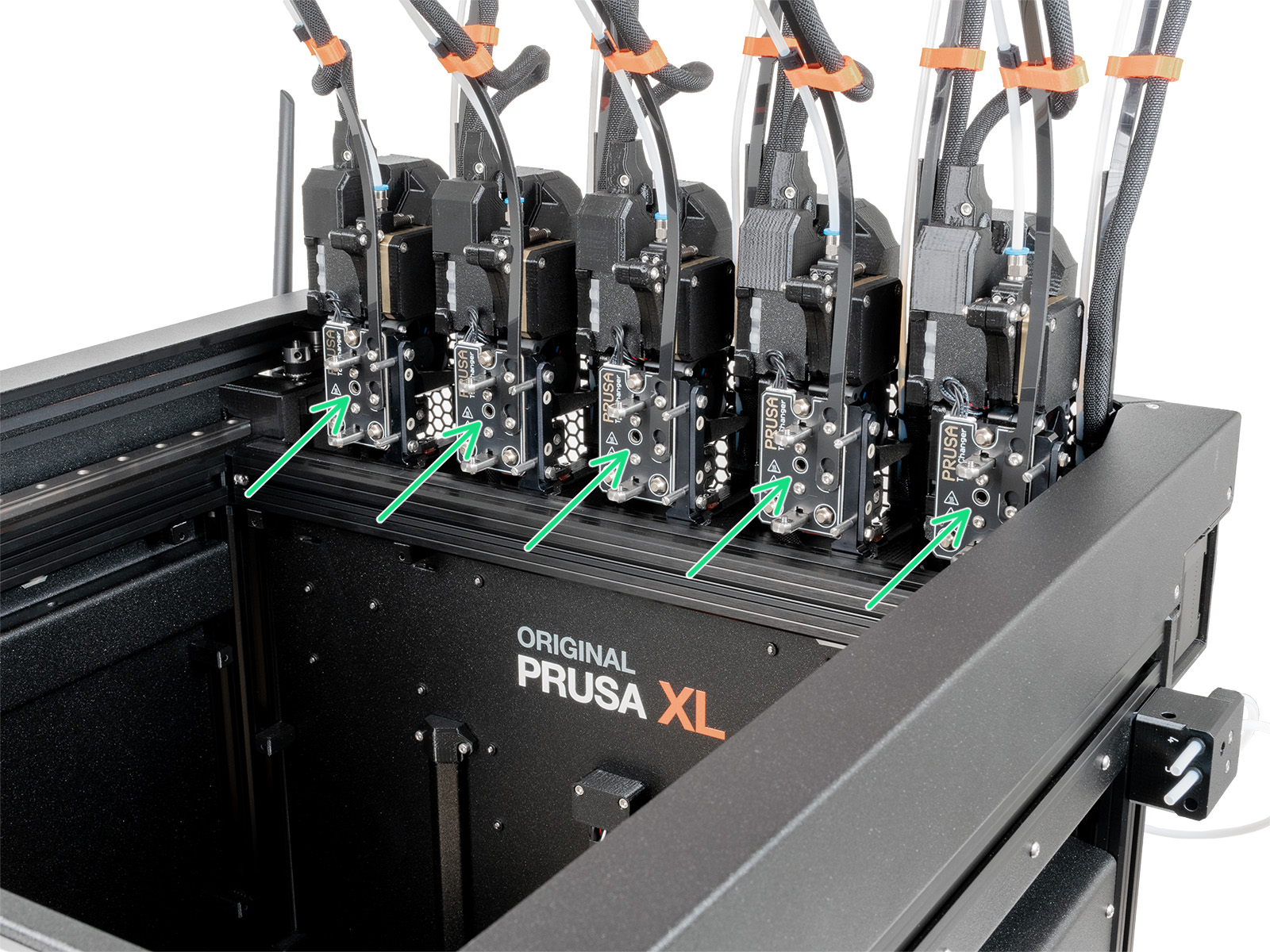
                  On multi-tool XL, use the Torx TX8 key in the part shown in the picture to adjust the set screw. Do not use extra force while tightening, it may damage the hotend tube. The nozzle must be approximately at a 35°-40° angle to avoid damaging the hotend cables.
                  Slicer settings

                  Each profile in the PrusaSlicer contains settings that determine temperature, speeds, and how much filament the 3D printer should extrude. The printer does not provide any feedback on how much filament actually leaves the nozzle. It can be that less filament is extruded than the firmware expects. If that happens, you may notice gaps in and/or in between printed layers.

                  Make sure you have set up your printer in PrusaSlicer by running the Configuration Wizard and as a starting point you should use the stock filament profiles which are tailored for your machine, filament type, and nozzle size. 

                  Gearbox alignment

                  It is possible, especially after interventions that involve the opening of the gearbox cover, that the gearbox is not fully aligned, causing an under-extrusion issue. Below are the procedures to align the gearbox. 

                  CORE One, MK4/S, MK3.9/S

                  Follow the dedicated gearbox alignment article for these printer models. 

                  XL 

                  The Original Prusa XL does not have an automatic gearbox alignment procedure. Perform these steps to reproduce the same movement. If loaded, unload the filament from the printer before proceeding. 
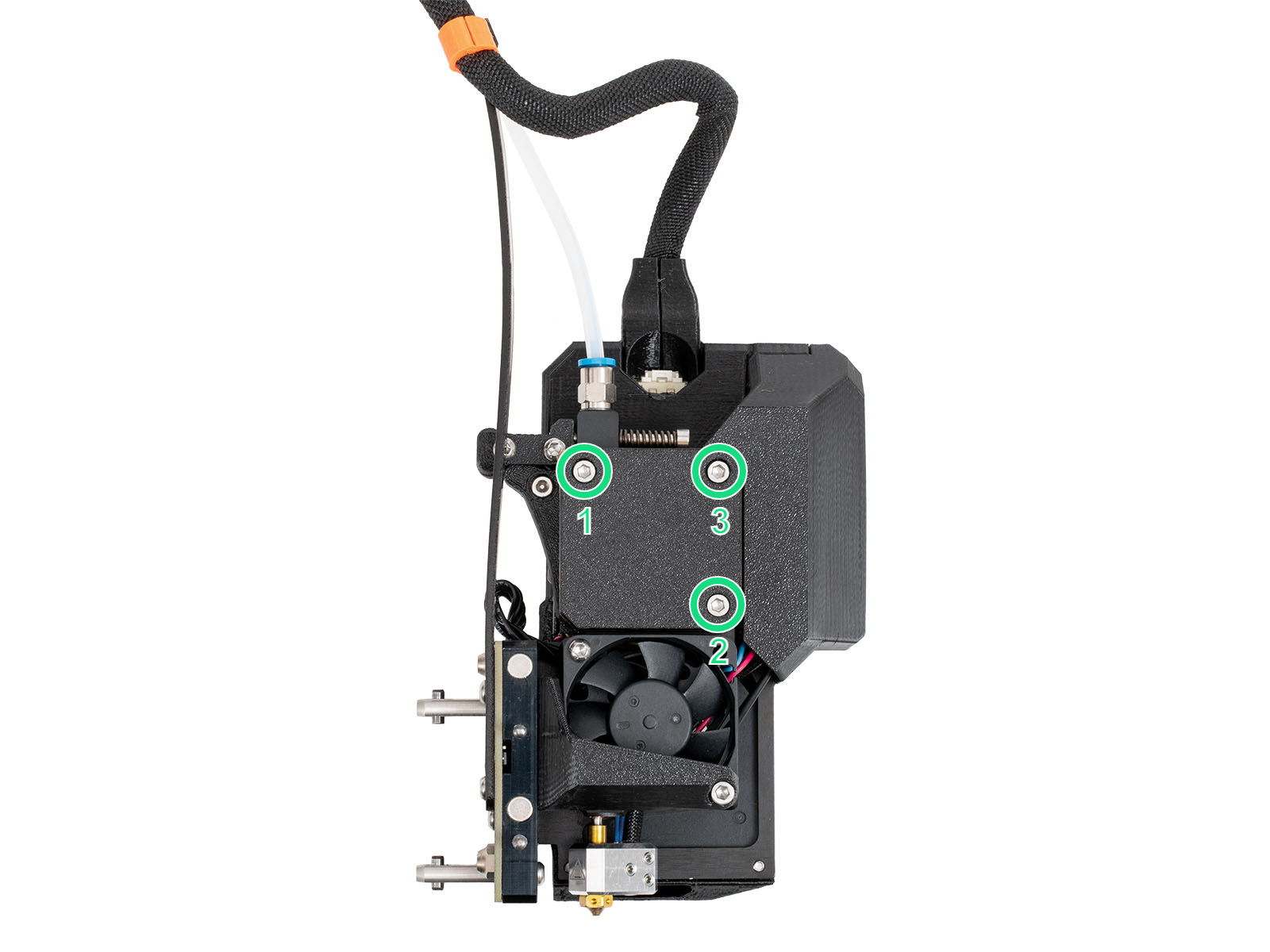
                  1. Slightly loosen the three bolts on the gearbox cover, by one turn and a half. 

                  1. On the LCD Menu, navigate to Filament -> Unload Filament.
                  2. As soon as the extruder's movement finishes, tighten the three M3x25 screws on the gearbox cover, in the order specified in the picture. 

                  Filament

                  A printing temperature that is too low or too high can cause print issues as well. If your filament brand and type are not listed in PrusaSlicer, you can try to adjust the print temperature by +/- 5-15°C to see if this resolves the issue.

                  Some specialty materials, like Materiales flexibles, may require many adjustments and tweaks to print them successfully. Composite materials, like Woodfill filament, may require at minimum a 0.6 mm nozzle, and 0.2 mm layer height to prevent clogging. If there are composite materials like kevlar or carbon fiber, a hardened nozzle is required.

                  Be sure to see our extensive material table, where most types of filament and their considerations are covered.

                  Some filaments can also have varying thickness, due to quality or infused materials like wood, which will cause unexpected changes in the volume of extruded filament. The industry standard for variations in diameter is +/- 0.05 mm.

                  Keep your filament dry, and free of moisture because damp filaments have a negative impact on printing, especially soluble filament, PETG, and ABS. We highly recommend putting spools back inside their original bag when it’s not in use, along with a silica gel. We recommend storing your filaments in a dry area or ideally in a “dry box”.

                  Incorrect loading/unloading

                  When loading a new filament with a lower specified temperature, preheat the nozzle to the temperature required by the previous filament type you have used. In other words, always to the highest temperature filament, as its remnants are most likely still in the hotend. For example, if you have printed with ABS or PETG and want to print with PLA now, load the PLA filament at the ABS or PETG temperature. This way, the newly introduced filament can push the old one out.

                  Low-temperature materials and enclosure

                  Printing PLA or a similar material in an enclosed printer can cause under-extrusion. 

                  For example, on our Original Prusa Enclosure with closed doors, if the ambient temperature is over 27°C, the temperature inside the enclosure may be too high for printing PLA or similar materials, causing under-extrusion or clogging. 

                  ¿Te resultó útil este artículo?
                  Esta acción está disponible solo para usuarios registrados. Por favor inicia sesión.
                  Inicia sesión  para publicar un comentario
                  Sin comentarios

                  Temas

                  • Resolución de problemas
                    • Resolución de problemas
                      • Monstruo de espagueti
                      • Residuos en el extrusor
                      • Uso del multímetro
                      • Resolución de problemas de PrusaLink
                      • Error Homing Z #17301 (XL)
                      • Error cama modular #17501 (XL)
                      • Error Dwarf #17502 (XL)
                      • Limpieza de la Boquilla Fallida. (XL)
                      • Error precalentamiento extrusor #17202 (XL)
                      • Deriva térmica extrusor #17204 (XL)
                      • Error Mintemp Extrusor #17208 (XL)
                      • Extruder Maxtemp error #17206 (XL)
                      • Puppy error #17514 (XL)
                      • No FW on USB flash drive #17604 (XL)
                      • Unsupported printer model #17610 (XL)
                      • Unsupported Buddy FW #17611 (XL)
                      • USB flash error #17613 (XL)
                      • Invalid FW size on USB flash drive #17603 (XL)
                      • USB flash drive not connected #17602 (XL)
                      • Firmware missing #17612 (XL)
                      • FW in internal flash corrupted #17608 (XL)
                      • Fallo en la verificación del hash #17607 (XL)
                      • ¡Impostor! Firma falsa #17606 (XL)
                      • Flash erase error #17605 (XL)
                      • Unsupported firmware BBF file #17614 (XL)
                      • Error cama modular #17250 (XL)
                      • Error cambiador #17101 (XL)
                      • Temp extrusor no coincide #17210 (XL)
                      • Error cama modular #17251 (XL)
                      • Error cama modular #17252 (XL)
                      • Error cama modular #17253 (XL)
                      • Error cama modular #17254 (XL)
                      • Error cama modular #17256 (XL)
                      • Error cama modular #17257 (XL)
                      • Modular bed error #17302 (XL)
                      • Modular bed error #17303 (XL)
                      • Error Dwarf #17503 (XL)
                      • Error ESP #17505 (XL)
                      • ESP error #17506 (XL)
                      • Error ESP #17504 (XL)
                      • Emergency stop #17510 (XL)
                      • Puppy error #17511 (XL)
                      • Puppy error #17512 (XL)
                      • Puppy error #17513 (XL)
                      • Puppy error #17515 (XL)
                      • Error Puppy #17516 (XL)
                      • Puppy error #17517 (XL)
                      • Puppy error #17518 (XL)
                      • Error Puppy #17519 (XL)
                      • Puppy error #17520 (XL)
                      • Puppy error #17521 (XL)
                      • Puppy error #17522 (XL)
                      • Error precalentamiento base #13201 (MK4) #21201 (MK3.9) #23201 (MK3.5)
                      • Error precalentamiento hotend #13202 (MK4) #21202 (MK3.9)
                      • Deriva térmica Base  #13203 (MK4) #21203 (MK3.9) #23203 (MK3.5)
                      • Deriva térmica Hotend #13204 (MK4) #21204 (MK3.9)
                      • Error mintemp hotend #13208 (MK4) #21208 (MK3.9)
                      • Error maxtemp hotend #13206 (MK4) #21206 (MK3.9)
                      • Error mintemp base #13207 (MK4) #21207 (MK3.9) #23207 (MK3.5)
                      • Error maxtemp base #13205 (MK4) #21205 (MK3.9) #23205 (MK3.5)
                      • Fallo Selftest (XL)
                      • El filamento no carga (XL)
                      • Hotend atascado (XL)
                      • Error Mintemp Heatbreak #17211 (XL)
                      • Error Maxtemp Heatbreak #17212 (XL)
                      • Homing error X #17304 (XL)
                      • Homing error Y #31305 (CORE One) #35305 (CORE One L) #36305 (CORE One INDX) #17305 (XL)
                      • USB Port Overcurrent #17306 (XL)
                      • USB Device Overcurrent #17307 (XL)
                      • I2C Send failed #17311 (XL)
                      • I2C Send Busy #17312 (XL)
                      • I2C Send Timeout #17313 (XL)
                      • I2C Send Undefined #17314 (XL)
                      • I2C Receive failed #17315 (XL)
                      • EEPROM I2C Receive Busy #17316 (XL)
                      • I2C Receive Timeout #17317 (XL)
                      • I2C Receive undefined #17318 (XL)
                      • Error Cama Modular #17319 (XL)
                      • Sin memoria #17507 (XL)
                      • Buffer PNG Lleno #17508 (XL)
                      • Célula de carga no calibrada #17523 (XL)
                      • Error tara célula de carga #17524 (XL)
                      • Fallo tara célula de carga #17525 (XL)
                      • Fallo medición célula de carga #17526 (XL)
                      • Mala Configuración Célula de carga #17527 (XL)
                      • Timeout célula de carga #17528 (XL)
                      • Error de Memoria LED #17529 (XL)
                      • Timeout Solicitud Marlin #17530 (XL)
                      • Fallo Asignación BBF #17531 (XL)
                      • Inicialización de BBF fallida #17532 (XL)
                      • I2C Send failed #13311 (MK4) #21311 (MK3.9) #23311 (MK3.5)
                      • Célula de carga No Calibrada #13523 (MK4) #21523 (MK3.9)
                      • Error Tara Célula de Carga #13524 (MK4) #21524 (MK3.9)
                      • Fallo Tara Célula de carga #13525 (MK4) #21525 (MK3.9)
                      • Fallo Medición Célula de carga #13526 (MK4) #21526 (MK3.9)
                      • Mala Configuración Célula de carga #13527 (MK4) #21527 (MK3.9)
                      • Timeout Célula de carga #13528 (MK4) #21528 (MK3.9)
                      • Error MINTEMP Heatbreak #26211 (MK4S) #13211 (MK4) #27211 (MK3.9S) #21211 (MK3.9) #31211 (CORE One)
                      • Error MAXTEMP Heatbreak #13212 (MK4) #21212 (MK3.9)
                      • Error Cama Modular #17320 (XL)
                      • Fusible fundido (MK4/S, MK3.9/S)
                      • El filamento no carga (MK4/S, MK3.9/S)
                      • Error de Posicionamiento del Eje Y #13305 (MK4) #21305 (MK3.9) #23305 (MK3.5)
                      • Tangled filament
                      • Restablecimiento de fábrica (MK4/S, MK3.9/S, MK3.5, XL)
                      • Sensor de filamento Nextruder (CORE One, MK4/S, MK3.9/S, XL)
                      • XY probe unstable #17105 (XL)
                      • XY position invalid #17106 (XL)
                      • Pin no alcanzado #17107 (XL)
                      • Dock position out of bounds #17103 (XL)
                      • Tool offset out of bounds #17104 (XL)
                      • ESP not connected #17533 (XL)
                      • Connect Registration Failed
                      • Connect Registration Failed #21401 (MK3.9)
                      • Connect Registration Failed #17401 (XL)
                      • Selftest failed (XL multi-tool)
                      • Blue Screen of Death - Pantalla Azul de la Muerte (BSOD) #31538 (CORE One) #35538 (CORE One L) #26538 (MK4S) #13538 (MK4) #27538 (MK3.9S) #17538 (XL) #21538 (MK3.9) #28538 (MK3.5S) #23538 (MK3.5) #12538 (MINI)
                      • Stuck filament detection #31101 (CORE One) #35101 (CORE One L) #26101 (MK4S) #13101 (MK4) #27101 (MK3.9S) #21101 (MK3.9) #17108 (XL)
                      • Hotend temp not matching #31210 (CORE One) #35210 (CORE One L) #26210 (MK4S) #13210 (MK4) #27210 (MK3.9S) #21210 (MK3.9)
                      • Hotend Heater Overcurrent #17322
                      • Heatbed temp not matching #17209 (XL)
                      • Problema cambiador #17813 (XL multi-cabezal)
                      • Under-extrusion (Nextruder printers)
                      • EXTRUDER ERROR #17536 (XL)
                      • Nozzle Timeout #31819 (CORE One) #35819 (CORE One L) #36819 (CORE One INDX) #26819 (MK4S) #13819 (MK4) #27819 (MK3.9S) #21819 (MK3.9) #28819 (MK3.5S) #23819 (MK3.5) #17819 (XL) #12819 (MINI)
                      • Uneven bed #31111 (CORE One) #35111 (CORE One L) #36111 (CORE One INDX)
                      • Filament sensor stuck #31113 (CORE One) #35113 (CORE One L) #36113 (CORE One INDX) #17113 (XL) #26113 (MK4S) #13113 (MK4) #27113 (MK3.9S) #21113 (MK3.9) #28113 (MK3.5S) #23113 (MK3.5) #12113 (MINI/+)
                      • Chamber MAXTEMP error #31214 (CORE One) #35214 (CORE One L) #36214 (CORE One INDX)
                      • Homing error X #31304 (CORE One) #35304 (CORE One L) #36304 (CORE One INDX) #17304 (XL)
                      • Puppy error #31511 (CORE One) #35511 (CORE One L) #36511 (CORE One INDX)
                      • Puppy error #31513 (CORE One) #35513 (CORE One L) #36513 (CORE One INDX)
                      • Fil. sensor troubleshooting #31114 (CORE One) #26114 (MK4S) #13114 (MK4) #27114 (MK3.9S) #21114 (MK3.9) #28114 (MK3.5S) #23114 (MK3.5)
                      • Chamber Mintemp error #31215 (CORE One) #35215 (CORE One L) #36215 (CORE One INDX)
                      • The heatbed cooled down during the power outage #31808 (CORE One) #35808 (CORE One L) #26808 (MK4S) #27808 (MK3.9S) #28808 (MK3.5S) #13808 (MK4) #21808 (MK3.9) #23808 (MK3.5) #17808 (XL) 
                      • El código G no es totalmente compatible #31803 (CORE One) #26803 (MK4S) #27803 (MK3.9S) #28803 (MK3.5S) #13803 (MK4) #21803 (MK3.9) #23803 (MK3.5) #17803 (XL) #12803 (MINI)
                      • Filament not detected #31804 (CORE One) #35804 (CORE One L) #26804 (MK4S) #27804 (MK3.9S) #28804 (MK3.5S) #13804 (MK4) #21804 (MK3.9) #23804 (MK3.5) #17804 (XL) #12804 (MINI)
                      • Vista previa del selftest inacabado #31801 (CORE One) #26801 (MK4S) #27801 (MK3.9S) #28801 (MK3.5S) #13801 (MK4) #21801 (MK3.9) #23801 (MK3.5) #17801 (XL) #12801 (MINI)
                      • Recuperación choque repetido #31811 (CORE One) #26811 (MK4S) #13811 (MK4) #27811 (MK3.9S) #21811 (MK3.9) #28811 (MK3.5S) #23811 (MK3.5) #17811 (XL) #12811 (MINI)
                      • Crash recovery home fail #31812 (CORE One) #35812 (CORE One L) #26812 (MK4S) #13812 (MK4) #27812 (MK3.9S) #21812 (MK3.9) #28812 (MK3.5S) #23812 (MK3.5) #17812 (XL) #12812 (MINI)
                      • Loading obstruction #31119 (CORE One) #35119 (CORE One L) #17119 (XL)
                      • Homing calibration needed #31118 (CORE One) #35118 (CORE One L) #36118 (CORE One INDX)#17118 (XL)
                      • Calibrate homing from menu #31120 (CORE One) #35120 (CORE One L) #36120 (CORE One INDX) #17120 (XL)
                      • MCU overheat #35270
                      • PCB overheat #35271
                      • Data Timeout #35330
                      • AC Controller Fault #35273
                      • AC controller fault #35333 (CORE One L)
                      • AC controller fault #35335 (CORE One L)
                      • AC controller fault #35336 (CORE One L)
                      • Fallo Selftest (CORE One L)
                      • Bed fan is not spinning #35849 (CORE One L)
                      • PSU fan is not spinning #35850 (CORE One)
                      • Fallo Selftest (CORE One/+)
                      • Hotend atascado (MK4)
                      • Ajustando la tensión de la correa (CORE One L, CORE One)
                      • Tarjetas SD y unidades USB
                    • Resolución de problemas de la calidad de impresión
                    • Códigos QR de error
                    • Mensajes de Error de Impresión