Prusa
  • SHOP
    • Latest products
    BY CATEGORY
    • 3D printersnew
    • 3D printer upgradesnew
    • Materials
    • Accessories
    • Spare parts
    • Courses
    • Merch
    • Get a price quote
    QUICK LINKS
    • Shipping & delivery
    • Returns & refunds
    • Payment & financing
    • Warranty
    • VAT & Customs fees
    • FAQ

    0 item in your cartitems in your cart

    Your cart is empty

    Go to cartShop 3D printers

    My profile

    Log in to see orders, saved items

    My profile

    Signed in as

    • Orders
    • Logout
  • 3D PRINTING
    • Explore 3D printing
    FOR BEGINNERS
    • 3D printing 101
    • How FDM printing works
    • Buying your first printer
    • 3D model catalog
    BY APPLICATION
    • Rapid prototyping
    • Manufacturing
    • Engineering
    • Research
    • Arts & design
    GO DEEPER
    • Materials guide
    • Courses
    • Webinars
    • Case studies
    • Custom 3D printing
  • 3D PRINTERS
    • All 3D printers
    FOR
    • Home or garageHobbyists, tinkerers and home printing
    • BusinessIn-house production for small teams
    • EnterpriseFleets, security and scale
    • Which Prusa is right for me
    SHOP & BROWSE
    • CORE One+new
    • CORE One+ INDXnew
    • CORE One L+new
    • CORE One L+ INDXnew
    • XL+new
    • MK4S
    • Prusa Pro HT90
    • Prusa Pro AFS
    • Prusa Pro SLX
    MORE FROM PRINTERS
    • Parts & upgradesnew
    • Critical infrastructure
    • Case studies
    • Signature Oak
    • Kits
  • MATERIALS
    • All materials
    BY USE
    • Every-day & design
    • Functional engineering
    • Composites
    • Pro speciality
    • SLA resins
    PRUSAMENT
    • PLA
    • PETG
    • ASA
    • PC
    • PA11
    • Flex
    • TPU
    MORE FROM MATERIALS
    • Materials guide
    • We make material in house
    • Sustainability
    • Order on the store
  • SOFTWARE
    • All software
    PREPARE THE PRINT
    • PrusaSlicer 3.0New
    PRINT & MONITOR
    • Prusa Connect
    • EasyPrint
    • iOS & Android app
    • Prusa Farm
    GET STARTED
    • Download & install
    • Knowledge base
    MORE FROM SOFTWARE
    • 3D model catalog
  • SUPPORT
    • Explore support
    FIND ANSWERS
    • Knowledge base
    • Troubleshooting
    • Courses
    • Webinars
    GET HELP
    • Contact us
    • Livechat
    • Shipping & delivery
    • Warranty
    • Returns & refunds
    • Service & spare parts
    • Service & Repair
    COMMUNITY
    • Forum
    • Reddit
    • Printables
  • TRUST CENTER
    • Trust Center overview
    BY TOPIC
    • GDPR
    • Certificates
    • Security
    • Compliance
    COMMITMENTS
    • Sustainability report
    TALK TO US
    • Contact the security team
  • COMPANY
    • About Prusa
    GET TO KNOW US
    • Our story
    • How we make printers
    • Open source
    • Brand & media kit
    NEWS
    • Blog
    • Newsroom
    • Events
    TRUST & PARTNERS
    • Sustainability
    • Resellers & distributors
    • Affiliate program
    • Contact
    • English
    • Čeština
    • Deutsch
    • Español
    • Français
    • Italiano
    • Polski
    • 日本語
  • Signed in as

    • Orders
    • Address
    • In-stock Alerts
    • My Courses
    • Subscription
    • Edit Account
    • Logout

Log in to see orders, saved items

Signed in as
  • Orders
  • Address
  • In-stock Alerts
  • My Courses
  • Subscription
  • Edit Account
  • English
  • Čeština
  • Deutsch
  • Español
  • Français
  • Italiano
  • Polski
  • 日本語
Shop

0 item in your cartitems in your cart

Your cart is empty

Go to cartShop 3D printers

My profile

Log in to see orders, saved items

My profile

Signed in as

  • Orders
  • Logout
SHOP
  • Latest products
BY CATEGORY
  • 3D printersnew
  • 3D printer upgradesnew
  • Materials
  • Accessories
  • Spare parts
  • Courses
  • Merch
  • Get a price quote
QUICK LINKS
  • Shipping & delivery
  • Returns & refunds
  • Payment & financing
  • Warranty
  • VAT & Customs fees
  • FAQ

Featured products

    Popular categories

      Trending searches

        Articles

          Blog

            Products

              Categories

                Suggested searches

                  Searching…
                  No results
                  Something went wrong.
                  ↑↓ Select↵ OpenEsc Close search
                  1. Support
                  2. PrusaSlicer
                  3. Advanced features
                  4. Insert pause or custom G-code at layer
                   

                  Contents

                  • Insert custom G-code at layer

                  Blog

                  • Print colorful and glowing Halloween decorations with our spooky offer
                  • Factorio Has Arrived on Printables
                  • Prusament PLA Lightweight: 65% lighter than regular PLA. Perfect choice for aircraft, cosplay, and more.

                  Newsletter

                  Signup and get our monthly squeeze on updates, blog, printables and much more.

                  By clicking, you agree to receive our newsletter.

                  This site is protected by reCAPTCHA Enterprise and the Google Privacy Policy and Terms of Service apply.

                  Factorio Transport Belts
                  E-shop
                  • 3D Printers
                  • Printer Upgrades
                  • Filaments
                  • Accessories
                  • Prusa Merchandise

                  © Prusa Research a.s.

                  Printables
                  • 3D Models
                  • Store
                  • Clubs
                  • 3D Design Contests
                  • Brands
                  Community
                  • World Map
                  • Forum
                  • User Groups
                  • Events
                  Help
                  • Prusa Help
                  • Prusa Academy
                  • 3D Printing Calculators
                  Software
                  • PrusaSlicer
                  • Prusa.app
                  • Prusa Connect
                  • Drivers and Software
                  Company
                  • About Us
                  • Blog
                  • Official Prusa Resellers
                  • Contact Us
                  • Certified for ISO 9001, ISO 14001, ISO 45001
                  • General Terms and Conditions
                  • General Terms and Conditions of Use of the PRUSA Websites
                  • Privacy Policy
                  • Information about cookies
                  • Customer Complaints Policy
                  • Status Page
                  • Do Not Sell or Share My Personal Information
                  • Supplemental Statements
                  • General Terms and Conditions
                  • General Terms and Conditions of Use of the PRUSA Websites
                  • Privacy Policy
                  • Information about cookies
                  • Customer Complaints Policy
                  • Status Page
                  • Do Not Sell or Share My Personal Information
                  • Supplemental Statements

                  © Prusa Research a.s.

                  JOSEF PRUSA®, PRUSA RESEARCH®, PRUSA POLYMERS®, PRUSA ORANGE®, PRUSA 3D ® AND PRUSAMENT® are registered trademarks of Prusa Development a.s. used by Prusa Research a.s. under licence from Prusa Development a.s.

                  Insert pause or custom G-code at layer

                  Relevant for

                  MMU family
                  MINI family
                  MK3 family
                  OLD PRODUCTS
                  SOFTWARE
                  90 comments
                  Article is also available in following languages
                  English
                  Čeština
                  Polski
                  Deutsch
                  Français
                  Español
                  Italiano
                  日本語

                  PrusaSlicer lets you schedule a filament change at a certain layer. This can be used to print basic multicolored models. The printer automatically pauses the print as soon as it reads the color change in the G-code (M600 command) and prompts the user to proceed with the filament change.

                  1. Slice your model normally. A preview will show how the part will be printed.
                  2. On the right side, you will see a layer slider. Drag the layer slider on the down to select the target layer
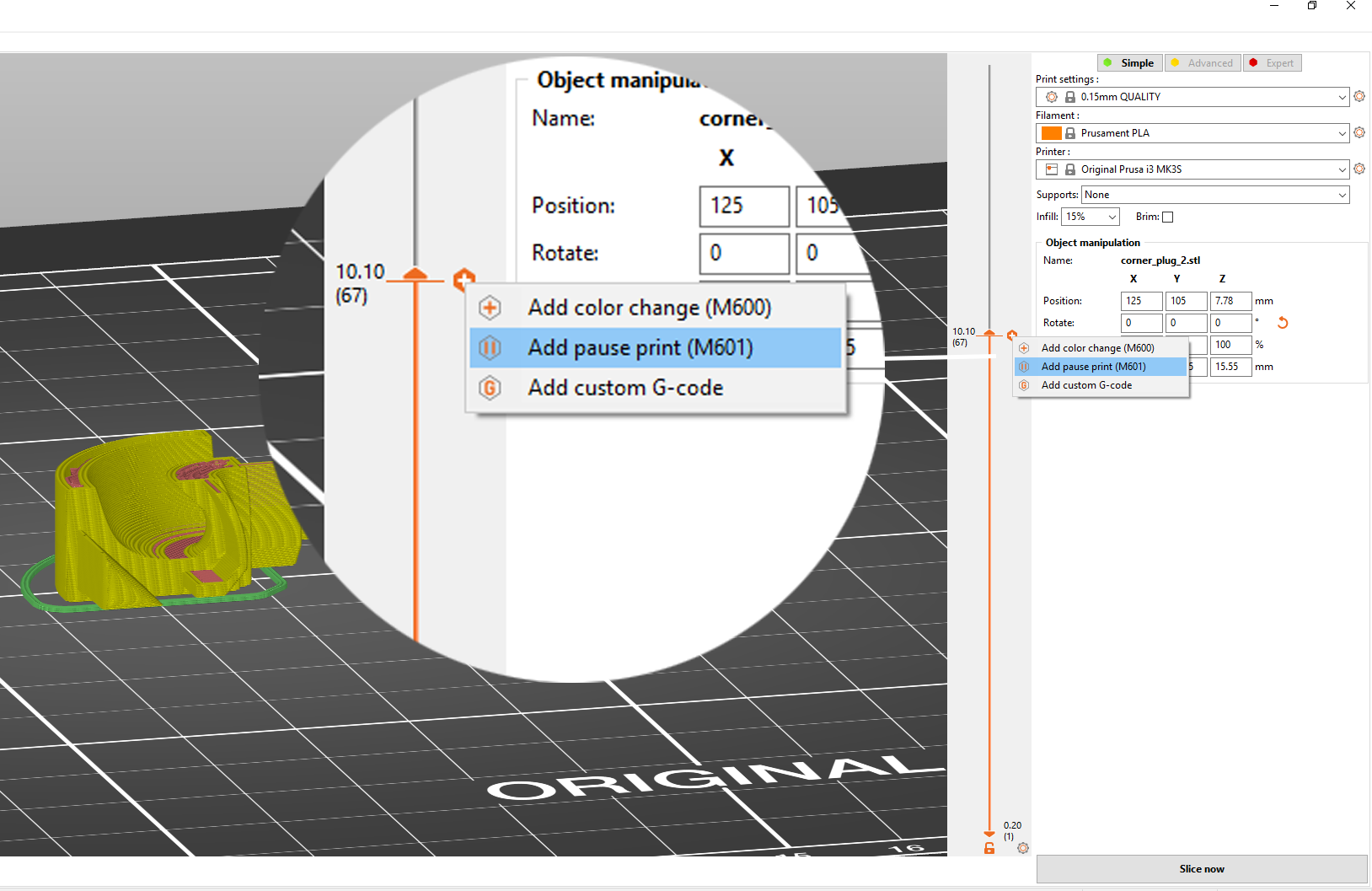
                  3. Right-click on the orange plus icon
                  4. Select Insert pause print (M601)
                    • The pause will be inserted before the selected layer is printed
                  5. Insert a short message to be displayed on the printer LCD when the print is paused
                    • e.g. “Place bearings in slots and resume printing”
                  6. Confirm the Pause by hitting OK

                  You can remove the pause by moving the slider to the pause layer and left-clicking on the grey cross icon.

                  You can edit the pause message by right-clicking on the grey cross icon.
                  When inserting magnets, they need to be firmly in their slots. Otherwise, they’ll get stuck to the print head as it passes over them. Either design the slots with a tight tolerance or use a small drop of super glue to hold them in place.

                  You need PrusaSlicer 2.2 or newer to access the Insert pause and Insert custom G-code function. Both of these features do not work if you have Sequential printing enabled.

                  This feature is also not supported in old printer firmware versions (on the MK3/S/+ you need at least firmware 3.9.1).

                  When you slice the print again with inserted print pauses, you’ll get time estimates till each pause. The printer will also signal the pause with a beep.

                  Insert custom G-code at layer

                  Inserting a custom G-code can be useful for advanced users when creating a calibration G-code, like a temperature tower. 

                  "With great power comes great responsibility"
                  Verify twice that you inserted the right G-codes and that you understand what they do. For example, with some G-codes you could accidentally override the EEPROM values or move the nozzle into the print bed.
                  1. A custom G-code can be inserted from the Preview window
                  2. Drag the layer slider on the right to select the target layer
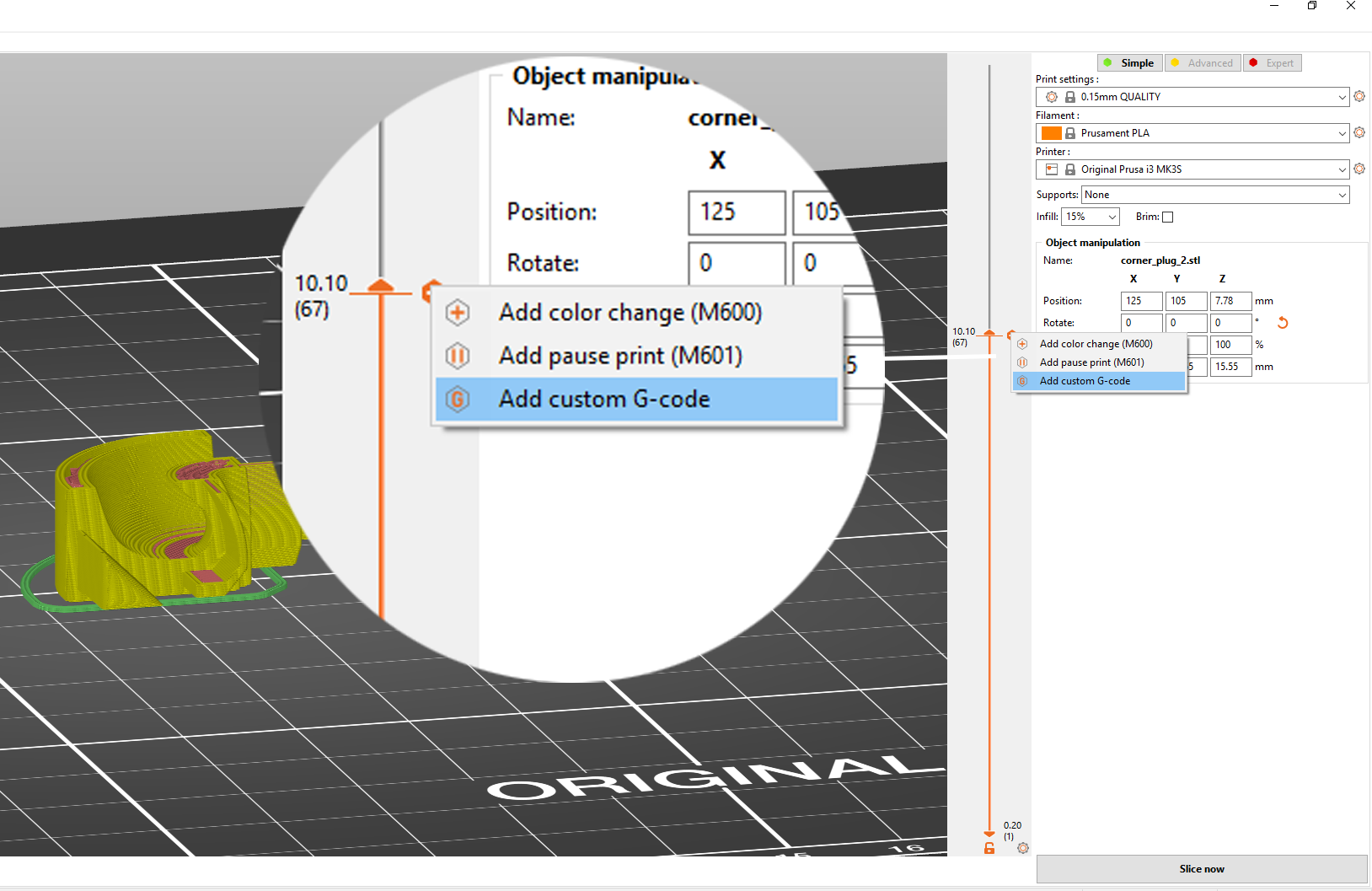
                  3. Right-click on the orange plus icon
                  4. Select Add custom G-code
                    • The custom G-code will be inserted before the selected layer is printed
                  5. Insert the custom G-code into the newly opened window. You can add several commands at once, simply press Enter to insert a new line
                  6. Confirm by hitting OK

                  You can remove the custom G-code by moving the slider to the target layer and left-clicking on the grey cross icon.

                  You can edit the custom G-code by right-clicking on the grey cross icon.
                  Most commonly used Custom G-code commands

                  M104 - Set Hotend Temperature


                  You can use this command to create a temperature tower by changing the hotend temperature at various layers.

                  M109 - Wait for Hotend Temperature

                  If the temperature is set with the letter S then M109 waits only when heating. If the temperature is set with the letter R then M109 will also wait for the temperature to go down.

                  Was this article helpful?
                  This action is available only to registered users. Please log-in.

                  Topics

                  • PrusaSlicer 2.9 (Legacy)
                    • Advanced features
                      • Per model settings
                      • Color change
                      • Modifiers
                      • Reload from disk
                      • Insert pause or custom G-code at layer
                      • Negative volume
                      • Simplify mesh
                      • Post-processing scripts
                      • Shape Gallery
                      • Compare presets
                      • G-code substitutions
                      • Text tool
                      • SVG embossing tool
                      • Pressure Advance
                    • About PrusaSlicer
                    • Configuration and profiles
                    • User interface
                    • Input/output
                    • Left toolbar
                    • Top toolbar
                    • Print settings
                    • Filament settings
                    • Printer settings
                    • Multi-material slicing
                    • SLA slicing
                    • Other (PrusaSlicer)

                  46 comments

                  Log in  to post a comment
                  Batkiwi
                  •
                  Ender 3 S1 Plus. Be nice if the 'change colour' setting actually allowed a colour change.
                  What should happen:
                  Print pauses at set layer
                  Head moves to front (not rear)
                  Hot end STAYS hot
                  You have time to extract one colour, put in new colour, purge until colour runs clean
                  Press re-start when you're ready.

                  I'm no master coder, but this doesn't sound hard. Along with all the other things going wrong here, who thought 'back left' (is behind the thing you're printing) was the place to park the head for a filament swap?
                  Reply
                  GioGio70
                  •
                  I have an Ender3 S1 Pro, if I set a pause to insert an object into the print, the printing stops but the head does not move from the piece and therefore I can't insert the object and then the printing does not restart. Do I need to add gcode to manage the movement and resumption?
                  Reply
                  Batkiwi
                  •
                  I put magnets into things often. I use the 'colour change' setting. Useless for changing colour, but at least the head gets out of the way for a minute. You have to be there hovering over it though, it WILL NOT wait for you.
                  Reply
                  MartinD
                  •
                  Am I doing something wrong or is there a bug? 
                  Article states "Select Insert Pause Print - The pause will be inserted before the selected layer is being printed"
                  I've an M6 nut to insert into my model. I slice my model and scroll through the layers until I see the first layer that covers the space for the m6 nut.
                  I insert the print pause on that layer because, as the article states, the print pause will be inserted before that layer starts to print. WHen the printer pauses and I go to insert the nut, I can't insert it because the first covering layer has been printed, the layer that covers the space for the nut.
                  What am I missing here? 
                  OMG, just figured it out (maybe not....)
                  If you insert a print pause in layer 10, the actual print pause gcode is inserted in layer 11. 
                  OMGx2 I removed the pause and inserted it again the same layer and now the gcode appears in that same layer.  
                  And this happened when chatting to support who also had the same thing happen to them using the same project file I was using. Looks like a bug.....


                  Reply
                  Craftsman_Chris
                  •
                  I can not get this to work with the Ender 3 S1 pro. I tried using both the pause at layer height which stands directly above the print and I can not change the filament and the filament change command extracts filament but there is not time to change filament it continues the print after the extract. I really need help on this!!
                  Reply
                  Nick
                  •
                  I have been observing a lot of ooze from the printer during pause, resulting in an incomplete layer after restart. Does the filament_retract_length_toolchange (Filament Settings > Filament Overrides > Retraction when tool is disabled > Length) parameter controls retraction during pause?
                  If not, what can I do to adjust the retraction? Or, what else should I adjust to fix this problem?
                  Reply
                  AndreasJoskaSutanto
                  •
                  I have the same issue, it would be a solution to have the option of inserting then pause command not only on the vertical slider (between layers), but in the horizontal one, where one could time the pause to be in the infill and the missing filament would be invisible.
                  Reply