Prusa
  • SHOP
    • Latest products
    BY CATEGORY
    • 3D printersnew
    • 3D printer upgradesnew
    • Materials
    • Accessories
    • Spare parts
    • Courses
    • Merch
    • Get a price quote
    QUICK LINKS
    • Shipping & delivery
    • Returns & refunds
    • Payment & financing
    • Warranty
    • VAT & Customs fees
    • FAQ

    0 item in your cartitems in your cart

    Your cart is empty

    Go to cartShop 3D printers

    My profile

    Log in to see orders, saved items

    My profile

    Signed in as

    • Orders
    • Logout
  • 3D PRINTING
    • Explore 3D printing
    FOR BEGINNERS
    • 3D printing 101
    • How FDM printing works
    • Buying your first printer
    • 3D model catalog
    BY APPLICATION
    • Rapid prototyping
    • Manufacturing
    • Engineering
    • Research
    • Arts & design
    GO DEEPER
    • Materials guide
    • Courses
    • Webinars
    • Case studies
    • Custom 3D printing
  • 3D PRINTERS
    • All 3D printers
    FOR
    • Home or garageHobbyists, tinkerers and home printing
    • BusinessIn-house production for small teams
    • EnterpriseFleets, security and scale
    • Which Prusa is right for me
    SHOP & BROWSE
    • CORE One+new
    • CORE One+ INDXnew
    • CORE One L+new
    • CORE One L+ INDXnew
    • XL+new
    • MK4S
    • Prusa Pro HT90
    • Prusa Pro AFS
    • Prusa Pro SLX
    MORE FROM PRINTERS
    • Parts & upgradesnew
    • Critical infrastructure
    • Case studies
    • Signature Oak
    • Kits
  • MATERIALS
    • All materials
    BY USE
    • Every-day & design
    • Functional engineering
    • Composites
    • Pro speciality
    • SLA resins
    PRUSAMENT
    • PLA
    • PETG
    • ASA
    • PC
    • PA11
    • Flex
    • TPU
    MORE FROM MATERIALS
    • Materials guide
    • We make material in house
    • Sustainability
    • Order on the store
  • SOFTWARE
    • All software
    PREPARE THE PRINT
    • PrusaSlicer 3.0New
    PRINT & MONITOR
    • Prusa Connect
    • EasyPrint
    • iOS & Android app
    • Prusa Farm
    GET STARTED
    • Download & install
    • Knowledge base
    MORE FROM SOFTWARE
    • 3D model catalog
  • SUPPORT
    • Explore support
    FIND ANSWERS
    • Knowledge base
    • Troubleshooting
    • Courses
    • Webinars
    GET HELP
    • Contact us
    • Livechat
    • Shipping & delivery
    • Warranty
    • Returns & refunds
    • Service & spare parts
    • Service & Repair
    COMMUNITY
    • Forum
    • Reddit
    • Printables
  • TRUST CENTER
    • Trust Center overview
    BY TOPIC
    • GDPR
    • Certificates
    • Security
    • Compliance
    COMMITMENTS
    • Sustainability report
    TALK TO US
    • Contact the security team
  • COMPANY
    • About Prusa
    GET TO KNOW US
    • Our story
    • How we make printers
    • Open source
    • Brand & media kit
    NEWS
    • Blog
    • Newsroom
    • Events
    TRUST & PARTNERS
    • Sustainability
    • Resellers & distributors
    • Affiliate program
    • Contact
    • English
    • Čeština
    • Deutsch
    • Español
    • Français
    • Italiano
    • Polski
    • 日本語
  • Signed in as

    • Orders
    • Address
    • In-stock Alerts
    • My Courses
    • Subscription
    • Edit Account
    • Logout

Log in to see orders, saved items

Signed in as
  • Orders
  • Address
  • In-stock Alerts
  • My Courses
  • Subscription
  • Edit Account
  • English
  • Čeština
  • Deutsch
  • Español
  • Français
  • Italiano
  • Polski
  • 日本語
Shop

0 item in your cartitems in your cart

Your cart is empty

Go to cartShop 3D printers

My profile

Log in to see orders, saved items

My profile

Signed in as

  • Orders
  • Logout
SHOP
  • Latest products
BY CATEGORY
  • 3D printersnew
  • 3D printer upgradesnew
  • Materials
  • Accessories
  • Spare parts
  • Courses
  • Merch
  • Get a price quote
QUICK LINKS
  • Shipping & delivery
  • Returns & refunds
  • Payment & financing
  • Warranty
  • VAT & Customs fees
  • FAQ

Featured products

    Popular categories

      Trending searches

        Articles

          Blog

            Products

              Categories

                Suggested searches

                  Searching…
                  No results
                  Something went wrong.
                  ↑↓ Select↵ OpenEsc Close search
                  1. Support
                  2. PrusaSlicer
                  3. Advanced features
                  4. G-code substitutions
                   

                  Contents

                  • Regular expression syntax
                  • Example

                  Blog

                  • Print colorful and glowing Halloween decorations with our spooky offer
                  • Factorio Has Arrived on Printables
                  • Prusament PLA Lightweight: 65% lighter than regular PLA. Perfect choice for aircraft, cosplay, and more.

                  Newsletter

                  Signup and get our monthly squeeze on updates, blog, printables and much more.

                  By clicking, you agree to receive our newsletter.

                  This site is protected by reCAPTCHA Enterprise and the Google Privacy Policy and Terms of Service apply.

                  Factorio Transport Belts
                  E-shop
                  • 3D Printers
                  • Printer Upgrades
                  • Filaments
                  • Accessories
                  • Prusa Merchandise

                  © Prusa Research a.s.

                  Printables
                  • 3D Models
                  • Store
                  • Clubs
                  • 3D Design Contests
                  • Brands
                  Community
                  • World Map
                  • Forum
                  • User Groups
                  • Events
                  Help
                  • Prusa Help
                  • Prusa Academy
                  • 3D Printing Calculators
                  Software
                  • PrusaSlicer
                  • Prusa.app
                  • Prusa Connect
                  • Drivers and Software
                  Company
                  • About Us
                  • Blog
                  • Official Prusa Resellers
                  • Contact Us
                  • Certified for ISO 9001, ISO 14001, ISO 45001
                  • General Terms and Conditions
                  • General Terms and Conditions of Use of the PRUSA Websites
                  • Privacy Policy
                  • Information about cookies
                  • Customer Complaints Policy
                  • Status Page
                  • Do Not Sell or Share My Personal Information
                  • Supplemental Statements
                  • General Terms and Conditions
                  • General Terms and Conditions of Use of the PRUSA Websites
                  • Privacy Policy
                  • Information about cookies
                  • Customer Complaints Policy
                  • Status Page
                  • Do Not Sell or Share My Personal Information
                  • Supplemental Statements

                  © Prusa Research a.s.

                  JOSEF PRUSA®, PRUSA RESEARCH®, PRUSA POLYMERS®, PRUSA ORANGE®, PRUSA 3D ® AND PRUSAMENT® are registered trademarks of Prusa Development a.s. used by Prusa Research a.s. under licence from Prusa Development a.s.

                  G-code substitutions

                  Relevant for

                  MK4 family
                  XL family
                  MINI family
                  MK3 family
                  MK3.5 family
                  +
                  7 comments
                  Article is also available in following languages
                  English
                  Čeština
                  Polski
                  Deutsch
                  Français
                  Español
                  Italiano
                  日本語
                  This feature will be available in PrusaSlicer 2.4.1

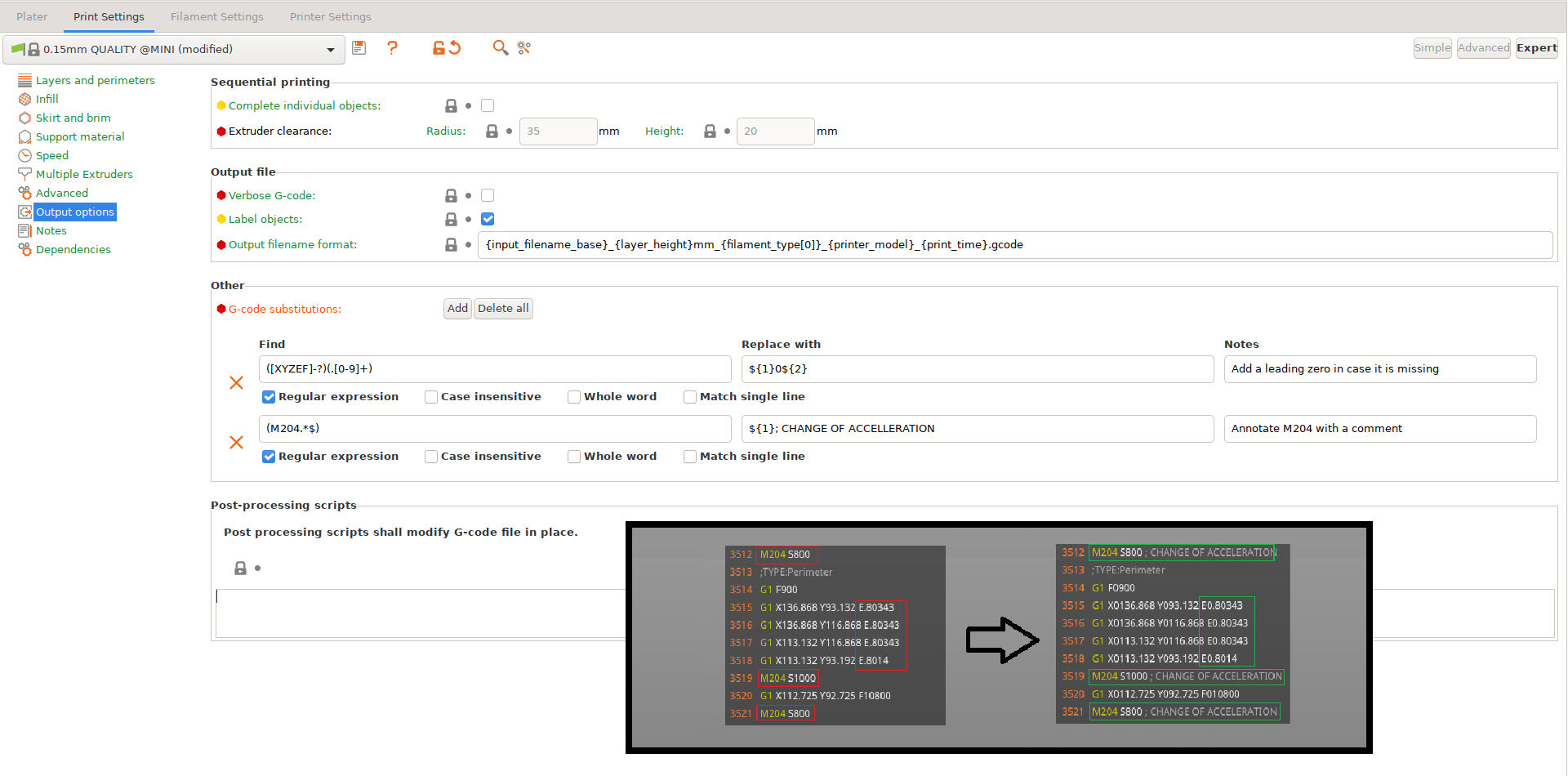
                  PrusaSlicer offers simple G-Code post-processing by specifying find and replace pairs, with optional regex matching, case sensitivity and whole word matching, similar to what common text editors offer. Regular expressions are very powerful and versatile tool that allows to set up even quite complicated substitutions. If you need more complicated post-processing, it is possible to use an external post-processing script instead.

                  The feature accessible from Print Settings -> Output options.

                  The G-Code is processed before it is previewed, so your changes will be visible in the G-Code preview. It may be helpful to turn on 'Verbose G-Code' to make PrusaSlicer generate extra annotations, which you can then match with a regex.
                  Regular expression syntax

                  Regular expression syntax of Perl is supported as described in boost Perl regular expression syntax, where a "single line" modifier mimics the Perl's s/ modifier. With regular expressions active, the "Replace with" pattern supports the "extended" syntax as described in boost extended format syntax. Lookahead and lookbehind are supported by the regular expression engine, but only for fixed length patterns. With regular expression disabled, n, r, t, and placeholders are supported in both "Find" and "Replace with" patterns similarly to Notepad++'s "extended" syntax.

                  The G-code find/replace post-processor processes G-code in blocks, where a single G-code block is generated for each layer starting with the Z up to move to the next layer. Multiple find/replace patterns are applied one by one to one G-code block before processing the next G-code block. Matching multi-line patterns is possible, however only inside one G-code block, most likely inside a single layer. Regular expressions are powerful but tricky, thus we recommend the regular expressions 101 online playground to get familiar with regular expressions and to test and fine tune the regular expressions modifying G-code before entering them into PrusaSlicer. Don't forget to switch the regex flavor to ECMAScript in the regular expressions 101 online playground.


                  Example

                  An example of a quite powerful G-code modification by a reasonably complex regular expression: Increase the extrusion rate of top solid infill from the default 95 percent to 98 percent.
                  Find:
                  Replace with:
                  Modifiers: regexp, single line

                  Was this article helpful?
                  This action is available only to registered users. Please log-in.

                  Topics

                  • PrusaSlicer 2.9 (Legacy)
                    • Advanced features
                      • Per model settings
                      • Color change
                      • Modifiers
                      • Reload from disk
                      • Insert pause or custom G-code at layer
                      • Negative volume
                      • Simplify mesh
                      • Post-processing scripts
                      • Shape Gallery
                      • Compare presets
                      • G-code substitutions
                      • Text tool
                      • SVG embossing tool
                      • Pressure Advance
                    • About PrusaSlicer
                    • Configuration and profiles
                    • User interface
                    • Input/output
                    • Left toolbar
                    • Top toolbar
                    • Print settings
                    • Filament settings
                    • Printer settings
                    • Multi-material slicing
                    • SLA slicing
                    • Other (PrusaSlicer)

                  7 comments

                  Log in  to post a comment
                  TeknikFrik
                  •
                  The example... I believe some new-line backslashes have been lost? Should it not read:

                  Find:
                  (;TYPE:Top solid infill\n)(.*?)(;TYPE:|$)(?!Top solid infill)
                  Replace:
                  ${1}M221 S98\n${2}M221 S95\n${3}
                  Reply
                  Canoe
                  •
                  For a mk4 mmu3

                  I want to add in a particular g-code substitution for all my slicing.
                  Currently, I have to put it in via the print settings->substitution tab, by copy/pasting each time I start up Slicer. Or else I have to find and replace in the g-code files. Or else I have to start with a previous *.3mf file and then read in the *.stl file I really want. Since I want the same substitution every time, this is a nuisance.

                  I have not been able to find the system's global "config file" or "parameters" . Which must exist, but where?

                  The g-code substitution I need is from the stock: "M708 A0x0b X5 ; extra load distance"
                  To the desired: "M708 A0x0b X10 ; extra load distance"
                  because for some reason, on my MK4 the filament needs to go a bit further forward in to the gear box.
                  Reply
                  Infinitymodular
                  •
                  I find this works with the example above to change the extrusion_multiplier for the top layer infill... I am trying to use the [extrusion_multiplier] placeholder value in the <replace> section, in order to offset the flow rate from the configured extrusion multiplier. Is this possible? It just seems to take the exact text in the replace field and replace with that. No placeholder injection. 
                  Reply
                  Scott Gartner
                  •
                  In PrusaSlicer 2.7.1 I can't get this feature to work at all.  I tried with and without regular expressions, I tried with and without comments, I get the following line output in the gcode, but no actual replacements are made (I tried valid substitutions as well):
                  ; gcode_substitutions = M73;xxxxxx;;
                  This was the setting I was hoping to make work:
                  ; gcode_substitutions = "(M73\\s+P[0-9]+\\s+R[0-9]+)\\n";"${1} ;LAYER_CHANGE_TRIGGER_CAMERA\\nG91\\nG1 E-1 F1800\\nG1 Z0.3\\nG90\\nG1 X180 Y180 F3600\\nG91\\nG1 Z-0.3\\nG1 E1 F1800\\nG90\\n";r;"Move head to trigger keeping frame"
                   
                  Reply
                  xA59rhR8FF
                  •

                  fe60 has it correct, the Find command should be:
                   
                  (;TYPE:Top solid infill\n)(.*?)(;TYPE:|$)(?!Top solid infill) 
                   
                  And the replace command should be:
                   
                  ${1}M221 S98\n${2}M221 S95\n${3}
                   
                  In my case I wanted top solid infill to be 95% and then subsequently reset to 100% to match my settings in SuperSlicer, so my replace command was as follows (leaving M221 without parameter resets it.)
                   
                  ${1}M221 S95\n${2}M221\n${3}
                  Reply