Prusa
  • SHOP
    • Latest products
    BY CATEGORY
    • 3D printersnew
    • 3D printer upgradesnew
    • Materials
    • Accessories
    • Spare parts
    • Courses
    • Merch
    • Get a price quote
    QUICK LINKS
    • Shipping & delivery
    • Returns & refunds
    • Payment & financing
    • Warranty
    • VAT & Customs fees
    • FAQ

    0 item in your cartitems in your cart

    Your cart is empty

    Go to cartShop 3D printers

    My profile

    Log in to see orders, saved items

    My profile

    Signed in as

    • Orders
    • Logout
  • 3D PRINTING
    • Explore 3D printing
    FOR BEGINNERS
    • 3D printing 101
    • How FDM printing works
    • Buying your first printer
    • 3D model catalog
    BY APPLICATION
    • Rapid prototyping
    • Manufacturing
    • Engineering
    • Research
    • Arts & design
    GO DEEPER
    • Materials guide
    • Courses
    • Webinars
    • Case studies
    • Custom 3D printing
  • 3D PRINTERS
    • All 3D printers
    FOR
    • Home or garageHobbyists, tinkerers and home printing
    • BusinessIn-house production for small teams
    • EnterpriseFleets, security and scale
    • Which Prusa is right for me
    SHOP & BROWSE
    • CORE One+new
    • CORE One+ INDXnew
    • CORE One L+new
    • CORE One L+ INDXnew
    • XL+new
    • MK4S
    • Prusa Pro HT90
    • Prusa Pro AFS
    • Prusa Pro SLX
    MORE FROM PRINTERS
    • Parts & upgradesnew
    • Spare parts
    • Critical infrastructure
    • Case studies
    • Signature Oak
    • Kits
  • MATERIALS
    • All materials
    BY USE
    • Every-day & design
    • Functional engineering
    • Composites
    • Pro speciality
    • SLA resins
    PRUSAMENT
    • PLA
    • PETG
    • ASA
    • PC
    • PA11
    • Flex
    • TPU
    MORE FROM MATERIALS
    • Materials guide
    • We make material in house
    • Sustainability
    • Order on the store
  • SOFTWARE
    • All software
    PREPARE THE PRINT
    • PrusaSlicer 3.0New
    PRINT & MONITOR
    • Prusa Connect
    • EasyPrint
    • iOS & Android app
    • Prusa Farm
    GET STARTED
    • Download & install
    • Knowledge base
    MORE FROM SOFTWARE
    • 3D model catalog
  • SUPPORT
    • Explore support
    FIND ANSWERS
    • Knowledge base
    • Troubleshooting
    • Courses
    • Webinars
    GET HELP
    • Contact us
    • Livechat
    • Shipping & delivery
    • Warranty
    • Returns & refunds
    • Service & spare parts
    • Service & Repair
    COMMUNITY
    • Forum
    • Reddit
    • Printables
  • TRUST CENTER
    • Trust Center overview
    BY TOPIC
    • GDPR
    • Certificates
    • Security
    • Compliance
    COMMITMENTS
    • Sustainability report
    TALK TO US
    • Contact the security team
  • COMPANY
    • About Prusa
    GET TO KNOW US
    • Our story
    • How we make printers
    • Open source
    • Brand & media kit
    NEWS
    • Blog
    • Newsroom
    • Events
    TRUST & PARTNERS
    • Sustainability
    • Resellers & distributors
    • Affiliate program
    • Contact
    • English
    • Čeština
    • Deutsch
    • Español
    • Français
    • Italiano
    • Polski
    • 日本語
  • Signed in as

    • Orders
    • Address
    • In-stock Alerts
    • My Courses
    • Subscription
    • Edit Account
    • Logout

Log in to see orders, saved items

Signed in as
  • Orders
  • Address
  • In-stock Alerts
  • My Courses
  • Subscription
  • Edit Account
  • English
  • Čeština
  • Deutsch
  • Español
  • Français
  • Italiano
  • Polski
  • 日本語
Shop

0 item in your cartitems in your cart

Your cart is empty

Go to cartShop 3D printers

My profile

Log in to see orders, saved items

My profile

Signed in as

  • Orders
  • Logout
SHOP
  • Latest products
BY CATEGORY
  • 3D printersnew
  • 3D printer upgradesnew
  • Materials
  • Accessories
  • Spare parts
  • Courses
  • Merch
  • Get a price quote
QUICK LINKS
  • Shipping & delivery
  • Returns & refunds
  • Payment & financing
  • Warranty
  • VAT & Customs fees
  • FAQ

Featured products

    Popular categories

      Trending searches

        Articles

          Blog

            Products

              Categories

                Suggested searches

                  Searching…
                  No results
                  Something went wrong.
                  ↑↓ Select↵ OpenEsc Close search
                  1. Support
                  2. Printer troubleshooting
                  3. Filament failed to unload (MINI/MINI+)
                   

                  Contents

                  • Stuck inside print head
                  • Stuck inside Bowden
                  • After it is resolved

                  Blog

                  • Prusament Pellets: Raw material batches for large-format 3D printing or small-scale polymer research & development
                  • Print colorful and glowing Halloween decorations with our spooky offer
                  • Factorio Has Arrived on Printables

                  Newsletter

                  Signup and get our monthly squeeze on updates, blog, printables and much more.

                  By clicking, you agree to receive our newsletter.

                  This site is protected by reCAPTCHA Enterprise and the Google Privacy Policy and Terms of Service apply.

                  Heavy Duty Keyboard Holder (No Supports)
                  E-shop
                  • 3D Printers
                  • Printer Upgrades
                  • Filaments
                  • Accessories
                  • Prusa Merchandise
                  Prusa

                  © Prusa Research a.s.

                  Printables
                  • 3D Models
                  • Store
                  • Clubs
                  • 3D Design Contests
                  • Brands
                  Community
                  • World Map
                  • Forum
                  • User Groups
                  • Events
                  Help
                  • Prusa Help
                  • Prusa Academy
                  • 3D Printing Calculators
                  Software
                  • PrusaSlicer
                  • Prusa.app
                  • Prusa Connect
                  • Drivers and Software
                  Company
                  • About Us
                  • Blog
                  • Official Prusa Resellers
                  • Contact Us
                  • Certified for ISO 9001, ISO 14001, ISO 45001
                  • General Terms and Conditions
                  • General Terms and Conditions of Use of the PRUSA Websites
                  • Privacy Policy
                  • Information about cookies
                  • Customer Complaints Policy
                  • Status Page
                  • Do Not Sell or Share My Personal Information
                  • Supplemental Statements
                  Prusa
                  • General Terms and Conditions
                  • General Terms and Conditions of Use of the PRUSA Websites
                  • Privacy Policy
                  • Information about cookies
                  • Customer Complaints Policy
                  • Status Page
                  • Do Not Sell or Share My Personal Information
                  • Supplemental Statements

                  © Prusa Research a.s.

                  JOSEF PRUSA®, PRUSA RESEARCH®, PRUSA POLYMERS®, PRUSA ORANGE®, PRUSA 3D ® AND PRUSAMENT® are registered trademarks of Prusa Development a.s. used by Prusa Research a.s. under licence from Prusa Development a.s.

                  Filament failed to unload

                  (MINI/MINI+)

                  Relevant for

                  MINI
                  MINI+
                  3 comments
                  Article is also available in following languages
                  English
                  Čeština
                  Polski
                  Deutsch
                  Français
                  Español
                  Italiano
                  日本語

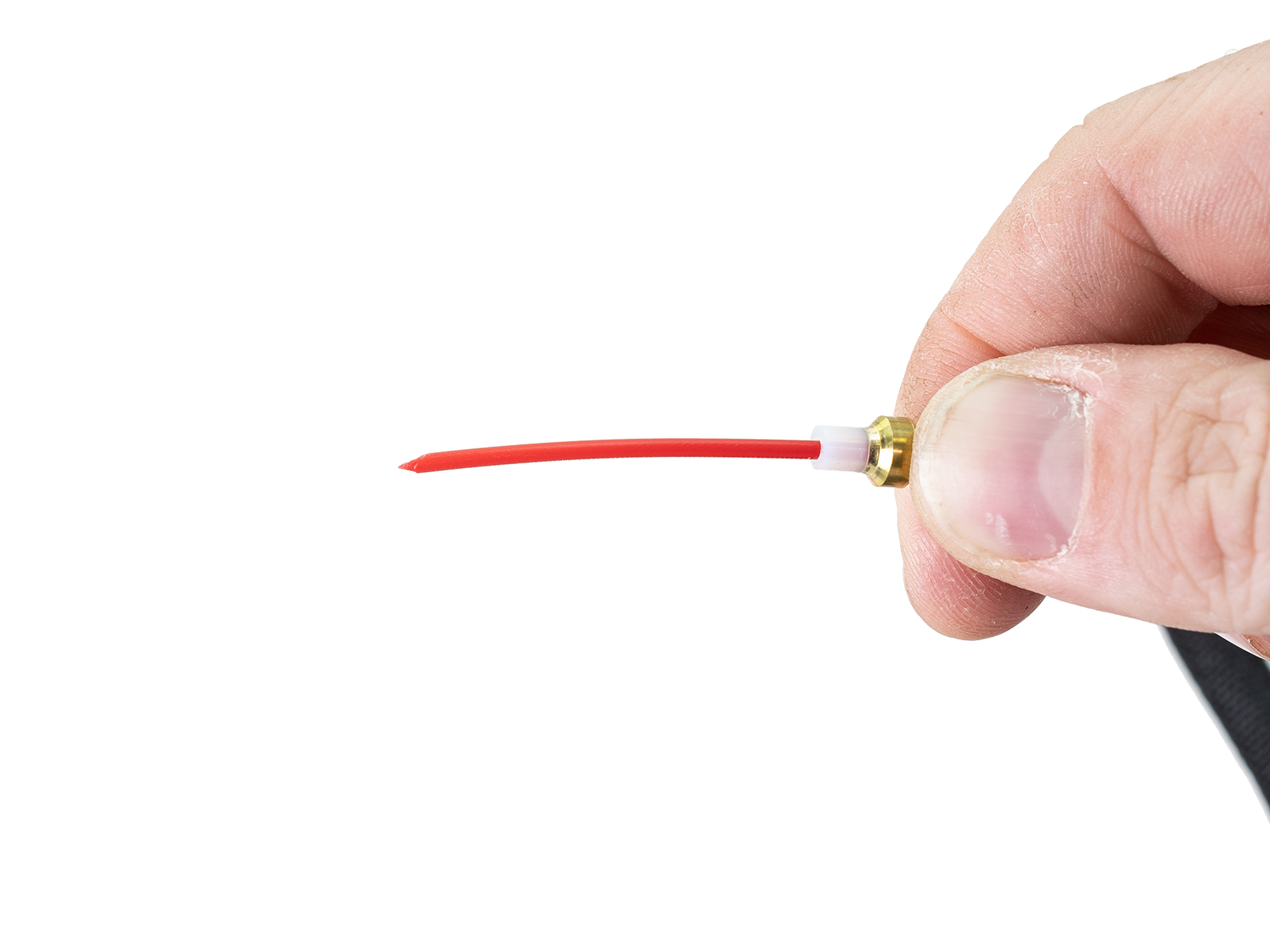
                  When unloading the filament, the tip can have a large or irregular shape that is too big for the Bowden PTFE tube. You may hear some grinding sounds from the extruder as the printer is unable to pull the filament. It can then be stuck in the Bowden or hotend PTFE tube after the unloading procedure is complete.

                  To resolve this in the fastest way possible your approach can differ depending on where it is stuck:

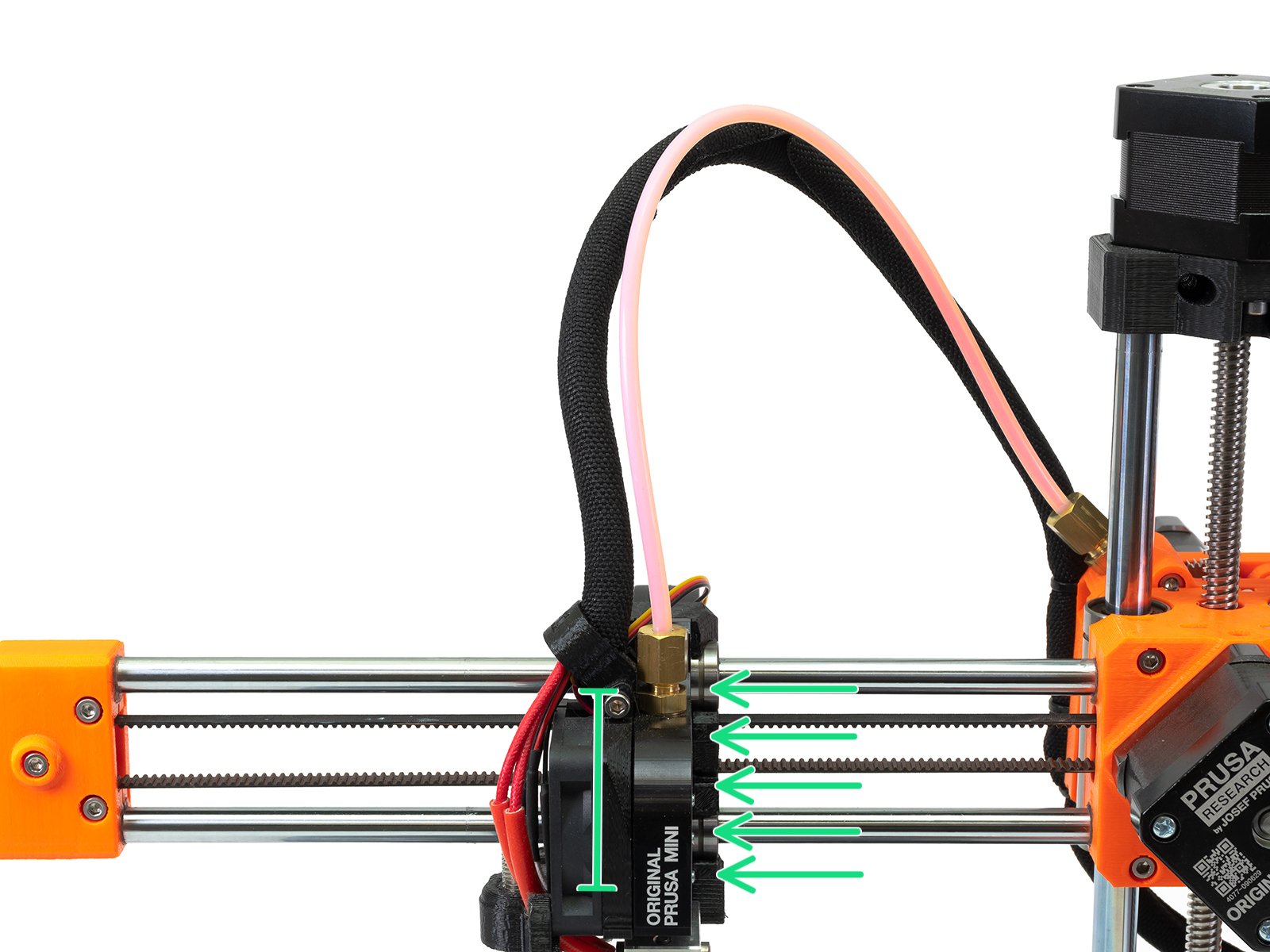
                  • Inside print head: The tip filament is not visible, stuck before the Bowden tube (green arrows).
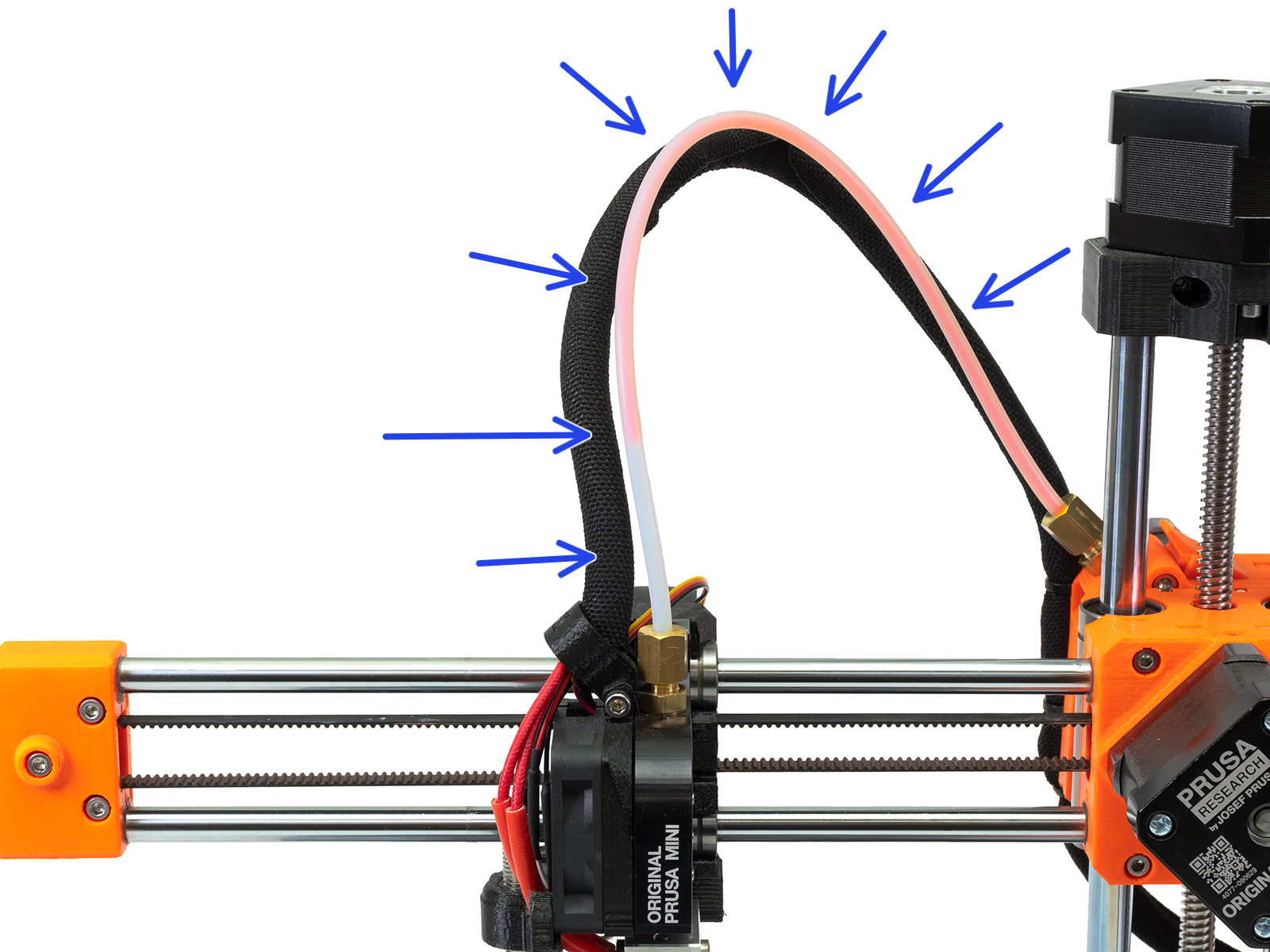
                  • Inside Bowden: The tip of the filament is visible and stuck in the Bowden PTFE tube (blue arrows).
                  Inside print head - Stuck anywhere below the fittingInside Bowden - Stuck anywhere in the Bowden tube

                  Stuck inside print head

                  1. Make sure the nozzle is still heated to the temperature of the loaded filament. If the nozzle is cold, navigate to LCD menu -> Settings -> Temperatures -> Nozzles, and set the correct temperature.
                  CAUTION: The nozzle is now hot and can cause burns!
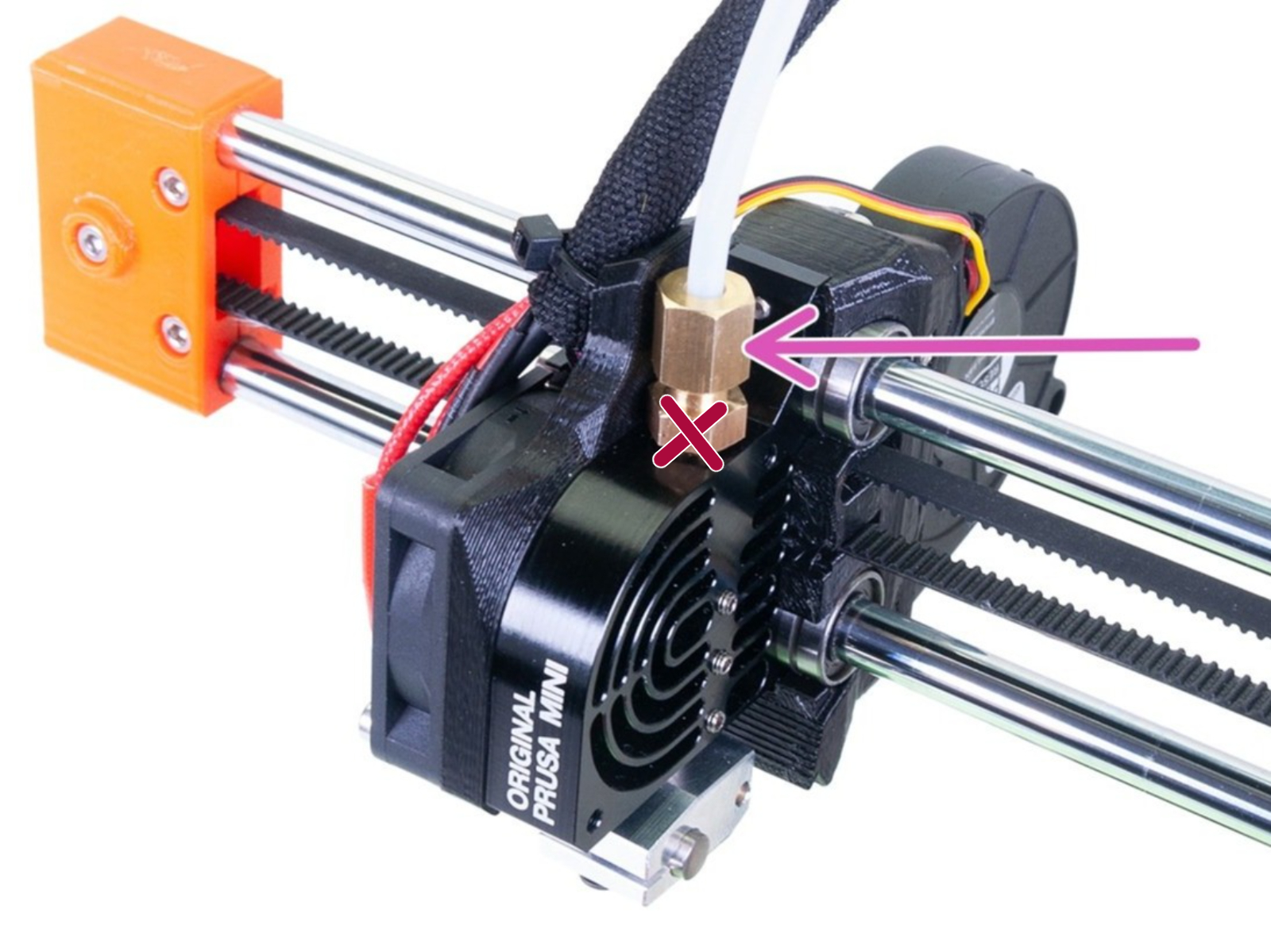
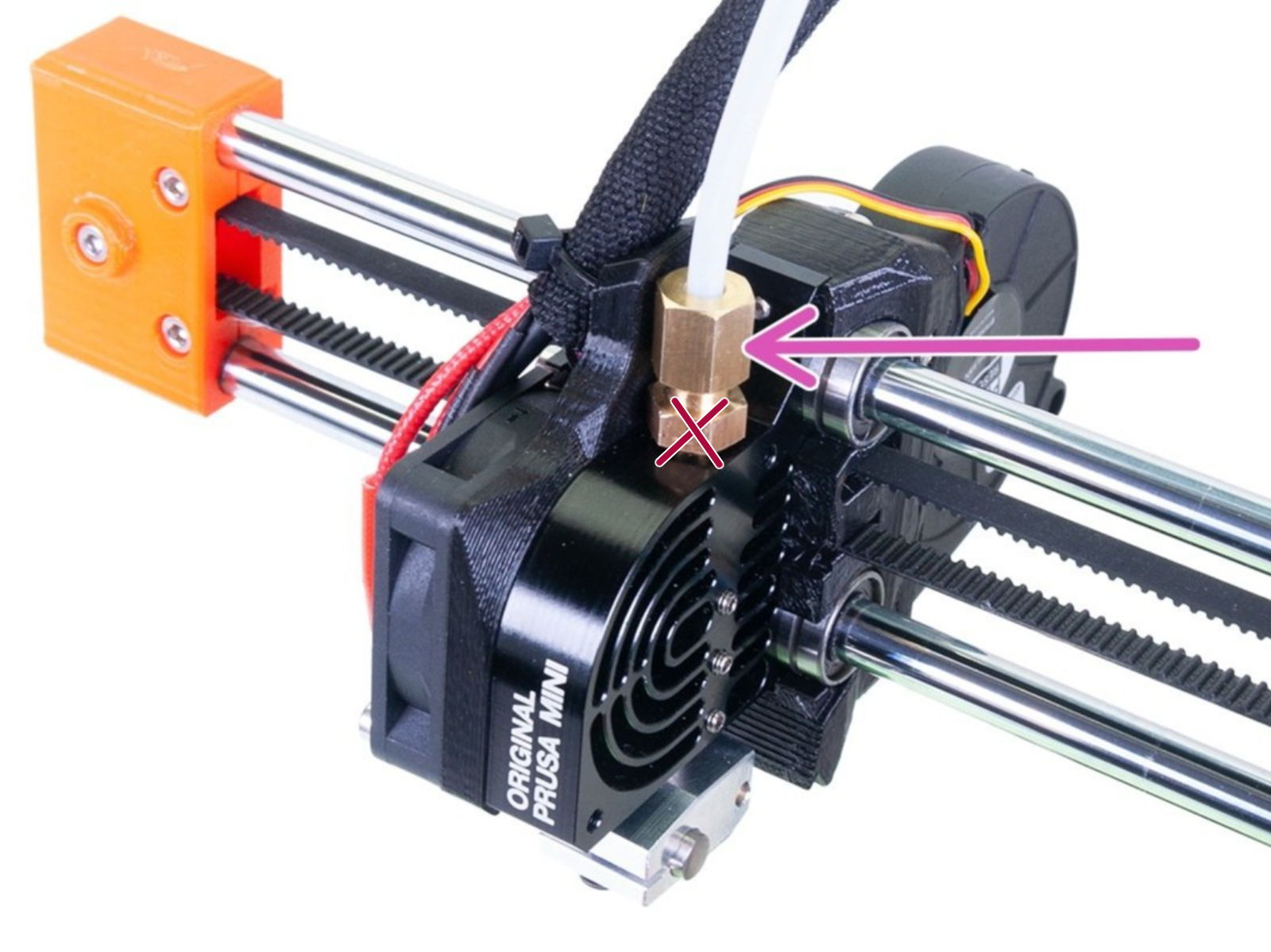
                  1. Unscrew the large brass nut (purple arrow) securing the long PTFE tube, using pliers or a 10 mm spanner. The lower portion of the brass fitting should not be unscrewed nor removed!

                  1.  Pull out the filament from the hotend PTFE tube. You may need to use pliers and there can be some resistance.
                  If the filament breaks in the hotend PTFE tube and there is filament left in it, follow the procedure to shown in this article to clear it.
                  1. Cut the irregularly shaped filament tip obstructing the unload, at a 45-degree angle. 
                  1. Repeat the unload filament function to completely unload the filament.
                  2. Resecure the brass fitting and you should be ready to load a new filament.
                  If you can not unload the filament from the menu after the procedure, loosen the Idler screw on the extruder and pull it out by hand.

                  Stuck inside Bowden

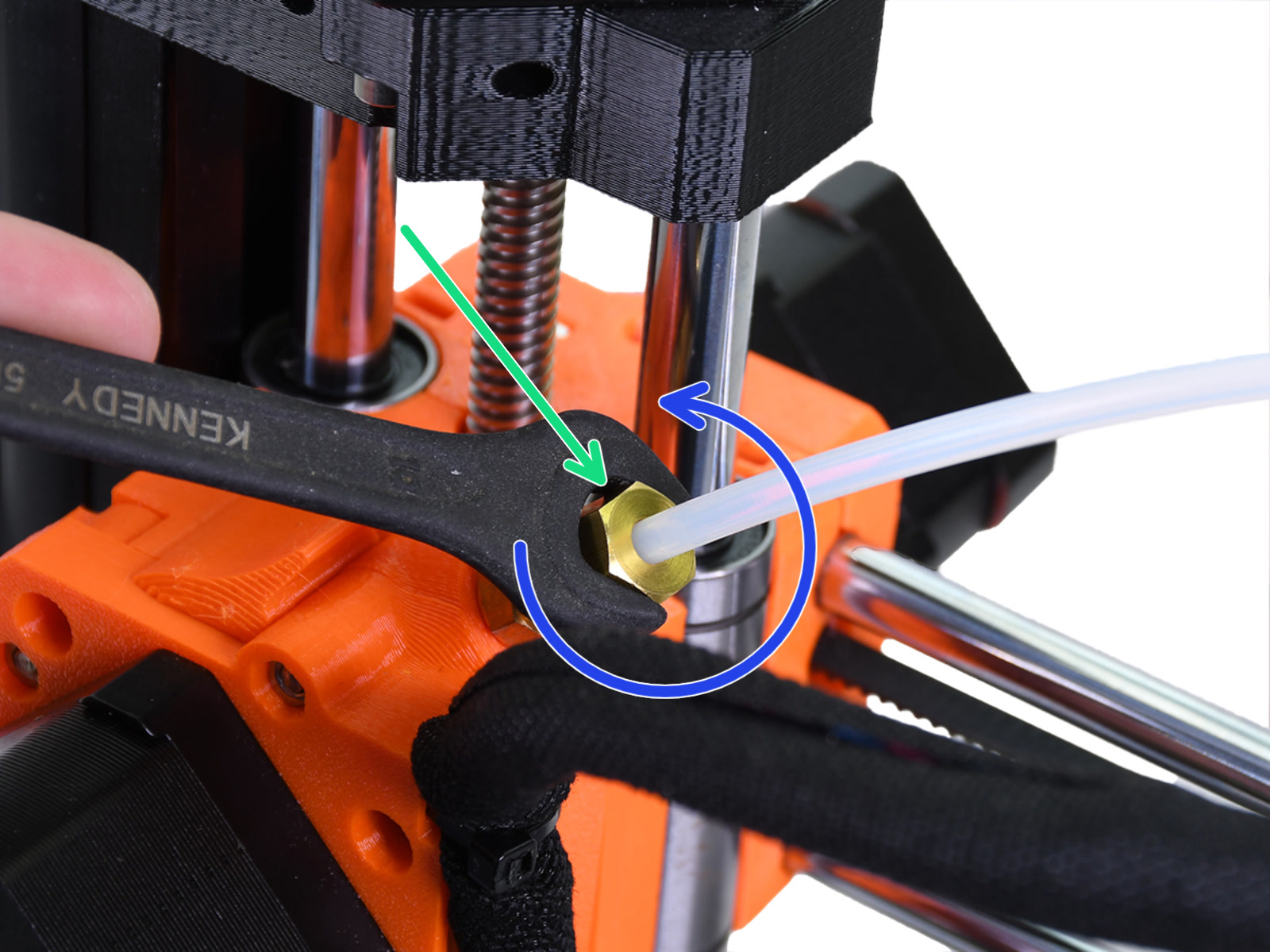
                  1. Unscrew the large brass nuts (green and purple arrows) on both sides of the Bowden PTFE tube by using pliers or a 10 mm spanner (blue arrow). The lower portion of either brass fittings should not be unscrewed and removed!
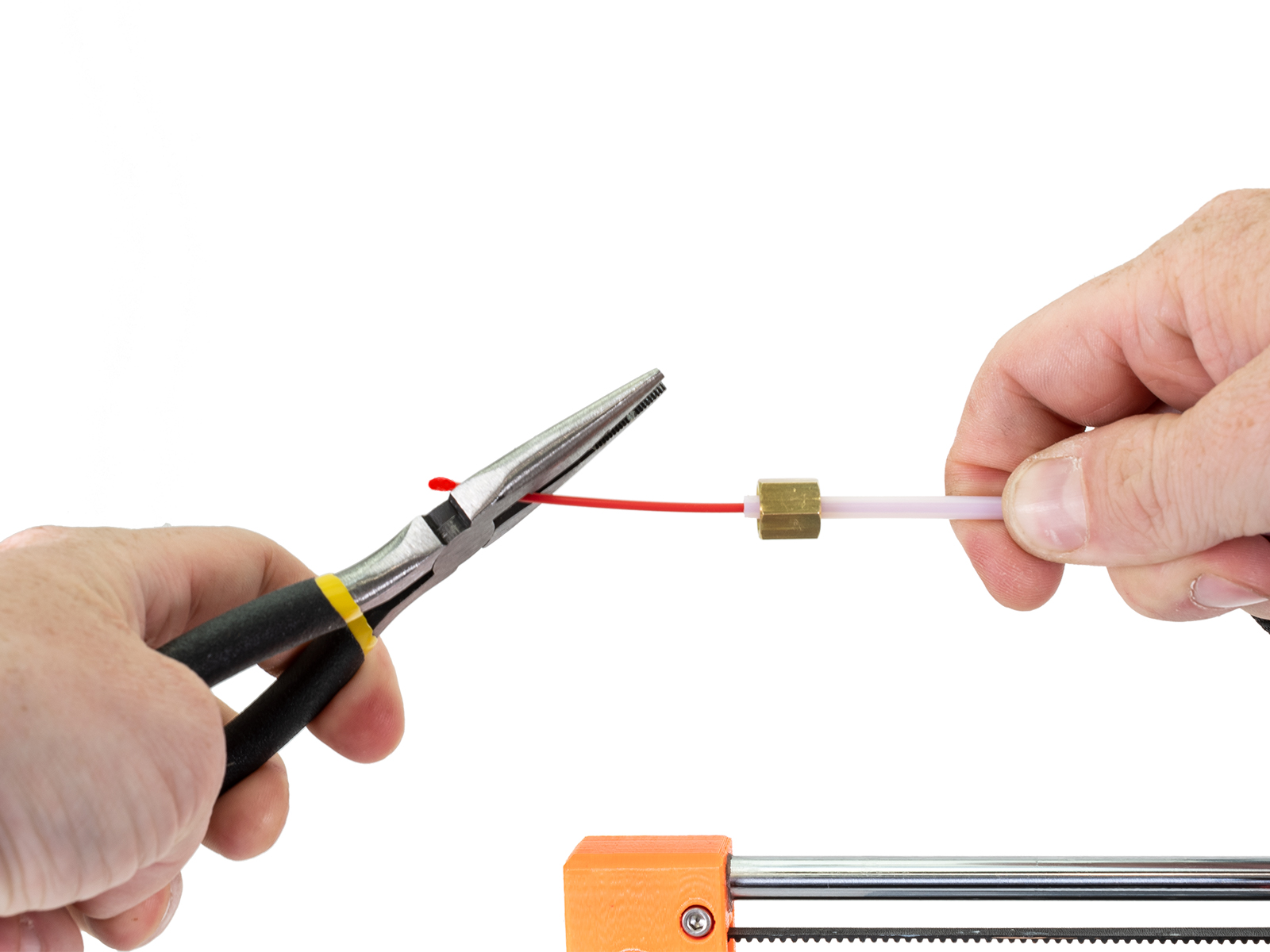
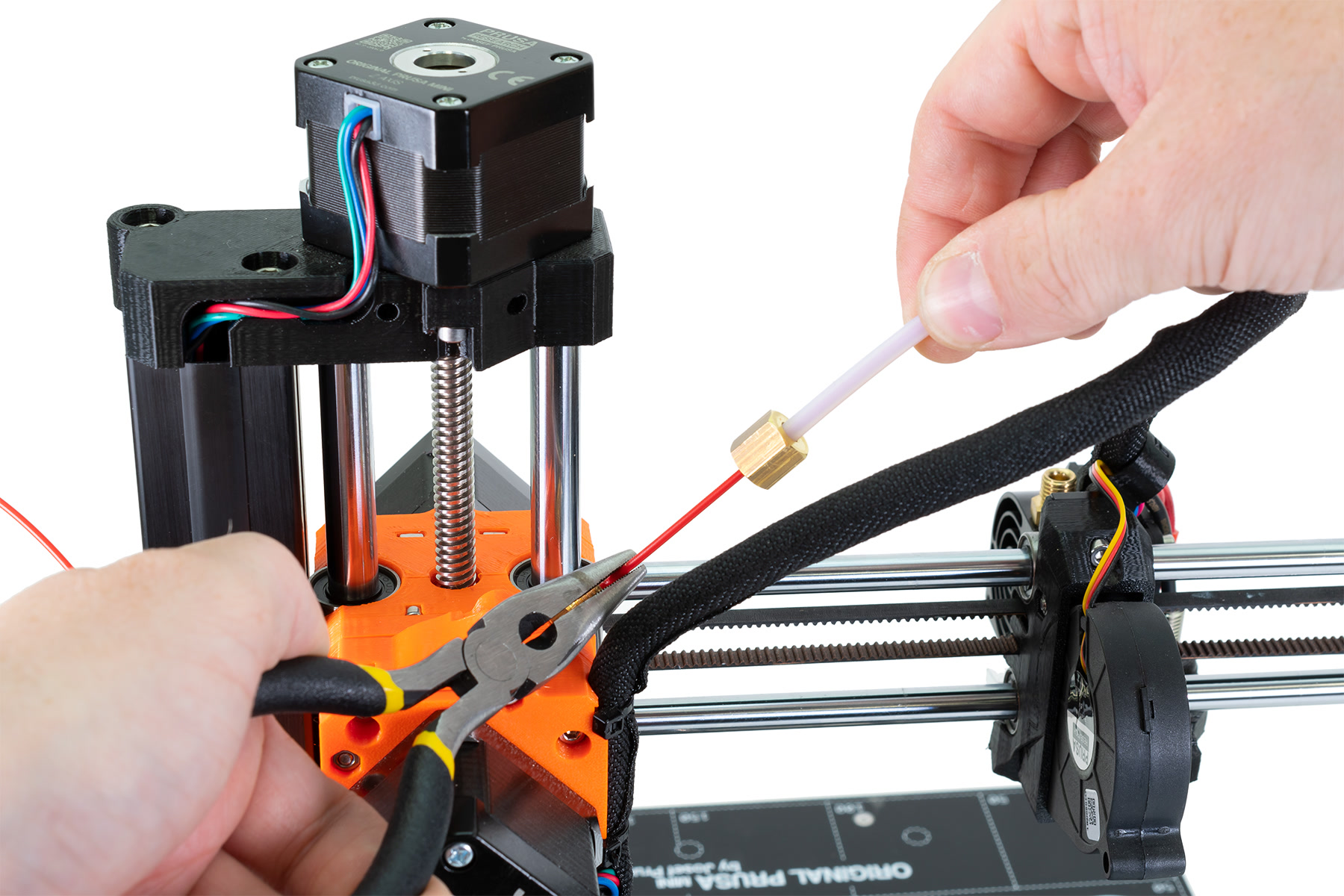
                  1. On the extruder, secure the filament with a pair of pliers while pulling the PTFE tube off the filament using your other hand. You can expect an amount of resistance as the filament tip goes through the last bit of the PTFE tube.
                  2. Cut the irregularly shaped filament tip obstructing the unload at a 45-degree angle.
                  3. Repeat the unload filament function to completely unload the filament.
                  4. Resecure both of the brass fittings and you should be ready to load a new filament.
                  If you can not unload the filament from the menu after the procedure, loosen the Idler screw on the extruder and pull it out by hand.

                  After it is resolved

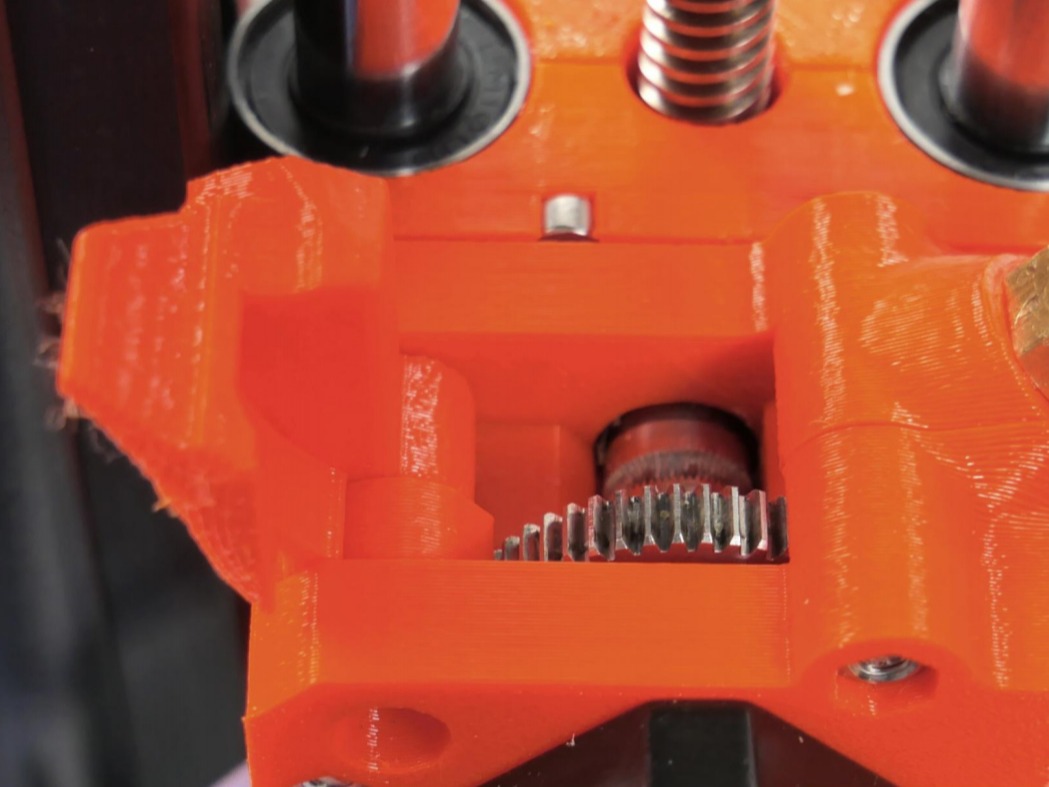
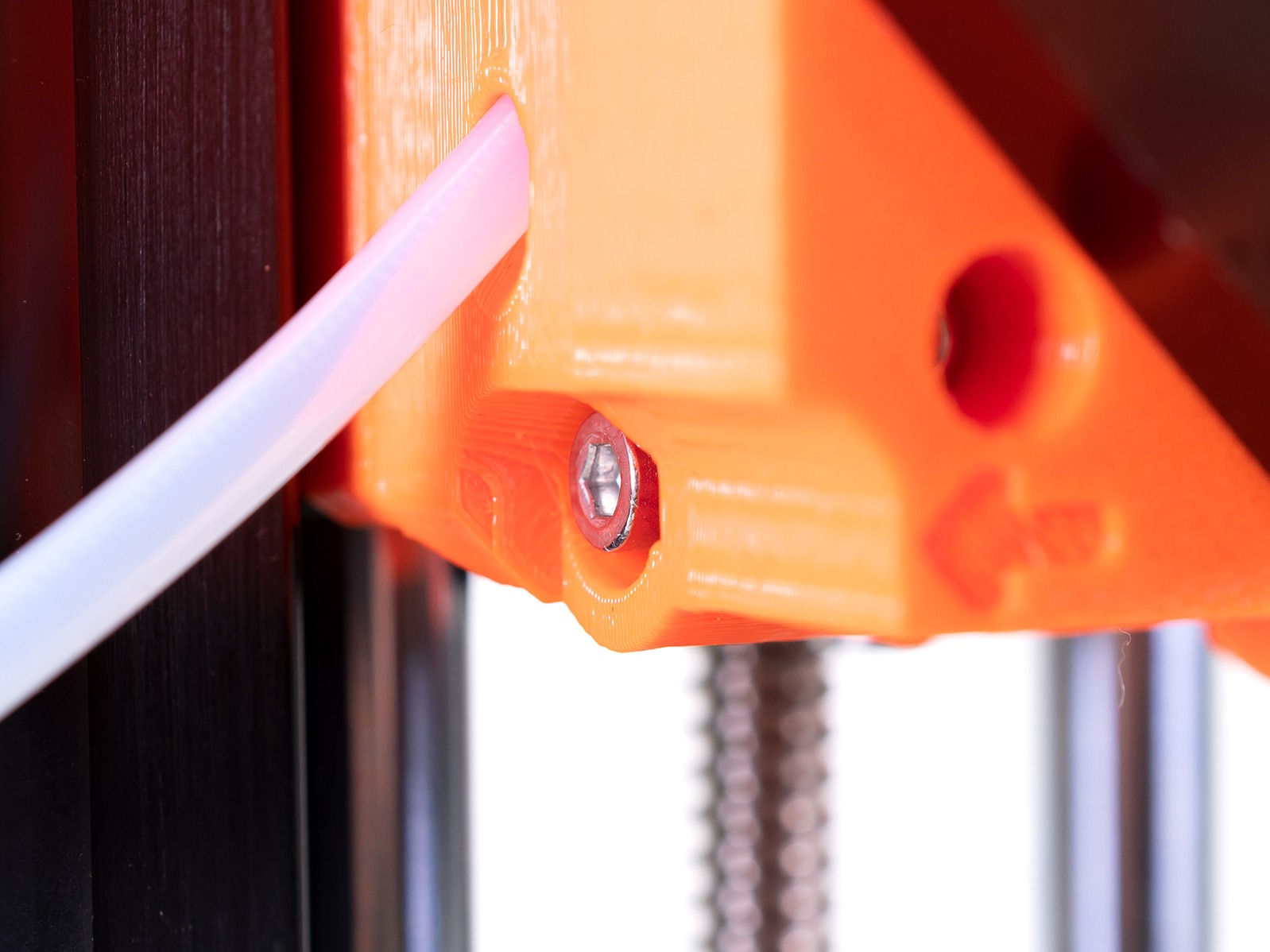
                  If you experience several failed unloads, the extruder's pulley gear (left picture) may have filament dust and debris in its teeth that need to be cleaned. Please see How to access and clean the extruder-pulley (MINI/MINI+) for detailed steps. Furthermore, make sure the idler screw is roughly flush with the plastic (right picture). 

                  Was this article helpful?
                  This action is available only to registered users. Please log-in.

                  3 comments

                  Log in  to post a comment
                  Matěj utěšený
                  •
                  A co cold pull
                  Reply
                  FriskyDingo
                  •
                  Hello, I am having issue with my idler screw backing out. I have to preform extruder surgery. I removed all debris from teeth. all good to go. I have tighted the screw flush with plastic as recommended. But over time the screw backs out and fliament eventually fails to feed. Ideas?
                  Reply
                  NuRxG
                  •
                  "the tip can have a large or irregular shape that is too big for the Bowden PTFE tube"
                                  If this happens regularly check the small ptfe tube inside the heat sink. The fillament that comes out of the hot end sits near the end of it to cool. Over time it can deform and enlarge the inner diameter of the tube in this spot. Which leaves a larger area for it to cool, resulting in the large blob. A new tube will get it to cool in the proper shape again.
                  Reply

                  Topics

                  • Troubleshooting
                    • Printer troubleshooting
                      • Spaghetti monster
                      • Extruder blob
                      • Extruder noises
                      • Print fan is not spinning
                      • Clogged nozzle/hotend (MINI/MINI+)
                      • Preheat error bed #12201 (MINI)
                      • M.I.N.D.A./SuperPINDA sensor testing (MINI/MINI+)
                      • Preheat error print head #12202 (MINI)
                      • Thermal runaway bed #12203 (MINI)
                      • Thermal runaway print head #12204 (MINI)
                      • Maxtemp error bed #12205 (MINI)
                      • Maxtemp error print head #12206 (MINI)
                      • Mintemp error bed #12207 (MINI)
                      • Mintemp error print head #12208 (MINI)
                      • Squaring your MINI
                      • Factory reset (MINI)
                      • Blown Fuse (MINI)
                      • IR Filament Sensor Troubleshooting (MINI/MINI+)
                      • Filament failed to unload (MINI/MINI+)
                      • Temp not matching print head #12210 (MINI/MINI+)
                      • PrusaLink Troubleshooting
                      • Homing Error #12301 (MINI)
                      • USB not connected #12602 (MINI/MINI+)
                      • No file on USB #12604 (MINI/MINI+)
                      • Signature verification failed #12606 (MINI/MINI+)
                      • Hash verification failed #12607 (MINI/MINI+)
                      • Unsupported printer type #12610 (MINI/MINI+)
                      • Unsupported printer version #12611 (MINI/MINI+)
                      • Flash erase error #12605 (MINI/MINI+)
                      • Temp not matching heatbed #12209 (MINI/MINI+)
                      • No FW in internal flash #12612 (MINI/MINI+)
                      • Invalid FW size on USB #12603 (MINI/MINI+)
                      • File system error #12613 (MINI/MINI+)
                      • Unsupported BBF version #12614 (MINI/MINI+)
                      • Tangled filament
                      • Emergency stop #12510 (MINI)
                      • Connect Registration Failed
                      • Connect Registration Failed #12401 (MINI)
                      • Blue Screen of Death (BSOD) #31538 (CORE One) #35538 (CORE One L) #36538 (CORE One INDX) #26538 (MK4S) #13538 (MK4) #27538 (MK3.9S) #17538 (XL) #21538 (MK3.9) #28538 (MK3.5S) #23538 (MK3.5) #12538 (MINI)
                      • Homing error Y #12305 (MINI/MINI+)
                      • Homing error X #12304 (MINI/MINI+)
                      • Troubleshooting the MINI/MINI+ assembly
                      • Firmware in the internal flash corrupted! #12608 (MINI)
                      • SD cards and USB drives
                    • Diagnostics
                    • Print Quality Troubleshooting
                    • QR Error codes
                    • Print Error Messages