Prusa
  • SHOP
    • Latest products
    BY CATEGORY
    • 3D printersnew
    • 3D printer upgradesnew
    • Materials
    • Accessories
    • Spare parts
    • Courses
    • Merch
    • Get a price quote
    QUICK LINKS
    • Shipping & delivery
    • Returns & refunds
    • Payment & financing
    • Warranty
    • VAT & Customs fees
    • FAQ

    0 item in your cartitems in your cart

    Your cart is empty

    Go to cartShop 3D printers

    My profile

    Log in to see orders, saved items

    My profile

    Signed in as

    • Orders
    • Logout
  • 3D PRINTING
    • Explore 3D printing
    FOR BEGINNERS
    • 3D printing 101
    • How FDM printing works
    • Buying your first printer
    • 3D model catalog
    BY APPLICATION
    • Rapid prototyping
    • Manufacturing
    • Engineering
    • Research
    • Arts & design
    GO DEEPER
    • Materials guide
    • Courses
    • Webinars
    • Case studies
    • Custom 3D printing
  • 3D PRINTERS
    • All 3D printers
    FOR
    • Home or garageHobbyists, tinkerers and home printing
    • BusinessIn-house production for small teams
    • EnterpriseFleets, security and scale
    • Which Prusa is right for me
    SHOP & BROWSE
    • CORE One+new
    • CORE One+ INDXnew
    • CORE One L+new
    • CORE One L+ INDXnew
    • XL+new
    • MK4S
    • Prusa Pro HT90
    • Prusa Pro AFS
    • Prusa Pro SLX
    MORE FROM PRINTERS
    • Parts & upgradesnew
    • Critical infrastructure
    • Case studies
    • Signature Oak
    • Kits
  • MATERIALS
    • All materials
    BY USE
    • Every-day & design
    • Functional engineering
    • Composites
    • Pro speciality
    • SLA resins
    PRUSAMENT
    • PLA
    • PETG
    • ASA
    • PC
    • PA11
    • Flex
    • TPU
    MORE FROM MATERIALS
    • Materials guide
    • We make material in house
    • Sustainability
    • Order on the store
  • SOFTWARE
    • All software
    PREPARE THE PRINT
    • PrusaSlicer 3.0New
    PRINT & MONITOR
    • Prusa Connect
    • EasyPrint
    • iOS & Android app
    • Prusa Farm
    GET STARTED
    • Download & install
    • Knowledge base
    MORE FROM SOFTWARE
    • 3D model catalog
  • SUPPORT
    • Explore support
    FIND ANSWERS
    • Knowledge base
    • Troubleshooting
    • Courses
    • Webinars
    GET HELP
    • Contact us
    • Livechat
    • Shipping & delivery
    • Warranty
    • Returns & refunds
    • Service & spare parts
    • Service & Repair
    COMMUNITY
    • Forum
    • Reddit
    • Printables
  • TRUST CENTER
    • Trust Center overview
    BY TOPIC
    • GDPR
    • Certificates
    • Security
    • Compliance
    COMMITMENTS
    • Sustainability report
    TALK TO US
    • Contact the security team
  • COMPANY
    • About Prusa
    GET TO KNOW US
    • Our story
    • How we make printers
    • Open source
    • Brand & media kit
    NEWS
    • Blog
    • Newsroom
    • Events
    TRUST & PARTNERS
    • Sustainability
    • Resellers & distributors
    • Affiliate program
    • Contact
    • English
    • Čeština
    • Deutsch
    • Español
    • Français
    • Italiano
    • Polski
    • 日本語
  • Signed in as

    • Orders
    • Address
    • In-stock Alerts
    • My Courses
    • Subscription
    • Edit Account
    • Logout

Log in to see orders, saved items

Signed in as
  • Orders
  • Address
  • In-stock Alerts
  • My Courses
  • Subscription
  • Edit Account
  • English
  • Čeština
  • Deutsch
  • Español
  • Français
  • Italiano
  • Polski
  • 日本語
Shop

0 item in your cartitems in your cart

Your cart is empty

Go to cartShop 3D printers

My profile

Log in to see orders, saved items

My profile

Signed in as

  • Orders
  • Logout
SHOP
  • Latest products
BY CATEGORY
  • 3D printersnew
  • 3D printer upgradesnew
  • Materials
  • Accessories
  • Spare parts
  • Courses
  • Merch
  • Get a price quote
QUICK LINKS
  • Shipping & delivery
  • Returns & refunds
  • Payment & financing
  • Warranty
  • VAT & Customs fees
  • FAQ

Featured products

    Popular categories

      Trending searches

        Articles

          Blog

            Products

              Categories

                Suggested searches

                  Searching…
                  No results
                  Something went wrong.
                  ↑↓ Select↵ OpenEsc Close search
                  1. Support
                  2. PrusaSlicer
                  3. Multi-material slicing
                  4. Purging volumes (MMU)
                   

                  Contents

                  • Purging volumes

                  Blog

                  • Print colorful and glowing Halloween decorations with our spooky offer
                  • Factorio Has Arrived on Printables
                  • Prusament PLA Lightweight: 65% lighter than regular PLA. Perfect choice for aircraft, cosplay, and more.

                  Newsletter

                  Signup and get our monthly squeeze on updates, blog, printables and much more.

                  By clicking, you agree to receive our newsletter.

                  This site is protected by reCAPTCHA Enterprise and the Google Privacy Policy and Terms of Service apply.

                  Factorio Transport Belts
                  E-shop
                  • 3D Printers
                  • Printer Upgrades
                  • Filaments
                  • Accessories
                  • Prusa Merchandise

                  © Prusa Research a.s.

                  Printables
                  • 3D Models
                  • Store
                  • Clubs
                  • 3D Design Contests
                  • Brands
                  Community
                  • World Map
                  • Forum
                  • User Groups
                  • Events
                  Help
                  • Prusa Help
                  • Prusa Academy
                  • 3D Printing Calculators
                  Software
                  • PrusaSlicer
                  • Prusa.app
                  • Prusa Connect
                  • Drivers and Software
                  Company
                  • About Us
                  • Blog
                  • Official Prusa Resellers
                  • Contact Us
                  • Certified for ISO 9001, ISO 14001, ISO 45001
                  • General Terms and Conditions
                  • General Terms and Conditions of Use of the PRUSA Websites
                  • Privacy Policy
                  • Information about cookies
                  • Customer Complaints Policy
                  • Status Page
                  • Do Not Sell or Share My Personal Information
                  • Supplemental Statements
                  • General Terms and Conditions
                  • General Terms and Conditions of Use of the PRUSA Websites
                  • Privacy Policy
                  • Information about cookies
                  • Customer Complaints Policy
                  • Status Page
                  • Do Not Sell or Share My Personal Information
                  • Supplemental Statements

                  © Prusa Research a.s.

                  JOSEF PRUSA®, PRUSA RESEARCH®, PRUSA POLYMERS®, PRUSA ORANGE®, PRUSA 3D ® AND PRUSAMENT® are registered trademarks of Prusa Development a.s. used by Prusa Research a.s. under licence from Prusa Development a.s.

                  Purging volumes (MMU)

                  Relevant for

                  MMU1
                  MMU2S
                  MMU3
                  PrusaSlicer
                  20 comments
                  Article is also available in following languages
                  English
                  Čeština
                  Polski
                  Deutsch
                  Français
                  Español
                  Italiano
                  日本語

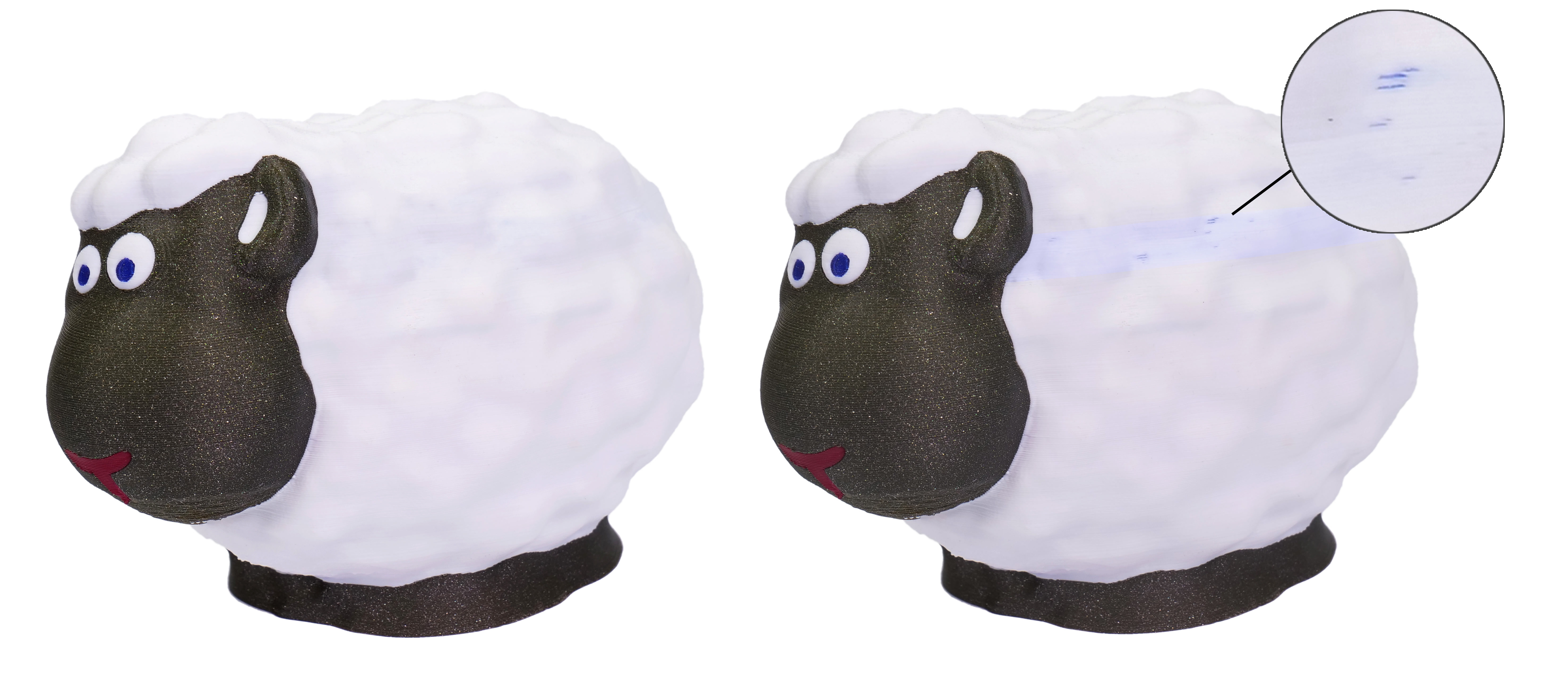
                  During a filament change, a small amount of melted plastic remains in the nozzle. As the new filament is loaded, it’s melted as well and starts pushing the nozzle content out. During this time, you’ll see a gradual change in the color of the extruded filament.

                  In order to ensure a sharp color transition, PrusaSlicer provides several ways to deposit this filament:
                  • Smart wipe tower
                  • Wipe to infill
                  • Wipe to object

                  The sheep on the right has the white color contaminated by the blue pigment from the previous filament

                  Purging volumes 

                  Two modes are possible to set the purging volumes. Use values from configuration, or use custom project-specific settings. 

                  Use values from configuration

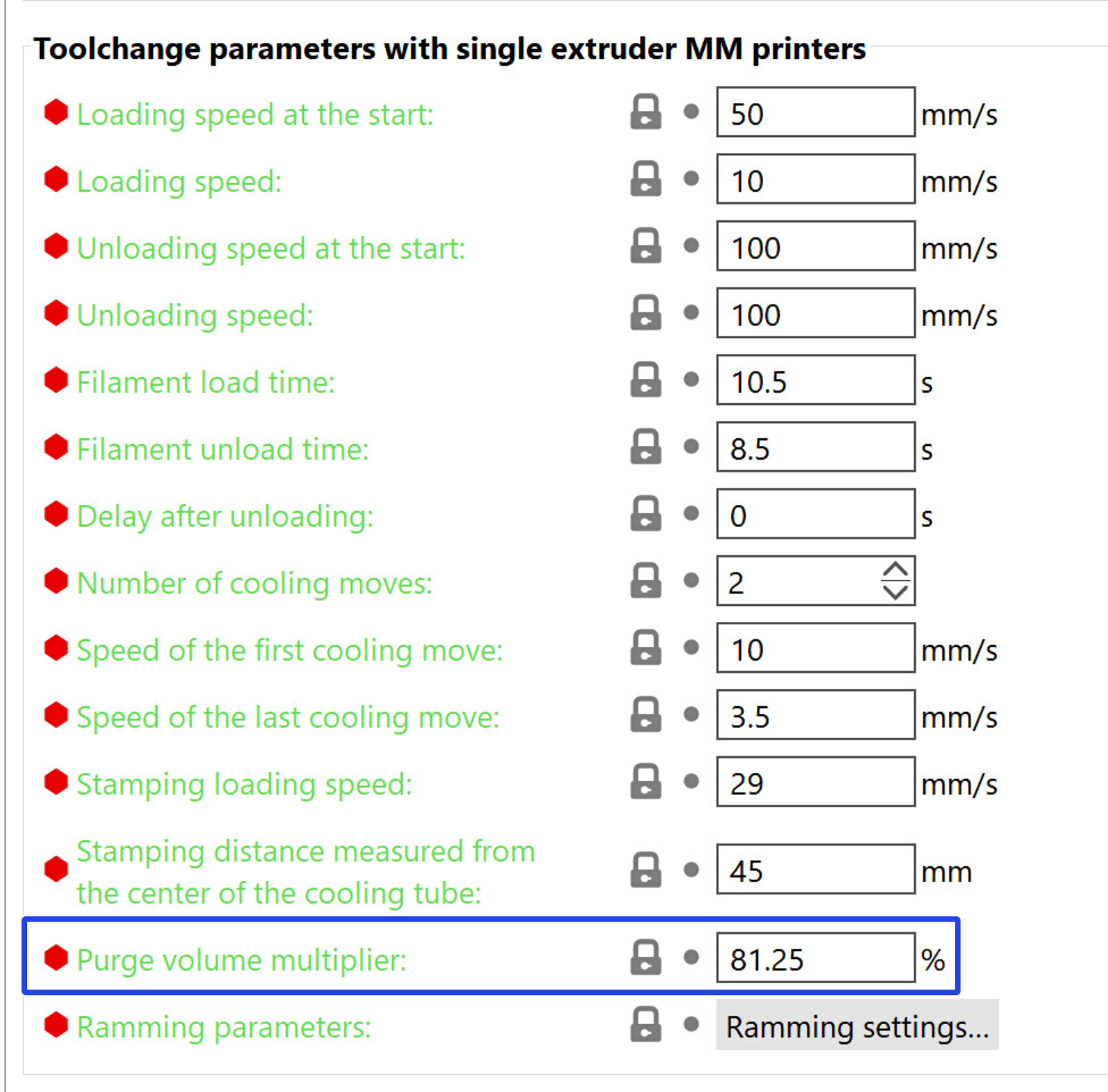
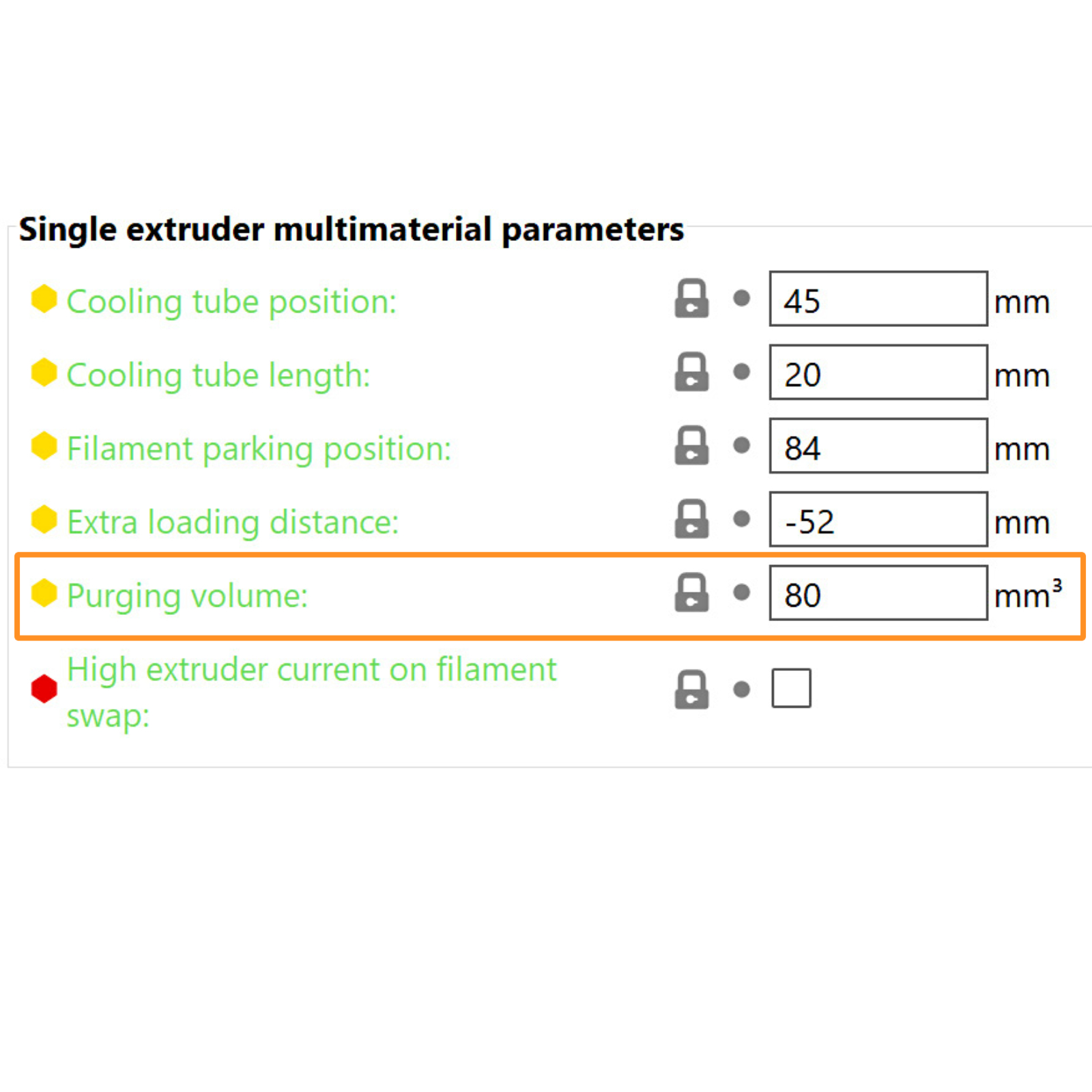
                  The volume to purge is set by changing the Purging Volume in Printer Settings -> Single extruder MM setup. This value can be further modified on the filament level using Purge Volume Multiplier in Filament Settings -> Advanced. The values cannot be modified in the purging volumes matrix. 
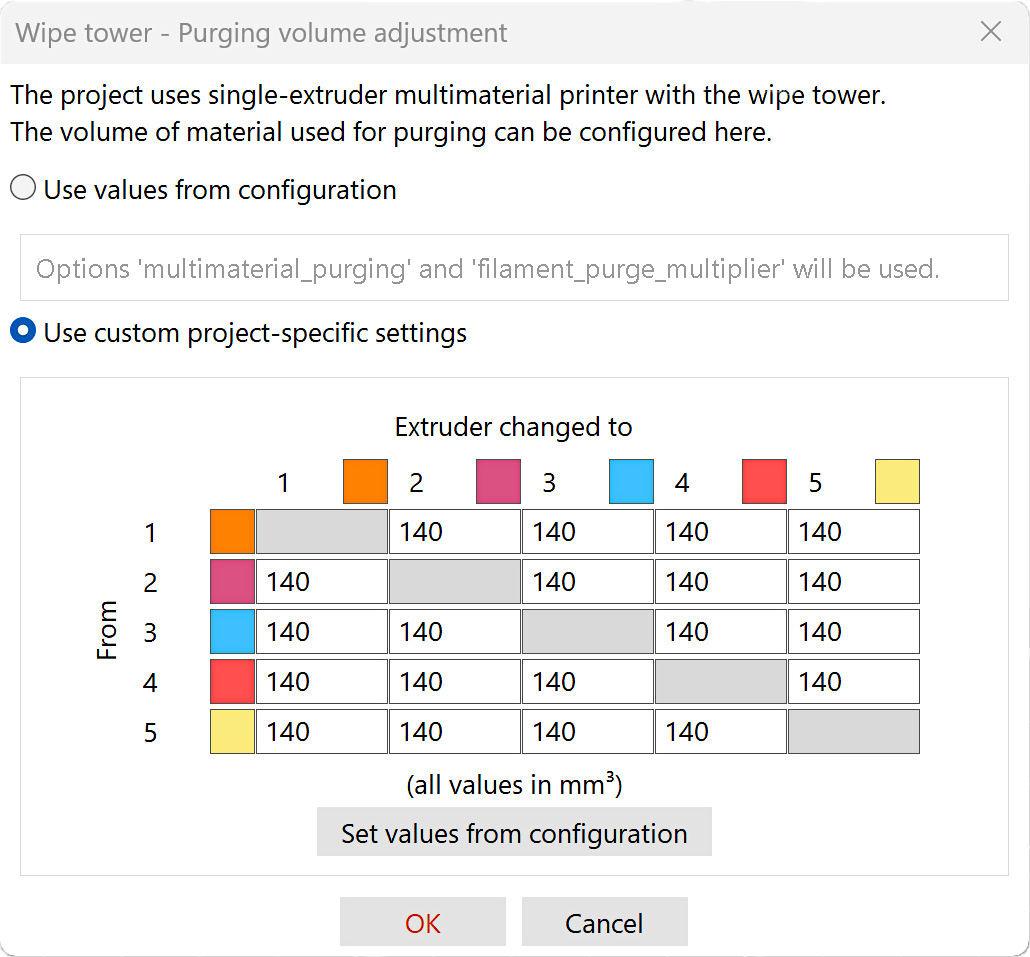
                  Use custom project-specific settings

                  Clicking on the purging volumes settings opens a new window that contains a matrix. Each cell represents the amount of filament required to purge during filament change from filament X (left column) to filament Y (top row).

                  By selecting use custom project-specific settings, you can set each matrix cell individually. The values from the configuration are not used in this mode. 
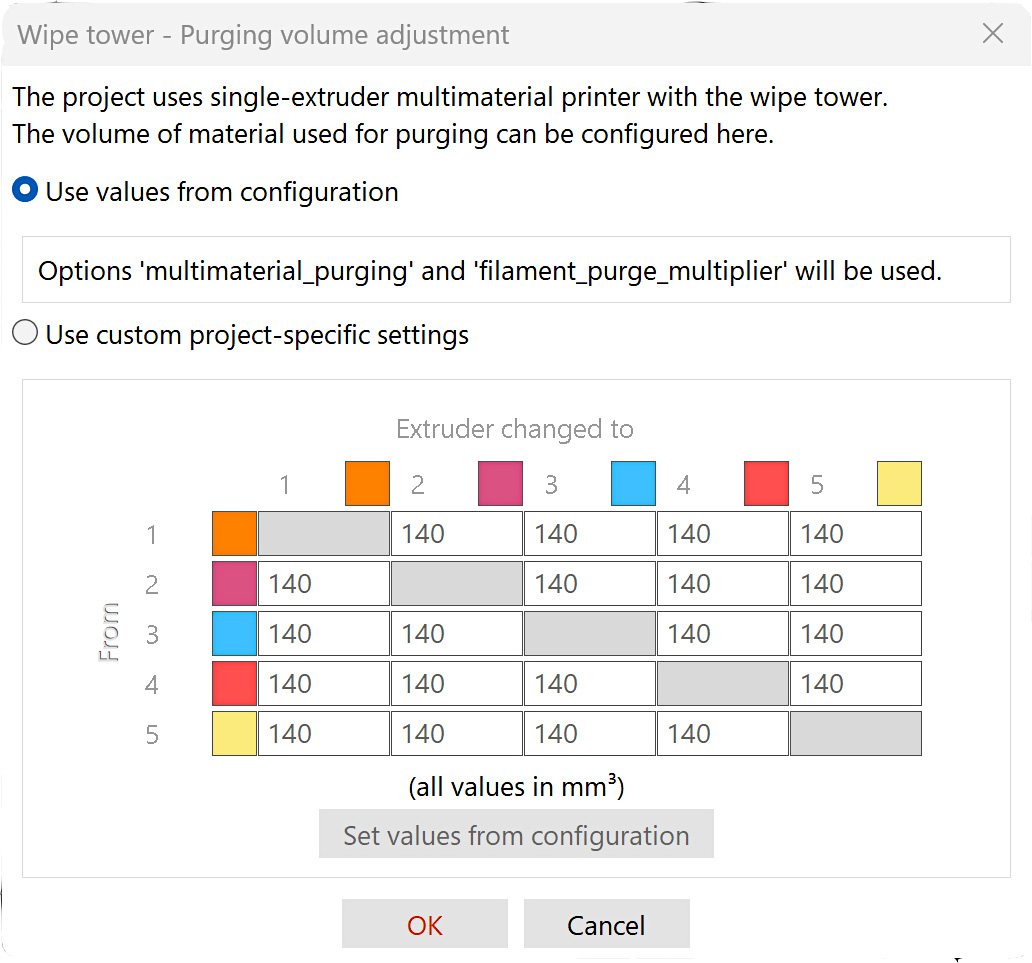
                  Example values

                   unloadload
                  Black8030
                  White2070

                  Transition Black to White = Black unload + White load = 80 + 70 = 150 mm³

                  Transition White to Black = White unload + Black load = 20 + 30 = 50 mm³

                  Transitioning from black to white requires more purging volume than transitioning from white to black, due to a higher color contamination from a darker to a lighter color. 

                  When using a soluble filament to print supports, or filaments with additives (highly glossy, glitter, etc.), increased purging volumes are most likely needed, compared to the standard example values. 

                  Was this article helpful?
                  This action is available only to registered users. Please log-in.

                  Topics

                  • PrusaSlicer 2.9 (Legacy)
                    • Multi-material slicing
                      • Importing Multi Material model
                      • Patterns - set extruder sequence
                      • Assigning tools / colors / extruders
                      • ColorPrint with the MMU
                      • Wipe tower
                      • Purging volumes (MMU)
                      • Multi material painting
                      • Experimental Printing with Different Nozzle Diameters
                      • Mutliple extruders settings, Interlocking & Advanced bonding
                      • ColorMix
                    • About PrusaSlicer
                    • Configuration and profiles
                    • User interface
                    • Input/output
                    • Left toolbar
                    • Top toolbar
                    • Print settings
                    • Filament settings
                    • Printer settings
                    • Advanced features
                    • SLA slicing
                    • Other (PrusaSlicer)

                  9 comments

                  Log in  to post a comment
                  Scotttomo
                  •
                  This is not representative of the current Prusaslicer 2.9.3 What is the point in having help articles that are out of date?
                  Reply
                  Lucas
                  •
                  It is on the Plater Menu on the Right side. "Purging Volumes". There you come to the Matrix.
                  Reply
                  Scotttomo
                  •
                  You sir, are a sent from god. I have been tearing my hair out for hours looking for this, thank you :)
                  I don't suppose you have ballpark figures for white to any other colour? Thanks again
                  Reply
                  BillB
                  •
                  where is Black in your example picture ???  I'm still confused... The example numbers are all the same...
                  so  Maybe #4 @140 to #5 since it it lighter under the #5 column to 160 ????
                  Reply
                  BillB
                  •
                  So... you use black and white as examples but still not shown in example matrix picture...

                  So in your example of Black to White, Black unload, - Black at 80 should be in the "From" line and then in the White Column would be the 70 ?
                  Am I understand this correctly??
                  Reply
                  Marina Curzi - Official Prusa CS
                  •
                  The "From" is the purge on unload, the "To" is the purge on Load.
                  Reply
                  Elle Skye
                  •
                  It seems "simple mode" no longer exists in prusa slicer.
                  Reply
                  David B.
                  •

                  Hi! It might be called a "beginner mode" instead in 2.8.x Alpha.

                  Reply
                  DadOf6
                  •
                  Hi Prusa team!
                  Are you going to update this article for the changes to purge volumes for 2.7.x and higher?
                  Reply
                  EddieTee
                  •
                  I think the "Clicking on the purging volumes settings opens a new window" button doesn't exist from 2.7 on? Can't seem to find it anywhere. SOLUTION: the button under the filaments in the "Plater" tab.
                  Reply
                  mressler
                  •
                  Thank you for this comment! This option also does not show up in the settings search bar - Prusa team, please update this article!
                  Reply
                  poyu
                  •
                  On PrusaSlicer 2.9.2, this button is to the right of the Infill and Brim settings, and below Supports dropdown.
                  Reply
                  paolopix
                  •
                  If I have a printer with 2 extruders and I don't flag the multi material item, the purging volume button on the right does not appear. how can I increase this value?
                  Reply