Prusa
  • SHOP
    • Latest products
    BY CATEGORY
    • 3D printersnew
    • 3D printer upgradesnew
    • Materials
    • Accessories
    • Spare parts
    • Courses
    • Merch
    • Get a price quote
    QUICK LINKS
    • Shipping & delivery
    • Returns & refunds
    • Payment & financing
    • Warranty
    • VAT & Customs fees
    • FAQ

    0 item in your cartitems in your cart

    Your cart is empty

    Go to cartShop 3D printers

    My profile

    Log in to see orders, saved items

    My profile

    Signed in as

    • Orders
    • Logout
  • 3D PRINTING
    • Explore 3D printing
    FOR BEGINNERS
    • 3D printing 101
    • How FDM printing works
    • Buying your first printer
    • 3D model catalog
    BY APPLICATION
    • Rapid prototyping
    • Manufacturing
    • Engineering
    • Research
    • Arts & design
    GO DEEPER
    • Materials guide
    • Courses
    • Webinars
    • Case studies
    • Custom 3D printing
  • 3D PRINTERS
    • All 3D printers
    FOR
    • Home or garageHobbyists, tinkerers and home printing
    • BusinessIn-house production for small teams
    • EnterpriseFleets, security and scale
    • Which Prusa is right for me
    SHOP & BROWSE
    • CORE One+new
    • CORE One+ INDXnew
    • CORE One L+new
    • CORE One L+ INDXnew
    • XL+new
    • MK4S
    • Prusa Pro HT90
    • Prusa Pro AFS
    • Prusa Pro SLX
    MORE FROM PRINTERS
    • Parts & upgradesnew
    • Critical infrastructure
    • Case studies
    • Signature Oak
    • Kits
  • MATERIALS
    • All materials
    BY USE
    • Every-day & design
    • Functional engineering
    • Composites
    • Pro speciality
    • SLA resins
    PRUSAMENT
    • PLA
    • PETG
    • ASA
    • PC
    • PA11
    • Flex
    • TPU
    MORE FROM MATERIALS
    • Materials guide
    • We make material in house
    • Sustainability
    • Order on the store
  • SOFTWARE
    • All software
    PREPARE THE PRINT
    • PrusaSlicer 3.0New
    PRINT & MONITOR
    • Prusa Connect
    • EasyPrint
    • iOS & Android app
    • Prusa Farm
    GET STARTED
    • Download & install
    • Knowledge base
    MORE FROM SOFTWARE
    • 3D model catalog
  • SUPPORT
    • Explore support
    FIND ANSWERS
    • Knowledge base
    • Troubleshooting
    • Courses
    • Webinars
    GET HELP
    • Contact us
    • Livechat
    • Shipping & delivery
    • Warranty
    • Returns & refunds
    • Service & spare parts
    • Service & Repair
    COMMUNITY
    • Forum
    • Reddit
    • Printables
  • TRUST CENTER
    • Trust Center overview
    BY TOPIC
    • GDPR
    • Certificates
    • Security
    • Compliance
    COMMITMENTS
    • Sustainability report
    TALK TO US
    • Contact the security team
  • COMPANY
    • About Prusa
    GET TO KNOW US
    • Our story
    • How we make printers
    • Open source
    • Brand & media kit
    NEWS
    • Blog
    • Newsroom
    • Events
    TRUST & PARTNERS
    • Sustainability
    • Resellers & distributors
    • Affiliate program
    • Contact
    • English
    • Čeština
    • Deutsch
    • Español
    • Français
    • Italiano
    • Polski
    • 日本語
  • Signed in as

    • Orders
    • Address
    • In-stock Alerts
    • My Courses
    • Subscription
    • Edit Account
    • Logout

Log in to see orders, saved items

Signed in as
  • Orders
  • Address
  • In-stock Alerts
  • My Courses
  • Subscription
  • Edit Account
  • English
  • Čeština
  • Deutsch
  • Español
  • Français
  • Italiano
  • Polski
  • 日本語
Shop

0 item in your cartitems in your cart

Your cart is empty

Go to cartShop 3D printers

My profile

Log in to see orders, saved items

My profile

Signed in as

  • Orders
  • Logout
SHOP
  • Latest products
BY CATEGORY
  • 3D printersnew
  • 3D printer upgradesnew
  • Materials
  • Accessories
  • Spare parts
  • Courses
  • Merch
  • Get a price quote
QUICK LINKS
  • Shipping & delivery
  • Returns & refunds
  • Payment & financing
  • Warranty
  • VAT & Customs fees
  • FAQ

Featured products

    Popular categories

      Trending searches

        Articles

          Blog

            Products

              Categories

                Suggested searches

                  Searching…
                  No results
                  Something went wrong.
                  ↑↓ Select↵ OpenEsc Close search
                  1. Support
                  2. Original Prusa i3 MK3S+
                  3. Print settings
                  4. Organic Supports
                   

                  Contents

                  • Organic supports settings

                  Blog

                  • Prusament Pellets: Raw material batches for large-format 3D printing or small-scale polymer research & development
                  • Print colorful and glowing Halloween decorations with our spooky offer
                  • Factorio Has Arrived on Printables

                  Newsletter

                  Signup and get our monthly squeeze on updates, blog, printables and much more.

                  By clicking, you agree to receive our newsletter.

                  This site is protected by reCAPTCHA Enterprise and the Google Privacy Policy and Terms of Service apply.

                  Factorio Transport Belts
                  E-shop
                  • 3D Printers
                  • Printer Upgrades
                  • Filaments
                  • Accessories
                  • Prusa Merchandise

                  © Prusa Research a.s.

                  Printables
                  • 3D Models
                  • Store
                  • Clubs
                  • 3D Design Contests
                  • Brands
                  Community
                  • World Map
                  • Forum
                  • User Groups
                  • Events
                  Help
                  • Prusa Help
                  • Prusa Academy
                  • 3D Printing Calculators
                  Software
                  • PrusaSlicer
                  • Prusa.app
                  • Prusa Connect
                  • Drivers and Software
                  Company
                  • About Us
                  • Blog
                  • Official Prusa Resellers
                  • Contact Us
                  • Certified for ISO 9001, ISO 14001, ISO 45001
                  • General Terms and Conditions
                  • General Terms and Conditions of Use of the PRUSA Websites
                  • Privacy Policy
                  • Information about cookies
                  • Customer Complaints Policy
                  • Status Page
                  • Do Not Sell or Share My Personal Information
                  • Supplemental Statements
                  • General Terms and Conditions
                  • General Terms and Conditions of Use of the PRUSA Websites
                  • Privacy Policy
                  • Information about cookies
                  • Customer Complaints Policy
                  • Status Page
                  • Do Not Sell or Share My Personal Information
                  • Supplemental Statements

                  © Prusa Research a.s.

                  JOSEF PRUSA®, PRUSA RESEARCH®, PRUSA POLYMERS®, PRUSA ORANGE®, PRUSA 3D ® AND PRUSAMENT® are registered trademarks of Prusa Development a.s. used by Prusa Research a.s. under licence from Prusa Development a.s.

                  Organic Supports

                  Relevant for

                  MK4 family
                  XL family
                  MINI family
                  MK3 family
                  MK3.5 family
                  +
                  22 comments
                  Article is also available in following languages
                  English
                  Čeština
                  Polski
                  Deutsch
                  Français
                  Español
                  Italiano
                  日本語

                  Organic supports are a type of support structure available in PrusaSlicer.

                  PrusaSlicer previously always used a 2D grid-based approach to generate supports. Although this method delivered decent results in many situations, it had its limitations. The supports often consumed quite a lot of filament, took a long time to print, ended up in spaces where they were difficult to remove from, and left visible marks on the model when removed. Especially when the settings were not tuned correctly. We improved some of these downsides by introducing the “Snug” supports in PrusaSlicer 2.4.
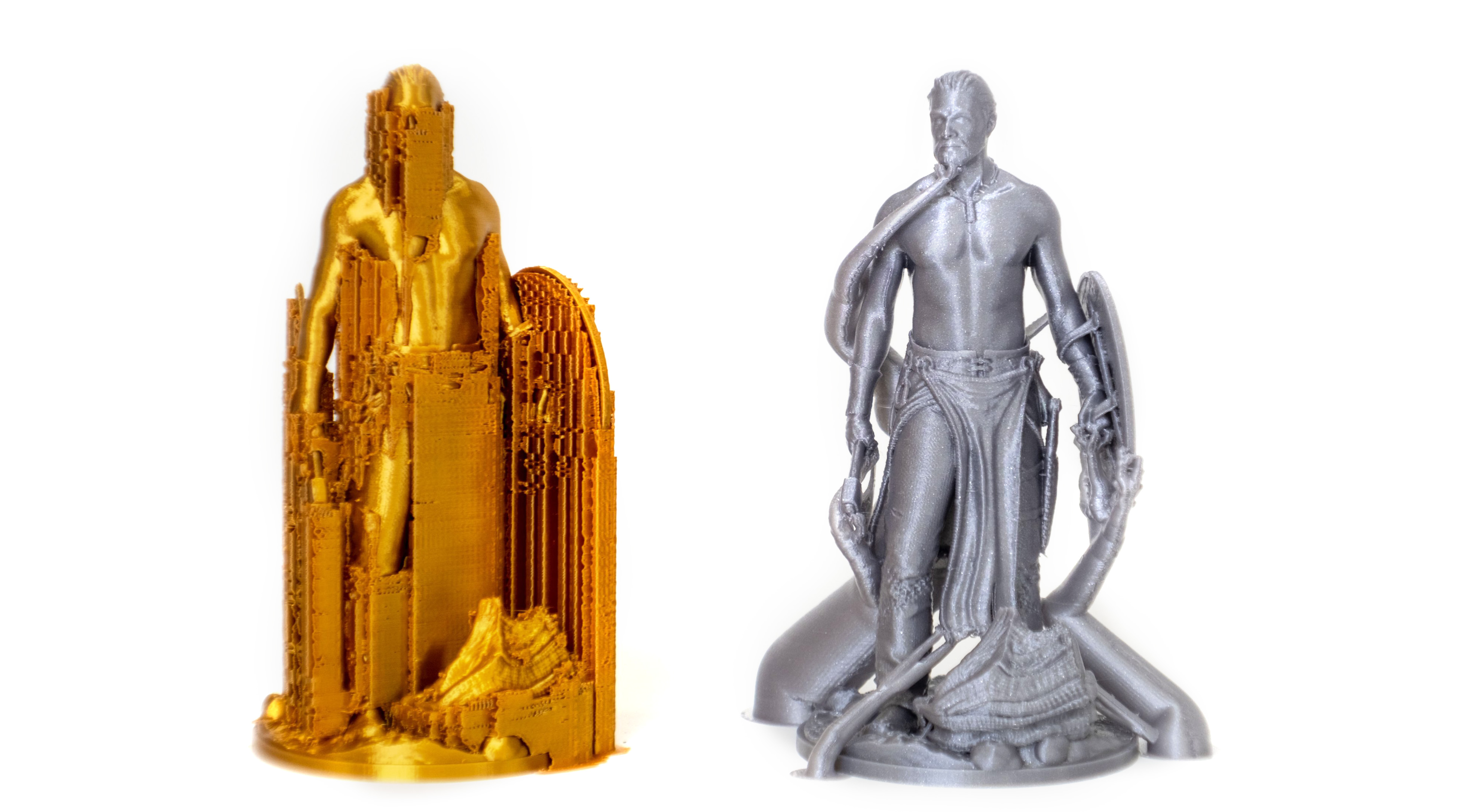
                  Grid supports (left) vs Organic supports (right)

                  The Organic supports are our significantly improved implementation of tree supports. We choose a new name for our supports because of their distinctly smooth shape and several differences in their behavior.

                  In contrast to the previously common implementation of tree supports, the branching of Organic supports is smarter and we made them straighter (shorter), smoother, and more stable. The cross-section perpendicular to the branch axis is guaranteed to be circular, and the algorithm automatically uses double perimeter walls for the trees where needed (this is configurable).

                  Organic supports are easily removable, do not scar the surface, and are fast and cheap to print.

                  Our implementation is an evolution of the tree supports by Thomas Rahm, which are significantly improved tree supports originally from Cura. We would like to thank Ultimaker Cura and Thomas Rahm for the effort they have invested into the problem.

                  After you turn on Support generation, you can switch to Organic supports in Print settings - Support material - Style.

                  Apart from the settings common for all support types, there are additional settings specific to the Organic supports.
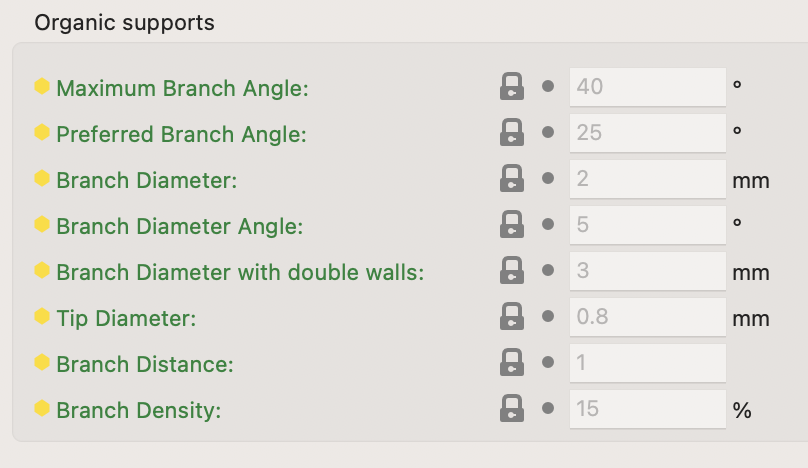
                  Organic supports settings

                  Maximum Branch Angle

                  The maximum angle of the branches, when the branches have to avoid the model. Use a lower angle to make them more vertical and more stable. Use a higher angle to be able to have more reach.

                  Preferred Branch Angle

                  The preferred angle of the branches, when they do not have to avoid the model. Use a lower angle to make them more vertical and more stable. Use a higher angle for branches to merge faster.

                  Branch Diameter

                  The diameter of the thinnest branches of organic supports. Thicker branches are sturdier. Branches towards the base will be wider than this.

                  Branch Diameter Angle

                  The angle of the branches' diameter as they gradually become thicker towards the bottom. An angle of 0 will cause the branches to have a uniform thickness over their length. A bit of an angle can increase the stability of the organic supports.

                  Branch Diameter with Double Walls

                  Branches with an area larger than the area of a circle of this diameter will be printed with double walls for stability.

                  Set this value to zero for no double walls.

                  Tip Diameter

                  Branch tip diameter for organic supports.

                  Branch Distance

                  How far apart the branches need to be when they touch the model. Making this distance small will cause the tree support to touch the model at more points, causing better overhangs printing but making the supports harder to remove.

                  Branch Density

                  Adjusts the density of the support structure used to generate the tips of the branches. A higher value results in better overhangs but the supports are harder to remove. We recommend keeping the top support interfaces enabled instead of using a high branch density value if dense interfaces are needed.

                  Organic supports can be manually enforced or blocked using the Paint-on supports tool.

                  Was this article helpful?
                  This action is available only to registered users. Please log-in.

                  Topics

                  • PrusaSlicer 2.9 (Legacy)
                    • Print settings
                      • Infill
                      • Support material
                      • Layers and perimeters
                      • Elephant foot compensation
                      • Sequential printing
                      • Max volumetric speed
                      • Skirt and Brim
                      • Ironing
                      • Fuzzy skin
                      • Slicing mode / 3DLabPrint airplanes
                      • Pressure equalizer
                      • Arachne perimeter generator
                      • Organic Supports
                      • Speed settings
                      • Infill patterns
                      • Seam position
                    • About PrusaSlicer
                    • Configuration and profiles
                    • User interface
                    • Input/output
                    • Left toolbar
                    • Top toolbar
                    • Filament settings
                    • Printer settings
                    • Advanced features
                    • Multi-material slicing
                    • SLA slicing
                    • Other (PrusaSlicer)

                  11 comments

                  Log in  to post a comment
                  omikronPersei8
                  •
                  Why do organic supports allow using multiple materials with wipe tower enabled (mmu3)? When using snug support style, if you try to use non-zero value for support-interface/support-material extruder you get this error:

                  The Wipe Tower currently supports the non-soluble supports only if they are
                  printed with the current extruder without triggering a tool change. (both
                  support_material_extruder and support_material_interface_extruder need to be
                  set to 0).

                  with organic supports the slicer allows you to have wipe tower enabled. How are organic supports different in this scenario?
                  Reply
                  Jay
                  •
                  So, I couldn't help but notice that this function still has the bug where at some layers in a tree, the slicer goes from 2 perimeters back to 1, resulting in gaps in the support trees. Eventually leading to failed supports and failed prints.
                  Reply
                  Andy Ruth
                  •
                  I cannot activate these Organic Support print settings on my MK4S, using slicer 2.4.9. What is wrong?
                  Reply
                  Tom in Phoenix
                  •
                  Apologies for the length, I wanted to anticipate any possible questions.
                  Hello Prusa Family.
                  My THANKS for any help.
                  I’m a beginner. I’ve been fiddling with two Mk3’s (Loaners) and became increasingly frustrated. (1st layer problems) I returned them both to the owner.
                  Then I purchased a new fully assembled MK4S. So far I am very happy with it using PLA.
                  Recently a build from Printables said to use PETG. I purchased a PETG filament that was on the slicer filament list. Overture. (My MK4s, Prusa slicer etc. all up to date, firmware as well. I am using the textured, recommended build plate)
                  The slicer recommended “supports” I set the supports to Organic and printed. (I previously used PLA and while the print was fine, the build needed PETG)
                  The organic supports were difficult to remove, one was so tight it left a lump of PETG. I filed it down but the print was ruined.
                  Is there any help for setting up the Organic support settings?
                  The print I am trying to make is below. The PLA print is fine, supports snap off cleanly. It just doesn’t fit the frame properly. Vibration kicks it off.

                  https://www.printables.com/model/695578-camera-mount-tapo-c100-on-prusa-mk4
                  Once again my thanks.
                  Tom
                  Reply
                  Jan Kratochvíl
                  •
                  Hi TomHec. I looked at the model and it is kinda small object and the part that needs supports is flat. I would use different type of supports (snug). Maybe you can try chynging "Top interface layers" for better removing. If this will not help, please contact us via livechat for help.
                  Reply
                  Tom in Phoenix
                  •
                  Thanks, we are just settling in to have our Thanksgiving dinner.
                  I will try what you suggest, and will definitely let you know how it works out.
                  Thank you for the help.
                  Happy Thanksgiving to all.
                  Tom
                  Reply
                  Jan Kratochvíl
                  •
                  You too. Hope, everything goes smooth.
                  Reply
                  Tom in Phoenix
                  •
                  Friday, 11/28.
                  Hi Jan
                  I went into the slicer and made the recommended changes.
                  Before I start, I think I noticed a software error.
                  I changed the style to “Snug”. When I hover over the down arrow in “top interface layers“ a text field pops up, stating that the default level is 3 heavy. When I actually click on the down arrow, the default level is stated as 2 “Default”.
                  I set the style to organic, and get the same results. Hover over the down arrow on “top interface layers” and the pop-up proclaims 3 heavy is the default. When you click on the down arrow to make a selection, it reports that the default level is 2 Default.
                  I imagine that my first print had the organic support “top interface layers” set to heavy which they certainly were in my print.
                  I am going to try using snug as you suggested with the top interface layers set to 2 default.
                  I will certainly let you know how the print turns out.
                  Tom
                  P.S
                  The print came out very well thank you. I set the supports for snug and the Top interface layers at 2.
                  It was still a little difficult, removing the supports, after they were all removed. The surface was relatively clean.
                  If I decide to make another one, I would set the top interface layer at 1.
                  Thank you again for your help, in resolving this problem.
                  I would like to hear your remarks about the default settings as mentioned in the message before the Post script.
                  Enjoy your weekend
                  Tom
                  Reply
                  Paul
                  •
                  Branch distance does not indicate a unit. is this a percentage, or in mm, or something else?
                  Reply