AA

Featured products

    Popular categories

      Trending searches

        Articles

          Blog

            Products

              Categories

                Suggested searches

                  Searching…
                  No results
                  Something went wrong.
                  ↑↓ Select↵ OpenEsc Close search
                  • English
                  • Čeština
                  • Deutsch
                  • Español
                  • Français
                  • Italiano
                  • Polski
                  • 日本語
                  • Orders
                  • Address
                  • In-stock Alerts
                  • My Courses
                  • Subscription
                  • Edit Account
                  • 3D printers9+▾

                    3D printersnew

                    newPrusa CORE One L+Learn more
                    newPrusa CORE One+ (Gen 2)Learn more
                    newPrusa CORE One L+ INDX 8-ToolnewPrusa CORE One+ (Gen 2) INDX 8-ToolPrusa CORE One L+: Critical InfrastructureOriginal Prusa MK4SnewOriginal Prusa XL+Original Prusa XL+: Critical Infrastructure

                    Printer upgrades

                    newINDX Conversion KitsnewPrusa CORE One L to CORE One L+ upgradenewPrusa CORE One+ to Prusa CORE One+ (Gen 2)newPrusa XL to Prusa XL+ Upgrade
                    Prusa Reward ProgramLove your Prusa printer? Share your experience and earn $30 Prusa e-shop vouchers.
                    How to Choose a 3D Printer?We’ll walk you through the basics to find the exact machine for your space, budget, and ideas.
                    Free E-bookDownload a free e-book Basics of 3D Printing with Josef Prusa and make your first steps in 3D printing world
                    Original Prusa Printable PartsCollections of printable spare parts for Original Prusa 3D printers and upgrades.
                    Shipping informationRegularly updated info about the current manufacturing capacity and delivery times of our printers.
                    Custom 3D PrintingProfessional custom 3D printing from various materials according to your requirements.
                  • Materials▾

                    Filaments

                    PrusamentPLAPETGASA / ABSPC (Polycarbonate)PA (Nylon)FlexCompositesSpecialMaterials clearance sale

                    Resin

                    Prusament ResinResin Cleaner
                    Filament GuideCheck my Prusament Spool
                    Prusament.com
                  • Parts & Accessories▾

                    Accessories

                    EnclosuresNozzlesPrint SheetsEssential AccessoriesCameras & AddonsTools & CraftingAdhesives

                    Spare parts

                    Merchandise

                    Spare parts - All PrintersCORE OneMK4/S & MK3.9/SMK3/S/+XL
                    Merch
                  • For Business▾
                    Prusa Pro HT90Prusa Pro SLXPrusa Pro AFSPrusa Pro Medical OneOriginal Prusa XLOriginal Prusa XL: Critical Infrastructure
                    Prusa CORE One+Learn more
                    Prusa CORE One LLearn more
                    Prusa CORE One L: Critical Infrastructure Edition

                    3D Printing for

                    Manufacturing and R&DAutomotive IndustryHealthcareEducation and Academic ResearchArchitects and DesignersFilm IndustryCritical Infrastructure

                    3D Printing Stories

                    • How 3D printing started: About Rep-rap and open-source with Adrian Bowyer
                    • Teaching mathematics redefined with 3D printing at JKU Linz
                    • The story behind the LTT screwdriver
                    • Victoria Hand Project: Changing Prosthetic Care with 3D Printing
                    Official Prusa Resellers
                    Sustainability
                    Prusa Education
                    Contact and Inquiry
                    Custom 3D Printing
                    ISO Certified
                  • Software▾
                    PrusaSlicer

                    PrusaSlicerPrusaSlicer

                    PrusaSlicer is an open-source, feature-rich, frequently updated tool that contains everything you need to export the perfect print files for your 3D printer.

                    WindowsMacOSLinux
                    Prusa Connect

                    Prusa Connect

                    Prusa Connect is a cloud service enabling remote control and monitoring of your 3D printers, offering secure data handling, easy setup, and support for managing multiple printers from anywhere.

                    Log in to Connect
                    Prusa.app

                    Prusa.app

                    Control your printer/s remotely from anywhere using the Prusa Connect technology behind. Prusa.app brings a new level of Prusa printer experience to Android and iOS phones.

                    Try it now!
                    Drivers & FirmwareDownload the latest firmware and drivers for your 3D printer.
                    PrusaSlicer Support
                    Prusa Connect Support
                  • 3D Models▾
                    3D PrintersArt & DesignHobby & MakersHouseholdTabletop MiniaturesToys & GamesPrintables Store

                    Popular 3D models

                    • Strong garden hose holder
                    • Prusa Spool Bot
                    • Build Tray — Modular Organizer for Assembly, Disassembly and Maintenance
                    • Broom Holder
                    • Octagon Fabric
                    • Prusa CORE One ? (Mimic Skin)

                    Design Contests

                    • Framework Laptop 12 Mainboard Re-Use9/1/2026 – 9/30/2026
                    • 🏆 Designer Challenge: Magic tricks!9/1/2026 – 9/22/2026
                    • Od prototypu k produktu: Příslušenství ke kamerám8/1/2026 – 9/14/2026
                  • Community▾

                    Upcoming Events

                    • Maker Faire Tokyo 20269/5/2026 – 9/6/2026 · Tokyo, Japan · Prusa Team
                    • IFA 20269/4/2026 – 9/8/2026 · Berlin, Germany · Prusa Team
                    • 3D Printopia 20269/26/2026 – 9/27/2026 · Pennsylvania, United States · Prusa Team
                    • Maker Faire Bay Area9/25/2026 – 9/27/2026 · Kalifornie, United States · Prusa Team

                    Prusa Forum

                    • [PrusaSlicer 3.0 Plugin] Filament Sample Card Generator
                    • Main-plate can't be removed (Filament stuck)
                    • Core One UI freeze
                    Prusa World MapPrusa World MapFind local 3D printing users and explore the community around you.
                  • Help▾
                    Guides & TutorialsPrusaSlicerPrusa ConnectMaterials

                    Printer Model

                    CORE One INDXCORE One LCORE One+CORE One

                    Hardware Troubleshooting

                    • Selftest failed (CORE One/+)
                    • Clogged nozzle (CORE One, CORE One L, XL, MK4/S, MK3.9/S)
                    • Adjusting belt tension (CORE One/+, CORE One INDX, CORE One L/+)
                    • Prusa Connect and PrusaLink explained

                    Drivers & Firmware

                    INDX familyCORE One familyMK4 familyXL familyMMU familyPRO family
                  • Courses▾

                    Become an expert in 3D printing

                    Prusa Academy offers online courses on various 3D printing related topics. Each course features:

                    • easy-to-read text with many pictures and short videos
                    • links for inspiration and further study
                    • quizzes for testing your knowledge along the way
                    • certificate of completion
                    Browse all coursesMy courses library
                    • 3D Modeling in Autodesk Fusion
                    • PrusaSlicer Masterclass – Beginner to Advanced
                    • Complete Guide to 3D Print Postprocessing, Painting, and Detailing
                    • Airbrush Your 3D Prints: From Basics to Advanced Tricks
                  • Blog▾
                    • Back-to-School 2026 Deals Are Here!
                    • PrusaSlicer 3.0 Preview – Built for the Future of 3D Printing
                    • Prusa CORE One+ (Gen 2) INDX, Shipping Has Started, Complete Printers Open for Orders
                    E-Book: Basics of 3D Printing
                  • Company▾

                    About Prusa Research

                    We are the largest maker of 3D printers in Europe and the United States.

                    Founded as a one-man startup in 2012 by Josef Prusa, a Czech hobbyist, maker, and inventor. In just 15 years, we've grown into a company of more than 1,200 people. Every month, we design, build, and ship over 10,000 innovative and secure 3D printers from our headquarters in Prague, Czech Republic, and Delaware, USA, to users in more than 160 countries.

                    Watch a video and find out how Prusa Research was born and what we achieved within only 10 years!

                    About UsTimelineSustainabilityOpen-source
                    About Us
                    Contact Us
                    Logo and Photos
                    ISO Certified
                  1. Support
                  2. Original Prusa i3 Plus 1.75 mm
                  3. Print settings
                  4. Max volumetric speed
                   

                  Contents

                  • What determines the final print speed?
                  • Print MVS vs Filament MVS
                  • Autospeed
                  • Choosing MVS
                  • Preview MVS

                  Blog

                  • Back-to-School 2026 Deals Are Here!
                  • PrusaSlicer 3.0 Preview – Built for the Future of 3D Printing
                  • Prusa CORE One+ (Gen 2) INDX, Shipping Has Started, Complete Printers Open for Orders

                  Newsletter

                  Signup and get our monthly squeeze on updates, blog, printables and much more.

                  By clicking, you agree to receive our newsletter.

                  This site is protected by reCAPTCHA Enterprise and the Google Privacy Policy and Terms of Service apply.

                  Strong garden hose holder
                  E-shop
                  • 3D Printers
                  • Printer Upgrades
                  • Filaments
                  • Accessories
                  • Prusa Merchandise

                  © Prusa Research a.s.

                  Printables
                  • 3D Models
                  • Store
                  • Clubs
                  • 3D Design Contests
                  • Brands
                  Community
                  • World Map
                  • Forum
                  • User Groups
                  • Events
                  Help
                  • Prusa Help
                  • Prusa Academy
                  • 3D Printing Calculators
                  Software
                  • PrusaSlicer
                  • Prusa.app
                  • Prusa Connect
                  • Drivers and Software
                  Company
                  • About Us
                  • Blog
                  • Official Prusa Resellers
                  • Contact Us
                  • Certified for ISO 9001, ISO 14001, ISO 45001
                  • General Terms and Conditions
                  • General Terms and Conditions of Use of the PRUSA Websites
                  • Privacy Policy
                  • Information about cookies
                  • Customer Complaints Policy
                  • Status Page
                  • Do Not Sell or Share My Personal Information
                  • Supplemental Statements
                  • General Terms and Conditions
                  • General Terms and Conditions of Use of the PRUSA Websites
                  • Privacy Policy
                  • Information about cookies
                  • Customer Complaints Policy
                  • Status Page
                  • Do Not Sell or Share My Personal Information
                  • Supplemental Statements

                  © Prusa Research a.s.

                  JOSEF PRUSA®, PRUSA RESEARCH®, PRUSA POLYMERS®, PRUSA ORANGE®, PRUSA 3D ® AND PRUSAMENT® are registered trademarks of Prusa Development a.s. used by Prusa Research a.s. under licence from Prusa Development a.s.

                  Max volumetric speed

                  Relevant for

                  MMU family
                  MK3 family
                  OLD PRODUCTS
                  SOFTWARE
                  19 comments
                  Article is also available in following languages
                  English
                  Čeština
                  Polski
                  Deutsch
                  Français
                  Español
                  Italiano
                  日本語

                  The Maximum volumetric speed setting (MVS), sometimes referred to as AutoSpeed, is one of the most powerful features in PrusaSlicer. MVS is the maximum amount of plastic (mm³/s) your hotend can reliably melt. Think of it as a speed limiter: PrusaSlicer lets your requested speeds through when safe, and only reduces them when the hotend would be asked to melt more than it can handle.

                  With MVS set correctly, you don't need to manually calculate safe speeds for every nozzle/layer height combination. MVS never increases your speed, it can only reduce it.

                  This gives PrusaSlicer users a significant advantage. Instead of trying to calculate ranges of speeds for combinations of nozzle sizes, layer heights, or extrusion widths, you can specify the speeds and settings you desire, then let MVS regulate speeds at slice time when necessary.

                  What determines the final print speed?

                  During printing, each extrusion move checks multiple limits. The most restrictive one among those will be used:

                  • Per-Feature Speed: your configured speed for each extrusion type in Print Settings - Speed (e.g., Perimeter speed, Infill speed, Bridge speed). Setting any of these to 0 mm/s activates automatic speed calculation for that type (see Autospeed).
                  • Max Volumetric Speed: if the requested speed exceeds the MVS, it is reduced. Wider/taller extrusions get slowed down more. The calculation used for the max speed is Max speed = MVS / cross-section area. PrusaSlicer uses a stadium-shaped cross-section model for accurate volume calculation.
                  • Overhang & Cooling: overhanging perimeters are slowed down based on how unsupported they are.
                  • Layer Time Cooldown: if the total layer time is too short, all speeds are reduced proportionally. The lowest speed possible is the one from Min Print Speed.
                    Set MVS to zero (0) for no limit.

                  Print MVS vs Filament MVS

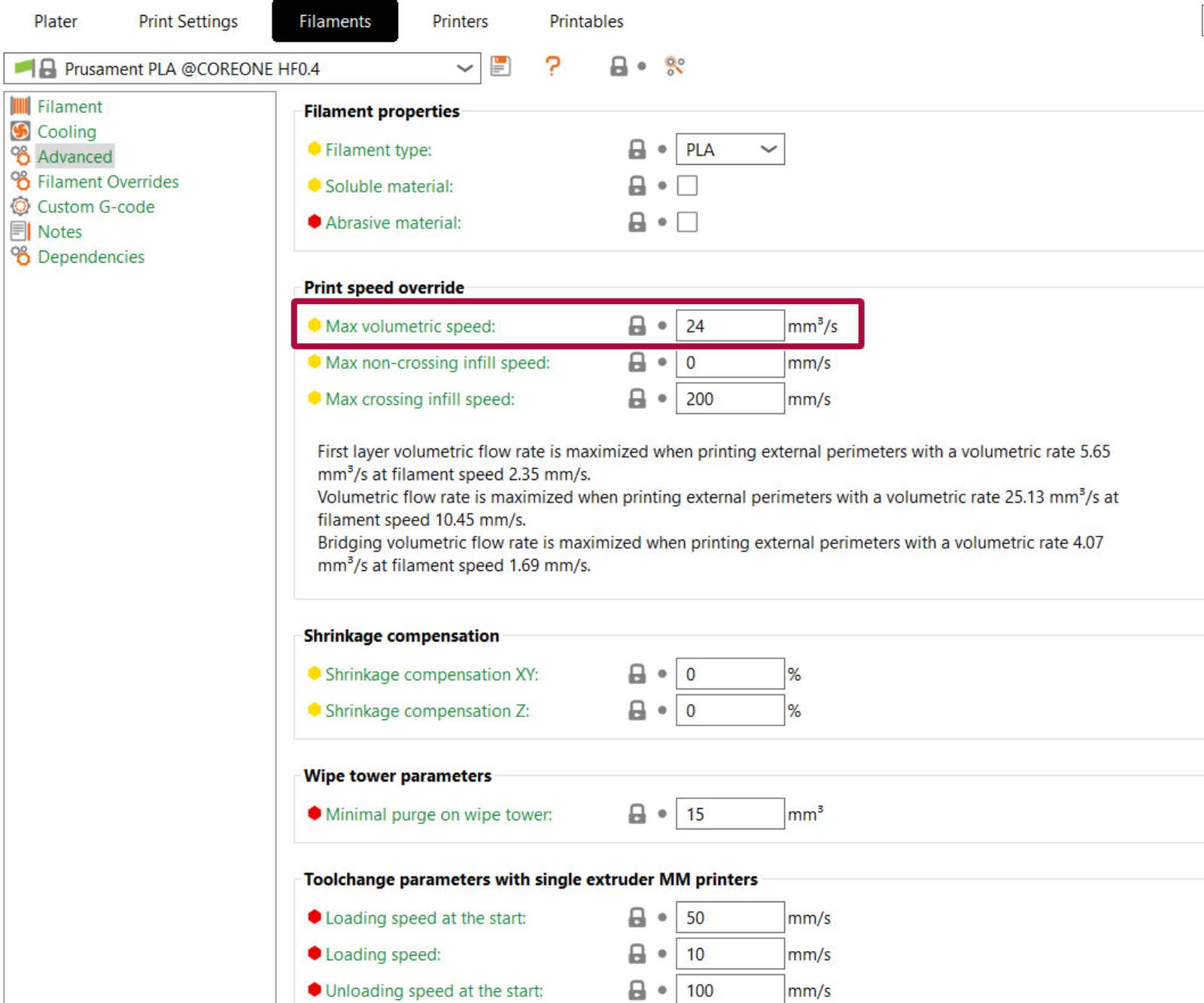
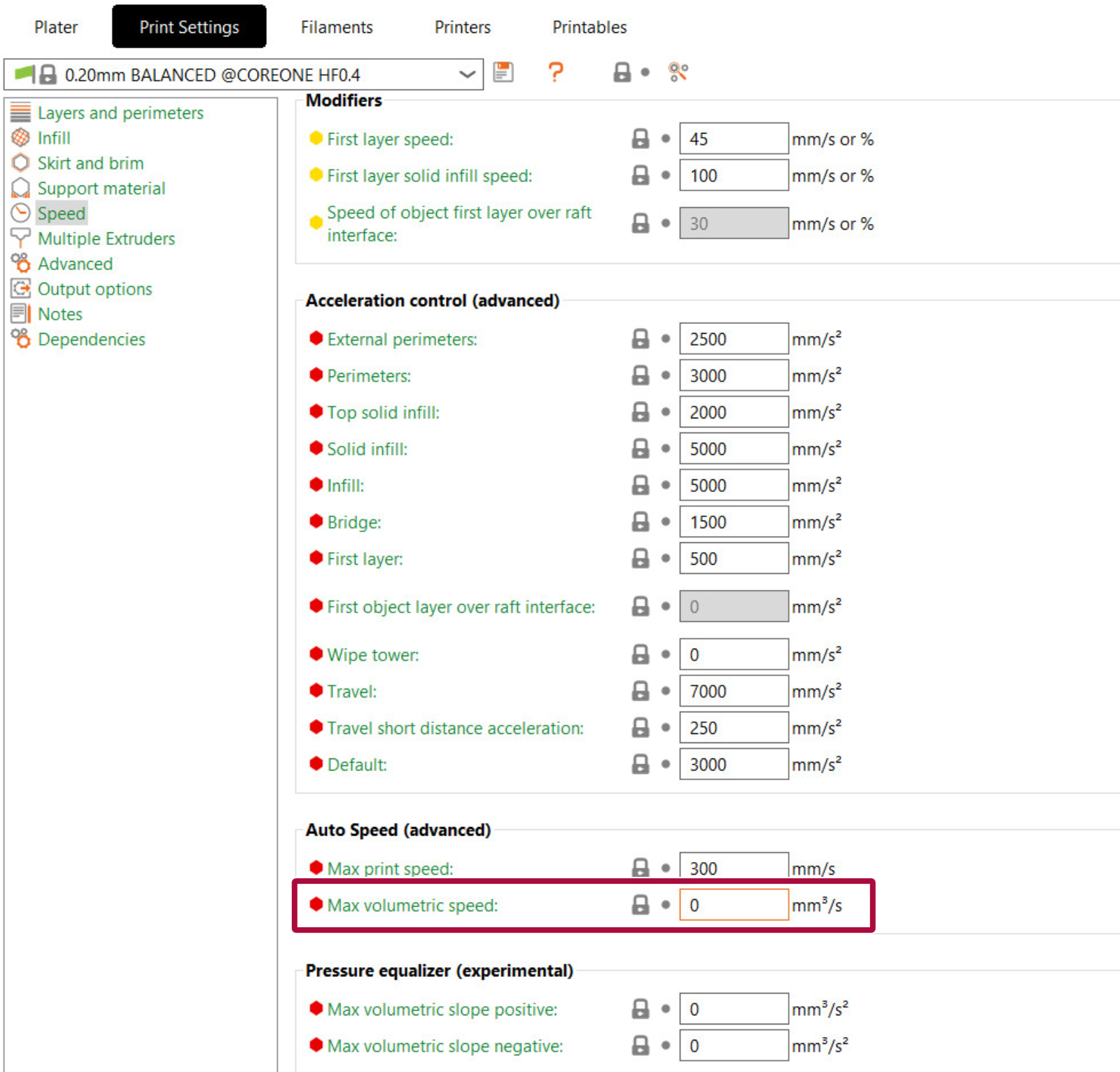
                  It is possible to set the MVS in two places in PrusaSlicer: Print settings -> Speed -> Max volumetric speed and Filament settings -> Advanced -> Max volumetric speed. The value chosen will always be the lowest between the two. Setting either to 0 disables that limit and uses the other one.
                  Autospeed

                  Setting any print speed setting (e.g., Perimeter speed, Infill speed) to 0 mm/s activates AutoSpeed for that extrusion type. MVS stops being just a brake and becomes the basis for calculating speed.

                  PrusaSlicer finds the smallest extrusion cross-section among all extrusion types with speed set to 0, multiplies it by Max Print Speed (found in Print Settings -> Speed -> Max print speed), and caps the result with MVS. Each extrusion then gets: "target volumetric speed / its cross-section". Thinner extrusions print faster, thicker ones slower. Note that Max Print Speed is used only in AutoSpeed mode, and it has no effect when speeds are non-zero.

                  AutoSpeed activates per extrusion type. For example, setting the Infill speed to 0 auto-calculates only infill, while perimeters still use their configured value.

                  Note that ironing extrusions are excluded from the calculation.

                  Choosing MVS

                  The correct MVS value depends on your hotend and the material you are printing with. Start conservative and increase gradually. Signs of MVS being too high: extruder clicking, under-extrusion at high speeds, poor layer adhesion.

                  The effective MVS is limited by the weaker link, either the hotend or the material. Set each in its respective profile, and PrusaSlicer will use the lowest value.

                  The effective MVS is limited by the weaker link, either the hotend or the material. Set each in its respective profile, and PrusaSlicer will use the lower value.

                  Filaments

                  Different filament materials have different characteristics. Viscosity, stiffness, and other factors may greatly reduce effective throughput.

                  FilamentTypical MVS RangeNotes
                  PLA12–20 mm³/sEasy to melt, higher flow possible
                  PETG8–15 mm³/sSlightly more viscous than PLA
                  ABS/ASA10–16 mm³/sSimilar to PETG
                  TPU2–5 mm³/sFlexible filaments require very
                  low flow
                  PC6–10 mm³/sHigh viscosity, slow melting
                  PA (Nylon)8–12 mm³/sVaries widely by blend

                  Hotend

                  HotendTypical MVS Range
                  Standard all-metal (e.g., E3D V6, Prusa MK3 stock)8–12 mm³/s
                  Prusa Nextruder (MK4/XL)15–20 mm³/s
                  High-flow nozzles (CHT, Bondtech CHT)20–35 mm³/s
                  High-flow hotends (Revo High Flow, Rapido HF)25–40 mm³/s

                  Nozzle diameter

                  Intuitively, it may seem that the nozzle diameter shouldn't affect the maximum amount of plastic that the hotend can heat in a given amount of time. However, with bigger nozzles, you can slightly increase MVS due to lower mechanical resistance - basically, it's a bit easier for the filament to get pushed through the nozzle.

                  And vice versa, with smaller nozzles, you'll have to decrease MVS a bit.

                  With larger nozzles, consider increasing the nozzle temperature to allow for even bigger MVS. E.g., you can print PLA 10-20 °C hotter than our standard profile when using a 0.6 mm nozzle.
                  Does printing with a large diameter nozzle and tall layer height actually save print time?

                  This is an often-overlooked consequence of MVS. When you use a large diameter nozzle and a very tall layer height, e.g., a 0.8 mm nozzle and a 0.5 mm layer height, your print speed is indeed going to be capped by MVS. That is, unless you install a more powerful hotend on your printer. If you notice in the preview that your speed is limited by MVS, you can try increasing the nozzle temperature and raising MVS a bit. However, it may be time to simply lower the layer height. You'll get more detail without increasing the print time because the printer will be able to print faster.

                  Preview MVS

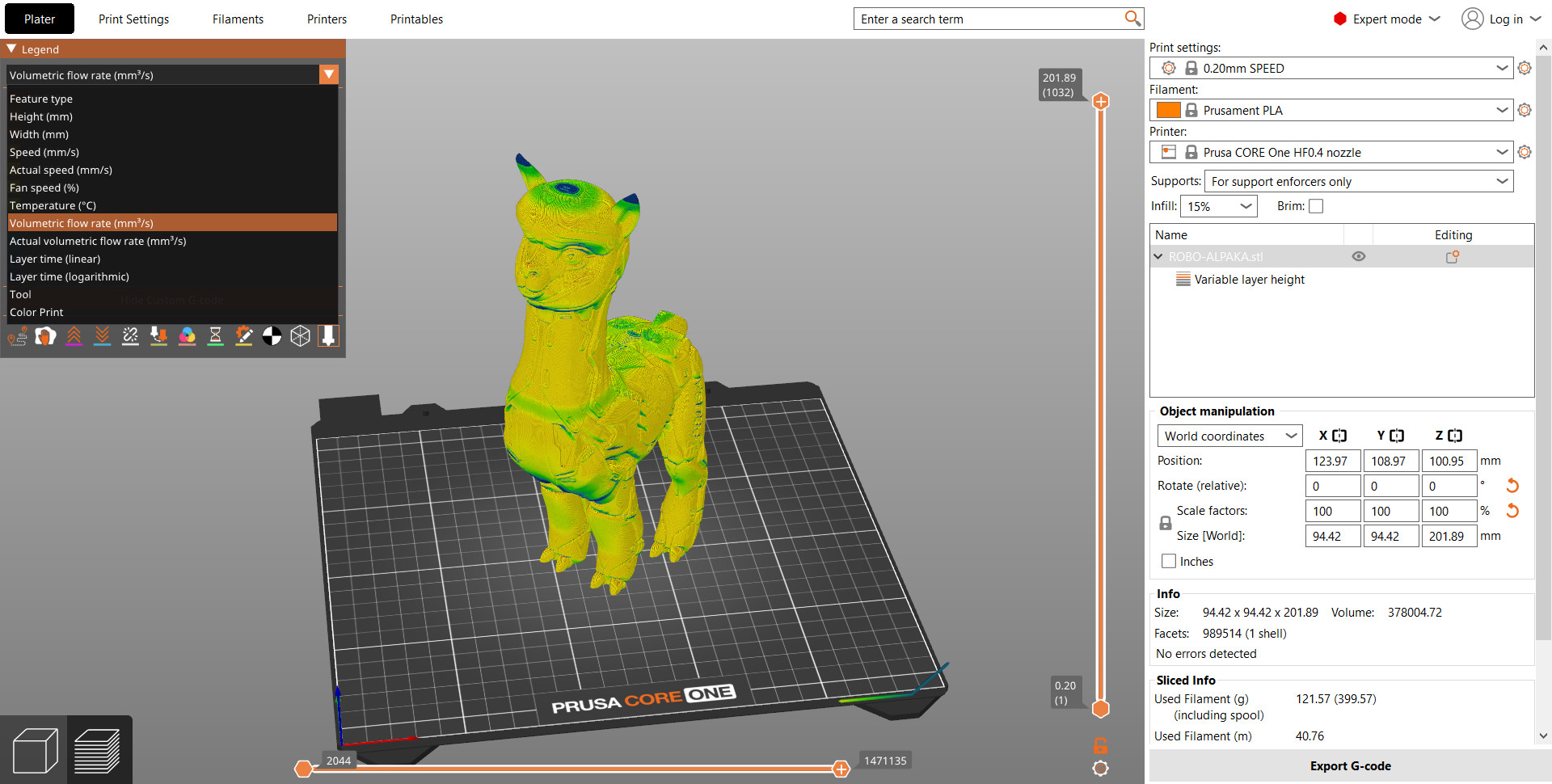
                  Once you slice your model, you can switch the preview mode to Volumetric flow rate using the select box on the top left corner.

                  On smaller models, you'll notice you're not being capped by MVS at all. Likewise, if you're printing with a small layer height, you're most likely not going to be capped by MVS. 

                  On the other hand, when printing bigger models with tall layer heights, you may notice the speed being limited by MVS, especially when printing infill. If the majority of your model is being printed more slowly due to the MVS limit, consider lowering the layer height. You'll get more details "for free".
                  Big thanks to Bob George for his help on this article

                  Was this article helpful?
                  This action is available only to registered users. Please log-in.

                  Topics

                  • PrusaSlicer 2.9 (Legacy)
                    • Print settings
                      • Infill
                      • Support material
                      • Layers and perimeters
                      • Elephant foot compensation
                      • Sequential printing
                      • Max volumetric speed
                      • Skirt and Brim
                      • Ironing
                      • Fuzzy skin
                      • Slicing mode / 3DLabPrint airplanes
                      • Pressure equalizer
                      • Arachne perimeter generator
                      • Organic Supports
                      • Speed settings
                      • Infill patterns
                      • Seam position
                    • About PrusaSlicer
                    • Configuration and profiles
                    • User interface
                    • Input/output
                    • Left toolbar
                    • Top toolbar
                    • Filament settings
                    • Printer settings
                    • Advanced features
                    • Multi-material slicing
                    • SLA slicing
                    • Other (PrusaSlicer)

                  14 comments

                  Log in  to post a comment
                  raporter1992
                  •
                  spoke with prusa technical support about this. I inquired about two specific printers. The MK4s and the Core One+. As of the writing of this comment:

                  max speed - 300
                  flow rate - 24mm3/s on HF nozzles, and 15mm3/s on the regular (non-HF) nozzles --calculated for PLA example (so set these numbers as your max depending on if you use a high flow nozzle or regular nozzle and then use filaments settings to use a smaller number based on the filament type)
                  Reply
                  DMartin
                  •
                  Yep this badly needs an update, also with figures for (eg) Nylon & Polypropylene.
                  Reply
                  George
                  •
                  We need updated numbers now with core xy printers and high flow nozzles...
                  Reply
                  jimwsmith
                  •
                  On blurb when MK4S was released this was siad:
                  a Bondtech CHT nozzle that increases Volumetric Flow. The new nozzle pushes ordinary Prusament PLA out with a volumetric flow of 24mm³, which is a 50% increase from the MK4 standard of 16mm³
                  Reply
                  bryn51
                  •
                  This article is useful, but it needs to be updated to include information about the newer model printers : Mk4, Mk4S, CoreOne and XP, plus impact of CHT Nozzles.
                  It would also be useful to know how Prusa Slicer arbitrates between Print Profile Autospeed settings (Max volumetric speed) and Filament Profile MVS.
                  Reply
                  Otmar
                  •
                  100% agree
                  Reply