Prusa
  • SHOP
    • Latest products
    BY CATEGORY
    • 3D printersnew
    • 3D printer upgradesnew
    • Materials
    • Accessories
    • Spare parts
    • Courses
    • Merch
    • Get a price quote
    QUICK LINKS
    • Shipping & delivery
    • Returns & refunds
    • Payment & financing
    • Warranty
    • VAT & Customs fees
    • FAQ

    0 item in your cartitems in your cart

    Your cart is empty

    Go to cartShop 3D printers

    My profile

    Log in to see orders, saved items

    My profile

    Signed in as

    • Orders
    • Logout
  • 3D PRINTING
    • Explore 3D printing
    FOR BEGINNERS
    • 3D printing 101
    • How FDM printing works
    • Buying your first printer
    • 3D model catalog
    BY APPLICATION
    • Rapid prototyping
    • Manufacturing
    • Engineering
    • Research
    • Arts & design
    GO DEEPER
    • Materials guide
    • Courses
    • Webinars
    • Case studies
    • Custom 3D printing
  • 3D PRINTERS
    • All 3D printers
    FOR
    • Home or garageHobbyists, tinkerers and home printing
    • BusinessIn-house production for small teams
    • EnterpriseFleets, security and scale
    • Which Prusa is right for me
    SHOP & BROWSE
    • CORE One+new
    • CORE One+ INDXnew
    • CORE One L+new
    • CORE One L+ INDXnew
    • XL+new
    • MK4S
    • Prusa Pro HT90
    • Prusa Pro AFS
    • Prusa Pro SLX
    MORE FROM PRINTERS
    • Parts & upgradesnew
    • Critical infrastructure
    • Case studies
    • Signature Oak
    • Kits
  • MATERIALS
    • All materials
    BY USE
    • Every-day & design
    • Functional engineering
    • Composites
    • Pro speciality
    • SLA resins
    PRUSAMENT
    • PLA
    • PETG
    • ASA
    • PC
    • PA11
    • Flex
    • TPU
    MORE FROM MATERIALS
    • Materials guide
    • We make material in house
    • Sustainability
    • Order on the store
  • SOFTWARE
    • All software
    PREPARE THE PRINT
    • PrusaSlicer 3.0New
    PRINT & MONITOR
    • Prusa Connect
    • EasyPrint
    • iOS & Android app
    • Prusa Farm
    GET STARTED
    • Download & install
    • Knowledge base
    MORE FROM SOFTWARE
    • 3D model catalog
  • SUPPORT
    • Explore support
    FIND ANSWERS
    • Knowledge base
    • Troubleshooting
    • Courses
    • Webinars
    GET HELP
    • Contact us
    • Livechat
    • Shipping & delivery
    • Warranty
    • Returns & refunds
    • Service & spare parts
    • Service & Repair
    COMMUNITY
    • Forum
    • Reddit
    • Printables
  • TRUST CENTER
    • Trust Center overview
    BY TOPIC
    • GDPR
    • Certificates
    • Security
    • Compliance
    COMMITMENTS
    • Sustainability report
    TALK TO US
    • Contact the security team
  • COMPANY
    • About Prusa
    GET TO KNOW US
    • Our story
    • How we make printers
    • Open source
    • Brand & media kit
    NEWS
    • Blog
    • Newsroom
    • Events
    TRUST & PARTNERS
    • Sustainability
    • Resellers & distributors
    • Affiliate program
    • Contact
    • English
    • Čeština
    • Deutsch
    • Español
    • Français
    • Italiano
    • Polski
    • 日本語
  • Signed in as

    • Orders
    • Address
    • In-stock Alerts
    • My Courses
    • Subscription
    • Edit Account
    • Logout

Log in to see orders, saved items

Signed in as
  • Orders
  • Address
  • In-stock Alerts
  • My Courses
  • Subscription
  • Edit Account
  • English
  • Čeština
  • Deutsch
  • Español
  • Français
  • Italiano
  • Polski
  • 日本語
Shop

0 item in your cartitems in your cart

Your cart is empty

Go to cartShop 3D printers

My profile

Log in to see orders, saved items

My profile

Signed in as

  • Orders
  • Logout
SHOP
  • Latest products
BY CATEGORY
  • 3D printersnew
  • 3D printer upgradesnew
  • Materials
  • Accessories
  • Spare parts
  • Courses
  • Merch
  • Get a price quote
QUICK LINKS
  • Shipping & delivery
  • Returns & refunds
  • Payment & financing
  • Warranty
  • VAT & Customs fees
  • FAQ

Featured products

    Popular categories

      Trending searches

        Articles

          Blog

            Products

              Categories

                Suggested searches

                  Searching…
                  No results
                  Something went wrong.
                  ↑↓ Select↵ OpenEsc Close search
                  1. Support
                  2. Original Prusa CW1
                  3. Print settings
                  4. Infill
                   

                  Contents

                  • Fill density
                  • Fill pattern
                  • Length of the infill anchor
                  • Maximum length of the infill anchor
                  • Top fill pattern
                  • Bottom fill pattern
                  • Automatic infill combination
                  • Automatic infill combination - Max layer height
                  • Combine infill every X layers
                  • Solid Infill every X layers
                  • Fill angle
                  • Solid infill threshold area

                  Blog

                  • Prusament Pellets: Raw material batches for large-format 3D printing or small-scale polymer research & development
                  • Print colorful and glowing Halloween decorations with our spooky offer
                  • Factorio Has Arrived on Printables

                  Newsletter

                  Signup and get our monthly squeeze on updates, blog, printables and much more.

                  By clicking, you agree to receive our newsletter.

                  This site is protected by reCAPTCHA Enterprise and the Google Privacy Policy and Terms of Service apply.

                  Factorio Transport Belts
                  E-shop
                  • 3D Printers
                  • Printer Upgrades
                  • Filaments
                  • Accessories
                  • Prusa Merchandise

                  © Prusa Research a.s.

                  Printables
                  • 3D Models
                  • Store
                  • Clubs
                  • 3D Design Contests
                  • Brands
                  Community
                  • World Map
                  • Forum
                  • User Groups
                  • Events
                  Help
                  • Prusa Help
                  • Prusa Academy
                  • 3D Printing Calculators
                  Software
                  • PrusaSlicer
                  • Prusa.app
                  • Prusa Connect
                  • Drivers and Software
                  Company
                  • About Us
                  • Blog
                  • Official Prusa Resellers
                  • Contact Us
                  • Certified for ISO 9001, ISO 14001, ISO 45001
                  • General Terms and Conditions
                  • General Terms and Conditions of Use of the PRUSA Websites
                  • Privacy Policy
                  • Information about cookies
                  • Customer Complaints Policy
                  • Status Page
                  • Do Not Sell or Share My Personal Information
                  • Supplemental Statements
                  • General Terms and Conditions
                  • General Terms and Conditions of Use of the PRUSA Websites
                  • Privacy Policy
                  • Information about cookies
                  • Customer Complaints Policy
                  • Status Page
                  • Do Not Sell or Share My Personal Information
                  • Supplemental Statements

                  © Prusa Research a.s.

                  JOSEF PRUSA®, PRUSA RESEARCH®, PRUSA POLYMERS®, PRUSA ORANGE®, PRUSA 3D ® AND PRUSAMENT® are registered trademarks of Prusa Development a.s. used by Prusa Research a.s. under licence from Prusa Development a.s.

                  Infill

                  Relevant for

                  MMU family
                  MINI family
                  MK3 family
                  OLD PRODUCTS
                  SLA family
                  +
                  41 comments
                  Article is also available in following languages
                  English
                  Čeština
                  Polski
                  Deutsch
                  Français
                  Español
                  Italiano
                  日本語

                  The main purpose of infill is to provide internal support for top layers, which would otherwise have to bridge over empty space. Infill also affects the speed of printing, structural strength, filament consumption, and even the look of the printed object.

                  Some options will only appear when Expert mode is selected.

                  Fill density

                  Most models can be printed with 10-15% infill. If the top of the model closes gradually, it can be printed hollow (0% infill), though we generally do not recommend it. If you need the model to be heavier, want more compression resistance or higher stiffness, you can increase the infill. You'll rarely need infill higher than 30%. Finally, you can print the model with 100% infill and the infill pattern will be forced to rectilinear. Keep in mind that 100% infill can have a negative impact on the look of the printed object.

                  Increasing model strength
                  The strength of a model is mostly defined by the number of perimeters (not infill). If you want to have a stronger print, increase the number of perimeters. That said, infill does help with compression resistance.

                  Fill pattern

                  PrusaSlicer offers many infill patterns to choose from - check the dedicated Infill pattern documentation page.

                  Length of the infill anchor

                  The infill is usually connected to the perimeters with a so-called anchor, which is a short line of another (inner) perimeter that turns into an infill line. This makes the infill sturdier and is required by some materials (namely PETG) to stabilize the extrusion flow at the start of an infill line.

                  The length of the infill anchor value sets how many millimeters of this anchor will connect the infill and the perimeters. If you set this value to 0, the infill will be printed independently on the perimeters. Set a higher value to print the anchor that will continue as the infill itself.

                  If expressed as a percentage (15%) it will be calculated over the infill extrusion width.
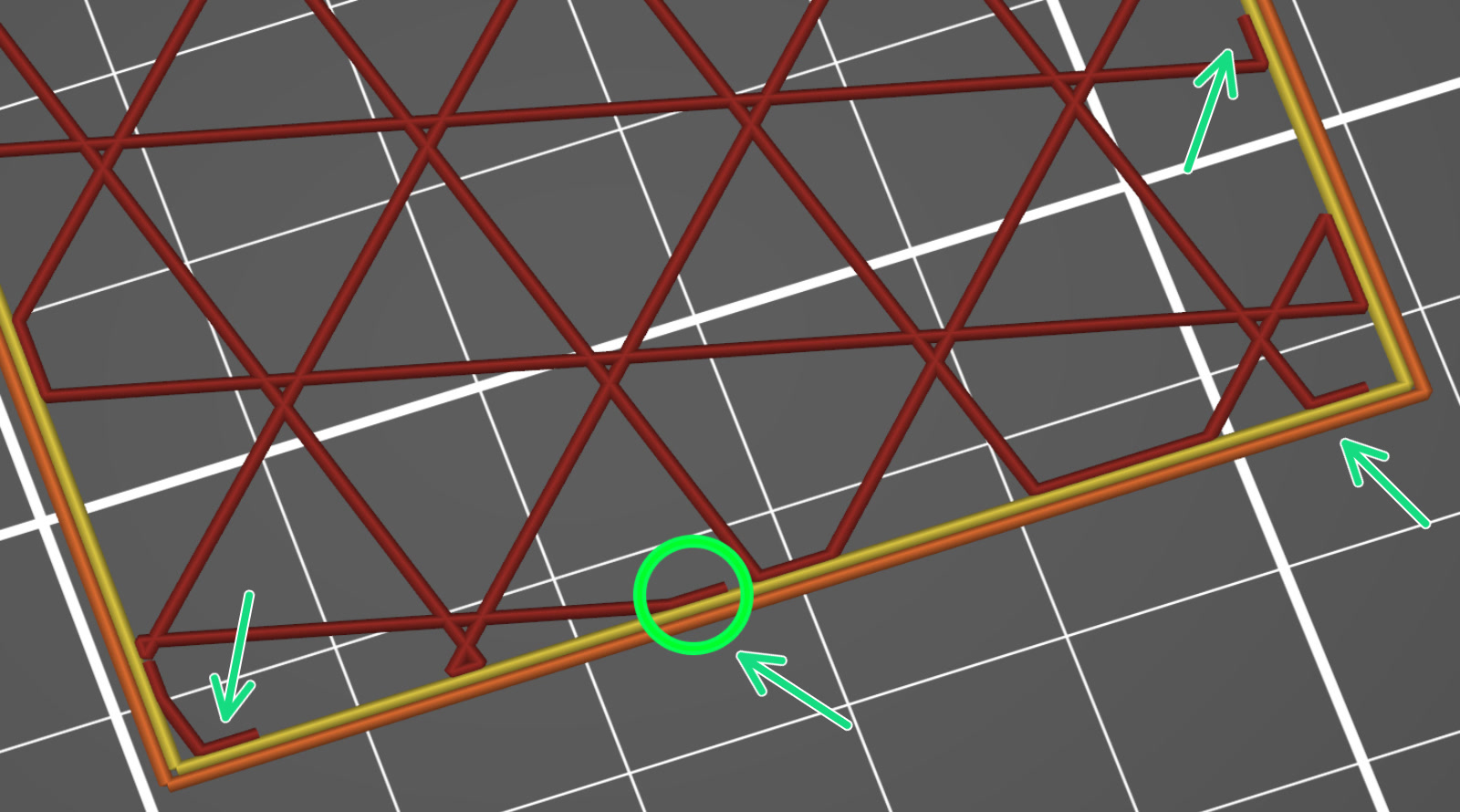
                  Maximum length of the infill anchor

                  This value sets the maximum length of the infill anchor connecting the infill with perimeters.

                  Set this parameter to 0 to disable anchoring completely.

                  Top fill pattern

                  You can pick a custom infill pattern that only affects the top visible layer, not the adjacent solid layers below. 

                  Bottom fill pattern

                  You can pick a custom infill pattern that only affects the bottom visible layer, not the adjacent solid layers above.

                  Automatic infill combination

                  This feature automatically combines the infill of several layers and speeds up your print by extruding thicker infill layers while preserving thin perimeters, thus maintaining accuracy.

                  Automatic infill combination - Max layer height

                  Maximum layer height for combining infill when automatic infill combining is enabled. The maximum layer height could be specified either as an absolute value in millimeters or as a percentage of the nozzle diameter. When printing with nozzle diameters that do not have standard settings in PrusaSlicer, it is recommended to use percentage value over absolute value.

                  Combine infill every X layers

                  Different layer heights will be used for infill and perimeters to speed up the print without sacrificing the print quality.
                  Example: Combine infill every 3 layers, layer height 0.1 mm, infill will be printed at 0.3 mm layer height.
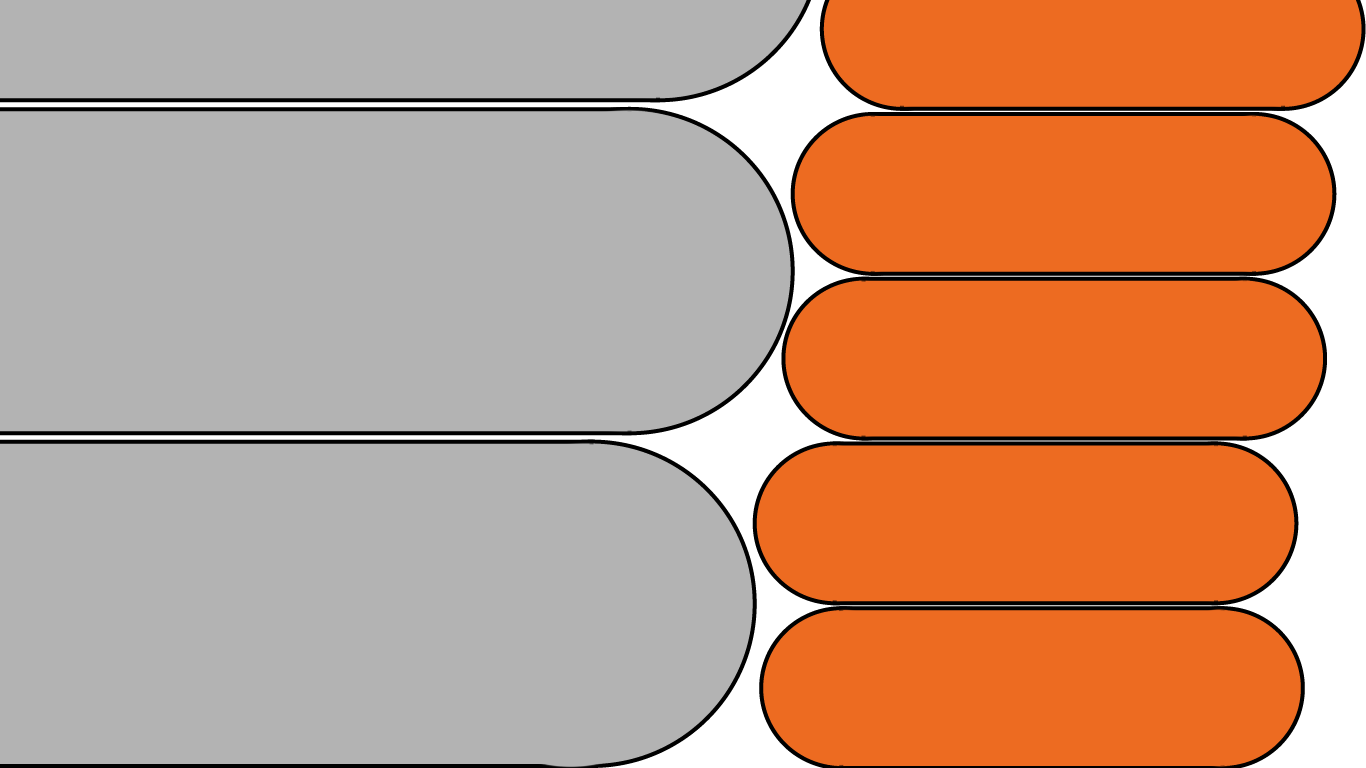
                  The maximum layer height is limited by your nozzle diameter. If you try to combine infill every 1+ layers with 0.4 mm nozzle and 0.3 mm layer height, no change will happen because you cannot print layers bigger than (about) 0.32mm (80% of nozzle diameter).
                  Infill (grey) printed at double the layer height of perimeters (orange)


                  Solid Infill every X layers

                  This feature allows you to force a solid layer after every given number of layers. This can be useful to increase the strength of the printed part, however other options, such as increasing the number of perimeters or infill percentage are preferred. Another application would be to create separate internal cells in order to increase thermal insulation.

                  Set to 0 to disable.

                  Fill angle

                  Default angle for infill orientation. Cross-hatching will be applied to some infill patterns.

                  Bridges will be printed using the best direction PrusaSlicer can detect, so this setting does not affect them.

                  Solid infill threshold area

                  Force solid infill for regions having a smaller area than the specified threshold.

                  Set to 0 to disable.
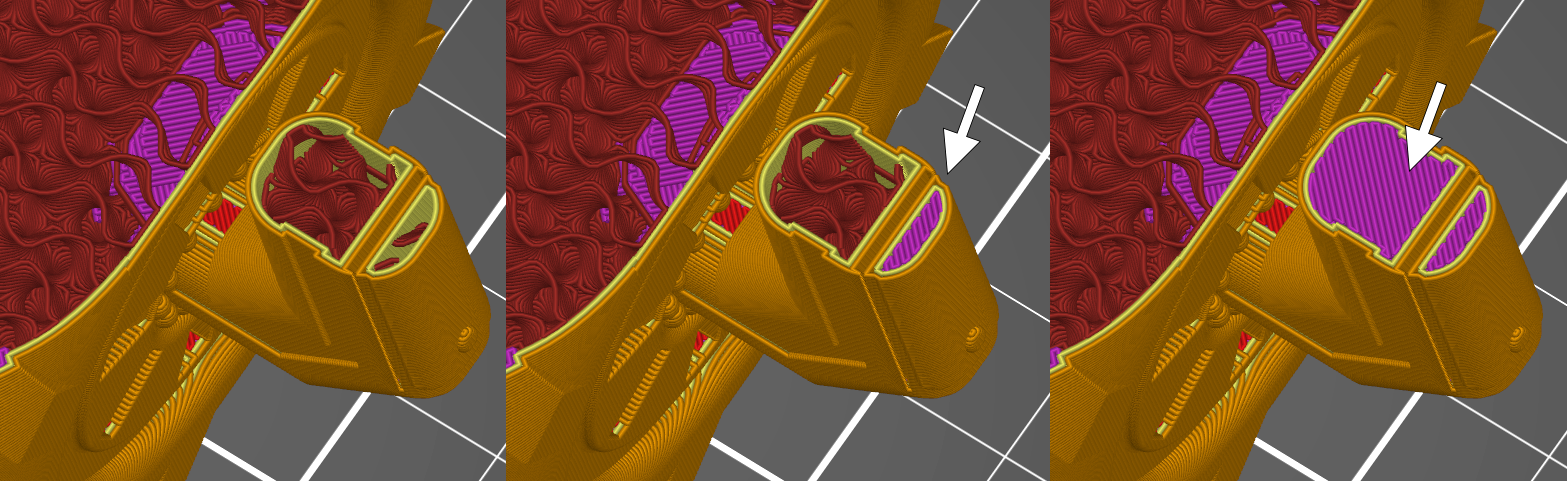
                  Solid infill threshold 0 (left), 15 (middle), 100 (right)

                  Was this article helpful?
                  This action is available only to registered users. Please log-in.

                  Topics

                  • PrusaSlicer 2.9 (Legacy)
                    • Print settings
                      • Infill
                      • Support material
                      • Layers and perimeters
                      • Elephant foot compensation
                      • Sequential printing
                      • Max volumetric speed
                      • Skirt and Brim
                      • Ironing
                      • Fuzzy skin
                      • Slicing mode / 3DLabPrint airplanes
                      • Pressure equalizer
                      • Arachne perimeter generator
                      • Organic Supports
                      • Speed settings
                      • Infill patterns
                      • Seam position
                    • About PrusaSlicer
                    • Configuration and profiles
                    • User interface
                    • Input/output
                    • Left toolbar
                    • Top toolbar
                    • Filament settings
                    • Printer settings
                    • Advanced features
                    • Multi-material slicing
                    • SLA slicing
                    • Other (PrusaSlicer)

                  22 comments

                  Log in  to post a comment
                  reckert
                  •
                  PrusaSlicer sends me here when I wanted to see the fill patterns, it would be good to see examples of the patterns so I can choose one.
                  Reply
                  IlyaMi
                  •
                  https://help.prusa3d.com/article/infill-patterns_177130
                  Reply
                  ifrit612
                  •
                  Hi, i am working in a research project and i need to make a custom infill with lines but in a certain incremental array of angles. ¿How can i do it?
                  Reply
                  Toby
                  •
                  The german version of this page has an option to use infill only where necessary, e.g. to support top layers. I can't find it on the english page.
                  Reply
                  littlecube141
                  •
                  Anyway to request infill line multiplier? Thanks
                  Reply
                  ifrit612
                  •
                  this is what i need 
                  Reply
                  Javier (Singular MARS Ltd)
                  •
                  I have a request: I'd like to tweak the thickness or width of the infill. Right now it's just a single line which makes the infill weak when density is low. Multiple lines would make it thicker (like inner ribs) while the density can remain low, gaining strength
                  Reply
                  David B.
                  •

                  Hi! Thickness of the infill lines can be modified in the Print settings > Advanced > Extrusion width > Infill.

                  Reply
                  Dave D
                  •
                  Rather than just adjusting the width of the extrusion, which is quite limited and nozzle-size dependent, I think the request from the OP is to be able to specify a number of lines for each support trace, similar to what can be done with perimeters. Just like I can choose, 2, 3, 4, etc., perimeters, specify 2,3, etc., support lines. Thus allowing for fewer (but stronger) support elements. I think it is an interesting idea. 
                  Reply