Prusa
  • SHOP
    • Latest products
    BY CATEGORY
    • 3D printersnew
    • 3D printer upgradesnew
    • Materials
    • Accessories
    • Spare parts
    • Courses
    • Merch
    • Get a price quote
    QUICK LINKS
    • Shipping & delivery
    • Returns & refunds
    • Payment & financing
    • Warranty
    • VAT & Customs fees
    • FAQ

    0 item in your cartitems in your cart

    Your cart is empty

    Go to cartShop 3D printers

    My profile

    Log in to see orders, saved items

    My profile

    Signed in as

    • Orders
    • Logout
  • 3D PRINTING
    • Explore 3D printing
    FOR BEGINNERS
    • 3D printing 101
    • How FDM printing works
    • Buying your first printer
    • 3D model catalog
    BY APPLICATION
    • Rapid prototyping
    • Manufacturing
    • Engineering
    • Research
    • Arts & design
    GO DEEPER
    • Materials guide
    • Courses
    • Webinars
    • Case studies
    • Custom 3D printing
  • 3D PRINTERS
    • All 3D printers
    FOR
    • Home or garageHobbyists, tinkerers and home printing
    • BusinessIn-house production for small teams
    • EnterpriseFleets, security and scale
    • Which Prusa is right for me
    SHOP & BROWSE
    • CORE One+new
    • CORE One+ INDXnew
    • CORE One L+new
    • CORE One L+ INDXnew
    • XL+new
    • MK4S
    • Prusa Pro HT90
    • Prusa Pro AFS
    • Prusa Pro SLX
    MORE FROM PRINTERS
    • Parts & upgradesnew
    • Critical infrastructure
    • Case studies
    • Signature Oak
    • Kits
  • MATERIALS
    • All materials
    BY USE
    • Every-day & design
    • Functional engineering
    • Composites
    • Pro speciality
    • SLA resins
    PRUSAMENT
    • PLA
    • PETG
    • ASA
    • PC
    • PA11
    • Flex
    • TPU
    MORE FROM MATERIALS
    • Materials guide
    • We make material in house
    • Sustainability
    • Order on the store
  • SOFTWARE
    • All software
    PREPARE THE PRINT
    • PrusaSlicer 3.0New
    PRINT & MONITOR
    • Prusa Connect
    • EasyPrint
    • iOS & Android app
    • Prusa Farm
    GET STARTED
    • Download & install
    • Knowledge base
    MORE FROM SOFTWARE
    • 3D model catalog
  • SUPPORT
    • Explore support
    FIND ANSWERS
    • Knowledge base
    • Troubleshooting
    • Courses
    • Webinars
    GET HELP
    • Contact us
    • Livechat
    • Shipping & delivery
    • Warranty
    • Returns & refunds
    • Service & spare parts
    • Service & Repair
    COMMUNITY
    • Forum
    • Reddit
    • Printables
  • TRUST CENTER
    • Trust Center overview
    BY TOPIC
    • GDPR
    • Certificates
    • Security
    • Compliance
    COMMITMENTS
    • Sustainability report
    TALK TO US
    • Contact the security team
  • COMPANY
    • About Prusa
    GET TO KNOW US
    • Our story
    • How we make printers
    • Open source
    • Brand & media kit
    NEWS
    • Blog
    • Newsroom
    • Events
    TRUST & PARTNERS
    • Sustainability
    • Resellers & distributors
    • Affiliate program
    • Contact
    • English
    • Čeština
    • Deutsch
    • Español
    • Français
    • Italiano
    • Polski
    • 日本語
  • Signed in as

    • Orders
    • Address
    • In-stock Alerts
    • My Courses
    • Subscription
    • Edit Account
    • Logout

Log in to see orders, saved items

Signed in as
  • Orders
  • Address
  • In-stock Alerts
  • My Courses
  • Subscription
  • Edit Account
  • English
  • Čeština
  • Deutsch
  • Español
  • Français
  • Italiano
  • Polski
  • 日本語
Shop

0 item in your cartitems in your cart

Your cart is empty

Go to cartShop 3D printers

My profile

Log in to see orders, saved items

My profile

Signed in as

  • Orders
  • Logout
SHOP
  • Latest products
BY CATEGORY
  • 3D printersnew
  • 3D printer upgradesnew
  • Materials
  • Accessories
  • Spare parts
  • Courses
  • Merch
  • Get a price quote
QUICK LINKS
  • Shipping & delivery
  • Returns & refunds
  • Payment & financing
  • Warranty
  • VAT & Customs fees
  • FAQ

Featured products

    Popular categories

      Trending searches

        Articles

          Blog

            Products

              Categories

                Suggested searches

                  Searching…
                  No results
                  Something went wrong.
                  ↑↓ Select↵ OpenEsc Close search
                  1. Support
                  2. Original Prusa i3 MK3
                  3. Print settings
                  4. Fuzzy skin
                   

                  Contents

                  • Ways to apply fuzzy skin
                  • Fuzzy skin settings
                  • Fuzzy skin modifier

                  Blog

                  • Print colorful and glowing Halloween decorations with our spooky offer
                  • Factorio Has Arrived on Printables
                  • Prusament PLA Lightweight: 65% lighter than regular PLA. Perfect choice for aircraft, cosplay, and more.

                  Newsletter

                  Signup and get our monthly squeeze on updates, blog, printables and much more.

                  By clicking, you agree to receive our newsletter.

                  This site is protected by reCAPTCHA Enterprise and the Google Privacy Policy and Terms of Service apply.

                  Factorio Transport Belts
                  E-shop
                  • 3D Printers
                  • Printer Upgrades
                  • Filaments
                  • Accessories
                  • Prusa Merchandise

                  © Prusa Research a.s.

                  Printables
                  • 3D Models
                  • Store
                  • Clubs
                  • 3D Design Contests
                  • Brands
                  Community
                  • World Map
                  • Forum
                  • User Groups
                  • Events
                  Help
                  • Prusa Help
                  • Prusa Academy
                  • 3D Printing Calculators
                  Software
                  • PrusaSlicer
                  • Prusa.app
                  • Prusa Connect
                  • Drivers and Software
                  Company
                  • About Us
                  • Blog
                  • Official Prusa Resellers
                  • Contact Us
                  • Certified for ISO 9001, ISO 14001, ISO 45001
                  • General Terms and Conditions
                  • General Terms and Conditions of Use of the PRUSA Websites
                  • Privacy Policy
                  • Information about cookies
                  • Customer Complaints Policy
                  • Status Page
                  • Do Not Sell or Share My Personal Information
                  • Supplemental Statements
                  • General Terms and Conditions
                  • General Terms and Conditions of Use of the PRUSA Websites
                  • Privacy Policy
                  • Information about cookies
                  • Customer Complaints Policy
                  • Status Page
                  • Do Not Sell or Share My Personal Information
                  • Supplemental Statements

                  © Prusa Research a.s.

                  JOSEF PRUSA®, PRUSA RESEARCH®, PRUSA POLYMERS®, PRUSA ORANGE®, PRUSA 3D ® AND PRUSAMENT® are registered trademarks of Prusa Development a.s. used by Prusa Research a.s. under licence from Prusa Development a.s.

                  Fuzzy skin

                  Relevant for

                  MMU family
                  MINI family
                  MK3 family
                  OLD PRODUCTS
                  SOFTWARE
                  44 comments
                  Article is also available in following languages
                  English
                  Čeština
                  Polski
                  Deutsch
                  Français
                  Español
                  Italiano
                  日本語
                  Some options will not appear when PrusaSlicer is in Simple mode.

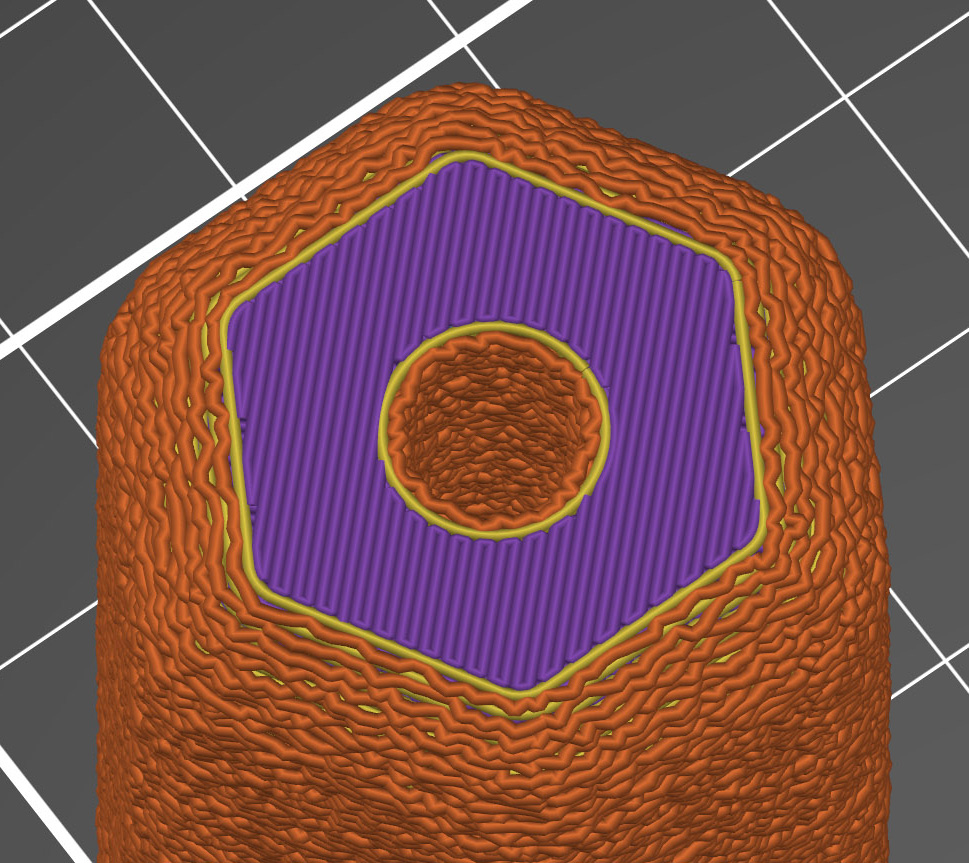
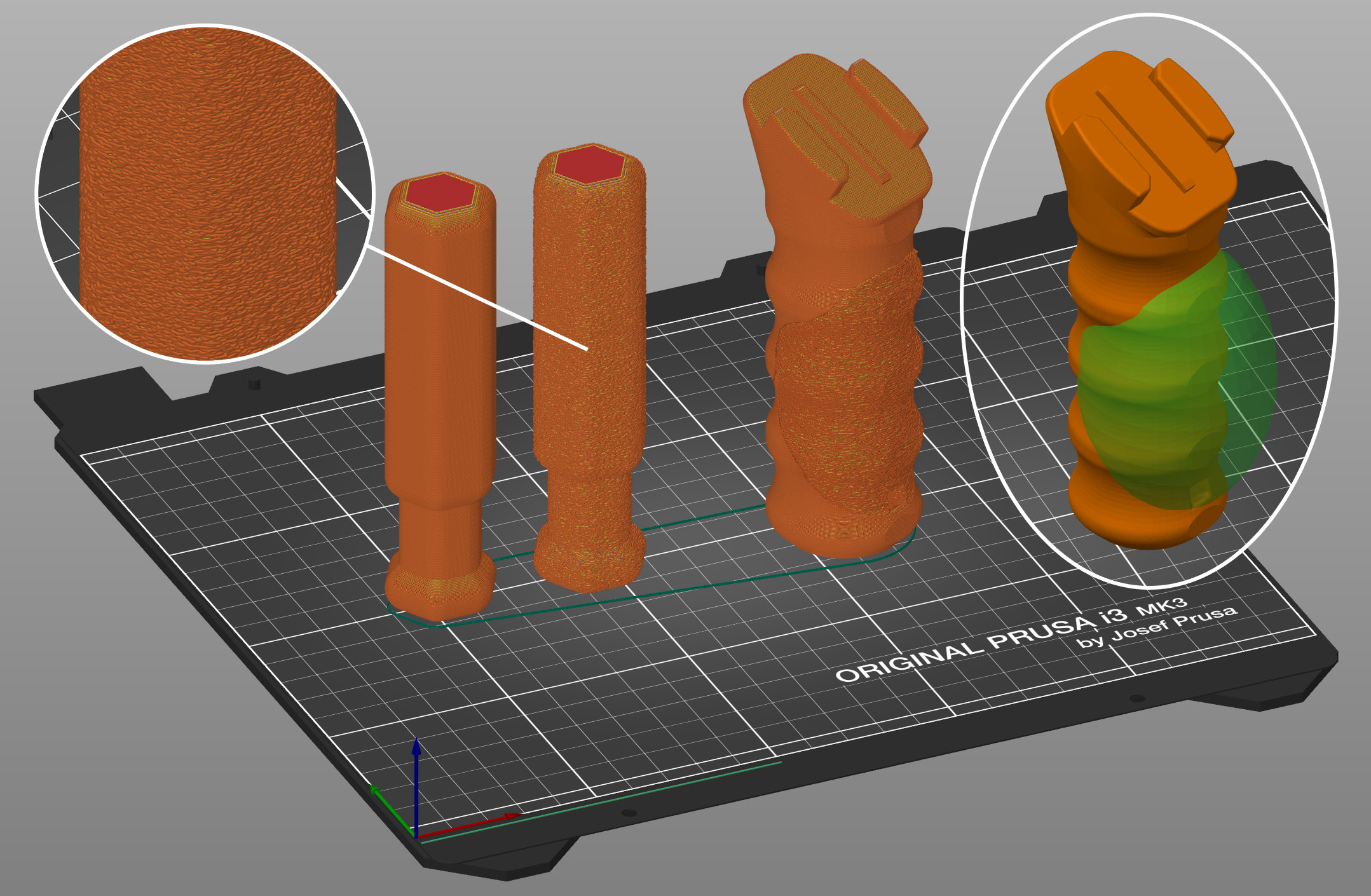
                  The Fuzzy skin feature lets you create a rough fiber-like texture on the sides of your models. If enabled, the perimeter will be resampled with a random step size, and each new sample point will be shifted inside or outside of the perimeter by a random length limited by the Fuzzy skin thickness. This simple algorithm produces nice results, suitable for tool handles or to give the print surface a new, interesting look, or to hide imprecision on prints. You can also use Modifiers to apply fuzzy skin only to a portion of your model.

                  Ways to apply fuzzy skin

                  Fuzzy skin can be applied to models in multiple ways, making it a powerful creative feature. There are multiple ways to apply it:

                  Global settings: Enable Fuzzy Skin for the entire print in Print Settings -> Layers and perimeters -> Fuzzy skin.

                  Per-object settings: Right-click an object, go to Add settings -> Fuzzy skin, and choose the needed options.

                  Modifiers (apply to a region): Instead of affecting the whole object, a TEXT (box/cylinder/sheet/mesh) will enable Fuzzy Skin only inside that modifier. Great for quick regional changes.

                  Paint-on Fuzzy skin: Paint exactly where you want the texture for a precise, detailed application.
                  Fuzzy skin settings

                  Fuzzy skin

                  You can apply Fuzzy skin only to Outside walls or All walls.
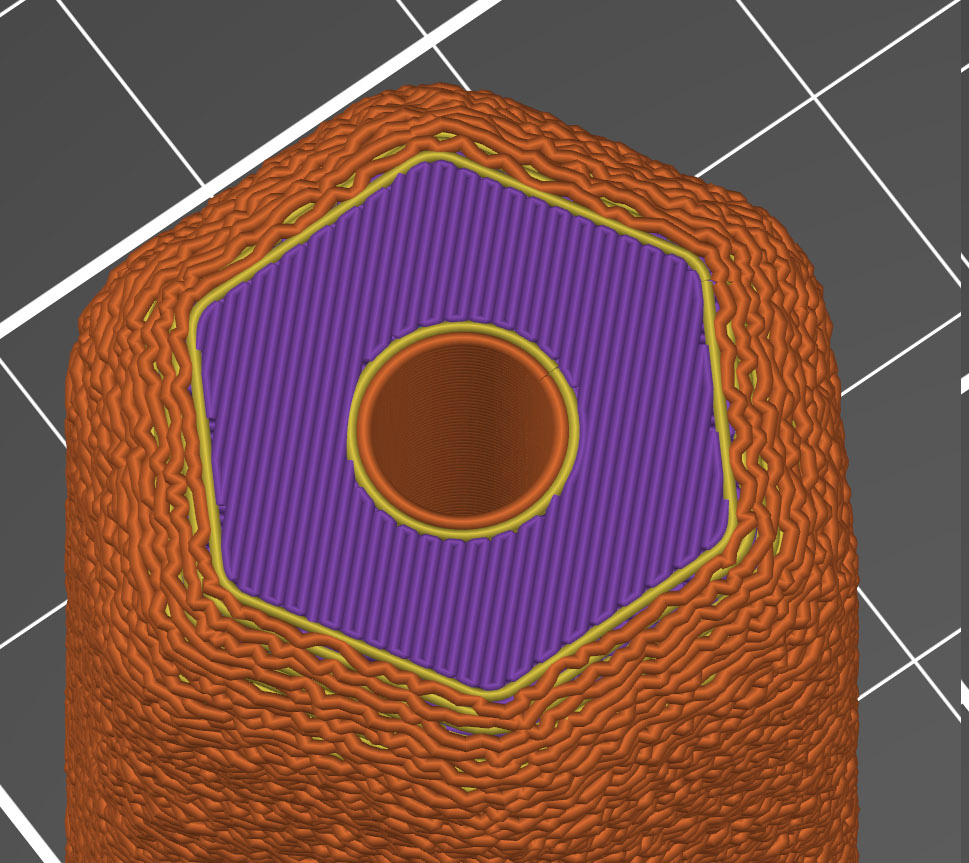
                  Outside wallsAll walls

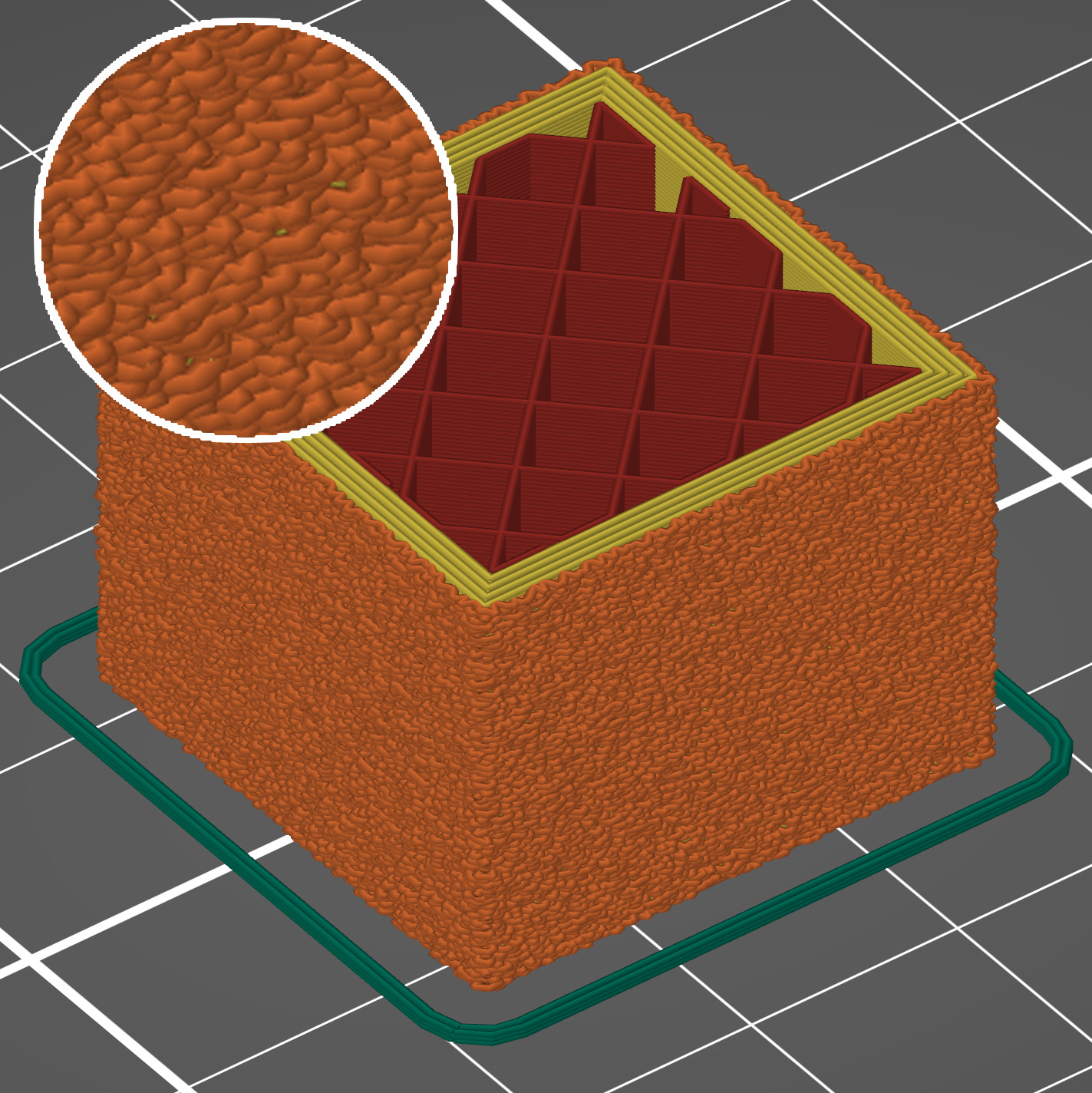
                  Fuzzy skin thickness

                  The maximum distance that each skin point can be offset (both ways) is measured perpendicular to the perimeter wall.
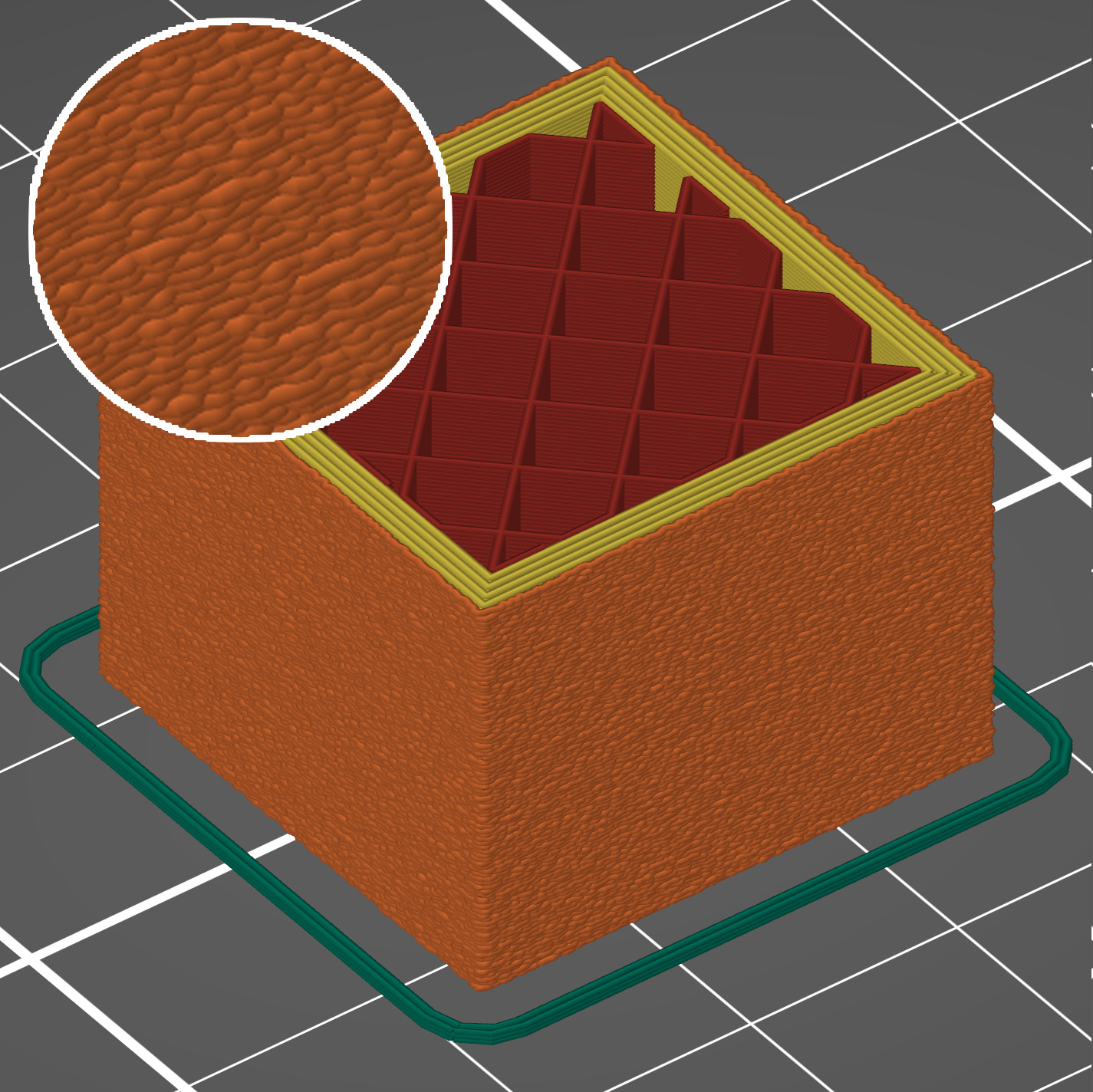
                  0.1 mm thickness0.3 mm thickness

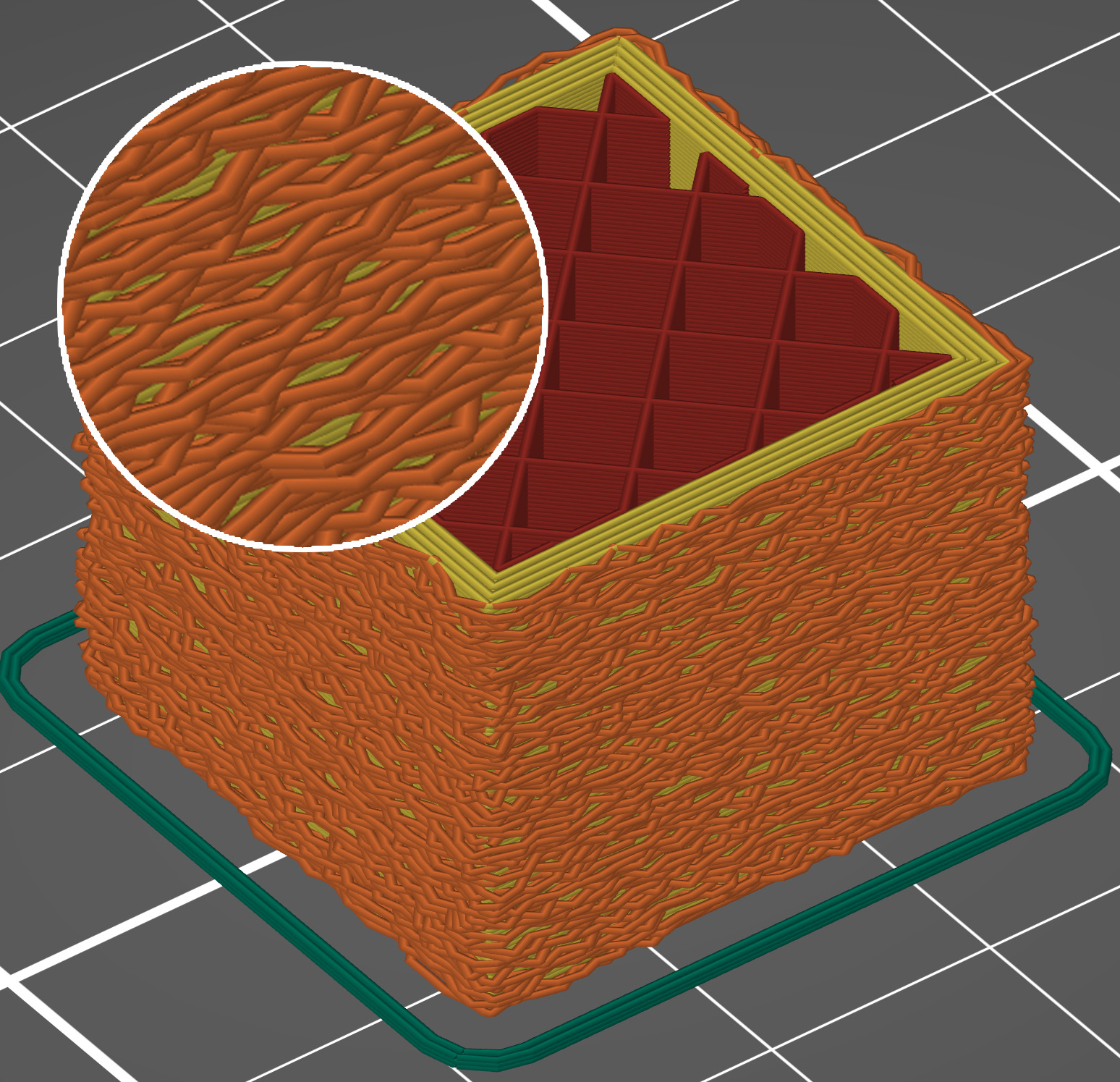
                  Fuzzy skin point distance

                  Perimeters will be split into multiple segments by inserting Fuzzy skin points. Lowering the Fuzzy skin point distance will increase the number of randomly offset points on the perimeter wall.
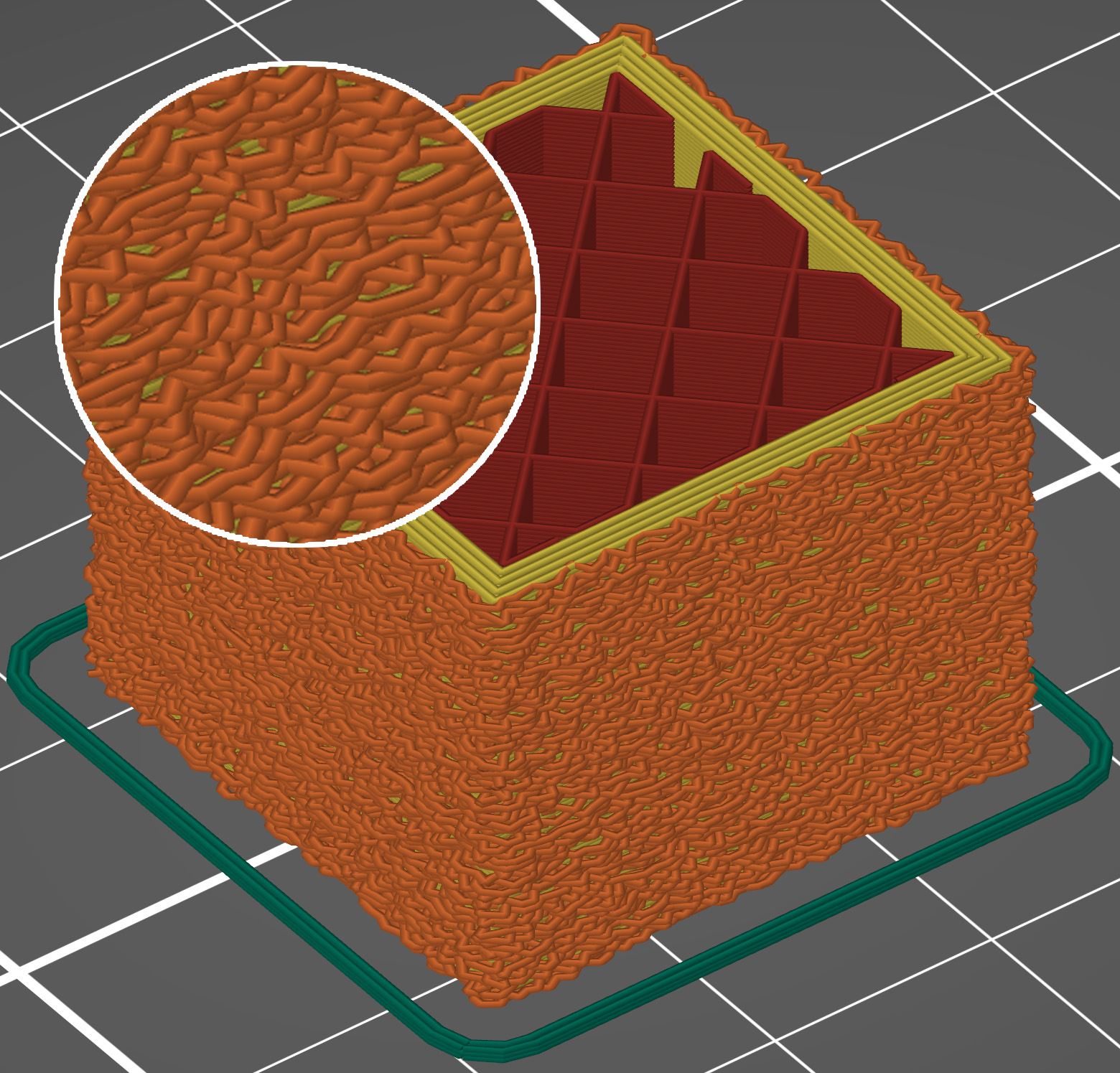
                  Fuzzy skin point distance 0.5 mmFuzzy skin point distance 1.0 mm

                  Fuzzy skin modifier

                  You can use modifiers to apply fuzzy skin only to a portion of your model.
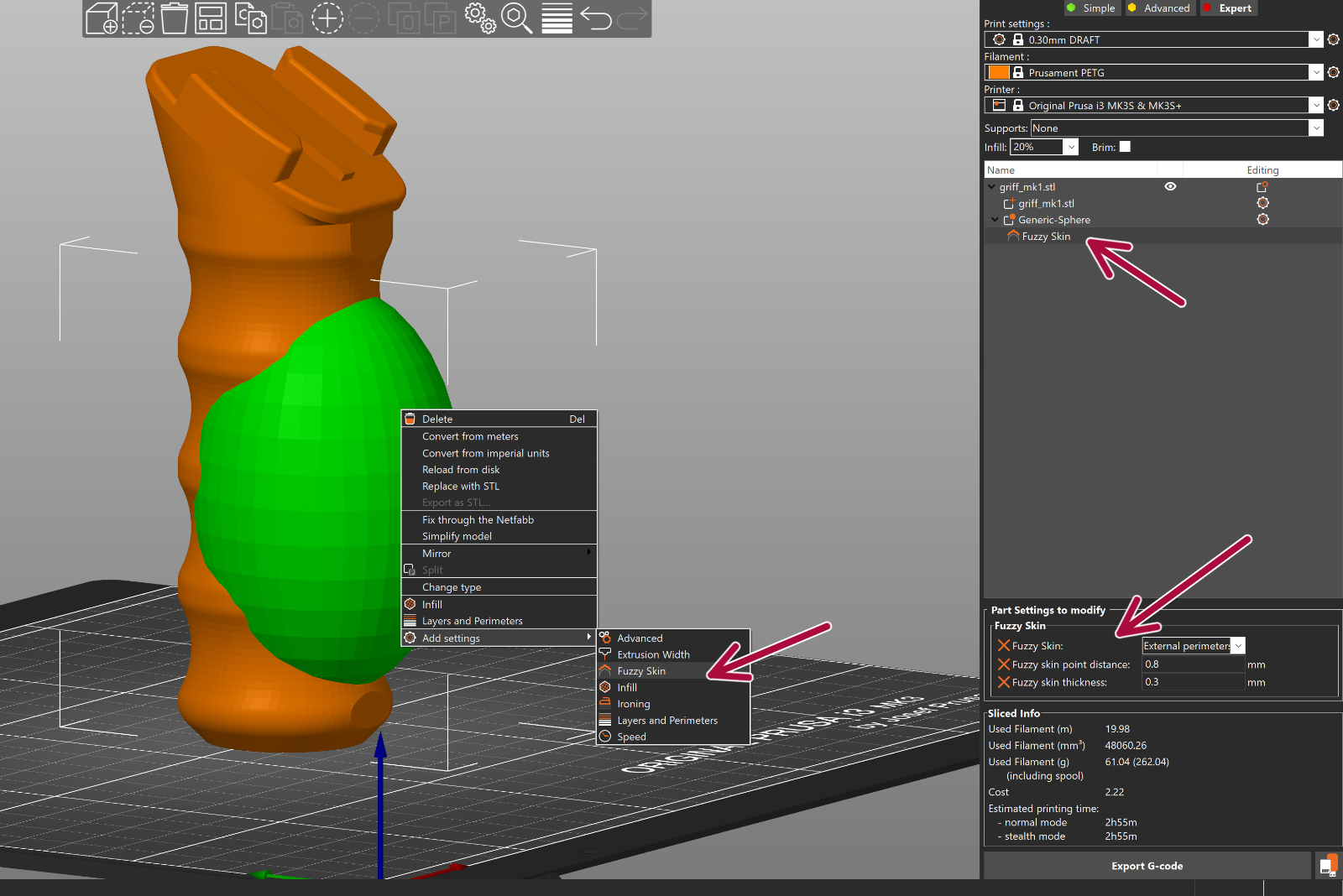
                  1. Right-click a model and pick Add modifier - [Select modifier type]. 
                  2. Position the modifier so that it overlaps with your model.
                  3. Right-click the modifier and choose Add settings - Fuzzy Skin.
                  4. In the pop-up window, select which settings you wish to modify.
                  5. Change Fuzzy skin to External perimeters or All Perimeters.
                  6. Optionally, you can edit other Fuzzy Skin settings as well.

                  Paint-on Fuzzy skin

                  To activate the paint on Fuzzy skin paint-on tool, select your model and click on Fuzzy Skin on the left toolbar.

                  The painting defines where texture appears. The texture settings (type, thickness, point distance) are taken from Print Settings -> Layers and perimeters -> Fuzzy skin, and is same for all painted areas.
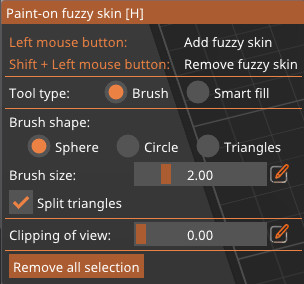
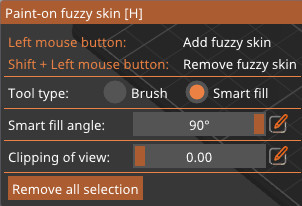
                  • Brush: Hold the mouse button and paint directly on the model. The available shapes are Sphere, Circle, Triangle.
                    • Sphere/Circle: set size; optionally Split large facets
                    • Triangle: uses the model’s existing mesh triangles (no size control)
                  • Smart Fill: Fills contiguous regions up to sharp edges; small gaps and tiny triangles are filled automatically. Use the Smart fill angle slider to control how far the fill spreads across neighboring facets.

                  Press Alt + mouse wheel to adjust the Smart Fill angle and see the region expand or shrink in real time.

                  Erase fuzzy skin: Shift + Left-click or Right-click.


                  Was this article helpful?
                  This action is available only to registered users. Please log-in.

                  Topics

                  • PrusaSlicer 2.9 (Legacy)
                    • Print settings
                      • Infill
                      • Support material
                      • Layers and perimeters
                      • Elephant foot compensation
                      • Sequential printing
                      • Max volumetric speed
                      • Skirt and Brim
                      • Ironing
                      • Fuzzy skin
                      • Slicing mode / 3DLabPrint airplanes
                      • Pressure equalizer
                      • Arachne perimeter generator
                      • Organic Supports
                      • Speed settings
                      • Infill patterns
                      • Seam position
                    • About PrusaSlicer
                    • Configuration and profiles
                    • User interface
                    • Input/output
                    • Left toolbar
                    • Top toolbar
                    • Filament settings
                    • Printer settings
                    • Advanced features
                    • Multi-material slicing
                    • SLA slicing
                    • Other (PrusaSlicer)

                  33 comments

                  Log in  to post a comment
                  Perchik
                  •
                  It'd be really nice to see a photo of a printed model with fuzzy skin
                  Reply
                  Alberto Garcia
                  •
                  Do the Fuzzy skin thickness and Fuzzy skin point distance settings apply when using Paint-on Fuzzy skin?
                  Reply
                  Scoutjango
                  •
                  The option in Prusa Slicer that links to here was called "only one perimeter", but here is no information about it. Please finally update this site. Other users already commented this one year ago.
                  Reply
                  Billy T
                  •
                  The option box was called "only one perimetre" with two options in it.
                  Reply
                  Abowyer_Mike
                  •
                  +1 for paint on fuzzy skin!
                  Reply