Prusa
  • SHOP
    • Latest products
    BY CATEGORY
    • 3D printersnew
    • 3D printer upgradesnew
    • Materials
    • Accessories
    • Spare parts
    • Courses
    • Merch
    • Get a price quote
    QUICK LINKS
    • Shipping & delivery
    • Returns & refunds
    • Payment & financing
    • Warranty
    • VAT & Customs fees
    • FAQ

    0 item in your cartitems in your cart

    Your cart is empty

    Go to cartShop 3D printers

    My profile

    Log in to see orders, saved items

    My profile

    Signed in as

    • Orders
    • Logout
  • 3D PRINTING
    • Explore 3D printing
    FOR BEGINNERS
    • 3D printing 101
    • How FDM printing works
    • Buying your first printer
    • 3D model catalog
    BY APPLICATION
    • Rapid prototyping
    • Manufacturing
    • Engineering
    • Research
    • Arts & design
    GO DEEPER
    • Materials guide
    • Courses
    • Webinars
    • Case studies
    • Custom 3D printing
  • 3D PRINTERS
    • All 3D printers
    FOR
    • Home or garageHobbyists, tinkerers and home printing
    • BusinessIn-house production for small teams
    • EnterpriseFleets, security and scale
    • Which Prusa is right for me
    SHOP & BROWSE
    • CORE One+new
    • CORE One+ INDXnew
    • CORE One L+new
    • CORE One L+ INDXnew
    • XL+new
    • MK4S
    • Prusa Pro HT90
    • Prusa Pro AFS
    • Prusa Pro SLX
    MORE FROM PRINTERS
    • Parts & upgradesnew
    • Critical infrastructure
    • Case studies
    • Signature Oak
    • Kits
  • MATERIALS
    • All materials
    BY USE
    • Every-day & design
    • Functional engineering
    • Composites
    • Pro speciality
    • SLA resins
    PRUSAMENT
    • PLA
    • PETG
    • ASA
    • PC
    • PA11
    • Flex
    • TPU
    MORE FROM MATERIALS
    • Materials guide
    • We make material in house
    • Sustainability
    • Order on the store
  • SOFTWARE
    • All software
    PREPARE THE PRINT
    • PrusaSlicer 3.0New
    PRINT & MONITOR
    • Prusa Connect
    • EasyPrint
    • iOS & Android app
    • Prusa Farm
    GET STARTED
    • Download & install
    • Knowledge base
    MORE FROM SOFTWARE
    • 3D model catalog
  • SUPPORT
    • Explore support
    FIND ANSWERS
    • Knowledge base
    • Troubleshooting
    • Courses
    • Webinars
    GET HELP
    • Contact us
    • Livechat
    • Shipping & delivery
    • Warranty
    • Returns & refunds
    • Service & spare parts
    • Service & Repair
    COMMUNITY
    • Forum
    • Reddit
    • Printables
  • TRUST CENTER
    • Trust Center overview
    BY TOPIC
    • GDPR
    • Certificates
    • Security
    • Compliance
    COMMITMENTS
    • Sustainability report
    TALK TO US
    • Contact the security team
  • COMPANY
    • About Prusa
    GET TO KNOW US
    • Our story
    • How we make printers
    • Open source
    • Brand & media kit
    NEWS
    • Blog
    • Newsroom
    • Events
    TRUST & PARTNERS
    • Sustainability
    • Resellers & distributors
    • Affiliate program
    • Contact
    • English
    • Čeština
    • Deutsch
    • Español
    • Français
    • Italiano
    • Polski
    • 日本語
  • Signed in as

    • Orders
    • Address
    • In-stock Alerts
    • My Courses
    • Subscription
    • Edit Account
    • Logout

Log in to see orders, saved items

Signed in as
  • Orders
  • Address
  • In-stock Alerts
  • My Courses
  • Subscription
  • Edit Account
  • English
  • Čeština
  • Deutsch
  • Español
  • Français
  • Italiano
  • Polski
  • 日本語
Shop

0 item in your cartitems in your cart

Your cart is empty

Go to cartShop 3D printers

My profile

Log in to see orders, saved items

My profile

Signed in as

  • Orders
  • Logout
SHOP
  • Latest products
BY CATEGORY
  • 3D printersnew
  • 3D printer upgradesnew
  • Materials
  • Accessories
  • Spare parts
  • Courses
  • Merch
  • Get a price quote
QUICK LINKS
  • Shipping & delivery
  • Returns & refunds
  • Payment & financing
  • Warranty
  • VAT & Customs fees
  • FAQ

Featured products

    Popular categories

      Trending searches

        Articles

          Blog

            Products

              Categories

                Suggested searches

                  Searching…
                  No results
                  Something went wrong.
                  ↑↓ Select↵ OpenEsc Close search
                  1. Support
                  2. Original Prusa i3 MK3
                  3. Print settings
                  4. Arachne perimeter generator
                   

                  Contents

                  • Minimum feature size
                  • Minimum perimeter width
                  • Perimeter transition length
                  • Perimeter transitioning threshold angle
                  • Perimeter transition filter margin

                  Blog

                  • Print colorful and glowing Halloween decorations with our spooky offer
                  • Factorio Has Arrived on Printables
                  • Prusament PLA Lightweight: 65% lighter than regular PLA. Perfect choice for aircraft, cosplay, and more.

                  Newsletter

                  Signup and get our monthly squeeze on updates, blog, printables and much more.

                  By clicking, you agree to receive our newsletter.

                  This site is protected by reCAPTCHA Enterprise and the Google Privacy Policy and Terms of Service apply.

                  Factorio Transport Belts
                  E-shop
                  • 3D Printers
                  • Printer Upgrades
                  • Filaments
                  • Accessories
                  • Prusa Merchandise

                  © Prusa Research a.s.

                  Printables
                  • 3D Models
                  • Store
                  • Clubs
                  • 3D Design Contests
                  • Brands
                  Community
                  • World Map
                  • Forum
                  • User Groups
                  • Events
                  Help
                  • Prusa Help
                  • Prusa Academy
                  • 3D Printing Calculators
                  Software
                  • PrusaSlicer
                  • Prusa.app
                  • Prusa Connect
                  • Drivers and Software
                  Company
                  • About Us
                  • Blog
                  • Official Prusa Resellers
                  • Contact Us
                  • Certified for ISO 9001, ISO 14001, ISO 45001
                  • General Terms and Conditions
                  • General Terms and Conditions of Use of the PRUSA Websites
                  • Privacy Policy
                  • Information about cookies
                  • Customer Complaints Policy
                  • Status Page
                  • Do Not Sell or Share My Personal Information
                  • Supplemental Statements
                  • General Terms and Conditions
                  • General Terms and Conditions of Use of the PRUSA Websites
                  • Privacy Policy
                  • Information about cookies
                  • Customer Complaints Policy
                  • Status Page
                  • Do Not Sell or Share My Personal Information
                  • Supplemental Statements

                  © Prusa Research a.s.

                  JOSEF PRUSA®, PRUSA RESEARCH®, PRUSA POLYMERS®, PRUSA ORANGE®, PRUSA 3D ® AND PRUSAMENT® are registered trademarks of Prusa Development a.s. used by Prusa Research a.s. under licence from Prusa Development a.s.

                  Arachne perimeter generator

                  Relevant for

                  MMU family
                  MINI family
                  MK3 family
                  OLD PRODUCTS
                  SLA family
                  +
                  10 comments
                  Article is also available in following languages
                  English
                  Čeština
                  Polski
                  Deutsch
                  Français
                  Español
                  Italiano
                  日本語

                  Starting from Prusa Slicer version 2.5.0, the standard perimeter generator is Arachne.

                  The Arachne generator produces perimeter loops and gap fills with varying extrusion widths. Simply put, it automatically widens or thins perimeters as needed. 

                  For years, the strategy PrusaSlicer used when generating perimeters was to offset the object contour with an extrusion line of constant width. This caused problems in various cases, especially when printing thin walls, text, or logos. The developers of Cura implemented a new strategy named Arachne based on the paper [Kuipers et al., 2020]. We ported the feature from Cura. We want to thank the Ultimaker Cura team led by Jaime van Kessel, for implementing this feature and for keeping Cura open-source.
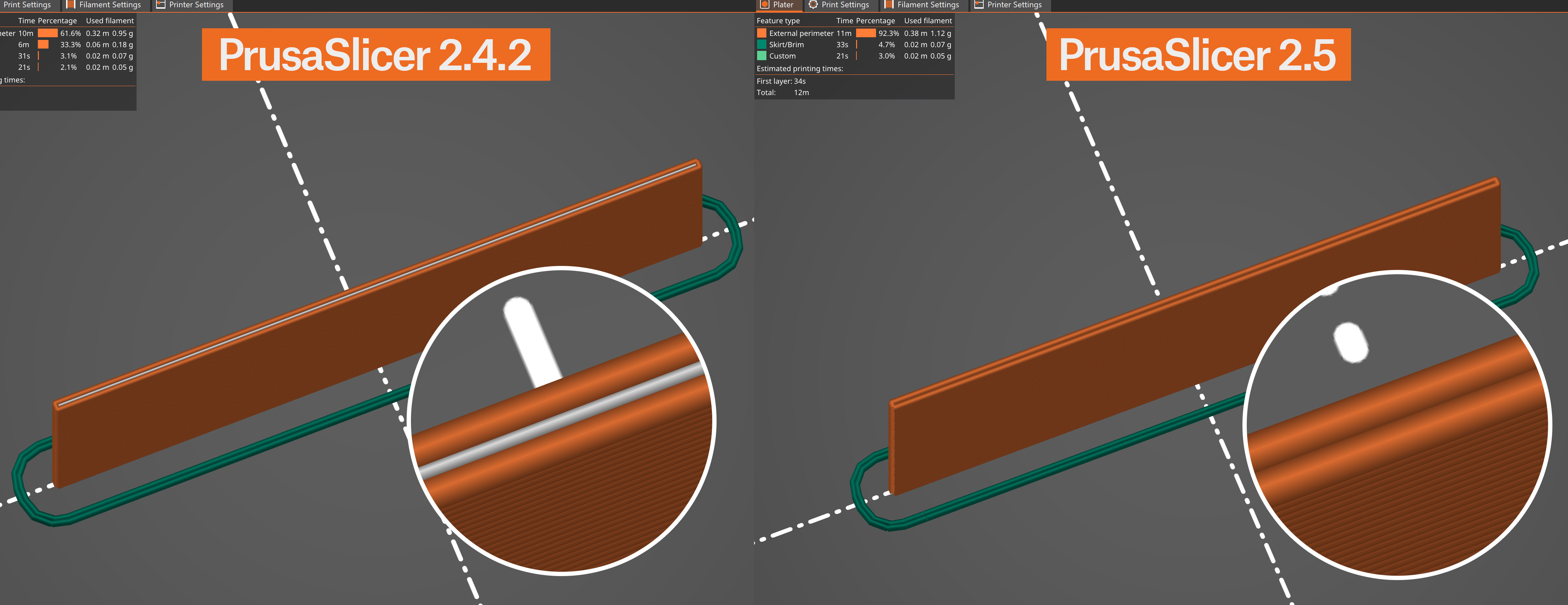


                  This approach produces nicer-looking prints with fewer artifacts. Gap infill and small extrusions used to fill gaps between perimeters are also significantly reduced, reducing the print time.

                  One field where the Arachne perimeter generator shows its power is when printing texts or small logos. Drawing fonts with constant line width is quite difficult. The new perimeter generator doesn’t have this limitation and produces much cleaner text even at a smaller scale.
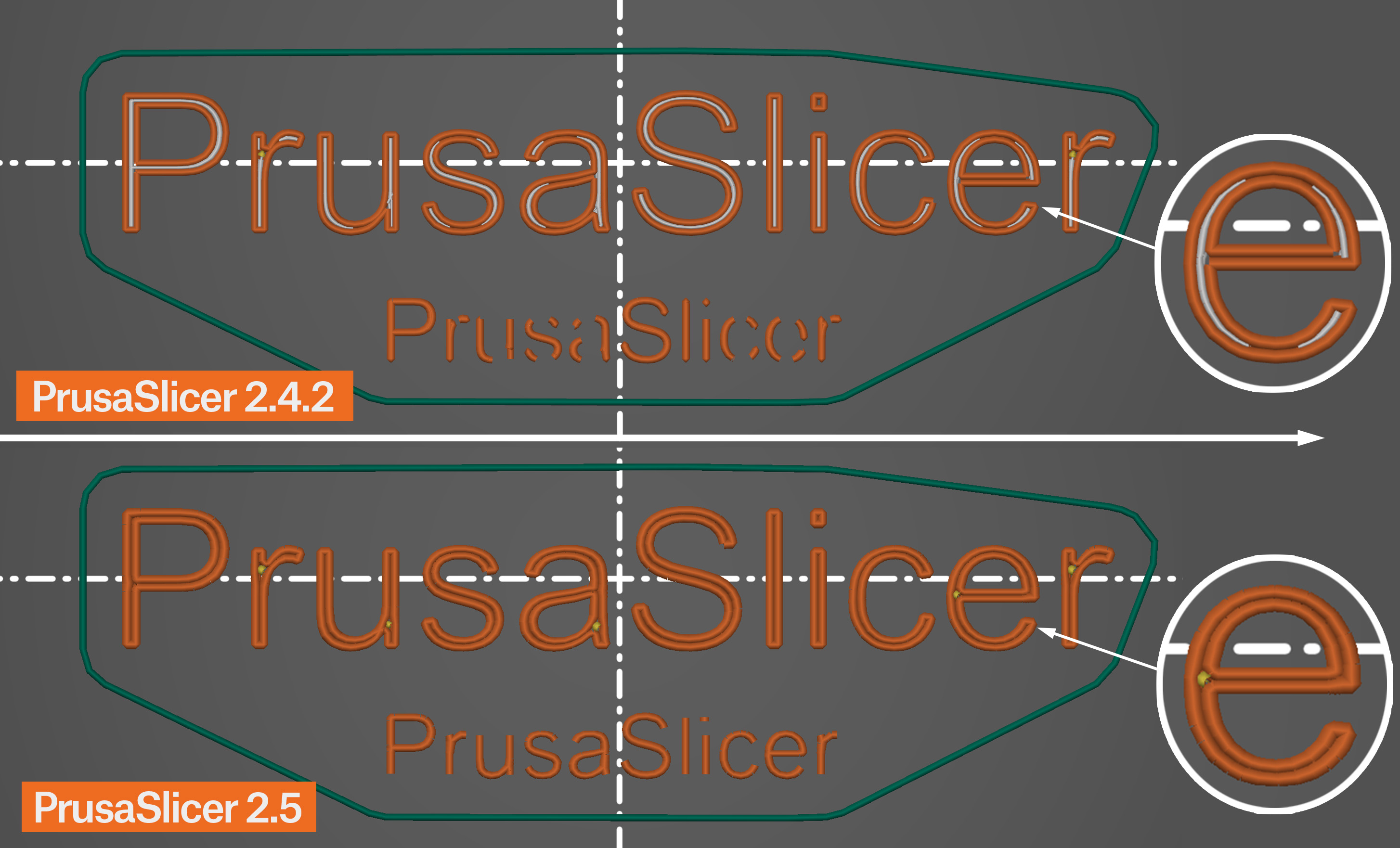
                  Classic perimeter generator in PrusaSlicer 2.4.2 vs Arachne in PrusaSlicer 2.5

                  The Arachne perimeter generation is the default option. If you want to use the previous perimeter generator, you can switch to it in the Print settings - Layer and perimeters - Perimeter generator settings.

                  The Detect Thin Walls feature is disabled when the Arachne perimeter generator is selected. It’s not needed since Arachne always tries to adapt the extrusion width to thin lines. 

                  You can adjust the Arachne perimeter generator settings in Print settings - Advanced - Arachne perimeter generator

                  Minimum feature size

                  Minimum thickness of thin features, expressed in millimeters or as a percentage of the nozzle diameter.

                  Features thinner than this value will not be printed.

                  Feature thicker than the minimum will be widened to the minimum perimeter width.

                  Minimum perimeter width

                  Width of a perimeter that will replace thin features defined by the Minimum feature size.

                  Perimeter transition length

                  When transitioning between a different number of perimeters as the part becomes thinner, a certain amount of space is allocated to split or join the perimeter segments. This value defines the length of this transition area.

                  Perimeter transitioning threshold angle

                  An angle at which a transition between even and odd number of perimeters should happen. A wedge shape with an angle greater than this value will not have transitions and no perimeters will be printed in the center to fill the remaining space. Lowering this value reduces the number and length of these center perimeters but may leave gaps or over-extrude.

                  Perimeter transition filter margin

                  This value prevents transitioning back and forth between one extra perimeter and one fewer. It is expressed in millimeters or as a percentage of the nozzle diameter.

                  Increasing this margin reduces the number of transitions, which reduces the number of extrusion starts/stops.

                  Was this article helpful?
                  This action is available only to registered users. Please log-in.

                  Topics

                  • PrusaSlicer 2.9 (Legacy)
                    • Print settings
                      • Infill
                      • Support material
                      • Layers and perimeters
                      • Elephant foot compensation
                      • Sequential printing
                      • Max volumetric speed
                      • Skirt and Brim
                      • Ironing
                      • Fuzzy skin
                      • Slicing mode / 3DLabPrint airplanes
                      • Pressure equalizer
                      • Arachne perimeter generator
                      • Organic Supports
                      • Speed settings
                      • Infill patterns
                      • Seam position
                    • About PrusaSlicer
                    • Configuration and profiles
                    • User interface
                    • Input/output
                    • Left toolbar
                    • Top toolbar
                    • Filament settings
                    • Printer settings
                    • Advanced features
                    • Multi-material slicing
                    • SLA slicing
                    • Other (PrusaSlicer)

                  7 comments

                  Log in  to post a comment
                  Tim A
                  •
                  As of PrusaSlicer 2.8.1 (0.6mm nozzle), I have found that when using Arachne perimeters the Fill Gaps setting has no effect. Gaps are not filled.
                  If gap fill is important for cosmetic or functional purposes, you must use Classic perimeters.
                  Reply
                  pdw
                  •
                  I've found seam artefacts to be much worse with Arachne.  Printing boxes with thin, two wall sides, I get a significant gap in the perimeter wall at the seam. I'm using aligned seams, and this is where the extruder resumes after quite a long travel. In classic mode, the same wall gets a small gap fill, but the seam is much much neater. This is on a MINI+, similar results with and without input shaping.
                  Reply
                  AGriggs191
                  •
                  Have you calibrated your linear advance?
                  Reply
                  Spin360
                  •
                  I have been having problems with seams leaving huge gaps. I'm currently testing a print to see if it was caused by the arachne algorithm (according to some reddit users it is).
                  Reply
                  AGriggs191
                  •
                  Have you calibrated your linear advance?
                  Reply
                  HaughtyGrayAlien
                  •
                  Using a 0.6 nozzle I've had nothing but problems with Arachne perimeter generation. It always leaves tiny holes in the top layer of the model and looks much worse than classic perimeter generation. 
                  Reply
                  calex
                  •
                  I feel you my friend.
                  I stopped using arachne with a 0.6mm nozzle...
                  Reply
                  Tim A
                  •
                  The Arachne perimeter generator offers a great opportunity to make prints stronger by staggering perimeter widths from one layer to the next. For prints with multiple perimeters, it would be great if the innermost perimeter were printed full nozzle width, then on the next layer it is printed at some narrower width. Third layer gets a narrow inner perimter, and so on. Compensate the succeeding perimeters to maintain wall thickness. This would creat a print with a cross-section looking something like a brick wall, with what I assume to be better layer adhesion and greater strength. Thoughts?
                  Reply