Prusa
  • SHOP
    • Latest products
    BY CATEGORY
    • 3D printersnew
    • 3D printer upgradesnew
    • Materials
    • Accessories
    • Spare parts
    • Courses
    • Merch
    • Get a price quote
    QUICK LINKS
    • Shipping & delivery
    • Returns & refunds
    • Payment & financing
    • Warranty
    • VAT & Customs fees
    • FAQ

    0 item in your cartitems in your cart

    Your cart is empty

    Go to cartShop 3D printers

    My profile

    Log in to see orders, saved items

    My profile

    Signed in as

    • Orders
    • Logout
  • 3D PRINTING
    • Explore 3D printing
    FOR BEGINNERS
    • 3D printing 101
    • How FDM printing works
    • Buying your first printer
    • 3D model catalog
    BY APPLICATION
    • Rapid prototyping
    • Manufacturing
    • Engineering
    • Research
    • Arts & design
    GO DEEPER
    • Materials guide
    • Courses
    • Webinars
    • Case studies
    • Custom 3D printing
  • 3D PRINTERS
    • All 3D printers
    FOR
    • Home or garageHobbyists, tinkerers and home printing
    • BusinessIn-house production for small teams
    • EnterpriseFleets, security and scale
    • Which Prusa is right for me
    SHOP & BROWSE
    • CORE One+new
    • CORE One+ INDXnew
    • CORE One L+new
    • CORE One L+ INDXnew
    • XL+new
    • MK4S
    • Prusa Pro HT90
    • Prusa Pro AFS
    • Prusa Pro SLX
    MORE FROM PRINTERS
    • Parts & upgradesnew
    • Spare parts
    • Critical infrastructure
    • Case studies
    • Signature Oak
    • Kits
  • MATERIALS
    • All materials
    BY USE
    • Every-day & design
    • Functional engineering
    • Composites
    • Pro speciality
    • SLA resins
    PRUSAMENT
    • PLA
    • PETG
    • ASA
    • PC
    • PA11
    • Flex
    • TPU
    MORE FROM MATERIALS
    • Materials guide
    • We make material in house
    • Sustainability
    • Order on the store
  • SOFTWARE
    • All software
    PREPARE THE PRINT
    • PrusaSlicer 3.0New
    PRINT & MONITOR
    • Prusa Connect
    • EasyPrint
    • iOS & Android app
    • Prusa Farm
    GET STARTED
    • Download & install
    • Knowledge base
    MORE FROM SOFTWARE
    • 3D model catalog
  • SUPPORT
    • Explore support
    FIND ANSWERS
    • Knowledge base
    • Troubleshooting
    • Courses
    • Webinars
    GET HELP
    • Contact us
    • Livechat
    • Shipping & delivery
    • Warranty
    • Returns & refunds
    • Service & spare parts
    • Service & Repair
    COMMUNITY
    • Forum
    • Reddit
    • Printables
  • TRUST CENTER
    • Trust Center overview
    BY TOPIC
    • GDPR
    • Certificates
    • Security
    • Compliance
    COMMITMENTS
    • Sustainability report
    TALK TO US
    • Contact the security team
  • COMPANY
    • About Prusa
    GET TO KNOW US
    • Our story
    • How we make printers
    • Open source
    • Brand & media kit
    NEWS
    • Blog
    • Newsroom
    • Events
    TRUST & PARTNERS
    • Sustainability
    • Resellers & distributors
    • Affiliate program
    • Contact
    • English
    • Čeština
    • Deutsch
    • Español
    • Français
    • Italiano
    • Polski
    • 日本語
  • Signed in as

    • Orders
    • Address
    • In-stock Alerts
    • My Courses
    • Subscription
    • Edit Account
    • Logout

Log in to see orders, saved items

Signed in as
  • Orders
  • Address
  • In-stock Alerts
  • My Courses
  • Subscription
  • Edit Account
  • English
  • Čeština
  • Deutsch
  • Español
  • Français
  • Italiano
  • Polski
  • 日本語
Shop

0 item in your cartitems in your cart

Your cart is empty

Go to cartShop 3D printers

My profile

Log in to see orders, saved items

My profile

Signed in as

  • Orders
  • Logout
SHOP
  • Latest products
BY CATEGORY
  • 3D printersnew
  • 3D printer upgradesnew
  • Materials
  • Accessories
  • Spare parts
  • Courses
  • Merch
  • Get a price quote
QUICK LINKS
  • Shipping & delivery
  • Returns & refunds
  • Payment & financing
  • Warranty
  • VAT & Customs fees
  • FAQ

Featured products

    Popular categories

      Trending searches

        Articles

          Blog

            Products

              Categories

                Suggested searches

                  Searching…
                  No results
                  Something went wrong.
                  ↑↓ Select↵ OpenEsc Close search
                  1. Support
                  2. Original Prusa i3 MK2.5
                  3. Printer troubleshooting
                  4. LCD screen not working
                   

                  Contents

                  • Squares or random signs on the LCD screen
                  • Blank LCD screen

                  Blog

                  • Prusament Pellets: Raw material batches for large-format 3D printing or small-scale polymer research & development
                  • Print colorful and glowing Halloween decorations with our spooky offer
                  • Factorio Has Arrived on Printables

                  Newsletter

                  Signup and get our monthly squeeze on updates, blog, printables and much more.

                  By clicking, you agree to receive our newsletter.

                  This site is protected by reCAPTCHA Enterprise and the Google Privacy Policy and Terms of Service apply.

                  Heavy Duty Keyboard Holder (No Supports)
                  E-shop
                  • 3D Printers
                  • Printer Upgrades
                  • Filaments
                  • Accessories
                  • Prusa Merchandise
                  Prusa

                  © Prusa Research a.s.

                  Printables
                  • 3D Models
                  • Store
                  • Clubs
                  • 3D Design Contests
                  • Brands
                  Community
                  • World Map
                  • Forum
                  • User Groups
                  • Events
                  Help
                  • Prusa Help
                  • Prusa Academy
                  • 3D Printing Calculators
                  Software
                  • PrusaSlicer
                  • Prusa.app
                  • Prusa Connect
                  • Drivers and Software
                  Company
                  • About Us
                  • Blog
                  • Official Prusa Resellers
                  • Contact Us
                  • Certified for ISO 9001, ISO 14001, ISO 45001
                  • General Terms and Conditions
                  • General Terms and Conditions of Use of the PRUSA Websites
                  • Privacy Policy
                  • Information about cookies
                  • Customer Complaints Policy
                  • Status Page
                  • Do Not Sell or Share My Personal Information
                  • Supplemental Statements
                  Prusa
                  • General Terms and Conditions
                  • General Terms and Conditions of Use of the PRUSA Websites
                  • Privacy Policy
                  • Information about cookies
                  • Customer Complaints Policy
                  • Status Page
                  • Do Not Sell or Share My Personal Information
                  • Supplemental Statements

                  © Prusa Research a.s.

                  JOSEF PRUSA®, PRUSA RESEARCH®, PRUSA POLYMERS®, PRUSA ORANGE®, PRUSA 3D ® AND PRUSAMENT® are registered trademarks of Prusa Development a.s. used by Prusa Research a.s. under licence from Prusa Development a.s.

                  LCD screen not working

                  Relevant for

                  Plus 1.75 mm
                  MK2.5
                  MK2.5S
                  MK3
                  MK3S
                  +
                  31 comments
                  Article is also available in following languages
                  English
                  Čeština
                  Polski
                  Deutsch
                  Français
                  Español
                  Italiano
                  日本語

                  The LCD screen is vital for operating the printer. Should you encounter any kind of trouble, such as a dead screen, corrupted text, or other issues, please refer to the guide below. 

                  First of all, unscrew the LCD screen from the printer frame, remove both M3x10 screw holding it the LCD board in the plastic casing, and remove it from the casing. See if the problem still appears when the LCD is not pressed by the casing.

                  Squares or random signs on the LCD screen

                  Firmware updates are necessary to keep your printer up to date. However, the installation of incorrect firmware can lead to letter corruption on the LCD screen. There's an easy fix, though:

                  • Go to the Drivers and Apps page and download the correct firmware version for your printer setup.
                  • Once you download the correct zip file, simply follow How to update firmware (MK3S+/MK3S/MK3) and you are good to go.
                  There is a small chance the printer's LCD screen can glitch out by electrostatic discharge when inserting the SD card. Try to turn the printer off and on again.

                  Blank LCD screen

                  This problem usually appears only on user-assembled printers. If your printer's LCD screen remains blank or displays corrupted symbols after you turn on the printer, there is a chance it is caused by incorrect wiring. Follow these steps to fix the issue.

                  If the screen is glowing but is completely blank, you may simply need to adjust the contrast. Please see LCD screen contrast adjustment (i3).
                  1. Turn the printer off, remove the power cord and unplug the printer's USB cable from your PC
                  2. Open the cover of the electronics board.
                    • Original Prusa i3 EINSY RAMBo board can be accessed by reverting STEP 31 in the Electronics Assembly.
                    • Original Prusa i3 miniRAMBo board can be accessed by reverting STEP 21 in the Electronics assembly.
                  3. Double-check that all cables are properly seated and they are not visibly damaged. Depending on the model of your printer, please refer to the following guides for information on how to make sure the cables are properly connected: Einsy RAMBo electronics wiring (MK3/MK3S/MK3S+) and Mini RAMBo electronics wiring (MK2S, MK2.5, MK2.5S).
                  4. Make sure that the LCD ribbon cables are not warped at any spot and that they are fully seated in the correct connector with the correct orientation.
                  5. If you suspect that the LCD ribbon cables connectors are not firmly seated in the slots, disconnect the LCD ribbon cables and check the slots for any bent pins. If there are bent pins, you can use tweezers to fix them. However, be very careful not to break the pin(s) completely.
                  6. Gently push the connectors back into their respective slots. Then reconnect the power cord and turn the printer on again. 
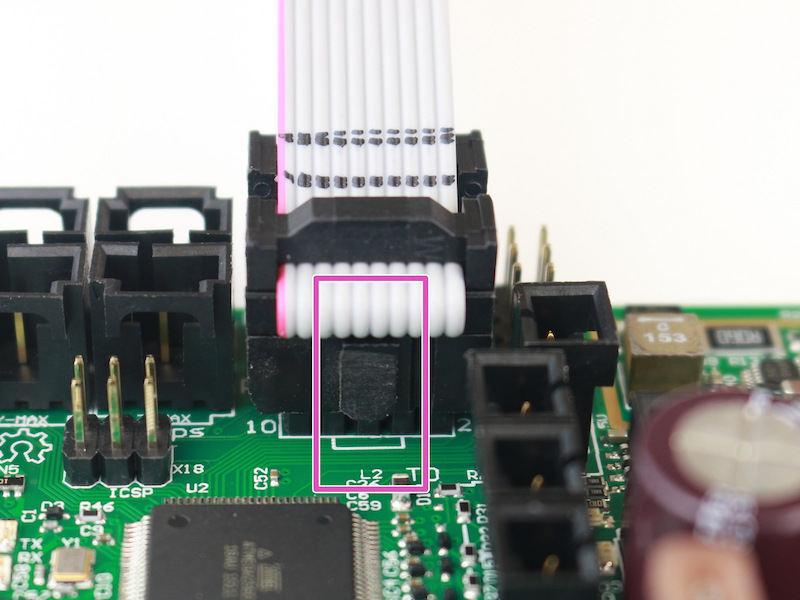
                  7. If none of the above resolved the problem, turn the printer off again and try to unplug both of the cables, lay them down on a flat surface and gently stretch them. Then plug them back in and turn on the printer. 
                  Was this article helpful?
                  This action is available only to registered users. Please log-in.

                  Topics

                  • Troubleshooting
                    • Printer troubleshooting
                      • Blown Fuse (MK3/MK3S/MK3S+)
                      • Extrusion stopped mid-print (Heat creep)
                      • Spaghetti monster
                      • Extruder blob
                      • Clogged nozzle/hotend (MK3.5/S, MK3S+, MK2.5S)
                      • Extruder noises
                      • Filament Not Loading
                      • Misaligned PINDA Sensor (MK2/S)
                      • Print fan is not spinning
                      • Hotend fan is not spinning
                      • Heatbed not heating up properly
                      • P.I.N.D.A./SuperPINDA Sensor testing
                      • SD card not working
                      • LCD screen not working
                      • Printer does not turn on or keeps turning off
                      • Blown Fuse (MK2S/MK2.5/MK2.5S)
                      • MK3S keeps prompting filament change
                      • Vibration when printing (MK3S+/MK2.5S)
                      • Factory reset (MK2S/MK2.5S/MK3S)
                      • Firmware updating issues (MK2.5S/MK3S+/MMU2S/MMU3)
                      • Nozzle crashed into the heatbed
                      • External SPI flash W25X20CL/xFLASH not responding - error
                      • IR Filament Sensor Troubleshooting (MK2.5S, MK3S)
                      • Failing Z calibration (MK3S/MK2.5S)
                      • Ambient temperature check (MK3/MK3S)
                      • PrusaLink Troubleshooting
                      • Tangled filament
                      • SD cards and USB drives
                    • Diagnostics
                    • Print Quality Troubleshooting
                    • QR Error codes
                    • Print Error Messages

                  15 comments

                  Log in  to post a comment
                  SerafinoS
                  •
                  Folks, you need to check the ribbon cable behind the lcd. It’s made of resin, and has soldering joints on some of the tracks… they tend to break and need to be resoldered. I did that and was fine. You do need to use a magnifying kit and fine solder needle…and possibly scrape resin material atop of the broken trace. The workmanship on my lcd ribbon cable to the screen has hard solder joints on the flexible material, makes no sense.check pin 1 thru 4
                  Reply
                  Tim Y
                  •
                  My MK4S worked fine for just over a week, but now the LCD goes blank shortly after briefly displaying the home screen. It sometimes flashes and comes back temporarily, but then goes blank again.
                  Reply
                  Zoose.
                  •
                  Im having the same issue. Have you found a solution? Thanks!
                  Reply
                  stokesaphone
                  •
                  I am also having the same issue.
                  Reply
                  Mike
                  •
                  Same here. Sometimes the display is 90° degrees rotated for a short time, or the sizes of the icons are wrong. Is there a solution available?
                  Reply
                  Tom M
                  •
                  I just put together a MK3S+ and after performing a first layer calibration, I removed the build plate to clean off the filament. The LCD then turned into white squares except for the top left corner. I turned the printer off then proceeded to follow the steps for updating drivers and firmware. After that didn't work, I unplugged both LCD cables, checked for bent pins, straightened and slightly stretched the cables, then plugged them back in, ensuring the correct cable went to the correct ports. The screen is still showing white squares. 
                  Reply
                  Same Old Shane
                  •
                  For situations like these, it is best to contact prusa support directly via the chat option on the eshop, or via email at [email protected] It could be a few different things that they can assist you with checking to see what the issue may be. 
                  Reply
                  Blog0893
                  •
                  Buenas, al encender la impresora I3 MK3S en la pantalla aparecen unos cuadrados en vez de letras, sin poder ajustar ni leer nada, comprobé todas las conexiones y sustituí los cables:
                  -Extruder heater
                  -Heatbed thermistor
                  Por que aparentaban estar deteriorados, de nuevo arranque la impresora y de nuevo, se veía el fondo de la pantalla LCD azul y los cuadrados en vez de letras.
                  Además probé instalar de nuevo Firmware en PrusaSlicer del PC, pero al tener la última versión me decía: Error avrdude.
                  No se que más puedo hacer llevo varias semanas leyendo el montaje de la impresora 3D-I3 MK3S y tengo todo igual que las instrucciones, pero no logró solucionar nada.
                  Reply
                  Blas Palencia
                  •
                  Hola. Siento mucho leer sobre este problema.
                  Por la descripción parece un problema con la unidad LCD o sus cables.Para confirmar esto, intenta conectar la impresora con el cable, y Pronterface, a un ordenador.
                  https://help.prusa3d.com/es/article/pronterface-y-cable-usb_2222
                  Contáctanos luego con el resultado y te ayudaremos hasta que esté resuelto.
                  https://help.prusa3d.com/es/article/atencion-al-cliente_2287
                  Un saludo,
                  Reply
                  Txema
                  •
                  I have a screen problem with a MK3s bought back in August 2020, where a couple of characters in the first two rows do not appear completely. I have verified that last Firmware is in the printer, dismounted the LCD case to verify if it was pressing too much the LCD, and also unplugged the cables from both sides (Einsy Rambo and LCD) for clearing the contacts with a specific contact cleaner, but still the problem is not solved.
                  I have uploaded a photo with the problem of the screen to the forum:
                  https://forum.prusaprinters.org/forum/original-prusa-i3-mk3s-mk3-hardware-firmware-and-software-help/problems-with-my-screen/#post-579241
                  Reply
                  David
                  •

                  Hi! Sometimes, the conductive pad right underneath the LCD looses contact. I had this happen for example due to thermal expansion when bringing the printer into a cold room. Check the reply in the forum thread :)

                  Reply
                  Txema
                  •
                  Great!!! I could tighten six out of the eight pads and the pixels have returned. Thank you very much!!
                  Reply