Prusa
  • SHOP
    • Latest products
    BY CATEGORY
    • 3D printersnew
    • 3D printer upgradesnew
    • Materials
    • Accessories
    • Spare parts
    • Courses
    • Merch
    • Get a price quote
    QUICK LINKS
    • Shipping & delivery
    • Returns & refunds
    • Payment & financing
    • Warranty
    • VAT & Customs fees
    • FAQ

    0 item in your cartitems in your cart

    Your cart is empty

    Go to cartShop 3D printers

    My profile

    Log in to see orders, saved items

    My profile

    Signed in as

    • Orders
    • Logout
  • 3D PRINTING
    • Explore 3D printing
    FOR BEGINNERS
    • 3D printing 101
    • How FDM printing works
    • Buying your first printer
    • 3D model catalog
    BY APPLICATION
    • Rapid prototyping
    • Manufacturing
    • Engineering
    • Research
    • Arts & design
    GO DEEPER
    • Materials guide
    • Courses
    • Webinars
    • Case studies
    • Custom 3D printing
  • 3D PRINTERS
    • All 3D printers
    FOR
    • Home or garageHobbyists, tinkerers and home printing
    • BusinessIn-house production for small teams
    • EnterpriseFleets, security and scale
    • Which Prusa is right for me
    SHOP & BROWSE
    • CORE One+new
    • CORE One+ INDXnew
    • CORE One L+new
    • CORE One L+ INDXnew
    • XL+new
    • MK4S
    • Prusa Pro HT90
    • Prusa Pro AFS
    • Prusa Pro SLX
    MORE FROM PRINTERS
    • Parts & upgradesnew
    • Spare parts
    • Critical infrastructure
    • Case studies
    • Signature Oak
    • Kits
  • MATERIALS
    • All materials
    BY USE
    • Every-day & design
    • Functional engineering
    • Composites
    • Pro speciality
    • SLA resins
    PRUSAMENT
    • PLA
    • PETG
    • ASA
    • PC
    • PA11
    • Flex
    • TPU
    MORE FROM MATERIALS
    • Materials guide
    • We make material in house
    • Sustainability
    • Order on the store
  • SOFTWARE
    • All software
    PREPARE THE PRINT
    • PrusaSlicer 3.0New
    PRINT & MONITOR
    • Prusa Connect
    • EasyPrint
    • iOS & Android app
    • Prusa Farm
    GET STARTED
    • Download & install
    • Knowledge base
    MORE FROM SOFTWARE
    • 3D model catalog
  • SUPPORT
    • Explore support
    FIND ANSWERS
    • Knowledge base
    • Troubleshooting
    • Courses
    • Webinars
    GET HELP
    • Contact us
    • Livechat
    • Shipping & delivery
    • Warranty
    • Returns & refunds
    • Service & spare parts
    • Service & Repair
    COMMUNITY
    • Forum
    • Reddit
    • Printables
  • TRUST CENTER
    • Trust Center overview
    BY TOPIC
    • GDPR
    • Certificates
    • Security
    • Compliance
    COMMITMENTS
    • Sustainability report
    TALK TO US
    • Contact the security team
  • COMPANY
    • About Prusa
    GET TO KNOW US
    • Our story
    • How we make printers
    • Open source
    • Brand & media kit
    NEWS
    • Blog
    • Newsroom
    • Events
    TRUST & PARTNERS
    • Sustainability
    • Resellers & distributors
    • Affiliate program
    • Contact
    • English
    • Čeština
    • Deutsch
    • Español
    • Français
    • Italiano
    • Polski
    • 日本語
  • Signed in as

    • Orders
    • Address
    • In-stock Alerts
    • My Courses
    • Subscription
    • Edit Account
    • Logout

Log in to see orders, saved items

Signed in as
  • Orders
  • Address
  • In-stock Alerts
  • My Courses
  • Subscription
  • Edit Account
  • English
  • Čeština
  • Deutsch
  • Español
  • Français
  • Italiano
  • Polski
  • 日本語
Shop

0 item in your cartitems in your cart

Your cart is empty

Go to cartShop 3D printers

My profile

Log in to see orders, saved items

My profile

Signed in as

  • Orders
  • Logout
SHOP
  • Latest products
BY CATEGORY
  • 3D printersnew
  • 3D printer upgradesnew
  • Materials
  • Accessories
  • Spare parts
  • Courses
  • Merch
  • Get a price quote
QUICK LINKS
  • Shipping & delivery
  • Returns & refunds
  • Payment & financing
  • Warranty
  • VAT & Customs fees
  • FAQ

Featured products

    Popular categories

      Trending searches

        Articles

          Blog

            Products

              Categories

                Suggested searches

                  Searching…
                  No results
                  Something went wrong.
                  ↑↓ Select↵ OpenEsc Close search
                  1. Support
                  2. Original Prusa i3 MK2.5
                  3. Printer troubleshooting
                  4. Failing Z calibration (MK3S/MK2.5S)
                   

                  Contents

                  • Extruder assembly
                  • Assembly is correct, calibration keeps failing

                  Blog

                  • Prusament Pellets: Raw material batches for large-format 3D printing or small-scale polymer research & development
                  • Print colorful and glowing Halloween decorations with our spooky offer
                  • Factorio Has Arrived on Printables

                  Newsletter

                  Signup and get our monthly squeeze on updates, blog, printables and much more.

                  By clicking, you agree to receive our newsletter.

                  This site is protected by reCAPTCHA Enterprise and the Google Privacy Policy and Terms of Service apply.

                  Heavy Duty Keyboard Holder (No Supports)
                  E-shop
                  • 3D Printers
                  • Printer Upgrades
                  • Filaments
                  • Accessories
                  • Prusa Merchandise
                  Prusa

                  © Prusa Research a.s.

                  Printables
                  • 3D Models
                  • Store
                  • Clubs
                  • 3D Design Contests
                  • Brands
                  Community
                  • World Map
                  • Forum
                  • User Groups
                  • Events
                  Help
                  • Prusa Help
                  • Prusa Academy
                  • 3D Printing Calculators
                  Software
                  • PrusaSlicer
                  • Prusa.app
                  • Prusa Connect
                  • Drivers and Software
                  Company
                  • About Us
                  • Blog
                  • Official Prusa Resellers
                  • Contact Us
                  • Certified for ISO 9001, ISO 14001, ISO 45001
                  • General Terms and Conditions
                  • General Terms and Conditions of Use of the PRUSA Websites
                  • Privacy Policy
                  • Information about cookies
                  • Customer Complaints Policy
                  • Status Page
                  • Do Not Sell or Share My Personal Information
                  • Supplemental Statements
                  Prusa
                  • General Terms and Conditions
                  • General Terms and Conditions of Use of the PRUSA Websites
                  • Privacy Policy
                  • Information about cookies
                  • Customer Complaints Policy
                  • Status Page
                  • Do Not Sell or Share My Personal Information
                  • Supplemental Statements

                  © Prusa Research a.s.

                  JOSEF PRUSA®, PRUSA RESEARCH®, PRUSA POLYMERS®, PRUSA ORANGE®, PRUSA 3D ® AND PRUSAMENT® are registered trademarks of Prusa Development a.s. used by Prusa Research a.s. under licence from Prusa Development a.s.

                  Failing Z calibration

                  (MK3S/MK2.5S)

                  Relevant for

                  MK2.5
                  MK2.5S
                  MK3
                  MK3S
                  MK3S+
                  13 comments
                  Article is also available in following languages
                  English
                  Čeština
                  Polski
                  Deutsch
                  Français
                  Español
                  Italiano
                  日本語

                  The size of the extruder and the length of travel of the Z-axis is coded into the firmware. Therefore, if the assembly of the extruder, or the firmware for your extruder, is not correct, the calibration will most likely fail.

                  Extruder assembly

                  On top, the E3D heatsink has protrusions from its profile and running around the whole heatsink. These fit into the extruder body printed part, which has two corresponding notches for these (orange arrows).

                  The heatsink will fit if placed into both notches, but also when only covering the bottom notch. This will not inhibit the rest of the assembly procedure, but the nozzle will be about 1 cm lower and Z-axis will have a shorter travel-distance than what is expected by the firmware.
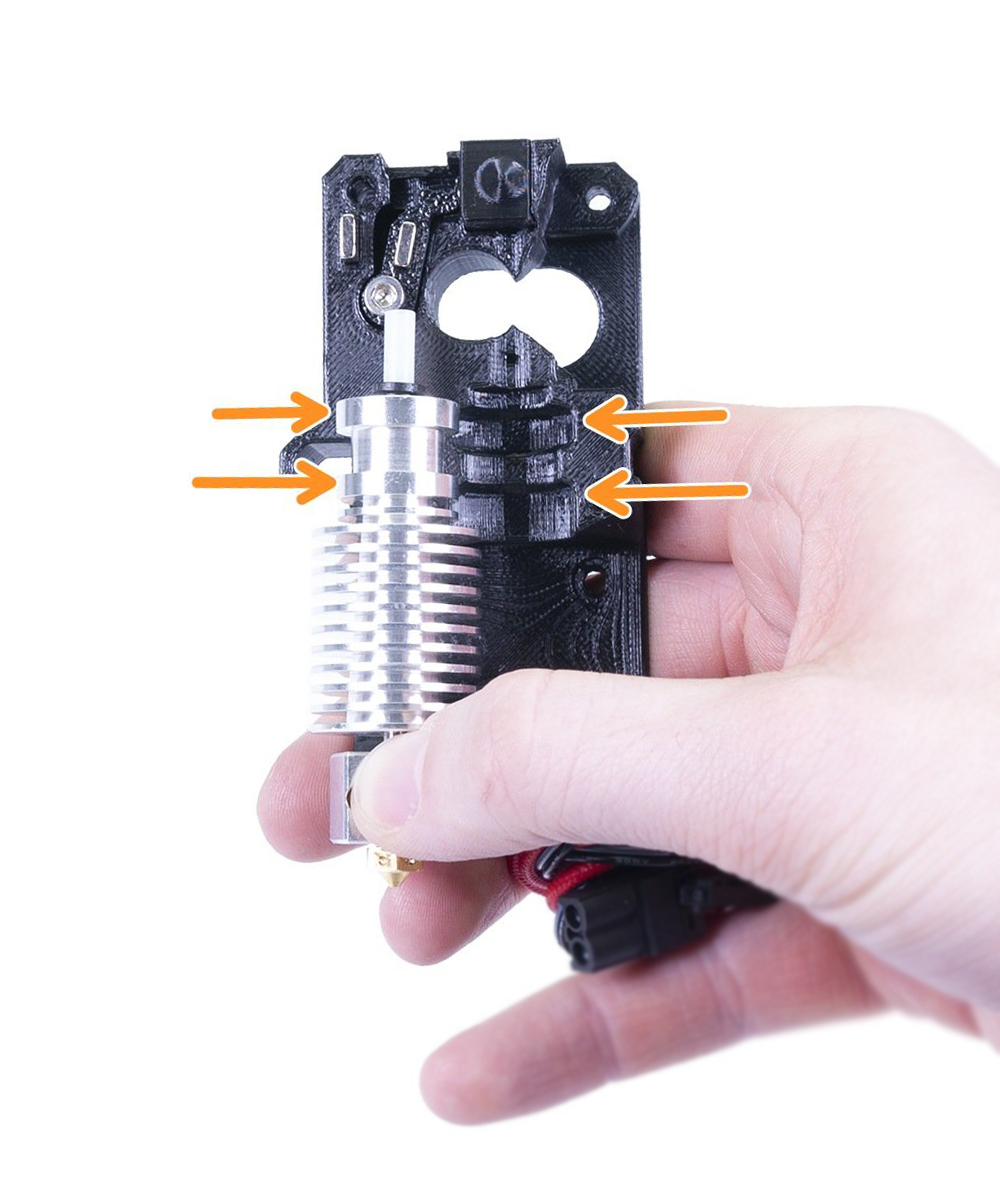
                  MK3S/MK2.5S extruder bodyMK3/MK2.5 extruder body

                  How to check

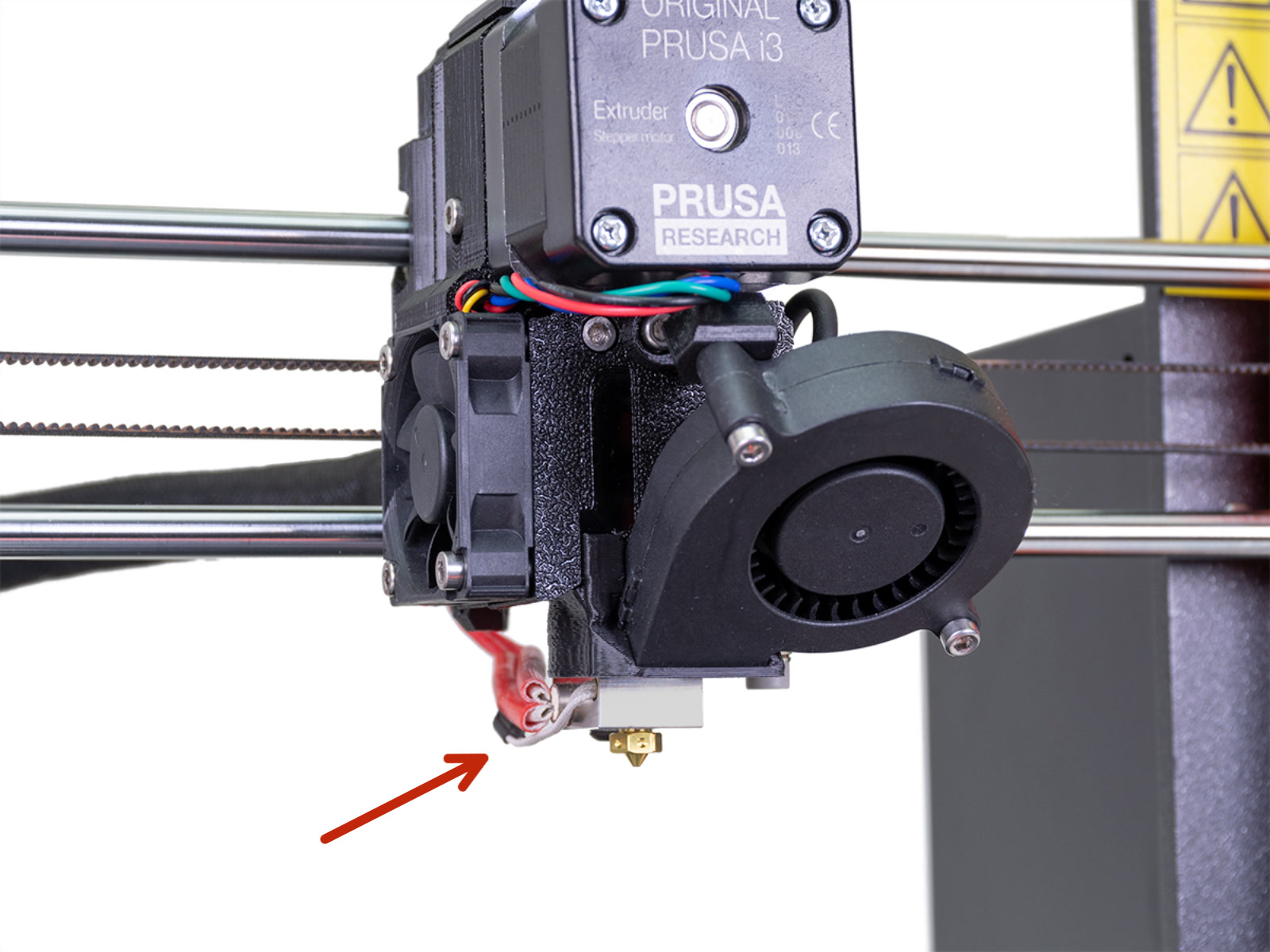
                  If you have installed the heatsink too low you will see the heater block protruding down from below the fan shroud. With the correct assembly, only the tip of the nozzle should be visible.
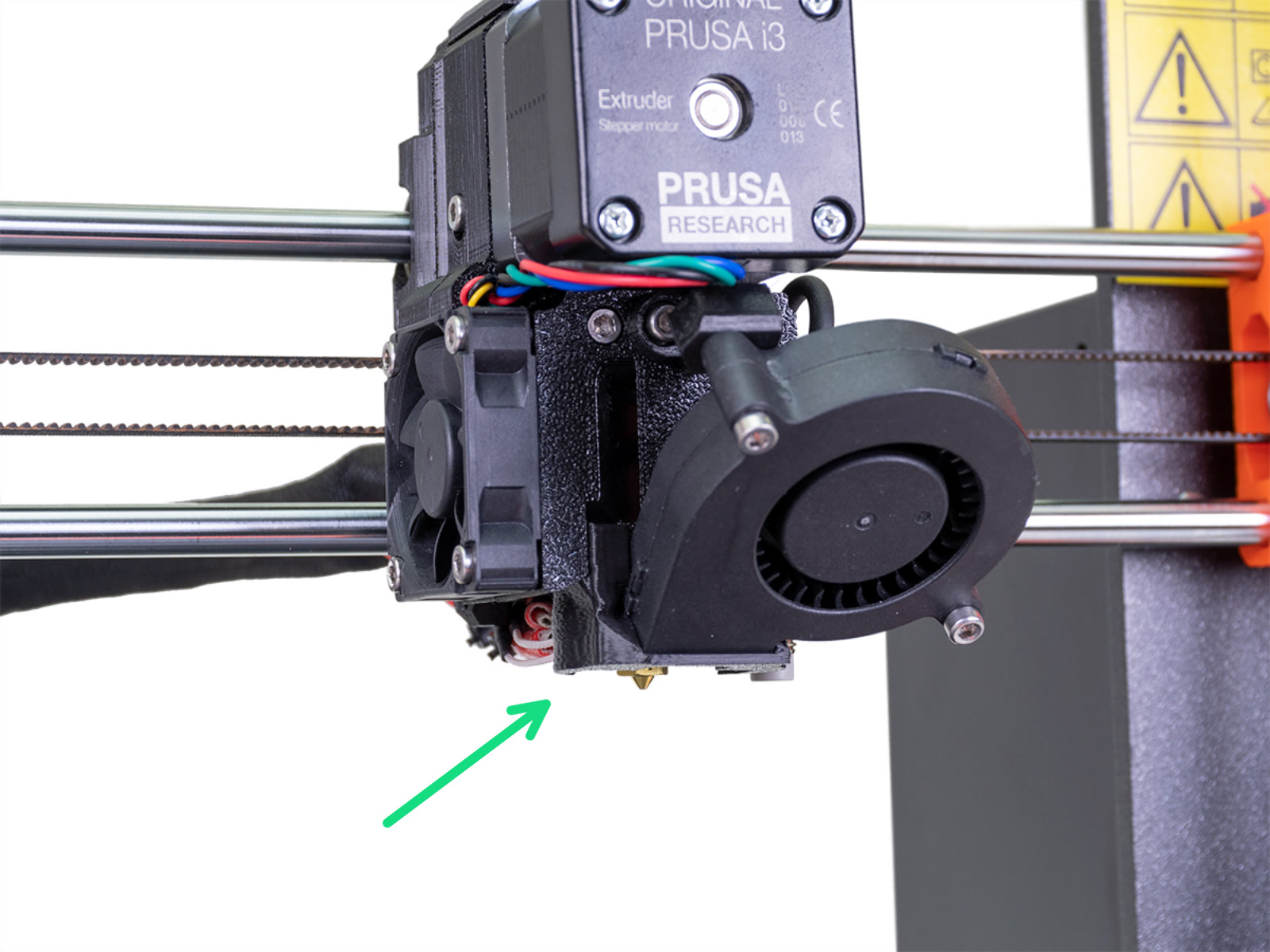
                  Hotend installed correctly - Only nozzle visibleHotend installed incorrectly - Hotend protruding

                  Correct assembly

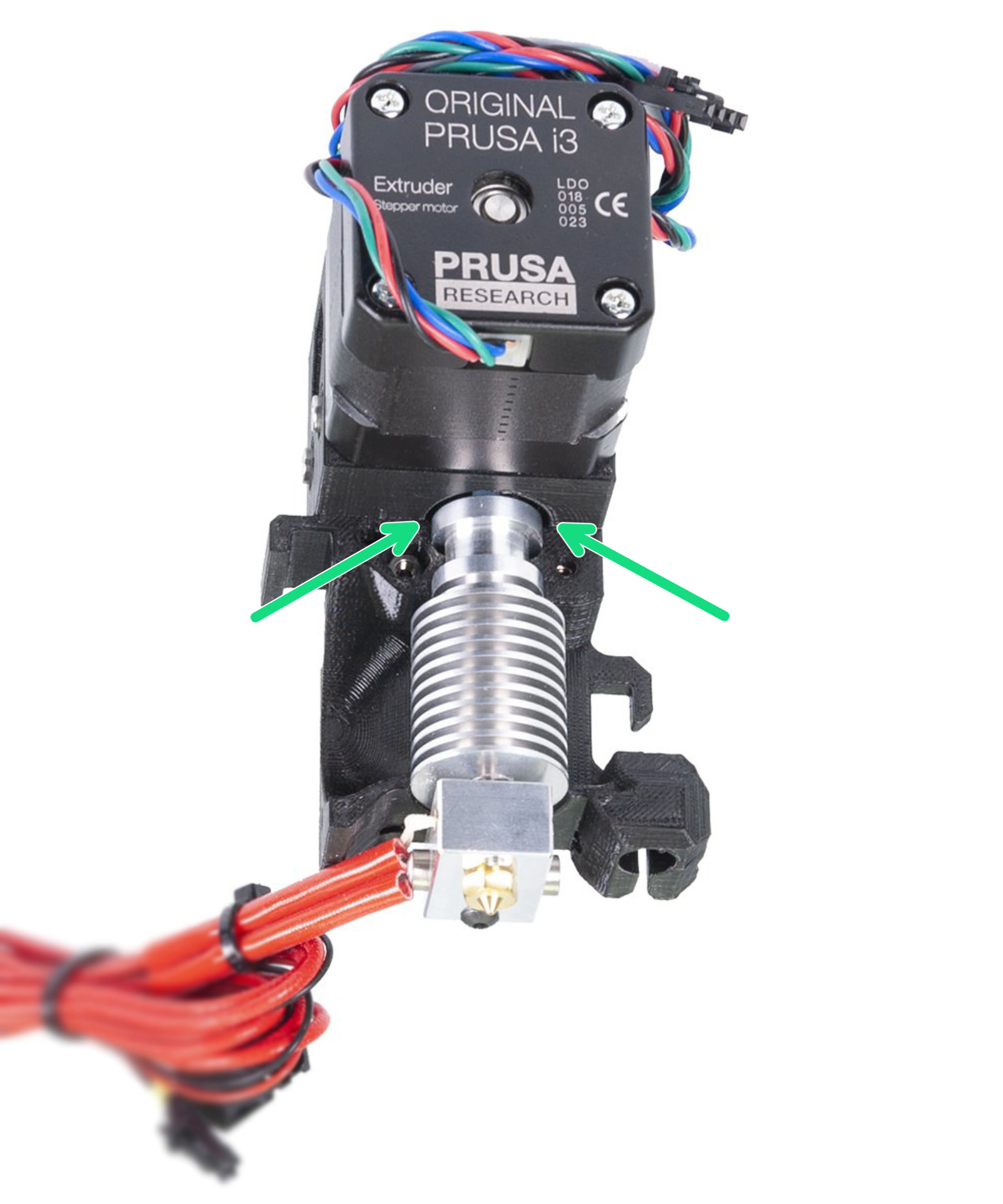
                  The top lip of the heatsink is seated in the top notch of the plastic part (green arrows) and both notches of the plastic part are filled. If this needs to be corrected, follow this guide for the MK3S or this guide for the MK3, to access the hotend after assembly. Note, that the removal of the PTFE tube shown in the linked guide is not necessary to reseat the hotend.
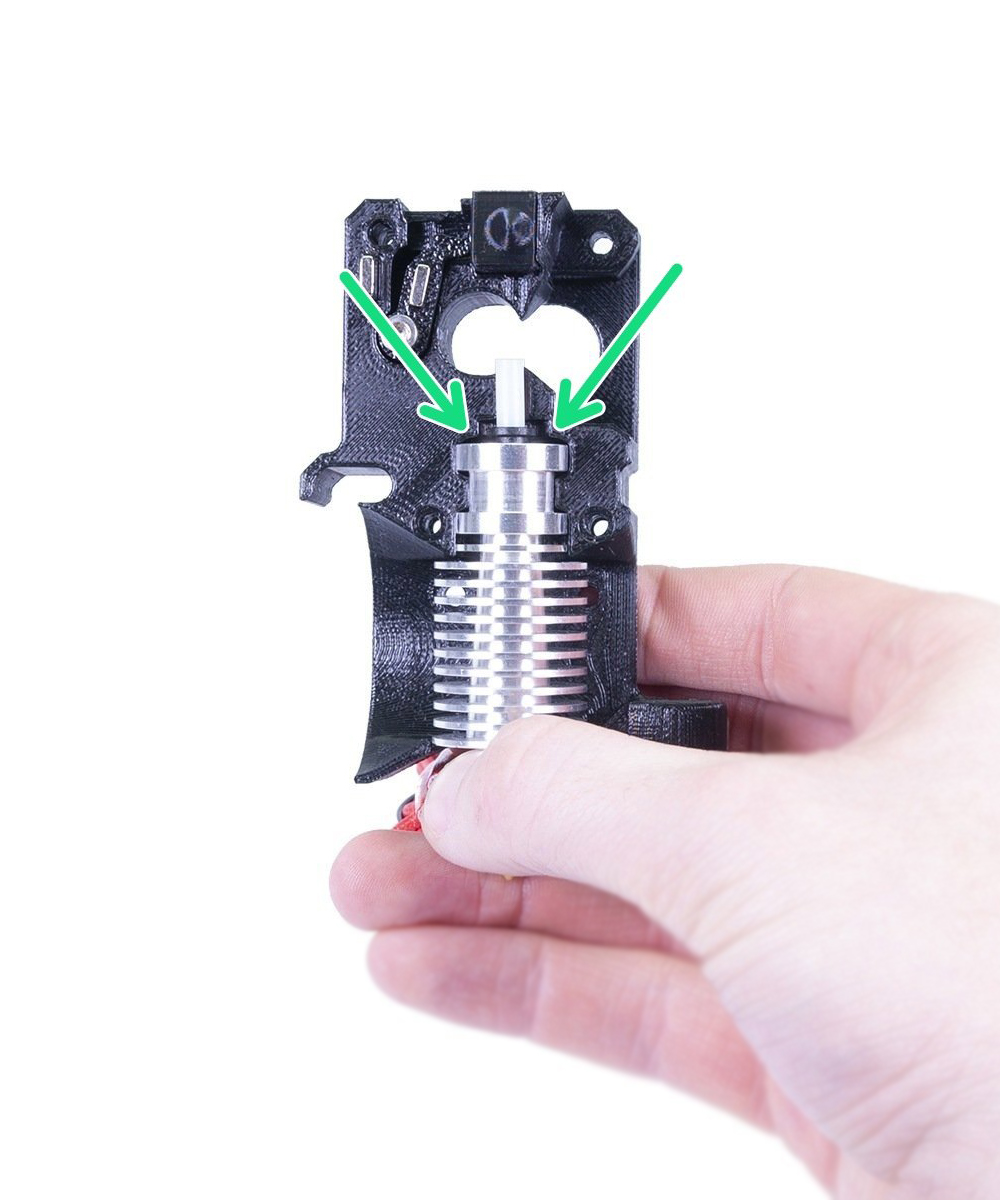
                  Hotend installed correctly MK3S<em>/MK2.5SHotend installed correctly MK3/MK2.5

                  Assembly is correct, calibration keeps failing

                  As mentioned, the travel distance of each axis is programmed to the firmware. If you load the MK3S<em>/MK2.5S firmware in the MK3/MK2.5 (non S) machine, the calibration will keep on failing, because the length of the Z-axis coded in both firmware differs. Therefore, it is crucial to use the correct firmware when updating. MK3S and MK3S<strong>+ uses the same firmware.

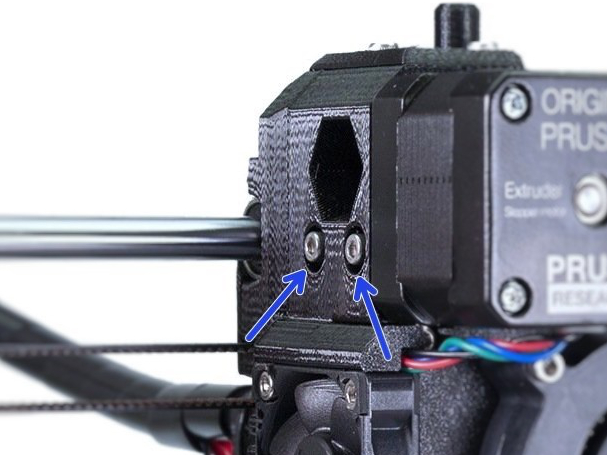
                  The easiest way to see which version you have is to check the extruder. The MK3S/MK2.5S & MK3S+ has one idler tension screw and the MK3/MK2.5 has two (pictures below). 
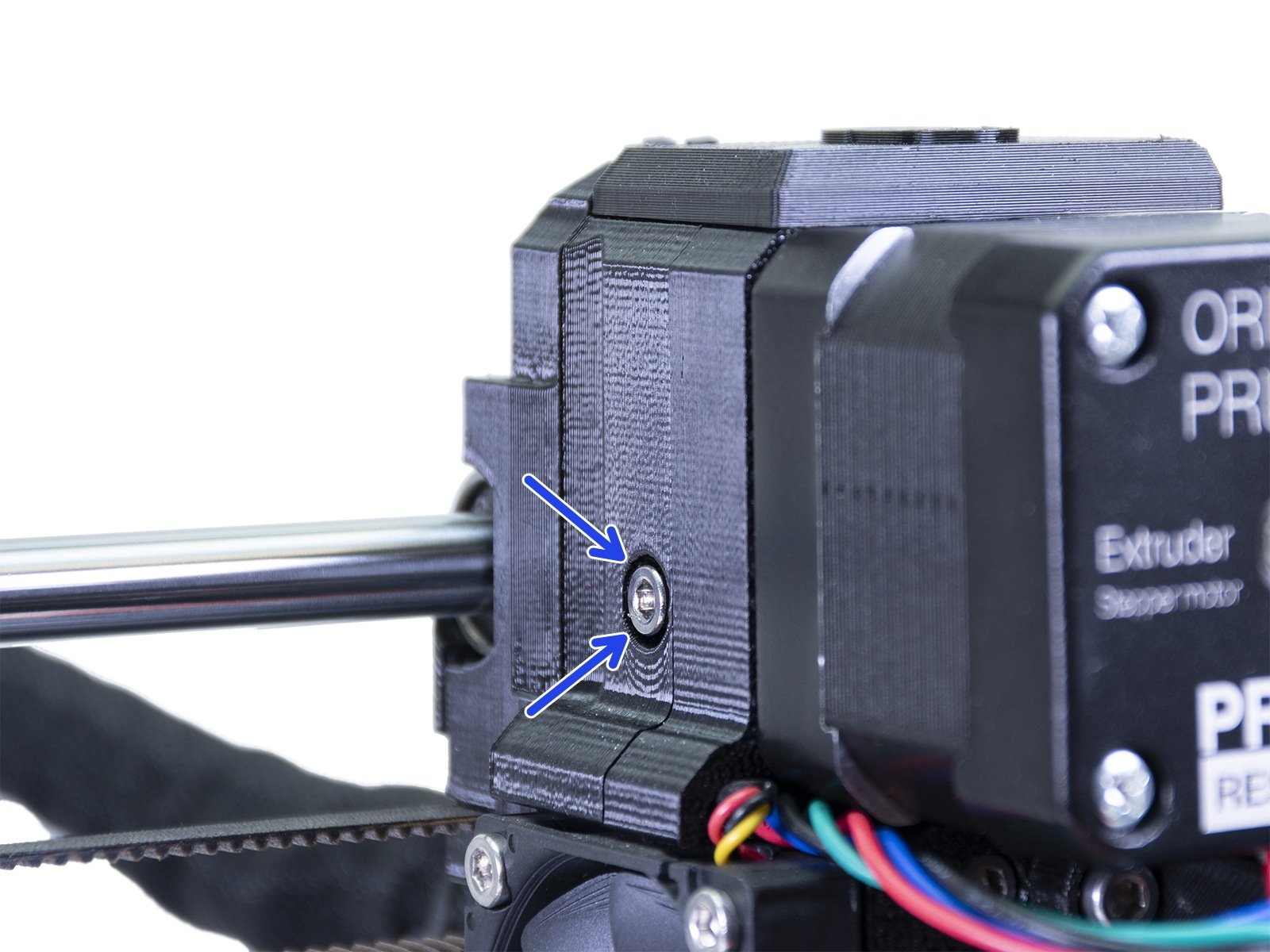
                  Original Prusa MK3S/MK2.5S & MK3S+ Original Prusa MK3/MK2.5
                  Was this article helpful?
                  This action is available only to registered users. Please log-in.

                  Topics

                  • Troubleshooting
                    • Printer troubleshooting
                      • Blown Fuse (MK3/MK3S/MK3S+)
                      • Extrusion stopped mid-print (Heat creep)
                      • Spaghetti monster
                      • Extruder blob
                      • Clogged nozzle/hotend (MK3.5/S, MK3S+, MK2.5S)
                      • Extruder noises
                      • Filament Not Loading
                      • Misaligned PINDA Sensor (MK2/S)
                      • Print fan is not spinning
                      • Hotend fan is not spinning
                      • Heatbed not heating up properly
                      • P.I.N.D.A./SuperPINDA Sensor testing
                      • SD card not working
                      • LCD screen not working
                      • Printer does not turn on or keeps turning off
                      • Blown Fuse (MK2S/MK2.5/MK2.5S)
                      • MK3S keeps prompting filament change
                      • Vibration when printing (MK3S+/MK2.5S)
                      • Factory reset (MK2S/MK2.5S/MK3S)
                      • Firmware updating issues (MK2.5S/MK3S+/MMU2S/MMU3)
                      • Nozzle crashed into the heatbed
                      • External SPI flash W25X20CL/xFLASH not responding - error
                      • IR Filament Sensor Troubleshooting (MK2.5S, MK3S)
                      • Failing Z calibration (MK3S/MK2.5S)
                      • Ambient temperature check (MK3/MK3S)
                      • PrusaLink Troubleshooting
                      • Tangled filament
                      • SD cards and USB drives
                    • Diagnostics
                    • Print Quality Troubleshooting
                    • QR Error codes
                    • Print Error Messages

                  5 comments

                  Log in  to post a comment
                  [email protected]
                  •
                  After running fine for years, failed at print start and said re-run calibration. I run z calibration and it fails just before the nozzle reaches the bed. The nozzle is about 1mm clear of the bed and the pinda sensor light has gone out. The Pinda sensor is about 2mm from the bed. It is a Mk3 that I got just after they were launched. I just installed firmware 3.14.1 (was at 3.14 when it initially failed). Message is "Calibration failed! Check the axes and run again." I have also done the pinda sensor tests which all worked OK
                  Reply
                  Cosmic145
                  •
                  Any update on your situation? I’m in the same boat. Bought a used mk3s and once I installed 3.14.1 I can’t calibrate z. And because z fails I can’t run the pinda calibration (needs to have z) succeed. Not sure what to do from here.
                  Reply
                  Jan Kratochvíl
                  •
                  Hello. We are in touch with FW team to check the issue.
                  Reply
                  Philip Puttifer
                  •
                  My printer just failed the Z setup and will not now work . How do I reset the Z setting?
                   
                  Reply
                  Same Old Shane
                  •
                  Im not sure exactly what you are refering to. If it is the live Z setting, you can go into the settings menu, scroll down to you see adjust live Z and dial it back to 0. If it is something else, you might want to contact support by pressing on the chat now button in the lower right hand corner. 
                  Reply
                  Ola Bednarek
                  •
                  Cześć,
                  Złożyłam ostatnio drukarkę PRUSA MK3S+ i mam problem z kalibracją osi Z. Zmieniałam już wysokość czujnika, sprawdziłam montaż ekstrudera oraz podłączenie przewodów. Wszystko wydaje się być w porządku. Czy ma ktoś jakiś pomysł, gdzie jeszcze może tkwić problem?
                  Ola
                  Reply
                  Marcin M. - Official Prusa
                  •
                  Witam
                  Uprzejmie prosimy o skontaktowanie się z naszym wsparciem przez LiveChat dostępny na naszej stronie lub mailowo na [email protected] w celu rozwiązania problemu.
                  Pozdrawiam serdecznie
                  Reply
                  Olivia
                  •
                  I successfully recalibrated my printer the first time. Then I changed filament and went to calibrate again using Calibrate Z.
                   
                  It smashed into the heatbed so hard it bent downwards. And refused to come back up until I went to live Z adjust. 
                   
                  The sensor is/was working perfectly but I was shocked at how hard it came down and had no idea it was bending the heatbed about 3mm downwards. 
                   
                  Shouldn't it stop?
                  Reply
                  William H. - Official Prusa
                  •

                  Sounds like you did not follow the steps in the Pre-flight check and set the distance of the PINDA;) There is not the same crash detection on the Z-axis, but the printer is not damaged by it. You can simply turn it off and turn the z-rods manually.

                  Reply
                  ToucanTom
                  •
                  I had a failed print and when I try to calibrate since then I am having this same problem on the z calibration, even after re-doing the pre-flight check. I double checked the assembly and the firmware and I cant seem to get it working again :( Any ideas on what to try next?
                  Reply
                  William H. - Official Prusa
                  •

                  When in doubt, contact support with pictures of your assembly and a video of the calibration failing. When it fails can be very telling.

                  Reply
                  blalor
                  •
                  "the length of the Z-axis coded in both firmware differs"Where is this configured in the 3.9.3 firmware?
                  Reply
                  William H. - Official Prusa
                  •

                   It is not an option in the LCD-menu. That is why we provide two different pre compiled versions of the fw. We can unfortunately not advise on how to edit and compile firmware source code.

                  Reply