Prusa
  • SHOP
    • Latest products
    BY CATEGORY
    • 3D printersnew
    • 3D printer upgradesnew
    • Materials
    • Accessories
    • Spare parts
    • Courses
    • Merch
    • Get a price quote
    QUICK LINKS
    • Shipping & delivery
    • Returns & refunds
    • Payment & financing
    • Warranty
    • VAT & Customs fees
    • FAQ

    0 item in your cartitems in your cart

    Your cart is empty

    Go to cartShop 3D printers

    My profile

    Log in to see orders, saved items

    My profile

    Signed in as

    • Orders
    • Logout
  • 3D PRINTING
    • Explore 3D printing
    FOR BEGINNERS
    • 3D printing 101
    • How FDM printing works
    • Buying your first printer
    • 3D model catalog
    BY APPLICATION
    • Rapid prototyping
    • Manufacturing
    • Engineering
    • Research
    • Arts & design
    GO DEEPER
    • Materials guide
    • Courses
    • Webinars
    • Case studies
    • Custom 3D printing
  • 3D PRINTERS
    • All 3D printers
    FOR
    • Home or garageHobbyists, tinkerers and home printing
    • BusinessIn-house production for small teams
    • EnterpriseFleets, security and scale
    • Which Prusa is right for me
    SHOP & BROWSE
    • CORE One+new
    • CORE One+ INDXnew
    • CORE One L+new
    • CORE One L+ INDXnew
    • XL+new
    • MK4S
    • Prusa Pro HT90
    • Prusa Pro AFS
    • Prusa Pro SLX
    MORE FROM PRINTERS
    • Parts & upgradesnew
    • Spare parts
    • Critical infrastructure
    • Case studies
    • Signature Oak
    • Kits
  • MATERIALS
    • All materials
    BY USE
    • Every-day & design
    • Functional engineering
    • Composites
    • Pro speciality
    • SLA resins
    PRUSAMENT
    • PLA
    • PETG
    • ASA
    • PC
    • PA11
    • Flex
    • TPU
    MORE FROM MATERIALS
    • Materials guide
    • We make material in house
    • Sustainability
    • Order on the store
  • SOFTWARE
    • All software
    PREPARE THE PRINT
    • PrusaSlicer 3.0New
    PRINT & MONITOR
    • Prusa Connect
    • EasyPrint
    • iOS & Android app
    • Prusa Farm
    GET STARTED
    • Download & install
    • Knowledge base
    MORE FROM SOFTWARE
    • 3D model catalog
  • SUPPORT
    • Explore support
    FIND ANSWERS
    • Knowledge base
    • Troubleshooting
    • Courses
    • Webinars
    GET HELP
    • Contact us
    • Livechat
    • Shipping & delivery
    • Warranty
    • Returns & refunds
    • Service & spare parts
    • Service & Repair
    COMMUNITY
    • Forum
    • Reddit
    • Printables
  • TRUST CENTER
    • Trust Center overview
    BY TOPIC
    • GDPR
    • Certificates
    • Security
    • Compliance
    COMMITMENTS
    • Sustainability report
    TALK TO US
    • Contact the security team
  • COMPANY
    • About Prusa
    GET TO KNOW US
    • Our story
    • How we make printers
    • Open source
    • Brand & media kit
    NEWS
    • Blog
    • Newsroom
    • Events
    TRUST & PARTNERS
    • Sustainability
    • Resellers & distributors
    • Affiliate program
    • Contact
    • English
    • Čeština
    • Deutsch
    • Español
    • Français
    • Italiano
    • Polski
    • 日本語
  • Signed in as

    • Orders
    • Address
    • In-stock Alerts
    • My Courses
    • Subscription
    • Edit Account
    • Logout

Log in to see orders, saved items

Signed in as
  • Orders
  • Address
  • In-stock Alerts
  • My Courses
  • Subscription
  • Edit Account
  • English
  • Čeština
  • Deutsch
  • Español
  • Français
  • Italiano
  • Polski
  • 日本語
Shop

0 item in your cartitems in your cart

Your cart is empty

Go to cartShop 3D printers

My profile

Log in to see orders, saved items

My profile

Signed in as

  • Orders
  • Logout
SHOP
  • Latest products
BY CATEGORY
  • 3D printersnew
  • 3D printer upgradesnew
  • Materials
  • Accessories
  • Spare parts
  • Courses
  • Merch
  • Get a price quote
QUICK LINKS
  • Shipping & delivery
  • Returns & refunds
  • Payment & financing
  • Warranty
  • VAT & Customs fees
  • FAQ

Featured products

    Popular categories

      Trending searches

        Articles

          Blog

            Products

              Categories

                Suggested searches

                  Searching…
                  No results
                  Something went wrong.
                  ↑↓ Select↵ OpenEsc Close search
                  1. Support
                  2. Original Prusa i3 MK2.5
                  3. Printer troubleshooting
                  4. Vibration when printing (MK3S+/MK2.5S)
                   

                  Contents

                  • Identify the noise
                  • Inspect your printer
                  • Other tips and tricks

                  Blog

                  • Prusament Pellets: Raw material batches for large-format 3D printing or small-scale polymer research & development
                  • Print colorful and glowing Halloween decorations with our spooky offer
                  • Factorio Has Arrived on Printables

                  Newsletter

                  Signup and get our monthly squeeze on updates, blog, printables and much more.

                  By clicking, you agree to receive our newsletter.

                  This site is protected by reCAPTCHA Enterprise and the Google Privacy Policy and Terms of Service apply.

                  Heavy Duty Keyboard Holder (No Supports)
                  E-shop
                  • 3D Printers
                  • Printer Upgrades
                  • Filaments
                  • Accessories
                  • Prusa Merchandise
                  Prusa

                  © Prusa Research a.s.

                  Printables
                  • 3D Models
                  • Store
                  • Clubs
                  • 3D Design Contests
                  • Brands
                  Community
                  • World Map
                  • Forum
                  • User Groups
                  • Events
                  Help
                  • Prusa Help
                  • Prusa Academy
                  • 3D Printing Calculators
                  Software
                  • PrusaSlicer
                  • Prusa.app
                  • Prusa Connect
                  • Drivers and Software
                  Company
                  • About Us
                  • Blog
                  • Official Prusa Resellers
                  • Contact Us
                  • Certified for ISO 9001, ISO 14001, ISO 45001
                  • General Terms and Conditions
                  • General Terms and Conditions of Use of the PRUSA Websites
                  • Privacy Policy
                  • Information about cookies
                  • Customer Complaints Policy
                  • Status Page
                  • Do Not Sell or Share My Personal Information
                  • Supplemental Statements
                  Prusa
                  • General Terms and Conditions
                  • General Terms and Conditions of Use of the PRUSA Websites
                  • Privacy Policy
                  • Information about cookies
                  • Customer Complaints Policy
                  • Status Page
                  • Do Not Sell or Share My Personal Information
                  • Supplemental Statements

                  © Prusa Research a.s.

                  JOSEF PRUSA®, PRUSA RESEARCH®, PRUSA POLYMERS®, PRUSA ORANGE®, PRUSA 3D ® AND PRUSAMENT® are registered trademarks of Prusa Development a.s. used by Prusa Research a.s. under licence from Prusa Development a.s.

                  Vibration when printing

                  (MK3S+/MK2.5S)

                  Relevant for

                  Plus 1.75 mm
                  MK2.5
                  MK2.5S
                  MK3
                  MK3S
                  +
                  14 comments
                  Article is also available in following languages
                  English
                  Čeština
                  Polski
                  Deutsch
                  Français
                  Español
                  Italiano
                  日本語

                  Your Original Prusa MK3S+/MK3S/MK3 printer may be causing some vibrations during use. In most cases, this will not cause any printing issues, however, we will show you how to minimize it or get rid of it entirely.

                   Changing the Power mode can often result in more silent printing. 

                  Identify the noise

                  Go to the Printer display -> Settings -> Move Axis, and Move X and Move Y individually to see if the noise can be narrowed down to a single axis. During operation/noise, try placing your hand on various components and hear if it dampens the sound.

                  Components such as:

                  • Heatbed
                  • PSU
                  • Motors
                  • LCD

                  Some sounds can be hard to identify and some may only present themselves with certain simultaneous movements. Therefore, we recommend inspecting all points outlined in this article, even if you are not sure exactly where the noise is coming from.

                  This article covers the i3 series of printers. For the Original Prusa MINI and MINI+, please see Vibration/noise when printing (MINI/MINI+).

                  Inspect your printer

                  Rubber feet

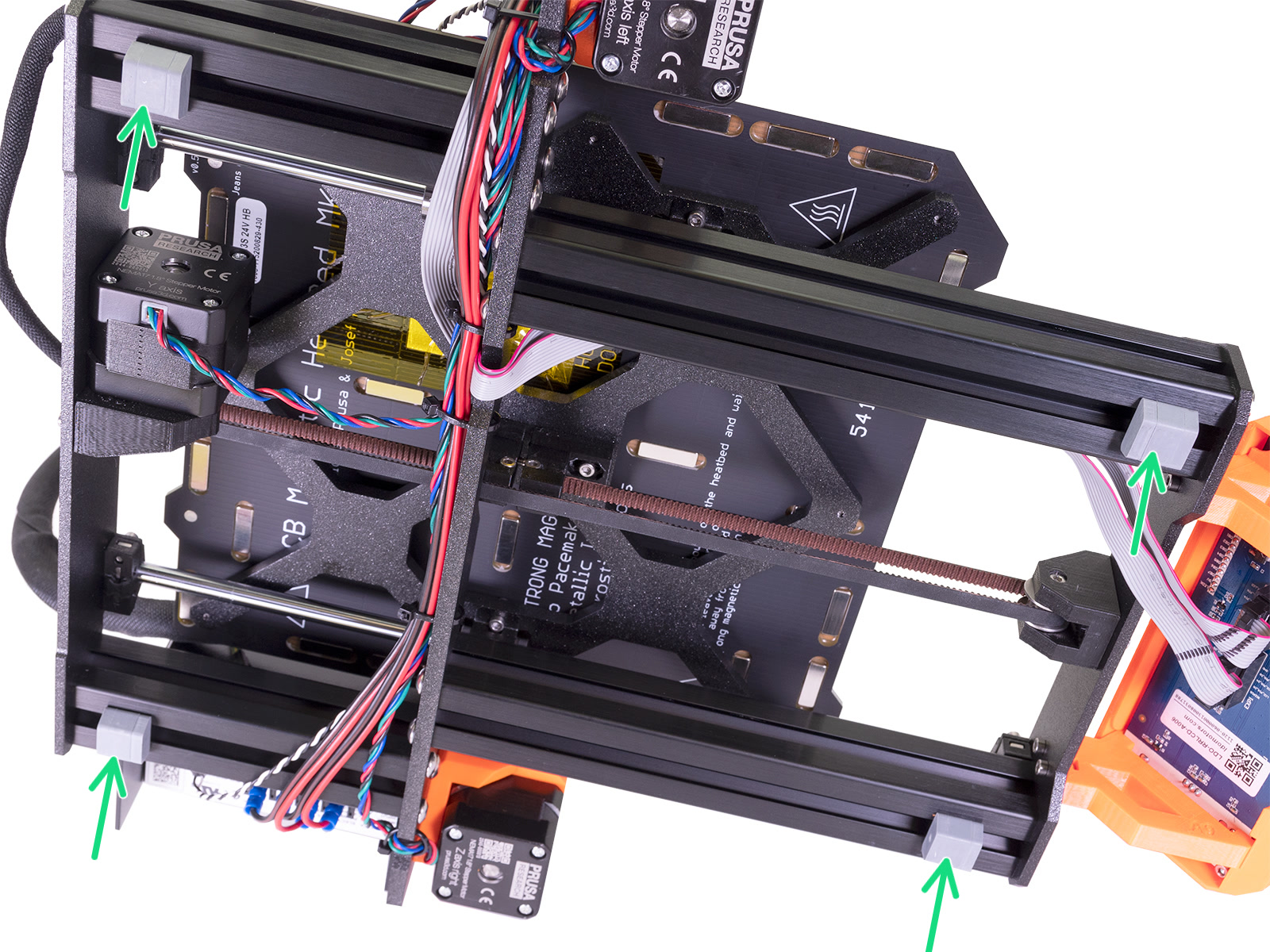
                  The printer comes with 4 rubber feet (green arrows) that should be placed in the correct position, 2-3 cm from the end of each extrusion.
                  Lubricating rods and bearings

                  New noises coming from the printer after many hours of use is likely a sign that the rods and bearings could use some attention. For more information on how and with what to lubricate check out our maintenance guide.

                  Align Y-rods

                  The Y-axis smooth rod alignment is part of the assembly manual and can greatly improve cases of sound and vibration.

                  The procedure is as follows:
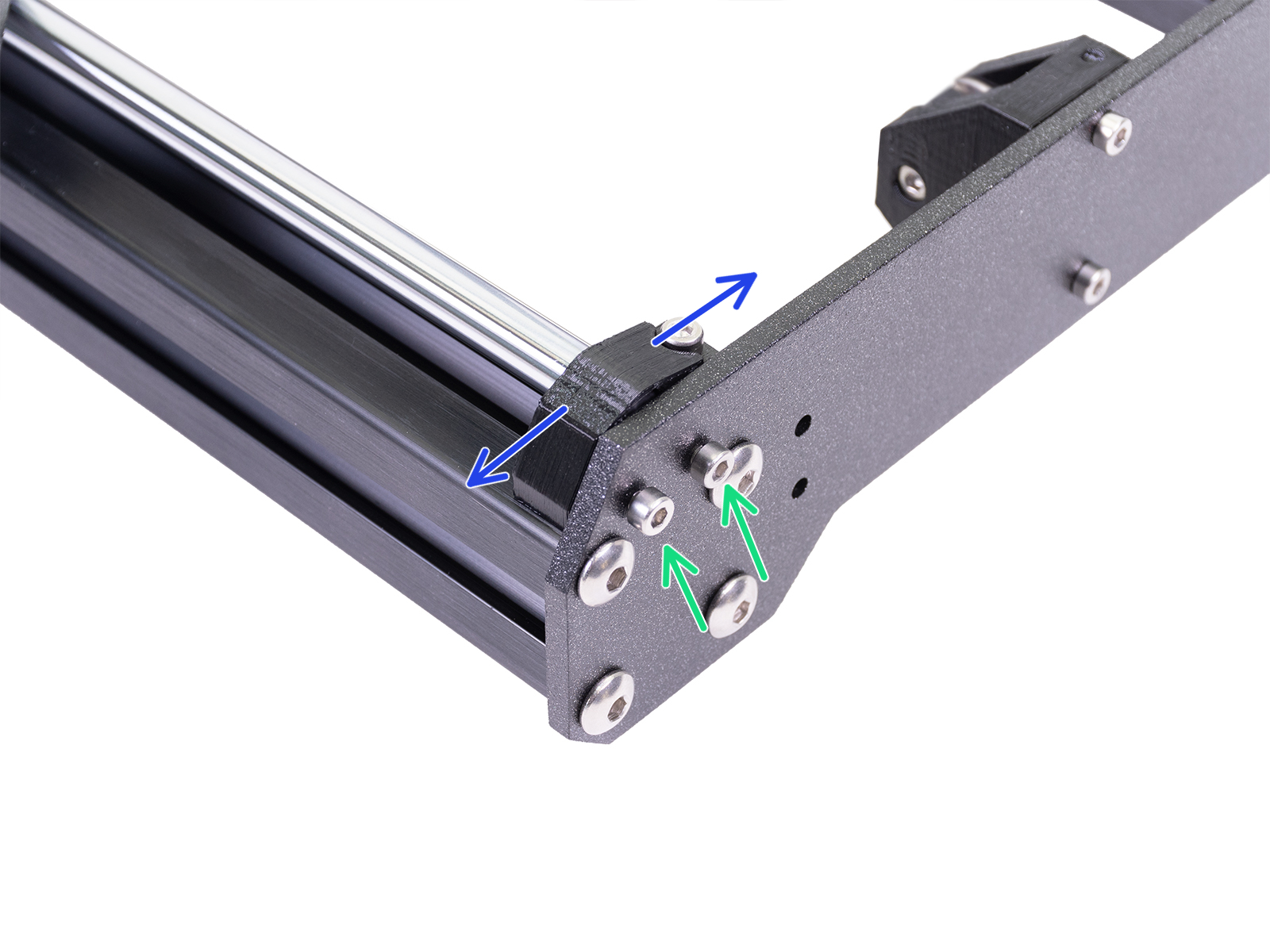
                  1. Losen all M3x10 screws on the four Y-holders half a turn (green arrows), so the printed parts are able to move (blue arrows).
                  2. By hand, move the heatbed back and forth across the entire length of the axis to align them.
                  3. Move the heatbed to the front plate and tighten all four screws of the front Y-rod-holders.
                  4. Move the heatbed to the rear plate and tighten all four screws of the rear Y-rod-holders.

                  Heatbed screws

                  Check the 9 screws on the heatbed if any might be loose. If these are not well secured, the heatbed, screws, and spacers can rattle during movements. When tightening, always follow the correct order of:
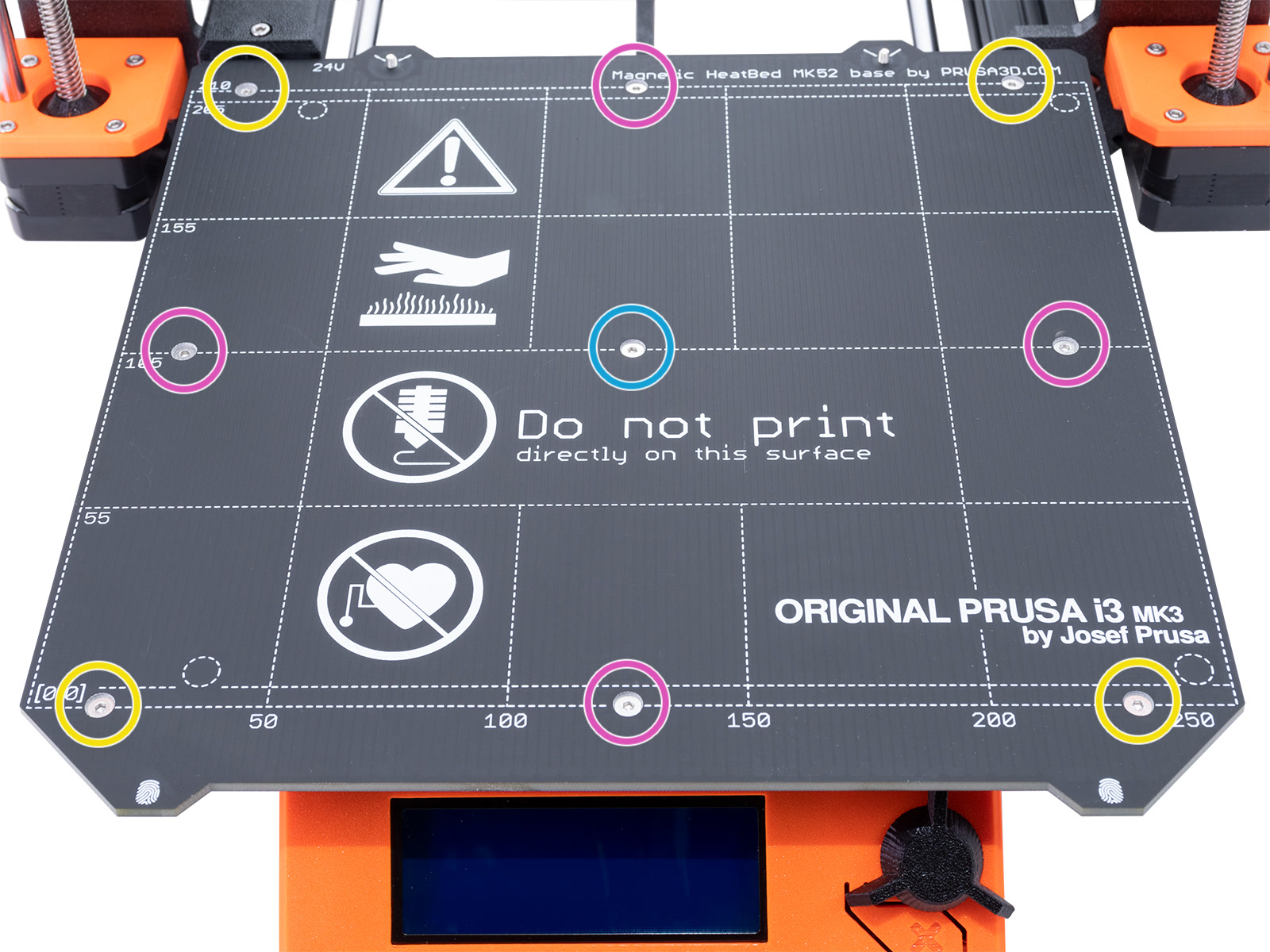
                  1. The center screw (light blue circles)
                  2. The four edges (purple circles)
                  3. The remaining four corners (yellow circles)

                  X and Y-axis pulleys

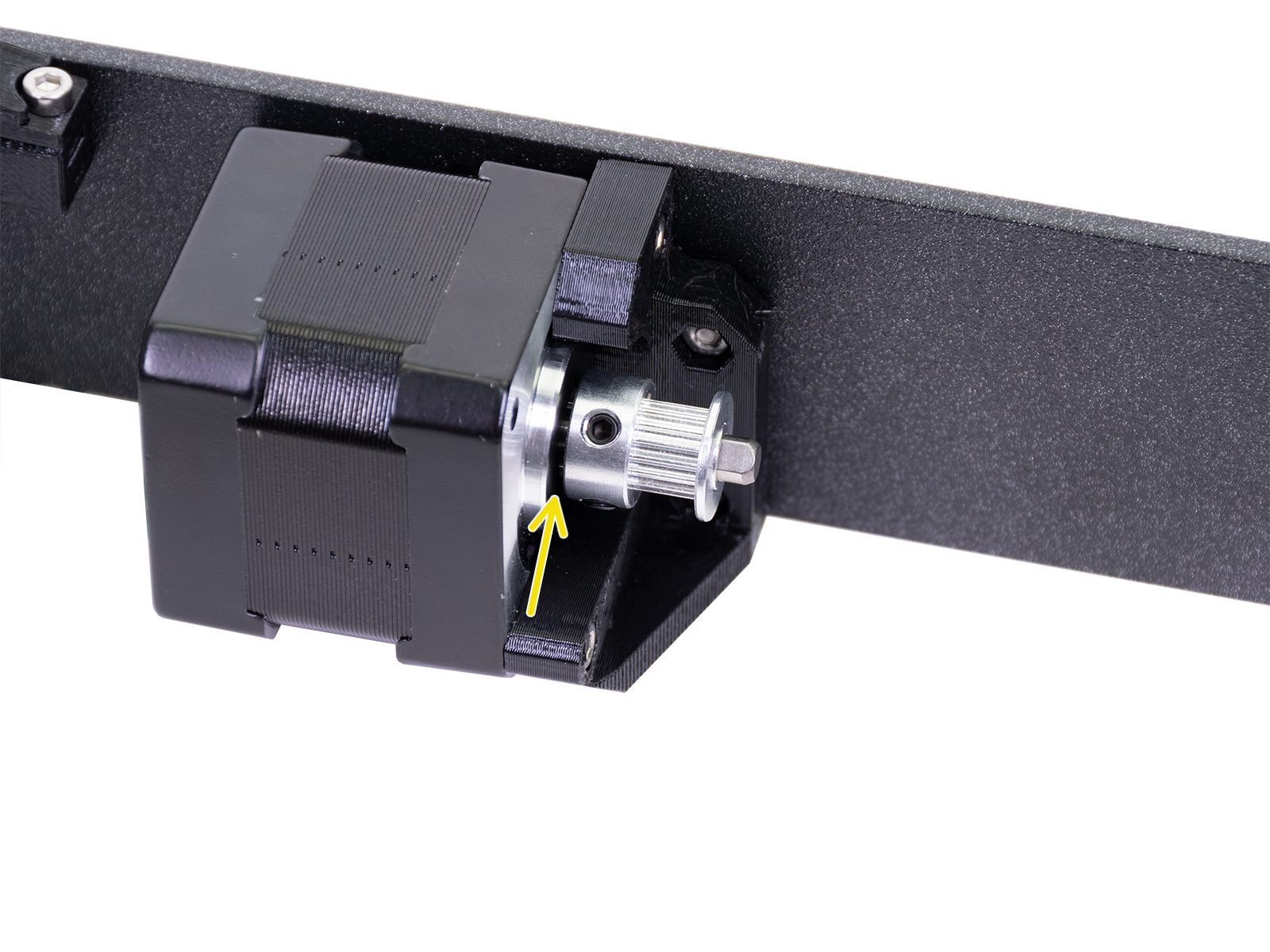
                  If the pulleys on the X and Y-axis are pushed against the motors, even just slightly, it adds resistance which leads to vibrations and even printing issues. Ensure that the spacing is correct (yellow arrow) and the pulley is oriented correctly.

                  Also, make sure the belt of the X-axis is aligned and not rubbing against a plastic part (purple arrow).
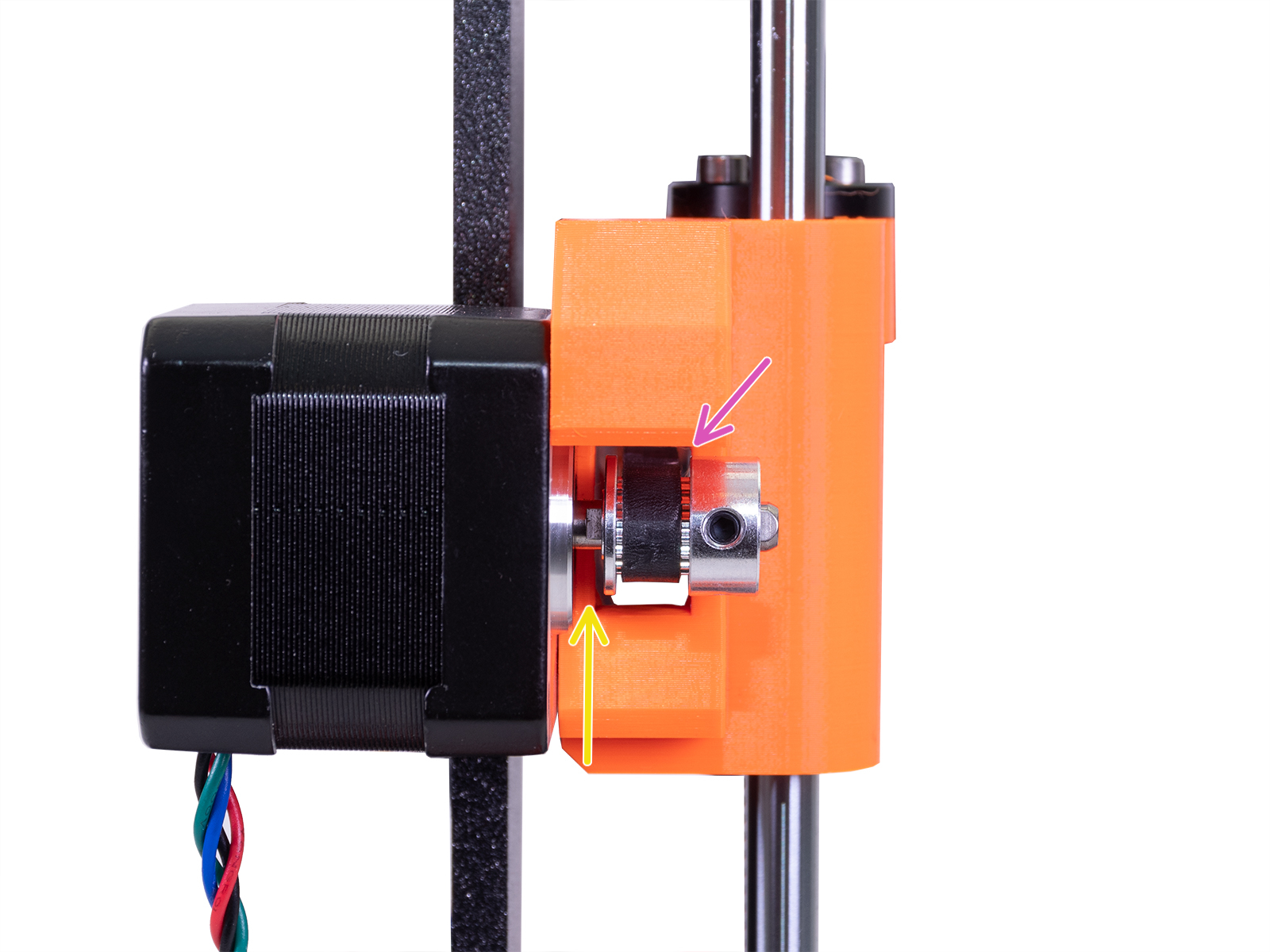
                  X-axis motor with pulley installed.Y-axis motor with pulley installed.

                  LCD-display

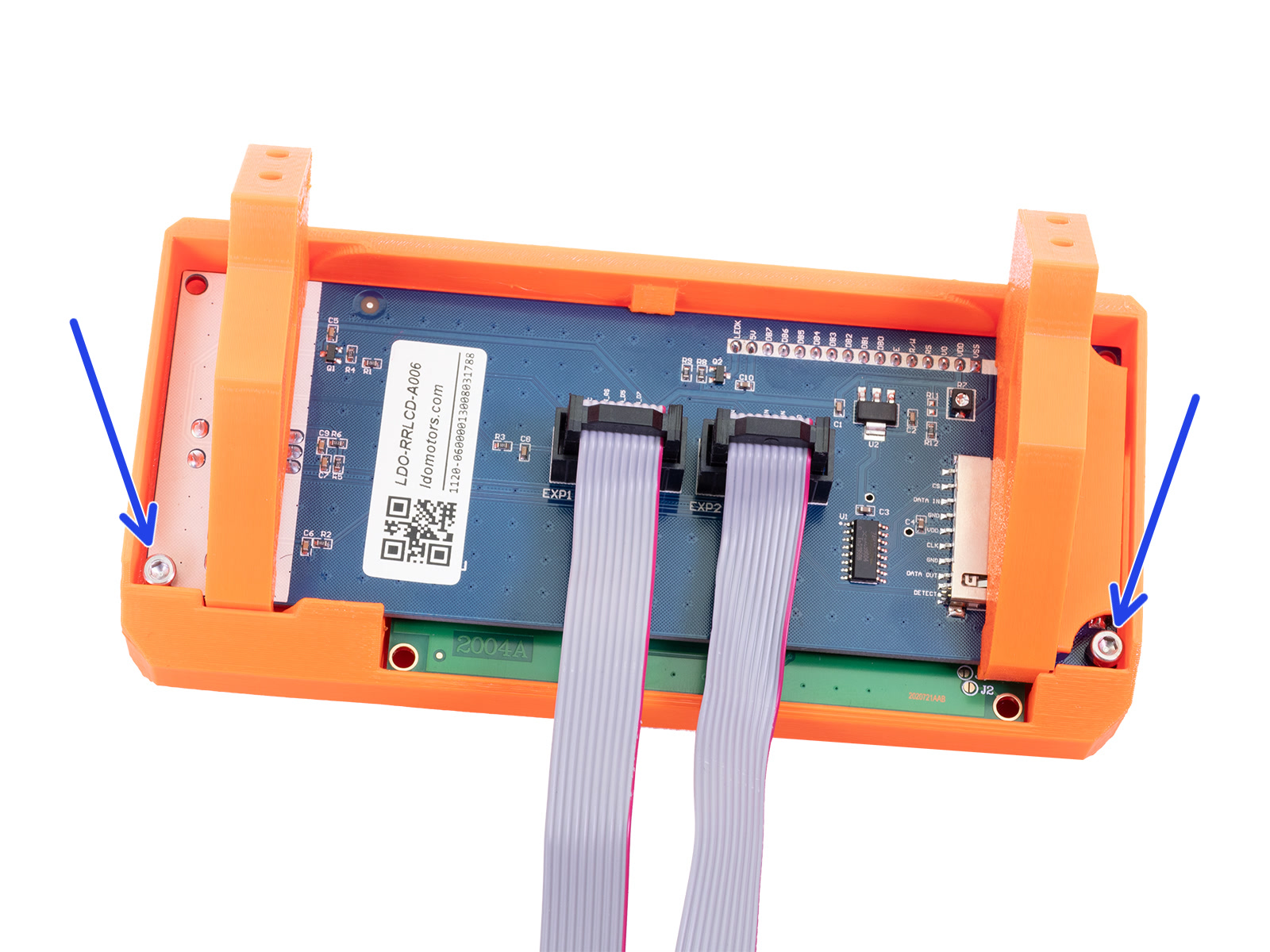
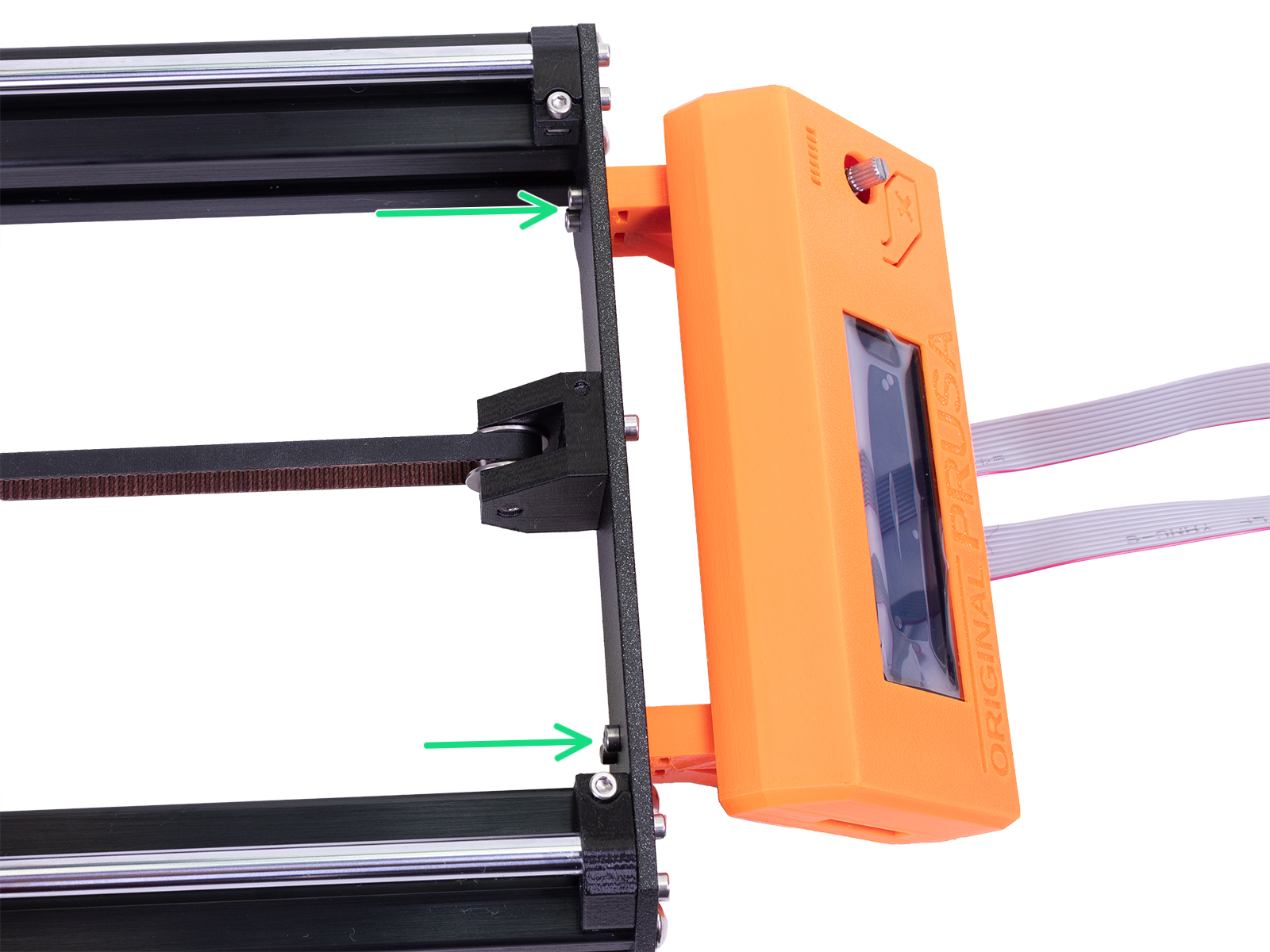
                  Loose screws securing the LCD module and the LCD assembly, can lead to vibrations as the Y-axis is moving. Make sure the screws securing the LCD assembly are tight (green arrow). The LCD module can also rattle during operation if not tightened all the way (blue arrows).
                  PSU

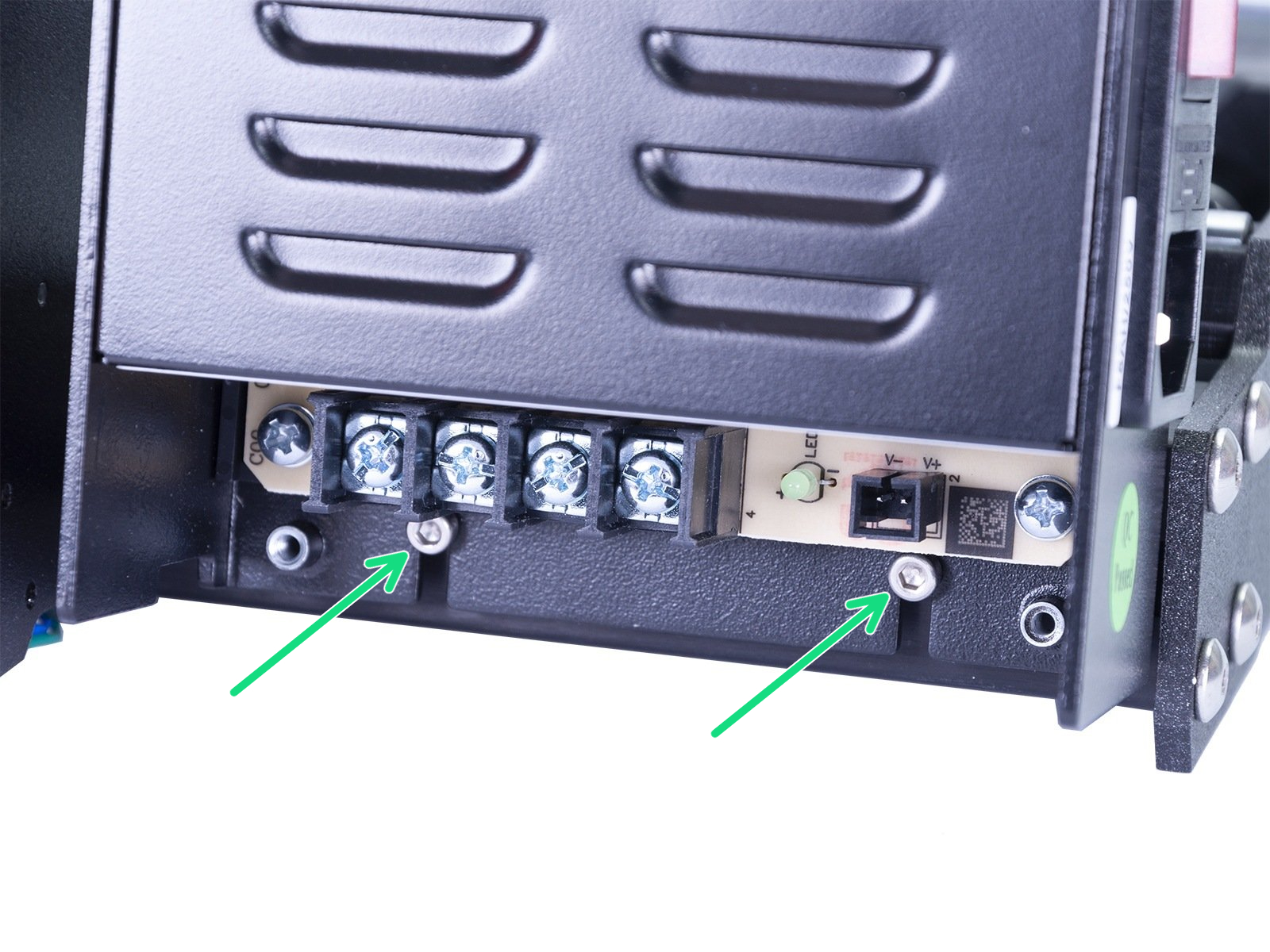
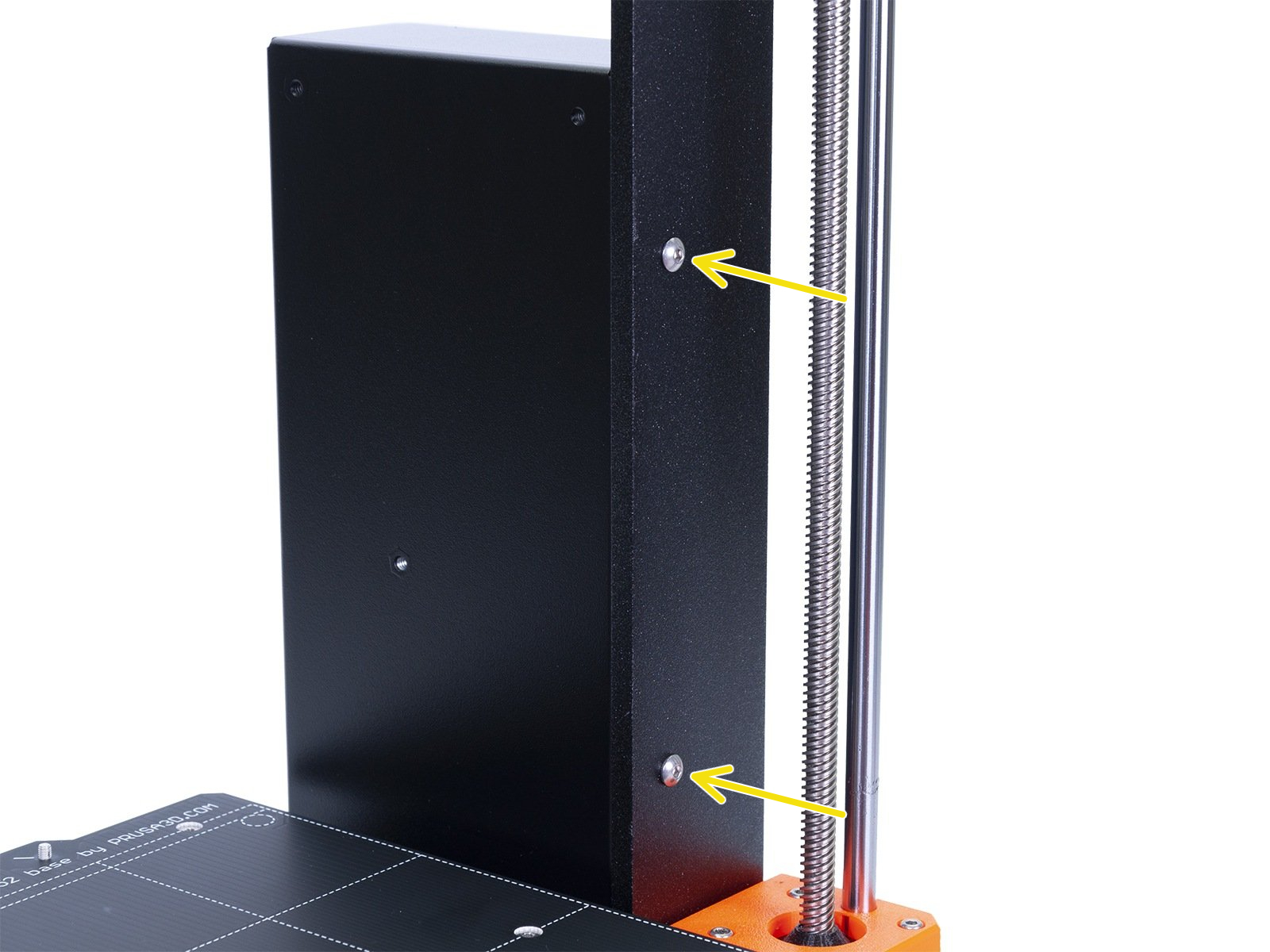
                  The PSU is secured with 4 screws: Two M4 screws on the side through the frame (yellow arrows) and two M3 screws at the bottom into T-nuts in the alu. extrusion (green arrows). Make sure all 4 of these are secure.
                  Other tips and tricks

                  Surface the printer stands on

                  The surface that the printer is on can amplify any of the vibrations and noises coming from the printer. The surface the printer is on should be steady and firm, and should not wobble during printing or if pushed by hand. A hardwood table is an example of this. 

                  This can be enhanced further by placing the printer on a concrete slab/tile which would eliminate any vibrations traveling into the table/desk the printer is standing on.

                  Padding under the printer

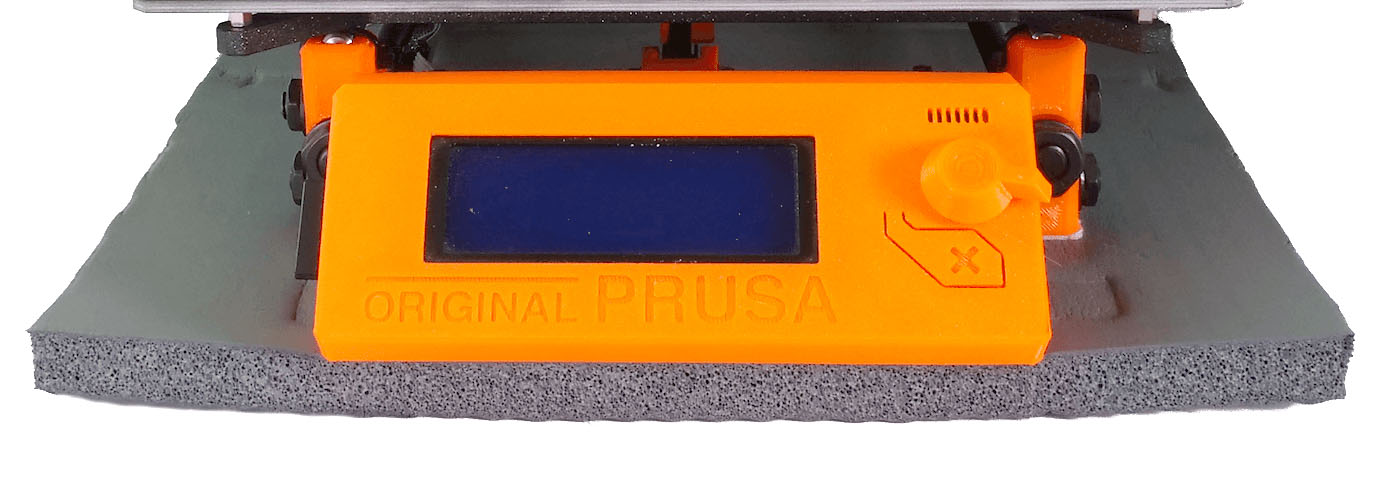
                  An easy solution to dampening the noise and vibration of your printer is to add some sort of additional padding underneath the printer. This will dampen any sound resulting from the resonance between the
                  printer and the surface the printer is resting on.

                  Due to the different construction of the Original Prusa MINI, very soft padding is not optimal as the printer can wobble during operation.

                  You can use something you have around the house. Such as a folded towel or foam padding like you may find in children's play areas.  
                  Was this article helpful?
                  This action is available only to registered users. Please log-in.

                  Topics

                  • Troubleshooting
                    • Printer troubleshooting
                      • Blown Fuse (MK3/MK3S/MK3S+)
                      • Extrusion stopped mid-print (Heat creep)
                      • Spaghetti monster
                      • Extruder blob
                      • Clogged nozzle/hotend (MK3.5/S, MK3S+, MK2.5S)
                      • Extruder noises
                      • Filament Not Loading
                      • Misaligned PINDA Sensor (MK2/S)
                      • Print fan is not spinning
                      • Hotend fan is not spinning
                      • Heatbed not heating up properly
                      • P.I.N.D.A./SuperPINDA Sensor testing
                      • SD card not working
                      • LCD screen not working
                      • Printer does not turn on or keeps turning off
                      • Blown Fuse (MK2S/MK2.5/MK2.5S)
                      • MK3S keeps prompting filament change
                      • Vibration when printing (MK3S+/MK2.5S)
                      • Factory reset (MK2S/MK2.5S/MK3S)
                      • Firmware updating issues (MK2.5S/MK3S+/MMU2S/MMU3)
                      • Nozzle crashed into the heatbed
                      • External SPI flash W25X20CL/xFLASH not responding - error
                      • IR Filament Sensor Troubleshooting (MK2.5S, MK3S)
                      • Failing Z calibration (MK3S/MK2.5S)
                      • Ambient temperature check (MK3/MK3S)
                      • PrusaLink Troubleshooting
                      • Tangled filament
                      • SD cards and USB drives
                    • Diagnostics
                    • Print Quality Troubleshooting
                    • QR Error codes
                    • Print Error Messages

                  7 comments

                  Log in  to post a comment
                  David
                  •
                  The left veritcal Z smooth bar was making a noice where the motor attaches.  All screws were tight, tension on the belt good, prints excellent.  I put a tiny, tiny, tiny bit of lubricant on the smooth bar and all noise is gone.
                  Reply
                  b4de4nd
                  •
                  The Y-Axis rattle is a thing on i3mks printers, and i can for the like of me not figure out why this has not been adressed. I bought the i3 mks+ as my first 3dprinter, and i love it. but i HATE the rattling noise from the bed. And ive tried every solution out there to make it quiet.I might go so far as to build a new Y-Axis with the Linear rail mod.However i would love to hear from prusa? I mean, a brand new printer rattling is pretty annoying, what to do?
                  Reply
                  Giuliano - Official Prusa CS
                  •
                  Hello. By placing the printer on a soft surface as suggested in this article, a lot of the vibrations will be absorbed, so the rattling sound will be less hearable. You can also grease the smooth rods, so that there won't be too much friction when the bearings slide.
                  Reply
                  Joaquin
                  •
                  I dont understand why Prusa keeps on putting 3 bearings on the Y Axis. 4 bearings, 2 per side would significantly reduce bearing vibration noise.The noise comes from the balls inside the bearings, specially from the right side where there is only one bearing.One bearing more wouldn't affect the cost of the machine.
                  Reply
                  David
                  •

                  Hi! Three bearings for the heatbed is the most forgiving setup in case the printer is built skewed or has other hardware issues. Check if your Y motor doesn't rattle between the motor chassis and the Y-rear plate.

                  Reply
                  Carefree
                  •
                  None of this helps with my problem. The bed on my factory assembled printer is vibrating the whole time it's printing. Extremely annoying. I can put a finger on the bed and push lightly and it stops. I really don't want to take it apart to grease bearings, tighten screws. That should have been done in-house before it shipped. And I haven't had it a week yet.
                  Reply
                  David
                  •
                  Hi! The MK3S+ bearings come pre-lubricated by Misumi itself. Greasing them some more will help if the bearings themselves are the source of the noise. It can be done in just a few minutes. Often there are also loose screws somewhere on the printer, which cause a rattling noise :)
                  Reply
                  Cadme1ster
                  •
                  According to the Misumi datasheed on the LM8UU bearings they don't come prelubricated. They come oiled with rust inhibitor, but this is not lube.
                  quote:  "MISUMI Linear Bushings are applied with Anti-rust Oil harmless to the bearing lubrication greases. After de-greasing the Antirust Oil, application of grease is recommended."
                  Prusa should add lubing the bearings with grease to the manual. It will be a lot less hassle disassembling the 3 axis again for lubrication once you figure this out.
                  Reply
                  Félix
                  •
                  Hi, I have a noise problem on my I3 MK3. It is the power supply unit which vibrates enormously (up to 60dBa). It's normal ??  is there a solution? I didn't find any information on the forums. Here is a link to a video of the noise:  Noiseeeee
                  Reply
                  Giuliano - Official Prusa CS
                  •
                  Hello. Try to re-tighten the screws holding the PSU to the frame.
                  Reply
                  Félix
                  •
                  Yes good idea, I have tried without success.
                  Reply