Prusa
  • SHOP
    • Latest products
    BY CATEGORY
    • 3D printersnew
    • 3D printer upgradesnew
    • Materials
    • Accessories
    • Spare parts
    • Courses
    • Merch
    • Get a price quote
    QUICK LINKS
    • Shipping & delivery
    • Returns & refunds
    • Payment & financing
    • Warranty
    • VAT & Customs fees
    • FAQ

    0 item in your cartitems in your cart

    Your cart is empty

    Go to cartShop 3D printers

    My profile

    Log in to see orders, saved items

    My profile

    Signed in as

    • Orders
    • Logout
  • 3D PRINTING
    • Explore 3D printing
    FOR BEGINNERS
    • 3D printing 101
    • How FDM printing works
    • Buying your first printer
    • 3D model catalog
    BY APPLICATION
    • Rapid prototyping
    • Manufacturing
    • Engineering
    • Research
    • Arts & design
    GO DEEPER
    • Materials guide
    • Courses
    • Webinars
    • Case studies
    • Custom 3D printing
  • 3D PRINTERS
    • All 3D printers
    FOR
    • Home or garageHobbyists, tinkerers and home printing
    • BusinessIn-house production for small teams
    • EnterpriseFleets, security and scale
    • Which Prusa is right for me
    SHOP & BROWSE
    • CORE One+new
    • CORE One+ INDXnew
    • CORE One L+new
    • CORE One L+ INDXnew
    • XL+new
    • MK4S
    • Prusa Pro HT90
    • Prusa Pro AFS
    • Prusa Pro SLX
    MORE FROM PRINTERS
    • Parts & upgradesnew
    • Critical infrastructure
    • Case studies
    • Signature Oak
    • Kits
  • MATERIALS
    • All materials
    BY USE
    • Every-day & design
    • Functional engineering
    • Composites
    • Pro speciality
    • SLA resins
    PRUSAMENT
    • PLA
    • PETG
    • ASA
    • PC
    • PA11
    • Flex
    • TPU
    MORE FROM MATERIALS
    • Materials guide
    • We make material in house
    • Sustainability
    • Order on the store
  • SOFTWARE
    • All software
    PREPARE THE PRINT
    • PrusaSlicer 3.0New
    PRINT & MONITOR
    • Prusa Connect
    • EasyPrint
    • iOS & Android app
    • Prusa Farm
    GET STARTED
    • Download & install
    • Knowledge base
    MORE FROM SOFTWARE
    • 3D model catalog
  • SUPPORT
    • Explore support
    FIND ANSWERS
    • Knowledge base
    • Troubleshooting
    • Courses
    • Webinars
    GET HELP
    • Contact us
    • Livechat
    • Shipping & delivery
    • Warranty
    • Returns & refunds
    • Service & spare parts
    • Service & Repair
    COMMUNITY
    • Forum
    • Reddit
    • Printables
  • TRUST CENTER
    • Trust Center overview
    BY TOPIC
    • GDPR
    • Certificates
    • Security
    • Compliance
    COMMITMENTS
    • Sustainability report
    TALK TO US
    • Contact the security team
  • COMPANY
    • About Prusa
    GET TO KNOW US
    • Our story
    • How we make printers
    • Open source
    • Brand & media kit
    NEWS
    • Blog
    • Newsroom
    • Events
    TRUST & PARTNERS
    • Sustainability
    • Resellers & distributors
    • Affiliate program
    • Contact
    • English
    • Čeština
    • Deutsch
    • Español
    • Français
    • Italiano
    • Polski
    • 日本語
  • Signed in as

    • Orders
    • Address
    • In-stock Alerts
    • My Courses
    • Subscription
    • Edit Account
    • Logout

Log in to see orders, saved items

Signed in as
  • Orders
  • Address
  • In-stock Alerts
  • My Courses
  • Subscription
  • Edit Account
  • English
  • Čeština
  • Deutsch
  • Español
  • Français
  • Italiano
  • Polski
  • 日本語
Shop

0 item in your cartitems in your cart

Your cart is empty

Go to cartShop 3D printers

My profile

Log in to see orders, saved items

My profile

Signed in as

  • Orders
  • Logout
SHOP
  • Latest products
BY CATEGORY
  • 3D printersnew
  • 3D printer upgradesnew
  • Materials
  • Accessories
  • Spare parts
  • Courses
  • Merch
  • Get a price quote
QUICK LINKS
  • Shipping & delivery
  • Returns & refunds
  • Payment & financing
  • Warranty
  • VAT & Customs fees
  • FAQ

Featured products

    Popular categories

      Trending searches

        Articles

          Blog

            Products

              Categories

                Suggested searches

                  Searching…
                  No results
                  Something went wrong.
                  ↑↓ Select↵ OpenEsc Close search
                  1. Support
                  2. Original Prusa i3 MK2S
                  3. Left toolbar
                  4. Seam painting
                   

                  Contents

                  • Seam placement logic
                  • Seam painting
                  • Cursor type
                  • Clipping of view

                  Blog

                  • Print colorful and glowing Halloween decorations with our spooky offer
                  • Factorio Has Arrived on Printables
                  • Prusament PLA Lightweight: 65% lighter than regular PLA. Perfect choice for aircraft, cosplay, and more.

                  Newsletter

                  Signup and get our monthly squeeze on updates, blog, printables and much more.

                  By clicking, you agree to receive our newsletter.

                  This site is protected by reCAPTCHA Enterprise and the Google Privacy Policy and Terms of Service apply.

                  Factorio Transport Belts
                  E-shop
                  • 3D Printers
                  • Printer Upgrades
                  • Filaments
                  • Accessories
                  • Prusa Merchandise

                  © Prusa Research a.s.

                  Printables
                  • 3D Models
                  • Store
                  • Clubs
                  • 3D Design Contests
                  • Brands
                  Community
                  • World Map
                  • Forum
                  • User Groups
                  • Events
                  Help
                  • Prusa Help
                  • Prusa Academy
                  • 3D Printing Calculators
                  Software
                  • PrusaSlicer
                  • Prusa.app
                  • Prusa Connect
                  • Drivers and Software
                  Company
                  • About Us
                  • Blog
                  • Official Prusa Resellers
                  • Contact Us
                  • Certified for ISO 9001, ISO 14001, ISO 45001
                  • General Terms and Conditions
                  • General Terms and Conditions of Use of the PRUSA Websites
                  • Privacy Policy
                  • Information about cookies
                  • Customer Complaints Policy
                  • Status Page
                  • Do Not Sell or Share My Personal Information
                  • Supplemental Statements
                  • General Terms and Conditions
                  • General Terms and Conditions of Use of the PRUSA Websites
                  • Privacy Policy
                  • Information about cookies
                  • Customer Complaints Policy
                  • Status Page
                  • Do Not Sell or Share My Personal Information
                  • Supplemental Statements

                  © Prusa Research a.s.

                  JOSEF PRUSA®, PRUSA RESEARCH®, PRUSA POLYMERS®, PRUSA ORANGE®, PRUSA 3D ® AND PRUSAMENT® are registered trademarks of Prusa Development a.s. used by Prusa Research a.s. under licence from Prusa Development a.s.

                  Seam painting

                  Relevant for

                  MMU family
                  MINI family
                  MK3 family
                  OLD PRODUCTS
                  SOFTWARE
                  16 comments
                  Article is also available in following languages
                  English
                  Čeština
                  Polski
                  Deutsch
                  Français
                  Español
                  Italiano
                  日本語

                  Starting from PrusaSlicer version 2.3, it is possible to paint on seams on your model.  The seam painting tool provides more detailed control over the seam placement. The tool is accessible from the left toolbar, and it is only shown in Advanced and Expert modes. After clicking on the icon, the user can paint 'Seam enforcers' or 'Seam blockers' on the model.

                  Seam placement logic

                  If there is a seam enforcer, it always places seams into the enforcer area.

                  If there is a blocker, its area is excluded from possible seam candidates.

                  The Nearest, Rear, and Random Seam position options are still respected. When the Aligned option is active and enforcers are used, the seam is placed in the middle of the enforcer area. This allows drawing smooth seams over the model.
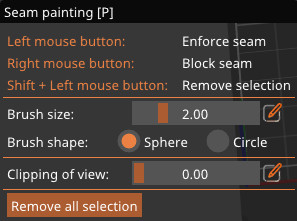
                  Seam painting

                  Left mouse button: Enforce seam

                  Right mouse button: Block seam

                  Shift + Left moue button: Erase selection

                  Brush size: Can also be accessed by the shortcut Alt + Mousewheel. Click the "Edit" icon on the side to add a specific number.

                  Cursor type

                  Spherical cursor (default)

                  Paints everything inside the sphere, regardless of whether it is visible or not from the current view. The preferred method for most cases.

                  Circular cursor

                  Paints all visible places inside the circle from the current view, possibly leaving unpainted areas, but never painting behind corners.

                  Clipping of view

                  You can use the clipping plane tool to hide a part of the object, so that difficult to reach areas can be easily painted. Move the slider from left to right to move the clipping plane. Click the "Edit" icon on the side to add a specific number.

                  Was this article helpful?
                  This action is available only to registered users. Please log-in.

                  Topics

                  • PrusaSlicer 2.9 (Legacy)
                    • Left toolbar
                      • Cut tool
                      • Place on Face tool
                      • Move, Rotate, Scale tools
                      • Paint-on supports
                      • Seam painting
                      • Measurement tool
                    • About PrusaSlicer
                    • Configuration and profiles
                    • User interface
                    • Input/output
                    • Top toolbar
                    • Print settings
                    • Filament settings
                    • Printer settings
                    • Advanced features
                    • Multi-material slicing
                    • SLA slicing
                    • Other (PrusaSlicer)

                  8 comments

                  Log in  to post a comment
                  Swiss_Cheese
                  •
                  This may help some of you.
                  https://forum.prusaprinters.org/forum/prusaslicer/pro-tips-the-brush-tool-by-swiss_cheese/
                  Reply
                  Excalibur2811
                  •
                  It would be nice to see some example diagrams explaining this here..
                  Reply
                  Same Old Shane
                  •
                  there are links in this article pointing to other ones about seams. Did you check there?https://help.prusa3d.com/en/article/seam-position_151069
                  Reply
                  Tim Angus
                  •
                  I signed up just to echo the comments regarding being able to paint straight lines. Seems (lolz) like doing this would be the more common case than not, tbh.
                  Reply
                  David
                  •

                  Hi Tim! The painted line is just an approximate point of where the seam should be located. Anyway, you can report a bug/ request a feature at github.com/prusa3d/PrusaSlicer

                  Reply
                  Tim Angus
                  •
                  Apparently there already is one https://github.com/prusa3d/PrusaSlicer/issues/5970
                  EDIT: or, several actually, but they're mostly duped to that one.
                  Reply
                  David
                  •

                  The problem might be even if you paint a straight line, the seams are not perfectly aligned. By the way for painting a straight line, you can sort of utilize another bug, you start painting a seam and while holding the left mouse button, you hit escape. then you enter the seam painting mode again and just click the end destination.

                  Reply
                  mchahn
                  •
                  Thanks for the trick!  It works perfectly.  I put the object half off the window and click top and bottom on the very edge.  This makes the line perfectly vertical.
                  Reply
                  Ramage
                  •
                  Two years later this 'bug' still works.  Thanks for the tip.
                  Reply
                  Spinnetti
                  •
                  Excellent find... Straight line selection is sorely missing!
                  Reply
                  DeMelo
                  •
                  Painting the seam is great, being able to draw straight lines in prusaslicer would be even better. But in my opinion the best way to precisely control seam positioning would be by creating a modifier mesh with your favorite modeling software and then importing it to prusaslicer to overlap with the printing model. The intersection lines would define the z-seam path.Cura offers a similar tool, but to control settings other than seam positioning.
                  Reply
                  Hermes Endakis
                  •
                  You can draw straight lines with your mouse on a Mac using an Accessibility option called 'Mouse Keys' that lets you use your keyboard to move the mouse around the screen. https://support.apple.com/en-au/guide/mac-help/mh27469/mac
                  Reply