Prusa
  • SHOP
    • Latest products
    BY CATEGORY
    • 3D printersnew
    • 3D printer upgradesnew
    • Materials
    • Accessories
    • Spare parts
    • Courses
    • Merch
    • Get a price quote
    QUICK LINKS
    • Shipping & delivery
    • Returns & refunds
    • Payment & financing
    • Warranty
    • VAT & Customs fees
    • FAQ

    0 item in your cartitems in your cart

    Your cart is empty

    Go to cartShop 3D printers

    My profile

    Log in to see orders, saved items

    My profile

    Signed in as

    • Orders
    • Logout
  • 3D PRINTING
    • Explore 3D printing
    FOR BEGINNERS
    • 3D printing 101
    • How FDM printing works
    • Buying your first printer
    • 3D model catalog
    BY APPLICATION
    • Rapid prototyping
    • Manufacturing
    • Engineering
    • Research
    • Arts & design
    GO DEEPER
    • Materials guide
    • Courses
    • Webinars
    • Case studies
    • Custom 3D printing
  • 3D PRINTERS
    • All 3D printers
    FOR
    • Home or garageHobbyists, tinkerers and home printing
    • BusinessIn-house production for small teams
    • EnterpriseFleets, security and scale
    • Which Prusa is right for me
    SHOP & BROWSE
    • CORE One+new
    • CORE One+ INDXnew
    • CORE One L+new
    • CORE One L+ INDXnew
    • XL+new
    • MK4S
    • Prusa Pro HT90
    • Prusa Pro AFS
    • Prusa Pro SLX
    MORE FROM PRINTERS
    • Parts & upgradesnew
    • Critical infrastructure
    • Case studies
    • Signature Oak
    • Kits
  • MATERIALS
    • All materials
    BY USE
    • Every-day & design
    • Functional engineering
    • Composites
    • Pro speciality
    • SLA resins
    PRUSAMENT
    • PLA
    • PETG
    • ASA
    • PC
    • PA11
    • Flex
    • TPU
    MORE FROM MATERIALS
    • Materials guide
    • We make material in house
    • Sustainability
    • Order on the store
  • SOFTWARE
    • All software
    PREPARE THE PRINT
    • PrusaSlicer 3.0New
    PRINT & MONITOR
    • Prusa Connect
    • EasyPrint
    • iOS & Android app
    • Prusa Farm
    GET STARTED
    • Download & install
    • Knowledge base
    MORE FROM SOFTWARE
    • 3D model catalog
  • SUPPORT
    • Explore support
    FIND ANSWERS
    • Knowledge base
    • Troubleshooting
    • Courses
    • Webinars
    GET HELP
    • Contact us
    • Livechat
    • Shipping & delivery
    • Warranty
    • Returns & refunds
    • Service & spare parts
    • Service & Repair
    COMMUNITY
    • Forum
    • Reddit
    • Printables
  • TRUST CENTER
    • Trust Center overview
    BY TOPIC
    • GDPR
    • Certificates
    • Security
    • Compliance
    COMMITMENTS
    • Sustainability report
    TALK TO US
    • Contact the security team
  • COMPANY
    • About Prusa
    GET TO KNOW US
    • Our story
    • How we make printers
    • Open source
    • Brand & media kit
    NEWS
    • Blog
    • Newsroom
    • Events
    TRUST & PARTNERS
    • Sustainability
    • Resellers & distributors
    • Affiliate program
    • Contact
    • English
    • Čeština
    • Deutsch
    • Español
    • Français
    • Italiano
    • Polski
    • 日本語
  • Signed in as

    • Orders
    • Address
    • In-stock Alerts
    • My Courses
    • Subscription
    • Edit Account
    • Logout

Log in to see orders, saved items

Signed in as
  • Orders
  • Address
  • In-stock Alerts
  • My Courses
  • Subscription
  • Edit Account
  • English
  • Čeština
  • Deutsch
  • Español
  • Français
  • Italiano
  • Polski
  • 日本語
Shop

0 item in your cartitems in your cart

Your cart is empty

Go to cartShop 3D printers

My profile

Log in to see orders, saved items

My profile

Signed in as

  • Orders
  • Logout
SHOP
  • Latest products
BY CATEGORY
  • 3D printersnew
  • 3D printer upgradesnew
  • Materials
  • Accessories
  • Spare parts
  • Courses
  • Merch
  • Get a price quote
QUICK LINKS
  • Shipping & delivery
  • Returns & refunds
  • Payment & financing
  • Warranty
  • VAT & Customs fees
  • FAQ

Featured products

    Popular categories

      Trending searches

        Articles

          Blog

            Products

              Categories

                Suggested searches

                  Searching…
                  No results
                  Something went wrong.
                  ↑↓ Select↵ OpenEsc Close search
                  1. Support
                  2. Original Prusa i3 MK2S
                  3. Left toolbar
                  4. Move, Rotate, Scale tools
                   

                  Contents

                  • Move
                  • Scale
                  • Rotate
                  • Moving an object below the print bed
                  • Moving an object above the print bed

                  Blog

                  • Print colorful and glowing Halloween decorations with our spooky offer
                  • Factorio Has Arrived on Printables
                  • Prusament PLA Lightweight: 65% lighter than regular PLA. Perfect choice for aircraft, cosplay, and more.

                  Newsletter

                  Signup and get our monthly squeeze on updates, blog, printables and much more.

                  By clicking, you agree to receive our newsletter.

                  This site is protected by reCAPTCHA Enterprise and the Google Privacy Policy and Terms of Service apply.

                  Factorio Transport Belts
                  E-shop
                  • 3D Printers
                  • Printer Upgrades
                  • Filaments
                  • Accessories
                  • Prusa Merchandise

                  © Prusa Research a.s.

                  Printables
                  • 3D Models
                  • Store
                  • Clubs
                  • 3D Design Contests
                  • Brands
                  Community
                  • World Map
                  • Forum
                  • User Groups
                  • Events
                  Help
                  • Prusa Help
                  • Prusa Academy
                  • 3D Printing Calculators
                  Software
                  • PrusaSlicer
                  • Prusa.app
                  • Prusa Connect
                  • Drivers and Software
                  Company
                  • About Us
                  • Blog
                  • Official Prusa Resellers
                  • Contact Us
                  • Certified for ISO 9001, ISO 14001, ISO 45001
                  • General Terms and Conditions
                  • General Terms and Conditions of Use of the PRUSA Websites
                  • Privacy Policy
                  • Information about cookies
                  • Customer Complaints Policy
                  • Status Page
                  • Do Not Sell or Share My Personal Information
                  • Supplemental Statements
                  • General Terms and Conditions
                  • General Terms and Conditions of Use of the PRUSA Websites
                  • Privacy Policy
                  • Information about cookies
                  • Customer Complaints Policy
                  • Status Page
                  • Do Not Sell or Share My Personal Information
                  • Supplemental Statements

                  © Prusa Research a.s.

                  JOSEF PRUSA®, PRUSA RESEARCH®, PRUSA POLYMERS®, PRUSA ORANGE®, PRUSA 3D ® AND PRUSAMENT® are registered trademarks of Prusa Development a.s. used by Prusa Research a.s. under licence from Prusa Development a.s.

                  Move, Rotate, Scale tools

                  Relevant for

                  MMU family
                  MINI family
                  MK3 family
                  OLD PRODUCTS
                  SLA family
                  +
                  19 comments
                  Article is also available in following languages
                  English
                  Čeština
                  Polski
                  Deutsch
                  Français
                  Español
                  Italiano
                  日本語

                  Move

                  Left-mouse drag can move objects even when the move tool is inactive. Enabling the Move tool M displays a 3D widget, which lets the user adjust the object’s position in the X, Y, or Z-axis.

                  • 1mm increments Shift


                  Scale

                  The Scale tool (S) displays a 3D widget, which lets the user scale the object either uniformly, by clicking one of the corner boxes, or non-uniformly, by clicking the X, Y, or Z-axis handle.

                  By default, scaling is symmetrical, both sides of the model expand uniformly and the center stays in place. Holding down the Ctrl key before grabbing one of the X, Y, or Z handles switches the mode to non-symmetrical.

                  • 5% increments Shift
                  • Scale to fit (maximum size) F
                    • only with the scale tool selected
                   

                  Rotate

                  The Rotate tool (R) displays a 3D widget that lets the user rotate the object around the X, Y, or Z-axis. As soon as the user clicks on one of the axes handles, two sets of white circular guidelines appear. Hovering the mouse over these guidelines will change the rotation from smooth to discrete steps.

                  • Outer circle / short marks 5-degree increments
                  • Inner circle / long marks 45-degree increments


                  Moving an object below the print bed

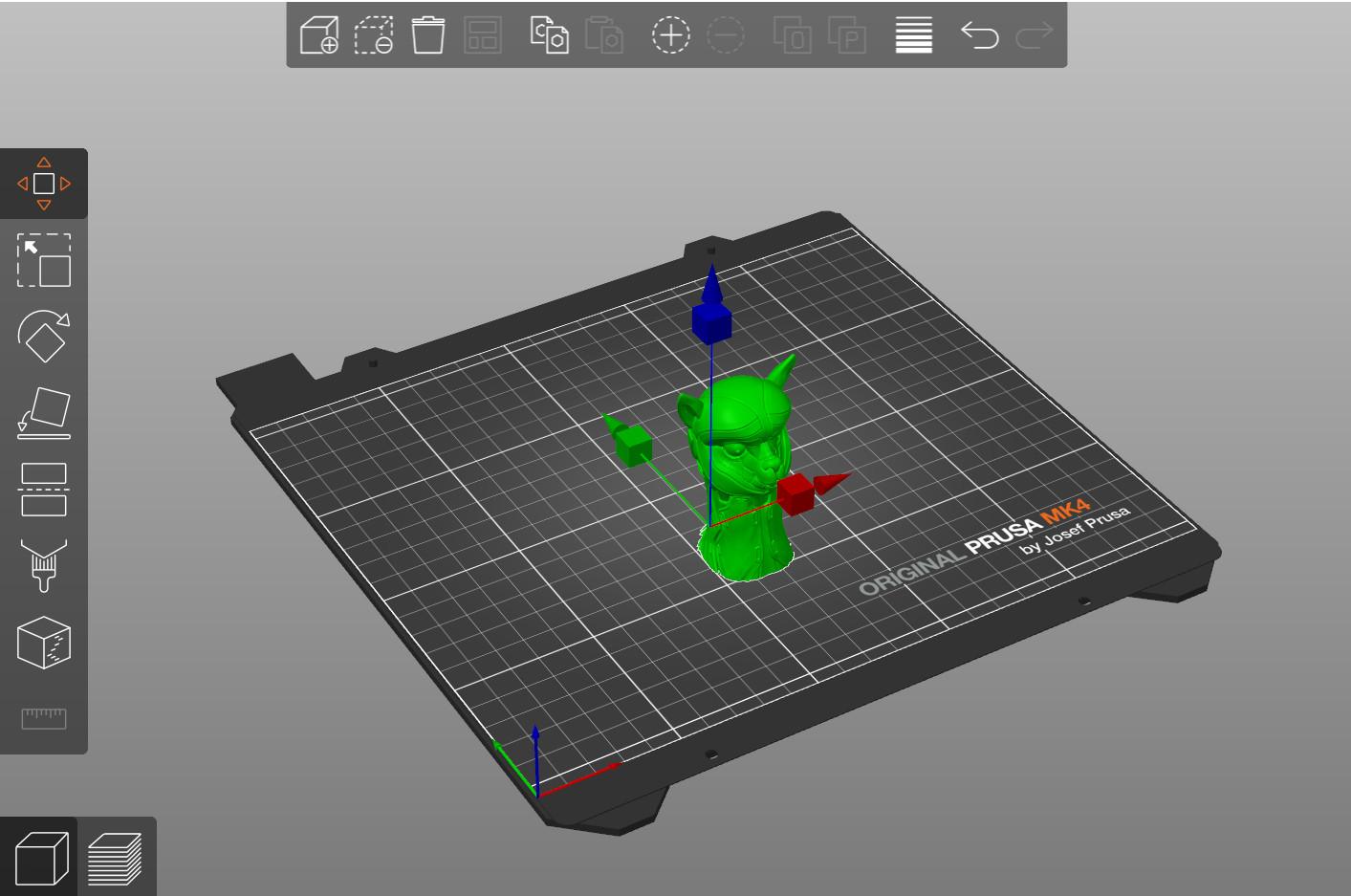
                  An object can be moved below the print bed to print just the part of the object above the print bed.

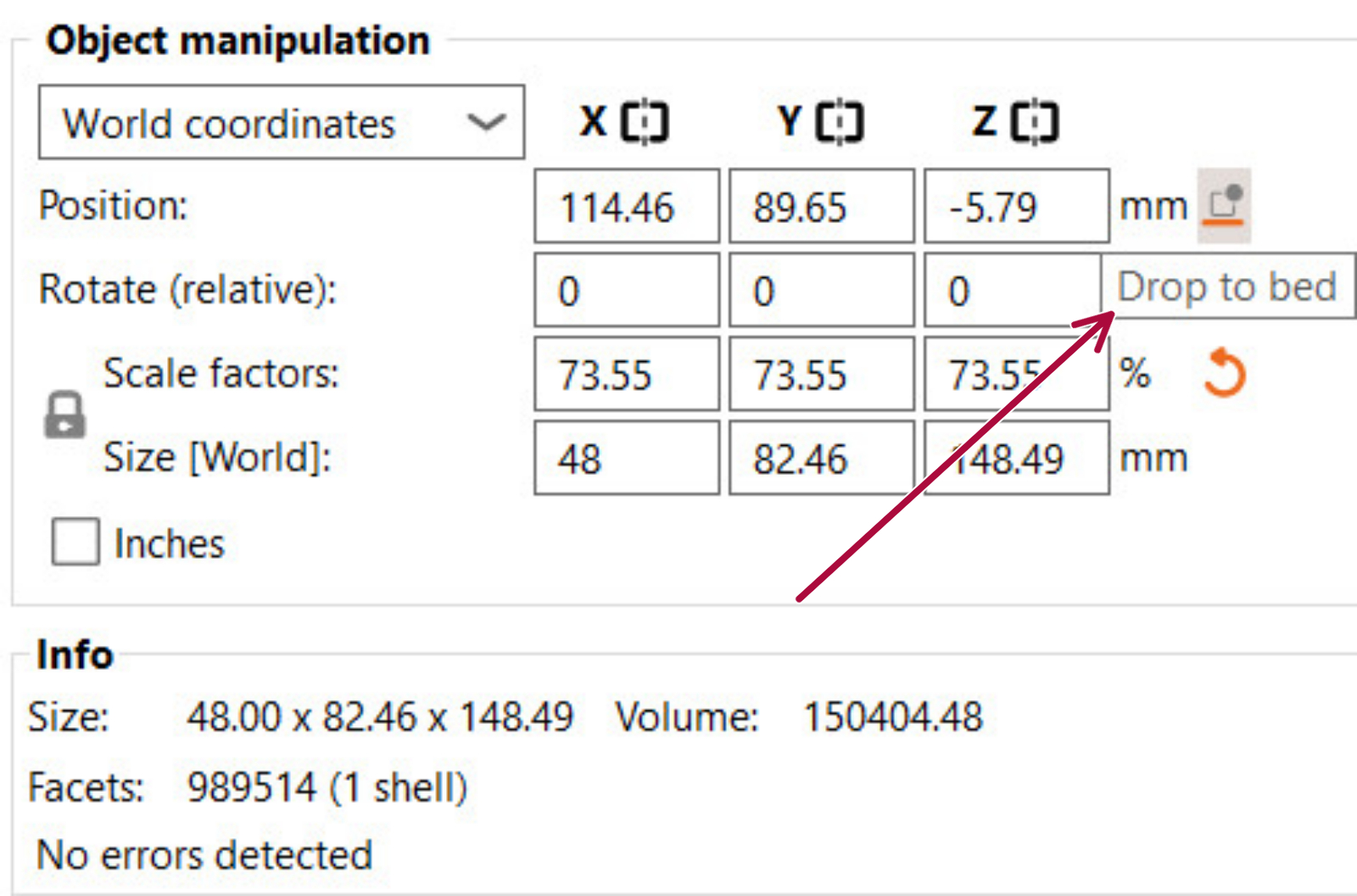
                  You can achieve a similar result with the Cut tool. However, the move tool is arguably simpler, non-destructive, and handy. For example, you can flatten the bottom of an uneven object to be printable without a raft. The “Drop to bed” button in the object manipulation panel can be used to move the object back to the print bed, so it's no longer sinking below it. The intersection of the model with the bed is visualized with a white outline. Moving objects below the print bed is not allowed in SLA mode, as it would make the placement of SLA supports confusing.
                  Moving an object above the print bed

                  We have a standalone article about how to do this.

                  Was this article helpful?
                  This action is available only to registered users. Please log-in.

                  Topics

                  • PrusaSlicer 2.9 (Legacy)
                    • Left toolbar
                      • Cut tool
                      • Place on Face tool
                      • Move, Rotate, Scale tools
                      • Paint-on supports
                      • Seam painting
                      • Measurement tool
                    • About PrusaSlicer
                    • Configuration and profiles
                    • User interface
                    • Input/output
                    • Top toolbar
                    • Print settings
                    • Filament settings
                    • Printer settings
                    • Advanced features
                    • Multi-material slicing
                    • SLA slicing
                    • Other (PrusaSlicer)

                  10 comments

                  Log in  to post a comment
                  magog29
                  •
                  Hi. I need to rotate object. When I select rotate function, the center point of rotation is in the center of object. But I need to rotate around another point. Is it possible?
                  Reply
                  PeterT
                  •
                  I'm finding on my Mac that clicking on control then a handle does not change scale mode but rather moves the platen around
                  Reply
                  PeterT
                  •
                  Hmmm I can get it to work in the Z direction , otherwise ctrl does nothing. what am I missing
                  Reply
                  Charles Mathieu
                  •
                  peut-on imprimer une symetrie  du fichier stl importé ??
                  Reply
                  Tomas Official CS
                  •
                  Oui, cela ne devra pas être un problème. N'hésitez pas à nous contacter par email - [email protected] ou par LiveChat avec le fichier 3MF idéalement pour qu'on puisse vous aider, si nécessaire. 
                  Reply
                  Moses9
                  •
                  Thanks for that. You can also move, rotate and scale 3D models easily, regardless of whether you are a 3D artist or a beginner, using the SelfCAD tool. 
                  It is user-friendly and has various tools to do all manner of 3D modeling operations. As a beginner, SelfCAD has got you covered. It has interactive tutorials and videos to guide you step by step in learning 3D modeling. 
                  Check this video on how to move, rotate, scale, and navigate SelfCAD workspace https://www.youtube.com/watch?v=ek8MtIfBr64&list=PLXHTPs03CIrhWHKpKBpncxsA942_VaWlh&index=1
                  Tutorials https://www.selfcad.com/tutorials
                  Videos  https://www.youtube.com/playlist?list=PLXHTPs03CIrhWHKpKBpncxsA942_VaWlh
                   
                  Reply
                  AlwaysTinkering
                  •
                  I think you could improve the use of these tools by adding some shortcut keys to toggle between modes (unless that feature exists and I have not found it).  Since you are already using keys to change behavior in a mode there are a couple of ways this could go.
                  1) I drop the enforcer... hold one control key goes to one mode, hold another goes to a different.  In that mode you can drag the on-screen controls, but maybe you cannot use the micro adjustment shortcuts.  For that you need to press the icon.
                  2) You just add a toggle control key to rotate between modes and once in that mode you release the keys and you get normal key controls.
                  Moving your eyes to the left tool box to select a mode requires some re-orientation back to the object after changing modes.   Focus is on getting the modifier applied, moved into place and sized properly.  
                   
                   
                  Reply