Prusa
  • SHOP
    • Latest products
    BY CATEGORY
    • 3D printersnew
    • 3D printer upgradesnew
    • Materials
    • Accessories
    • Spare parts
    • Courses
    • Merch
    • Get a price quote
    QUICK LINKS
    • Shipping & delivery
    • Returns & refunds
    • Payment & financing
    • Warranty
    • VAT & Customs fees
    • FAQ

    0 item in your cartitems in your cart

    Your cart is empty

    Go to cartShop 3D printers

    My profile

    Log in to see orders, saved items

    My profile

    Signed in as

    • Orders
    • Logout
  • 3D PRINTING
    • Explore 3D printing
    FOR BEGINNERS
    • 3D printing 101
    • How FDM printing works
    • Buying your first printer
    • 3D model catalog
    BY APPLICATION
    • Rapid prototyping
    • Manufacturing
    • Engineering
    • Research
    • Arts & design
    GO DEEPER
    • Materials guide
    • Courses
    • Webinars
    • Case studies
    • Custom 3D printing
  • 3D PRINTERS
    • All 3D printers
    FOR
    • Home or garageHobbyists, tinkerers and home printing
    • BusinessIn-house production for small teams
    • EnterpriseFleets, security and scale
    • Which Prusa is right for me
    SHOP & BROWSE
    • CORE One+new
    • CORE One+ INDXnew
    • CORE One L+new
    • CORE One L+ INDXnew
    • XL+new
    • MK4S
    • Prusa Pro HT90
    • Prusa Pro AFS
    • Prusa Pro SLX
    MORE FROM PRINTERS
    • Parts & upgradesnew
    • Critical infrastructure
    • Case studies
    • Signature Oak
    • Kits
  • MATERIALS
    • All materials
    BY USE
    • Every-day & design
    • Functional engineering
    • Composites
    • Pro speciality
    • SLA resins
    PRUSAMENT
    • PLA
    • PETG
    • ASA
    • PC
    • PA11
    • Flex
    • TPU
    MORE FROM MATERIALS
    • Materials guide
    • We make material in house
    • Sustainability
    • Order on the store
  • SOFTWARE
    • All software
    PREPARE THE PRINT
    • PrusaSlicer 3.0New
    PRINT & MONITOR
    • Prusa Connect
    • EasyPrint
    • iOS & Android app
    • Prusa Farm
    GET STARTED
    • Download & install
    • Knowledge base
    MORE FROM SOFTWARE
    • 3D model catalog
  • SUPPORT
    • Explore support
    FIND ANSWERS
    • Knowledge base
    • Troubleshooting
    • Courses
    • Webinars
    GET HELP
    • Contact us
    • Livechat
    • Shipping & delivery
    • Warranty
    • Returns & refunds
    • Service & spare parts
    • Service & Repair
    COMMUNITY
    • Forum
    • Reddit
    • Printables
  • TRUST CENTER
    • Trust Center overview
    BY TOPIC
    • GDPR
    • Certificates
    • Security
    • Compliance
    COMMITMENTS
    • Sustainability report
    TALK TO US
    • Contact the security team
  • COMPANY
    • About Prusa
    GET TO KNOW US
    • Our story
    • How we make printers
    • Open source
    • Brand & media kit
    NEWS
    • Blog
    • Newsroom
    • Events
    TRUST & PARTNERS
    • Sustainability
    • Resellers & distributors
    • Affiliate program
    • Contact
    • English
    • Čeština
    • Deutsch
    • Español
    • Français
    • Italiano
    • Polski
    • 日本語
  • Signed in as

    • Orders
    • Address
    • In-stock Alerts
    • My Courses
    • Subscription
    • Edit Account
    • Logout

Log in to see orders, saved items

Signed in as
  • Orders
  • Address
  • In-stock Alerts
  • My Courses
  • Subscription
  • Edit Account
  • English
  • Čeština
  • Deutsch
  • Español
  • Français
  • Italiano
  • Polski
  • 日本語
Shop

0 item in your cartitems in your cart

Your cart is empty

Go to cartShop 3D printers

My profile

Log in to see orders, saved items

My profile

Signed in as

  • Orders
  • Logout
SHOP
  • Latest products
BY CATEGORY
  • 3D printersnew
  • 3D printer upgradesnew
  • Materials
  • Accessories
  • Spare parts
  • Courses
  • Merch
  • Get a price quote
QUICK LINKS
  • Shipping & delivery
  • Returns & refunds
  • Payment & financing
  • Warranty
  • VAT & Customs fees
  • FAQ

Featured products

    Popular categories

      Trending searches

        Articles

          Blog

            Products

              Categories

                Suggested searches

                  Searching…
                  No results
                  Something went wrong.
                  ↑↓ Select↵ OpenEsc Close search
                  1. Support
                  2. PrusaSlicer
                  3. About PrusaSlicer
                  4. Install PrusaSlicer
                   

                  Contents

                  • Windows
                  • Mac
                  • Linux (including Chrome OS)

                  Blog

                  • Print colorful and glowing Halloween decorations with our spooky offer
                  • Factorio Has Arrived on Printables
                  • Prusament PLA Lightweight: 65% lighter than regular PLA. Perfect choice for aircraft, cosplay, and more.

                  Newsletter

                  Signup and get our monthly squeeze on updates, blog, printables and much more.

                  By clicking, you agree to receive our newsletter.

                  This site is protected by reCAPTCHA Enterprise and the Google Privacy Policy and Terms of Service apply.

                  Factorio Transport Belts
                  E-shop
                  • 3D Printers
                  • Printer Upgrades
                  • Filaments
                  • Accessories
                  • Prusa Merchandise

                  © Prusa Research a.s.

                  Printables
                  • 3D Models
                  • Store
                  • Clubs
                  • 3D Design Contests
                  • Brands
                  Community
                  • World Map
                  • Forum
                  • User Groups
                  • Events
                  Help
                  • Prusa Help
                  • Prusa Academy
                  • 3D Printing Calculators
                  Software
                  • PrusaSlicer
                  • Prusa.app
                  • Prusa Connect
                  • Drivers and Software
                  Company
                  • About Us
                  • Blog
                  • Official Prusa Resellers
                  • Contact Us
                  • Certified for ISO 9001, ISO 14001, ISO 45001
                  • General Terms and Conditions
                  • General Terms and Conditions of Use of the PRUSA Websites
                  • Privacy Policy
                  • Information about cookies
                  • Customer Complaints Policy
                  • Status Page
                  • Do Not Sell or Share My Personal Information
                  • Supplemental Statements
                  • General Terms and Conditions
                  • General Terms and Conditions of Use of the PRUSA Websites
                  • Privacy Policy
                  • Information about cookies
                  • Customer Complaints Policy
                  • Status Page
                  • Do Not Sell or Share My Personal Information
                  • Supplemental Statements

                  © Prusa Research a.s.

                  JOSEF PRUSA®, PRUSA RESEARCH®, PRUSA POLYMERS®, PRUSA ORANGE®, PRUSA 3D ® AND PRUSAMENT® are registered trademarks of Prusa Development a.s. used by Prusa Research a.s. under licence from Prusa Development a.s.

                  Install PrusaSlicer

                  Relevant for

                  MK3S+
                  MINI+
                  PrusaSlicer
                  59 comments
                  Article is also available in following languages
                  English
                  Čeština
                  Polski
                  Deutsch
                  Français
                  Español
                  Italiano
                  日本語

                  Windows

                  A stand-alone EXE installer of the latest stable release can be downloaded from PrusaSlicer introduction & download or our Github.

                  When downloading from Github, make sure you download the correct file for your computer. For Windows, it will be a .zip file, with "Win32" or "Win64" in the title. Most computers these days are 64-bit, which will run the 32-bit version as well. If you have an old computer, you may want to get the Win32 version.

                  The Drivers & Apps installation package includes the PrusaSlicer itself but also sets of test objects and printer drivers. These are optional, you can choose to install only PrusaSlicer.

                  Check out Download PrusaSlicer for download and testing of Alpha and Beta versions of PrusaSlicer, across all platforms.

                  Silent mode - installation

                  The PrusaSlicer Windows installer supports a “silent” mode for unattended installation or removal without any user interaction.

                  • Silent installation:

                  • Silent uninstallation:

                  These commands can be combined with /LOG="pathtofile.log" to generate an installation log.

                  Mac

                  A stand-alone DMG installer of the latest stable release can be downloaded from PrusaSlicer introduction & download or our Github.

                  When downloading from Github, make sure you download the correct file for your computer. For Mac it will be the DMG file, which is 64-bit.

                  The Drivers & Apps installation package includes the PrusaSlicer itself but also sets of test objects and printer drivers. These are optional, you can choose to install only PrusaSlicer.

                  To install any of these packages, just Drag and Drop it in the installer window. 
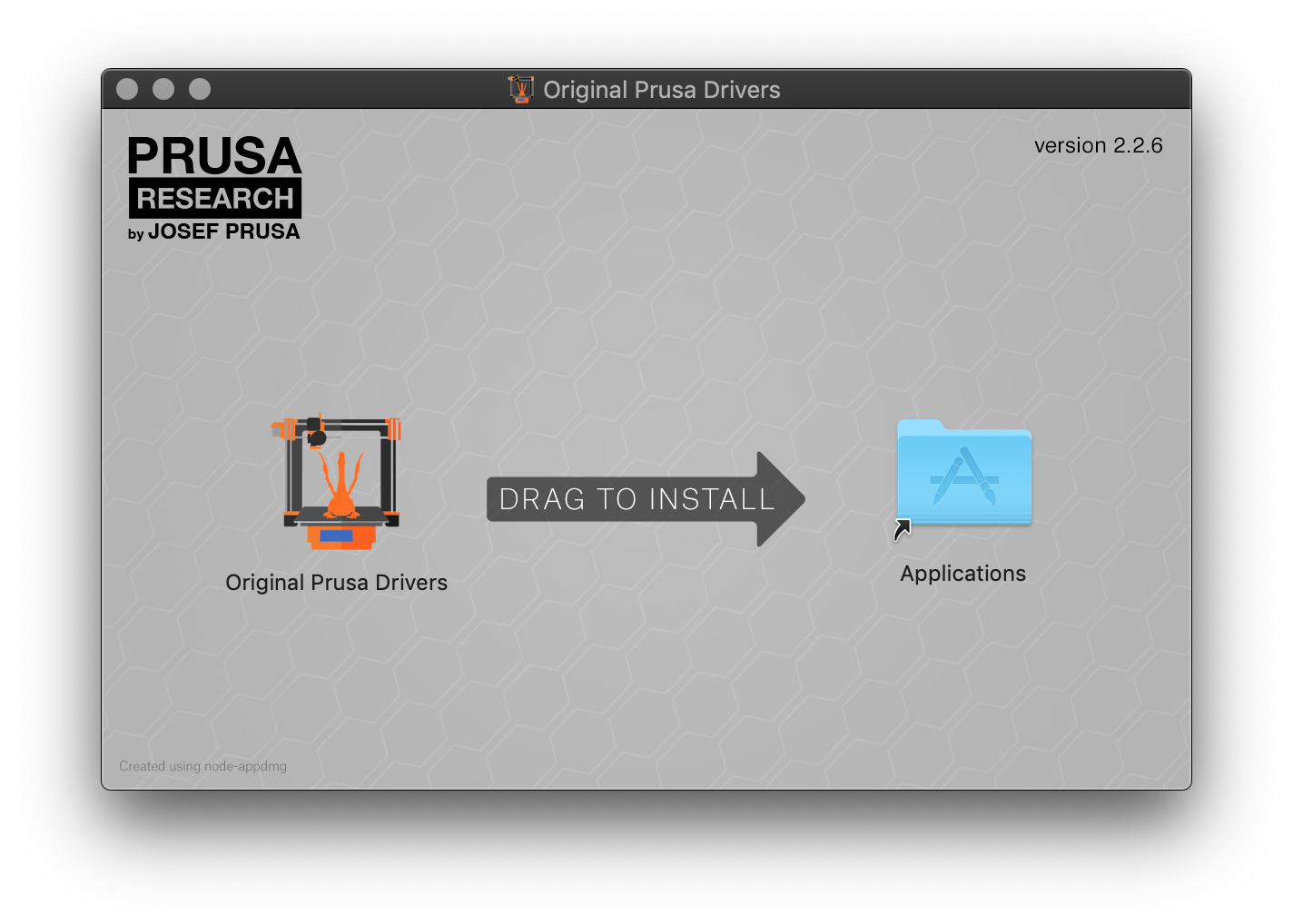
                  macOS_install

                  Linux (including Chrome OS)

                  PrusaSlicer can be installed on Linux as a Flatpak through

                  Flathub. To use it, you must first install Flatpak and add the Flathub repository to the list of remotes. To do so, it is best to follow the steps here: Flathub Quick Setup Page.

                  For example, on the latest Ubuntu, this is as simple as

                  Than restart your system.

                  Some distributions, like Mint, have Flatpak already installed and set up

                  To verify that Flatpak is properly installed on your system, you can run

                  Once Flatpak is properly installed and the Flathub repository is added, you can install PrusaSlicer via your distribution software center if your distribution allows it. Alternatively, you can use the install button here: Flathub or install it via terminal by running:

                  After the installation, PrusaSlicer will be integrated into your desktop environment, and you can run it as you would any other application. If you prefer using the terminal, you can do:

                  to run PrusaSlicer.

                  Install without superuser privileges

                  You need superuser privileges to install Flatpak. However, you can install PrusaSlicer without it. You can use the --user option to run all Flatpak commands and install PrusaSlicer for the current user without requiring sudo. Remember to add the Flathub repository for the current user. In the end, this boils down to:

                  Using Flatpak for Alpha, Beta, and RC Releases

                  To try the prerelease version of PrusaSlicer, you’ll need to use Flatpak from the terminal. Add the Flathub-beta repository (you only need to do this once):

                  To install the latest version of PrusaSlicer:

                  To run PrusaSlicer from the terminal, you can do:

                  Note: that you can run all the mentioned commands with the --user option if you do not have superuser privileges on your machine.
                  Note: PrusaSlicer appears on GitHub first, so Flathub releases may be delayed by a few hours for build processing.

                  Troubleshooting

                  Installation issue

                  If you have issues with the installation, ensure that Flatpak is installed:

                  and that the Flathub remote is properly set up

                  I cannot access some files/directories

                  Flatpak limits the files and directories that an application can access. By default PrusaSlicer can access files in the $HOME directory, /run/media and /media (to allow interaction with USB drives).

                  If you have a remote drive mounted elsewhere, or simply a symlink to a non-standard location you want to access from within PrusaSlicer, you must allow it to do so.

                  The most straightforward approach is to install Flatseal (see How do I install Flatseal?) and enable the necessary access permissions there. Open Flatseal, navigate to PrusaSlicer -> Filesystem -> Other files and add in locations you need. Alternatively, you can simply check the option All system files, but this is not recommended.
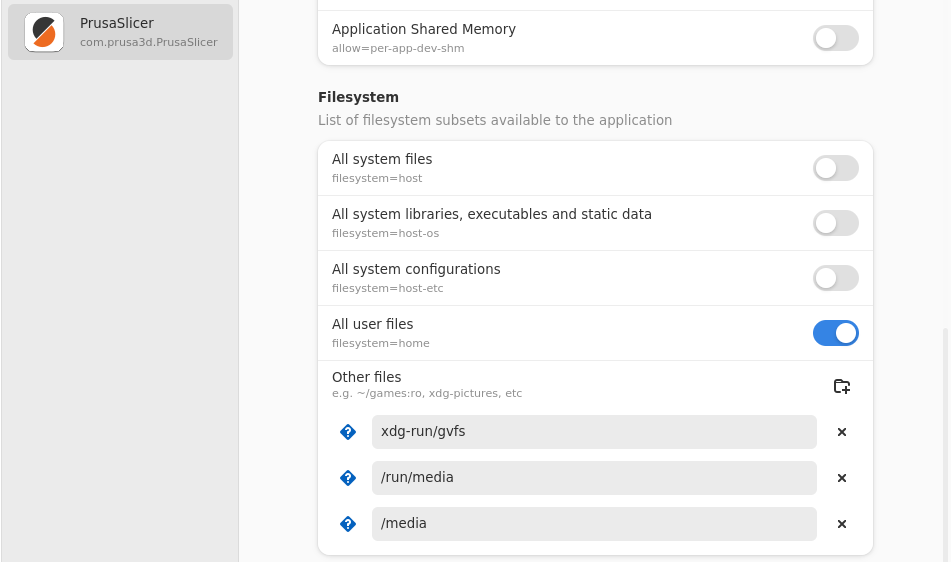
                  access some files/directories

                  PrusaSlicer is in light mode even though my system theme is dark – Help! PrusaSlicer is in light mode, and it's burning my eyes!

                  PrusaSlicer aims to always use dark theme if the host system uses it. The PrusaSlicer Flatpak determines if the host system is using a specific theme during installation. If it does it tries to download the appropriate Flatpak version of the theme. This may not always work due to differences between Linux distributions and the variety of available themes. Nevertheless, you should always make sure to switch the theme of your system first and reinstall the PrusaSlicer Flatpak afterwards. The re-installation is performed by running:

                  If for any reason the application is still in light mode (which may very well happen), there is a fallback option. First, install Flatseal (see How do I install Flatseal?), and then navigate to PrusaSlicer -> Environment -> Variables and set

                  I want to switch to a language, but the language is not listed

                  By default, Flatpak will not download all the language options, but you can configure Flatapak to download and install all the languages you want. For example, to enable the download of Czech locales for all your Flatpak applications you can do:

                  You will have to reinstall PrusaSlicer afterward. The re-installation is performed by running:

                  How do I install Flatseal?

                  To install Flatseal you can do:

                  assuming Flatpak is already installed on your system and the Flathub repository is correctly set up.


                  Was this article helpful?
                  This action is available only to registered users. Please log-in.

                  Topics

                  • PrusaSlicer 2.9 (Legacy)
                    • About PrusaSlicer
                      • First print with PrusaSlicer (2.9)
                      • FAQ - PrusaSlicer
                      • Install PrusaSlicer
                      • Get support
                      • PrusaSlicer General info
                      • Download PrusaSlicer
                      • Minimum system requirements
                      • Printables in PrusaSlicer
                      • Multiple build plates on PrusaSlicer
                      • EasyPrint
                    • Configuration and profiles
                    • User interface
                    • Input/output
                    • Left toolbar
                    • Top toolbar
                    • Print settings
                    • Filament settings
                    • Printer settings
                    • Advanced features
                    • Multi-material slicing
                    • SLA slicing
                    • Other (PrusaSlicer)

                  46 comments

                  Log in  to post a comment
                  GPRay
                  •
                  I have a recent Prusa CORE one L from Prusa and have downloaded PrusaSlicer several times. In setting up the slicer I have a problem transferring data to my Core one machine in the top line setup of the slicer. I think the problem lies in the database listing all the machines officially supported. The coreL does not appear to be in that list, despite my cleaning out my previous attempts and reinstalling new ones from the official Prusa site I would have expected to solve this lack with new uploads. By comparison, every time I tried using G codes on the data stick, that came with the CORE including building the spaceship, worked fine. Bad weather in my area corrupted my passwords so I also had to make a new one, which I am now using.
                  Reply
                  markku_pentilla
                  •
                  what to do with error in install when it tries to open link and it does not find anything?
                  Reply
                  miniellipse
                  •
                  Why did you complicate Linux people's lives? Appimage worked just fine.
                  Reply
                  Alex Brown
                  •
                  Realy agree with this !
                  Reply
                  bad_science
                  •
                  I'm using the Windows portable build of PrusaSlicer via Wine on Ubuntu. There are a few visual quirks in places, but it's good enough. There is also Bambulab's Orca, which is still available via AppImage. Not everyone enjoys having Flatpak jammed down their throats, really disappointed in Prusa for this move.
                  Reply
                  Crash Cash
                  •
                  https://dl.flathub.org/repo/ tells me "403 forbidden" so I can't download PrusaSlicer for Linux
                  Reply