AA

Featured products

    Popular categories

      Trending searches

        Articles

          Blog

            Products

              Categories

                Suggested searches

                  Searching…
                  No results
                  Something went wrong.
                  ↑↓ Select↵ OpenEsc Close search
                  • English
                  • Čeština
                  • Deutsch
                  • Español
                  • Français
                  • Italiano
                  • Polski
                  • 日本語
                  • Orders
                  • Address
                  • In-stock Alerts
                  • My Courses
                  • Subscription
                  • Edit Account
                  • 3D printers9+▾

                    3D printersnew

                    newPrusa CORE One L+Learn more
                    newPrusa CORE One+ (Gen 2)Learn more
                    newPrusa CORE One L+ INDX 8-ToolnewPrusa CORE One+ (Gen 2) INDX 8-ToolPrusa CORE One L+: Critical InfrastructureOriginal Prusa MK4SnewOriginal Prusa XL+Original Prusa XL+: Critical Infrastructure

                    Printer upgrades

                    newINDX Conversion KitsnewPrusa CORE One L to CORE One L+ upgradenewPrusa CORE One+ to Prusa CORE One+ (Gen 2)newPrusa XL to Prusa XL+ Upgrade
                    Prusa Reward ProgramLove your Prusa printer? Share your experience and earn $30 Prusa e-shop vouchers.
                    How to Choose a 3D Printer?We’ll walk you through the basics to find the exact machine for your space, budget, and ideas.
                    Free E-bookDownload a free e-book Basics of 3D Printing with Josef Prusa and make your first steps in 3D printing world
                    Original Prusa Printable PartsCollections of printable spare parts for Original Prusa 3D printers and upgrades.
                    Shipping informationRegularly updated info about the current manufacturing capacity and delivery times of our printers.
                    Custom 3D PrintingProfessional custom 3D printing from various materials according to your requirements.
                  • Materials▾

                    Filaments

                    PrusamentPLAPETGASA / ABSPC (Polycarbonate)PA (Nylon)FlexCompositesSpecialMaterials clearance sale

                    Resin

                    Prusament ResinResin Cleaner
                    Filament GuideCheck my Prusament Spool
                    Prusament.com
                  • Parts & Accessories▾

                    Accessories

                    EnclosuresNozzlesPrint SheetsEssential AccessoriesCameras & AddonsTools & CraftingAdhesives

                    Spare parts

                    Merchandise

                    Spare parts - All PrintersCORE OneMK4/S & MK3.9/SMK3/S/+XL
                    Merch
                  • For Business▾
                    Prusa Pro HT90Prusa Pro SLXPrusa Pro AFSPrusa Pro Medical OneOriginal Prusa XLOriginal Prusa XL: Critical Infrastructure
                    Prusa CORE One+Learn more
                    Prusa CORE One LLearn more
                    Prusa CORE One L: Critical Infrastructure Edition

                    3D Printing for

                    Manufacturing and R&DAutomotive IndustryHealthcareEducation and Academic ResearchArchitects and DesignersFilm IndustryCritical Infrastructure

                    3D Printing Stories

                    • How 3D printing started: About Rep-rap and open-source with Adrian Bowyer
                    • Teaching mathematics redefined with 3D printing at JKU Linz
                    • The story behind the LTT screwdriver
                    • Victoria Hand Project: Changing Prosthetic Care with 3D Printing
                    Official Prusa Resellers
                    Sustainability
                    Prusa Education
                    Contact and Inquiry
                    Custom 3D Printing
                    ISO Certified
                  • Software▾
                    PrusaSlicer

                    PrusaSlicerPrusaSlicer

                    PrusaSlicer is an open-source, feature-rich, frequently updated tool that contains everything you need to export the perfect print files for your 3D printer.

                    WindowsMacOSLinux
                    Prusa Connect

                    Prusa Connect

                    Prusa Connect is a cloud service enabling remote control and monitoring of your 3D printers, offering secure data handling, easy setup, and support for managing multiple printers from anywhere.

                    Log in to Connect
                    Prusa.app

                    Prusa.app

                    Control your printer/s remotely from anywhere using the Prusa Connect technology behind. Prusa.app brings a new level of Prusa printer experience to Android and iOS phones.

                    Try it now!
                    Drivers & FirmwareDownload the latest firmware and drivers for your 3D printer.
                    PrusaSlicer Support
                    Prusa Connect Support
                  • 3D Models▾
                    3D PrintersArt & DesignHobby & MakersHouseholdTabletop MiniaturesToys & GamesPrintables Store

                    Popular 3D models

                    • Strong garden hose holder
                    • Prusa Spool Bot
                    • Build Tray — Modular Organizer for Assembly, Disassembly and Maintenance
                    • Broom Holder
                    • Octagon Fabric
                    • Prusa CORE One ? (Mimic Skin)

                    Design Contests

                    • Framework Laptop 12 Mainboard Re-Use9/1/2026 – 9/30/2026
                    • 🏆 Designer Challenge: Magic tricks!9/1/2026 – 9/22/2026
                    • Makeup Organizers9/4/2026 – 9/20/2026
                  • Community▾

                    Upcoming Events

                    • 3D Printopia 20269/26/2026 – 9/27/2026 · Pennsylvania, United States · Prusa Team
                    • Maker Faire Bay Area9/25/2026 – 9/27/2026 · Kalifornie, United States · Prusa Team
                    • Hobby Messe10/2/2026 – 10/4/2026 · Sachsen, Germany · Prusa Team
                    • Mezinárodní strojírenský veletrh10/6/2026 – 10/9/2026 · Jihomoravský kraj, Czechia · Prusa Team

                    Prusa Forum

                    • Prusament PLA ColorMix: Print 45 color shades using just five filament spools
                    • Horizontal banding (is this over-extrusion)?
                    • Can you print PC on your L+ Gen 2?
                    Prusa World MapPrusa World MapFind local 3D printing users and explore the community around you.
                  • Help▾
                    Guides & TutorialsPrusaSlicerPrusa ConnectMaterials

                    Printer Model

                    CORE One INDXCORE One LCORE One+CORE One

                    Hardware Troubleshooting

                    • Selftest failed (CORE One/+)
                    • Clogged nozzle (CORE One, CORE One L, XL, MK4/S, MK3.9/S)
                    • Adjusting belt tension (CORE One/+, CORE One INDX, CORE One L/+)
                    • Prusa Connect and PrusaLink explained

                    Drivers & Firmware

                    INDX familyCORE One familyMK4 familyXL familyMMU familyPRO family
                  • Courses▾

                    Become an expert in 3D printing

                    Prusa Academy offers online courses on various 3D printing related topics. Each course features:

                    • easy-to-read text with many pictures and short videos
                    • links for inspiration and further study
                    • quizzes for testing your knowledge along the way
                    • certificate of completion
                    Browse all coursesMy courses library
                    • 3D Modeling in Autodesk Fusion
                    • PrusaSlicer Masterclass – Beginner to Advanced
                    • Complete Guide to 3D Print Postprocessing, Painting, and Detailing
                    • Airbrush Your 3D Prints: From Basics to Advanced Tricks
                  • Blog▾
                    • Prusament PLA ColorMix: Print 45 color shades using just five filament spools (and more)
                    • Back-to-School 2026 Deals Are Here!
                    • PrusaSlicer 3.0 Preview – Built for the Future of 3D Printing
                    E-Book: Basics of 3D Printing
                  • Company▾

                    About Prusa Research

                    We are the largest maker of 3D printers in Europe and the United States.

                    Founded as a one-man startup in 2012 by Josef Prusa, a Czech hobbyist, maker, and inventor. In just 15 years, we've grown into a company of more than 1,200 people. Every month, we design, build, and ship over 10,000 innovative and secure 3D printers from our headquarters in Prague, Czech Republic, and Delaware, USA, to users in more than 160 countries.

                    Watch a video and find out how Prusa Research was born and what we achieved within only 10 years!

                    About UsTimelineSustainabilityOpen-source
                    About Us
                    Contact Us
                    Logo and Photos
                    ISO Certified
                  1. Support
                  2. Original Prusa i3 MK2.5
                  3. Printer troubleshooting
                  4. Hotend fan is not spinning
                   

                  Contents

                  • When the Hotend fan should actually spin

                  Blog

                  • Prusament PLA ColorMix: Print 45 color shades using just five filament spools (and more)
                  • Back-to-School 2026 Deals Are Here!
                  • PrusaSlicer 3.0 Preview – Built for the Future of 3D Printing

                  Newsletter

                  Signup and get our monthly squeeze on updates, blog, printables and much more.

                  By clicking, you agree to receive our newsletter.

                  This site is protected by reCAPTCHA Enterprise and the Google Privacy Policy and Terms of Service apply.

                  Strong garden hose holder
                  E-shop
                  • 3D Printers
                  • Printer Upgrades
                  • Filaments
                  • Accessories
                  • Prusa Merchandise

                  © Prusa Research a.s.

                  Printables
                  • 3D Models
                  • Store
                  • Clubs
                  • 3D Design Contests
                  • Brands
                  Community
                  • World Map
                  • Forum
                  • User Groups
                  • Events
                  Help
                  • Prusa Help
                  • Prusa Academy
                  • 3D Printing Calculators
                  Software
                  • PrusaSlicer
                  • Prusa.app
                  • Prusa Connect
                  • Drivers and Software
                  Company
                  • About Us
                  • Blog
                  • Official Prusa Resellers
                  • Contact Us
                  • Certified for ISO 9001, ISO 14001, ISO 45001
                  • General Terms and Conditions
                  • General Terms and Conditions of Use of the PRUSA Websites
                  • Privacy Policy
                  • Information about cookies
                  • Customer Complaints Policy
                  • Status Page
                  • Do Not Sell or Share My Personal Information
                  • Supplemental Statements
                  • General Terms and Conditions
                  • General Terms and Conditions of Use of the PRUSA Websites
                  • Privacy Policy
                  • Information about cookies
                  • Customer Complaints Policy
                  • Status Page
                  • Do Not Sell or Share My Personal Information
                  • Supplemental Statements

                  © Prusa Research a.s.

                  JOSEF PRUSA®, PRUSA RESEARCH®, PRUSA POLYMERS®, PRUSA ORANGE®, PRUSA 3D ® AND PRUSAMENT® are registered trademarks of Prusa Development a.s. used by Prusa Research a.s. under licence from Prusa Development a.s.

                  Hotend fan is not spinning

                  Relevant for

                  Plus 1.75 mm
                  MK2.5
                  MK2.5S
                  MK3
                  MK3S
                  +
                  4 comments
                  Article is also available in following languages
                  English
                  Čeština
                  Polski
                  Deutsch
                  Français
                  Español
                  Italiano
                  日本語

                  This issue can be preceded by the error Err: EXTR. FAN ERROR. Before we start checking your Hotend fan, power down and unplug your USB cable if it's connected. Open the electronics covering and examine the Mini RAMBo electronics wiring (MK2S, MK2.5, MK2.5S) or Einsy RAMBo electronics wiring (MK3/MK3S/MK3S+).

                  Make sure that the fan is:

                  1. Plugged into the right connector.
                  2. Plugged in with the proper connector orientation.
                  3. Plugged in completely and making good electrical contact.

                  You can easily test the nozzle Hotend fan function from the LCD menu Preheat - PLA. From when the Hotend temperature reaches 50 °C, the fan should immediately spin up.

                  On MK2.5S/MK3S - From the LCD menu - Support - Extruder Info, you can find the RPM reading of the 3-wire fans that support this. The expected range should be from ~3500 - 4200 RPM on both fans, when run at full speed. Only the print fan speed can be adjusted by the user.

                  If the fan doesn't spin up, you can unplug it from the electronics board and test it with the 12V DC (MK2/S) or 5V DC (MK3) power source. If the fan spins up to an external power source, check all the electronics wiring in Mini RAMBo electronics wiring (MK2S, MK2.5, MK2.5S) or Einsy RAMBo electronics wiring (MK3/MK3S/MK3S+) and potentially a Blown Fuse (MK2S/MK2.5/MK2.5S). If the fan has a yellow sensor wire, it must be connected to ground (GND) for the fan to spin.

                  When the Hotend fan should actually spin

                  Hotend cooling fan cools down the top part of the Hotend (heatsink) from the heat which is transferred from the heater block. It always starts up when Hotend temperature reading reaches 50°C and spins for the whole duration of the print! If the fan is not functioning, you can expect the nozzle to jam after the first few layers due to heat creep.
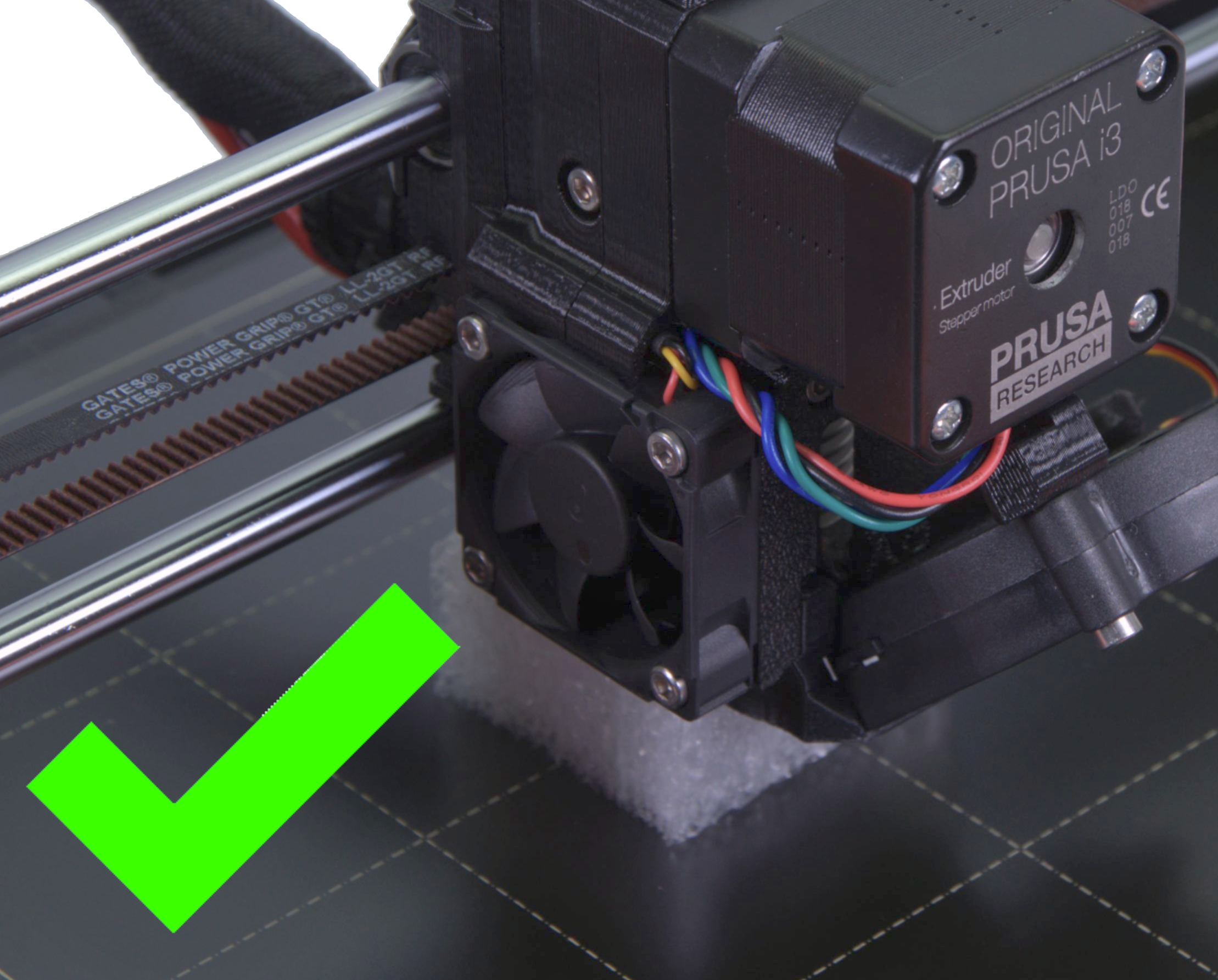
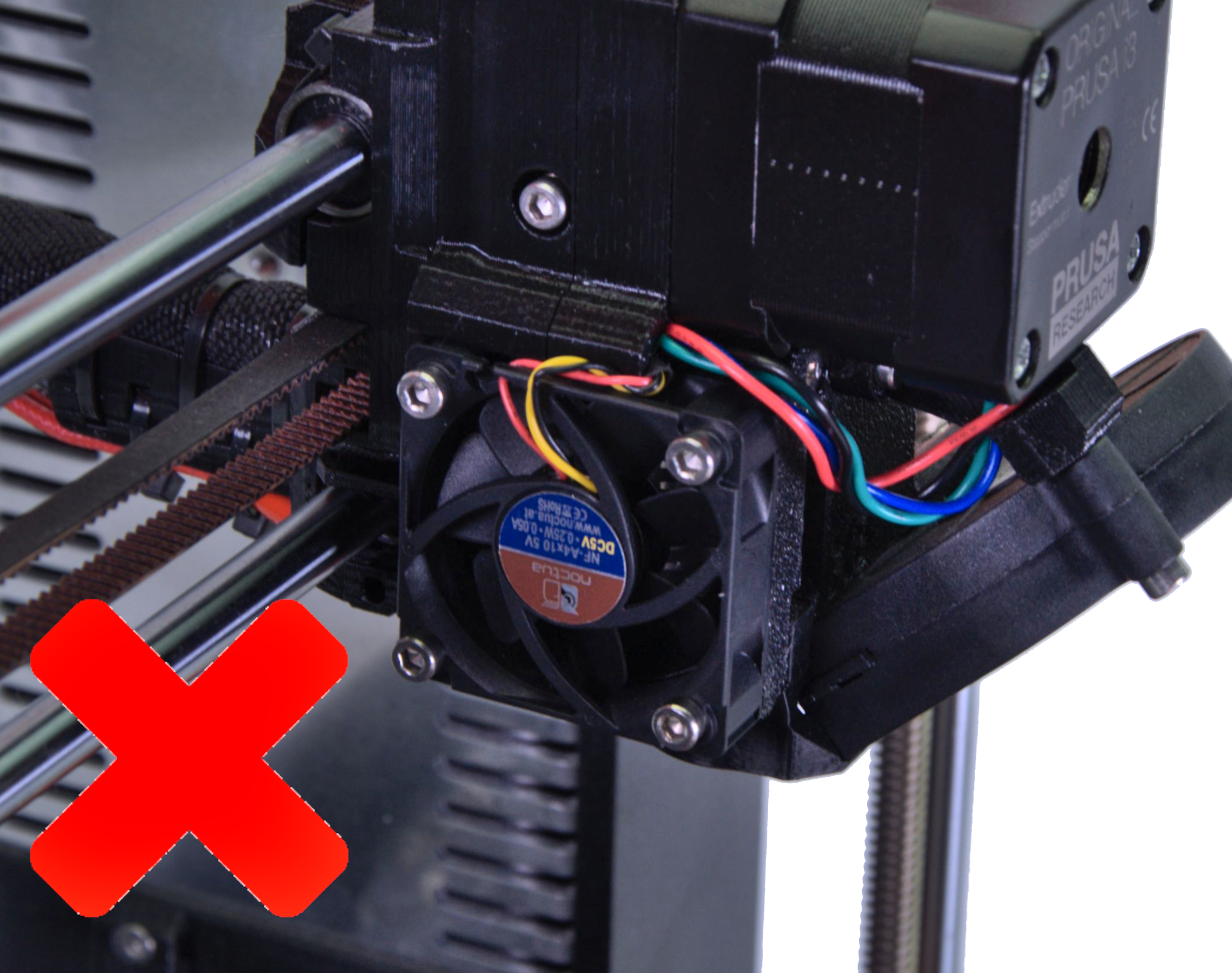
                  Always make sure that the fan is pushing the air in through and around the heatsink and not out. The proper orientation of the hotend fan can be checked with the photo below.
                  Correct: Sticker facing inwardsNOT Correct: Sticker facing outwards
                  Was this article helpful?
                  This action is available only to registered users. Please log-in.

                  2 comments

                  Log in  to post a comment
                  Santiago
                  •
                  Hi, I accidentally touched the hotend fan when it was running (I have a MINI+). It stopped for a second and resume running for a while. Now it cannot start again. It seems extremely fragile just to stop spinning because I slightly touched it a second. Is there anything I can do to fix it? Thanks,
                  Reply
                  William H. - Official Prusa
                  •

                  It will only spin when the nozzle temp is above 50 degrees C

                  Reply
                  Doug
                  •
                  "....you can unplug it from the electronics board and test it with the 12V DC (MK2/S) or 5V DC (MK3) power source."
                   
                  How would you do this? I've tested wire continuity, and that passed. Would like to test if the fan actually works.
                  Reply
                  William H. - Official Prusa
                  •

                  Phone chargers are normally 5V (if MK3), so you can snip an old broken USB cable and connect the White and red or black and red cable to this. A pc PSU is often 12V.

                  If you are testing a fan with a yellow sensor wire, this may need to be connected to ground.

                  Reply

                  Topics

                  • Troubleshooting
                    • Printer troubleshooting
                      • Blown Fuse (MK3/MK3S/MK3S+)
                      • Extrusion stopped mid-print (Heat creep)
                      • Spaghetti monster
                      • Extruder blob
                      • Clogged nozzle/hotend (MK3.5/S, MK3S+, MK2.5S)
                      • Extruder noises
                      • Filament Not Loading
                      • Misaligned PINDA Sensor (MK2/S)
                      • Print fan is not spinning
                      • Hotend fan is not spinning
                      • Heatbed not heating up properly
                      • P.I.N.D.A./SuperPINDA Sensor testing
                      • SD card not working
                      • LCD screen not working
                      • Printer does not turn on or keeps turning off
                      • Blown Fuse (MK2S/MK2.5/MK2.5S)
                      • MK3S keeps prompting filament change
                      • Vibration when printing (MK3S+/MK2.5S)
                      • Factory reset (MK2S/MK2.5S/MK3S)
                      • Firmware updating issues (MK2.5S/MK3S+/MMU2S/MMU3)
                      • Nozzle crashed into the heatbed
                      • External SPI flash W25X20CL/xFLASH not responding - error
                      • IR Filament Sensor Troubleshooting (MK2.5S, MK3S)
                      • Failing Z calibration (MK3S/MK2.5S)
                      • Ambient temperature check (MK3/MK3S)
                      • PrusaLink Troubleshooting
                      • Tangled filament
                      • SD cards and USB drives
                    • Print Quality Troubleshooting
                    • QR Error codes
                    • Print Error Messages