Prusa
  • SHOP
    • Latest products
    BY CATEGORY
    • 3D printersnew
    • 3D printer upgradesnew
    • Materials
    • Accessories
    • Spare parts
    • Courses
    • Merch
    • Get a price quote
    QUICK LINKS
    • Shipping & delivery
    • Returns & refunds
    • Payment & financing
    • Warranty
    • VAT & Customs fees
    • FAQ

    0 item in your cartitems in your cart

    Your cart is empty

    Go to cartShop 3D printers

    My profile

    Log in to see orders, saved items

    My profile

    Signed in as

    • Orders
    • Logout
  • 3D PRINTING
    • Explore 3D printing
    FOR BEGINNERS
    • 3D printing 101
    • How FDM printing works
    • Buying your first printer
    • 3D model catalog
    BY APPLICATION
    • Rapid prototyping
    • Manufacturing
    • Engineering
    • Research
    • Arts & design
    GO DEEPER
    • Materials guide
    • Courses
    • Webinars
    • Case studies
    • Custom 3D printing
  • 3D PRINTERS
    • All 3D printers
    FOR
    • Home or garageHobbyists, tinkerers and home printing
    • BusinessIn-house production for small teams
    • EnterpriseFleets, security and scale
    • Which Prusa is right for me
    SHOP & BROWSE
    • CORE One+new
    • CORE One+ INDXnew
    • CORE One L+new
    • CORE One L+ INDXnew
    • XL+new
    • MK4S
    • Prusa Pro HT90
    • Prusa Pro AFS
    • Prusa Pro SLX
    MORE FROM PRINTERS
    • Parts & upgradesnew
    • Critical infrastructure
    • Case studies
    • Signature Oak
    • Kits
  • MATERIALS
    • All materials
    BY USE
    • Every-day & design
    • Functional engineering
    • Composites
    • Pro speciality
    • SLA resins
    PRUSAMENT
    • PLA
    • PETG
    • ASA
    • PC
    • PA11
    • Flex
    • TPU
    MORE FROM MATERIALS
    • Materials guide
    • We make material in house
    • Sustainability
    • Order on the store
  • SOFTWARE
    • All software
    PREPARE THE PRINT
    • PrusaSlicer 3.0New
    PRINT & MONITOR
    • Prusa Connect
    • EasyPrint
    • iOS & Android app
    • Prusa Farm
    GET STARTED
    • Download & install
    • Knowledge base
    MORE FROM SOFTWARE
    • 3D model catalog
  • SUPPORT
    • Explore support
    FIND ANSWERS
    • Knowledge base
    • Troubleshooting
    • Courses
    • Webinars
    GET HELP
    • Contact us
    • Livechat
    • Shipping & delivery
    • Warranty
    • Returns & refunds
    • Service & spare parts
    • Service & Repair
    COMMUNITY
    • Forum
    • Reddit
    • Printables
  • TRUST CENTER
    • Trust Center overview
    BY TOPIC
    • GDPR
    • Certificates
    • Security
    • Compliance
    COMMITMENTS
    • Sustainability report
    TALK TO US
    • Contact the security team
  • COMPANY
    • About Prusa
    GET TO KNOW US
    • Our story
    • How we make printers
    • Open source
    • Brand & media kit
    NEWS
    • Blog
    • Newsroom
    • Events
    TRUST & PARTNERS
    • Sustainability
    • Resellers & distributors
    • Affiliate program
    • Contact
    • English
    • Čeština
    • Deutsch
    • Español
    • Français
    • Italiano
    • Polski
    • 日本語
  • Signed in as

    • Orders
    • Address
    • In-stock Alerts
    • My Courses
    • Subscription
    • Edit Account
    • Logout

Log in to see orders, saved items

Signed in as
  • Orders
  • Address
  • In-stock Alerts
  • My Courses
  • Subscription
  • Edit Account
  • English
  • Čeština
  • Deutsch
  • Español
  • Français
  • Italiano
  • Polski
  • 日本語
Shop

0 item in your cartitems in your cart

Your cart is empty

Go to cartShop 3D printers

My profile

Log in to see orders, saved items

My profile

Signed in as

  • Orders
  • Logout
SHOP
  • Latest products
BY CATEGORY
  • 3D printersnew
  • 3D printer upgradesnew
  • Materials
  • Accessories
  • Spare parts
  • Courses
  • Merch
  • Get a price quote
QUICK LINKS
  • Shipping & delivery
  • Returns & refunds
  • Payment & financing
  • Warranty
  • VAT & Customs fees
  • FAQ

Featured products

    Popular categories

      Trending searches

        Articles

          Blog

            Products

              Categories

                Suggested searches

                  Searching…
                  No results
                  Something went wrong.
                  ↑↓ Select↵ OpenEsc Close search
                  1. Support
                  2. Original Prusa i3 MK2S
                  3. Left toolbar
                  4. Cut tool
                   

                  Contents

                  • Planar mode
                  • Dovetail mode
                  • Cut result
                  • Other features

                  Blog

                  • Print colorful and glowing Halloween decorations with our spooky offer
                  • Factorio Has Arrived on Printables
                  • Prusament PLA Lightweight: 65% lighter than regular PLA. Perfect choice for aircraft, cosplay, and more.

                  Newsletter

                  Signup and get our monthly squeeze on updates, blog, printables and much more.

                  By clicking, you agree to receive our newsletter.

                  This site is protected by reCAPTCHA Enterprise and the Google Privacy Policy and Terms of Service apply.

                  Factorio Transport Belts
                  E-shop
                  • 3D Printers
                  • Printer Upgrades
                  • Filaments
                  • Accessories
                  • Prusa Merchandise

                  © Prusa Research a.s.

                  Printables
                  • 3D Models
                  • Store
                  • Clubs
                  • 3D Design Contests
                  • Brands
                  Community
                  • World Map
                  • Forum
                  • User Groups
                  • Events
                  Help
                  • Prusa Help
                  • Prusa Academy
                  • 3D Printing Calculators
                  Software
                  • PrusaSlicer
                  • Prusa.app
                  • Prusa Connect
                  • Drivers and Software
                  Company
                  • About Us
                  • Blog
                  • Official Prusa Resellers
                  • Contact Us
                  • Certified for ISO 9001, ISO 14001, ISO 45001
                  • General Terms and Conditions
                  • General Terms and Conditions of Use of the PRUSA Websites
                  • Privacy Policy
                  • Information about cookies
                  • Customer Complaints Policy
                  • Status Page
                  • Do Not Sell or Share My Personal Information
                  • Supplemental Statements
                  • General Terms and Conditions
                  • General Terms and Conditions of Use of the PRUSA Websites
                  • Privacy Policy
                  • Information about cookies
                  • Customer Complaints Policy
                  • Status Page
                  • Do Not Sell or Share My Personal Information
                  • Supplemental Statements

                  © Prusa Research a.s.

                  JOSEF PRUSA®, PRUSA RESEARCH®, PRUSA POLYMERS®, PRUSA ORANGE®, PRUSA 3D ® AND PRUSAMENT® are registered trademarks of Prusa Development a.s. used by Prusa Research a.s. under licence from Prusa Development a.s.

                  Cut tool

                  Relevant for

                  MMU family
                  MINI family
                  MK3 family
                  OLD PRODUCTS
                  SLA family
                  +
                  37 comments
                  Article is also available in following languages
                  English
                  Čeština
                  Polski
                  Deutsch
                  Français
                  Español
                  Italiano
                  日本語

                  In some cases, you might want to cut a model into multiple pieces before printing:

                  • The model is too big to be printed in one piece.
                  • You only want to print a part of a model.
                  • A part of the model needs a different print orientation for added strength.
                  • Printing the model in one piece would require a needlessly large amount of support material.

                  PrusaSlicer provides an advanced cutting function:

                  • Cut models at any angle.
                  • Select which parts to separate and which to keep connected.
                  • Generate connectors and dowel pins for easy assembly.

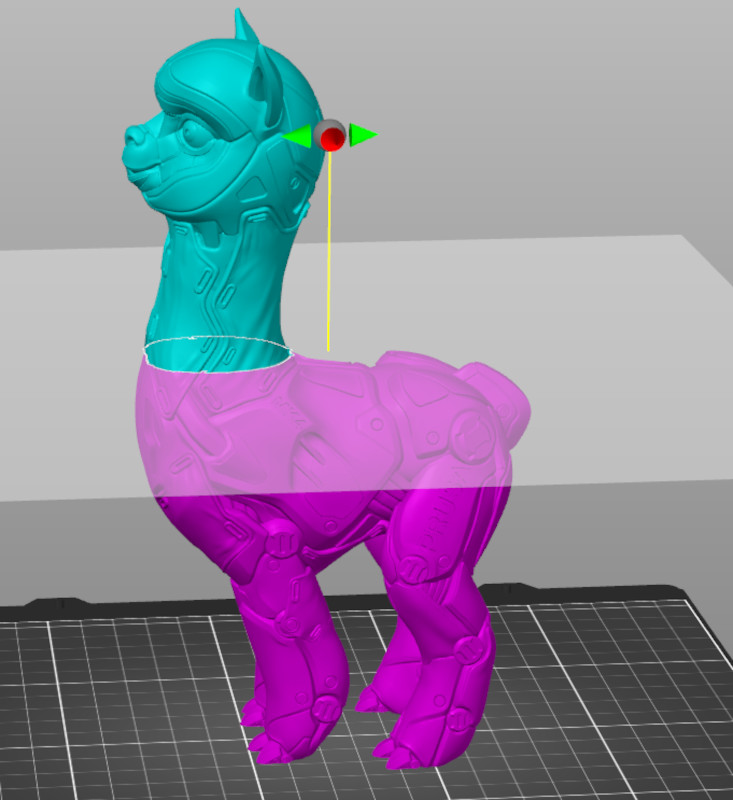
                  Select the object and press the C key or pick the Cut tool from the left toolbar. A widget showing the cutting plane will appear on the object, and a context menu will appear on the left side menu. On the menu, you can choose Planar mode or Dovetail mode.

                  Planar mode

                  If planar mode is selected, the cut will be made on a straight plane wherever you place the cutting widget. With this widget, you can select where the cut will be placed in the Z, X, and Y axes.

                  Enter an exact value [mm] in the context menu to set the cutting plane position on the Z axis. To change the rotation of the cutting plane, use the arrows on top of the cutting widget.  

                  The cut widget can be placed back in the initial position by clicking the Reset cut button. Note that this will also remove the connectors.
                  Connectors

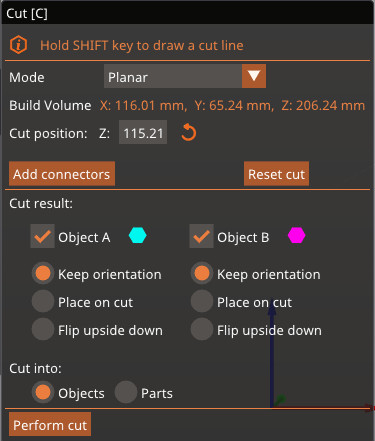
                  Under the axes information, you can add connectors between the cut parts. When this option is selected, a new menu will show to format the connector. Use the left mouse button to add a connector, and the right button to remove it.

                  The standard connector is a circular prism plug, but you can choose between three different types of connectors:

                  • Plug: adds a plug to the side of the cut and subtracts the space for it from the other side
                  • Dowel: subtracts the pin from both sides and generates an extra object to print as the connector
                  • Snap: Adds a snap-fit connector on one side and subtracts the space to fit it on the other side

                  You can also choose the plugs' style, shape, depth size, and rotation. If you wish to change the side of the cut for the plug and snap connectors, click on Flip cut plane.
                  Dovetail mode

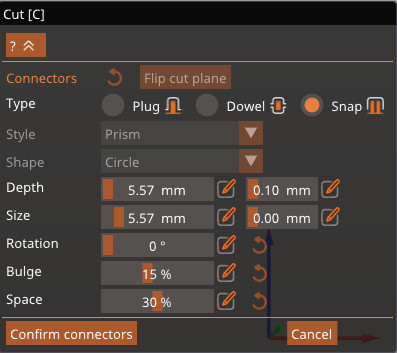
                  The Dovetail mode creates a pin and a tail in a trapezoidal shape on the cut plane. When this option is selected, the cut widget has the same movement as the planar mode, as well as an arrow to adjust the position of the tail. Under the axes information, it is possible to adjust the dimensions of the tail.
                  Cut result

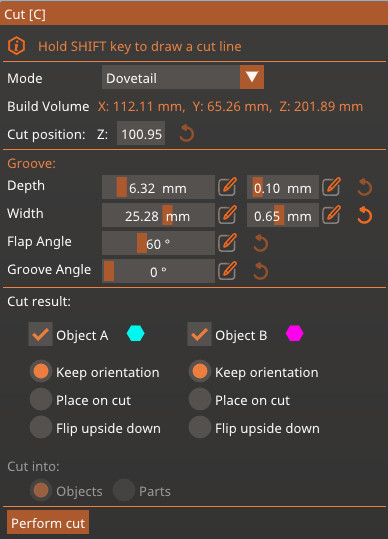
                  It is possible to choose if the cut will form two different objects, or if it will cut the same object into two different parts.

                  If the option to cut the object into parts is selected, the object will be split into two different sectors that can have different settings, but they will remain connected. Note that this option is not available if the Dovetail mode is selected.

                  If the option cut into parts is selected, it is possible to choose what happens to each new object: keep the current orientation, place the part where the cut was made down on the print surface, or flip the part upside down from the current orientation.

                  Other features

                  Select which parts to separate and which to keep connected

                  If the cutting plane intersects the model in several different regions, you can select which parts to cut and which to keep connected by right-clicking them.


                  Add cut plane

                  You can also hold down the Shift key and click on two points on the screen to quickly define a cutting plane. The cutting plane will be perpendicular to the current view.


                  Was this article helpful?
                  This action is available only to registered users. Please log-in.

                  Topics

                  • PrusaSlicer 2.9 (Legacy)
                    • Left toolbar
                      • Cut tool
                      • Place on Face tool
                      • Move, Rotate, Scale tools
                      • Paint-on supports
                      • Seam painting
                      • Measurement tool
                    • About PrusaSlicer
                    • Configuration and profiles
                    • User interface
                    • Input/output
                    • Top toolbar
                    • Print settings
                    • Filament settings
                    • Printer settings
                    • Advanced features
                    • Multi-material slicing
                    • SLA slicing
                    • Other (PrusaSlicer)

                  24 comments

                  Log in  to post a comment
                  dmbgo
                  •
                  Play buttons, as if there was a video, but nothing there. A video example would be great.
                  Reply
                  Jan Kratochvíl
                  •
                  Hello. There are animations - try different browser.
                  Reply
                  chattercoma
                  •
                  Say I need to cut the model into 4 parts to fit them on my printer bed. I'm thinking Slicer would somehow keep a list or collection of the four parts as I cut the model up, so I could then slice and print each of them. I don't see any feature like that. The alternative is to manually keep track of the precise location(s) of the cut plane(s) with paper and pencil and re-create each of the 4 pieces from the original model one-at-a-time. This approach not only seems too laborious to do, but also not very accurate and will probably have a poor outcome.

                  The manual page here doesn't discuss this at all, but it seems like the main and best motivation for having the Cut feature on the Slicer. Can you shed any light on this?
                  Reply
                  Fredericksdownfall
                  •
                  I am trying to cut a viking longship into three pieces but I am not even sure what to do when I have made the first cut. How do I save each part separately for printing but also so I can put a second cut further down the ships hull. I cant find anything in the literature that makes this clear

                  I have a screenshot of what I mean but not sure how to post it here
                  Reply
                  Buluk
                  •
                  It would be great to be able to align or place more precisely the connectors on the plan.
                  Otherwise it's a cool feature.
                  Reply
                  ScrappeyDP
                  •
                  What does the Tolerance do next to Width and Depth?
                  Is there a way to loosen the dovetail fit of the parts so they don't fit together so tightly? I am having issues with fitment
                  Reply
                  Jan Kratochvíl
                  •
                  Yes, the tolerances are for better fit of the pins or dovetails.
                  Reply