Prusa
  • SHOP
    • Latest products
    BY CATEGORY
    • 3D printersnew
    • 3D printer upgradesnew
    • Materials
    • Accessories
    • Spare parts
    • Courses
    • Merch
    • Get a price quote
    QUICK LINKS
    • Shipping & delivery
    • Returns & refunds
    • Payment & financing
    • Warranty
    • VAT & Customs fees
    • FAQ

    0 item in your cartitems in your cart

    Your cart is empty

    Go to cartShop 3D printers

    My profile

    Log in to see orders, saved items

    My profile

    Signed in as

    • Orders
    • Logout
  • 3D PRINTING
    • Explore 3D printing
    FOR BEGINNERS
    • 3D printing 101
    • How FDM printing works
    • Buying your first printer
    • 3D model catalog
    BY APPLICATION
    • Rapid prototyping
    • Manufacturing
    • Engineering
    • Research
    • Arts & design
    GO DEEPER
    • Materials guide
    • Courses
    • Webinars
    • Case studies
    • Custom 3D printing
  • 3D PRINTERS
    • All 3D printers
    FOR
    • Home or garageHobbyists, tinkerers and home printing
    • BusinessIn-house production for small teams
    • EnterpriseFleets, security and scale
    • Which Prusa is right for me
    SHOP & BROWSE
    • CORE One+new
    • CORE One+ INDXnew
    • CORE One L+new
    • CORE One L+ INDXnew
    • XL+new
    • MK4S
    • Prusa Pro HT90
    • Prusa Pro AFS
    • Prusa Pro SLX
    MORE FROM PRINTERS
    • Parts & upgradesnew
    • Spare parts
    • Critical infrastructure
    • Case studies
    • Signature Oak
    • Kits
  • MATERIALS
    • All materials
    BY USE
    • Every-day & design
    • Functional engineering
    • Composites
    • Pro speciality
    • SLA resins
    PRUSAMENT
    • PLA
    • PETG
    • ASA
    • PC
    • PA11
    • Flex
    • TPU
    MORE FROM MATERIALS
    • Materials guide
    • We make material in house
    • Sustainability
    • Order on the store
  • SOFTWARE
    • All software
    PREPARE THE PRINT
    • PrusaSlicer 3.0New
    PRINT & MONITOR
    • Prusa Connect
    • EasyPrint
    • iOS & Android app
    • Prusa Farm
    GET STARTED
    • Download & install
    • Knowledge base
    MORE FROM SOFTWARE
    • 3D model catalog
  • SUPPORT
    • Explore support
    FIND ANSWERS
    • Knowledge base
    • Troubleshooting
    • Courses
    • Webinars
    GET HELP
    • Contact us
    • Livechat
    • Shipping & delivery
    • Warranty
    • Returns & refunds
    • Service & spare parts
    • Service & Repair
    COMMUNITY
    • Forum
    • Reddit
    • Printables
  • TRUST CENTER
    • Trust Center overview
    BY TOPIC
    • GDPR
    • Certificates
    • Security
    • Compliance
    COMMITMENTS
    • Sustainability report
    TALK TO US
    • Contact the security team
  • COMPANY
    • About Prusa
    GET TO KNOW US
    • Our story
    • How we make printers
    • Open source
    • Brand & media kit
    NEWS
    • Blog
    • Newsroom
    • Events
    TRUST & PARTNERS
    • Sustainability
    • Resellers & distributors
    • Affiliate program
    • Contact
    • English
    • Čeština
    • Deutsch
    • Español
    • Français
    • Italiano
    • Polski
    • 日本語
  • Signed in as

    • Orders
    • Address
    • In-stock Alerts
    • My Courses
    • Subscription
    • Edit Account
    • Logout

Log in to see orders, saved items

Signed in as
  • Orders
  • Address
  • In-stock Alerts
  • My Courses
  • Subscription
  • Edit Account
  • English
  • Čeština
  • Deutsch
  • Español
  • Français
  • Italiano
  • Polski
  • 日本語
Shop

0 item in your cartitems in your cart

Your cart is empty

Go to cartShop 3D printers

My profile

Log in to see orders, saved items

My profile

Signed in as

  • Orders
  • Logout
SHOP
  • Latest products
BY CATEGORY
  • 3D printersnew
  • 3D printer upgradesnew
  • Materials
  • Accessories
  • Spare parts
  • Courses
  • Merch
  • Get a price quote
QUICK LINKS
  • Shipping & delivery
  • Returns & refunds
  • Payment & financing
  • Warranty
  • VAT & Customs fees
  • FAQ

Featured products

    Popular categories

      Trending searches

        Articles

          Blog

            Products

              Categories

                Suggested searches

                  Searching…
                  No results
                  Something went wrong.
                  ↑↓ Select↵ OpenEsc Close search
                  1. Support
                  2. Original Prusa i3 MK2.5
                  3. Print Error Messages
                  4. Preheat error (Heatbed)
                   

                  Contents

                  • "Heatbed preheat error" (Heatbed)
                  • How to find out if your Heater or Thermistor is defective for your Nozzle/ Heatbed?
                  • Checking voltages and resistance

                  Blog

                  • Prusament Pellets: Raw material batches for large-format 3D printing or small-scale polymer research & development
                  • Print colorful and glowing Halloween decorations with our spooky offer
                  • Factorio Has Arrived on Printables

                  Newsletter

                  Signup and get our monthly squeeze on updates, blog, printables and much more.

                  By clicking, you agree to receive our newsletter.

                  This site is protected by reCAPTCHA Enterprise and the Google Privacy Policy and Terms of Service apply.

                  Heavy Duty Keyboard Holder (No Supports)
                  E-shop
                  • 3D Printers
                  • Printer Upgrades
                  • Filaments
                  • Accessories
                  • Prusa Merchandise
                  Prusa

                  © Prusa Research a.s.

                  Printables
                  • 3D Models
                  • Store
                  • Clubs
                  • 3D Design Contests
                  • Brands
                  Community
                  • World Map
                  • Forum
                  • User Groups
                  • Events
                  Help
                  • Prusa Help
                  • Prusa Academy
                  • 3D Printing Calculators
                  Software
                  • PrusaSlicer
                  • Prusa.app
                  • Prusa Connect
                  • Drivers and Software
                  Company
                  • About Us
                  • Blog
                  • Official Prusa Resellers
                  • Contact Us
                  • Certified for ISO 9001, ISO 14001, ISO 45001
                  • General Terms and Conditions
                  • General Terms and Conditions of Use of the PRUSA Websites
                  • Privacy Policy
                  • Information about cookies
                  • Customer Complaints Policy
                  • Status Page
                  • Do Not Sell or Share My Personal Information
                  • Supplemental Statements
                  Prusa
                  • General Terms and Conditions
                  • General Terms and Conditions of Use of the PRUSA Websites
                  • Privacy Policy
                  • Information about cookies
                  • Customer Complaints Policy
                  • Status Page
                  • Do Not Sell or Share My Personal Information
                  • Supplemental Statements

                  © Prusa Research a.s.

                  JOSEF PRUSA®, PRUSA RESEARCH®, PRUSA POLYMERS®, PRUSA ORANGE®, PRUSA 3D ® AND PRUSAMENT® are registered trademarks of Prusa Development a.s. used by Prusa Research a.s. under licence from Prusa Development a.s.

                  Preheat error

                  (Heatbed)

                  Relevant for

                  Plus 1.75 mm
                  MK2.5
                  MK2.5S
                  MK3
                  MK3S
                  +
                  11 comments
                  Article is also available in following languages
                  English
                  Čeština
                  Polski
                  Deutsch
                  Français
                  Español
                  Italiano
                  日本語

                  Preheat error can happen with either with your Nozzle or Heated bed. So 1st make sure with which of these you have the problem.

                  "Heatbed preheat error" (Heatbed)

                  Things to check:

                  1. Make sure that your Heated bed thermistor is properly seated under the Golden Kapton tape (photo below)
                  2. Remove the cable cover from the back of the heated bed and inspect the leads to ensure they are still intact and soldered securely to the pads
                  3. For MK2/MK25: Make sure the heatbed connector is fully seated into the socket on the RamboMini - You should routinely check this in general!
                  4. If you've checked all the above and everything is in order. Please flash to the latest firmware.
                  5. Would the issue still persist, then there is for sure something wrong with your heater or thermistor. In order to find out which one of these is malfunctioning. Do the simple test described below.
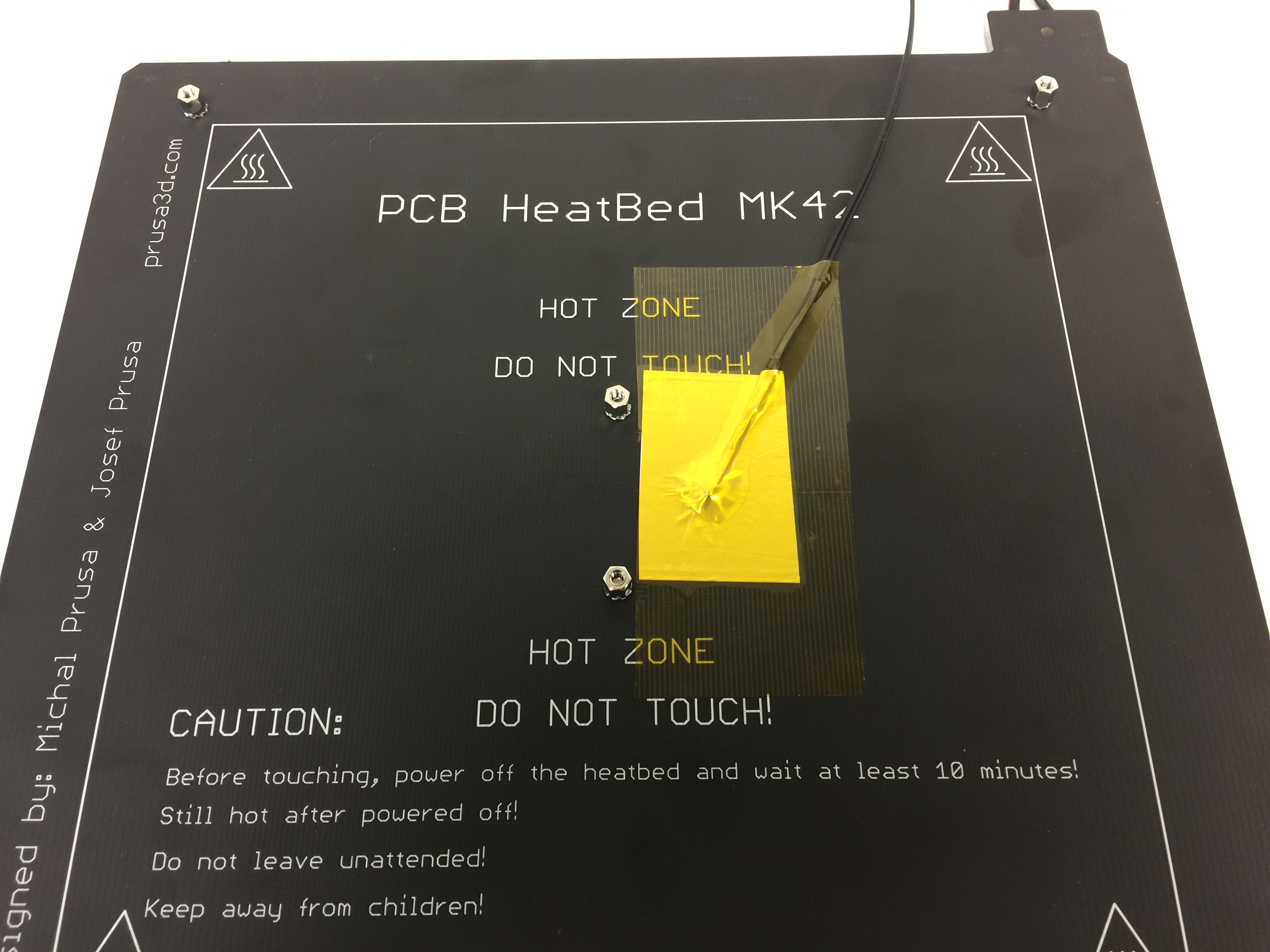
                  How to find out if your Heater or Thermistor is defective for your Nozzle/ Heatbed? 

                  It is not very common, but there is a chance that extensive printing damaged your heater or thermistor. 

                  The easiest solution is to take a hairdryer and blow hot air at the Hotend or Heatbed. During this process just check if there is any temperature change on the LCD. If there is a change, it means that your thermistor is working, which means that the heater is damaged. If there is no change at all, your thermistor is defective.

                  Checking voltages and resistance

                  Using a multimeter would be the most efficient and accurate way of determining if the components are good or not. It is quite straight forward. See Multimeter usage for how and what to measure. 

                  Was this article helpful?
                  This action is available only to registered users. Please log-in.

                  Topics

                  • Troubleshooting
                    • Print Error Messages
                      • TMC driver overtemp
                      • File incomplete. Continue anyway?
                      • Thermal Runaway (i3 series)
                      • Blackout occurred. Recover print?
                      • Please open idler and remove filament manually
                      • Bed leveling failed
                      • Err: EXTR. FAN ERROR
                      • Err: PRINT FAN ERROR
                      • Preheat error (Heatbed)
                      • Preheat error
                      • MAXTEMP
                      • MINTEMP error and MINTEMP BED
                      • Preheat the nozzle!
                    • Diagnostics
                    • Print Quality Troubleshooting
                    • QR Error codes
                    • Printer troubleshooting

                  7 comments

                  Log in  to post a comment
                  vertaco26
                  •
                  I had this issue in the case of a very small print in ABS in the MIDDLE of the plate. This is where is located the thermo sensor under the plate. When the bed temperature has to increase from 100 to 110 degC, the fan of the extruder prevents the plate from heating up properly. Printing the part on the side resolves the issue.
                  Reply
                  Tom S
                  •
                  [solution hack] I had this problem in the past, and a new heatbed solved it... till recently, when I got the same error.I usually get the error when the printed element fell, and the printer started printing in thin air.
                  The first time, doing a flash to the newest software solved the issue for some prints, but then a thin element fell, it started printing in the air, and I had the usual "Heatbed preheat error again".
                  However, what solved it for me was starting the print - seeing that the heatbed wasn't warming up - and manually "kickstarting" the heatbed with a hairdryer. After that, I heated it up this way a few degrees, it did the rest itself and is now keeping a steady temperature.
                  As this has given me many grey hairs in the past, I wanted to share this solution here asap :) hope it can help someone.
                  Reply
                  Cherry Hill Tech
                  •
                  I usually print PLA at a bed temp of 60, with many prints. I got this error the next day after printing two small parts with PETG at a bed temp of 83 for the first time in a year. I believe the extremely slight expansion and contraction of the screws and bed with this higher temp where it attaches left a less than perfect connection from the wires to the bed. I noticed that one of my heater wires, where it attaches to the bed, although firmly attached through the washer to the nut, was able to rotate, along with the nut. When I removed both of these screws and retightened them fully, the error went away and I could print again. There must be some sort of very exact measurement of voltage and if it is even slightly off the printer gives this error and wont heat the bed. In my case the connection was a little less than perfect with the wire connection, and printing with PETG made it go enough over a threshold to become a problem.
                  Reply
                  binel
                  •
                  I believe that the issue arises when printing thin walls and despite saying "bed preheat error" it is not related to the termistor or to the bed.  I observed it several times with tiny parts being printed. @Support I can provide a .3mf file so that you can reproduce the issue.
                  Reply
                  Giuliano - Official Prusa CS
                  •
                  Hello. The support can have a look at your test file. If you wish to contact them, please write an email at [email protected].
                  Reply
                  jf2112pm
                  •
                  I have a new MK3S and have done 3 small prints.15% into my fourth, the heatbed error shows up. numbers jump all over the place all the way to a190, 60 109 79 etcI have checked everything and it starts again and then same error pops up.I will try the hair dryer suggestion and see what results I getany other suggestions?
                  Reply
                  Official Prusa CS
                  •
                  Hi, it sounds like your heatbed thermistor is damaged and doesn't report correct readings. Please contact our support to double-check it :)
                  Reply