Prusa
  • SHOP
    • Latest products
    BY CATEGORY
    • 3D printersnew
    • 3D printer upgradesnew
    • Materials
    • Accessories
    • Spare parts
    • Courses
    • Merch
    • Get a price quote
    QUICK LINKS
    • Shipping & delivery
    • Returns & refunds
    • Payment & financing
    • Warranty
    • VAT & Customs fees
    • FAQ

    0 item in your cartitems in your cart

    Your cart is empty

    Go to cartShop 3D printers

    My profile

    Log in to see orders, saved items

    My profile

    Signed in as

    • Orders
    • Logout
  • 3D PRINTING
    • Explore 3D printing
    FOR BEGINNERS
    • 3D printing 101
    • How FDM printing works
    • Buying your first printer
    • 3D model catalog
    BY APPLICATION
    • Rapid prototyping
    • Manufacturing
    • Engineering
    • Research
    • Arts & design
    GO DEEPER
    • Materials guide
    • Courses
    • Webinars
    • Case studies
    • Custom 3D printing
  • 3D PRINTERS
    • All 3D printers
    FOR
    • Home or garageHobbyists, tinkerers and home printing
    • BusinessIn-house production for small teams
    • EnterpriseFleets, security and scale
    • Which Prusa is right for me
    SHOP & BROWSE
    • CORE One+new
    • CORE One+ INDXnew
    • CORE One L+new
    • CORE One L+ INDXnew
    • XL+new
    • MK4S
    • Prusa Pro HT90
    • Prusa Pro AFS
    • Prusa Pro SLX
    MORE FROM PRINTERS
    • Parts & upgradesnew
    • Critical infrastructure
    • Case studies
    • Signature Oak
    • Kits
  • MATERIALS
    • All materials
    BY USE
    • Every-day & design
    • Functional engineering
    • Composites
    • Pro speciality
    • SLA resins
    PRUSAMENT
    • PLA
    • PETG
    • ASA
    • PC
    • PA11
    • Flex
    • TPU
    MORE FROM MATERIALS
    • Materials guide
    • We make material in house
    • Sustainability
    • Order on the store
  • SOFTWARE
    • All software
    PREPARE THE PRINT
    • PrusaSlicer 3.0New
    PRINT & MONITOR
    • Prusa Connect
    • EasyPrint
    • iOS & Android app
    • Prusa Farm
    GET STARTED
    • Download & install
    • Knowledge base
    MORE FROM SOFTWARE
    • 3D model catalog
  • SUPPORT
    • Explore support
    FIND ANSWERS
    • Knowledge base
    • Troubleshooting
    • Courses
    • Webinars
    GET HELP
    • Contact us
    • Livechat
    • Shipping & delivery
    • Warranty
    • Returns & refunds
    • Service & spare parts
    • Service & Repair
    COMMUNITY
    • Forum
    • Reddit
    • Printables
  • TRUST CENTER
    • Trust Center overview
    BY TOPIC
    • GDPR
    • Certificates
    • Security
    • Compliance
    COMMITMENTS
    • Sustainability report
    TALK TO US
    • Contact the security team
  • COMPANY
    • About Prusa
    GET TO KNOW US
    • Our story
    • How we make printers
    • Open source
    • Brand & media kit
    NEWS
    • Blog
    • Newsroom
    • Events
    TRUST & PARTNERS
    • Sustainability
    • Resellers & distributors
    • Affiliate program
    • Contact
    • English
    • Čeština
    • Deutsch
    • Español
    • Français
    • Italiano
    • Polski
    • 日本語
  • Signed in as

    • Orders
    • Address
    • In-stock Alerts
    • My Courses
    • Subscription
    • Edit Account
    • Logout

Log in to see orders, saved items

Signed in as
  • Orders
  • Address
  • In-stock Alerts
  • My Courses
  • Subscription
  • Edit Account
  • English
  • Čeština
  • Deutsch
  • Español
  • Français
  • Italiano
  • Polski
  • 日本語
Shop

0 item in your cartitems in your cart

Your cart is empty

Go to cartShop 3D printers

My profile

Log in to see orders, saved items

My profile

Signed in as

  • Orders
  • Logout
SHOP
  • Latest products
BY CATEGORY
  • 3D printersnew
  • 3D printer upgradesnew
  • Materials
  • Accessories
  • Spare parts
  • Courses
  • Merch
  • Get a price quote
QUICK LINKS
  • Shipping & delivery
  • Returns & refunds
  • Payment & financing
  • Warranty
  • VAT & Customs fees
  • FAQ

Featured products

    Popular categories

      Trending searches

        Articles

          Blog

            Products

              Categories

                Suggested searches

                  Searching…
                  No results
                  Something went wrong.
                  ↑↓ Select↵ OpenEsc Close search
                  1. Support
                  2. PrusaSlicer
                  3. SLA slicing
                  4. Hollowing
                   

                  Contents

                  • Using the Hollowing tool
                  • Adding drainage holes
                  • Confirm and preview the hollowed mesh

                  Blog

                  • Print colorful and glowing Halloween decorations with our spooky offer
                  • Factorio Has Arrived on Printables
                  • Prusament PLA Lightweight: 65% lighter than regular PLA. Perfect choice for aircraft, cosplay, and more.

                  Newsletter

                  Signup and get our monthly squeeze on updates, blog, printables and much more.

                  By clicking, you agree to receive our newsletter.

                  This site is protected by reCAPTCHA Enterprise and the Google Privacy Policy and Terms of Service apply.

                  Factorio Transport Belts
                  E-shop
                  • 3D Printers
                  • Printer Upgrades
                  • Filaments
                  • Accessories
                  • Prusa Merchandise

                  © Prusa Research a.s.

                  Printables
                  • 3D Models
                  • Store
                  • Clubs
                  • 3D Design Contests
                  • Brands
                  Community
                  • World Map
                  • Forum
                  • User Groups
                  • Events
                  Help
                  • Prusa Help
                  • Prusa Academy
                  • 3D Printing Calculators
                  Software
                  • PrusaSlicer
                  • Prusa.app
                  • Prusa Connect
                  • Drivers and Software
                  Company
                  • About Us
                  • Blog
                  • Official Prusa Resellers
                  • Contact Us
                  • Certified for ISO 9001, ISO 14001, ISO 45001
                  • General Terms and Conditions
                  • General Terms and Conditions of Use of the PRUSA Websites
                  • Privacy Policy
                  • Information about cookies
                  • Customer Complaints Policy
                  • Status Page
                  • Do Not Sell or Share My Personal Information
                  • Supplemental Statements
                  • General Terms and Conditions
                  • General Terms and Conditions of Use of the PRUSA Websites
                  • Privacy Policy
                  • Information about cookies
                  • Customer Complaints Policy
                  • Status Page
                  • Do Not Sell or Share My Personal Information
                  • Supplemental Statements

                  © Prusa Research a.s.

                  JOSEF PRUSA®, PRUSA RESEARCH®, PRUSA POLYMERS®, PRUSA ORANGE®, PRUSA 3D ® AND PRUSAMENT® are registered trademarks of Prusa Development a.s. used by Prusa Research a.s. under licence from Prusa Development a.s.

                  Hollowing

                  Relevant for

                  SL1
                  CW1
                  SL1S SPEED
                  PrusaSlicer
                  12 comments
                  Article is also available in following languages
                  English
                  Čeština
                  Polski
                  Deutsch
                  Français
                  Español
                  Italiano
                  日本語

                  All objects sliced for the SLA printers are completely solid by default. There is no infill pattern like in FFF/FDM 3D printing. Solid objects printed from the liquid resin can be heavy and robust, but the resin consumption is high compared to hollow objects, especially when printing large models.

                  Hollowing out your 3D model is a great way to:

                  • save a considerable amount of material (lowers the print price)
                  • lower the surface area of each layer - which decreases the force needed to detach the print from the display when moving to the next layer
                  • reduce the number of needed supports (lower weight of printed model)

                  We suggest adding at least two drainage holes. Without them, the uncured resin would end up being trapped inside your finished print.

                  You need PrusaSlicer 2.2 or newer to access the Hollowing tool.

                  Using the Hollowing tool

                  Hollowing can be configured for each model individually using the Hollowing tool in the left toolbar. Alternatively, you can configure hollowing for all models at once in Print Settings - Hollowing.

                  The hollowing and drainage hole workflow is non-destructive. Hollowing can be canceled and drainage holes can be moved or removed at any time.

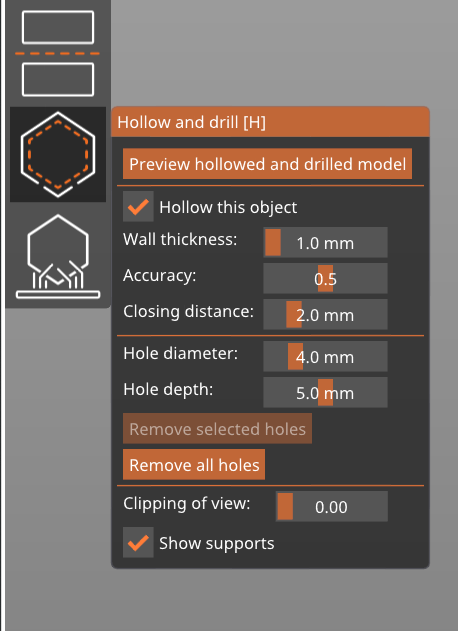
                  The model hollowing is configured with the following parameters:

                  Hollowing thickness

                  The thickness of the resulting shell. The minimum value is 1 mm.

                  Hollowing accuracy

                  A trade-off between accuracy and performance. If a low hollowing accuracy is set, the resulting model wall thickness may be uneven. Therefore a higher hollowing accuracy is recommended for a small hollowing thickness (for thin shells) to ensure minimum wall thickness.

                  Hollowing closing distance

                  Hollowing suppresses cavities narrower than the closing distance threshold, and it also fills in sharp concave corners of the inner wall, from which it would otherwise be difficult to remove the uncured highly viscous resin.

                  Adding drainage holes

                  Drainage holes can be added by left-clicking on the object when the SLA hollowing gizmo is active.

                  The holes can later be repositioned by dragging them on the mesh.

                  Each hole is always perpendicular to the surface and its diameter and depth can be configured - the current settings will be used for newly placed holes.

                  You can remove holes by right-clicking on any of them.

                  You can add holes even to models that have hollowing disabled. This is useful for models that you have hollowed in an external program.

                  If you need to input an exact value or the slider does not have enough range for your, you can Ctrl+Left click the value to edit it.

                  Please understand that if the input mesh is broken, the hole drilling algorithm may refuse to proceed in order to prevent program crashes or incorrect results.

                  Confirm and preview the hollowed mesh

                  The hollowing and hole-drilling are performed after the Preview hollowed and drilled model button is pressed. Note that both hollowing and hole-drilling are computationally expensive tasks and will take some time, especially with complex models. In case the user does not press the button himself, the hollowing and drilling will be performed during the slicing process.

                  The Clipping plane tool can be used to peek inside an object (the same tool is present in the SLA support points editing gizmo). Move the slider from left to right to move the clipping plane. You can review the hollowed geometry and place the drainage holes appropriately.

                  The Reset direction button will align the clipping plane tool parallel to the current camera view. E.g. if you want to have the clipping plane moving up-down, look at the model from the top (Top view 1 ) and hit the Reset direction button.
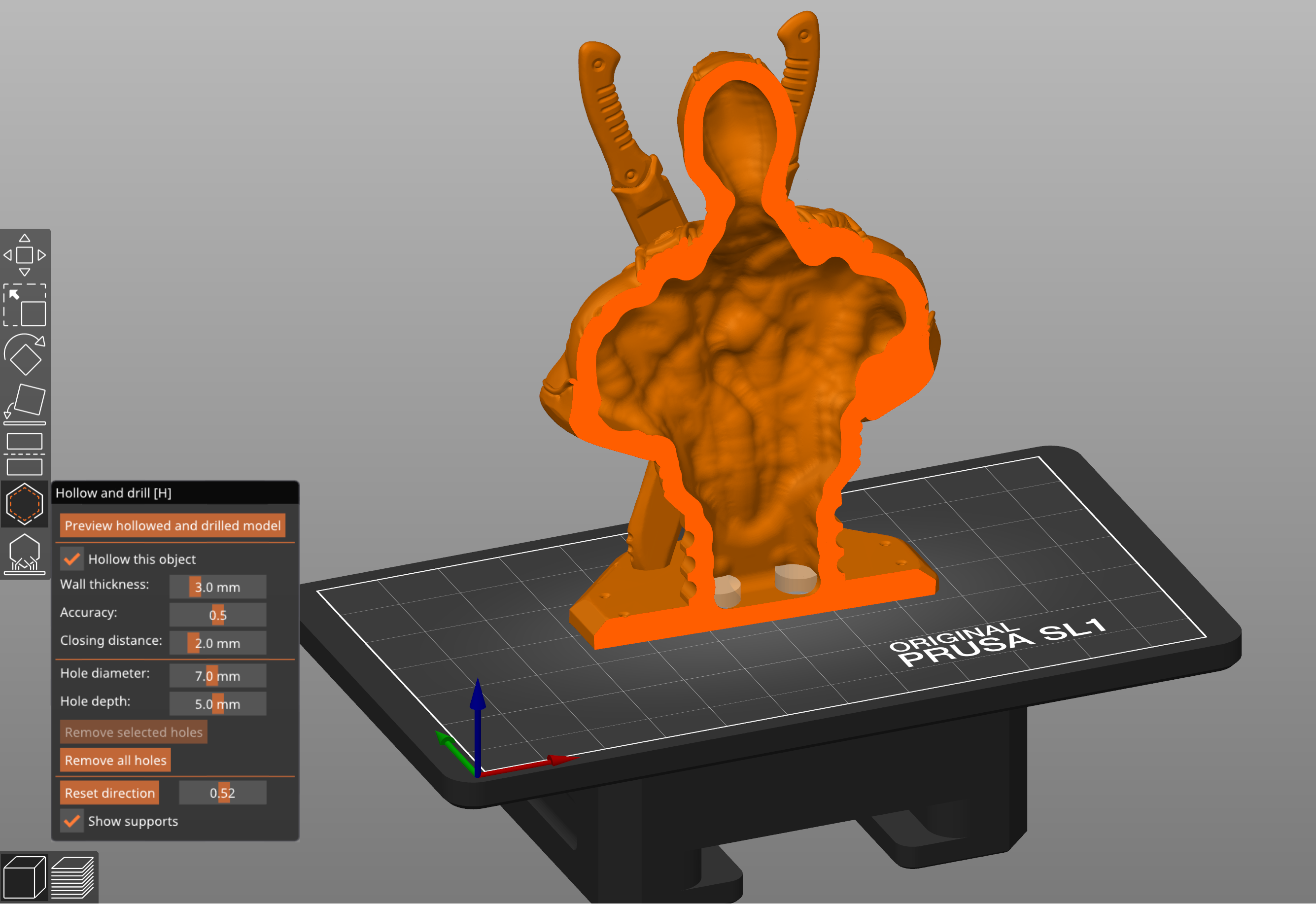
                  The Reset direction button is only visible if you move the Clipping plane tool to a non-zero value.

                  You can export the hollowed and drilled model by selecting File - Export - Export plate as STL.
                  Changing a parameter will force an invalidation of the mesh (such as moving a hole, scaling the object, etc.). The model visualization reverts to the original object without the holes drilled and without the hollowing applied.

                  Solid vs hollowed model example

                  Solid model: 237 ml, $13.75 resin cost

                  Hollowed model: 81 ml, $4.70 resin cost
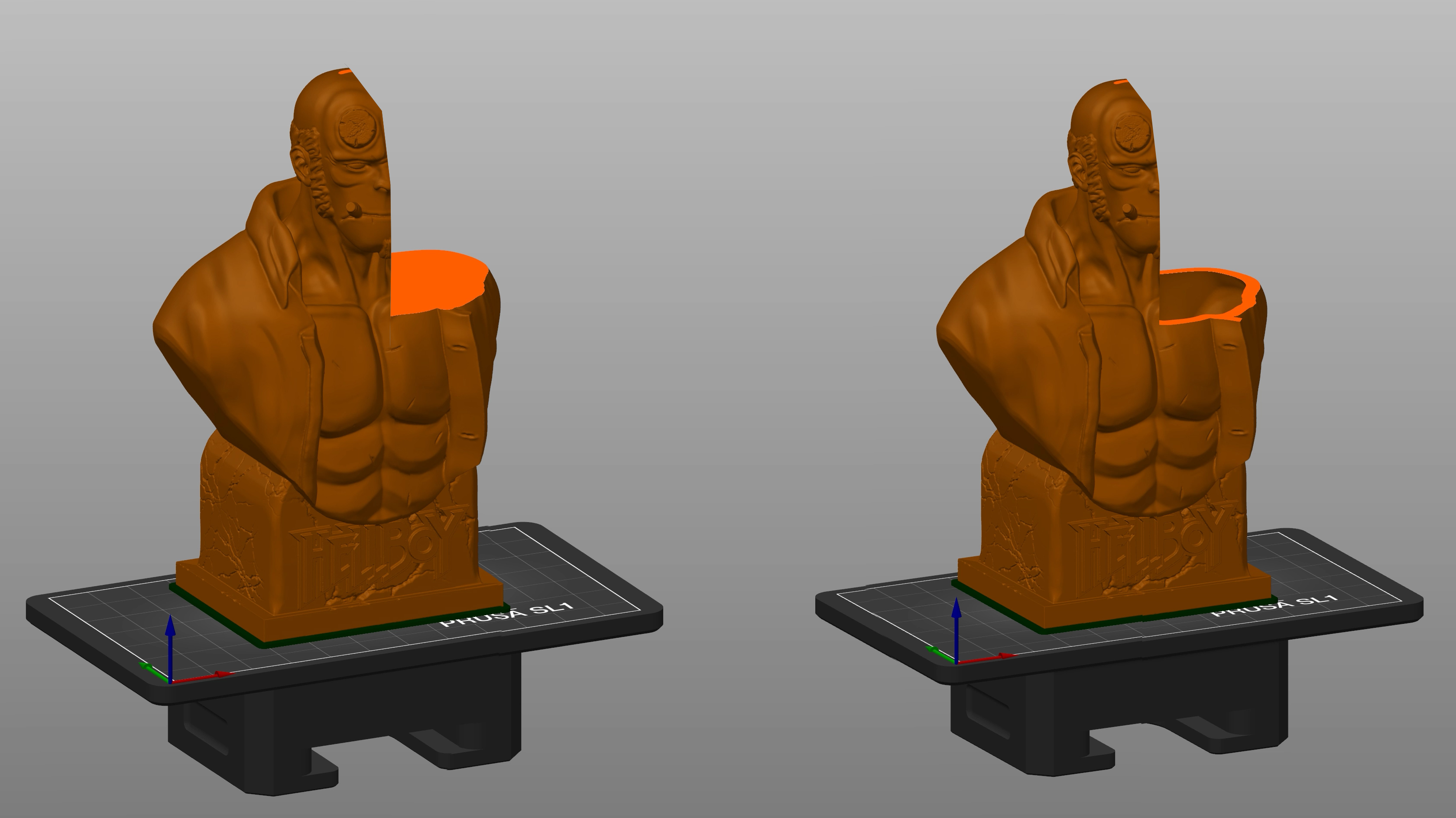
                  Hellboy bust model by fotismint
                   
                  The hollowing and hole drilling features rely on OpenVDB and CGAL libraries. Many thanks to the authors of the two libraries.
                  Was this article helpful?
                  This action is available only to registered users. Please log-in.

                  Topics

                  • PrusaSlicer 2.9 (Legacy)
                    • SLA slicing
                      • Geometrically precise objects
                      • Tree supports
                      • Object orientation
                      • Hollowing
                      • Connecting Original Prusa SL1/SL1S to PrusaSlicer
                    • About PrusaSlicer
                    • Configuration and profiles
                    • User interface
                    • Input/output
                    • Left toolbar
                    • Top toolbar
                    • Print settings
                    • Filament settings
                    • Printer settings
                    • Advanced features
                    • Multi-material slicing
                    • Other (PrusaSlicer)

                  8 comments

                  Log in  to post a comment
                  Somuee
                  •
                  Could you please "flick the switch" to have this ability in all printer profiles? Sometimes I want to hollow out a large model that is bigger than the SL1 bed
                  Reply
                  Jupp3
                  •
                  I think it should be pointed out that this feature has been broken in all versions after 2.5.2, and known to (often, not always) create broken mesh. This can make further editing (if you need to do any) harder, and LycheeSlicer is known to slice files broken like this into complete, 100% useless mess.More info in github issues: 11460, 11053, 13515
                  Reply
                  De3DPrintman
                  •
                  I really love the fact that this feature is implemented in PS. Before I had to use Meshmixer to do the job so this is awesome. You do have to be exact when it comes to the placement of the boring holes otherwise it can be tricky to get all leftover material and cleaning agent out of the print.
                  Reply
                  Mullcom
                  •
                  Why do the other printers like MK3 support 
                  Hollowing
                  ?

                   
                  Reply
                  Jupp3
                  •
                  Hollowing isn't really a "printer feature", but something that slicer / 3D model editor can do before / when slicing a model.In addition, different kinds of hollowing suit different print technologies better than others; hollowing with sparse infill suits FDM technology perfectly, as there will be just air inside. With resin printing, there would be uncured resin (hazardous chemical) that can't get out."Full" hollowing with thick enough shell, minimal supports for overhangs and drain holes is better for resin printing. Drain holes aren't needed on FDM, but otherwise similar "idea" can be done with lightning infill.
                  Reply
                  Dombi3D
                  •
                  Would be nice to have a feature where we can select a plane face which will be deleted so creates an open shell. A workaround that I use now to hollow the modell for example 2mm wall thickness than save it as STL and after that import it again and cut that 2mm out (I have to make this extra step because if I just cut out immediately after the hollowing process the slicer recalculate the geometry and keeps the surface closed), but so I loose this height from the modell.
                  Reply