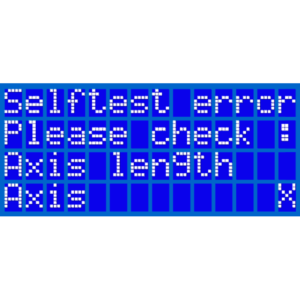
This error can appear during the Self-test or the XYZ-calibration when the firmware detects a shorter distance of axis travel than expected. The exact length of each axis is stored…
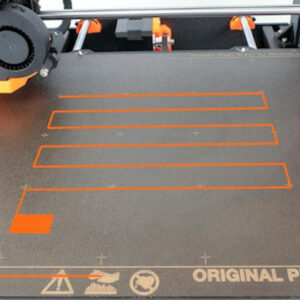
The Calibration failed error occurs once there is a problem with the calibration. The printer was unable to properly detect the calibration point/s and can not successfully finish…
From article XYZ Calibration (MK3/MK3S/MK3S+) Initial XYZ Calibration error messages "XYZ calibration failed. Bed calibration point was not found." = Printer was unable to perfectly…
The "Distance between the tip of the nozzle and the bed surface has not been set yet" error message occurs after you successfully finish all of the calibration parts, except the…
This is an advanced system for displaying error screens, providing more useful information to the user. In case of an issue, the printer will display the name of the error followed…
The error message Printer has not been calibrated yet occurs after the assembly of your printer or after the Factory reset of all data. It will remain on the main LCD screen until…
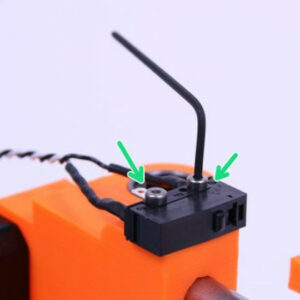
Your printer suspects that everything is not in perfect order with your end-stops. Wiring issue Make sure there is not a wiring-issue with the X/Y end-stop on the mini RAMBo…
From article Calibration XYZ (MK2/S) Initial XYZ Calibration error messages "XYZ calibration failed. Bed calibration point was not found."= Printer was unable to perfectly locate…
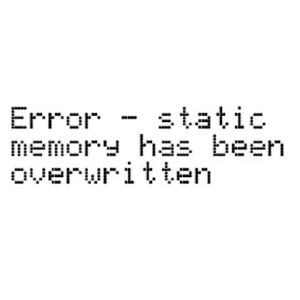
The printer shows the error message "Static memory has been overwritten". It is caused by too many commands in the memory at the same time, causing it to overflow. The firmware…
This error was changed in firmware version 1.5.0! This article only applies to SL1 printers with firmware older than 1.5.0. During the Wizard, the SL1 will test the tilting-motion…
What happened? The printer is displaying the message: Tilt homing failed, check its surroundings, and repeat the action. Error name: Tilt homing failed Error code: #10101 Issued…
What happened? The printer is displaying the message: Tower homing failed, make sure there is no obstacle in its path and repeat the action. Error name: Tower homing failed Error…
What happened? The printer is displaying the message: RPM of (fan)s not in range. Check if the fan is connected correctly. Error name: Fan RPM not in range Error code: #10122 Issued…
What happened? The printer is displaying the message: Requested intensity cannot be reached by max. allowed PWM Error name: UV intensity too low Error code: #10318 The most probable…
What happened? The printer is displaying the message: Failed to reach tilt endstop, please check that the cable is connected and repeat the action. Error name: Tilt endstop not…
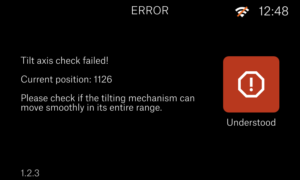
What happened? The printer is displaying the message: Tilt axis check failed! Check if the tilt can move smoothly in its entire range. Error name: Tilt check failed Error code:…
What happened? The printer displaying the message: Moving the tower failed. Make sure there is no obstacle in its path and repeat the action. Error name: Tower moving failed Error…
What happened? The printer is displaying the message: Invalid tilt alignment position. Error name: Invalid tilt align position Error code: #10121 How to fix it? Use the steps below…
What happened? The printer is displaying the message: Failed to reach tower endstop, please check that the tower motor is connected and repeat the action. Error name: Tower endstop…
What happened? The printer displaying the message: The printer is not UV calibrated, please connect the UV calibrator and run the procedure. Error name: Printer is not UV calibrated Error…
What happened? The printer displaying the message: Internal error (DBUS mapping failed), please restart the printer. Contact the support if the problem persists. Error name: Internal…
What happened? The printer is displaying the message: The printer is not calibrated. Please run the Wizard first. Error name: Not mechanically calibrated Error code: #10113 Issued…
What happened? The printer is displaying the message: Tower not in the expected position. Are the platform and tank mounted and secured correctly? Error name: Tower position error Error…
What happened? The printer is displaying the message: The printer has booted from an alternative slot due to failed boot attempts using the primary slot. Update the printer with…
What happened? The printer displaying the message: Cannot set the update channel, please restart the printer and try again. Error name: Cannot set update channel Error code: #10513 This…
What happened? The printer displaying the message: This Wizard cannot be canceled, please finish the steps. Error name: This Wizard cannot be canceled Error code: #10522 Is not…
What happened? The printer is displaying the message: Serial numbers in wrong format! Please contact tech support! Error name: Serial number error Error code: #10527 How to fix…
What happened? The printer is displaying the message: The model was sliced for a different printer variant [SL1/SL1S]. Your printer variant is [SL1S/SL1]. Warning name: Printer…
What happened? The printer is displaying the message: Requested intensity cannot be reached by min. allowed PWM. Error name: UV intensity too high Error code: #10317 The most…
What happened? The printer is displaying the message: Failed to serialize Wizard data. Restart the printer and try again. Error name: Data preparation failure Error code: #10524 How…
What happened? The printer is displaying the message: The UV LED calibrator is not detected. Check the connection and try again. Error name: UV LED calibrator not detected Error…
What happened? The printer is displaying the message: Correct settings were found, but the standard deviation (found) is greater than the allowed value (allowed). Verify the UV…
What happened? The printer displaying the message: UV LED is overheating! Check whether the heatsink is installed correctly. Error name: UV LED heatsink overheating Error code:…
What happened? The printer is displaying the message: Failed to load fans and LEDs factory calibration. The printer was not able to find the UV PMW value due to a calibration error,…
What happened? The printer is displaying the message: Data is from unknown UV LED sensor! Error name: UV data error Error code: #10533 After calibration using the UV calibrator,…
What happened? The printer is displaying the message: Display usage error. The display has just been replaced or a factory reset has been performed, clearing the usage data. Error…
What happened? The printer is displaying the message: Saving the new factory default value failed. Restart the printer and try again. Error name: Data overwrite failed Error code:…
What happened? The printer is displaying the message: Failed to set hostname Error Name: Hostname error Error code: #10536 How to fix it? The Hostname set up on your printer does…
What happened? The printer is displaying the message: The UV LED calibrator detected some light on a dark display. This means there is a light 'leak' under the UV calibrator, or…
What happened? The printer is displaying the message: Communication with the UV LED calibrator has failed. Check the connection and try again. Error name: UV LED calibrator link…
What happened? The printer is displaying the message: The UV LED calibrator failed to read expected UV light intensity. Check the UV calibrator placement on the screen. Error name:…
What happened? The printer is displaying the message: No calibration data to show! UV calibration needs to be remade. Error name: No UV calibration data Error code: #10532 How…
What happened? The printer is displaying the message: Failed to save Wizard data. Restart the printer and try again. Error name: Wizard data failure Error code: #10526 How to fix…
What happened? The printer is displaying the message: Cannot connect to the UV LED calibrator. Check the connection and try again. Error name: UV LED calibrator connection error Error…