Prusa
  • SHOP
    • Latest products
    BY CATEGORY
    • 3D printersnew
    • 3D printer upgradesnew
    • Materials
    • Accessories
    • Spare parts
    • Courses
    • Merch
    • Get a price quote
    QUICK LINKS
    • Shipping & delivery
    • Returns & refunds
    • Payment & financing
    • Warranty
    • VAT & Customs fees
    • FAQ

    0 item in your cartitems in your cart

    Your cart is empty

    Go to cartShop 3D printers

    My profile

    Log in to see orders, saved items

    My profile

    Signed in as

    • Orders
    • Logout
  • 3D PRINTING
    • Explore 3D printing
    FOR BEGINNERS
    • 3D printing 101
    • How FDM printing works
    • Buying your first printer
    • 3D model catalog
    BY APPLICATION
    • Rapid prototyping
    • Manufacturing
    • Engineering
    • Research
    • Arts & design
    GO DEEPER
    • Materials guide
    • Courses
    • Webinars
    • Case studies
    • Custom 3D printing
  • 3D PRINTERS
    • All 3D printers
    FOR
    • Home or garageHobbyists, tinkerers and home printing
    • BusinessIn-house production for small teams
    • EnterpriseFleets, security and scale
    • Which Prusa is right for me
    SHOP & BROWSE
    • CORE One+new
    • CORE One+ INDXnew
    • CORE One L+new
    • CORE One L+ INDXnew
    • XL+new
    • MK4S
    • Prusa Pro HT90
    • Prusa Pro AFS
    • Prusa Pro SLX
    MORE FROM PRINTERS
    • Parts & upgradesnew
    • Critical infrastructure
    • Case studies
    • Signature Oak
    • Kits
  • MATERIALS
    • All materials
    BY USE
    • Every-day & design
    • Functional engineering
    • Composites
    • Pro speciality
    • SLA resins
    PRUSAMENT
    • PLA
    • PETG
    • ASA
    • PC
    • PA11
    • Flex
    • TPU
    MORE FROM MATERIALS
    • Materials guide
    • We make material in house
    • Sustainability
    • Order on the store
  • SOFTWARE
    • All software
    PREPARE THE PRINT
    • PrusaSlicer 3.0New
    PRINT & MONITOR
    • Prusa Connect
    • EasyPrint
    • iOS & Android app
    • Prusa Farm
    GET STARTED
    • Download & install
    • Knowledge base
    MORE FROM SOFTWARE
    • 3D model catalog
  • SUPPORT
    • Explore support
    FIND ANSWERS
    • Knowledge base
    • Troubleshooting
    • Courses
    • Webinars
    GET HELP
    • Contact us
    • Livechat
    • Shipping & delivery
    • Warranty
    • Returns & refunds
    • Service & spare parts
    • Service & Repair
    COMMUNITY
    • Forum
    • Reddit
    • Printables
  • TRUST CENTER
    • Trust Center overview
    BY TOPIC
    • GDPR
    • Certificates
    • Security
    • Compliance
    COMMITMENTS
    • Sustainability report
    TALK TO US
    • Contact the security team
  • COMPANY
    • About Prusa
    GET TO KNOW US
    • Our story
    • How we make printers
    • Open source
    • Brand & media kit
    NEWS
    • Blog
    • Newsroom
    • Events
    TRUST & PARTNERS
    • Sustainability
    • Resellers & distributors
    • Affiliate program
    • Contact
    • English
    • Čeština
    • Deutsch
    • Español
    • Français
    • Italiano
    • Polski
    • 日本語
  • Signed in as

    • Orders
    • Address
    • In-stock Alerts
    • My Courses
    • Subscription
    • Edit Account
    • Logout

Log in to see orders, saved items

Signed in as
  • Orders
  • Address
  • In-stock Alerts
  • My Courses
  • Subscription
  • Edit Account
  • English
  • Čeština
  • Deutsch
  • Español
  • Français
  • Italiano
  • Polski
  • 日本語
Shop

0 item in your cartitems in your cart

Your cart is empty

Go to cartShop 3D printers

My profile

Log in to see orders, saved items

My profile

Signed in as

  • Orders
  • Logout
SHOP
  • Latest products
BY CATEGORY
  • 3D printersnew
  • 3D printer upgradesnew
  • Materials
  • Accessories
  • Spare parts
  • Courses
  • Merch
  • Get a price quote
QUICK LINKS
  • Shipping & delivery
  • Returns & refunds
  • Payment & financing
  • Warranty
  • VAT & Customs fees
  • FAQ

Featured products

    Popular categories

      Trending searches

        Articles

          Blog

            Products

              Categories

                Suggested searches

                  Searching…
                  No results
                  Something went wrong.
                  ↑↓ Select↵ OpenEsc Close search
                  1. Support
                  2. Original Prusa i3 MK3
                  3. Top toolbar
                  4. Variable layer height function
                   

                  Contents

                  • Setting up variable layer height
                  • Automatic variable layer height metrics

                  Blog

                  • Print colorful and glowing Halloween decorations with our spooky offer
                  • Factorio Has Arrived on Printables
                  • Prusament PLA Lightweight: 65% lighter than regular PLA. Perfect choice for aircraft, cosplay, and more.

                  Newsletter

                  Signup and get our monthly squeeze on updates, blog, printables and much more.

                  By clicking, you agree to receive our newsletter.

                  This site is protected by reCAPTCHA Enterprise and the Google Privacy Policy and Terms of Service apply.

                  Factorio Transport Belts
                  E-shop
                  • 3D Printers
                  • Printer Upgrades
                  • Filaments
                  • Accessories
                  • Prusa Merchandise

                  © Prusa Research a.s.

                  Printables
                  • 3D Models
                  • Store
                  • Clubs
                  • 3D Design Contests
                  • Brands
                  Community
                  • World Map
                  • Forum
                  • User Groups
                  • Events
                  Help
                  • Prusa Help
                  • Prusa Academy
                  • 3D Printing Calculators
                  Software
                  • PrusaSlicer
                  • Prusa.app
                  • Prusa Connect
                  • Drivers and Software
                  Company
                  • About Us
                  • Blog
                  • Official Prusa Resellers
                  • Contact Us
                  • Certified for ISO 9001, ISO 14001, ISO 45001
                  • General Terms and Conditions
                  • General Terms and Conditions of Use of the PRUSA Websites
                  • Privacy Policy
                  • Information about cookies
                  • Customer Complaints Policy
                  • Status Page
                  • Do Not Sell or Share My Personal Information
                  • Supplemental Statements
                  • General Terms and Conditions
                  • General Terms and Conditions of Use of the PRUSA Websites
                  • Privacy Policy
                  • Information about cookies
                  • Customer Complaints Policy
                  • Status Page
                  • Do Not Sell or Share My Personal Information
                  • Supplemental Statements

                  © Prusa Research a.s.

                  JOSEF PRUSA®, PRUSA RESEARCH®, PRUSA POLYMERS®, PRUSA ORANGE®, PRUSA 3D ® AND PRUSAMENT® are registered trademarks of Prusa Development a.s. used by Prusa Research a.s. under licence from Prusa Development a.s.

                  Variable layer height function

                  Relevant for

                  MMU family
                  MINI family
                  MK3 family
                  OLD PRODUCTS
                  SLA family
                  +
                  49 comments
                  Article is also available in following languages
                  English
                  Čeština
                  Polski
                  Deutsch
                  Français
                  Español
                  Italiano
                  日本語

                  PrusaSlicer lets you define different regions of your model to be printed with a different layer height and automatically smooth the transition between them. This can result in significantly shorter print times with minimal sacrifice to the print quality.
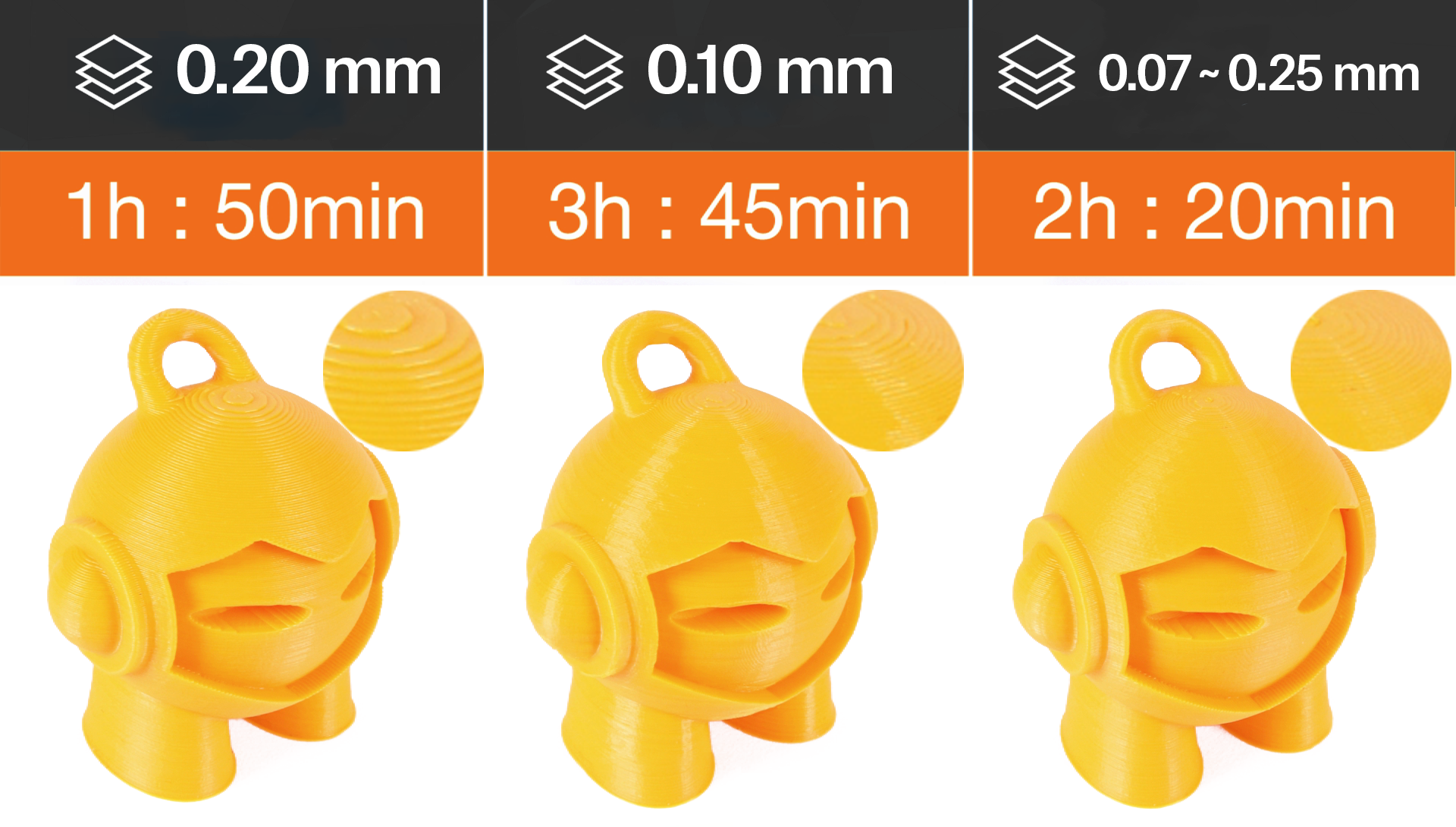
                  The variable layer height can be set up either automatically, manually or you can combine the two workflows together.

                  Setting up variable layer height 

                  First, select a model in the 3D view. Then the variable layer height tool becomes available in the top toolbar. As soon as you activate it a realtime preview of the contour lines created by individual layers is displayed. A new window appears in the bottom right corner and a new panel is displayed on the right side of the 3D view.

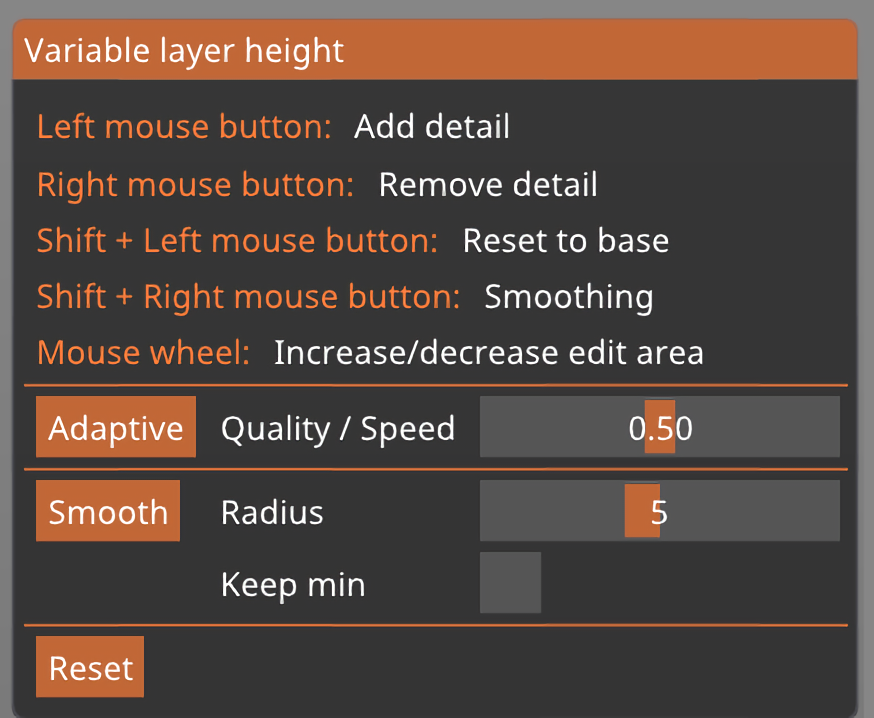
                  Adaptive

                  Calculates the layer profile according to the Quality/Speed setting.

                  Quality/Speed

                  By moving this slider you can change the ratio of small and tall layers. Hit the Adaptive button to see the new variable layer profile.

                  Smooth

                  As the name suggests, this smoothes the layer variable layer height profile. A bigger radius will smooth the curve more. You can press this button repeatedly to get an even smoother result.

                  Keep min

                  When enabled the smallest layer heights(green) won't be smoothed and will remain at their minimum value.

                  Reset

                  Resets the variable layer height settings (both automatic and manual changes).

                  You can manually edit the result of the automatic variable layer height.
                  You can also skip the automatic step completely and set everything manually.

                  When you hover the mouse above the variable layer height panel (on the right), the affected part of the model is highlighted in yellow.

                  Left mouse button Add detail

                  Right mouse button Remove detail

                  Shift + Left mouse button Reset to base

                  Shift + Right mouse button Smoothing

                  Mouse wheel Increase od decrease the edited area

                  Note that all instances of the object are also affected by the variable layer height tool.

                  You may notice a sharp jump on the bottom of the blue line - that’s normal and it’s a visual representation of the first layer height setting.
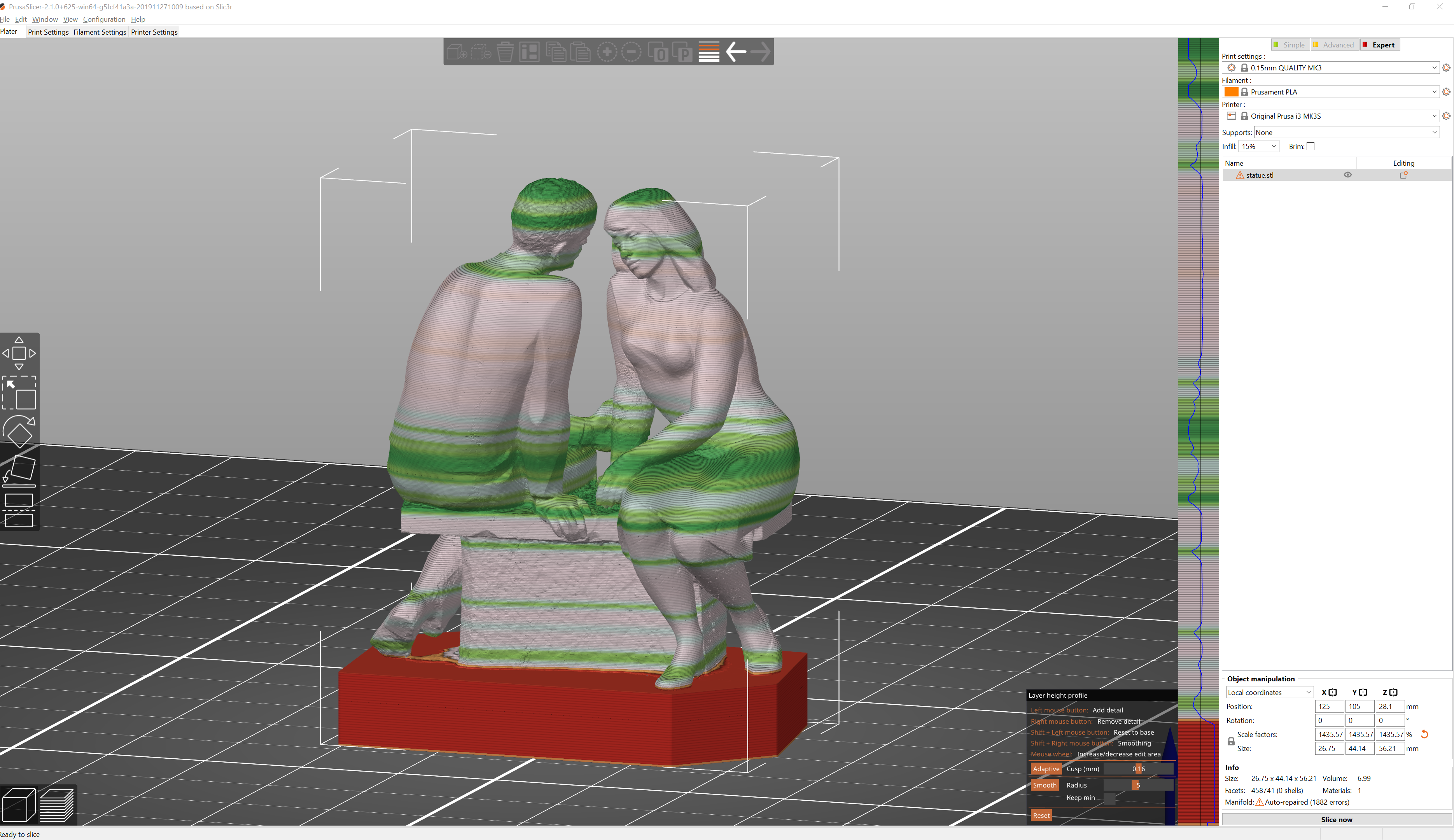
                  The images below might be from old PrusaSlicer versions, but the functionalities are the same even if the interface looks different.

                  A practical example of variable layer height

                  What layer height profile should you pick?

                  Try to select a profile with a layer height that's close to what the majority of the print will be printed at. You could say that it doesn't really matter, if you move the slider to favor more quality/speed you can get really small layer heights even if you have a really tall layer profile selected. However, the profiles also change other things except for just the layer height - tall layers get wider extrusion, for example. A good "average" layer height profile (e.g. 0.15 mm layer height profile for 0.4 mm nozzle) will most likely also work well for most cases.

                  Automatic variable layer height metrics

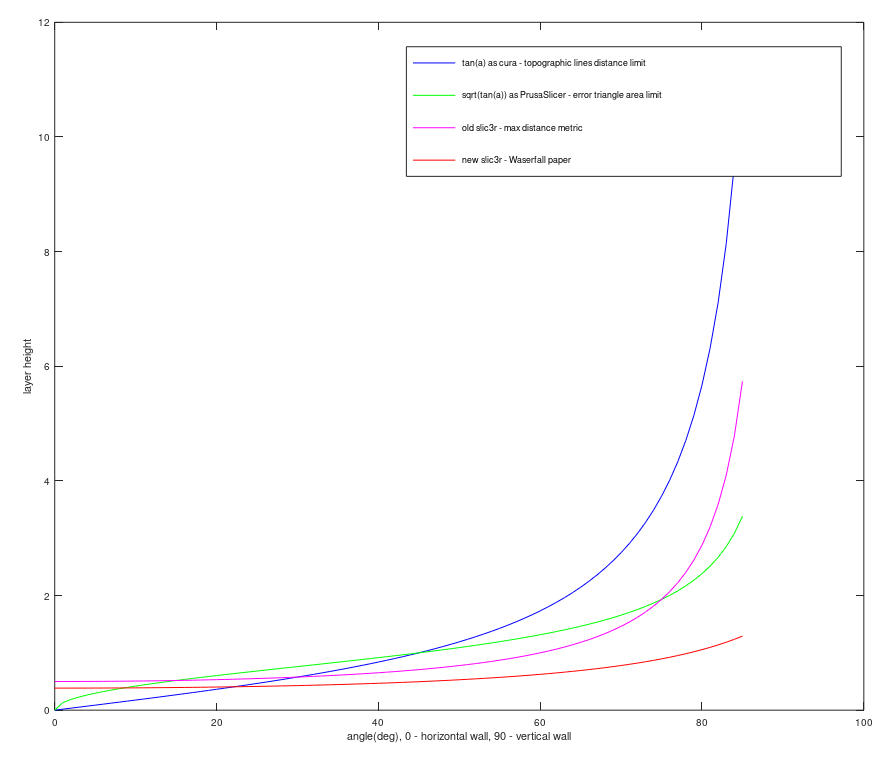
                  We have experimented with various metrics for surface quality. The metrics by Florens Wasserfall et al. implemented in Slic3r limits the maximum discretization error (largest Euclidean distance of the stepped surface from the source model).

                  Cura limits the maximum distance of contour lines in the XY plane, producing more intuitive results than the metric by Waserfall.

                  In the end, we have implemented yet another metric, limiting the cross-section area between the stepped surface and the source model. The following graph shows the layer height limit of various metrics depending on the surface slope.
                   

                  Was this article helpful?
                  This action is available only to registered users. Please log-in.

                  Topics

                  • PrusaSlicer 2.9 (Legacy)
                    • Top toolbar
                      • Undo / Redo
                      • Variable layer height function
                      • Split to objects/parts
                      • Copy, paste, instances
                      • Auto-arrange tool
                      • Search function
                    • About PrusaSlicer
                    • Configuration and profiles
                    • User interface
                    • Input/output
                    • Left toolbar
                    • Print settings
                    • Filament settings
                    • Printer settings
                    • Advanced features
                    • Multi-material slicing
                    • SLA slicing
                    • Other (PrusaSlicer)

                  24 comments

                  Log in  to post a comment
                  cpsPrinter
                  •
                  Would it be possible to add this feature also for resin printers like SL1S?
                  It would be great if one could set the layer height and curing time per layer individually for each layer ...
                  Reply
                  Kenny
                  •
                  I think adding layer height changes the way color changes are added would have been more intuitive. I really just want to choose a layer and specify the new layer height to switch to. I don't want to mess with these confusing panels.
                  Reply
                  Otso
                  •
                  I agree! All I want to do is, for example, set 0.3 mm layer height between 0-30 mm, and the reset 0.2 mm layer height.

                  Please just let us insert points where the layer height is changed, and let us type in the new layer height at that point.
                  Reply
                  chefravioli
                  •
                  Not sure if this is a new feature since this comment was made, but you can do this now. In your object list, Right-Click -> Height Range Modifier. This adds a modifier to your object that allows you to set a beginning and end range and the layer height for that range, and you can add multiple ranges.
                  Reply
                  DRGRS74
                  •
                  Thank you. Your comment sent me directly to the easy way to set layer heights. It took me a while for my brain to recognize I needed to specify mm, not layer numbers.
                  Reply
                  Pablo Durán Millán
                  •
                  i think this ui to set the layer height is unnecesarily complicated for most cases. sure it is nice to have a more automatic way to determine it but in most cases i only want to change the layer height once or twice. for example start at 0.2 and then change to 0.25 from layer 50 onwards. so would be nice to have a better way to do this as it is currently a real pain in the ass
                  Reply
                  davidpbest
                  •
                  No idea what you mean by ". As soon as you activate it a realtime preview of the contour lines".   A screen shot would be a nice addition to clear this up.
                  Reply
                  Marina Curzi - Official Prusa CS
                  •

                  This refers to the preview shown on the model itself, you will see different colours when you make a change to the layer height on the right-side panel.

                  Reply
                  McDaddy
                  •
                  Would love to see a function to have variable layer height on perimeters only, or only on parts of the model. Something similar to the "paint multi colour function". 
                  Reply