Prusa
  • SHOP
    • Latest products
    BY CATEGORY
    • 3D printersnew
    • Upgradesnew
    • Materials
    • Accessories
    • Spare parts
    • Courses
    • Merch
    • Sales inquiry & Price quote
    QUICK LINKS
    • Shipping information
    • Refunds & returns
    • Payment options
    • Warranty
    • VAT & Customs fees
    • FAQ

    0 item in your cartitems in your cart

    Your cart is empty

    Go to cartShop 3D printers

    My profile

    Log in to see orders, saved items

    My profile

    Signed in as

    • Orders
    • Logout
  • 3D PRINTING
    • Explore 3D printing
    FOR BEGINNERS
    • 3D printing 101
    • Types of printers (FDM/SLA)
    • How to choose a 3D Printer
    • Printables (3D models)
    BY APPLICATION
    • Rapid prototyping
    • Manufacturing
    • Engineering
    • Research
    • Arts & design
    GO DEEPER
    • Materials guide
    • Courses
    • Webinars
    • Case studies
    • Custom 3D printing
  • 3D PRINTERS
    • All 3D printers
    FOR
    • Home or garageHobbyists, tinkerers and home printing
    • Shop or studioIn-house production for small teams
    • EnterpriseFleets, security and scale
    • How to choose a 3D Printer
    SHOP & BROWSE
    • CORE One+new
    • CORE One+ INDXnew
    • CORE One L+new
    • CORE One L+ INDXnew
    • XL+new
    • MK4S
    • Prusa Pro HT90
    • Prusa Pro AFS
    • Prusa Pro SLX
    MORE FROM PRINTERS
    • Upgradesnew
    • Spare parts
    • Critical infrastructure
    • Case studies
    • Signature Oak
    • Kits
  • MATERIALS
    • All materials
    BY USE
    • Every-day & design
    • Functional engineering
    • Composites
    • Pro speciality
    • SLA resins
    PRUSAMENT
    • PLA
    • PETG
    • ASA
    • PC
    • PA11
    • Flex
    • TPU
    MORE FROM MATERIALS
    • Materials guide
    • We make material in house
    • Sustainability
    • Order on the store
  • SOFTWARE
    • All software
    PREPARE THE PRINT
    • PrusaSlicer 3.0New
    PRINT & MONITOR
    • Prusa Connect
    • EasyPrint
    • iOS & Android app
    • Prusa Farm
    GET STARTED
    • Download & install
    • Knowledge base
    MORE FROM SOFTWARE
    • Printables (3D models)
  • SUPPORT
    • Explore support
    FIND ANSWERS
    • Knowledge base
    • Troubleshooting
    • Courses
    • Webinars
    GET HELP
    • Contact us
    • Livechat
    • Shipping information
    • Warranty
    • Refunds & returns
    • Spare parts
    • Factory repair
    COMMUNITY
    • Forum
    • Reddit
    • Printables
  • TRUST CENTER
    • Trust Center overview
    BY TOPIC
    • GDPR
    • Certificates
    • Security
    • Compliance
    COMMITMENTS
    • Sustainability report
    TALK TO US
    • Contact the security team
  • COMPANY
    • About Prusa
    GET TO KNOW US
    • Our story
    • How we make printers
    • Open source
    • Brand & media kit
    NEWS
    • Blog
    • Newsroom
    • Events
    TRUST & PARTNERS
    • Sustainability
    • Resellers & distributors
    • Affiliate program
    • Contact
    • English
    • Čeština
    • Deutsch
    • Español
    • Français
    • Italiano
    • Polski
    • 日本語
  • Signed in as

    • Orders
    • Address
    • In-stock Alerts
    • My Courses
    • Subscription
    • Edit Account
    • Logout

Log in to see orders, saved items

Signed in as
  • Orders
  • Address
  • In-stock Alerts
  • My Courses
  • Subscription
  • Edit Account
  • English
  • Čeština
  • Deutsch
  • Español
  • Français
  • Italiano
  • Polski
  • 日本語
Shop

0 item in your cartitems in your cart

Your cart is empty

Go to cartShop 3D printers

My profile

Log in to see orders, saved items

My profile

Signed in as

  • Orders
  • Logout
SHOP
  • Latest products
BY CATEGORY
  • 3D printersnew
  • Upgradesnew
  • Materials
  • Accessories
  • Spare parts
  • Courses
  • Merch
  • Sales inquiry & Price quote
QUICK LINKS
  • Shipping information
  • Refunds & returns
  • Payment options
  • Warranty
  • VAT & Customs fees
  • FAQ

Featured products

    Popular categories

      Trending searches

        Articles

          Blog

            Products

              Categories

                Suggested searches

                  Searching…
                  No results
                  Something went wrong.
                  ↑↓ Select↵ OpenEsc Close search
                  1. Support
                  2. Original Prusa MMU2S
                  3. Printer features
                  4. SpoolJoin (MMU2S)
                   

                  Blog

                  • Blender for 3D Printing: The 5-Minute Guide to STL Editing
                  • Prusament Pellets: Raw material batches for large-format 3D printing or small-scale polymer research & development
                  • Print colorful and glowing Halloween decorations with our spooky offer

                  Newsletter

                  Signup and get our monthly squeeze on updates, blog, printables and much more.

                  By clicking, you agree to receive our newsletter.

                  This site is protected by reCAPTCHA Enterprise and the Google Privacy Policy and Terms of Service apply.

                  Heavy Duty Keyboard Holder (No Supports)
                  E-shop
                  • 3D Printers
                  • Printer Upgrades
                  • Filaments
                  • Accessories
                  • Prusa Merchandise
                  Prusa

                  © Prusa Research a.s.

                  Printables
                  • 3D Models
                  • Store
                  • Clubs
                  • 3D Design Contests
                  • Brands
                  Community
                  • World Map
                  • Forum
                  • User Groups
                  • Events
                  Help
                  • Prusa Help
                  • Prusa Academy
                  • 3D Printing Calculators
                  Software
                  • PrusaSlicer
                  • Prusa.app
                  • Prusa Connect
                  • Drivers and Software
                  Company
                  • About Us
                  • Blog
                  • Official Prusa Resellers
                  • Contact Us
                  • Certified for ISO 9001, ISO 14001, ISO 45001
                  • General Terms and Conditions
                  • General Terms and Conditions of Use of the PRUSA Websites
                  • Privacy Policy
                  • Information about cookies
                  • Customer Complaints Policy
                  • Status Page
                  • Do Not Sell or Share My Personal Information
                  • Supplemental Statements
                  Prusa
                  • General Terms and Conditions
                  • General Terms and Conditions of Use of the PRUSA Websites
                  • Privacy Policy
                  • Information about cookies
                  • Customer Complaints Policy
                  • Status Page
                  • Do Not Sell or Share My Personal Information
                  • Supplemental Statements

                  © Prusa Research a.s.

                  JOSEF PRUSA®, PRUSA RESEARCH®, PRUSA POLYMERS®, PRUSA ORANGE®, PRUSA 3D ® AND PRUSAMENT® are registered trademarks of Prusa Development a.s. used by Prusa Research a.s. under licence from Prusa Development a.s.

                  SpoolJoin (MMU2S)

                  Relevant for

                  MMU2S
                  20 comments
                  Article is also available in following languages
                  English
                  Čeština
                  Polski
                  Deutsch
                  Français
                  Español
                  Italiano
                  日本語

                  If you have spools with just a small amount of filament, and not enough for a print, you do not need to throw them away, or manually change the filament every time it ends. You can use the MMU2S feature of filament depletion, called SpoolJoin.

                  This feature will automatically switch to the next filament in line, should you run out. In order to activate it, go to LCD Menu - Settings - SpoolJoin [On/Off]. Add each spool that you wish to finish on the MMU2S (do not skip any filament slot in between). Once the filament depletes, the printer will unload it and load the next slot.

                  The function works sequentially in a loop, switching from filament 1 to 2, then 2 to 3, and so forth. The switching occurs when the FINDA sensor detects the current spool is finished. While the printer is going through filament slots, you can replace the spools on the slots that have run out, and when the filament in slot 5 ends, it will go back to slot 1 and continue.

                  After an unload, there will be filament on the filament slot: even if you are not replacing the spool once it runs out, you'll have to remove the filament leftover by hand. Alternatively, you can do this after finishing the print, choose in LCD Menu - Eject filament - Eject Filament 1/2/3/4/5. 

                  We recommend turning the SpoolJoin feature off for multi-material prints. As an example, suppose your multi-material print uses filaments 1 and 2. If filament 1 runs out or run-out is falsely detected, filament 2 will be used in both places, as filament 1 is considered empty.
                  There is a niche use of SpoolJoin when printing multi-material models. If you have a two-color print and, in PrusaSlicer, set it to use Filament 1 and 3, there is now a spare spool loaded to Filament 2. This will be used when Filament 1 runs out. In addition, Filament 4 and 5 can be loaded before printing with the same intention, substituting for Filament 3.
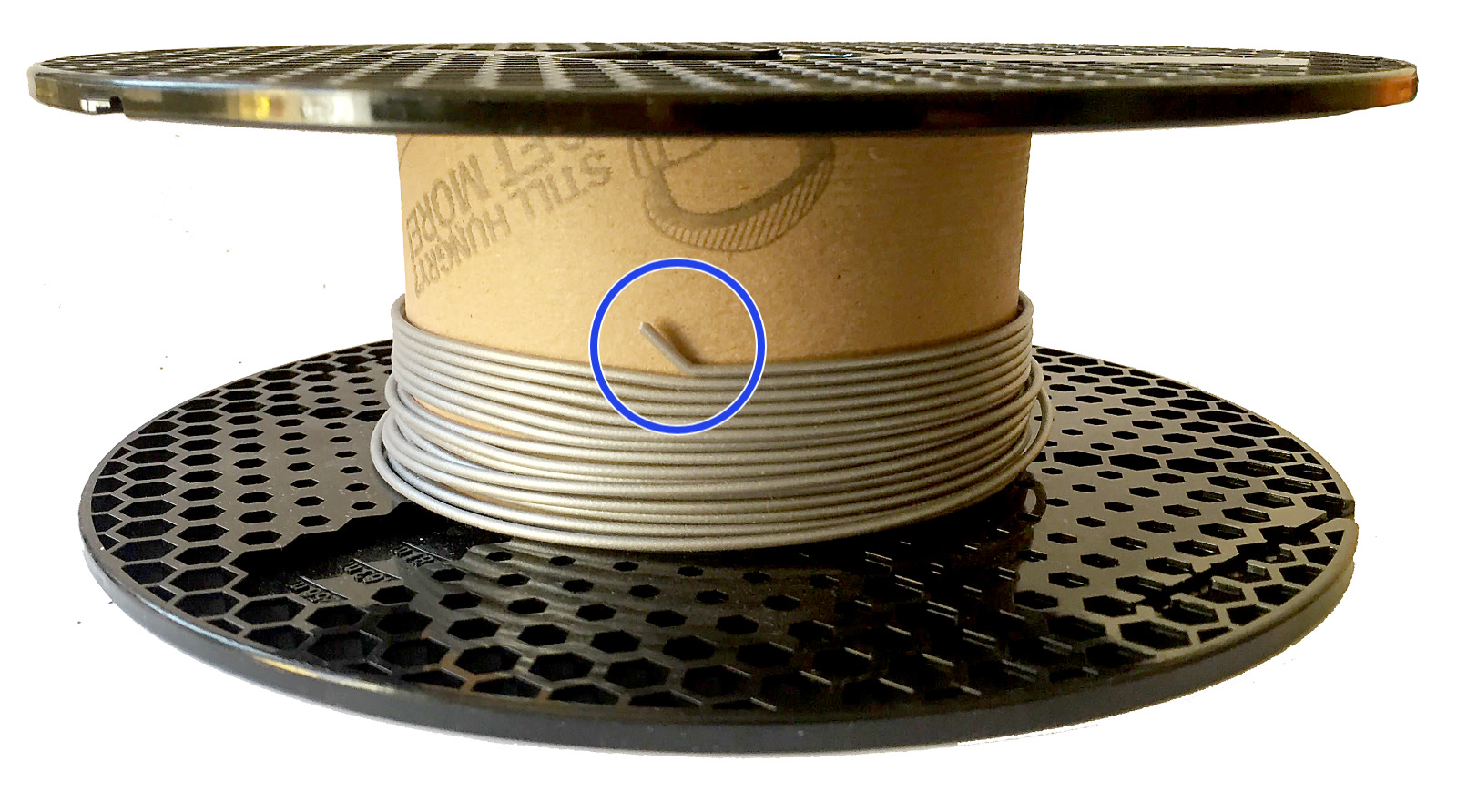
                  Filaments are often "secured" to the spool by a bent end (Blue circle). This might make your filament get stuck in the MMU2S PTFE tubes or pull the empty spool. Make sure to cut that end when you are finishing a spool.
                  Was this article helpful?
                  This action is available only to registered users. Please log-in.

                  Topics

                  • About your printer
                    • Printer features
                      • HW setup (MK2.5/S & MK3/S/+)
                      • Print statistics
                      • Prusa firmware-specific G-code commands
                      • IR Filament Sensor (MK2.5S, MK3S/+, MK3.5/S)
                      • SpoolJoin (MMU2S)
                      • Tune Menu
                      • Water-soluble materials (PVA/BVOH)
                      • Sample G-codes
                      • List of parts for MMU upgrades
                    • Printer description
                    • General Information

                  11 comments

                  Log in  to post a comment
                  Pitom
                  •
                  When using spooljoin while printing a multimaterial object, the extruder of the first spool is used again when this filament has to be used after the change of spool. The problem is... it is empty. The g-code has to adapt itself to jump to the new extruder instead of using the first one. I don't know if it's possible.

                  But this element has to be taken into account while printing multimaterial object with the forecast of a spooljoin during the printing.
                  Reply
                  Eddie Louw
                  •
                  Where is the spool join setting on MK4S MMU3?
                  Reply
                  Mike1D
                  •
                  Please update the description that it will work with MMU3, too.(unless that feature has been removed which I don't hope - waiting for my MMU3 to be delivered)Also it might be useful to add this information (or a link to it) to the online handbook of MMU3. I was searching for that feature for quite a while and even no reply in the forum. I found it the using google at a reddit forum.
                  Reply
                  MMPLLC
                  •
                  I have an MMU3 on a Mk3S that is pretty well dialed in. For the "niche" use of SpoolJoin, it says to preload spools 1 and 3, and the print sliced to use them as such, with spool 2 as the backup, and the printer will use spool 2 when spool 1 runs out. It also says that when spool 5 runs out, ti will move on to spool 1. Do these two tactics work in conjuntion? I currently do a lot of prints that use 3 and sometimes 4 spools, and I have the prints sliced to use spools 1-4. Can I slice a print to use spool 5 instead of spool 1, turn on SpoolJoin with spool 1 as the back up, and expect it to use spool 1 once spool 5 runs out, while still using spools 2-4 normally?
                  Reply
                  bryn51
                  •
                  This article could elaborate more on how the spool join feature actually works.  Does it sense the end of a roll using the Finda sensor ? If so then how would it unload the old filament ?
                  Reply
                  Giuliano - Official Prusa CS
                  •
                  Hello. The FINDA senses the end of the filament. With the Spool Join function enabled, instead of waiting for the manual spool change, the selector will move to the right to pick up the next filament when the FINDA doesn't detect the filament any longer.
                  Reply