Prusa
  • SHOP
    • Latest products
    BY CATEGORY
    • 3D printersnew
    • 3D printer upgradesnew
    • Materials
    • Accessories
    • Spare parts
    • Courses
    • Merch
    • Get a price quote
    QUICK LINKS
    • Shipping & delivery
    • Returns & refunds
    • Payment & financing
    • Warranty
    • VAT & Customs fees
    • FAQ

    0 item in your cartitems in your cart

    Your cart is empty

    Go to cartShop 3D printers

    My profile

    Log in to see orders, saved items

    My profile

    Signed in as

    • Orders
    • Logout
  • 3D PRINTING
    • Explore 3D printing
    FOR BEGINNERS
    • 3D printing 101
    • How FDM printing works
    • Buying your first printer
    • 3D model catalog
    BY APPLICATION
    • Rapid prototyping
    • Manufacturing
    • Engineering
    • Research
    • Arts & design
    GO DEEPER
    • Materials guide
    • Courses
    • Webinars
    • Case studies
    • Custom 3D printing
  • 3D PRINTERS
    • All 3D printers
    FOR
    • Home or garageHobbyists, tinkerers and home printing
    • BusinessIn-house production for small teams
    • EnterpriseFleets, security and scale
    • Which Prusa is right for me
    SHOP & BROWSE
    • CORE One+new
    • CORE One+ INDXnew
    • CORE One L+new
    • CORE One L+ INDXnew
    • XL+new
    • MK4S
    • Prusa Pro HT90
    • Prusa Pro AFS
    • Prusa Pro SLX
    MORE FROM PRINTERS
    • Parts & upgradesnew
    • Critical infrastructure
    • Case studies
    • Signature Oak
    • Kits
  • MATERIALS
    • All materials
    BY USE
    • Every-day & design
    • Functional engineering
    • Composites
    • Pro speciality
    • SLA resins
    PRUSAMENT
    • PLA
    • PETG
    • ASA
    • PC
    • PA11
    • Flex
    • TPU
    MORE FROM MATERIALS
    • Materials guide
    • We make material in house
    • Sustainability
    • Order on the store
  • SOFTWARE
    • All software
    PREPARE THE PRINT
    • PrusaSlicer 3.0New
    PRINT & MONITOR
    • Prusa Connect
    • EasyPrint
    • iOS & Android app
    • Prusa Farm
    GET STARTED
    • Download & install
    • Knowledge base
    MORE FROM SOFTWARE
    • 3D model catalog
  • SUPPORT
    • Explore support
    FIND ANSWERS
    • Knowledge base
    • Troubleshooting
    • Courses
    • Webinars
    GET HELP
    • Contact us
    • Livechat
    • Shipping & delivery
    • Warranty
    • Returns & refunds
    • Service & spare parts
    • Service & Repair
    COMMUNITY
    • Forum
    • Reddit
    • Printables
  • TRUST CENTER
    • Trust Center overview
    BY TOPIC
    • GDPR
    • Certificates
    • Security
    • Compliance
    COMMITMENTS
    • Sustainability report
    TALK TO US
    • Contact the security team
  • COMPANY
    • About Prusa
    GET TO KNOW US
    • Our story
    • How we make printers
    • Open source
    • Brand & media kit
    NEWS
    • Blog
    • Newsroom
    • Events
    TRUST & PARTNERS
    • Sustainability
    • Resellers & distributors
    • Affiliate program
    • Contact
    • English
    • Čeština
    • Deutsch
    • Español
    • Français
    • Italiano
    • Polski
    • 日本語
  • Signed in as

    • Orders
    • Address
    • In-stock Alerts
    • My Courses
    • Subscription
    • Edit Account
    • Logout

Log in to see orders, saved items

Signed in as
  • Orders
  • Address
  • In-stock Alerts
  • My Courses
  • Subscription
  • Edit Account
  • English
  • Čeština
  • Deutsch
  • Español
  • Français
  • Italiano
  • Polski
  • 日本語
Shop

0 item in your cartitems in your cart

Your cart is empty

Go to cartShop 3D printers

My profile

Log in to see orders, saved items

My profile

Signed in as

  • Orders
  • Logout
SHOP
  • Latest products
BY CATEGORY
  • 3D printersnew
  • 3D printer upgradesnew
  • Materials
  • Accessories
  • Spare parts
  • Courses
  • Merch
  • Get a price quote
QUICK LINKS
  • Shipping & delivery
  • Returns & refunds
  • Payment & financing
  • Warranty
  • VAT & Customs fees
  • FAQ

Featured products

    Popular categories

      Trending searches

        Articles

          Blog

            Products

              Categories

                Suggested searches

                  Searching…
                  No results
                  Something went wrong.
                  ↑↓ Select↵ OpenEsc Close search
                  1. Support
                  2. Original Prusa MK3.9S
                  3. Printer troubleshooting
                  4. Hotend mintemp error #31208 (CORE One) #35208 (CORE One L) #26208 (MK4S) #13208 (MK4) #27208 (MK3.9S) #21208 (MK3.9)
                   

                  Contents

                  • What happened?
                  • How to fix it?

                  Blog

                  • Print colorful and glowing Halloween decorations with our spooky offer
                  • Factorio Has Arrived on Printables
                  • Prusament PLA Lightweight: 65% lighter than regular PLA. Perfect choice for aircraft, cosplay, and more.

                  Newsletter

                  Signup and get our monthly squeeze on updates, blog, printables and much more.

                  By clicking, you agree to receive our newsletter.

                  This site is protected by reCAPTCHA Enterprise and the Google Privacy Policy and Terms of Service apply.

                  Factorio Transport Belts
                  E-shop
                  • 3D Printers
                  • Printer Upgrades
                  • Filaments
                  • Accessories
                  • Prusa Merchandise

                  © Prusa Research a.s.

                  Printables
                  • 3D Models
                  • Store
                  • Clubs
                  • 3D Design Contests
                  • Brands
                  Community
                  • World Map
                  • Forum
                  • User Groups
                  • Events
                  Help
                  • Prusa Help
                  • Prusa Academy
                  • 3D Printing Calculators
                  Software
                  • PrusaSlicer
                  • Prusa.app
                  • Prusa Connect
                  • Drivers and Software
                  Company
                  • About Us
                  • Blog
                  • Official Prusa Resellers
                  • Contact Us
                  • Certified for ISO 9001, ISO 14001, ISO 45001
                  • General Terms and Conditions
                  • General Terms and Conditions of Use of the PRUSA Websites
                  • Privacy Policy
                  • Information about cookies
                  • Customer Complaints Policy
                  • Status Page
                  • Do Not Sell or Share My Personal Information
                  • Supplemental Statements
                  • General Terms and Conditions
                  • General Terms and Conditions of Use of the PRUSA Websites
                  • Privacy Policy
                  • Information about cookies
                  • Customer Complaints Policy
                  • Status Page
                  • Do Not Sell or Share My Personal Information
                  • Supplemental Statements

                  © Prusa Research a.s.

                  JOSEF PRUSA®, PRUSA RESEARCH®, PRUSA POLYMERS®, PRUSA ORANGE®, PRUSA 3D ® AND PRUSAMENT® are registered trademarks of Prusa Development a.s. used by Prusa Research a.s. under licence from Prusa Development a.s.

                  Hotend mintemp error

                  #31208 (CORE One) #35208 (CORE One L) #26208 (MK4S) #13208 (MK4) #27208 (MK3.9S) #21208 (MK3.9)

                  Relevant for

                  MK4
                  MK3.9
                  MK4S
                  MK3.9S
                  CORE One family
                  23 comments
                  Article is also available in following languages
                  English
                  Čeština
                  Polski
                  Deutsch
                  Français
                  Español
                  Italiano
                  日本語

                  What happened?

                  The printer is showing the message "Check the print head thermistor wiring for possible damage."

                  Error name: Hotend mintemp error

                  Error code: #31208 (CORE One) #35208 (CORE One L) #26208 (MK4S) #13208 (MK4) #27208 (MK3.9S) #21208 (MK3.9)

                  This error is shown when the printer's nozzle temperature drops below 5 ºC at any point during the print . If this happens during a print, the print will be stopped.

                  How to fix it?

                  Ensure that the ambient temperature where the printer is is stable, and above 18 ºC. If not due to low ambient temperature, this error is usually caused by the hotend thermistor. 

                  Before accessing or manipulating any printer parts and electronic boards, ensure the printer is cooled down and switched off. 

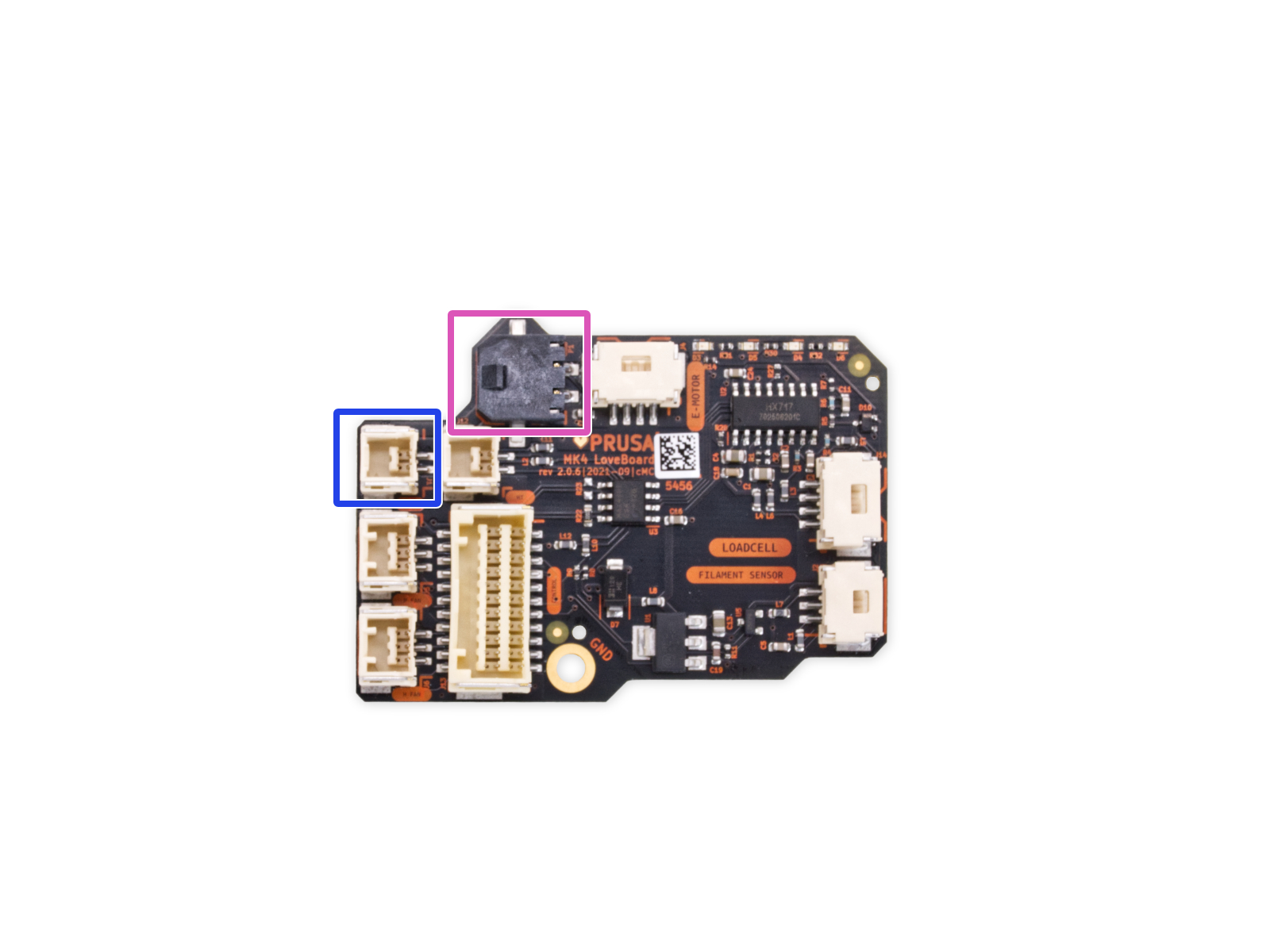
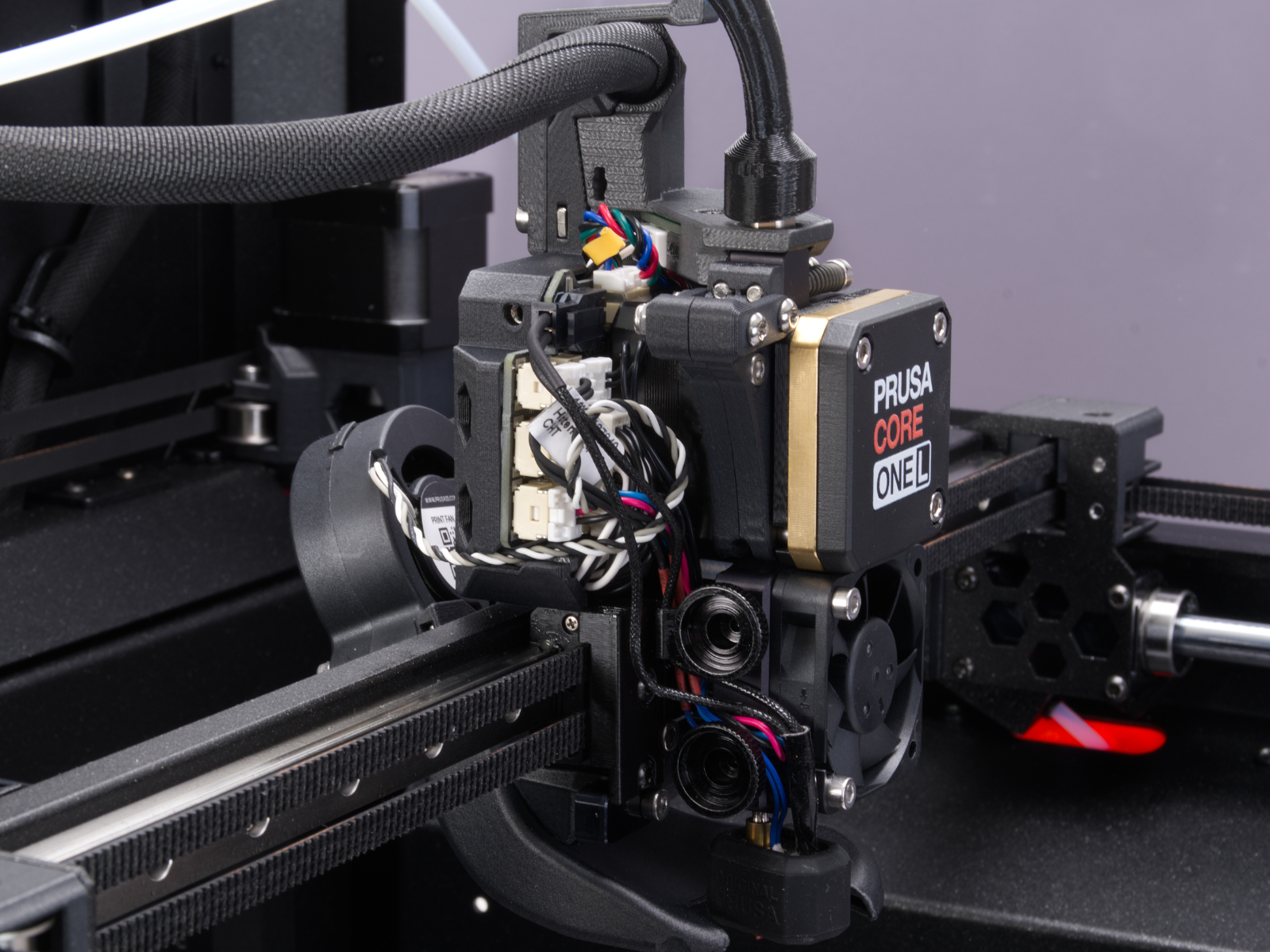
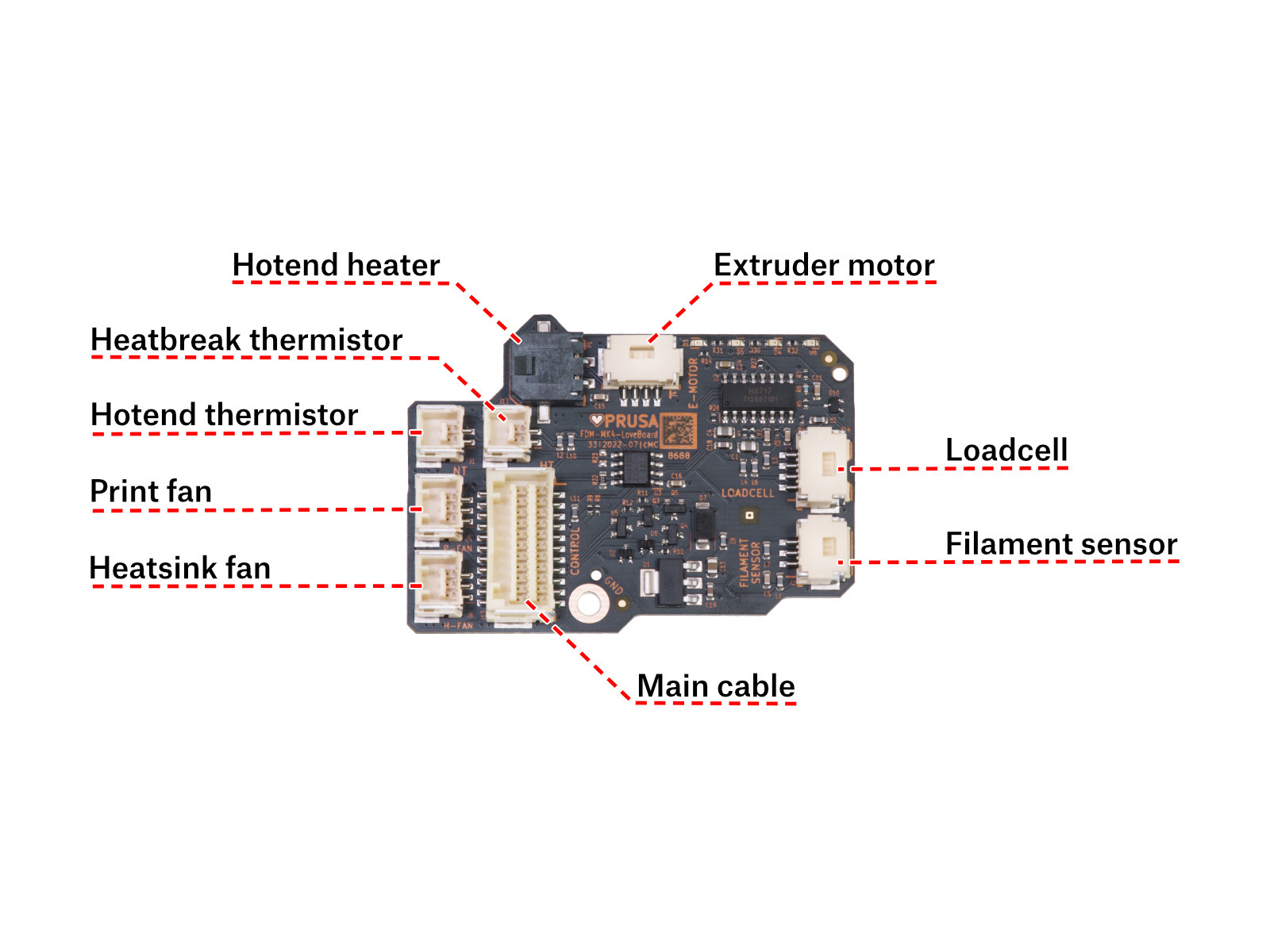
                  Access the LoveBoard and check the heater and thermistor cables. Make sure that they are connected correctly and that there is no damage along their length.
                  How to access the LoveBoard left side - CORE One 

                  Using a T10 Torx key, loosen and remove one M3x6rT bolt. Then, release the side cover. 
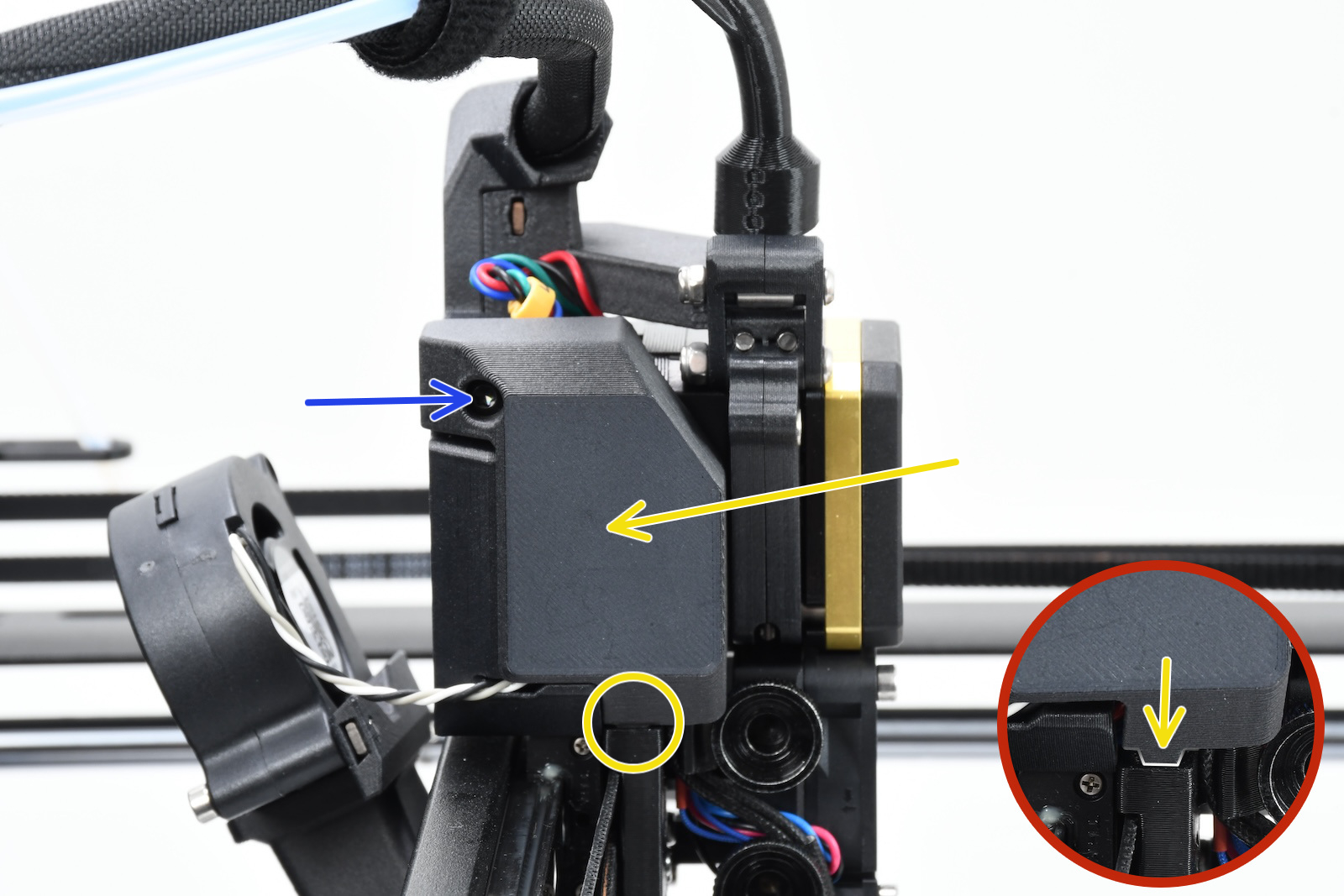
                  How to access the LoveBoard left side - CORE One L

                  Using a 2.5mm Allen key, remove the M3x10 screw on top of the cover to release it.
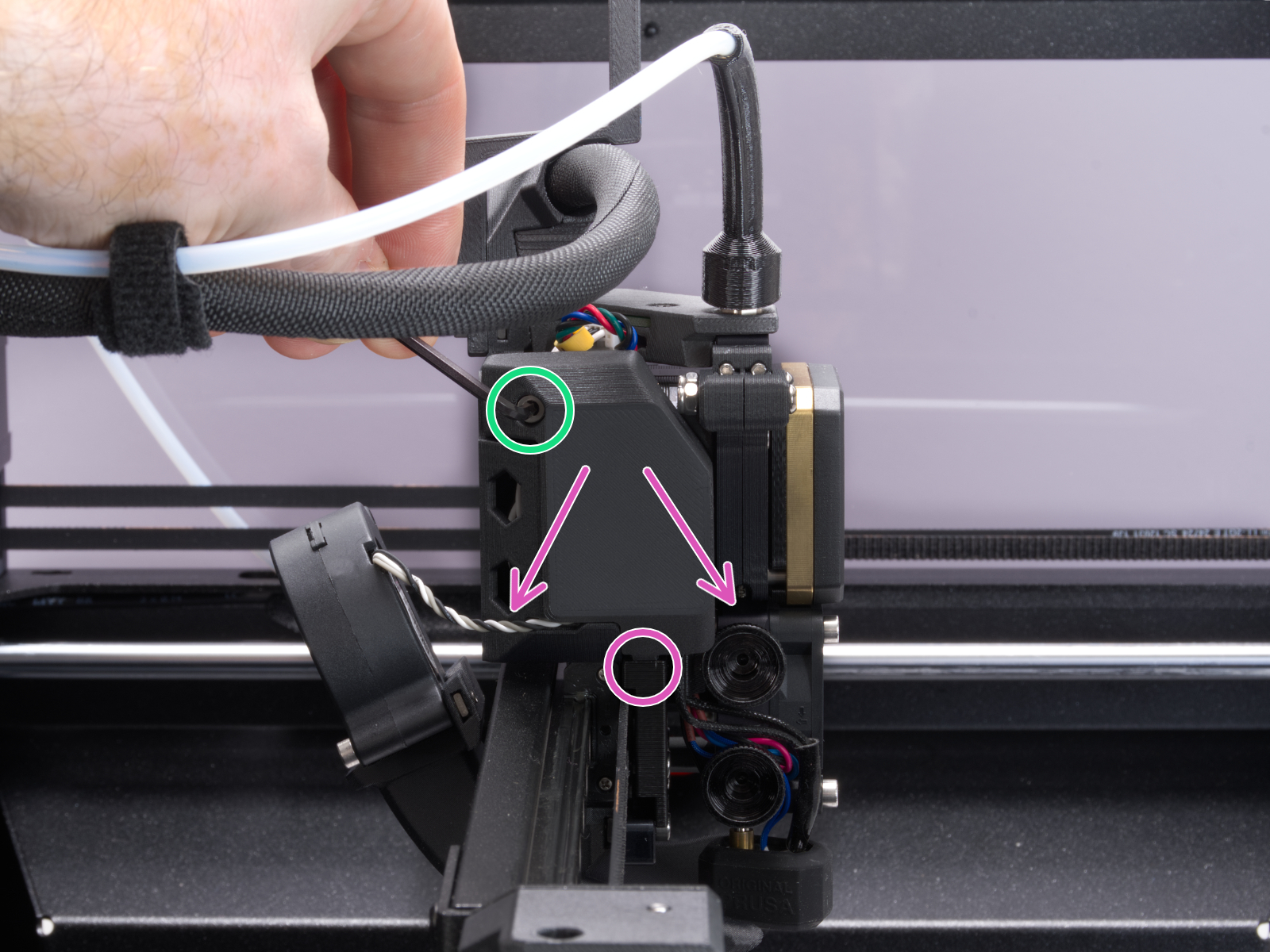
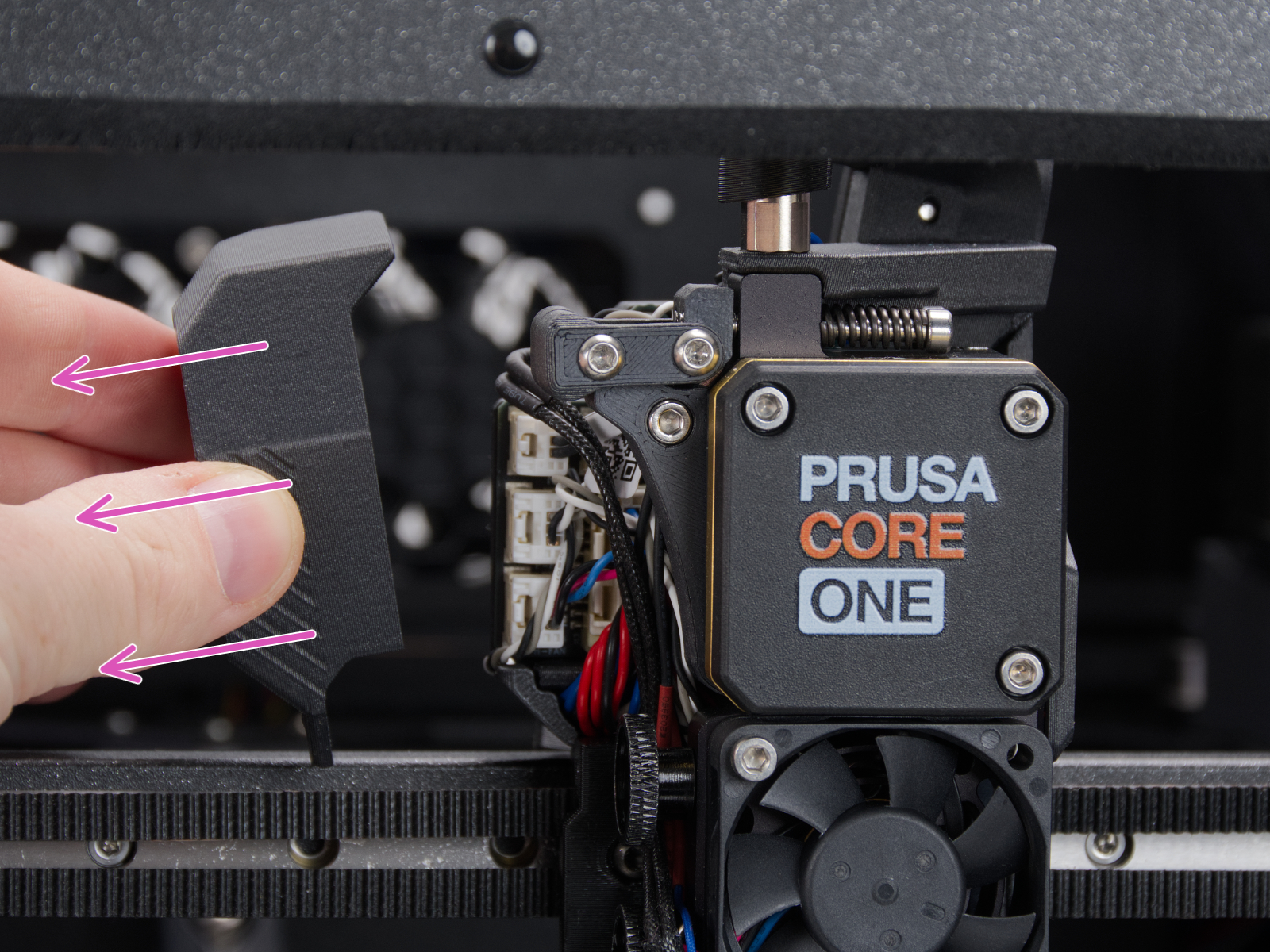
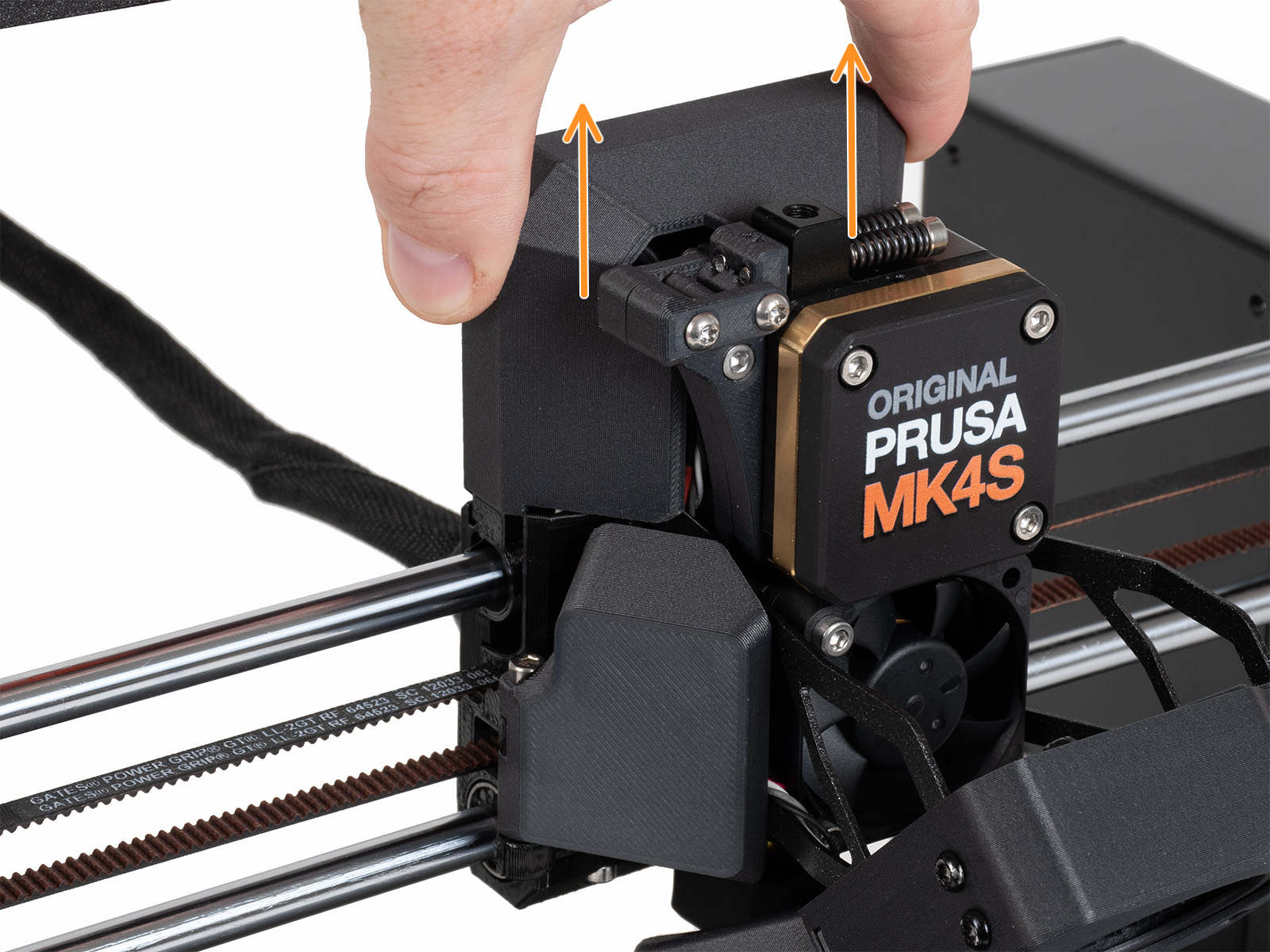
                  How to access the LoveBoard left side - MK4/S,  MK3.9/S

                  Slide the LoveBoard cover upward to remove it from the Nextruder
                  On the xBuddy board, check if the fuse that protects the extruder is not damaged.

                  Make sure that the Loveboard main cable is correctly connected to the xBuddy board, and not pinched.

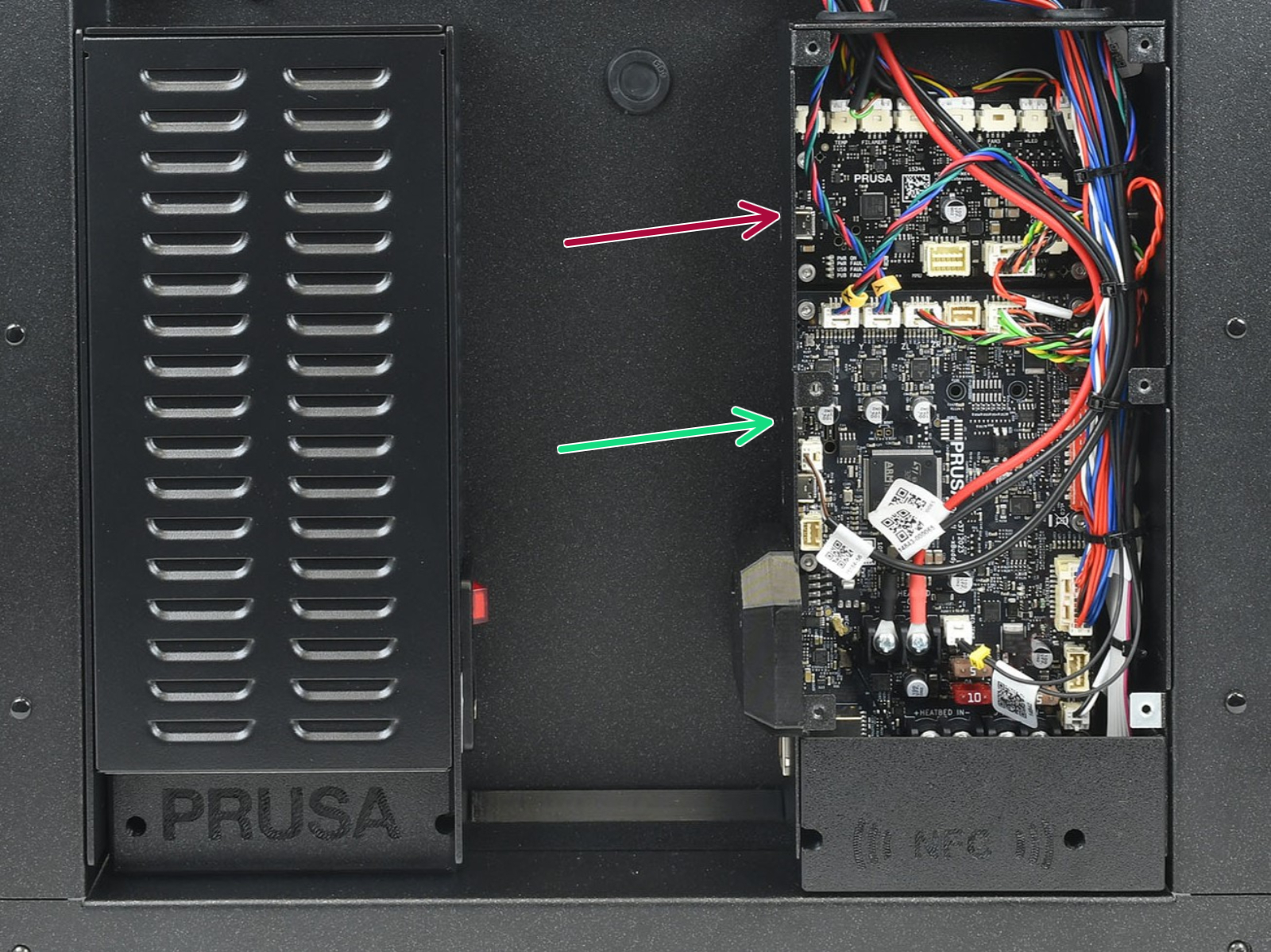
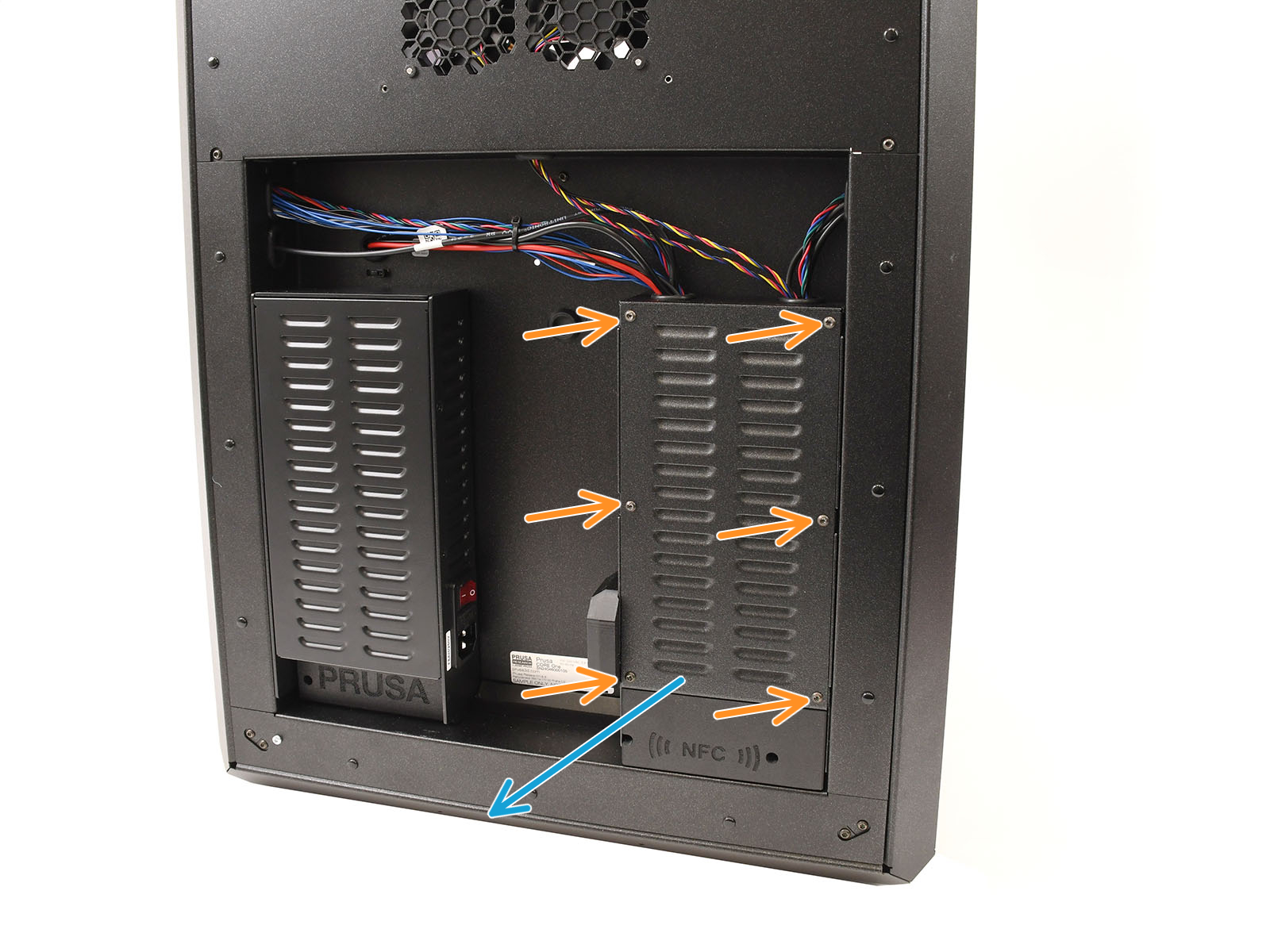
                  How to access the xBuddy board - CORE One

                  Locate the xBuddy board case. Looking at the printer from its rear, it is the rightmost case. 

                  Using a T10 Torx key, remove six M3x4bT bolts to release the xBuddy box cover. 

                  The bottom larger board is the xBuddy board, while the top smaller board is the xBuddy extension board. 
                  How to access the xBuddy board - CORE One L

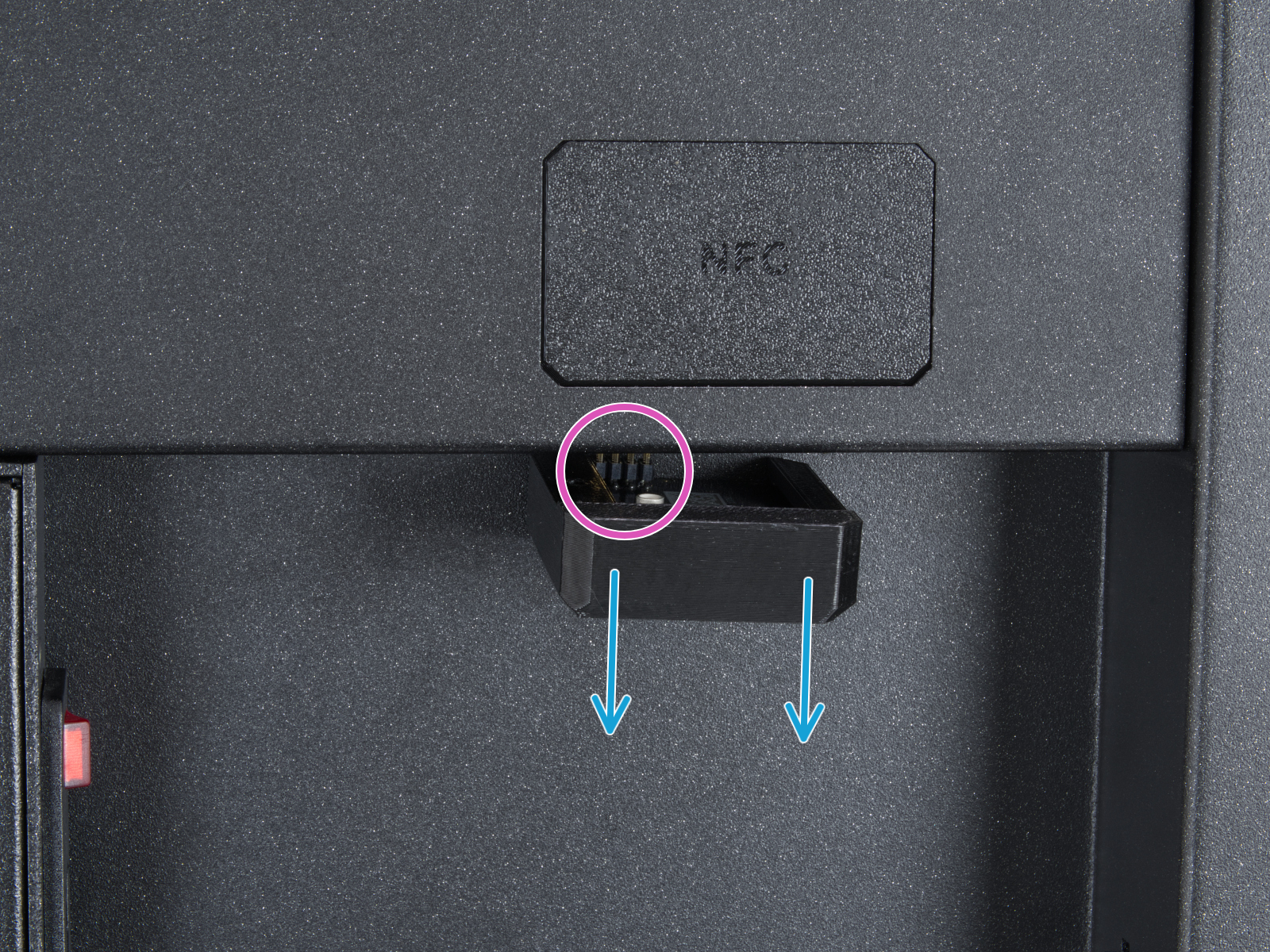
                  Locate the Wi-Fi module on the rear panel of the printer. Using a 2.5 mm Allen key, remove the M3x14 screw. Gently pull the Wi-Fi module straight downward to remove it from the printer.
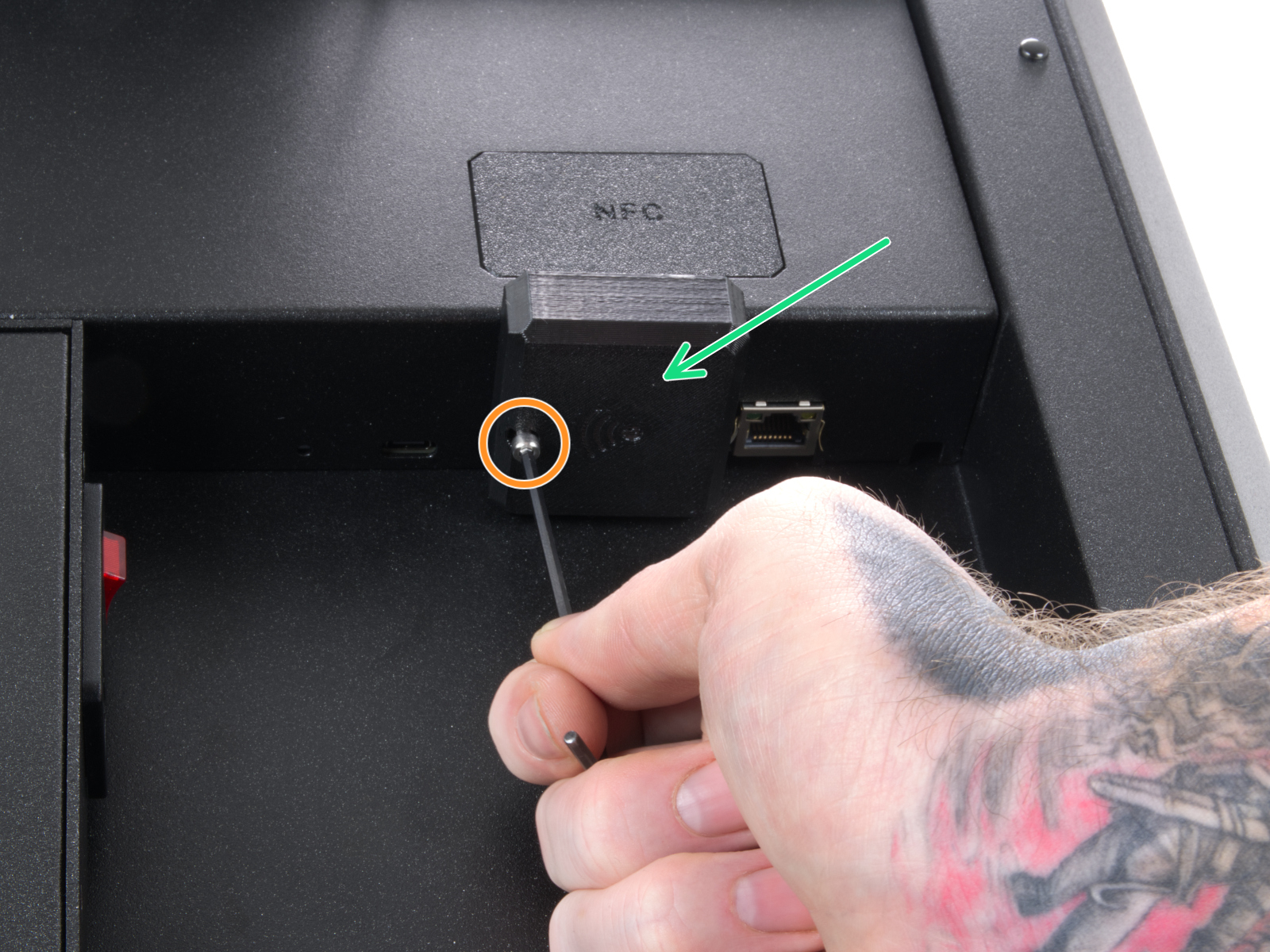
                  Note that the Wi-Fi module is connected to the electronics with eight spikes.

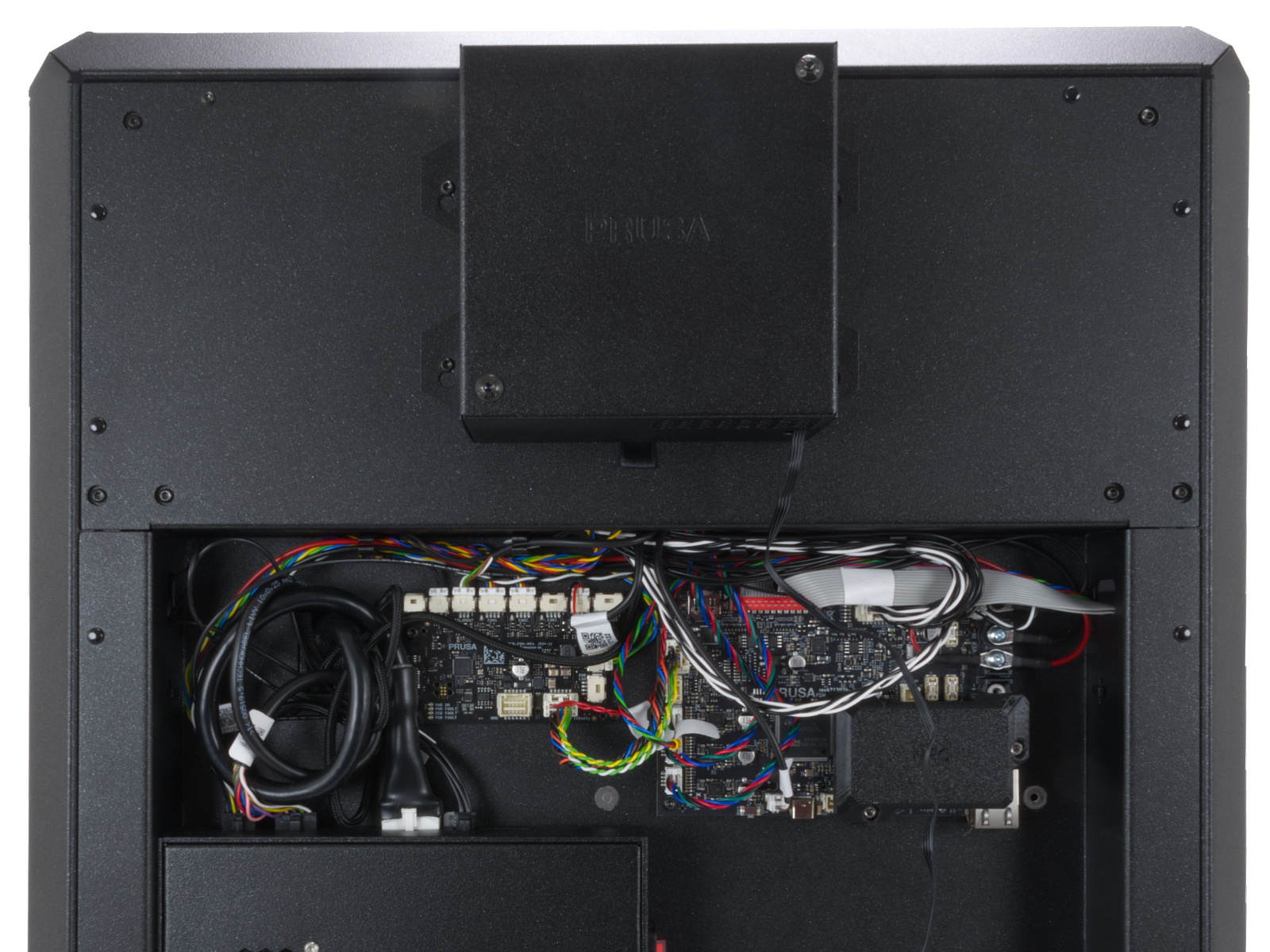
                  From the inside of the printer, locate on the rear side the highlighted M3x4bT bolts. 
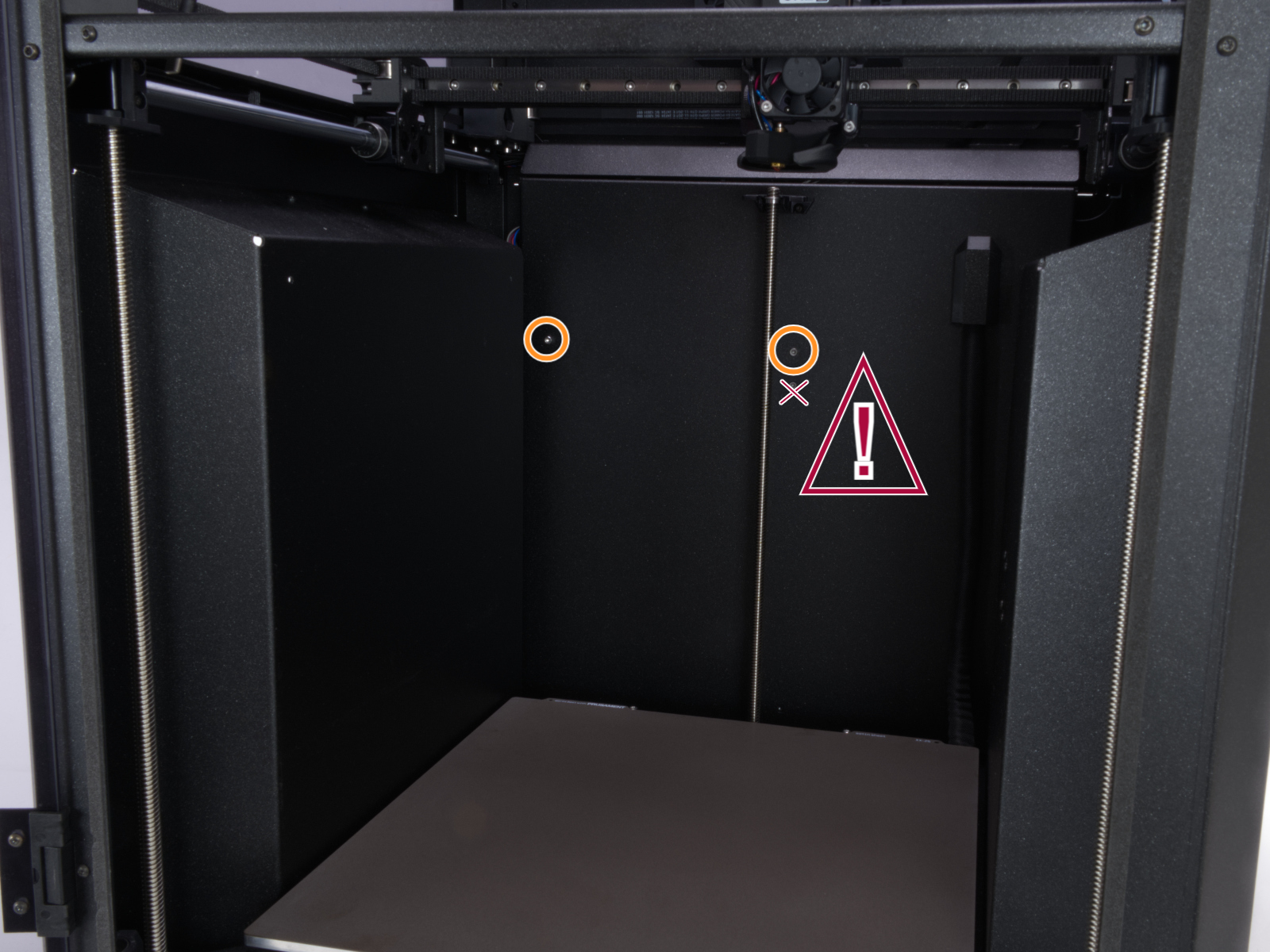
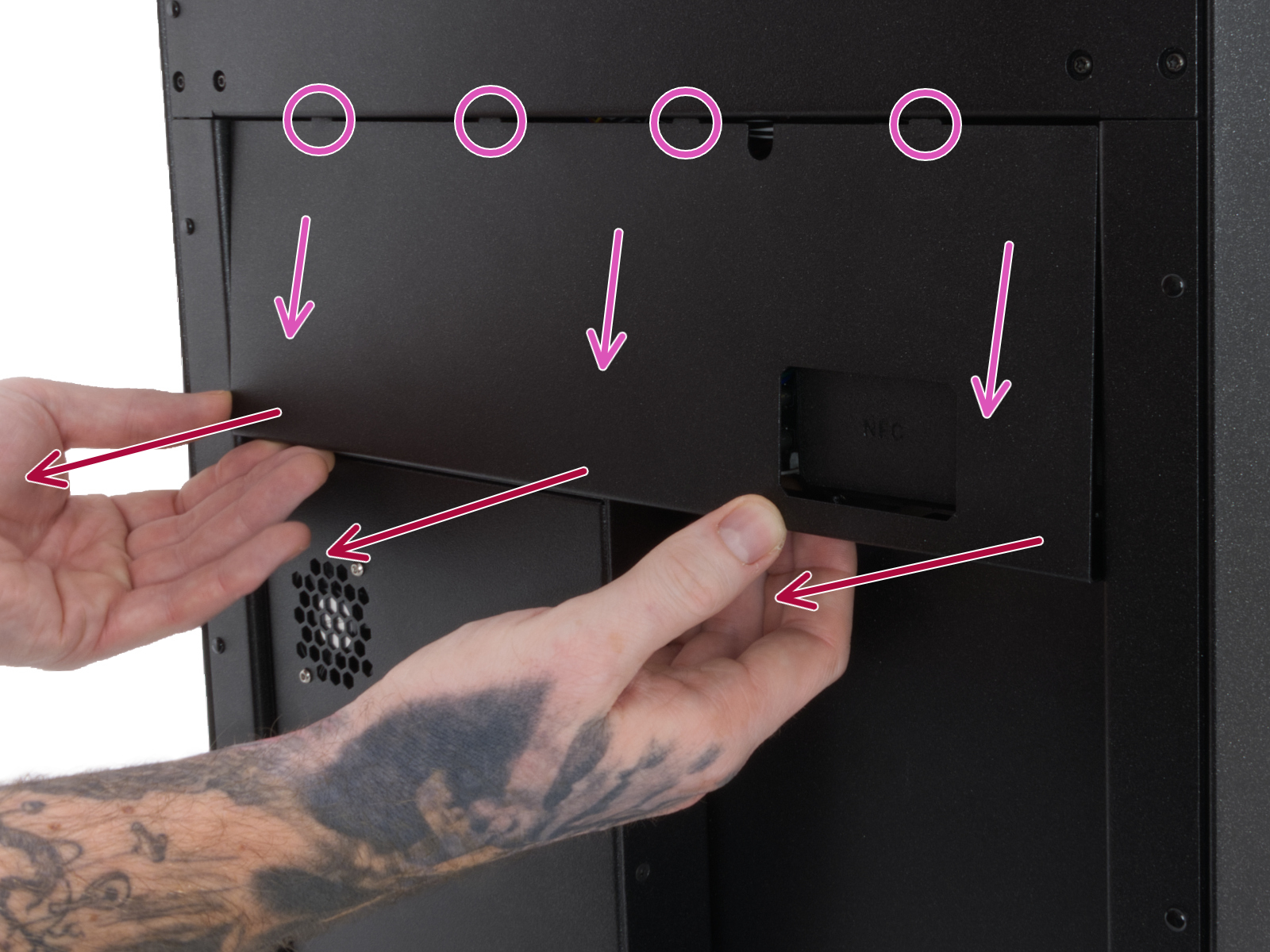
                  Using a T10 Torx key, remove two M3x4rT bolts to release the rear xBuddy box cover. Lift the cover to expose the xBuddy and xBuddy extension boards. 
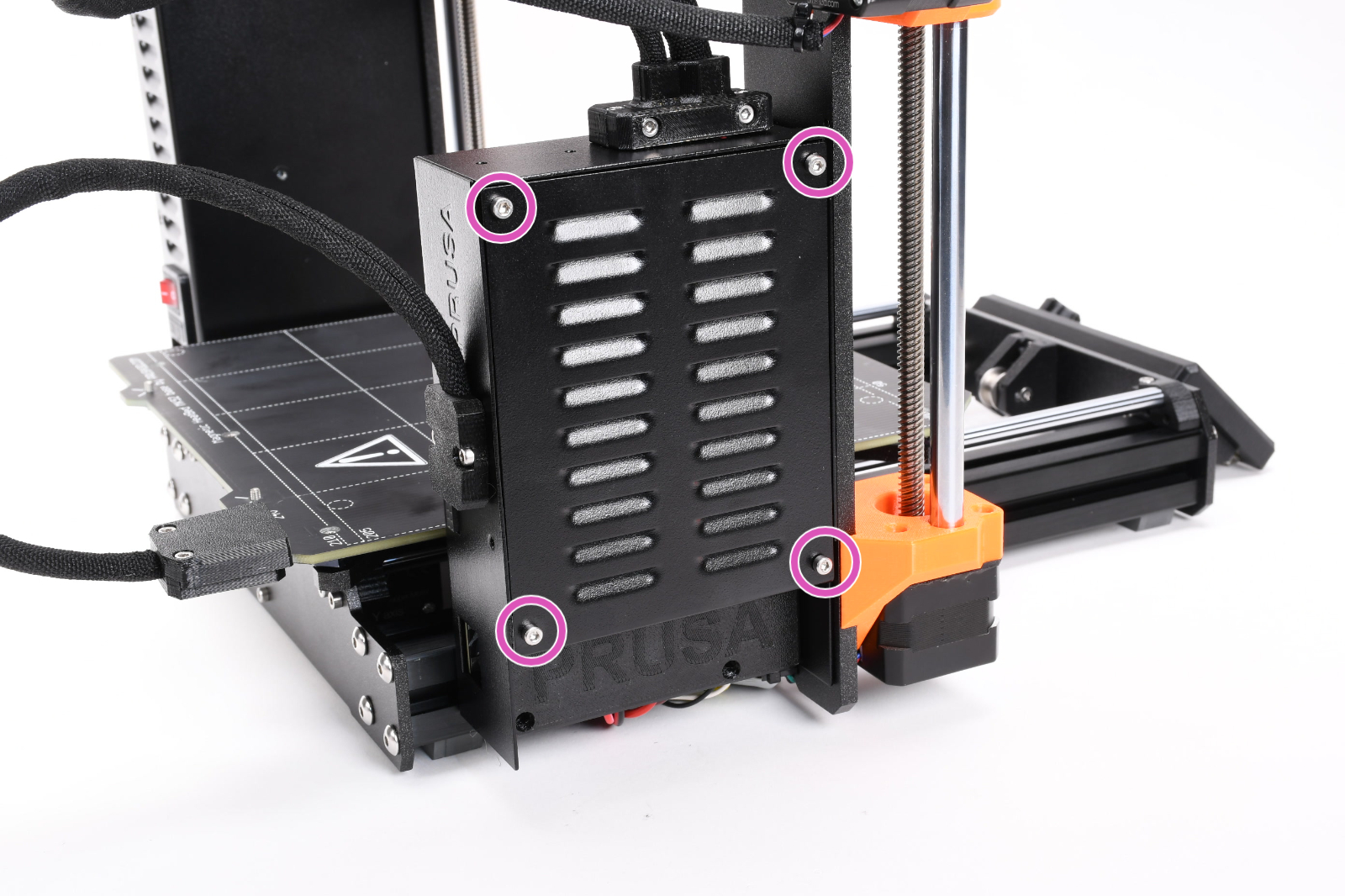
                  How to access the xBuddy board - MK4/S, MK3.9/S

                  Access the xBuddy board by loosening four M3x6 bolts. 
                  Multimeter check

                  If you have a multimeter available, use this guide to check the resistance on the hotend heater and the hotend thermistor.

                  Was this article helpful?
                  This action is available only to registered users. Please log-in.

                  Topics

                  • Troubleshooting
                    • Printer troubleshooting
                      • Spaghetti monster
                      • Extruder blob
                      • PrusaLink Troubleshooting
                      • Hotend preheat error #31202 (CORE One) #35202 (CORE One L) #26202 (MK4S) #13202 (MK4) #27202 (MK3.9S) #21202 (MK3.9) 
                      • Bed thermal runaway #31203 (CORE One) #35203 (CORE One L) #36203 (CORE One INDX) #26203 (MK4S) #13203 (MK4) #27203 (MK3.9S) #21203 (MK3.9) #28203 (MK3.5S) #23203 (MK3.5) 
                      • Hotend thermal runaway #31204 (CORE One) #35204 (CORE One L) #26204 (MK4S) #13204 (MK4) #27204 (MK3.9S) #21204 (MK3.9)
                      • Hotend mintemp error #31208 (CORE One) #35208 (CORE One L) #26208 (MK4S) #13208 (MK4) #27208 (MK3.9S) #21208 (MK3.9)
                      • Bed mintemp error #31207 (CORE One) #35207 (CORE One L) #36207 (CORE One INDX) #26207 (MK4S) #13207 (MK4) #27207 (MK3.9S) #21207 (MK3.9) #28207 (MK3.5S) #23207 (MK3.5)
                      • Bed maxtemp error #31205 (CORE One) #35205 (CORE One L) #36205 (CORE One INDX) #26205 (MK4S) #13205 (MK4) #27201 (MK3.9S) #21201 (MK3.9) #28201 (MK3.5S) #23201 (MK3.5)
                      • Homing error Y #31305 (CORE One) #35305 (CORE One L) #36305 (CORE One INDX) #17305 (XL)
                      • Heatbed Port Overcurrent #31309 (CORE One) #35309 (CORE One L) #26309 (MK4S) #13309 (MK4) #27309 (MK3.9S) #21309 (MK3.9) #28309 (MK3.5S) #23309 (MK3.5) #12309 (MINI) #36309 (INDX)
                      • MMU Overcurrent #31310 (CORE One) #35310 (CORE One L) #26310 (MK4S) #13310 (MK4) #27310 (MK3.9S) #21310 (MK3.9) #28310 (MK3.5S) #23310 (MK3.5)
                      • Loadcell Not Calibrated #31523 (CORE One) #35223 (CORE One L) #26523 (MK4S) #13523 (MK4) #27523 (MK3.9S) #21523 (MK3.9)
                      • Loadcell Measure Failed #31526 (CORE One) #35526 (CORE One L) #36526 (CORE One INDX) #26526 (MK4S) #13526 (MK4) #27526 (MK3.9S) #21526 (MK3.9) #36526 (CORE One INDX)
                      • Loadcell Bad Configuration #31527 (CORE One) #35527 (CORE One L) #36527 (CORE One INDX) #26527 (MK4S) #13527 (MK4) #27527 (MK3.9S) #21527 (MK3.9)
                      • Loadcell Timeout #31528 (CORE One) #35528 (CORE One L) #26528 (MK4S) #36528 (CORE One INDX) #13528 (MK4) #27528 (MK3.9S) #21528 (MK3.9)
                      • Heatbreak MINTEMP Error #31211 (CORE One) #35211 (CORE One L) #26211 (MK4S) #13211 (MK4) #27211 (MK3.9S) #21211 (MK3.9)
                      • Blown Fuse (MK4/S, MK3.9/S)
                      • Filament not loading (MK4/S, MK3.9/S)
                      • Homing error Y #26305 (MK4S) #13305 (MK4) #21305 (MK3.9) #23305 (MK3.5)
                      • Tangled filament
                      • Factory reset (CORE One L, CORE One, MK4/S, MK3.9/S, MK3.5/S, MINI/+, XL)
                      • Nextruder filament sensor (CORE One, CORE One L, MK4/S, MK3.9/S, XL/+)
                      • Connect Registration Failed
                      • Connect Registration Failed #21401 (MK3.9)
                      • Blue Screen of Death (BSOD) #31538 (CORE One) #35538 (CORE One L) #36538 (CORE One INDX) #26538 (MK4S) #13538 (MK4) #27538 (MK3.9S) #17538 (XL) #21538 (MK3.9) #28538 (MK3.5S) #23538 (MK3.5) #12538 (MINI)
                      • Stuck filament detection #31101 (CORE One) #35101 (CORE One L) #26101 (MK4S) #13101 (MK4) #27101 (MK3.9S) #21101 (MK3.9) #17108 (XL)
                      • Heatbed temp not matching #31209 (CORE One) #35209 (CORE One L) #26209 (MK4S) #13209 (MK4) #27209 (MK3.9S) #21209 (MK3.9) #28209 (MK3.5S) #23209 (MK3.5)
                      • Hotend temp not matching #31210 (CORE One) #35210 (CORE One L) #26210 (MK4S) #13210 (MK4) #27210 (MK3.9S) #21210 (MK3.9)
                      • Loadcell troubleshooting
                      • Under-extrusion (Nextruder printers)
                      • Homing error X #31304 (CORE One) #35304 (CORE One L) #36304 (CORE One INDX) #17304 (XL)
                      • Fil. sensor troubleshooting #31114 (CORE One) #26114 (MK4S) #13114 (MK4) #27114 (MK3.9S) #21114 (MK3.9) #28114 (MK3.5S) #23114 (MK3.5)
                      • MCU in Buddy is overheated #31825 (CORE One) #35825 (CORE One L) #26825 (MK4S) #27825 (MK3.9S) #28825 (MK3.5S) #13825 (MK4) #21825 (MK3.9) #23825 (MK3.5) #17825 (XL) #12825 (MINI)
                      • Crash recovery axis long #31809 (CORE One) #35809 (CORE One L) #26809 (MK4S) #13809 (MK4) #27809 (MK3.9S) #21809 (MK3.9) #28809 (MK3.5S) #23809 (MK3.5) #17809 (XL) #12809 (MINI)
                      • Crash recovery repeated crash #31811 (CORE One) #35811 (CORE One L) #26811 (MK4S) #13811 (MK4) #27811 (MK3.9S) #21811 (MK3.9) #28811 (MK3.5S) #23811 (MK3.5) #17811 (XL) #12811 (MINI)
                      • Crash recovery axis short #31810 (CORE One) #35810 (CORE One L) #26810 (MK4S) #13810 (MK4) #27810 (MK3.9S) #21810 (MK3.9) #28810 (MK3.5S) #23810 (MK3.5) #17810 (XL) #12810 (MINI)
                      • Chamber overheating #36260 (INDX) #31260 (CORE One) #35260 (CORE One L) #17260 (XL)
                      • Chamber temperature is critical #36261 (INDX) #31261 (CORE One L) #35261 (CORE One) #17261 (XL)
                      • Clogged nozzle (CORE One, CORE One L, XL, MK4/S, MK3.9/S)
                      • SD cards and USB drives
                    • Diagnostics
                    • Print Quality Troubleshooting
                    • QR Error codes
                    • Print Error Messages

                  16 comments

                  Log in  to post a comment
                  gabem0919
                  •
                  Hi, just upgraded from Mk4 to Mk4S, and I’m getting #26208 error. Printer was running fine before upgrade. After I finished installing the upgrade I reran calibration test and got the error. I’ve gone through all the troubleshooting steps, but still no luck.
                  What should I do next?
                  Reply
                  domzique dom
                  •
                  Contact the support.
                  another you can do is turn off the machine, take off the full hotend.
                  And install a brand new hotend and see if it works.

                  Don't try to change the temperature of the nozzle. Just check at the bottom left of the lcd screen if the nozzle has a temperature.

                  On my machine, I found out that the hotend wire had a very small loose contact which was the problem. By changing the hotend, it works now without the error. This is only for my situation.
                  Reply
                  KAZU
                  •
                  I have performed all troubleshooting steps for the error code #26208, but the error persists. I have completely disassembled and inspected the Nextruder. I cannot figure out why the hotend temperature drops to 5
                  ∘
                  Could you please advise?
                  Reply
                  mrbunky13
                  •
                  Got this error on a 2 month old Core One. Printed mostly fine up to this point.
                  Removed the hot end thermistor and it read 113k Ohms, well within the normal range.
                  Tested the NTC thermistor, and that one read 115k Ohms, also normal range.
                  Wiring on both thermistors shows no damage, and did not see any intermittent readings when measuring the resistance.
                  Checked Love board cable to Buddy Board, and both ends were secure.
                  After reseating the two thermistor cables and reassembling everything, the printer booted up fine and no longer threw the error on any attempt to heat the nozzle.
                  Unfortunately this leaves the printer in a suspect state, and prints are still failing (nozzle clog/under extruding). Tried to contact support, but the link just kept sending me back to the top of the page, and doesn't allow any other report to be filed.
                  Reply
                  mrbunky13
                  •
                  Wiggling the hot end thermistor wire near the connector causes the problem to happen.
                  Leaving the side panels off of the nextruder is allowing printing to happen, but this connection to the Love Board is not very tight.
                  Reply
                  djcox
                  •
                  Keep getting this on the Core One. I've been able to get it to go away at times by messing with the wire but it always come back. Can't find any guides on how to replace either.
                  Reply
                  Jan Kratochvíl
                  •
                  Hello. Please contact our support team to find where the problem is.
                  Reply
                  phil zphil
                  •
                  Same Error here.

                  Took the Thermistor out and inspected visualy. No damage to be seen.
                  Measuring it with the Multimeter, i get 87 kOhm at ca. 30 degree celsius which seems normal for a ntc 100k thermistor.

                  Any ideas what could be wrong?
                  Reply