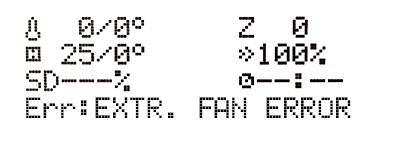
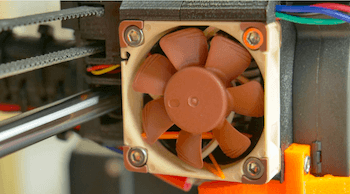
The EXTR. FAN ERROR message appears when the extruder fan does not receive any RPM (Revolutions per Minute) readings, in other words, there is something preventing it from spinning. The extruder fan is the Noctua fan on the left of the extruder. If you have issues with the front print fan, please see Print fan is not spinning.
Troubleshooting
From the LCD menu - Support - Extruder Info, you can find the RPM reading of the 3-wire fans that support this. The expected range should be from ~3500 - 4200 RPM on both fans, when running at full speed. Only the print fan speed can be adjusted by the user.
Visually inspect the extruder fan and make sure there is no debris preventing it from spinning.
Bigger parts can be cleared with tweezers, dust can be cleared with a computer cleaner spray (hold the fan with your hand while blowing at it, otherwise, you might damage the blades).
If you have replaced one of the fans with a replacement not supporting RPM sensing, then you can turn off the monitoring in the LCD Menu - Settings - Check fans.
If the extruder fan stopped working completely, it must be replaced. You can purchase a new one at our e-shop or contact the support for a Warranty replacement.
Was this article helpful?
This action is available only to registered users. Please log-in.
Exactly my case. I inserted a neoymium magnet and the "hotend fan error" started. Not inmediately but after some layers. Resume print helped but I had to cancel. To blow on the fan made it turn again but not enough. I tried with a vacuum cleaner sucking the aire from the opposite side of the fan's wind direction and it helped but the temperature was not stable enough. Somehow when this error happens, the fan just stops turning. Settings/fan check off sis not helped neither. So it is to just keep resuming print until reaching enough distance from the magnet or use supports on the space that later the magnet will use. But encasing the magnet inside was impossible. A smaller magnet was able to be encased but it was not functional for my project. I guess it is a hardware limitation.
So My extruder fan starts at 51C as expected and runs the whole time as expected. But then suddenly it gives the fan error Also a new one is the thermo bed error. all this started after an update
depending on the firmware, you could roll back the firmware and check again, if there are no issues (checking for physical hardware issue) you could possible keep it at teh rolled back firmware and report the issue via the github page for the firmware so the devs see the ticket.
I had this error yesterday - and found this thread. I can "resume print" and the printer will resume for a time - and then give the error again. I looked for the menu where I could turn off the fan "detection" and just run @ 100% just to finish this print - but I could not find the experimental menu - is this menu listing something that must be enabled somewhere else (ah -now I see- elsewhere in this knowledge base - it is only available if ceratin firmware is installed). I finally realized that in my situation, the problem was being caused by the rather large rare-earth magnets that I had placed into pockets in my print (I never get this error on other print jobs) - and it stands to reason that the magnetic fields were interfering with the fan motor (the magnets in the tiny fan motor didn't stand a chance against the neodymiums I was inserting ;-). I stood by with a can of air to restart the fan every time it would stop, and with a few "resumes" also - I was able to lay down a few more layers (thereby raising the print carriage and fan) and the problem dissipated and the print finished. I may try changing the orientation of the print on the bed - and try to keep the fan off to one side of the print area where the magnetic fields may not be as high. I'm actually very pleased with Prusa for not having lots of other ferrous metal parts in the print carriage. I hear stories from others who say they can't install magnets in their prints at all - because they immediately jump up/out to stick to the hotend or other moving parts. Just thought I would post this for anyone else who might run across this issue.
I'm having the same issue. Printing with strong neodimium magnets, my fans, extruder and print fan, continue stopping while they are on top of the magnet. The extruder fan stop and did not restart. I have to blow on the palets to restart it. Instead the print fan that restart when it's away from the magnetic area. I'm thinking to print a pipe to take high the extruder fan, so the magnet will not interfery the fan. But this solution could damage the extruder part because of slighty loss cooling? Exisist a setting to modify the rpm of that fan to compensate the fact that that fan will be much distant to the extruder body?
I had the same problem today. Printing in an eclosure the EXT FAN ERROR appeared. Reading this blog, I decided to turn off, and then restore power as a first approach. To my surprise, after restoring the power the error was gone. I was not able to resume the print unfortunately. But at least I don't have to do any repairs.It seems to me there is a relation with higher temperatures. Also I leave my Prusa turned on all the time. I will follow the advice to lower fan speed by 5%, which is quite counterintuitive printing in an enclosure.
Hi! There shouldn't be a direct relation of the adjustable print fan speed to the EXTR. FAN ERROR since it stands for the extruder fan. In fact, to print successfully in an enclosure with a higher ambient temp, you might need to bump up the print fan speeds compared to a non-enclosed printer to prevent some warping. Then it might be beneficial to turn on the ALTFAN detection in the [id=161213|title=EXPERIMENTAL menu] to run the extruder fan at 100% speed regardless of the sensed RPM value. Since in the experimental menu, you might give the E-Cool mode a try too.


9 comments
depending on the firmware, you could roll back the firmware and check again, if there are no issues (checking for physical hardware issue) you could possible keep it at teh rolled back firmware and report the issue via the github page for the firmware so the devs see the ticket.
I finally realized that in my situation, the problem was being caused by the rather large rare-earth magnets that I had placed into pockets in my print (I never get this error on other print jobs) - and it stands to reason that the magnetic fields were interfering with the fan motor (the magnets in the tiny fan motor didn't stand a chance against the neodymiums I was inserting ;-). I stood by with a can of air to restart the fan every time it would stop, and with a few "resumes" also - I was able to lay down a few more layers (thereby raising the print carriage and fan) and the problem dissipated and the print finished.
I may try changing the orientation of the print on the bed - and try to keep the fan off to one side of the print area where the magnetic fields may not be as high.
I'm actually very pleased with Prusa for not having lots of other ferrous metal parts in the print carriage. I hear stories from others who say they can't install magnets in their prints at all - because they immediately jump up/out to stick to the hotend or other moving parts.
Just thought I would post this for anyone else who might run across this issue.
I'm thinking to print a pipe to take high the extruder fan, so the magnet will not interfery the fan.
But this solution could damage the extruder part because of slighty loss cooling? Exisist a setting to modify the rpm of that fan to compensate the fact that that fan will be much distant to the extruder body?
Hi! There shouldn't be a direct relation of the adjustable print fan speed to the EXTR. FAN ERROR since it stands for the extruder fan.
In fact, to print successfully in an enclosure with a higher ambient temp, you might need to bump up the print fan speeds compared to a non-enclosed printer to prevent some warping.
Then it might be beneficial to turn on the ALTFAN detection in the [id=161213|title=EXPERIMENTAL menu] to run the extruder fan at 100% speed regardless of the sensed RPM value. Since in the experimental menu, you might give the E-Cool mode a try too.