Prusa
  • SHOP
    • Latest products
    BY CATEGORY
    • 3D printersnew
    • 3D printer upgradesnew
    • Materials
    • Accessories
    • Spare parts
    • Courses
    • Merch
    • Get a price quote
    QUICK LINKS
    • Shipping & delivery
    • Returns & refunds
    • Payment & financing
    • Warranty
    • VAT & Customs fees
    • FAQ

    0 item in your cartitems in your cart

    Your cart is empty

    Go to cartShop 3D printers

    My profile

    Log in to see orders, saved items

    My profile

    Signed in as

    • Orders
    • Logout
  • 3D PRINTING
    • Explore 3D printing
    FOR BEGINNERS
    • 3D printing 101
    • How FDM printing works
    • Buying your first printer
    • 3D model catalog
    BY APPLICATION
    • Rapid prototyping
    • Manufacturing
    • Engineering
    • Research
    • Arts & design
    GO DEEPER
    • Materials guide
    • Courses
    • Webinars
    • Case studies
    • Custom 3D printing
  • 3D PRINTERS
    • All 3D printers
    FOR
    • Home or garageHobbyists, tinkerers and home printing
    • BusinessIn-house production for small teams
    • EnterpriseFleets, security and scale
    • Which Prusa is right for me
    SHOP & BROWSE
    • CORE One+new
    • CORE One+ INDXnew
    • CORE One L+new
    • CORE One L+ INDXnew
    • XL+new
    • MK4S
    • Prusa Pro HT90
    • Prusa Pro AFS
    • Prusa Pro SLX
    MORE FROM PRINTERS
    • Parts & upgradesnew
    • Critical infrastructure
    • Case studies
    • Signature Oak
    • Kits
  • MATERIALS
    • All materials
    BY USE
    • Every-day & design
    • Functional engineering
    • Composites
    • Pro speciality
    • SLA resins
    PRUSAMENT
    • PLA
    • PETG
    • ASA
    • PC
    • PA11
    • Flex
    • TPU
    MORE FROM MATERIALS
    • Materials guide
    • We make material in house
    • Sustainability
    • Order on the store
  • SOFTWARE
    • All software
    PREPARE THE PRINT
    • PrusaSlicer 3.0New
    PRINT & MONITOR
    • Prusa Connect
    • EasyPrint
    • iOS & Android app
    • Prusa Farm
    GET STARTED
    • Download & install
    • Knowledge base
    MORE FROM SOFTWARE
    • 3D model catalog
  • SUPPORT
    • Explore support
    FIND ANSWERS
    • Knowledge base
    • Troubleshooting
    • Courses
    • Webinars
    GET HELP
    • Contact us
    • Livechat
    • Shipping & delivery
    • Warranty
    • Returns & refunds
    • Service & spare parts
    • Service & Repair
    COMMUNITY
    • Forum
    • Reddit
    • Printables
  • TRUST CENTER
    • Trust Center overview
    BY TOPIC
    • GDPR
    • Certificates
    • Security
    • Compliance
    COMMITMENTS
    • Sustainability report
    TALK TO US
    • Contact the security team
  • COMPANY
    • About Prusa
    GET TO KNOW US
    • Our story
    • How we make printers
    • Open source
    • Brand & media kit
    NEWS
    • Blog
    • Newsroom
    • Events
    TRUST & PARTNERS
    • Sustainability
    • Resellers & distributors
    • Affiliate program
    • Contact
    • English
    • Čeština
    • Deutsch
    • Español
    • Français
    • Italiano
    • Polski
    • 日本語
  • Signed in as

    • Orders
    • Address
    • In-stock Alerts
    • My Courses
    • Subscription
    • Edit Account
    • Logout

Log in to see orders, saved items

Signed in as
  • Orders
  • Address
  • In-stock Alerts
  • My Courses
  • Subscription
  • Edit Account
  • English
  • Čeština
  • Deutsch
  • Español
  • Français
  • Italiano
  • Polski
  • 日本語
Shop

0 item in your cartitems in your cart

Your cart is empty

Go to cartShop 3D printers

My profile

Log in to see orders, saved items

My profile

Signed in as

  • Orders
  • Logout
SHOP
  • Latest products
BY CATEGORY
  • 3D printersnew
  • 3D printer upgradesnew
  • Materials
  • Accessories
  • Spare parts
  • Courses
  • Merch
  • Get a price quote
QUICK LINKS
  • Shipping & delivery
  • Returns & refunds
  • Payment & financing
  • Warranty
  • VAT & Customs fees
  • FAQ

Featured products

    Popular categories

      Trending searches

        Articles

          Blog

            Products

              Categories

                Suggested searches

                  Searching…
                  No results
                  Something went wrong.
                  ↑↓ Select↵ OpenEsc Close search
                  1. Support
                  2. PrusaSlicer
                  3. Input/output
                  4. Binary G-code
                   

                  Contents

                  • Binary G-code
                  • Slicer requirements
                  • Disabling binary G-code export for all profiles
                  • Firmware requirements
                  • Compatibility issues

                  Blog

                  • Print colorful and glowing Halloween decorations with our spooky offer
                  • Factorio Has Arrived on Printables
                  • Prusament PLA Lightweight: 65% lighter than regular PLA. Perfect choice for aircraft, cosplay, and more.

                  Newsletter

                  Signup and get our monthly squeeze on updates, blog, printables and much more.

                  By clicking, you agree to receive our newsletter.

                  This site is protected by reCAPTCHA Enterprise and the Google Privacy Policy and Terms of Service apply.

                  Factorio Transport Belts
                  E-shop
                  • 3D Printers
                  • Printer Upgrades
                  • Filaments
                  • Accessories
                  • Prusa Merchandise

                  © Prusa Research a.s.

                  Printables
                  • 3D Models
                  • Store
                  • Clubs
                  • 3D Design Contests
                  • Brands
                  Community
                  • World Map
                  • Forum
                  • User Groups
                  • Events
                  Help
                  • Prusa Help
                  • Prusa Academy
                  • 3D Printing Calculators
                  Software
                  • PrusaSlicer
                  • Prusa.app
                  • Prusa Connect
                  • Drivers and Software
                  Company
                  • About Us
                  • Blog
                  • Official Prusa Resellers
                  • Contact Us
                  • Certified for ISO 9001, ISO 14001, ISO 45001
                  • General Terms and Conditions
                  • General Terms and Conditions of Use of the PRUSA Websites
                  • Privacy Policy
                  • Information about cookies
                  • Customer Complaints Policy
                  • Status Page
                  • Do Not Sell or Share My Personal Information
                  • Supplemental Statements
                  • General Terms and Conditions
                  • General Terms and Conditions of Use of the PRUSA Websites
                  • Privacy Policy
                  • Information about cookies
                  • Customer Complaints Policy
                  • Status Page
                  • Do Not Sell or Share My Personal Information
                  • Supplemental Statements

                  © Prusa Research a.s.

                  JOSEF PRUSA®, PRUSA RESEARCH®, PRUSA POLYMERS®, PRUSA ORANGE®, PRUSA 3D ® AND PRUSAMENT® are registered trademarks of Prusa Development a.s. used by Prusa Research a.s. under licence from Prusa Development a.s.

                  Binary G-code

                  Relevant for

                  MK4 family
                  XL family
                  MINI family
                  MK3.9 family
                  SOFTWARE
                  +
                  14 comments
                  Article is also available in following languages
                  English
                  Čeština
                  Polski
                  Deutsch
                  Français
                  Español
                  Italiano
                  日本語

                  Binary G-code is a new standard for encoding and compressing ASCII G-code files. G-code files are easy to read and interpret, but their downside is that the data is not saved efficiently, and the file size is often large. Compression of the file is problematic because the printers usually run on limited hardware and may not have enough memory and/or CPU power to decompress it.

                  Binary G-code

                  The binary G-code format is flexible and the encoding and compression of individual blocks is variable. We also provide libbgcode library which contains the routines to convert ASCII G-codes to binary and vice versa. The library is written in C++ and the repository includes bindings for Python.

                  Our testing shows that using binary G-code reduces the average size by about 70%.
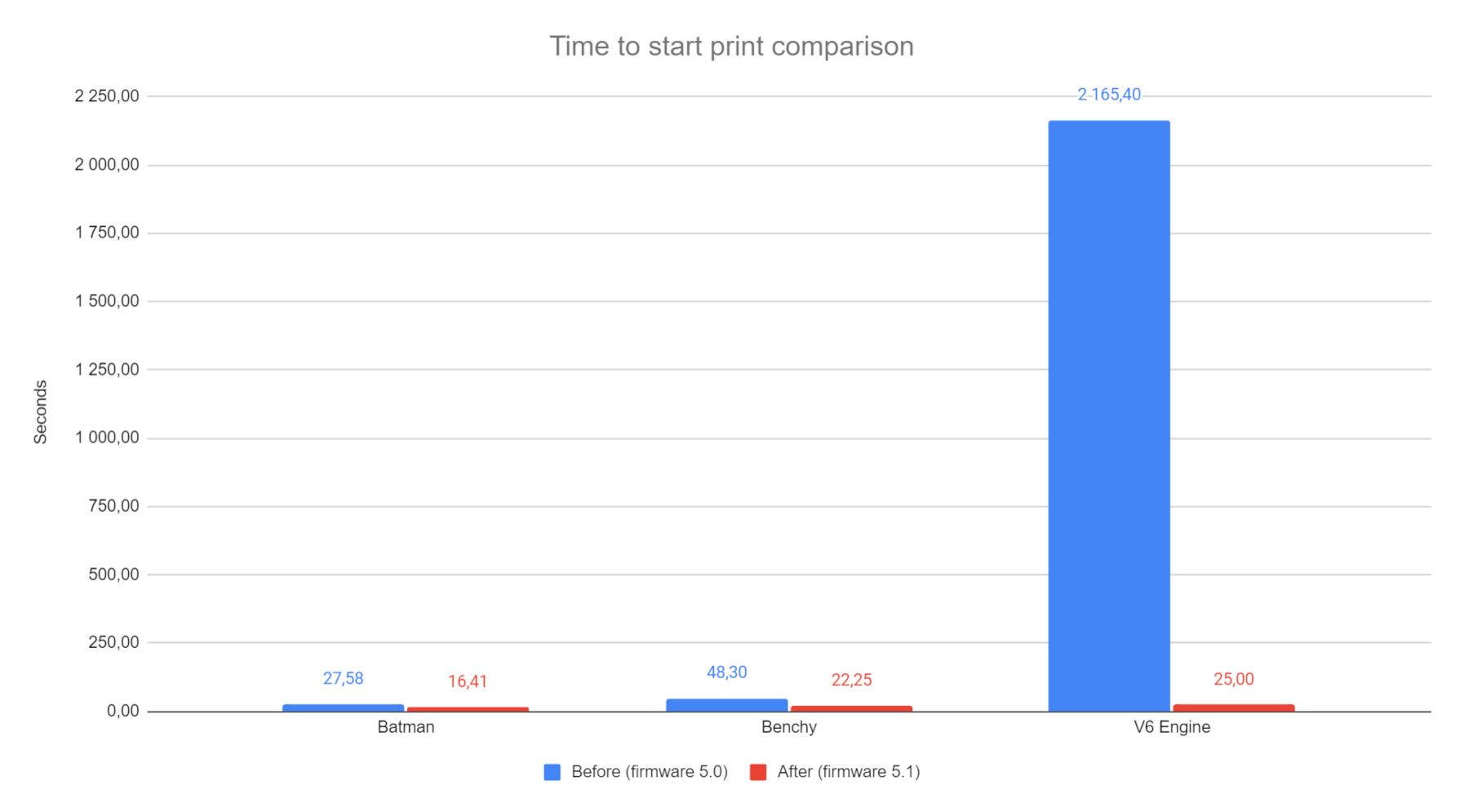
                  Slicer requirements

                  The support for the .bgcode file format is implemented in PrusaSlicer, including its export, loading configs, and previewing G-code or file associations. Exporting binary G-code can be enabled in the Printers tab in General -> Support binary G-code. This option is enabled by default starting from the PrusaSlicer version 2.7.0. An option to convert ASCII G-code to binary (or the opposite) can be found at File -> Convert.

                  Disabling binary G-code export for all profiles

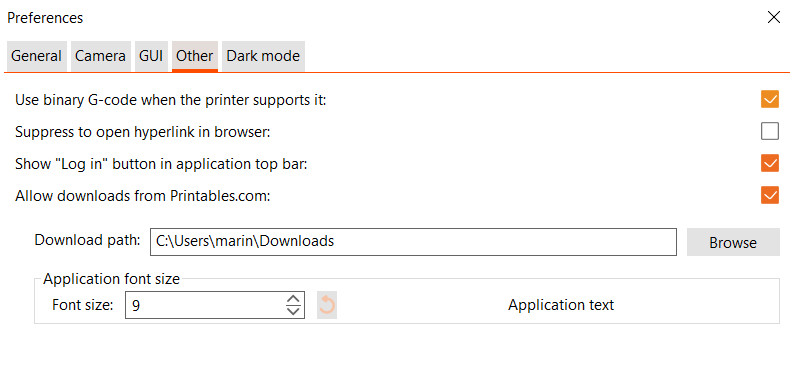
                  You can disable the use of binary G-code even globally for all profiles in the Configuration - > Preferences -> Other -> Use binary G-code when the printer supports it.
                  Firmware requirements

                  To print a binary G-code, it has to be supported by the firmware of the printer. For Original Prusa MINI, MK4, and XL printers, it is supported starting from firmware 5.1.0. It is necessary to update the printer firmware before using the binary G-code format.

                  Compatibility issues

                  Some external printer control programs like Octoprint might have an issue with the binary G-code. In this case, disable the binary G-code feature in PrusaSlicer.

                  Was this article helpful?
                  This action is available only to registered users. Please log-in.

                  Topics

                  • PrusaSlicer 2.9 (Legacy)
                    • Input/output
                      • Export
                      • Supported file formats
                      • Saving projects as 3MF
                      • Export SD/USB flash drive
                      • Binary G-code
                    • About PrusaSlicer
                    • Configuration and profiles
                    • User interface
                    • Left toolbar
                    • Top toolbar
                    • Print settings
                    • Filament settings
                    • Printer settings
                    • Advanced features
                    • Multi-material slicing
                    • SLA slicing
                    • Other (PrusaSlicer)

                  8 comments

                  Log in  to post a comment
                  Randy
                  •
                  I upgraded my preassembled MK4S with MMU3 and now I get a Warning "The G-code isn't fully compatible! Nozzle flow rate doesn't match"
                  How do I fix this. I don't see any ware I can verify what the system thinks the flowrate should be. I did see something is the G-code about flow rate but have no idea what I should change it to if I should change it.
                  Reply
                  Konrad Rosenbaum
                  •
                  Part of the MMU3 install is swapping the HF (high flow) nozzle for a standard nozzle - because the HF nozzle requires a longer purge between material swaps. If your GCode was made for the HF nozzle, then the material flow it contains is too high for the standard nozzle - hence the error.

                  Simple re-create the GCode, the difference in print time is usually only a few seconds. Or you can swap the HF nozzle back in, but you have to tune your MMU settings in the slicer for larger purges, which will also waste more plastic and time.
                  Reply
                  Evan Quinn
                  •
                  wifi transfer, even with this change, is still terribly slow.
                  Reply
                  Konrad Rosenbaum
                  •
                  That's a hardware limitation: the wifi module is one of those simple embedded modules that use serial communication with the main board. This greatly limits the speed it can use to send and receive data. I think the wired ethernet port is lots faster, since it is more directly connected.
                  Reply
                  RobMcCoy
                  •
                  Edit: I found the option --binary-gcode.Thanks for the hard work and great software.Is bgcode supported by prusa-slicer-console.exe? I have a large library that needs periodic reslicing, so the console is crucial.
                  Reply
                  dcorbin13
                  •
                  When generating ASCII G-code, the Prusa slicer generates a lot of interesting and useful meta-data in the .gcode file.    Is this information available in the binary format?  Is there a page that documents the binary format?
                  Reply
                  Cedric Finance
                  •
                  You can find the specifications here: https://github.com/prusa3d/libbgcode/blob/main/doc/specifications.md
                  Reply
                  rwhiffen
                  •
                  This should be updated to reflect the new location of this preference in the 2.7.1 version.  I thought I was going crazy because my UI didn't match this screen shot anymore after upgraded from 2.7.0 to 2.7.1
                  Reply