Prusa
  • SHOP
    • Latest products
    BY CATEGORY
    • 3D printersnew
    • 3D printer upgradesnew
    • Materials
    • Accessories
    • Spare parts
    • Courses
    • Merch
    • Get a price quote
    QUICK LINKS
    • Shipping & delivery
    • Returns & refunds
    • Payment & financing
    • Warranty
    • VAT & Customs fees
    • FAQ

    0 item in your cartitems in your cart

    Your cart is empty

    Go to cartShop 3D printers

    My profile

    Log in to see orders, saved items

    My profile

    Signed in as

    • Orders
    • Logout
  • 3D PRINTING
    • Explore 3D printing
    FOR BEGINNERS
    • 3D printing 101
    • How FDM printing works
    • Buying your first printer
    • 3D model catalog
    BY APPLICATION
    • Rapid prototyping
    • Manufacturing
    • Engineering
    • Research
    • Arts & design
    GO DEEPER
    • Materials guide
    • Courses
    • Webinars
    • Case studies
    • Custom 3D printing
  • 3D PRINTERS
    • All 3D printers
    FOR
    • Home or garageHobbyists, tinkerers and home printing
    • BusinessIn-house production for small teams
    • EnterpriseFleets, security and scale
    • Which Prusa is right for me
    SHOP & BROWSE
    • CORE One+new
    • CORE One+ INDXnew
    • CORE One L+new
    • CORE One L+ INDXnew
    • XL+new
    • MK4S
    • Prusa Pro HT90
    • Prusa Pro AFS
    • Prusa Pro SLX
    MORE FROM PRINTERS
    • Parts & upgradesnew
    • Critical infrastructure
    • Case studies
    • Signature Oak
    • Kits
  • MATERIALS
    • All materials
    BY USE
    • Every-day & design
    • Functional engineering
    • Composites
    • Pro speciality
    • SLA resins
    PRUSAMENT
    • PLA
    • PETG
    • ASA
    • PC
    • PA11
    • Flex
    • TPU
    MORE FROM MATERIALS
    • Materials guide
    • We make material in house
    • Sustainability
    • Order on the store
  • SOFTWARE
    • All software
    PREPARE THE PRINT
    • PrusaSlicer 3.0New
    PRINT & MONITOR
    • Prusa Connect
    • EasyPrint
    • iOS & Android app
    • Prusa Farm
    GET STARTED
    • Download & install
    • Knowledge base
    MORE FROM SOFTWARE
    • 3D model catalog
  • SUPPORT
    • Explore support
    FIND ANSWERS
    • Knowledge base
    • Troubleshooting
    • Courses
    • Webinars
    GET HELP
    • Contact us
    • Livechat
    • Shipping & delivery
    • Warranty
    • Returns & refunds
    • Service & spare parts
    • Service & Repair
    COMMUNITY
    • Forum
    • Reddit
    • Printables
  • TRUST CENTER
    • Trust Center overview
    BY TOPIC
    • GDPR
    • Certificates
    • Security
    • Compliance
    COMMITMENTS
    • Sustainability report
    TALK TO US
    • Contact the security team
  • COMPANY
    • About Prusa
    GET TO KNOW US
    • Our story
    • How we make printers
    • Open source
    • Brand & media kit
    NEWS
    • Blog
    • Newsroom
    • Events
    TRUST & PARTNERS
    • Sustainability
    • Resellers & distributors
    • Affiliate program
    • Contact
    • English
    • Čeština
    • Deutsch
    • Español
    • Français
    • Italiano
    • Polski
    • 日本語
  • Signed in as

    • Orders
    • Address
    • In-stock Alerts
    • My Courses
    • Subscription
    • Edit Account
    • Logout

Log in to see orders, saved items

Signed in as
  • Orders
  • Address
  • In-stock Alerts
  • My Courses
  • Subscription
  • Edit Account
  • English
  • Čeština
  • Deutsch
  • Español
  • Français
  • Italiano
  • Polski
  • 日本語
Shop

0 item in your cartitems in your cart

Your cart is empty

Go to cartShop 3D printers

My profile

Log in to see orders, saved items

My profile

Signed in as

  • Orders
  • Logout
SHOP
  • Latest products
BY CATEGORY
  • 3D printersnew
  • 3D printer upgradesnew
  • Materials
  • Accessories
  • Spare parts
  • Courses
  • Merch
  • Get a price quote
QUICK LINKS
  • Shipping & delivery
  • Returns & refunds
  • Payment & financing
  • Warranty
  • VAT & Customs fees
  • FAQ

Featured products

    Popular categories

      Trending searches

        Articles

          Blog

            Products

              Categories

                Suggested searches

                  Searching…
                  No results
                  Something went wrong.
                  ↑↓ Select↵ OpenEsc Close search
                  1. Support
                  2. PrusaSlicer
                  3. Other (PrusaSlicer)
                  4. 3Dconnexion devices
                   

                  Contents

                  • Windows
                  • Mac
                  • Linux

                  Blog

                  • Print colorful and glowing Halloween decorations with our spooky offer
                  • Factorio Has Arrived on Printables
                  • Prusament PLA Lightweight: 65% lighter than regular PLA. Perfect choice for aircraft, cosplay, and more.

                  Newsletter

                  Signup and get our monthly squeeze on updates, blog, printables and much more.

                  By clicking, you agree to receive our newsletter.

                  This site is protected by reCAPTCHA Enterprise and the Google Privacy Policy and Terms of Service apply.

                  Factorio Transport Belts
                  E-shop
                  • 3D Printers
                  • Printer Upgrades
                  • Filaments
                  • Accessories
                  • Prusa Merchandise

                  © Prusa Research a.s.

                  Printables
                  • 3D Models
                  • Store
                  • Clubs
                  • 3D Design Contests
                  • Brands
                  Community
                  • World Map
                  • Forum
                  • User Groups
                  • Events
                  Help
                  • Prusa Help
                  • Prusa Academy
                  • 3D Printing Calculators
                  Software
                  • PrusaSlicer
                  • Prusa.app
                  • Prusa Connect
                  • Drivers and Software
                  Company
                  • About Us
                  • Blog
                  • Official Prusa Resellers
                  • Contact Us
                  • Certified for ISO 9001, ISO 14001, ISO 45001
                  • General Terms and Conditions
                  • General Terms and Conditions of Use of the PRUSA Websites
                  • Privacy Policy
                  • Information about cookies
                  • Customer Complaints Policy
                  • Status Page
                  • Do Not Sell or Share My Personal Information
                  • Supplemental Statements
                  • General Terms and Conditions
                  • General Terms and Conditions of Use of the PRUSA Websites
                  • Privacy Policy
                  • Information about cookies
                  • Customer Complaints Policy
                  • Status Page
                  • Do Not Sell or Share My Personal Information
                  • Supplemental Statements

                  © Prusa Research a.s.

                  JOSEF PRUSA®, PRUSA RESEARCH®, PRUSA POLYMERS®, PRUSA ORANGE®, PRUSA 3D ® AND PRUSAMENT® are registered trademarks of Prusa Development a.s. used by Prusa Research a.s. under licence from Prusa Development a.s.

                  3Dconnexion devices

                  Relevant for

                  MMU family
                  MINI family
                  MK3 family
                  OLD PRODUCTS
                  SLA family
                  +
                  28 comments
                  Article is also available in following languages
                  English
                  Čeština
                  Polski
                  Deutsch
                  Français
                  Español
                  Italiano
                  日本語
                  It seems that the latest 3DConnexion driver delivers a configuration file, which is no longer compatible with the 3DConnexion driver binary. We have reported this bug to 3DConnexion.

                  If your 3DConnexion device does not work with the driver you will likely need to do the following for now: https://github.com/prusa3d/PrusaSlicer/issues/7277#issuecomment-1006359238
                  (updated January 2022)

                  PrusaSlicer (from version 2.2.0) supports the following 3Dconnexion devices:

                  • Spacemouse plus XT
                  • Cadman
                  • Spacemouse classic
                  • Spaceball 5000
                  • Space traveller
                  • Space pilot
                  • Space navigator (TESTED)
                  • Space explorer
                  • Space navigator for notebooks
                  • Space pilot pro
                  • Space mouse pro
                  • Spacemouse wireless (USB cable) (TESTED)
                  • Spacemouse wireless receiver
                  • Spacemouse pro wireless (TESTED)
                  • Spacemouse pro wireless receiver
                  • Spacemouse enterprise
                  • Spacemouse compact (TESTED)
                  • Spacemouse module
                  • Nulooq
                  • 3Dconnexion universal receiver (TESTED)
                  On Windows & Mac OS use the 3D connexion driver dialog to configure your device.
                  On Linux, press Ctrl + M while in the platter view to open 3Dconnexion settings dialog.

                  If you're unable to configure your device, enable Configuration - Preferences - Enable support for legacy 3D connexion devices. You might have to do this even for relatively new devices, due to lack of support from 3Dconnexion. Then press CTRL+M (Shift+Command+M on Mac).
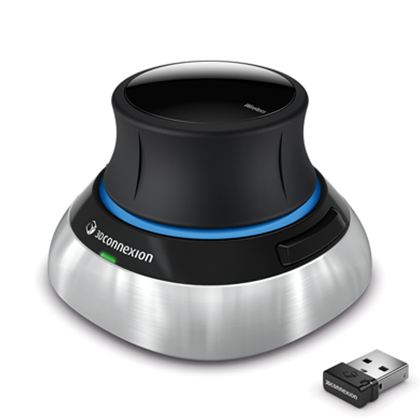
                  3Dconnexion SpaceMouse

                  Windows

                  It is enough to plug-in any of the listed devices to the pc to have it working.

                  The current implementation does not support flipping axes in the 3dconnexion driver on Windows.

                  Mac

                  It is enough to plug-in any of the wired listed devices to have it working.

                  3Dconnexion universal receiver is currently not working on Mac.

                  Linux

                  Linux users need to create a file named “90-3dconnexion.rules” with the following content:

                  # Logitech vendor devices
                  KERNEL=="hidraw", ATTRS{idVendor}=="046d", ATTRS{idProduct}=="c603", MODE="0666"
                  KERNEL=="hidraw", ATTRS{idVendor}=="046d", ATTRS{idProduct}=="c605", MODE="0666"
                  KERNEL=="hidraw", ATTRS{idVendor}=="046d", ATTRS{idProduct}=="c606", MODE="0666"
                  KERNEL=="hidraw", ATTRS{idVendor}=="046d", ATTRS{idProduct}=="c621", MODE="0666"
                  KERNEL=="hidraw", ATTRS{idVendor}=="046d", ATTRS{idProduct}=="c623", MODE="0666"
                  KERNEL=="hidraw", ATTRS{idVendor}=="046d", ATTRS{idProduct}=="c625", MODE="0666"
                  KERNEL=="hidraw", ATTRS{idVendor}=="046d", ATTRS{idProduct}=="c626", MODE="0666"
                  KERNEL=="hidraw", ATTRS{idVendor}=="046d", ATTRS{idProduct}=="c627", MODE="0666"
                  KERNEL=="hidraw", ATTRS{idVendor}=="046d", ATTRS{idProduct}=="c628", MODE="0666"
                  KERNEL=="hidraw", ATTRS{idVendor}=="046d", ATTRS{idProduct}=="c629", MODE="0666"
                  KERNEL=="hidraw", ATTRS{idVendor}=="046d", ATTRS{idProduct}=="c62b", MODE="0666"
                  KERNEL=="hidraw", ATTRS{idVendor}=="046d", ATTRS{idProduct}=="c62e", MODE="0666"
                  KERNEL=="hidraw", ATTRS{idVendor}=="046d", ATTRS{idProduct}=="c62f", MODE="0666"
                  KERNEL=="hidraw", ATTRS{idVendor}=="046d", ATTRS{idProduct}=="c631", MODE="0666"
                  KERNEL=="hidraw", ATTRS{idVendor}=="046d", ATTRS{idProduct}=="c632", MODE="0666"
                  KERNEL=="hidraw", ATTRS{idVendor}=="046d", ATTRS{idProduct}=="c633", MODE="0666"
                  KERNEL=="hidraw", ATTRS{idVendor}=="046d", ATTRS{idProduct}=="c635", MODE="0666"
                  KERNEL=="hidraw", ATTRS{idVendor}=="046d", ATTRS{idProduct}=="c636", MODE="0666"
                  KERNEL=="hidraw", ATTRS{idVendor}=="046d", ATTRS{idProduct}=="c640", MODE="0666"
                  KERNEL=="hidraw", ATTRS{idVendor}=="046d", ATTRS{idProduct}=="c652", MODE="0666"
                  # 3D Connexion vendor devices
                  KERNEL=="hidraw", ATTRS{idVendor}=="256f", ATTRS{idProduct}=="c603", MODE="0666"
                  KERNEL=="hidraw", ATTRS{idVendor}=="256f", ATTRS{idProduct}=="c605", MODE="0666"
                  KERNEL=="hidraw", ATTRS{idVendor}=="256f", ATTRS{idProduct}=="c606", MODE="0666"
                  KERNEL=="hidraw", ATTRS{idVendor}=="256f", ATTRS{idProduct}=="c621", MODE="0666"
                  KERNEL=="hidraw", ATTRS{idVendor}=="256f", ATTRS{idProduct}=="c623", MODE="0666"
                  KERNEL=="hidraw", ATTRS{idVendor}=="256f", ATTRS{idProduct}=="c625", MODE="0666"
                  KERNEL=="hidraw", ATTRS{idVendor}=="256f", ATTRS{idProduct}=="c626", MODE="0666"
                  KERNEL=="hidraw", ATTRS{idVendor}=="256f", ATTRS{idProduct}=="c627", MODE="0666"
                  KERNEL=="hidraw", ATTRS{idVendor}=="256f", ATTRS{idProduct}=="c628", MODE="0666"
                  KERNEL=="hidraw", ATTRS{idVendor}=="256f", ATTRS{idProduct}=="c629", MODE="0666"
                  KERNEL=="hidraw", ATTRS{idVendor}=="256f", ATTRS{idProduct}=="c62b", MODE="0666"
                  KERNEL=="hidraw", ATTRS{idVendor}=="256f", ATTRS{idProduct}=="c62e", MODE="0666"
                  KERNEL=="hidraw", ATTRS{idVendor}=="256f", ATTRS{idProduct}=="c62f", MODE="0666"
                  KERNEL=="hidraw", ATTRS{idVendor}=="256f", ATTRS{idProduct}=="c631", MODE="0666"
                  KERNEL=="hidraw", ATTRS{idVendor}=="256f", ATTRS{idProduct}=="c632", MODE="0666"
                  KERNEL=="hidraw", ATTRS{idVendor}=="256f", ATTRS{idProduct}=="c633", MODE="0666"
                  KERNEL=="hidraw", ATTRS{idVendor}=="256f", ATTRS{idProduct}=="c635", MODE="0666"
                  KERNEL=="hidraw", ATTRS{idVendor}=="256f", ATTRS{idProduct}=="c636", MODE="0666"
                  KERNEL=="hidraw", ATTRS{idVendor}=="256f", ATTRS{idProduct}=="c640", MODE="0666"
                  KERNEL=="hidraw", ATTRS{idVendor}=="256f", ATTRS{idProduct}=="c652", MODE="0666"

                  and save it into:

                  /etc/udev/rules.d

                  After this is done, it is enough to plug-in any of the listed devices to the pc to have it working.

                  The cited file is part of the PrusaSlicer distribution. You can find it in: resourcesudev90-3dconnexion.rules

                   
                  Was this article helpful?
                  This action is available only to registered users. Please log-in.

                  Topics

                  • PrusaSlicer 2.9 (Legacy)
                    • Other (PrusaSlicer)
                      • 3Dconnexion devices
                      • Sending files to Octoprint/Duet
                      • Macros
                      • Export toolpaths as OBJ
                      • PrusaSlicer G-code viewer
                      • List of placeholders
                      • How to lift object from the print bed
                      • Opening models in PrusaSlicer from supported websites
                    • About PrusaSlicer
                    • Configuration and profiles
                    • User interface
                    • Input/output
                    • Left toolbar
                    • Top toolbar
                    • Print settings
                    • Filament settings
                    • Printer settings
                    • Advanced features
                    • Multi-material slicing
                    • SLA slicing

                  17 comments

                  Log in  to post a comment
                  Brian Cloutier
                  •
                  I found an interesting behavior while troubleshooting my SpaceMouse Wireless w/ Universal Receiver in PrusaSlicer v2.9.3 on Fedora 43.

                  PrusaSlicer detected the SpaceMouse but would not respond to any inputs. My udev rules appeared fine because I received the following when using --loglevel 4:
                  Connected 3DConnexion device:
                  Manufacturer/product: 3Dconnexion/3Dconnexion Universal Receiver
                  Manufacturer id.....: 9583 (256f)
                  Product id..........: 50770 (c652)
                  Path................: '/dev/hidraw6'

                  The issue seems to be caused by the fact that the Universal Receiver can be paired to 5 devices, and PrusaSlicer seems to automatically connect to the first device it detects. The problem for me was that I has re-paired my SpaceMouse at some time in the past, and the original, phantom pairing still resided on the Universal Receiver. This is what I saw when I plugged in the dongle and ran dmesg:
                  usb 1-4.2.1.1: New USB device found, idVendor=256f, idProduct=c652, bcdDevice= 1.06
                  usb 1-4.2.1.1: New USB device strings: Mfr=1, Product=2, SerialNumber=0
                  usb 1-4.2.1.1: Product: 3Dconnexion Universal Receiver
                  usb 1-4.2.1.1: Manufacturer: 3Dconnexion
                  hid-generic 0003:256F:C652.0016: hiddev99,hidraw6: USB HID v1.11 Device...
                  input: 3Dconnexion 3Dconnexion Universal Receiver as /devices/pci0000...
                  hid-generic 0003:256F:C652.0017: input,hiddev102,hidraw9: USB HID v1.11 Multi-Axis...
                  hid-generic 0003:256F:C652.0018: hiddev103,hidraw10: USB HID v1.11 Device...
                  hid-generic 0003:256F:C652.0019: hiddev104,hidraw11: USB HID v1.11 Device...
                  hid-generic 0003:256F:C652.001A: hiddev105,hidraw12: USB HID v1.11 Device...

                  I guessed that the device named Multi-Axis Controller (currently set to hidraw9) was what I really wanted PrusaSlicer to detect, and further guessed that if I were to un-pair and re-pair the SpaceMouse I could cycle it to the top. That is exactly what happened, and now my SpaceMouse works with PrusaSlicer as expected!

                  I had to use the Windows 3DConnexion pairing software to un/re-pair. Maybe there's a more clever way of fixing the issue through udev rules, but the brute-force way is there if you need it.
                  Reply
                  melted pellets
                  •
                  These docs don't get maintained much, and all comments are a bit old, so I thought I'd confirm that I successfully set this up on LINUX circa 2025

                  ubuntu 22.04, X11, prusaslicer 2.9.2 (which is flatpak only now). I didn't do anything in PS, although I did grant PS access to "all devices" through FlatSeal

                  similar to previous users, I also needed to change `KERNEL=="hidraw"` to `SUBSYSTEM=="hidraw*"` (note the asterik as well). Since I'm also using it with freecad & spacenavd, I have THREE sets of the udev rule (you can keep the file short by just observing the vendor/product id's in `dmesg` when you plug it in, btw)

                  1) the rules in the article, above; `KERNEL=="hidraw*` - I kept these for completeness I don't believe they are necessary.
                  2) a full duplicate of those rules with `KERNEL="event*" SUBSYSTEM=="input*"`, which appears necessary for programs that use the 6dof input directly, such as spacenavd. [I can't 100% attest this is true]
                  3) another full duplicate with `KERNEL=="hidraw*` replaced with `SUBSYSTEM=="hidraw*`, in order for prusaslicer to recognize them.

                  I don't believe it's relevant here, but in order to use with freecad, I also installed the latest spacenavd, libspnav and spnavcfg from git. Each of these is the normal `./configure && make && sudo make install`. Don't forget to remove any `apt` installed versions, first.
                  - https://github.com/FreeSpacenav/spnavcfg/releases
                  - https://github.com/FreeSpacenav/libspnav/releases
                  - https://github.com/FreeSpacenav/spacenavd/releases

                  hope that helps someone. Great to have it working ...
                  Reply
                  Akmjoe
                  •
                  On Linux, the udev rules all need to start with
                  KERNEL=="hidraw*"
                  The asterisk after hidraw is a wildcard, so will make the rule apply to all hidraw devices - my spacemouse was /dev/hidraw1, and would not work until I changed the udev rules and rebooted.
                   
                  Reply
                  DET-Man
                  •
                  For anybody who wants to use the 3D Connexion devices with Linux, the following might help which guides you on what needs to be done to get it running on Ubuntu 22.10 (but it should help also for other distros)
                  1. Install the Open Source driver "spacenavd". There are many good reasons to use this instead of the proprietary Linux driver:
                  sudo apt install spacenavd
                  This will install a systemd unit which will be started automatically
                  2. Install the lib to access the daemon. I am not sure if PursaSlicer requires it, but mostly any other Linux application with support for 3DConnexion devices will require it anyways.
                  sudo apt install libspnav0
                  3. To set the access rights for the device nodes create the 90-3dconnexion.rules as described above. However I needed to change the rules from "KERNEL" to "SUBSYSTEM", e.g. for the Sacemouse Wirless the rule will be:
                  SUBSYSTEM=="hidraw", ATTRS{idVendor}=="256f", ATTRS{idProduct}=="c652", MODE="0666"
                  (not sure why the KERNEL filter did not apply, maybe I will check this later or somebody can point me to the root cause)
                  And just a last info for anybody having trouble and digging into the details:
                  When starting the systemd service for spacenavd it will report the following in the logs:
                  systemd[1]: Started 3Dconnexion Input Devices Userspace Driver.spacenavd[1193]: Authorization required, but no authorization protocol specified
                  I believe you can just ignore it (and it is triggered by an xauthority issue which should not matter). For me any application is working perfectly with the spacenavd driver and the only issue I had was to set the access rights for PrusaSlicer with the udev rule as described above.
                  Reply
                  Thomot512
                  •
                  Thanks. On Arch Linux, I also had to change from "KERNEL" to "SUBSYTEM".
                  Reply
                  RA LaRock
                  •
                  I found the solution on Github here:
                  https://github.com/prusa3d/PrusaSlicer/issues/7549
                  in the comment about editing the prusa-slicer.xml file. This worked for me on Windows 10, Spacemouse Wireless Pro, Prusa Slicer ver 2.4.1-beta1.
                  Reply