Prusa
  • BOUTIQUE
    • Derniers produits
    PAR CATÉGORIE
    • Imprimantes 3Dnouveau
    • Mises à niveau d'imprimantes 3Dnouveau
    • Matériaux
    • Accessoires
    • Pièces de rechange
    • Cours
    • Produits dérivés
    • Obtenir un devis
    LIENS RAPIDES
    • Expédition et livraison
    • Retours et remboursements
    • Paiement et financement
    • Garantie
    • TVA et frais de douane
    • FAQ

    0 article au panierarticles au panier

    Votre panier est vide

    Voir le panierImprimantes 3D

    Mon profil

    Se connecter pour voir vos commandes et articles enregistrés

    Mon profil

    Connecté en tant que

    • Commandes
    • Déconnexion
  • Impression 3D
    • Explorer l'impression 3D
    POUR LES DÉBUTANTS
    • Impression 3D : les bases
    • Comment fonctionne l'impression FDM
    • Acheter votre première imprimante
    • Catalogue de modèles 3D
    PAR APPLICATION
    • Prototypage rapide
    • fabrication
    • Ingénierie
    • Recherche
    • Arts et design
    ALLER PLUS LOIN
    • Guide des matériaux
    • Cours
    • Webinaires
    • Études de cas
    • Impression 3D personnalisée
  • Imprimantes 3D
    • Toutes les imprimantes 3D
    pour
    • Maison ou garageAmateurs, bricoleurs et impression à domicile
    • EntrepriseProduction interne pour les petites équipes
    • EntrepriseFlottes, sécurité et échelle
    • Quelle Prusa me convient le mieux
    ACHETER ET NAVIGUER
    • CORE One+nouveau
    • CORE One+ INDXnouveau
    • CORE One L+nouveau
    • CORE One L+ INDXnouveau
    • XL+nouveau
    • MK4S
    • Prusa PRO HT90
    • Prusa Pro AFS
    • Prusa PRO SLX
    PLUS D'IMPRIMANTES
    • Pièces et mises à niveaunouveau
    • Spare parts
    • Infrastructure critique
    • Études de cas
    • Chêne Signature
    • Kits
  • Matériaux
    • Tous les matériaux
    PAR UTILISATION
    • Quotidien et design
    • Ingénierie fonctionnelle
    • Composites
    • Spécialité pro
    • Résines SLA
    Prusament
    • PLA
    • PETG
    • ASA
    • PC
    • PA11
    • Flex
    • TPU
    PLUS DE MATÉRIAUX
    • Guide des matériaux
    • Nous fabriquons nos matériaux en interne
    • Durabilité
    • Commander sur la boutique
  • Logiciel
    • Tous les logiciels
    PRÉPARER L'IMPRESSION
    • PrusaSlicer 3.0nouveau
    IMPRIMER ET SURVEILLER
    • Prusa Connect
    • EasyPrint
    • Application iOS et Android
    • Ferme Prusa
    COMMENCER
    • Télécharger et installer
    • Base de connaissances
    PLUS DE LOGICIELS
    • Catalogue de modèles 3D
  • ASSISTANCE
    • Explorer l'assistance
    TROUVER DES RÉPONSES
    • Base de connaissances
    • Dépannage
    • Cours
    • Webinaires
    OBTENIR DE L'AIDE
    • Contactez-nous
    • Chat en direct
    • Expédition et livraison
    • Garantie
    • Retours et remboursements
    • Service et pièces de rechange
    • Service et réparation
    Communauté
    • Forum
    • Reddit
    • Printables
  • Centre de confiance
    • Aperçu du Trust Center
    PAR SUJET
    • RGPD
    • Certificats
    • Sécurité
    • Conformité
    ENGAGEMENTS
    • Rapport de durabilité
    PARLEZ-NOUS
    • Contacter l'équipe de sécurité
  • Entreprise
    • À propos de Prusa
    APPRENEZ À NOUS CONNAÎTRE
    • Notre histoire
    • Comment nous fabriquons les imprimantes
    • Open source
    • Kit de marque et de médias
    ACTUALITÉS
    • Blog
    • Salle de presse
    • Événements
    CONFIANCE ET PARTENAIRES
    • Durabilité
    • Revendeurs et distributeurs
    • Programme d'affiliation
    • Contact
    • English
    • Čeština
    • Deutsch
    • Español
    • Français
    • Italiano
    • Polski
    • 日本語
  • Connecté en tant que

    • Commandes
    • Adresse
    • Alertes de stock
    • Mes cours
    • Abonnement
    • Modifier le compte
    • Déconnexion

Se connecter pour voir vos commandes et articles enregistrés

Connecté en tant que
  • Commandes
  • Adresse
  • Alertes de stock
  • Mes cours
  • Abonnement
  • Modifier le compte
  • English
  • Čeština
  • Deutsch
  • Español
  • Français
  • Italiano
  • Polski
  • 日本語
Boutique

0 article au panierarticles au panier

Votre panier est vide

Voir le panierImprimantes 3D

Mon profil

Se connecter pour voir vos commandes et articles enregistrés

Mon profil

Connecté en tant que

  • Commandes
  • Déconnexion
BOUTIQUE
  • Derniers produits
PAR CATÉGORIE
  • Imprimantes 3Dnouveau
  • Mises à niveau d'imprimantes 3Dnouveau
  • Matériaux
  • Accessoires
  • Pièces de rechange
  • Cours
  • Produits dérivés
  • Obtenir un devis
LIENS RAPIDES
  • Expédition et livraison
  • Retours et remboursements
  • Paiement et financement
  • Garantie
  • TVA et frais de douane
  • FAQ

Produits en vedette

    Catégories populaires

      Recherches populaires

        Articles

          Blog

            Produits

              Catégories

                Recherches suggérées

                  Recherche…
                  Aucun résultat
                  Une erreur est survenue.
                  ↑↓ Sélectionner↵ OuvrirEsc Fermer la recherche
                  1. Support
                  2. PrusaSlicer
                  3. Découpage multi-matériaux
                  4. ColorMix
                   

                  Contenu

                  • Compatibility
                  • ColorMix painting in PrusaSlicer
                  • Physical extruders preset
                  • Setting up virtual extruders
                  • Assigning (virtual) colors and painting
                  • Print settings
                  • Opening a ColorMix model
                  • Practical tips
                  • Examples of ColorMix models
                  • References

                  Blog

                  • Granulés Prusament : lots de matières premières pour l’impression 3D grand format ou la recherche et le développement de polymères à petite échelle
                  • Imprimez des décorations d’Halloween colorées et lumineuses grâce à notre offre effrayante
                  • Factorio est arrivé sur Printables

                  Newsletter

                  Abonnez-vous et obtenez notre dose mensuelle d'informations utiles au sujet des nouveaux firmware, des nouvelles versions de PrusaSlicer et des conseils généraux pour les projets d'impression 3D.

                  En cliquant, vous acceptez de recevoir notre newsletter.

                  Ce site est protégé par reCAPTCHA Enterprise et la Politique de confidentialité et les Conditions d'utilisation de Google s'appliquent.

                  Heavy Duty Keyboard Holder (No Supports)
                  Boutique en ligne
                  • Imprimantes 3D
                  • Mises à niveau d'Imprimante
                  • Filaments
                  • Accessoires
                  • Merchandising Prusa
                  Prusa

                  © Prusa Research a.s.

                  Printables
                  • Modèles 3D
                  • Store
                  • Clubs
                  • Concours de Design 3D
                  • Brands
                  Communauté
                  • Carte du Monde
                  • Forum
                  • Groupes d'Utilisateurs
                  • Événements
                  Aide
                  • Aide Prusa
                  • Prusa Academy
                  • Calculatrices d'Impression 3D
                  Logiciel
                  • PrusaSlicer
                  • Prusa.app
                  • Prusa Connect
                  • Pilotes et Logiciels
                  Société
                  • À Propos de Nous
                  • Blog
                  • Revendeurs officiels Prusa
                  • Nous Contacter
                  • Certifiée selon les normes ISO 9001, ISO 14001 et ISO 45001
                  • Conditions Générales
                  • Conditions Générales d'Utilisation des sites web PRUSA
                  • Politique de confidentialité
                  • Informations sur les cookies
                  • Politique de traitement des réclamations clients
                  • Page d'état des sites web
                  • Paramètres des cookies
                  Prusa
                  • Conditions Générales
                  • Conditions Générales d'Utilisation des sites web PRUSA
                  • Politique de confidentialité
                  • Informations sur les cookies
                  • Politique de traitement des réclamations clients
                  • Page d'état des sites web
                  • Paramètres des cookies

                  © Prusa Research a.s.

                  JOSEF PRUSA®, PRUSA RESEARCH®, PRUSA POLYMERS®, PRUSA ORANGE®, PRUSA 3D ® ET PRUSAMENT® sont des marques déposées de Prusa Development a.s. utilisées par Prusa Research a.s. sous licence de Prusa Development a.s.

                  ColorMix

                  Pertinent pour

                  XL family
                  MMU family
                  PrusaSlicer
                  INDX family
                  Article est également disponible dans les langues suivantes
                  English
                  Čeština
                  Polski
                  Deutsch
                  Français
                  Español
                  Italiano
                  日本語

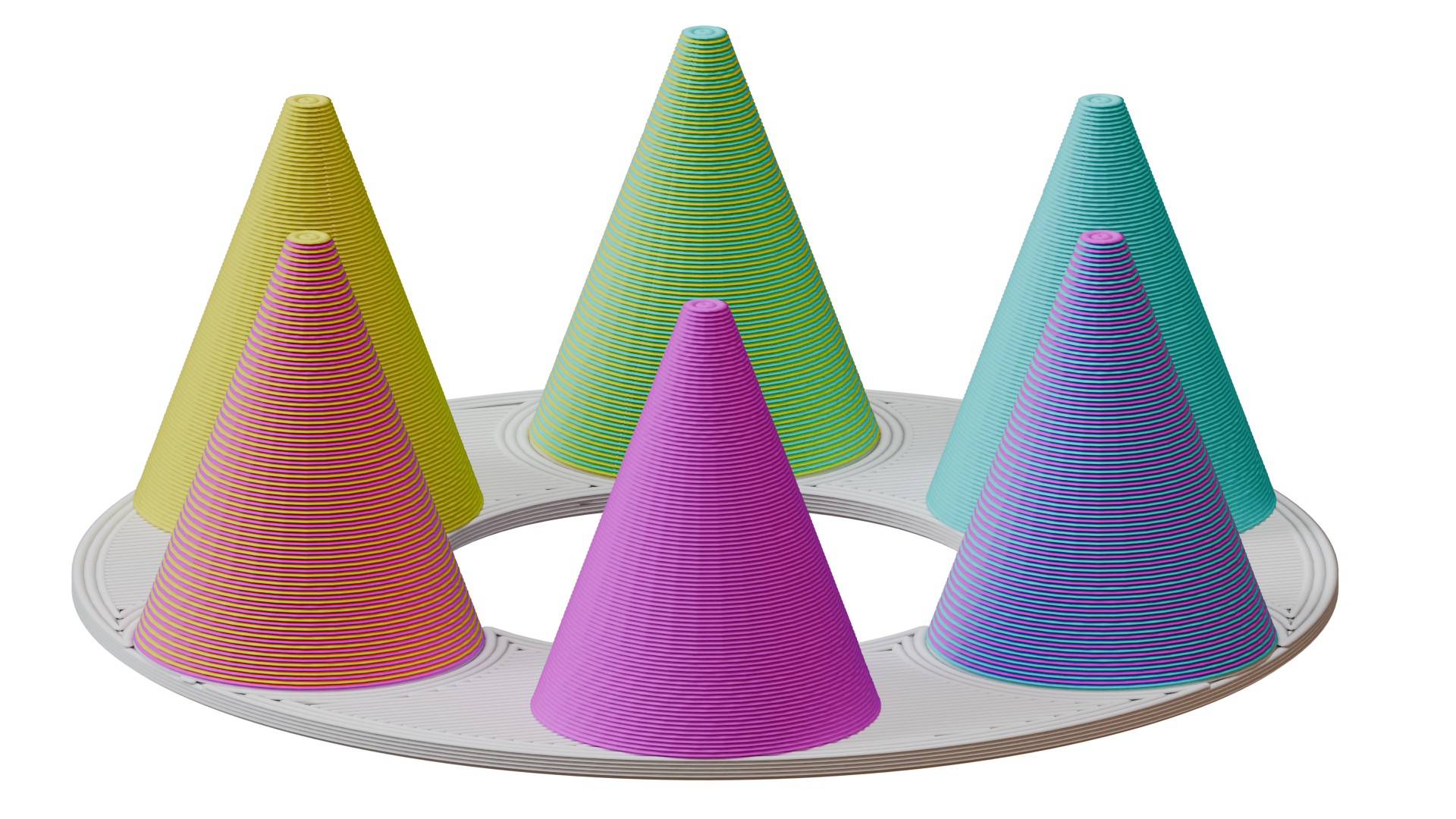
                  The ColorMix is as a feature in PrusaSlicer and  EasyPrint. Using any multi-color printer, it allows you to create additional color tones from the loaded filaments. It works similarly to inkjet 2D printing. There, thanks to a method called Halftoning, all colors are printed from just Cyan, Magenta, Yellow, and Black (CMYK) ink in a varying pattern of dots. 

                  In 3D printing, the colors alternate by layers. For example, a 50% cyan, 50% yellow combination creates green when viewed from a normal viewing distance. 

                  This article explains how to set it up in PrusaSlicer and use it to color and print ColorMix models. 
                  Compatibility 

                  ColorMix printing is possible on any multi-color 3D printer: any printer equipped with the MMU, XL/+ in a 2T or 5T version, CORE One+/L with the INDX upgrade, or any other multi-filament system available on the market. 

                  Because the mixed colors require many tool changes, these prints produce more waste than classical colored models. It is significantly more efficient to print them using the INDX toolchanger. 

                  The slicer feature is available in EasyPrint and in PrusaSlicer from version 2.9.6. 

                  We demonstrate the feature with the Prusament ColorMix PLA bundle, but it is not dependent on these colors nor on PLA as a material. Any colors of any material can be combined in this way, and even different materials can be combined if they are printable together. 

                  ColorMix painting in PrusaSlicer 

                  Physical extruders preset 

                  Open PrusaSlicer and select your multi-color printer. Change the preview colors of the filaments to match your spools. You can change the color assigned to an extruder by clicking on the color box next to the profile name in the Filament profile selection. 
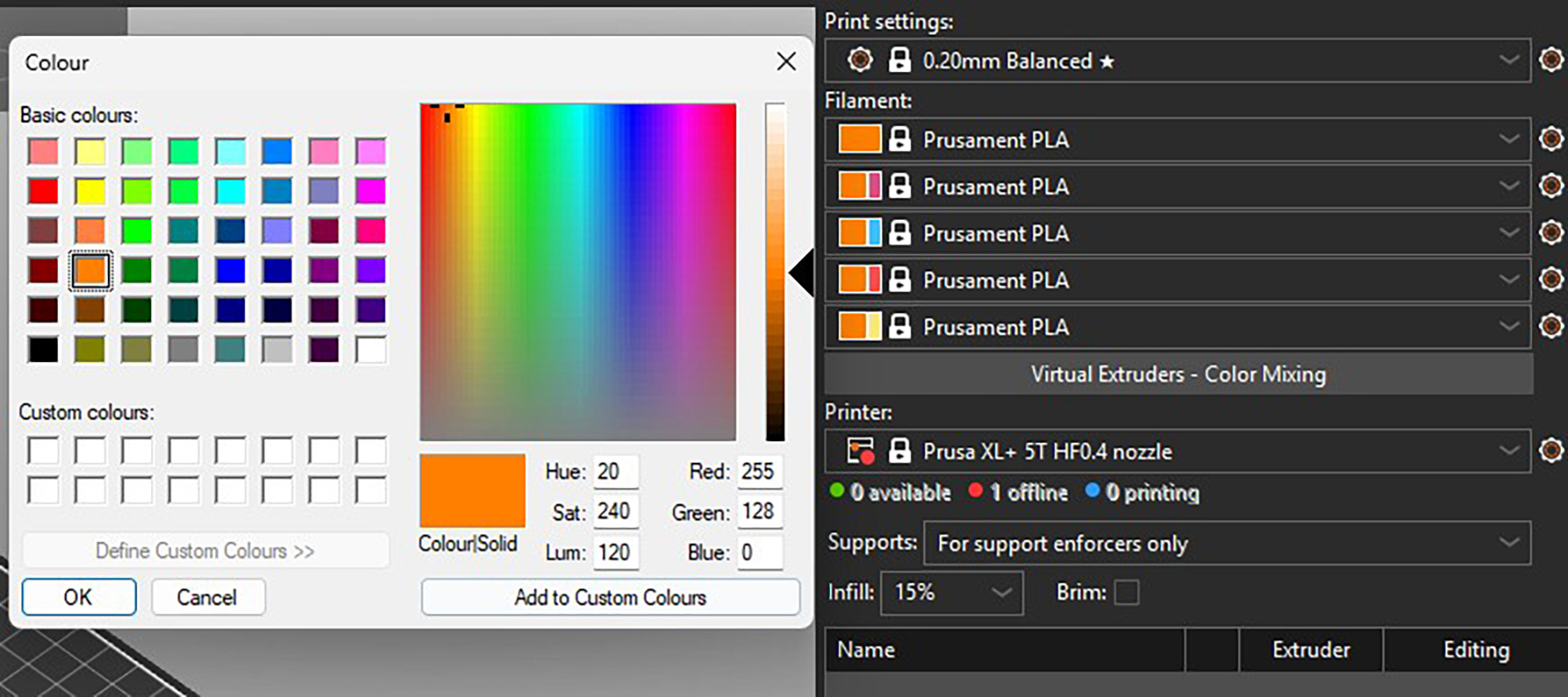
                  Recommended: All the models designed for the ColorMix filament that we share have them loaded in the following order: Cyan, Magenta, Yellow, White, Black, Gold, and Silver. The order is the same whether the printer has four, five, or eight tools. You can set this in PrusaSlicer and save it as a preset. Always sticking to the same order helps to avoid remapping the G-code extruders before every print.  

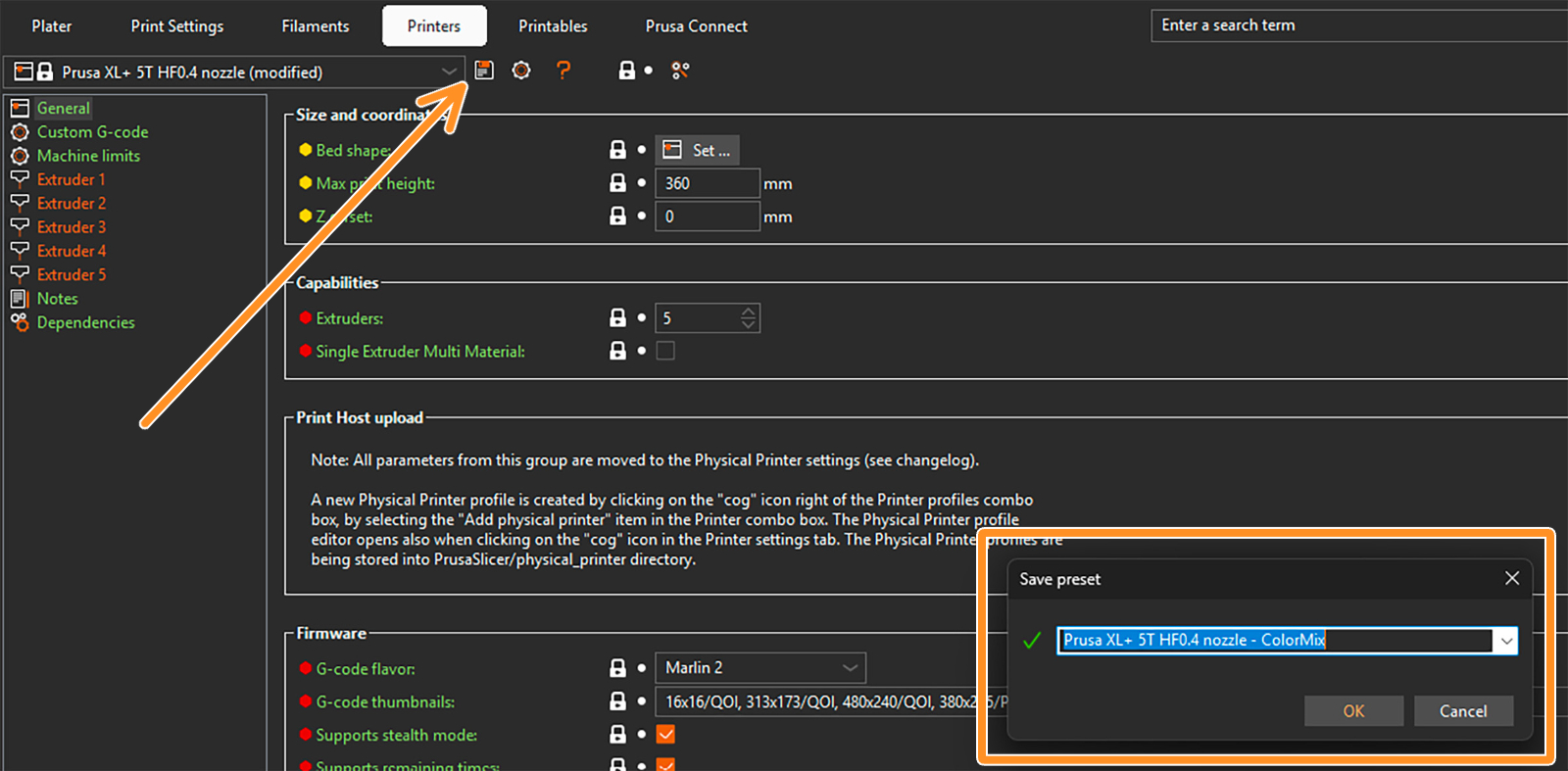
                  To save a preset, click on the gear next to the printer profile and select Edit preset. Then click on the Save preset icon (orange arrow), and in the pop-up window, save the preset with the word "ColorMix" in the name. 
                  Setting up virtual extruders 

                  The ColorMix colors are represented by so-called virtual extruders. You can set them up under the filament profiles. The following window opens. 
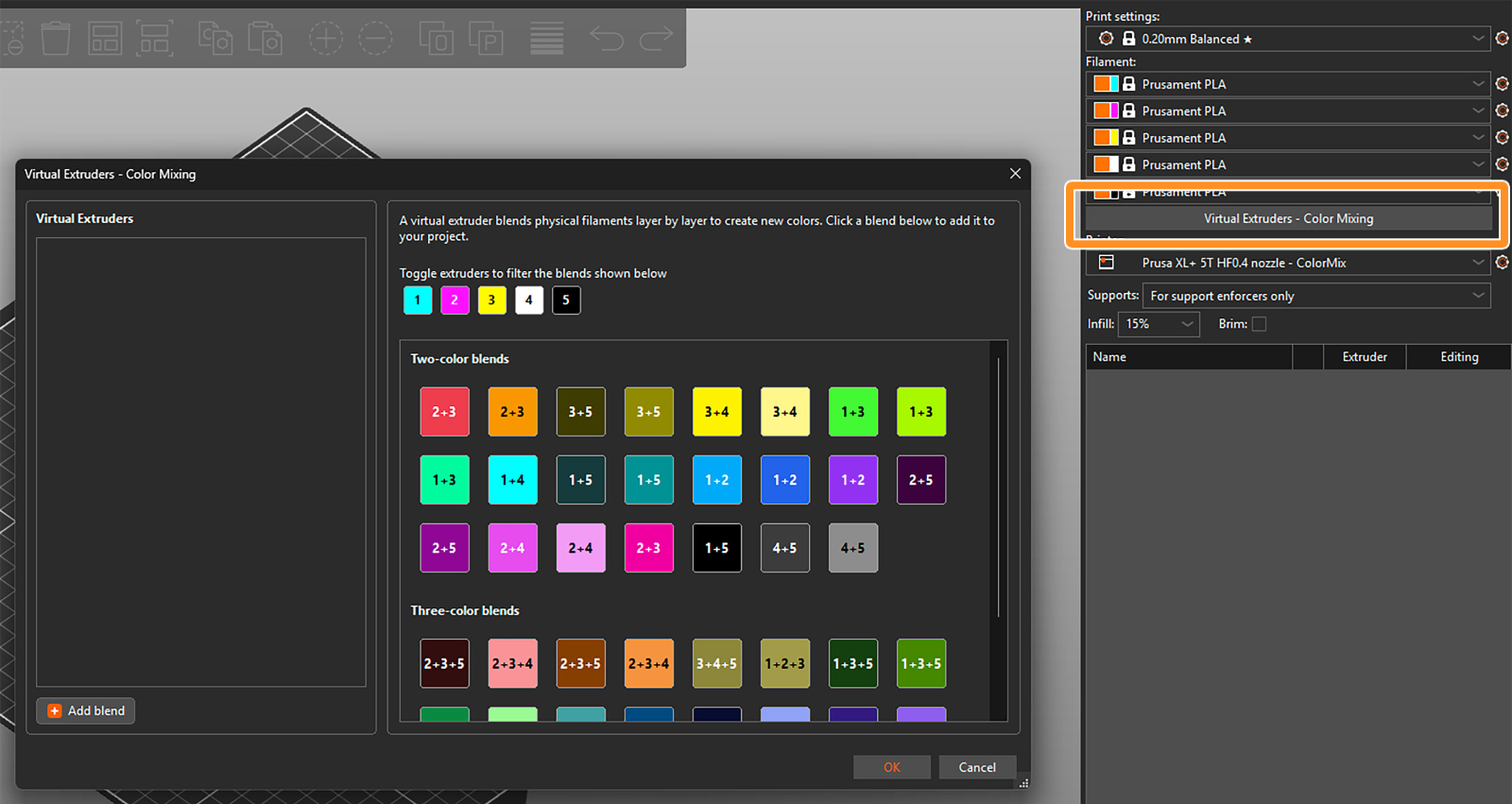
                  There are two ways to assign the virtual extruders. Firstly, you can select them from the blends available on the right side of the widow. The selected ones appear in the list of virtual extruders on the left side. 

                  Toggle the available extruders and filter the blends shown in the section. 
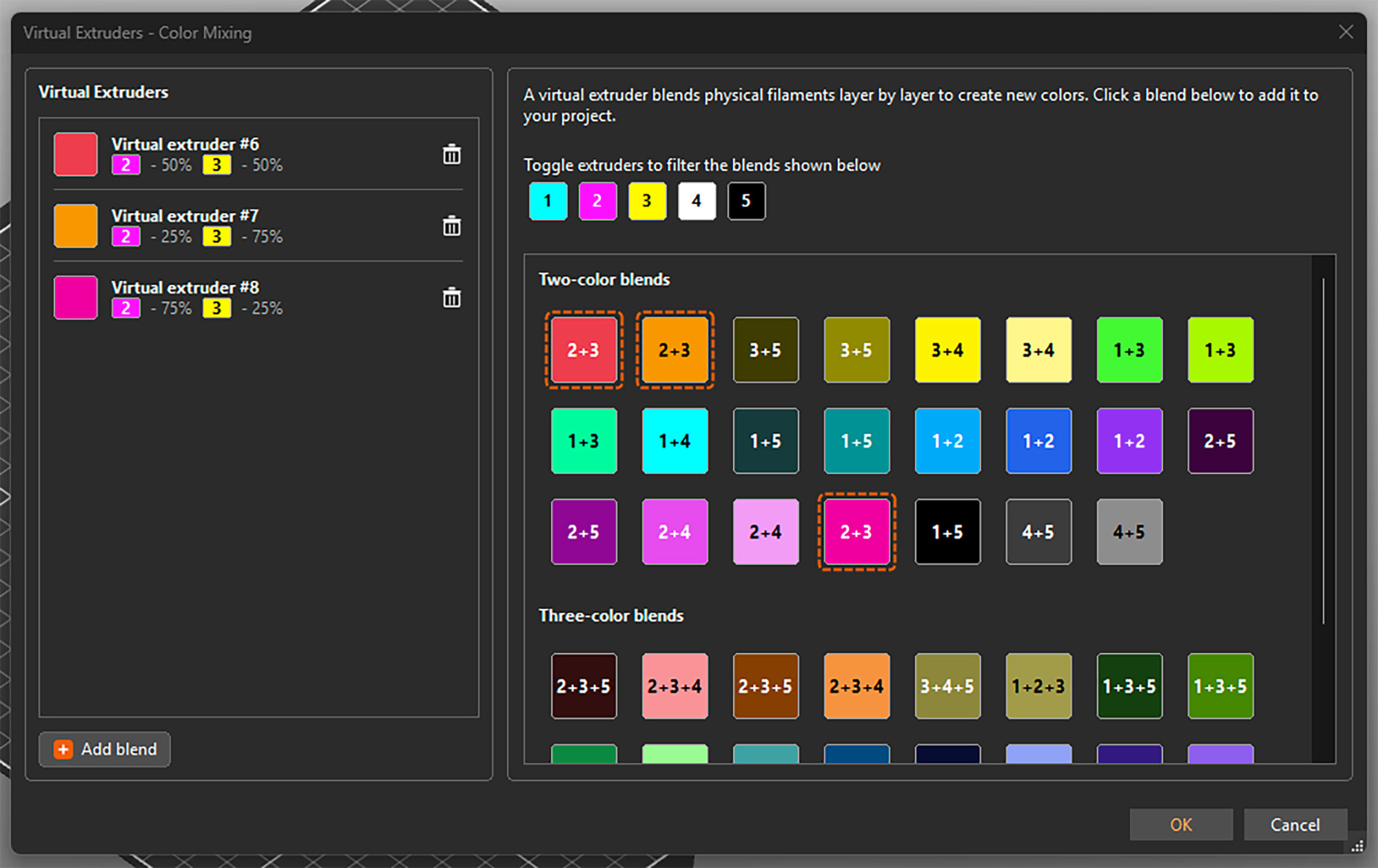
                  Alternatively, you can add them by clicking Add blend in the bottom left corner and manually setting up the ratio of the colors. This adds the virtual extruder to the list and also directly opens its settings on the right side. 
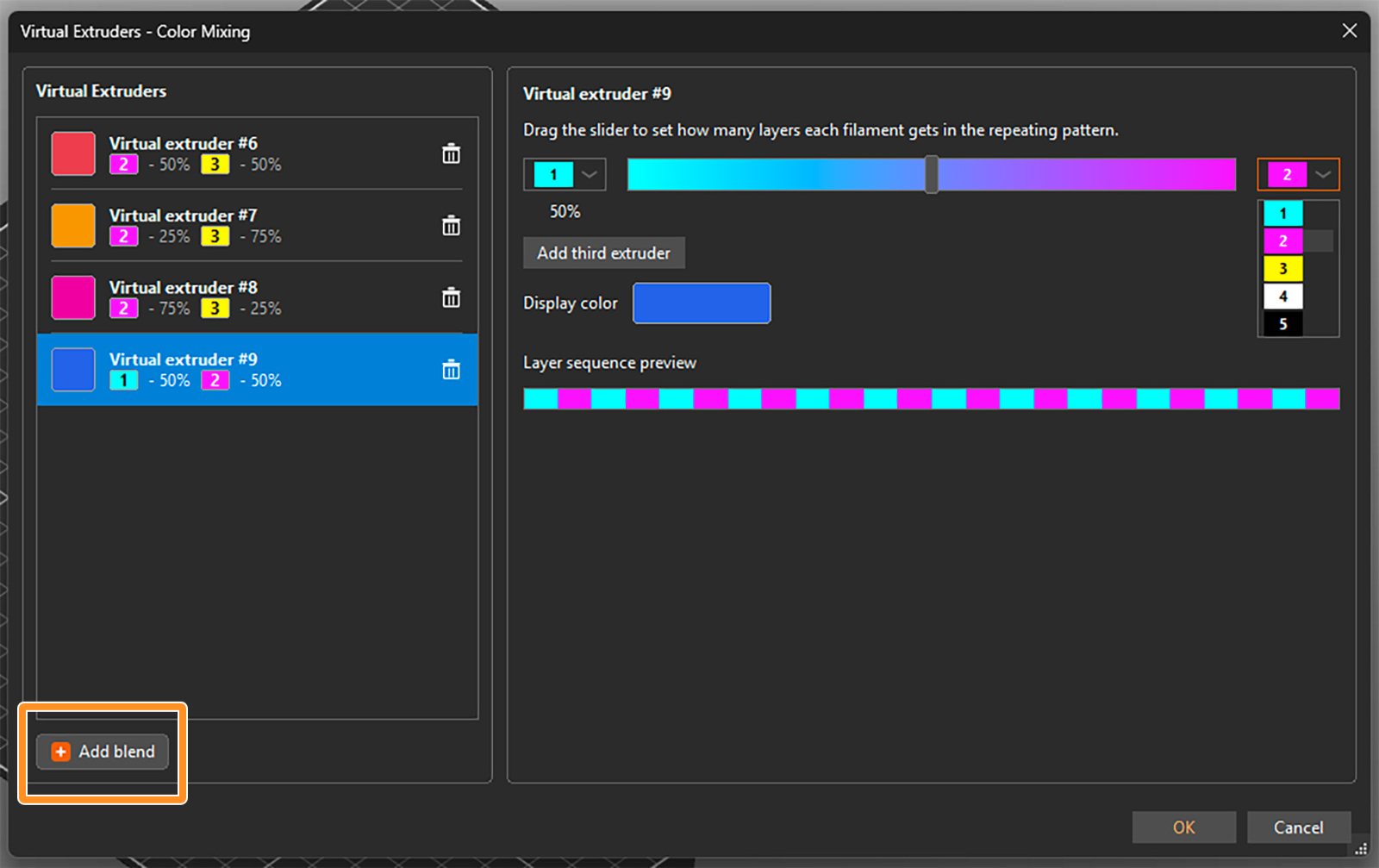
                  You can select the two filaments to be mixed from drop-down menus and set their ratio using a slider. An estimated display color is shown, but you can click on it and change it if you need. The layer sequence shows how the filaments are alternated to appear as the virtual color. 

                  For a three-color blend, click on Add third extruder. Then you can again select the extruders from the drop-down menus and change their relative ratio by dragging the grey circle inside the color triangle. 
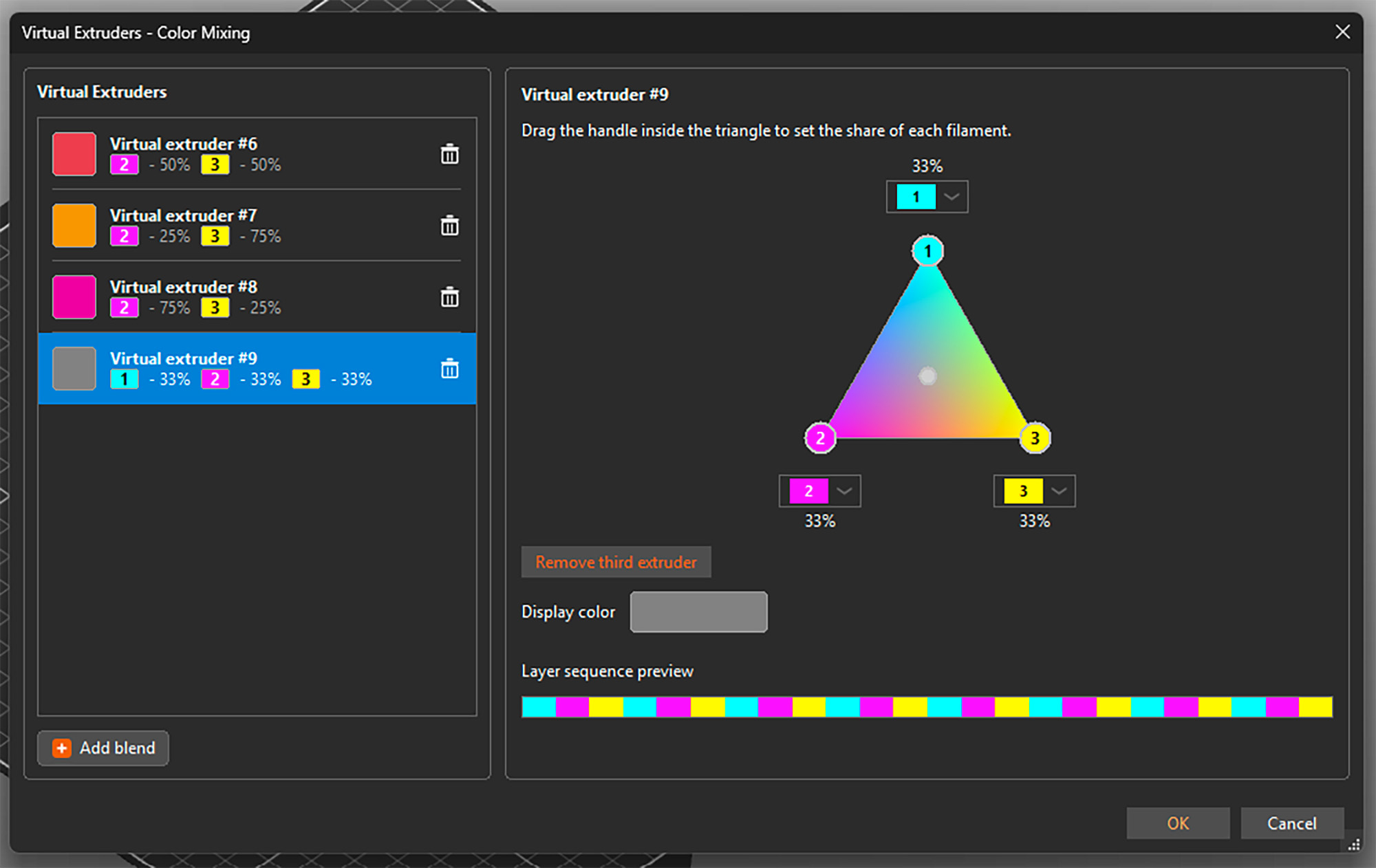
                  You can open the setting by selecting any virtual extruder on the left side and adjust its properties. You can also delete any of them by clicking the trashcan icon. See that besides a display color, each virtual extruder is assigned a number 

                  Once you're all set, confirm all virtual extruders and close the window by clicking OK in the bottom right corner. You can reopen it and add or change extruders at any point, even if they are already used for painting the model. 

                  Important: The tested and reasonable ratios for two-color blends are 25% : 75%, 50% : 50%, and 75% : 25%. For three-color blends, the optimal mix is 33% : 33% : 33%. 

                  Assigning (virtual) colors and painting

                  When the virtual extruders are set up as shown above, PrusaSlicer works with them just the same as with the physical ones. This means you can assign colors to different models and their parts and use all multi-material painting tools, such as brushes or Smart fill. 

                  The only difference is that the virtual extruders appear with a [V] in the drop-down menus. 
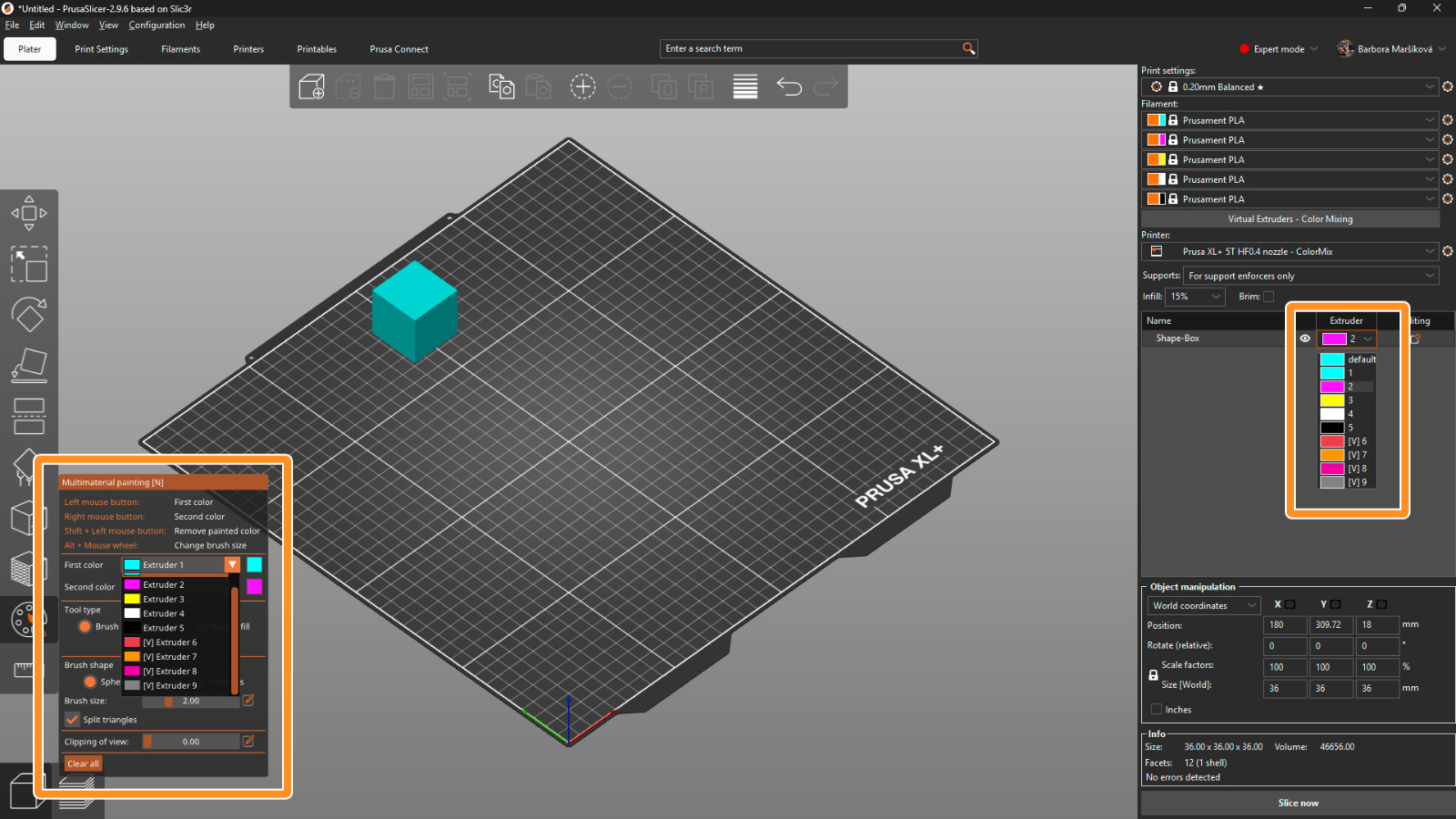
                  Print settings 

                  For optimal results, use a layer height of a maximum of 0.15 mm. For a perfect outcome, 0.1 mm layer height would be even better, but it adds a lot of printing time, and usually it’s not necessary.

                  The recommended infill type is gyroid with 5-10% density, depending on the model’s geometry. Because of the translucency, the infill might sometimes be visible, and this way the structure is uniform. 

                  The mixing itself is done by PrusaSlicer automatically whenever you use a virtual extruder. Simply slice the model, upload the G-code to the printer, and make sure that the correct extruder colors are assigned with respect to the loaded filaments. 

                  Opening a ColorMix model 

                  To open a model that was colored using the virtual extruders, always use File → Open Project (Ctrl + O). If you use Import, all virtual extruders will be merged into the last physical one. 
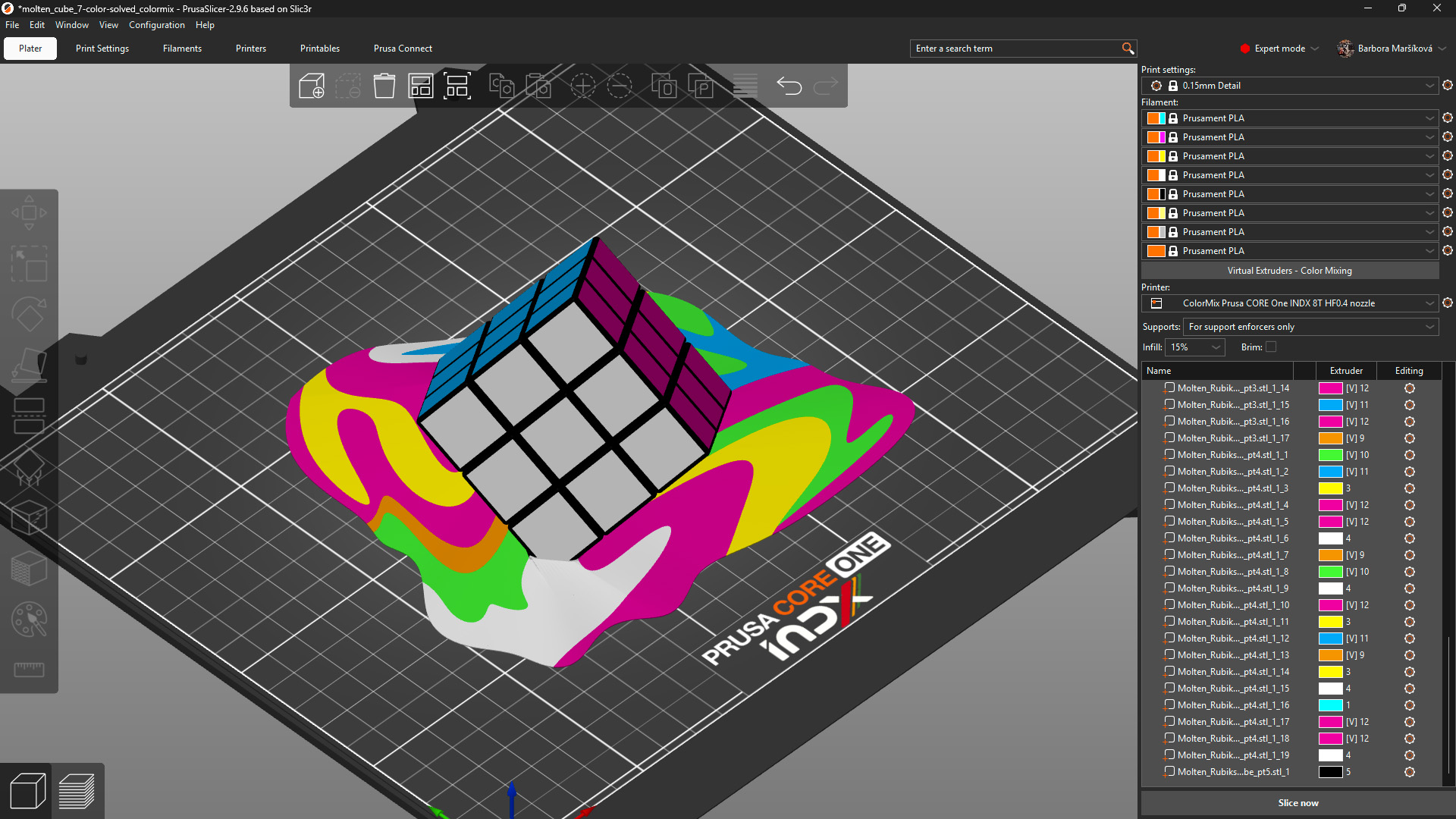
                  Model: Solved ColorMix Rubik's cube by MrFlippant. 

                  Practical tips 

                  Even with the semi-translucent Prusament PLA ColorMix, the mixing effect works the best on vertical and almost vertical surfaces.

                  See the printed molten cube below. The parts on the cube itself, which are printed under a steep angle, appear in a mixed color with only a slightly stripy pattern. The melting colors visibly show the different layers printed from different filaments. 
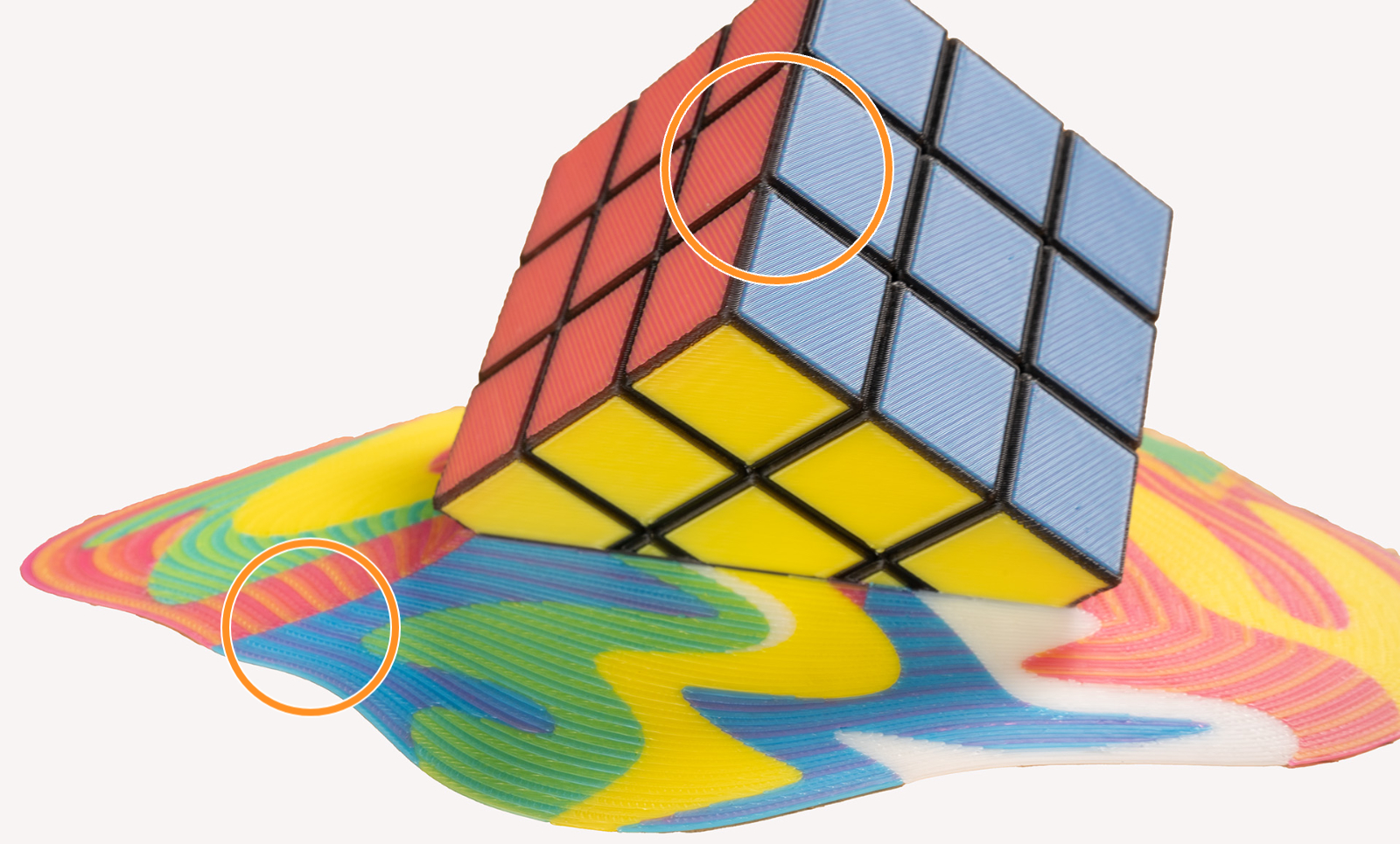
                  This effect is even more visible when using filament of highly saturated colors. It is a physical limitation of the method itself, not a printing error. Consider this when painting and printing your models. 

                  To visualize the colors, you can print a test model such as the ColorMix Calibration Cones or this ColorMix Test palette. 
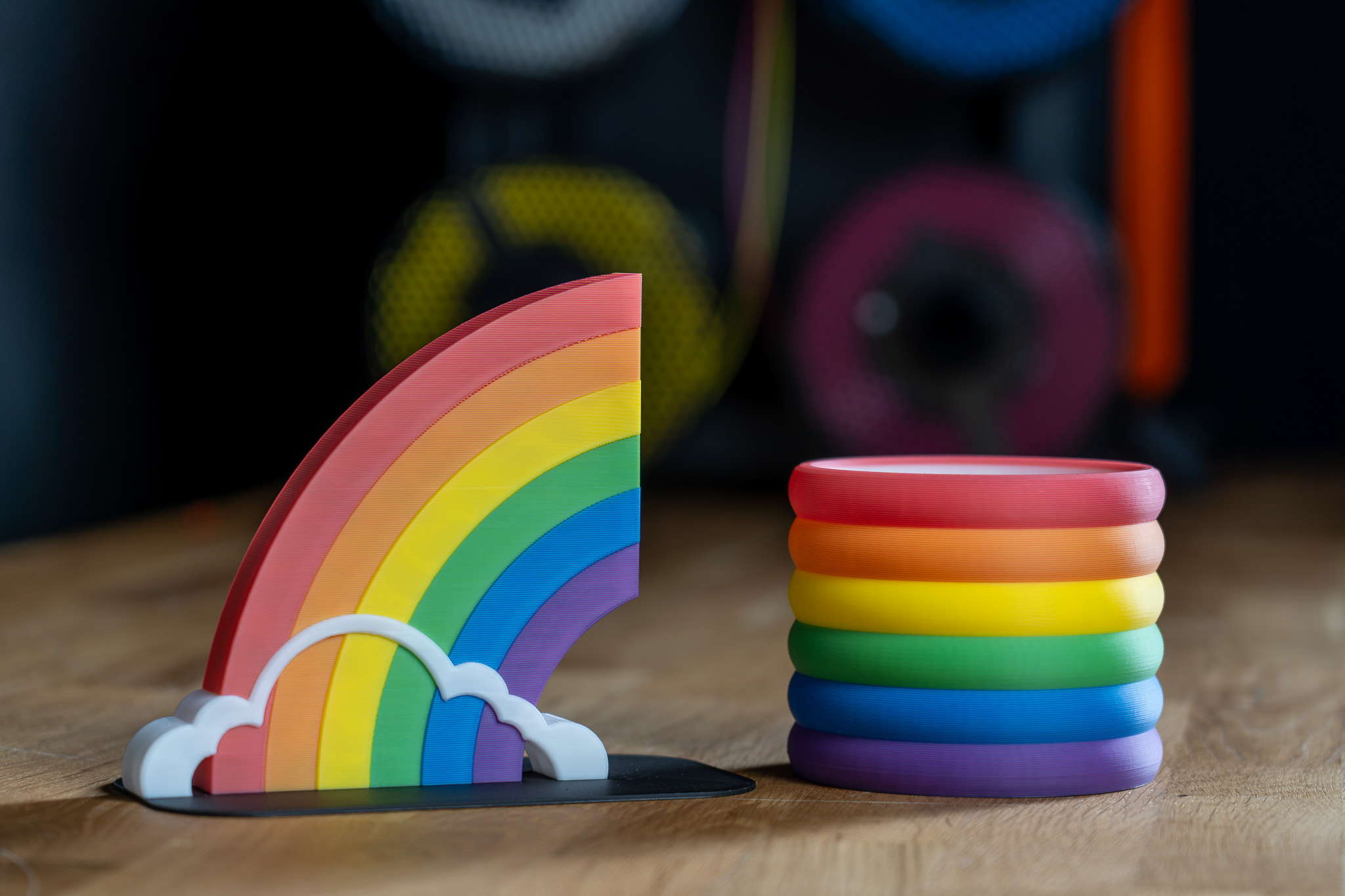
                  Examples of ColorMix models 

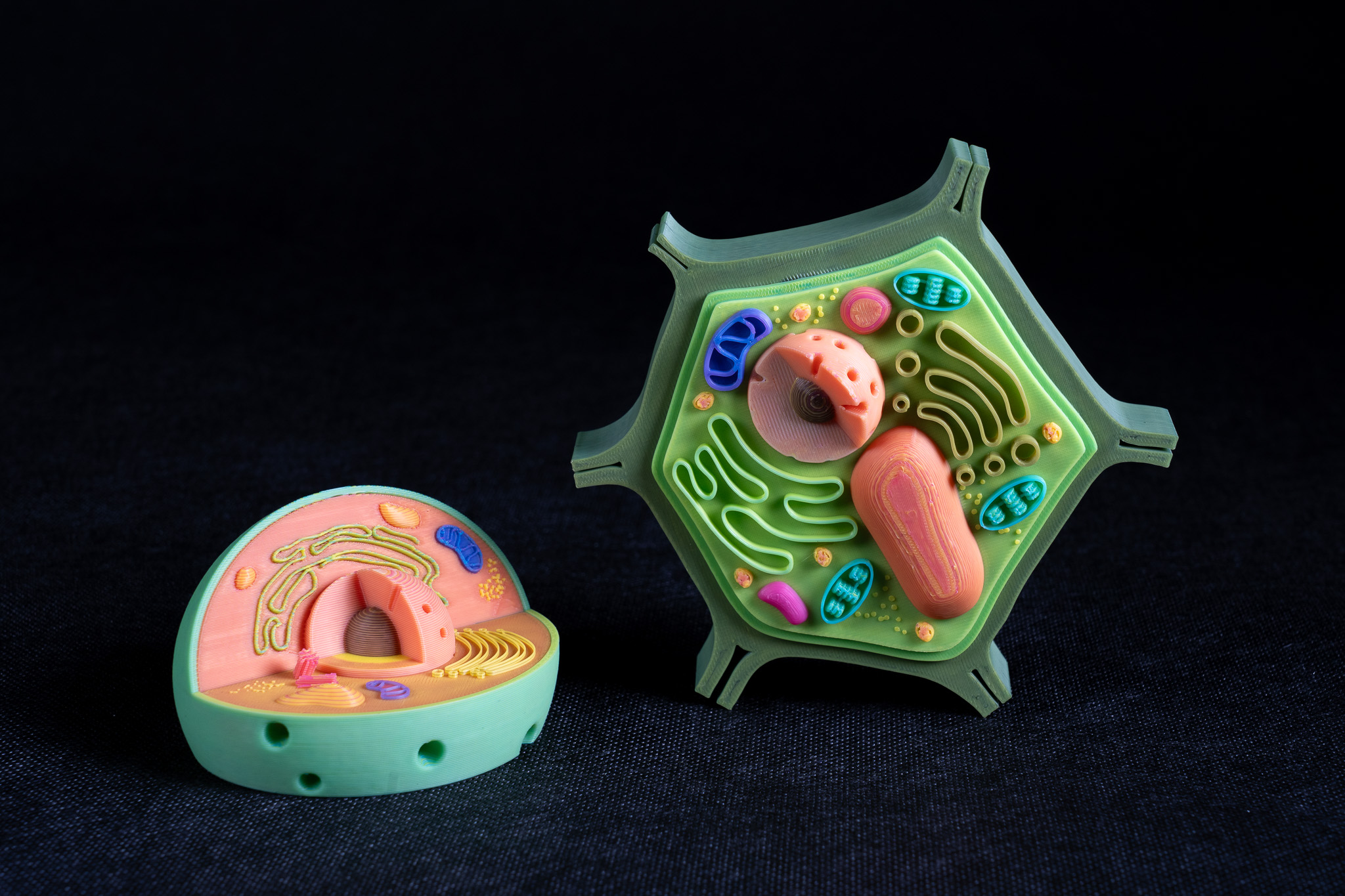
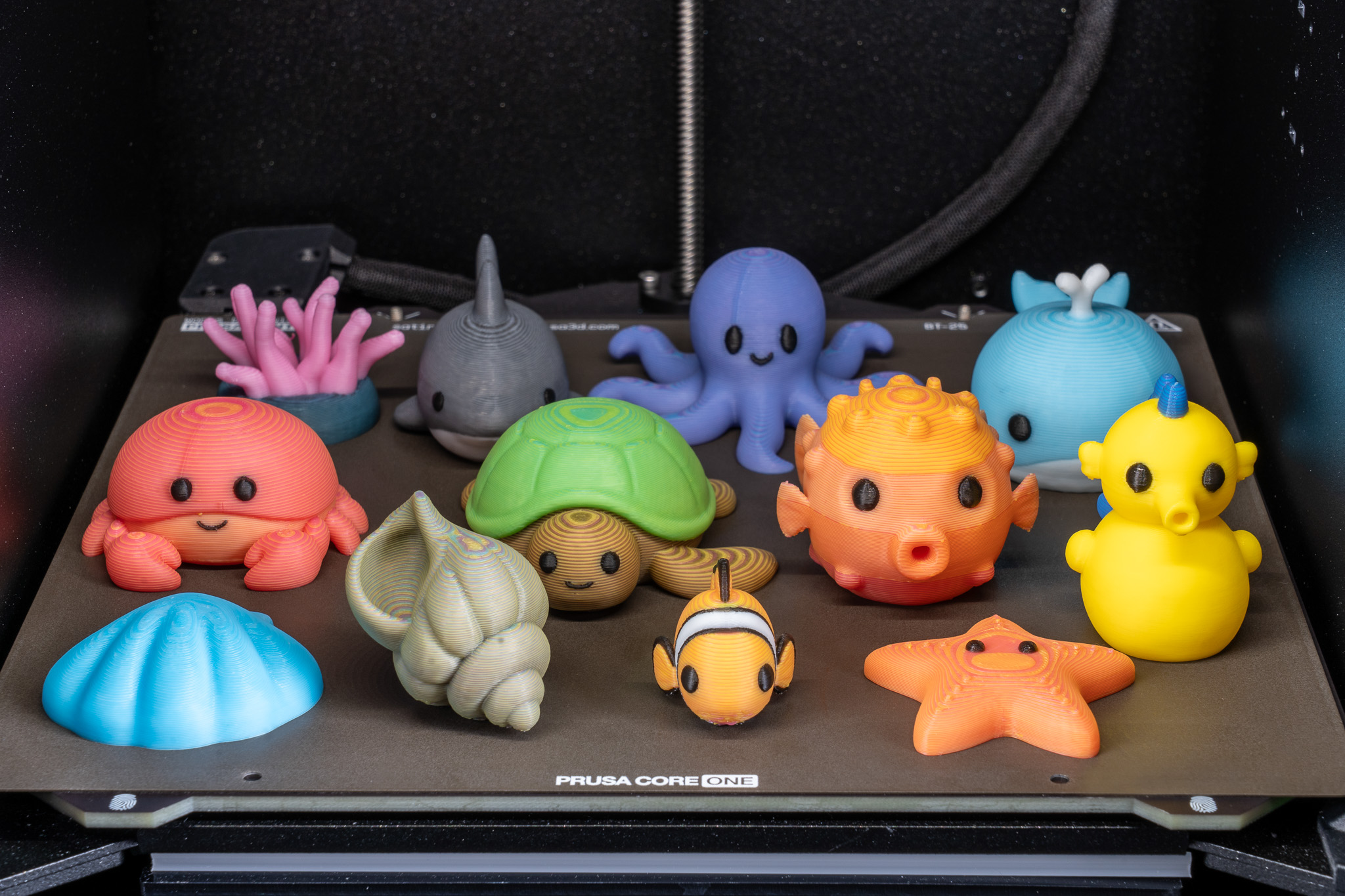
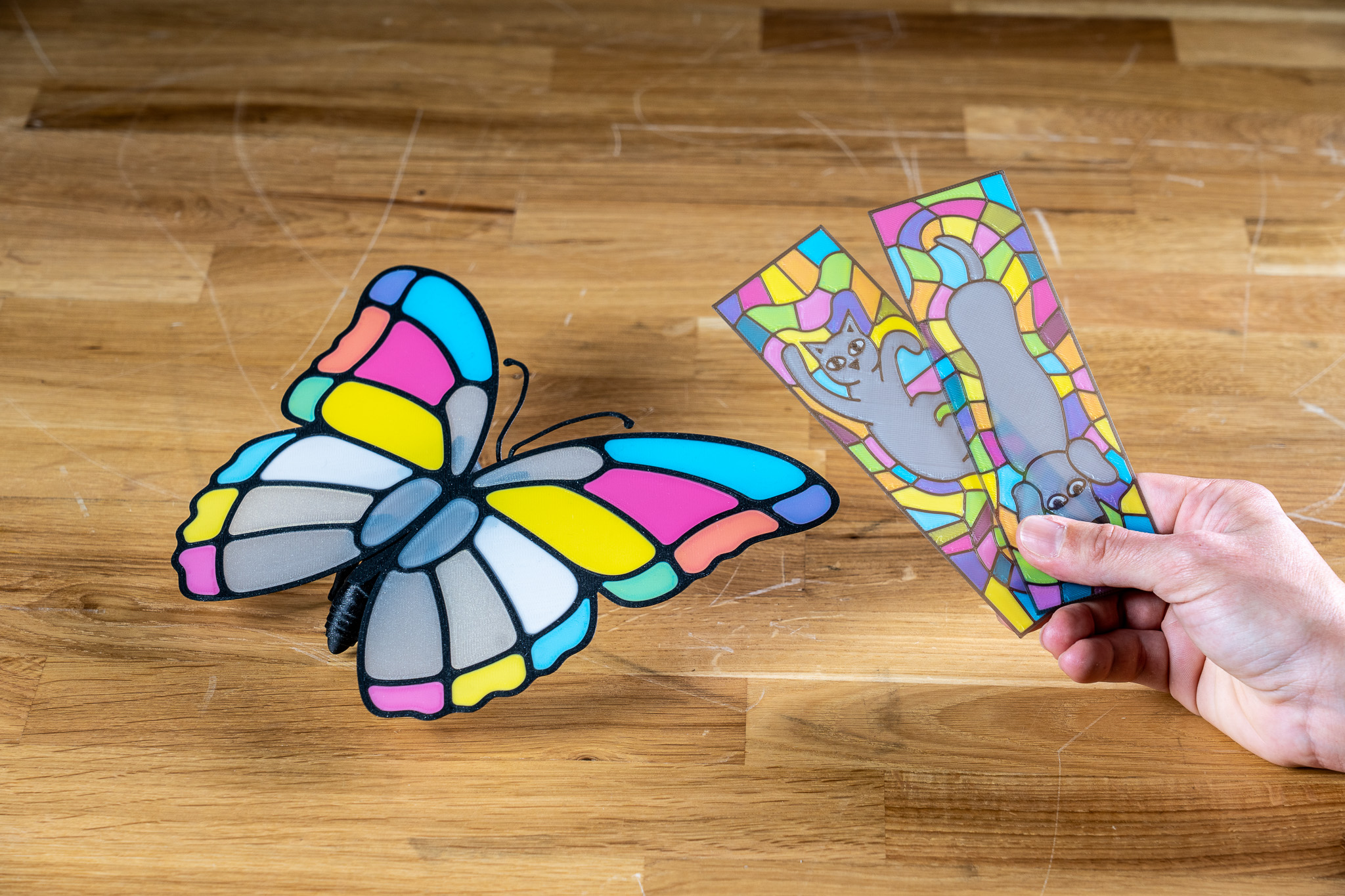
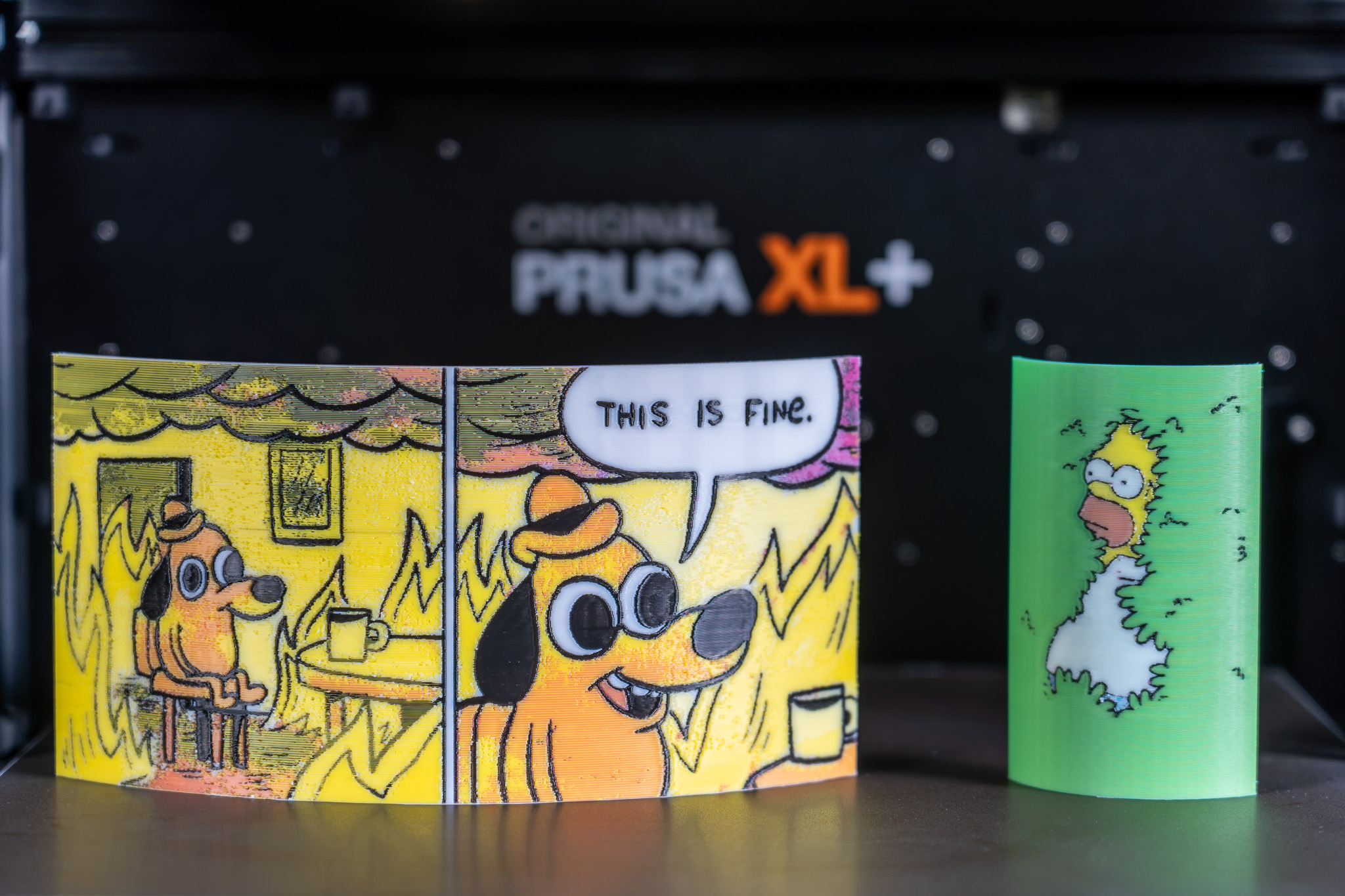
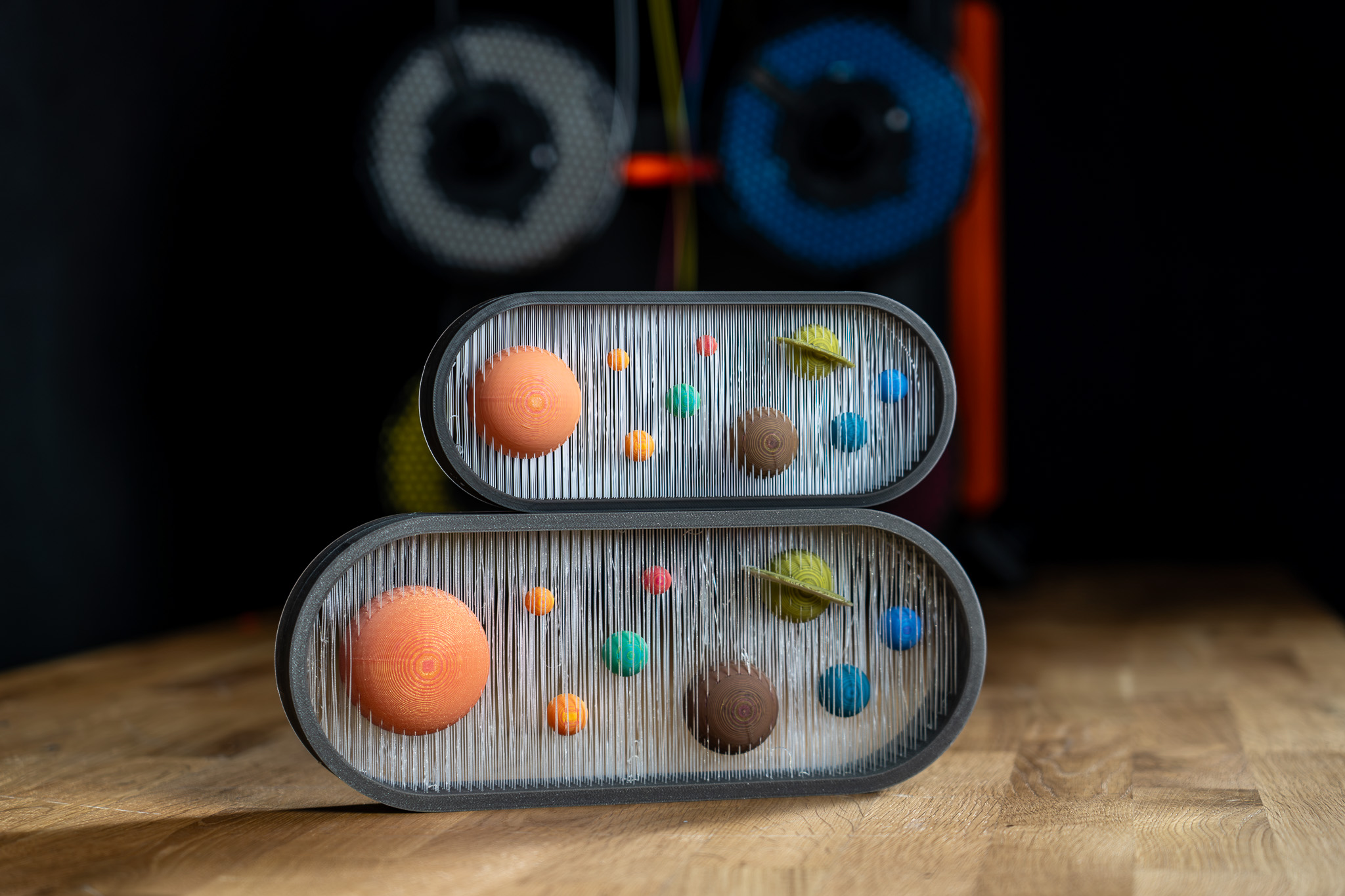
                  All displayed models are available on Printables and they were printed using the ColorMix filament bundle. 

                  References 

                  To learn more about the ColorMix and see more examples of printed models, see the release article and the filament announcement. 

                  The ColorMix feature is based on the works of the 3D printing community. Ratdoux’s OrcaSlicer-FullSpectrum showed how virtual mixed-color filaments could be created by alternating thin layers of differently colored materials. Justin H. Rahb’s filament-mixer helped predict what those colors might look like, and projects like PeggyPalette made it easier to compare and share results.

                  Cet article vous a-t-il été utile ?
                  Cette action n'est disponible que pour les utilisateurs enregistrés. Veuillez vous connecter.
                  Se connecter  pour poster un commentaire
                  Aucun commentaire

                  Thèmes

                  • PrusaSlicer 2.9 (Ancienne version)
                    • Découpage multi-matériaux
                      • Importation d'un modèle Multi Material
                      • Motifs - définir la séquence d'extrusion
                      • Attribution d' outils / couleurs / extrudeurs
                      • ColorPrint avec le mmu
                      • Tour de nettoyage
                      • Volumes de purge (MMU)
                      • Peinture multi-matériaux
                      • Impression expérimentale avec différents diamètres de buses
                      • Réglages des extrudeurs multiples, Imbrication & Liaison avancée
                      • ColorMix
                    • À propos de PrusaSlicer
                    • Configuration et profils
                    • Interface utilisateur
                    • Entrée/sortie
                    • Barre d'outils de gauche
                    • Barre d'outil du haut
                    • Réglages d'impression
                    • Réglages du filament
                    • Réglages de l'Imprimante
                    • Fonctionnalités avancées
                    • Découpage SLA
                    • Autre (PrusaSlicer)