Prusa
  • SHOP
    • Learn more
    • All deals
    3D printers
    • CORE One+ (Gen2)
    • CORE One L+
    • XL+
    • MK4S
    • Mini+
    • HT90
    Consumables and Merch
    • Prusament
    • Resin
    • Buddy filament
    • Merch
    • Accessories
  • SHOP
    • Latest products
    BY CATEGORY
    • 3D printersnew
    • Upgradesnew
    • Materials
    • Accessories
    • Spare parts
    • Courses
    • Merch
    • Sales inquiry & Price quote
    QUICK LINKS
    • Shipping information
    • Refunds & returns
    • Payment options
    • Warranty
    • VAT & Customs fees
    • FAQ

    0 item in your cartitems in your cart

    Your cart is empty

    Go to cartShop 3D printers

    My profile

    Log in to see orders, saved items

    My profile

    Signed in as

    • Orders
    • Logout
  • 3D PRINTING
    • Explore 3D printing
    FOR BEGINNERS
    • 3D printing 101
    • Types of printers (FDM/SLA)
    • How to choose a 3D Printer
    • Printables (3D models)
    BY APPLICATION
    • Rapid prototyping
    • Manufacturing
    • Engineering
    • Research
    • Arts & design
    GO DEEPER
    • Materials guide
    • Courses
    • Webinars
    • Case studies
    • Custom 3D printing
  • 3D PRINTERS
    • All 3D printers
    FOR
    • Home or garageHobbyists, tinkerers and home printing
    • Shop or studioIn-house production for small teams
    • EnterpriseFleets, security and scale
    • How to choose a 3D Printer
    SHOP & BROWSE
    • CORE One+new
    • CORE One+ INDXnew
    • CORE One L+new
    • CORE One L+ INDXnew
    • XL+new
    • MK4S
    • Prusa Pro HT90
    • Prusa Pro AFS
    • Prusa Pro SLX
    MORE FROM PRINTERS
    • Upgradesnew
    • Spare parts
    • Critical infrastructure
    • Case studies
    • Signature Oak
    • Kits
  • MATERIALS
    • All materials
    BY USE
    • Every-day & design
    • Functional engineering
    • Composites
    • Pro speciality
    • SLA resins
    PRUSAMENT
    • PLA
    • PETG
    • ASA
    • PC
    • PA11
    • Flex
    • TPU
    MORE FROM MATERIALS
    • Materials guide
    • We make material in house
    • Sustainability
    • Order on the store
  • SOFTWARE
    • All software
    PREPARE THE PRINT
    • PrusaSlicer 3.0New
    PRINT & MONITOR
    • Prusa Connect
    • EasyPrint
    • iOS & Android app
    • Prusa Farm
    GET STARTED
    • Download & install
    • Knowledge base
    MORE FROM SOFTWARE
    • Printables (3D models)
  • SUPPORT
    • Explore support
    FIND ANSWERS
    • Knowledge base
    • Troubleshooting
    • Courses
    • Webinars
    GET HELP
    • Contact us
    • Livechat
    • Shipping information
    • Warranty
    • Refunds & returns
    • Spare parts
    • Factory repair
    COMMUNITY
    • Forum
    • Reddit
    • Printables
  • TRUST CENTER
    • Trust Center overview
    BY TOPIC
    • GDPR
    • Certificates
    • Security
    • Compliance
    COMMITMENTS
    • Sustainability report
    TALK TO US
    • Contact the security team
  • COMPANY
    • About Prusa
    GET TO KNOW US
    • Our story
    • How we make printers
    • Open source
    • Brand & media kit
    NEWS
    • Blog
    • Newsroom
    • Events
    TRUST & PARTNERS
    • Sustainability
    • Resellers & distributors
    • Affiliate program
    • Contact
    • English
    • Čeština
    • Deutsch
    • Español
    • Français
    • Italiano
    • Polski
    • 日本語
  • Signed in as

    • Orders
    • Address
    • In-stock Alerts
    • My Courses
    • Subscription
    • Edit Account
    • Logout

Log in to see orders, saved items

Signed in as
  • Orders
  • Address
  • In-stock Alerts
  • My Courses
  • Subscription
  • Edit Account
  • English
  • Čeština
  • Deutsch
  • Español
  • Français
  • Italiano
  • Polski
  • 日本語
Shop

0 item in your cartitems in your cart

Your cart is empty

Go to cartShop 3D printers

My profile

Log in to see orders, saved items

My profile

Signed in as

  • Orders
  • Logout
SHOP
  • Latest products
BY CATEGORY
  • 3D printersnew
  • Upgradesnew
  • Materials
  • Accessories
  • Spare parts
  • Courses
  • Merch
  • Sales inquiry & Price quote
QUICK LINKS
  • Shipping information
  • Refunds & returns
  • Payment options
  • Warranty
  • VAT & Customs fees
  • FAQ

Featured products

    Popular categories

      Trending searches

        Articles

          Blog

            Products

              Categories

                Suggested searches

                  Searching…
                  No results
                  Something went wrong.
                  ↑↓ Select↵ OpenEsc Close search
                  1. Support
                  2. Printer troubleshooting
                  3. MMU2S idler unable to move freely
                   

                  Contents

                  • Loosen idler cover
                  • Check the idler barrel path
                  • Change Stallguard threshold

                  Blog

                  • 400°C HT Hotend is out! Plus: New Materials and HighTemp Sheets for CORE One+/L+.
                  • Blender for 3D Printing: The 5-Minute Guide to STL Editing
                  • Prusament Pellets: Raw material batches for large-format 3D printing or small-scale polymer research & development

                  Newsletter

                  Signup and get our monthly squeeze on updates, blog, printables and much more.

                  By clicking, you agree to receive our newsletter.

                  This site is protected by reCAPTCHA Enterprise and the Google Privacy Policy and Terms of Service apply.

                  Heavy Duty Keyboard Holder (No Supports)
                  E-shop
                  • 3D Printers
                  • Printer Upgrades
                  • Filaments
                  • Accessories
                  • Prusa Merchandise
                  Prusa

                  © Prusa Research a.s.

                  Printables
                  • 3D Models
                  • Store
                  • Clubs
                  • 3D Design Contests
                  • Brands
                  Community
                  • World Map
                  • Forum
                  • User Groups
                  • Events
                  Help
                  • Prusa Help
                  • Prusa Academy
                  • 3D Printing Calculators
                  Software
                  • PrusaSlicer
                  • Prusa.app
                  • Prusa Connect
                  • Drivers and Software
                  Company
                  • About Us
                  • Blog
                  • Official Prusa Resellers
                  • Contact Us
                  • Certified for ISO 9001, ISO 14001, ISO 45001
                  • General Terms and Conditions
                  • General Terms and Conditions of Use of the PRUSA Websites
                  • Privacy Policy
                  • Information about cookies
                  • Customer Complaints Policy
                  • Status Page
                  • Do Not Sell or Share My Personal Information
                  • Supplemental Statements
                  Prusa
                  • General Terms and Conditions
                  • General Terms and Conditions of Use of the PRUSA Websites
                  • Privacy Policy
                  • Information about cookies
                  • Customer Complaints Policy
                  • Status Page
                  • Do Not Sell or Share My Personal Information
                  • Supplemental Statements

                  © Prusa Research a.s.

                  JOSEF PRUSA®, PRUSA RESEARCH®, PRUSA POLYMERS®, PRUSA ORANGE®, PRUSA 3D ® AND PRUSAMENT® are registered trademarks of Prusa Development a.s. used by Prusa Research a.s. under licence from Prusa Development a.s.

                  MMU2S idler unable to move freely

                  Relevant for

                  MMU2S
                  15 comments
                  Article is also available in following languages
                  English
                  Čeština
                  Polski
                  Deutsch
                  Français
                  Español
                  Italiano
                  日本語

                  If your Original Prusa Multi Material idler barrel has some issues moving, makes clicking noises, or gives the error #04125 Idler cannot home, something is preventing the full movement of the idler barrel.

                  Loosen idler cover

                  First, check the idler screws' tightness. Too much tension can prevent the motor from turning the idler barrel. You can try completely loosening the tension screws, and allow the MMU to finish the homing. If it passes, then the idler cover is too tight.

                  To find the perfect tension, tighten the screw about 0.1 mm to 0.4 mm under the edge of the hole on both sides of the idler body. All 5 filaments have to be loaded to the hobbed pulleys position. Then move with the selector to the far right (5th filament position) and back and observe. If you hear clicking, loosen the screws a bit and try to move with the selector again until there is no more clicking.

                  Check the idler barrel path

                  If the idler does not rotate freely with the spring screws loosened, you can open the idler completely and verify that nothing's blocking it, like the remains of filament or dirt. Check if the idler is centered and if the edges of the idler don’t grind the idler body.

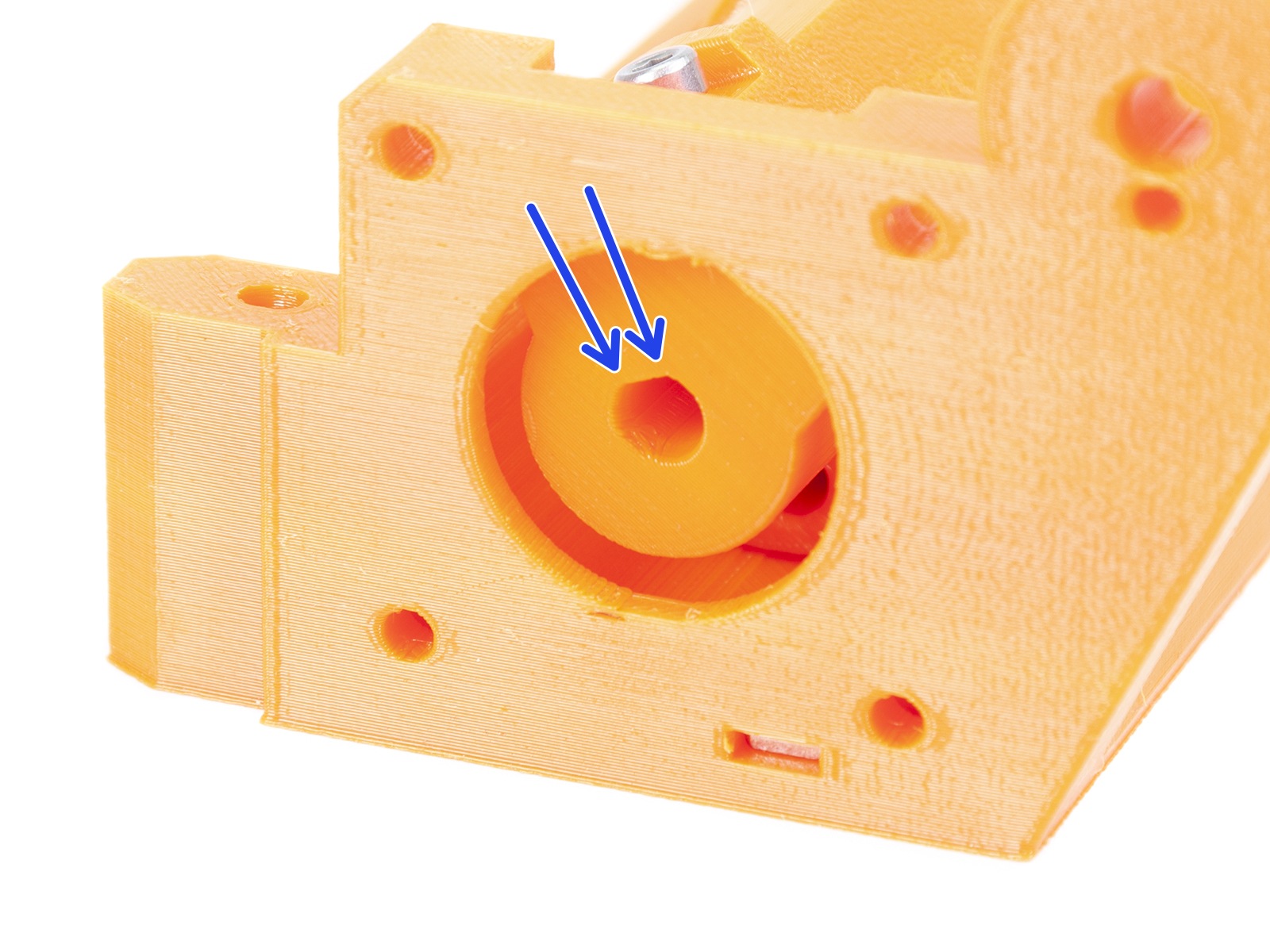
                  Check the idler barrel connection with the Idler motor. The plastic around the motor shaft cannot be broken or worn out, which can happen due to heat. Move the barrel across the whole axis by hand, and make sure that during the whole range of rotation, the barrel does not touch the cover and does not scratch against the sides.

                  If the barrel is bent in relation to the rest of the idler, try loosening the two screws that connect it to the Idler motor, and tighten them again gently. Make sure that the two screws are tightened evenly against the flat part of the motor shaft.
                   

                  Change Stallguard threshold

                  If you are getting the #04125 Idler cannot home error, the printer will give you two options. You can either click to Retry or Tune. If the issue is persistent even though you checked all the items above, you can lower the Stallguard value.  If the threshold is too high the MMU will not home. Therefore, start from the default value of 7, and decrease the value by 1.

                  Was this article helpful?
                  This action is available only to registered users. Please log-in.

                  9 comments

                  Log in  to post a comment
                  tigertrainer
                  •
                  mine screwed up after update to printer. I just took it apart and see nothing wrong . It was working great ten minutes before update . Don't understand why after every update something screws up.
                  Reply
                  Dan [Incodenito]
                  •
                  Had the exact same issue. Basically my MK3S+ & MMU2 were in storage for a few years. Got them out to start getting back into 3D printing, and printed fine from an SD card. Updated both to their latest firmware (3.14.1-8237) and (3.03) and had all sorts of issues. I had to factory reset the MK3S+ because it thought the bed was 1/4 the size? Huh? So strange...

                  The whole time the MMU2 was buzzing at me and giving me the #04125 error. So I disabled the MMU until I figured out the MK3S+ problem, and then the #04125 error went away when I changed this sensitivity setting from 7 to 6. Wasted a whole night figuring this out instead of getting back into 3D printing... Oh well :)
                  Reply
                  3lobit print
                  •
                  In my case, checking the alignment of the idler motor and idler bearing helped. Poor alignment was causing more resistance when the motor was turning. The idler must rotate without any play.
                  Reply
                  Jason White
                  •
                  Second this. When first assembling, it was unclear to me what level of resistance I should experience moving the roller. Answer: very little. 
                  Reply
                  dEviant
                  •
                  For months now I've had issues with filament loading being very inconsistent/unreliable due to the idler sometimes being positioned wrong. Even though the title of this KB article suggests that it has nothng to do with this problem, tightening the two screws did solve it. This KB article should be labeled as also being appropriate for the inconsistent filament loading (due to idler selecting wrong filament) issue. 
                  Reply
                  Sebk
                  •
                  I had this issue. Sometimes the idler would move freely and sometimes it would not. What did the trick for me was to screws for the stepper motor were too tight. Unscrewing them a bit helped a lot !
                  Reply
                  Jari Keinanen
                  •
                  Thank you! Too tight stepper motor screws were my problem too. Loosed them and tighten half a turn was enough. Also I made sure the middle part run as smoothly as it can and tighten the top screws firmlyMMU2+ is a picky device
                  Reply
                  Jason White
                  •
                  +1 for stepper motor screws being too night. Loosened all four a bit and problem solved. Doesn't even make the "grinding" sound anymore. Nice and smooth.
                  Reply
                  Richard Engler
                  •
                  +1 It is unreal! I just had to losen those screws and it all worked!
                  Reply
                  nathanw
                  •
                  This is also very useful information if your idler moves TOO freely. My MMU2S idler had loads of slop, which was causing unreliable loads/unloads. I was holding the idler by hand to make it work properly. The situation was far from ideal. Tightening the two screws to hold the idler onto the motor shaft solved my problem.
                  Reply

                  Topics

                  • Troubleshooting
                    • Printer troubleshooting
                      • Factory reset (MMU2S pre firmware 1.0.6)
                      • MMU2S idler unable to move freely
                      • MMU2S Selector not moving
                      • MMU2S LEDs meaning
                      • Firmware updating issues (MK2.5S/MK3S+/MMU2S/MMU3)
                      • IR filament sensor calibration (MMU3, MMU2S)
                      • FINDA setup and troubleshooting
                      • Filament jam (MMU2S)
                      • Logging data over serial line (MMU2S)
                      • FINDA: Filament Stuck #04102 (MMU)
                      • Tangled filament
                      • Status LED explained (MMU3)
                      • Factory Reset (MMU)
                      • TMC driver shorted #04304 (MMU)
                      • TMC driver shorted #04314 (MMU)
                      • TMC driver shorted #04324 (MMU)
                      • Service menu - Factory Reset
                      • Service menu - Individual Filament Calibration
                      • SD cards and USB drives
                    • Diagnostics
                    • Print Quality Troubleshooting
                    • QR Error codes
                    • Print Error Messages