Prusa
  • SHOP
    • Latest products
    BY CATEGORY
    • 3D printersnew
    • 3D printer upgradesnew
    • Materials
    • Accessories
    • Spare parts
    • Courses
    • Merch
    • Get a price quote
    QUICK LINKS
    • Shipping & delivery
    • Returns & refunds
    • Payment & financing
    • Warranty
    • VAT & Customs fees
    • FAQ

    0 item in your cartitems in your cart

    Your cart is empty

    Go to cartShop 3D printers

    My profile

    Log in to see orders, saved items

    My profile

    Signed in as

    • Orders
    • Logout
  • 3D PRINTING
    • Explore 3D printing
    FOR BEGINNERS
    • 3D printing 101
    • How FDM printing works
    • Buying your first printer
    • 3D model catalog
    BY APPLICATION
    • Rapid prototyping
    • Manufacturing
    • Engineering
    • Research
    • Arts & design
    GO DEEPER
    • Materials guide
    • Courses
    • Webinars
    • Case studies
    • Custom 3D printing
  • 3D PRINTERS
    • All 3D printers
    FOR
    • Home or garageHobbyists, tinkerers and home printing
    • BusinessIn-house production for small teams
    • EnterpriseFleets, security and scale
    • Which Prusa is right for me
    SHOP & BROWSE
    • CORE One+new
    • CORE One+ INDXnew
    • CORE One L+new
    • CORE One L+ INDXnew
    • XL+new
    • MK4S
    • Prusa Pro HT90
    • Prusa Pro AFS
    • Prusa Pro SLX
    MORE FROM PRINTERS
    • Parts & upgradesnew
    • Critical infrastructure
    • Case studies
    • Signature Oak
    • Kits
  • MATERIALS
    • All materials
    BY USE
    • Every-day & design
    • Functional engineering
    • Composites
    • Pro speciality
    • SLA resins
    PRUSAMENT
    • PLA
    • PETG
    • ASA
    • PC
    • PA11
    • Flex
    • TPU
    MORE FROM MATERIALS
    • Materials guide
    • We make material in house
    • Sustainability
    • Order on the store
  • SOFTWARE
    • All software
    PREPARE THE PRINT
    • PrusaSlicer 3.0New
    PRINT & MONITOR
    • Prusa Connect
    • EasyPrint
    • iOS & Android app
    • Prusa Farm
    GET STARTED
    • Download & install
    • Knowledge base
    MORE FROM SOFTWARE
    • 3D model catalog
  • SUPPORT
    • Explore support
    FIND ANSWERS
    • Knowledge base
    • Troubleshooting
    • Courses
    • Webinars
    GET HELP
    • Contact us
    • Livechat
    • Shipping & delivery
    • Warranty
    • Returns & refunds
    • Service & spare parts
    • Service & Repair
    COMMUNITY
    • Forum
    • Reddit
    • Printables
  • TRUST CENTER
    • Trust Center overview
    BY TOPIC
    • GDPR
    • Certificates
    • Security
    • Compliance
    COMMITMENTS
    • Sustainability report
    TALK TO US
    • Contact the security team
  • COMPANY
    • About Prusa
    GET TO KNOW US
    • Our story
    • How we make printers
    • Open source
    • Brand & media kit
    NEWS
    • Blog
    • Newsroom
    • Events
    TRUST & PARTNERS
    • Sustainability
    • Resellers & distributors
    • Affiliate program
    • Contact
    • English
    • Čeština
    • Deutsch
    • Español
    • Français
    • Italiano
    • Polski
    • 日本語
  • Signed in as

    • Orders
    • Address
    • In-stock Alerts
    • My Courses
    • Subscription
    • Edit Account
    • Logout

Log in to see orders, saved items

Signed in as
  • Orders
  • Address
  • In-stock Alerts
  • My Courses
  • Subscription
  • Edit Account
  • English
  • Čeština
  • Deutsch
  • Español
  • Français
  • Italiano
  • Polski
  • 日本語
Shop

0 item in your cartitems in your cart

Your cart is empty

Go to cartShop 3D printers

My profile

Log in to see orders, saved items

My profile

Signed in as

  • Orders
  • Logout
SHOP
  • Latest products
BY CATEGORY
  • 3D printersnew
  • 3D printer upgradesnew
  • Materials
  • Accessories
  • Spare parts
  • Courses
  • Merch
  • Get a price quote
QUICK LINKS
  • Shipping & delivery
  • Returns & refunds
  • Payment & financing
  • Warranty
  • VAT & Customs fees
  • FAQ

Featured products

    Popular categories

      Trending searches

        Articles

          Blog

            Products

              Categories

                Suggested searches

                  Searching…
                  No results
                  Something went wrong.
                  ↑↓ Select↵ OpenEsc Close search
                  1. Support
                  2. Original Prusa MMU1
                  3. Other (PrusaSlicer)
                  4. PrusaSlicer G-code viewer
                   

                  Contents

                  • Supported slicers
                  • Associate with .gcode file extension
                  • Features
                  • How it works

                  Blog

                  • Print colorful and glowing Halloween decorations with our spooky offer
                  • Factorio Has Arrived on Printables
                  • Prusament PLA Lightweight: 65% lighter than regular PLA. Perfect choice for aircraft, cosplay, and more.

                  Newsletter

                  Signup and get our monthly squeeze on updates, blog, printables and much more.

                  By clicking, you agree to receive our newsletter.

                  This site is protected by reCAPTCHA Enterprise and the Google Privacy Policy and Terms of Service apply.

                  Factorio Transport Belts
                  E-shop
                  • 3D Printers
                  • Printer Upgrades
                  • Filaments
                  • Accessories
                  • Prusa Merchandise

                  © Prusa Research a.s.

                  Printables
                  • 3D Models
                  • Store
                  • Clubs
                  • 3D Design Contests
                  • Brands
                  Community
                  • World Map
                  • Forum
                  • User Groups
                  • Events
                  Help
                  • Prusa Help
                  • Prusa Academy
                  • 3D Printing Calculators
                  Software
                  • PrusaSlicer
                  • Prusa.app
                  • Prusa Connect
                  • Drivers and Software
                  Company
                  • About Us
                  • Blog
                  • Official Prusa Resellers
                  • Contact Us
                  • Certified for ISO 9001, ISO 14001, ISO 45001
                  • General Terms and Conditions
                  • General Terms and Conditions of Use of the PRUSA Websites
                  • Privacy Policy
                  • Information about cookies
                  • Customer Complaints Policy
                  • Status Page
                  • Do Not Sell or Share My Personal Information
                  • Supplemental Statements
                  • General Terms and Conditions
                  • General Terms and Conditions of Use of the PRUSA Websites
                  • Privacy Policy
                  • Information about cookies
                  • Customer Complaints Policy
                  • Status Page
                  • Do Not Sell or Share My Personal Information
                  • Supplemental Statements

                  © Prusa Research a.s.

                  JOSEF PRUSA®, PRUSA RESEARCH®, PRUSA POLYMERS®, PRUSA ORANGE®, PRUSA 3D ® AND PRUSAMENT® are registered trademarks of Prusa Development a.s. used by Prusa Research a.s. under licence from Prusa Development a.s.

                  PrusaSlicer G-code viewer

                  Relevant for

                  MMU family
                  MINI family
                  MK3 family
                  OLD PRODUCTS
                  SLA family
                  +
                  14 comments
                  Article is also available in following languages
                  English
                  Čeština
                  Polski
                  Deutsch
                  Français
                  Español
                  Italiano
                  日本語

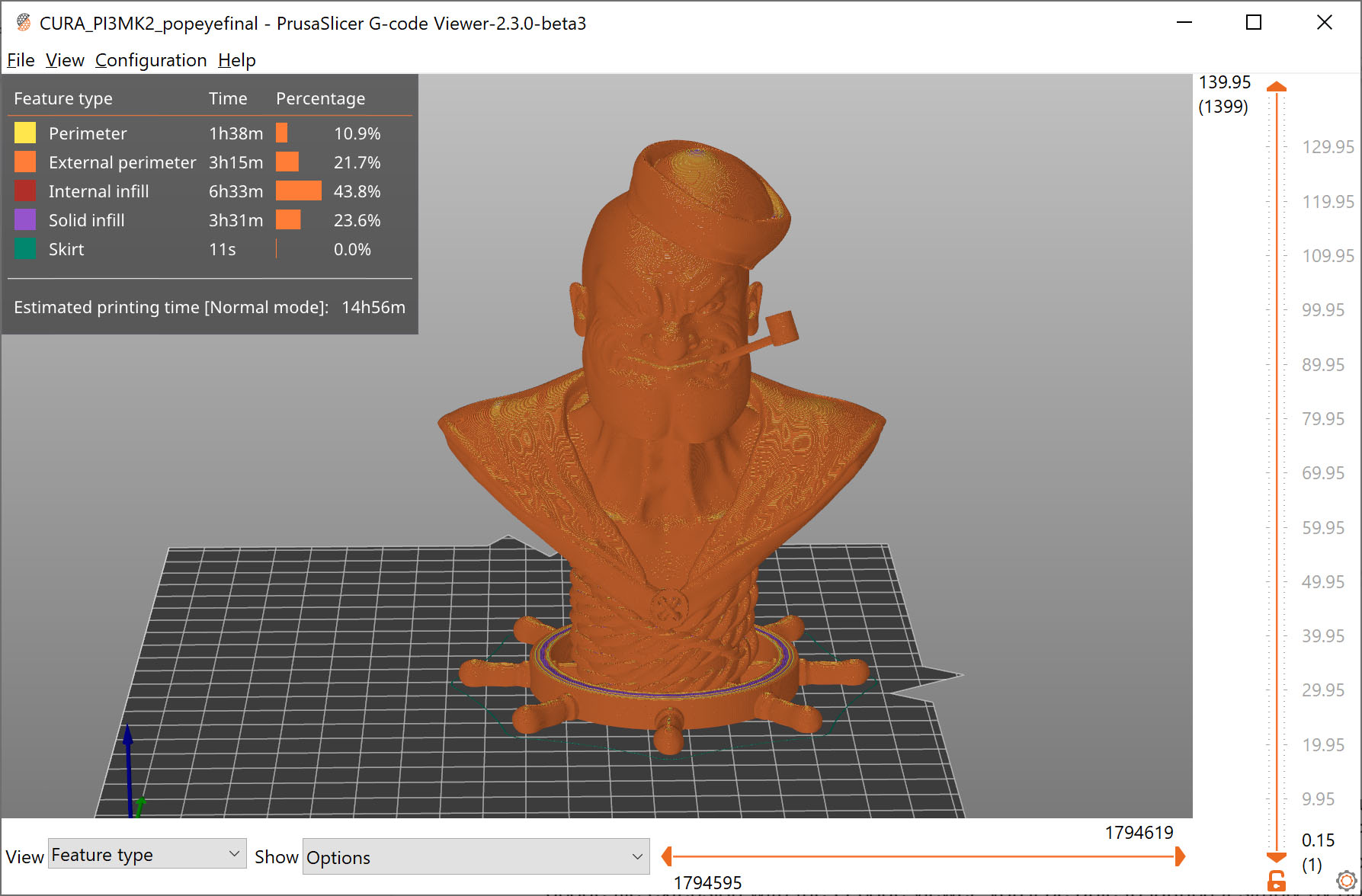
                  Standalone PrusaSlicer G-code Viewer is a lightweight application, which you can use to quickly preview G-codes from all popular slicers. Its behavior is identical to the preview in PrusaSlicer (the same code is used), however, you can load an external G-code file.

                  Supported slicers

                  We currently parse, and up to some level interpret, G-code from:
                  • PrusaSlicer
                  • Slic3r and Slic3rPE
                  • CURA
                  • ideaMaker
                  • Simplify3D
                  • Craftware
                  • KISSSlicer

                  PrusaSlicer Standalone G-code Viewer tries hard to estimate the extrusion widths, layer heights, extrusion types, types of moves, layers, etc. from the G-code generated by various slicers. The G-code itself does not contain all the information mentioned above, thus the G-code is usually augmented with slicer specific comments. We try to get as much data as possible, but some parts might still get marked as unknown.

                  PrusaSlicer version 2.3 and newer augments the G-code with comments ";TYPE:", ";HEIGHT:", ";LAYER_CHANGE", ";COLOR_CHANGE", ";PAUSE_PRINT" and ";CUSTOM_GCODE". G-code generated by older PrusaSlicer which does not contain these new annotations will still be displayed, but the extrusion widths or extrusion types may not be shown reliably.

                  G-code generated with other slicers will most likely still load correctly, but some features, such as the print time analysis by feature might be unavailable.

                  Associate with .gcode file extension

                  If you associate the .gcode file extension with the G-code viewer, you'll be able to launch it simply by opening the file (double-clicking on it or pressing Enter). You can do so by enabling Configuration - Preferences - Associate .gcode files to PrusaSlicer G-code Viewer.

                  Alternatively, you associate the file extension using your operating system tools.

                  Windows

                  1. Right-click any G-code file
                  2. Select Open with - Choose default program... - PrusaSlicer G-code Viewer
                  3. Click More at the bottom
                  4. Tick Always use this app

                  macOS

                  1. Select any G-code file in the Finder and choose File > Get Info
                  2. In the Open With section, select PrusaSlicer G-code Viewer
                  3. Click Change All and confirm

                  Ubuntu

                  1. Select any G-code file
                  2. Right-click the file and select Properties
                  3. Select the Open With tab
                  4. Select PrusaSlicer G-code Viewer and click Set as default.

                  The process is similar on other Linux distributions.

                  Features

                  The stand-alone G-Code Viewer shows names of used Printer/Print settings/Filament.

                  Once the final G-code is available after slicing, a new horizontal slider shows up, limiting visualization of extrusions and travel by time thus allowing simulation of the print in time. By default the new horizontal slider limits visualization of the last layer selected by the vertical toolbar. Alternatively the horizontal slider limits the extrusions in all layers selected by the vertical slider. In the first case, if the horizontal slider limits visibility of the top layer, then the other layers below are rendered in a gray color. We borrowed this visualization strategy from the Craftware user interface as Cura did.

                  The legend newly shows the print time and the print time fraction per feature (perimeter, infill etc.), and the legend labels serve as buttons to show / hide the particular extrusion time. The print time estimate is available in both the G-code preview after slicing and in the stand-alone G-code viewer.

                  Multiple instances

                  One can start as many PrusaSlicer G-code Viewers as he wishes either by opening a G-code from the "File->G-code preview" menu, by starting the G-code viewer application, or by double-clicking on a G-code file in a File Explorer/Finder.

                  How it works

                  From the technical point of view, the stand-alone G-code viewer is a PrusaSlicer in disguise. The stand-alone G-code viewer is started as a new PrusaSlicer process. The way how the G-code viewer process is started is platform specific:

                  Windows

                  The PrusaSlicer.dll contains all the code while the prusa-slicer.exe, prusa-slicer-console.exe and the new prusa-gcodeviewer.exe wrappers just load PrusaSlicer.dll with the proper parameters.

                  OSX

                  The application distribution format supports a single binary, which in our case is PrusaSlicer.app/Contents/MacOS/PrusaSlicer. For command-line usage, this binary may be symlinked to prusa-gocdeviewer to start in a G-code viewer mode. Starting new instances of PrusaSlicer does not quite fit the OSX system, as the Finder only expects a single instance of a GUI application to be running. Thus when drag & dropping onto a dock icon of PrusaSlicer resp. G-code viewer, the file is sent to the first instance of PrusaSlicer resp. G-code viewer.

                  Linux

                  We support two binary distributions: AppImage and .tar.bz2. The .tar.bz2 format contains a new prusa-gcodeviewer starter script, while the AppImage may be symlinked to prusa-gcodeviewer to start the G-code viewer. The AppImage works by mounting the zipped filesystem image embedded inside the AppImage file and starting the application from there. It is not recommended to start prusa-gcodeviewer from an already mounted AppImage, as the AppImage will be unmounted when the PrusaSlicer that mounted it closes. When the user starts a G-code viewer from an AppImage PrusaSlicer application, another AppImage is mounted by the G-code viewer, which means the PrusaSlicer binary is being loaded into RAM the second time. Therefore if one is low on RAM, it is recommended to use the .tar.bz2 distribution instead of the AppImage until the AppImage is improved to support multiple processes running from a single mounted AppImage.

                  Was this article helpful?
                  This action is available only to registered users. Please log-in.

                  Topics

                  • PrusaSlicer 2.9 (Legacy)
                    • Other (PrusaSlicer)
                      • 3Dconnexion devices
                      • Sending files to Octoprint/Duet
                      • Macros
                      • Export toolpaths as OBJ
                      • PrusaSlicer G-code viewer
                      • List of placeholders
                      • How to lift object from the print bed
                      • Opening models in PrusaSlicer from supported websites
                    • About PrusaSlicer
                    • Configuration and profiles
                    • User interface
                    • Input/output
                    • Left toolbar
                    • Top toolbar
                    • Print settings
                    • Filament settings
                    • Printer settings
                    • Advanced features
                    • Multi-material slicing
                    • SLA slicing

                  6 comments

                  Log in  to post a comment
                  jvys007
                  •
                  You can find the .exe file of G-code viewer in the folder where Slicer is installed ... most likely ..... .\Programs\Prusa3D\PrusaSlicer. Ther is a file "prusa-gcodeviewer.exe" located and you can just sent the shortcut to desktop or ... where ever you want to execute it directly not via Prusa Slicer.
                  Reply
                  Henris Vigis
                  •
                  were to find download butun
                   
                  Reply
                  Giuliano - Official Prusa CS
                  •
                  Hello. The g-code viewer can be downloaded with the whole driver package here: https://www.prusa3d.com/page/prusaslicer_424/
                  Reply
                  geno
                  •
                  Hi everybody.
                  I was not able to find the download link to gcodeviewer.
                  The option "gcode viewer" in file menu of Prusa slicer is missing.
                   
                  Any idea?
                  Best regards
                   
                   
                  Reply
                  Giuliano - Official Prusa CS
                  •
                  Hello. The gcode viewer should be in the drivers package.
                  Reply
                  Sugarlumpz
                  •
                  I'm feeling very stupid, but where is the download link???
                  Reply
                  Sugarlumpz
                  •
                  Ah, nevermind. It'd downloaded with the slicer. In case anyone else was lost like me, you use it by choosing "gcode preview" from the file menu in Prusa Slicer.
                  Reply
                  helliam
                  •
                  Thank you very much!!!!!  After the firmware update, it removed the stand alone g-code viewer. I was looking for it as well.  I appreciate you pointing this out to all of us.  I was lost as well.
                  Reply
                  Raf
                  •
                  It would be extremely helpful if the gcode viewer could register itself in the Windows shell (explorer.exe) to show the preview in the "preview pane".
                  BTW the "3D Viewer" from Microsoft, when set as the default "STL" viewer, does it and it is extremely useful as it shows the 3D preview and also allows to rotate the object in the preview.
                  Reply
                  David
                  •

                  Hi Raf! You can request the feature at: http://github.com/prusa3d/PrusaSlicer

                  Reply