Prusa
  • SHOP
    • Latest products
    BY CATEGORY
    • 3D printersnew
    • 3D printer upgradesnew
    • Materials
    • Accessories
    • Spare parts
    • Courses
    • Merch
    • Get a price quote
    QUICK LINKS
    • Shipping & delivery
    • Returns & refunds
    • Payment & financing
    • Warranty
    • VAT & Customs fees
    • FAQ

    0 item in your cartitems in your cart

    Your cart is empty

    Go to cartShop 3D printers

    My profile

    Log in to see orders, saved items

    My profile

    Signed in as

    • Orders
    • Logout
  • 3D PRINTING
    • Explore 3D printing
    FOR BEGINNERS
    • 3D printing 101
    • How FDM printing works
    • Buying your first printer
    • 3D model catalog
    BY APPLICATION
    • Rapid prototyping
    • Manufacturing
    • Engineering
    • Research
    • Arts & design
    GO DEEPER
    • Materials guide
    • Courses
    • Webinars
    • Case studies
    • Custom 3D printing
  • 3D PRINTERS
    • All 3D printers
    FOR
    • Home or garageHobbyists, tinkerers and home printing
    • BusinessIn-house production for small teams
    • EnterpriseFleets, security and scale
    • Which Prusa is right for me
    SHOP & BROWSE
    • CORE One+new
    • CORE One+ INDXnew
    • CORE One L+new
    • CORE One L+ INDXnew
    • XL+new
    • MK4S
    • Prusa Pro HT90
    • Prusa Pro AFS
    • Prusa Pro SLX
    MORE FROM PRINTERS
    • Parts & upgradesnew
    • Critical infrastructure
    • Case studies
    • Signature Oak
    • Kits
  • MATERIALS
    • All materials
    BY USE
    • Every-day & design
    • Functional engineering
    • Composites
    • Pro speciality
    • SLA resins
    PRUSAMENT
    • PLA
    • PETG
    • ASA
    • PC
    • PA11
    • Flex
    • TPU
    MORE FROM MATERIALS
    • Materials guide
    • We make material in house
    • Sustainability
    • Order on the store
  • SOFTWARE
    • All software
    PREPARE THE PRINT
    • PrusaSlicer 3.0New
    PRINT & MONITOR
    • Prusa Connect
    • EasyPrint
    • iOS & Android app
    • Prusa Farm
    GET STARTED
    • Download & install
    • Knowledge base
    MORE FROM SOFTWARE
    • 3D model catalog
  • SUPPORT
    • Explore support
    FIND ANSWERS
    • Knowledge base
    • Troubleshooting
    • Courses
    • Webinars
    GET HELP
    • Contact us
    • Livechat
    • Shipping & delivery
    • Warranty
    • Returns & refunds
    • Service & spare parts
    • Service & Repair
    COMMUNITY
    • Forum
    • Reddit
    • Printables
  • TRUST CENTER
    • Trust Center overview
    BY TOPIC
    • GDPR
    • Certificates
    • Security
    • Compliance
    COMMITMENTS
    • Sustainability report
    TALK TO US
    • Contact the security team
  • COMPANY
    • About Prusa
    GET TO KNOW US
    • Our story
    • How we make printers
    • Open source
    • Brand & media kit
    NEWS
    • Blog
    • Newsroom
    • Events
    TRUST & PARTNERS
    • Sustainability
    • Resellers & distributors
    • Affiliate program
    • Contact
    • English
    • Čeština
    • Deutsch
    • Español
    • Français
    • Italiano
    • Polski
    • 日本語
  • Signed in as

    • Orders
    • Address
    • In-stock Alerts
    • My Courses
    • Subscription
    • Edit Account
    • Logout

Log in to see orders, saved items

Signed in as
  • Orders
  • Address
  • In-stock Alerts
  • My Courses
  • Subscription
  • Edit Account
  • English
  • Čeština
  • Deutsch
  • Español
  • Français
  • Italiano
  • Polski
  • 日本語
Shop

0 item in your cartitems in your cart

Your cart is empty

Go to cartShop 3D printers

My profile

Log in to see orders, saved items

My profile

Signed in as

  • Orders
  • Logout
SHOP
  • Latest products
BY CATEGORY
  • 3D printersnew
  • 3D printer upgradesnew
  • Materials
  • Accessories
  • Spare parts
  • Courses
  • Merch
  • Get a price quote
QUICK LINKS
  • Shipping & delivery
  • Returns & refunds
  • Payment & financing
  • Warranty
  • VAT & Customs fees
  • FAQ

Featured products

    Popular categories

      Trending searches

        Articles

          Blog

            Products

              Categories

                Suggested searches

                  Searching…
                  No results
                  Something went wrong.
                  ↑↓ Select↵ OpenEsc Close search
                  1. Support
                  2. Original Prusa i3 MK3
                  3. Print Error Messages
                  4. Preheat error
                   

                  Contents

                  • Troubleshooting
                  • Testing the thermistor and heater

                  Blog

                  • Print colorful and glowing Halloween decorations with our spooky offer
                  • Factorio Has Arrived on Printables
                  • Prusament PLA Lightweight: 65% lighter than regular PLA. Perfect choice for aircraft, cosplay, and more.

                  Newsletter

                  Signup and get our monthly squeeze on updates, blog, printables and much more.

                  By clicking, you agree to receive our newsletter.

                  This site is protected by reCAPTCHA Enterprise and the Google Privacy Policy and Terms of Service apply.

                  Factorio Transport Belts
                  E-shop
                  • 3D Printers
                  • Printer Upgrades
                  • Filaments
                  • Accessories
                  • Prusa Merchandise

                  © Prusa Research a.s.

                  Printables
                  • 3D Models
                  • Store
                  • Clubs
                  • 3D Design Contests
                  • Brands
                  Community
                  • World Map
                  • Forum
                  • User Groups
                  • Events
                  Help
                  • Prusa Help
                  • Prusa Academy
                  • 3D Printing Calculators
                  Software
                  • PrusaSlicer
                  • Prusa.app
                  • Prusa Connect
                  • Drivers and Software
                  Company
                  • About Us
                  • Blog
                  • Official Prusa Resellers
                  • Contact Us
                  • Certified for ISO 9001, ISO 14001, ISO 45001
                  • General Terms and Conditions
                  • General Terms and Conditions of Use of the PRUSA Websites
                  • Privacy Policy
                  • Information about cookies
                  • Customer Complaints Policy
                  • Status Page
                  • Do Not Sell or Share My Personal Information
                  • Supplemental Statements
                  • General Terms and Conditions
                  • General Terms and Conditions of Use of the PRUSA Websites
                  • Privacy Policy
                  • Information about cookies
                  • Customer Complaints Policy
                  • Status Page
                  • Do Not Sell or Share My Personal Information
                  • Supplemental Statements

                  © Prusa Research a.s.

                  JOSEF PRUSA®, PRUSA RESEARCH®, PRUSA POLYMERS®, PRUSA ORANGE®, PRUSA 3D ® AND PRUSAMENT® are registered trademarks of Prusa Development a.s. used by Prusa Research a.s. under licence from Prusa Development a.s.

                  Preheat error

                  Relevant for

                  Plus 1.75 mm
                  MK2.5
                  MK2.5S
                  MK3
                  MK3S
                  +
                  21 comments
                  Article is also available in following languages
                  English
                  Čeština
                  Polski
                  Deutsch
                  Français
                  Español
                  Italiano
                  日本語

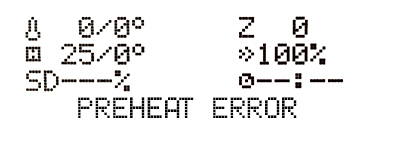
                  The Preheat error message occurs when there is a problem with the preheat process before your print starts. Therefore, there is something preventing the printer from heating up in proper time.

                  Make sure to distinguish between the Preheat error and the Bed preheat error. 

                  • Preheat error - a problem with preheating the hotend.
                  • Bed preheat error - a problem with preheating the heatbed.

                  Troubleshooting

                  Preheat error

                  1. Make sure that the ambient temperature is stable and there is nothing cooling the printer down, such as a nearby air-conditioning unit or an open window. 
                  2. Make sure the thermistor and heater are properly plugged into the electronics board. You can doublecheck that by following these guides: Mini RAMBo electronics wiring (MK2S, MK2.5, MK2.5S) or Einsy RAMBo electronics wiring (MK3/MK3S/MK3S+).
                  3. Check if the fuses are not blown.
                  4. Make sure that your hotend assembly is correct.
                  5. If the issue persists, then there is something wrong with your printer's thermistor or heater. In order to find out which one of these two is malfunctioning, perform the simple test described below.

                  Bed preheat error

                  1. Make sure that the ambient temperature is stable and there is cooling down the printer, such as a nearby air-conditioning unit or an open window.
                  2. Make sure the heatbed thermistor is properly seated under the heated bed and secured with the golden Kapton tape. If not, then simply put it back and make sure that the thermistor cable has some space for movement.
                  3. Make sure that the thermistor and heatbed are correctly plugged into the electronics board. You can doublecheck that by following these guides: Mini RAMBo electronics wiring (MK2S, MK2.5, MK2.5S) or Einsy RAMBo electronics wiring (MK3/MK3S/MK3S+). 
                  4.  Check if the fuses are not blown.
                  5. If the issue persists, there is something wrong with your printer's thermistor or heater. In order to find out which one of these two is malfunctioning, perform the simple test described below.

                  Testing the thermistor and heater

                  You can also verify if the thermistor or heater are damaged using a multimeter

                  It is not very common, but there is a chance that only the thermistor is defective. You can check it using the following test: 

                  1. Use a hairdryer to blow hot air at the heatbed or hotend.
                  2. In the meantime, check if there is any temperature change on the LCD screen.
                  3. If there is a positive temperature change it means that the heatbed or hotend thermistor is working. Which means there is something wrong with the heater or heatbed. In both cases contact our support and they will provide assistance.
                  4. If there is no change at all, the hotend or heatbed thermistor is defective. 
                  Was this article helpful?
                  This action is available only to registered users. Please log-in.

                  Topics

                  • Troubleshooting
                    • Print Error Messages
                      • TMC driver overtemp
                      • File incomplete. Continue anyway?
                      • Thermal Runaway (i3 series)
                      • Blackout occurred. Recover print?
                      • Please open idler and remove filament manually
                      • Bed leveling failed
                      • Err: EXTR. FAN ERROR
                      • Err: PRINT FAN ERROR
                      • Preheat error (Heatbed)
                      • Preheat error
                      • MAXTEMP
                      • MINTEMP error and MINTEMP BED
                      • Preheat the nozzle!
                    • Diagnostics
                    • Print Quality Troubleshooting
                    • QR Error codes
                    • Printer troubleshooting

                  12 comments

                  Log in  to post a comment
                  BajaRon
                  •
                  I am getting this Preheat Error in a Nozzle Change process. I've checked Fuses, Thermister responds instanly to hair dryer, I've check connections as well as Thermister and heating probe installation and I am not able to find anything amiss. It heats normally to 165, then stops as if this is the desired temperature. It does then fluctuate between 165 and 167.

                  I seem to be out of tricks. I've repeated this process a few times with identical results. Even after removing and reinstalling both hot block probes.
                  Reply
                  coolcut
                  •
                  The heatbed on my MK3S stopped working and after testing the voltage with a multimeter at the einsy board heatbed connectors and then at the connectors on the heatbed I managed to figure out it was the cable.
                  The board was outputting stable 23.95V whereas the voltage at the heatbed connectors was fluctuating between 18 and 22V.
                  After removing the sleeve from the heatbed (and thermistor) cable I found that the cable was crimped and actually 95% severed by the connectors for the heatbed..
                  Reply
                  RMIL
                  •
                  I am currently having this issue. I had to remove a clog and remove the nozzle. Naturally with the nozzle removed, I had to order new nozzles and wait for them to come in. I reassembled everything, except no nozzle inserted in the heat block. I tried to preheat to 280c so i could insert the new nozzle, but it gives me the preheat error at about 165c. I have tried several times and always at about 165c it beeps and gives me the preheat error. I checked the cables, connections, fuse, etc. What is odd to me is that it attempts to heat up when commanded and then caps out and gives me the error. Any ideas?
                  Reply
                  Giuliano - Official Prusa CS
                  •
                  Hello. I advise to inspect the thermistor and make sure that it's all the way in the heater block and well secured with the grub screw. If that's already the case, please contact the support via email or live chat for troubleshooting.
                  Reply
                  simonlaube
                  •
                  Power panic issues can also result in a preheat error. Check out the following forum page which solved the issue for me:  https://forum.prusa3d.com/forum/original-prusa-i3-mk3s-mk3-hardware-firmware-and-software-help/hotend-and-bed-suddenly-not-heating/
                  Reply
                  jdavidnet
                  •
                  Last night we suffered a power outage.  I removed the failed print, used the preheat function to unload the filament, and I was going to move from a .25mm nozzle to a .40mm nozzle, and start a different print.  While unscrewing the nozzle I damaged the working thermalcouple and since I had 2 spare, I started taking the printer appart to put in a new thermal couple.  ( about this time I'm really wishing I had a new E3D Revo system )  Between the kids, breakfast and everything else I get the new replacement thermalcouple in, and ... well I got a PREHEAT ERROR.  So I thought well, f' it, I must have just spent all of that time cable managing a dud of a thermalcouple.
                  I tried the troubleshooting mentioned above, and ther hair dryer does make the thermister go up.  I also tried testing the voltage on the pins for the thermal couple, both without a heating load, and with a heating load.  I tried two spare thermalcouples, one red, and one white (I think 1 is from E3D directly and the other from Amazon).  Neither heated, and Neither had a voltage load across the pins.
                  I also updated the firmware to the lastest Firmware 3.11.0, and still no voltage or heat on the nozzle.  The bed heats fine, but the nozzle thermalcouple just won't heat.
                  Is there something else I can try?  Is my controller board shot?
                  Reply
                  jdavidnet
                  •
                  BTW I'm I've now commited over 6 hours to this fix.  Help!?
                  Reply
                  jdavidnet
                  •
                  I contacted Pursa Support and they got back to me within 12-18hrs.  I think it's the time difference.
                  They sent me a few other articles about potential issues, and I discovered that it was a blown fuse. And after further review on the help articles, I noticed that I had installed the wrong heater.  I had installed the 12 volt heater.  Now, after replacing the 5 Amp fuse, and putting in a 24 volt heater, everything seems to be working.
                  I just need to recalibrate my machine for the different Nozzle.
                  Reply