Prusa
  • SHOP
    • Latest products
    BY CATEGORY
    • 3D printersnew
    • 3D printer upgradesnew
    • Materials
    • Accessories
    • Spare parts
    • Courses
    • Merch
    • Get a price quote
    QUICK LINKS
    • Shipping & delivery
    • Returns & refunds
    • Payment & financing
    • Warranty
    • VAT & Customs fees
    • FAQ

    0 item in your cartitems in your cart

    Your cart is empty

    Go to cartShop 3D printers

    My profile

    Log in to see orders, saved items

    My profile

    Signed in as

    • Orders
    • Logout
  • 3D PRINTING
    • Explore 3D printing
    FOR BEGINNERS
    • 3D printing 101
    • How FDM printing works
    • Buying your first printer
    • 3D model catalog
    BY APPLICATION
    • Rapid prototyping
    • Manufacturing
    • Engineering
    • Research
    • Arts & design
    GO DEEPER
    • Materials guide
    • Courses
    • Webinars
    • Case studies
    • Custom 3D printing
  • 3D PRINTERS
    • All 3D printers
    FOR
    • Home or garageHobbyists, tinkerers and home printing
    • BusinessIn-house production for small teams
    • EnterpriseFleets, security and scale
    • Which Prusa is right for me
    SHOP & BROWSE
    • CORE One+new
    • CORE One+ INDXnew
    • CORE One L+new
    • CORE One L+ INDXnew
    • XL+new
    • MK4S
    • Prusa Pro HT90
    • Prusa Pro AFS
    • Prusa Pro SLX
    MORE FROM PRINTERS
    • Parts & upgradesnew
    • Critical infrastructure
    • Case studies
    • Signature Oak
    • Kits
  • MATERIALS
    • All materials
    BY USE
    • Every-day & design
    • Functional engineering
    • Composites
    • Pro speciality
    • SLA resins
    PRUSAMENT
    • PLA
    • PETG
    • ASA
    • PC
    • PA11
    • Flex
    • TPU
    MORE FROM MATERIALS
    • Materials guide
    • We make material in house
    • Sustainability
    • Order on the store
  • SOFTWARE
    • All software
    PREPARE THE PRINT
    • PrusaSlicer 3.0New
    PRINT & MONITOR
    • Prusa Connect
    • EasyPrint
    • iOS & Android app
    • Prusa Farm
    GET STARTED
    • Download & install
    • Knowledge base
    MORE FROM SOFTWARE
    • 3D model catalog
  • SUPPORT
    • Explore support
    FIND ANSWERS
    • Knowledge base
    • Troubleshooting
    • Courses
    • Webinars
    GET HELP
    • Contact us
    • Livechat
    • Shipping & delivery
    • Warranty
    • Returns & refunds
    • Service & spare parts
    • Service & Repair
    COMMUNITY
    • Forum
    • Reddit
    • Printables
  • TRUST CENTER
    • Trust Center overview
    BY TOPIC
    • GDPR
    • Certificates
    • Security
    • Compliance
    COMMITMENTS
    • Sustainability report
    TALK TO US
    • Contact the security team
  • COMPANY
    • About Prusa
    GET TO KNOW US
    • Our story
    • How we make printers
    • Open source
    • Brand & media kit
    NEWS
    • Blog
    • Newsroom
    • Events
    TRUST & PARTNERS
    • Sustainability
    • Resellers & distributors
    • Affiliate program
    • Contact
    • English
    • Čeština
    • Deutsch
    • Español
    • Français
    • Italiano
    • Polski
    • 日本語
  • Signed in as

    • Orders
    • Address
    • In-stock Alerts
    • My Courses
    • Subscription
    • Edit Account
    • Logout

Log in to see orders, saved items

Signed in as
  • Orders
  • Address
  • In-stock Alerts
  • My Courses
  • Subscription
  • Edit Account
  • English
  • Čeština
  • Deutsch
  • Español
  • Français
  • Italiano
  • Polski
  • 日本語
Shop

0 item in your cartitems in your cart

Your cart is empty

Go to cartShop 3D printers

My profile

Log in to see orders, saved items

My profile

Signed in as

  • Orders
  • Logout
SHOP
  • Latest products
BY CATEGORY
  • 3D printersnew
  • 3D printer upgradesnew
  • Materials
  • Accessories
  • Spare parts
  • Courses
  • Merch
  • Get a price quote
QUICK LINKS
  • Shipping & delivery
  • Returns & refunds
  • Payment & financing
  • Warranty
  • VAT & Customs fees
  • FAQ

Featured products

    Popular categories

      Trending searches

        Articles

          Blog

            Products

              Categories

                Suggested searches

                  Searching…
                  No results
                  Something went wrong.
                  ↑↓ Select↵ OpenEsc Close search
                  1. Support
                  2. Printer troubleshooting
                  3. FINDA setup and troubleshooting
                   

                  Contents

                  • FINDA height setup
                  • FINDA troubleshooting

                  Blog

                  • Print colorful and glowing Halloween decorations with our spooky offer
                  • Factorio Has Arrived on Printables
                  • Prusament PLA Lightweight: 65% lighter than regular PLA. Perfect choice for aircraft, cosplay, and more.

                  Newsletter

                  Signup and get our monthly squeeze on updates, blog, printables and much more.

                  By clicking, you agree to receive our newsletter.

                  This site is protected by reCAPTCHA Enterprise and the Google Privacy Policy and Terms of Service apply.

                  Factorio Transport Belts
                  E-shop
                  • 3D Printers
                  • Printer Upgrades
                  • Filaments
                  • Accessories
                  • Prusa Merchandise

                  © Prusa Research a.s.

                  Printables
                  • 3D Models
                  • Store
                  • Clubs
                  • 3D Design Contests
                  • Brands
                  Community
                  • World Map
                  • Forum
                  • User Groups
                  • Events
                  Help
                  • Prusa Help
                  • Prusa Academy
                  • 3D Printing Calculators
                  Software
                  • PrusaSlicer
                  • Prusa.app
                  • Prusa Connect
                  • Drivers and Software
                  Company
                  • About Us
                  • Blog
                  • Official Prusa Resellers
                  • Contact Us
                  • Certified for ISO 9001, ISO 14001, ISO 45001
                  • General Terms and Conditions
                  • General Terms and Conditions of Use of the PRUSA Websites
                  • Privacy Policy
                  • Information about cookies
                  • Customer Complaints Policy
                  • Status Page
                  • Do Not Sell or Share My Personal Information
                  • Supplemental Statements
                  • General Terms and Conditions
                  • General Terms and Conditions of Use of the PRUSA Websites
                  • Privacy Policy
                  • Information about cookies
                  • Customer Complaints Policy
                  • Status Page
                  • Do Not Sell or Share My Personal Information
                  • Supplemental Statements

                  © Prusa Research a.s.

                  JOSEF PRUSA®, PRUSA RESEARCH®, PRUSA POLYMERS®, PRUSA ORANGE®, PRUSA 3D ® AND PRUSAMENT® are registered trademarks of Prusa Development a.s. used by Prusa Research a.s. under licence from Prusa Development a.s.

                  FINDA setup and troubleshooting

                  Relevant for

                  MMU2S
                  11 comments
                  Article is also available in following languages
                  English
                  Čeština
                  Polski
                  Deutsch
                  Français
                  Español
                  Italiano
                  日本語

                  The FINDA sensor, sometimes referred to as F.I.N.D.A. is essentially the MK2/S PINDA sensor (without thermistor), upcycled to be used as a filament sensor. It is triggered by the proximity of the stainless steel ball. When the filament is pushed through the selector, it raises the ball towards the FINDA. There is a small red LED light on the top of the sensor that turns OFF when the filament is detected. When the filament is removed, the stainless steel ball falls back down and the red light turns ON.
                  The FINDA is not the same as the P.I.N.D.A. or SuperPINDA used on the MK2.5S and MK3/S/+ extruder. These are not interchangeable with the FINDA and it is important to differentiate the different Original Prusa induction sensors.

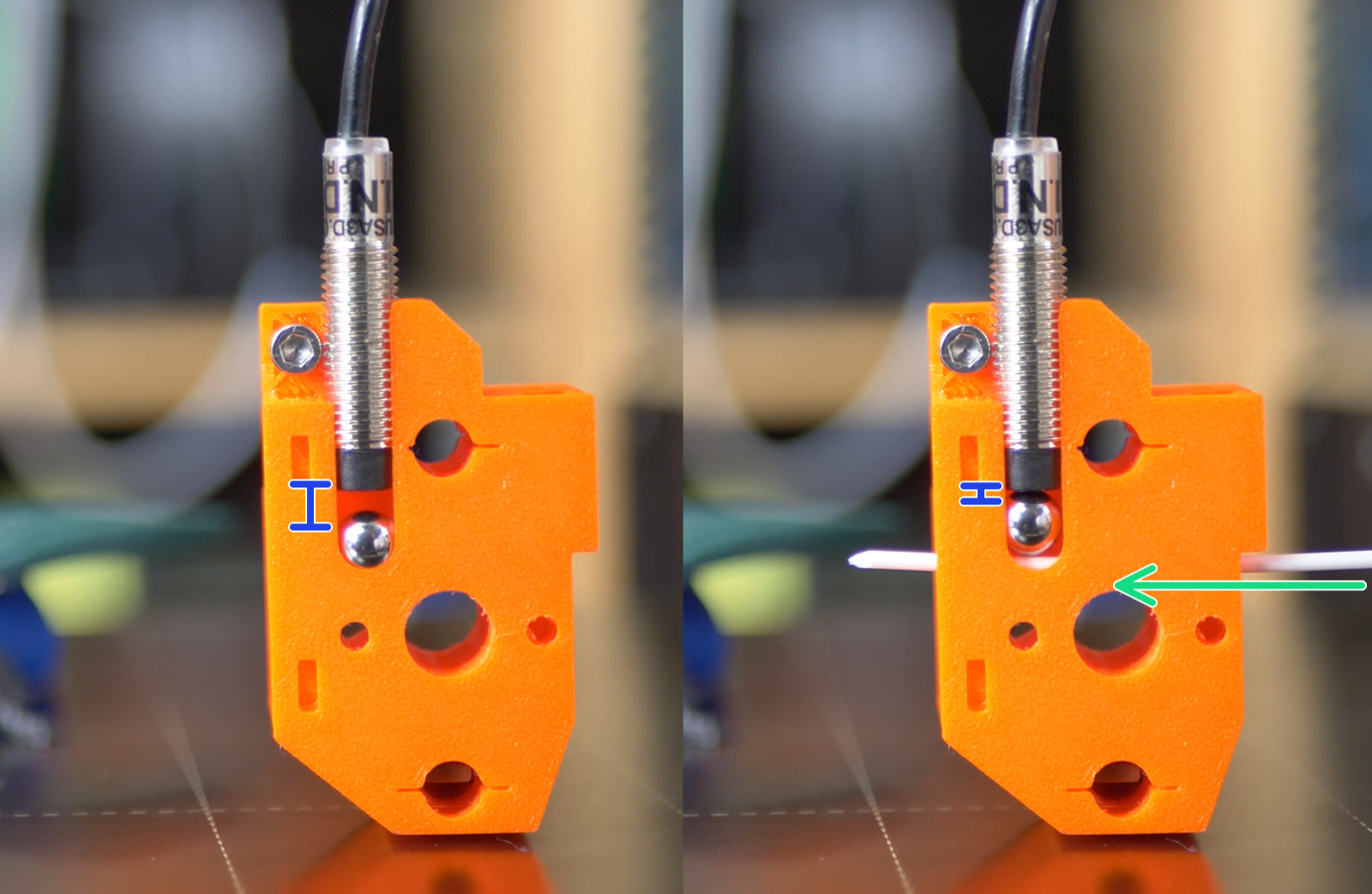
                  The FINDA sensor must be distanced correctly from the steel ball (blue ruler - left picture) so it is triggered only when filament is present (green arrow - right picture), pushing the steel ball higher.

                  FINDA height setup

                  The FINDA sensor has to be properly inserted into its socket: not too low, not too high. Check out our assembly manual, specifically this step, to see how the FINDA fits in.

                  1. Supposing the steel ball and the FINDA are still in the selector, loosen the M3x10 screw holding the FINDA in place. Do not remove the screw, you just need to be able to move the FINDA up and down.
                  2. Open the LCD menu -> Support -> Sensor info and focus on the FINDA value.
                  3. Insert any 1.75 mm filament into the selector. The FINDA value should turn from 0 to 1.
                    • If it does not change from 0 to 1, push the FINDA down a little bit. Keep in mind you must be able to move with the filament freely!
                    • If it does change reliably from 0 to 1 as long as the filament is inserted, the calibration is done.
                  The tip of the sensor does not need to press directly on the steel ball in order to detect it, it is triggered by the magnetic field. Thus, do not press the FINDA down during step 3.

                  Finally, tighten the M3x10 screw to prevent the FINDA from moving. The steel ball, however, has to move freely!

                  FINDA troubleshooting

                  Debris in the selector

                  As explained in the first paragraph, the steel ball has to move freely. Sometimes, however, filament debris, dust, or strings may amass in the hole or even in the FINDA/ball socket. Use compressed air to clean it.

                  You can also use an interdental brush to clean debris. The diameter should be around 1.5 mm (0.06”) and the length should be 10-15 mm (0.4-0.6”)

                  Faulty sensor

                  You can always check the proper functioning of the sensor by inserting a piece of filament and observing the red light on top of the sensor. You can also go to the LCD Menu -> Support -> Sensor info to see the FINDA status. It should be 0 when the filament is out (red LED on) and 1 when the filament is inserted into the selector (red LED off).

                  In some situations, the FINDA itself may be working but its cable might be damaged and fail to transfer the information to the logic board. In most cases, it can be damaged during the assembly while doing cable management. It can be also damaged by opening the Idler body all the way and having it hang on the cables.

                  The best way to check the cable is to insert a piece of filament into the selector and go to the Sensor info menu. The FINDA value should be 1. Then wiggle with the cable and see if the value flickers and changes to 0 at any point.

                  Wiring

                  In case the FINDA value in the Sensor info menu is N/A during manual testing, check the cable connection to the MMU logic board and the MMU cable connection into the RAMBo board (MK3S / MK2.5S). Pay attention to the order of the colors of the individual wires. However, during load and unload, the FINDA value in the Sensor info menu will be N/A.

                  Was this article helpful?
                  This action is available only to registered users. Please log-in.

                  6 comments

                  Log in  to post a comment
                  sjhjr
                  •
                  LCD menu -> Support -> Sensor info and focus on the FINDA value is for the MMU2. It doesn’t exist for the MMU3. For that just see if red light on top turns on and off with filament
                  Reply
                  IG
                  •
                  For what it's worth, new MMU3 (2024) on MK4, no FINDA in sensor list. - prior to first print Red light test works fine. Turned out to be the connection from the PD-board to the MK4 buddy board is not super secure. I was able to get it to remain functional after some fiddling, and I am hoping that printing will not cause enough shaking to lose the connection.
                  Reply
                  Erzak
                  •
                  I'm assembling my MMU3 on MK4S and got to the filament sensor calibration. I don't see FINDA listed in the sensor list, you're saying this is normal?
                  Reply
                  fhartmann
                  •
                  Does somebody knows why State of FINDA is not shown during Load and Unload but instead N/V ? Is there a Firmware reason? At least on straith forward state Indication it doen`t make sense. 
                  Reply
                  David
                  •

                  Hi Francis! You can sort of observe the state of the FINDA probe when looking at the top of the probe. There is a small red LED light inside which lights up when there is no filament detected.

                  Reply
                  alvismalphie
                  •
                  I cannot find the red FINDA light on my MMU2S. I can see from the "support|sensor" page on the LCD that the FINDA is switching states - but I can't find a red LED on the FINDA itself. Could you add a picture or an arrow or something showing where the light is?
                  Reply
                  David
                  •

                  Hi! Have a look from above, at where the cable enters the FINDA. The light of the LED isn´t too strong to be honest but you should be able to see it from around the cable :)

                  Reply
                  EJTH
                  •
                  Here is my quick guide to FINDA calibration:                                                1. put filament inside Selector                                                                         2. Loosen pinda.                                                                                               3. Raise the pinda till it is LED on                                                                 4. lower it just enough so it is constant LED off even if you wiggle around the filament.                                                                                          5. Tighten                                                                                                                                                              Now here is a very important step:                                                                                                                                                  Follow this guide and reset your MMU2s firmware, or else you will have your printer constantly asking you to change filament randomly mid print, even though everything is fine.I mportant. follow "Factory resetting the MMU2S firmware", not the soft reset!   https://help.prusa3d.com/en/article/factory-reset-mmu2s_1920/                                                                                                                                                                                                                                                         (Sorry if this post has a wierd layout, editor wont let me make line breaks. I tried to pad out the text so it is easy to read on desktop).                                                                                                                                                                                                                                                            Doing this made my MMU2s much more reliable. If you have problems with the MMU2s giving you errors when everything is fine (nothing is stuck etc), try this!
                  Reply
                  William H. - Official Prusa
                  •
                  Thank you for your feedback:) This may not be needed for everyone, but a factory reset is generally a good thing to do in combination with flashing the firmware if you are seeing firmware-related behavior. We will be updating our MMU2S material.
                  Reply

                  Topics

                  • Troubleshooting
                    • Printer troubleshooting
                      • Factory reset (MMU2S pre firmware 1.0.6)
                      • MMU2S idler unable to move freely
                      • MMU2S Selector not moving
                      • MMU2S LEDs meaning
                      • Firmware updating issues (MK2.5S/MK3S+/MMU2S/MMU3)
                      • IR filament sensor calibration (MMU3, MMU2S)
                      • FINDA setup and troubleshooting
                      • Filament jam (MMU2S)
                      • Logging data over serial line (MMU2S)
                      • FINDA: Filament Stuck #04102 (MMU)
                      • Tangled filament
                      • Status LED explained (MMU3)
                      • Factory Reset (MMU)
                      • TMC driver shorted #04304 (MMU)
                      • TMC driver shorted #04314 (MMU)
                      • TMC driver shorted #04324 (MMU)
                      • Service menu - Factory Reset
                      • Service menu - Individual Filament Calibration
                      • SD cards and USB drives
                    • Diagnostics
                    • Print Quality Troubleshooting
                    • QR Error codes
                    • Print Error Messages