Prusa
  • SHOP
    • Latest products
    BY CATEGORY
    • 3D printersnew
    • 3D printer upgradesnew
    • Materials
    • Accessories
    • Spare parts
    • Courses
    • Merch
    • Get a price quote
    QUICK LINKS
    • Shipping & delivery
    • Returns & refunds
    • Payment & financing
    • Warranty
    • VAT & Customs fees
    • FAQ

    0 item in your cartitems in your cart

    Your cart is empty

    Go to cartShop 3D printers

    My profile

    Log in to see orders, saved items

    My profile

    Signed in as

    • Orders
    • Logout
  • 3D PRINTING
    • Explore 3D printing
    FOR BEGINNERS
    • 3D printing 101
    • How FDM printing works
    • Buying your first printer
    • 3D model catalog
    BY APPLICATION
    • Rapid prototyping
    • Manufacturing
    • Engineering
    • Research
    • Arts & design
    GO DEEPER
    • Materials guide
    • Courses
    • Webinars
    • Case studies
    • Custom 3D printing
  • 3D PRINTERS
    • All 3D printers
    FOR
    • Home or garageHobbyists, tinkerers and home printing
    • BusinessIn-house production for small teams
    • EnterpriseFleets, security and scale
    • Which Prusa is right for me
    SHOP & BROWSE
    • CORE One+new
    • CORE One+ INDXnew
    • CORE One L+new
    • CORE One L+ INDXnew
    • XL+new
    • MK4S
    • Prusa Pro HT90
    • Prusa Pro AFS
    • Prusa Pro SLX
    MORE FROM PRINTERS
    • Parts & upgradesnew
    • Critical infrastructure
    • Case studies
    • Signature Oak
    • Kits
  • MATERIALS
    • All materials
    BY USE
    • Every-day & design
    • Functional engineering
    • Composites
    • Pro speciality
    • SLA resins
    PRUSAMENT
    • PLA
    • PETG
    • ASA
    • PC
    • PA11
    • Flex
    • TPU
    MORE FROM MATERIALS
    • Materials guide
    • We make material in house
    • Sustainability
    • Order on the store
  • SOFTWARE
    • All software
    PREPARE THE PRINT
    • PrusaSlicer 3.0New
    PRINT & MONITOR
    • Prusa Connect
    • EasyPrint
    • iOS & Android app
    • Prusa Farm
    GET STARTED
    • Download & install
    • Knowledge base
    MORE FROM SOFTWARE
    • 3D model catalog
  • SUPPORT
    • Explore support
    FIND ANSWERS
    • Knowledge base
    • Troubleshooting
    • Courses
    • Webinars
    GET HELP
    • Contact us
    • Livechat
    • Shipping & delivery
    • Warranty
    • Returns & refunds
    • Service & spare parts
    • Service & Repair
    COMMUNITY
    • Forum
    • Reddit
    • Printables
  • TRUST CENTER
    • Trust Center overview
    BY TOPIC
    • GDPR
    • Certificates
    • Security
    • Compliance
    COMMITMENTS
    • Sustainability report
    TALK TO US
    • Contact the security team
  • COMPANY
    • About Prusa
    GET TO KNOW US
    • Our story
    • How we make printers
    • Open source
    • Brand & media kit
    NEWS
    • Blog
    • Newsroom
    • Events
    TRUST & PARTNERS
    • Sustainability
    • Resellers & distributors
    • Affiliate program
    • Contact
    • English
    • Čeština
    • Deutsch
    • Español
    • Français
    • Italiano
    • Polski
    • 日本語
  • Signed in as

    • Orders
    • Address
    • In-stock Alerts
    • My Courses
    • Subscription
    • Edit Account
    • Logout

Log in to see orders, saved items

Signed in as
  • Orders
  • Address
  • In-stock Alerts
  • My Courses
  • Subscription
  • Edit Account
  • English
  • Čeština
  • Deutsch
  • Español
  • Français
  • Italiano
  • Polski
  • 日本語
Shop

0 item in your cartitems in your cart

Your cart is empty

Go to cartShop 3D printers

My profile

Log in to see orders, saved items

My profile

Signed in as

  • Orders
  • Logout
SHOP
  • Latest products
BY CATEGORY
  • 3D printersnew
  • 3D printer upgradesnew
  • Materials
  • Accessories
  • Spare parts
  • Courses
  • Merch
  • Get a price quote
QUICK LINKS
  • Shipping & delivery
  • Returns & refunds
  • Payment & financing
  • Warranty
  • VAT & Customs fees
  • FAQ

Featured products

    Popular categories

      Trending searches

        Articles

          Blog

            Products

              Categories

                Suggested searches

                  Searching…
                  No results
                  Something went wrong.
                  ↑↓ Select↵ OpenEsc Close search
                  1. Support
                  2. Print Quality Troubleshooting
                  3. Under-extrusion
                   

                  Contents

                  • First layer calibration too close
                  • Slicer settings
                  • Nozzle
                  • Extruder gears
                  • Insufficient hotend cooling
                  • Filament

                  Blog

                  • Print colorful and glowing Halloween decorations with our spooky offer
                  • Factorio Has Arrived on Printables
                  • Prusament PLA Lightweight: 65% lighter than regular PLA. Perfect choice for aircraft, cosplay, and more.

                  Newsletter

                  Signup and get our monthly squeeze on updates, blog, printables and much more.

                  By clicking, you agree to receive our newsletter.

                  This site is protected by reCAPTCHA Enterprise and the Google Privacy Policy and Terms of Service apply.

                  Factorio Transport Belts
                  E-shop
                  • 3D Printers
                  • Printer Upgrades
                  • Filaments
                  • Accessories
                  • Prusa Merchandise

                  © Prusa Research a.s.

                  Printables
                  • 3D Models
                  • Store
                  • Clubs
                  • 3D Design Contests
                  • Brands
                  Community
                  • World Map
                  • Forum
                  • User Groups
                  • Events
                  Help
                  • Prusa Help
                  • Prusa Academy
                  • 3D Printing Calculators
                  Software
                  • PrusaSlicer
                  • Prusa.app
                  • Prusa Connect
                  • Drivers and Software
                  Company
                  • About Us
                  • Blog
                  • Official Prusa Resellers
                  • Contact Us
                  • Certified for ISO 9001, ISO 14001, ISO 45001
                  • General Terms and Conditions
                  • General Terms and Conditions of Use of the PRUSA Websites
                  • Privacy Policy
                  • Information about cookies
                  • Customer Complaints Policy
                  • Status Page
                  • Do Not Sell or Share My Personal Information
                  • Supplemental Statements
                  • General Terms and Conditions
                  • General Terms and Conditions of Use of the PRUSA Websites
                  • Privacy Policy
                  • Information about cookies
                  • Customer Complaints Policy
                  • Status Page
                  • Do Not Sell or Share My Personal Information
                  • Supplemental Statements

                  © Prusa Research a.s.

                  JOSEF PRUSA®, PRUSA RESEARCH®, PRUSA POLYMERS®, PRUSA ORANGE®, PRUSA 3D ® AND PRUSAMENT® are registered trademarks of Prusa Development a.s. used by Prusa Research a.s. under licence from Prusa Development a.s.

                  Under-extrusion

                  Relevant for

                  MK2.5
                  MK2.5S
                  MK3
                  MK3S
                  MK3.5
                  +
                  21 comments
                  Article is also available in following languages
                  English
                  Čeština
                  Polski
                  Deutsch
                  Français
                  Español
                  Italiano
                  日本語

                  You can recognize under extrusion when there is material missing in your print’s layers. Printed objects with under extruded layers can be fragile and tend to break apart. There could be several causes to under-extrusion and you should also think if you recently did any changes to your printer (or perhaps no maintenance for a long period), as you might find the culprit there.
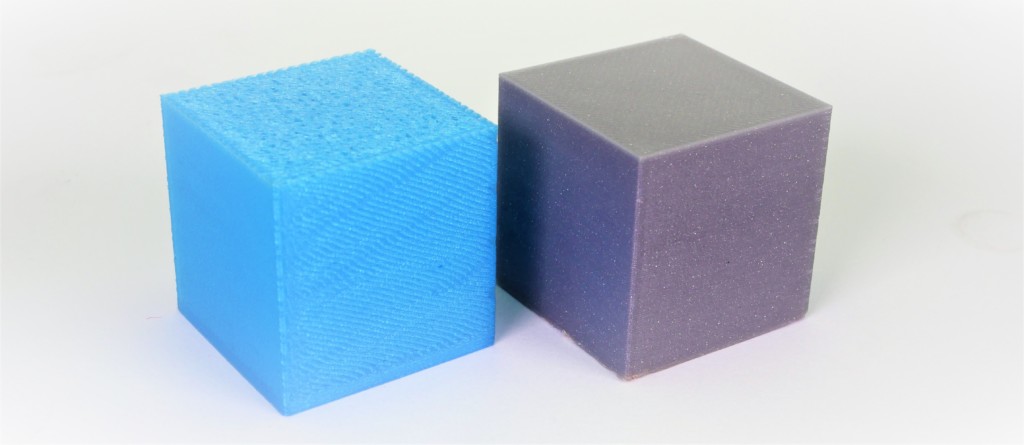
                  Example of severe under extrusion (left cube) and a normal print (right cube).

                  Common factors in under extrusions are:

                  • First layer calibration too close
                  • Slicer settings
                  • Nozzle
                  • Extruder gears
                  • Insufficient hotend cooling
                  • Filament

                  First layer calibration too close

                  Make sure you have performed the First Layer Calibration correctly. Avoid compensating for a lack of adhesion by squishing the first layer too much. If the nozzle is too close to the build plate, the filament can be obstructed from pushing through. We recommend running the first layer calibration every time you move the printer to a different location or do maintenance on the hotend, like changing the nozzle. Moreover, when you swap the steel sheet from the textured one to the smooth one you must recalibrate due to the sheet's different thickness. That is why we introduced the Steel sheet profiles.

                  Slicer settings

                  Each profile in the PrusaSlicer contains settings that determine temperature, speeds, and how much filament the 3D printer should extrude. The printer does not provide any feedback on how much filament actually leaves the nozzle. It can be that less filament is extruded than the firmware expects. If that happens, you may notice gaps in and/or in between printed layers.

                  Make sure you have set up your printer in PrusaSlicer by running the Configuration Wizard and as a starting point you should use the stock filament profiles which are tailored for your machine, filament type, and nozzle size.

                  Nozzle

                  If you had the nozzle removed from the hotend at some point, make sure it has been correctly reinstalled. Please see the dedicated guide for your hotend:

                  • Changing or replacing the nozzle (MK2.5/S, MK3/S/+, MK3.5/S)
                  • Changing/replacing the nozzle (MINI)

                  Incorrect installation can cause both clogging and leaks. The nozzle must be tightened when heated and there must be a gap between the nozzle and the heater block. Also, inspect the extruder and hotend for any damage, like the heater element or thermistor's wires or a bent heatbreak (only on V6 hotend).
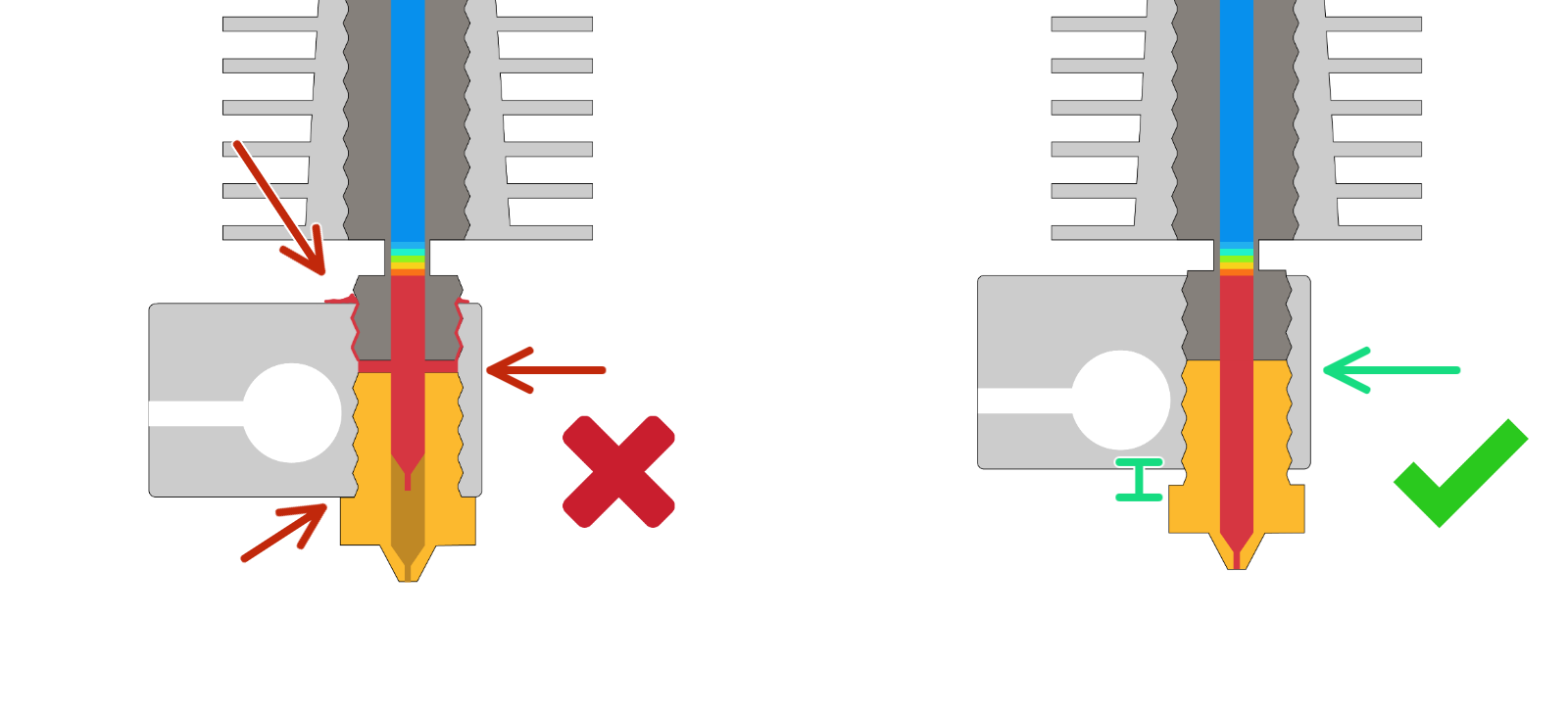
                  If the installation of the nozzle is correct, then performing a Cold pull will often resolve a clog.

                  Using specialty nozzles

                  If you are using specialty nozzles like hardened steel or stainless steel, etc., you may have to increase the nozzle temperature when printing, usually within a range of 5-10 °C. Steel has different thermal properties compared to a brass nozzle, which can affect print results, mainly the inter-layer adhesion. But remember that higher temperatures can also lead to increased stringing. If the issue persists, try replacing the nozzle with the original 0.4mm brass nozzle and see if it makes a difference.

                  Furthermore, not all nozzle sizes will be suitable for all filaments. Filament that contains particles of wood or metal will most often be unsuitable for nozzles with a diameter below 0.4, and some will require an even larger nozzle, like 0.6 mm or 0.8 mm. For more information, please see Different nozzle types.

                  A 0.1 mm nozzle can be considered experimental; Its small diameter will not work with all filaments, the tolerances required in its manufacturing are hard to guarantee and the excessive printing time it requires can be beyond reasonable. For these fine resolutions, you may want to consider SLA printing.

                  Extruder gears

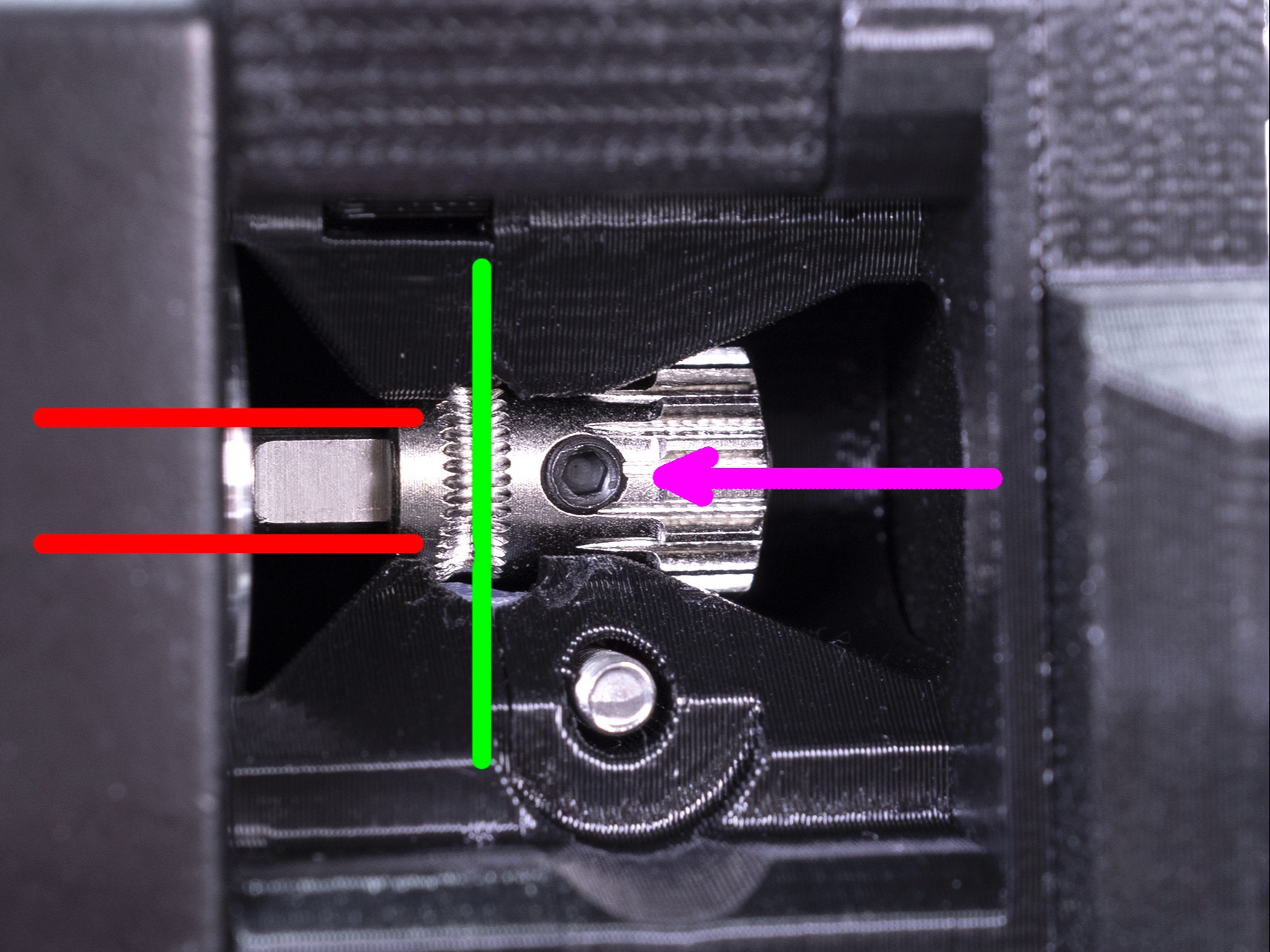
                  Check both Bondtech gears for any dirt or misalignment so they are able to push filament through. Please see Checking/re-aligning the Bondtech gear (MK3S/MK2.5S) for details.

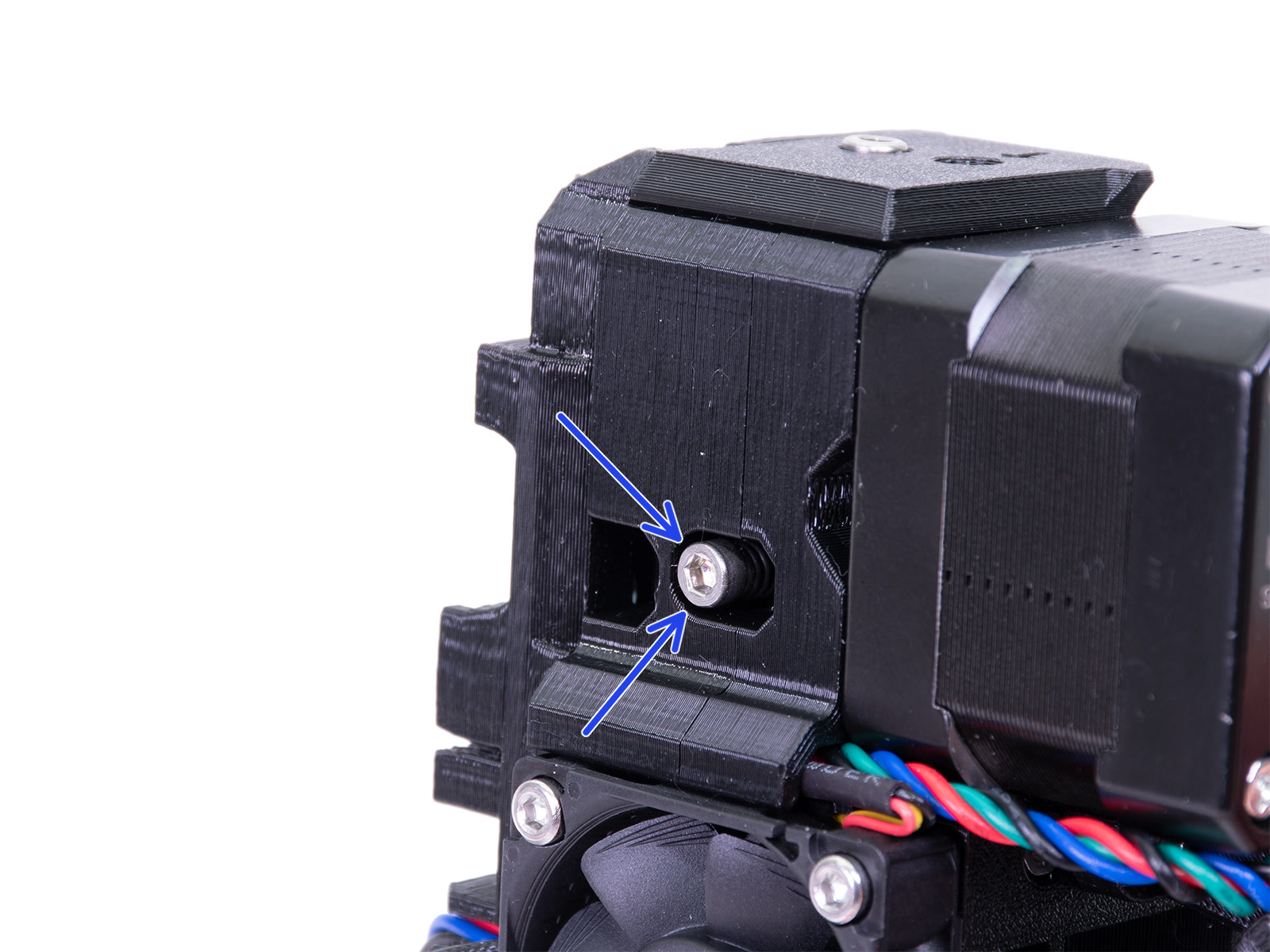
                  Additionally, make sure that your printer’s extruder idler is at the correct tension. Having the idler screw too loose or too tight can cause under extrusion.
                  Insufficient hotend cooling

                  Controlling the "melt-zone" of the filament is very important. With insufficient cooling, the filament can start melting too far away from the nozzle. Check that your extruder fan is installed in the correct orientation and whether the fan is blocked by a piece of filament or some other debris.

                  Unless you have turned off "Fan check", the printer will give an error if it detects if either fan is not spinning when it should (hotend fan or print fan).

                  If you are using your printer in an enclosure, make sure the temperature inside is not too hot, as overheating can result in Heat creep, where the filament will start melting before it reaches the nozzle
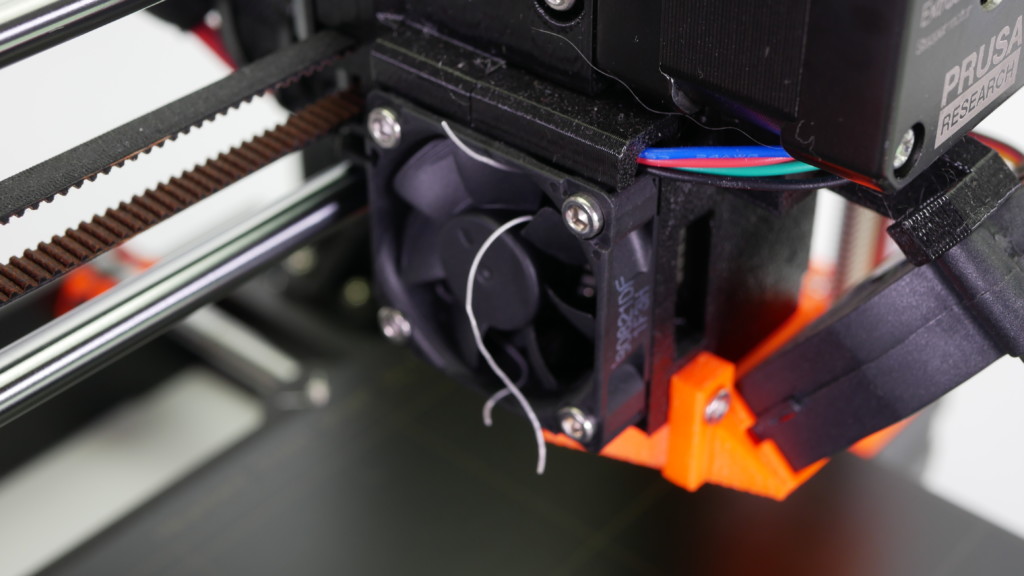
                  Example of a blocked fan by a strand of filament.

                  The hotend fan will always spin if the nozzle is heated above 50 °C.

                  Filament

                  Too low or too high printing temperature can cause print issues as well. If your filament brand and type is not listed in PrusaSlicer, you can try to adjust the print temperature by +/- 5-15°C to see if this resolves the issue.

                  Some specialty materials, like Flexible materials, may require many adjustments and tweaks to print them successfully. Composite materials, like Woodfill filament, may require at minimum a 0.6 mm nozzle, and 0.2 mm layer height to prevent clogging. If there are composite materials like kevlar or carbon fiber, a hardened nozzle is required.

                  Be sure to see our extensive material table, where most types of filament and their considerations are covered.

                  Some filaments can also have a varying thickness, due to quality or infused materials like wood, which will cause unexpected changes in the volume of extruded filament. The industry standard of variations in diameter is +/- 0.05 mm.

                  Keep your filament dry, free of moisture because damp filaments have a negative impact on printing, especially soluble filament, PETG, and ABS. We highly recommend putting spools back inside their original bag when it’s not in use, along with a silica gel. We recommend storing your filaments in a dry area or ideally in a “dry box”.

                  Incorrect loading/unloading

                  When loading a new filament with a lower specified temperature, preheat the nozzle to the temperature required by the previous filament type you have used. In other words, always the highest temperature filament, as its remnants are most likely still in the hotend. For example, if you have printed with ABS or PETG and want to print with PLA now, load the PLA filament at the ABS or PETG temperature. This way, the newly introduced filament can push the old one out.

                  Was this article helpful?
                  This action is available only to registered users. Please log-in.

                  9 comments

                  Log in  to post a comment
                  memberwhen
                  •
                  Hi,
                  I am using a MK4. I am now experiencing under extrusion when printing, it happens with every model. I have tried using exactly the same settings (0.2mm SPEED preset in PrusaSlicer) as previous successful prints, but it is under extruding. I have tried all the suggestions above, but still not working. Using different PLAs, also trying different temperatures, it keeps under extruding. Any suggestions?
                  Reply
                  Virtualluke
                  •
                  I've noticed severe under extrusion in my infill since updating to the latest firmware. It's happening with almost every speed/quality setting, and on all of my filament types. Have you recently updated your firmware?
                  Reply
                  jo
                  •
                  Also on my printer! Prints on my Mini+ have been going well, until I updated to 6.2.2+8853. Since then, almost every print has been a failure!
                  Reply
                  TavrosLab
                  •
                  Do you have the same problem with 6.2.4+8909?
                  Reply
                  janicek.trnecka
                  •
                  This seems to be recurring issue, I recently updated and bam ..all perfect prints are crappy...will try take some steps back...
                  Reply
                  Rhett’s Frets LLC
                  •
                  What to do if the gap between the hot end and the nozzle are not present and filament is oozing from the top of the hotend?
                  Reply
                  David B.
                  •

                  Hi. Assume, were talking about the V6 hotend. 
                  If there is a gap between the heatbreak and the nozzle (the nozzle isnt tightened up against the heatbreak properly) resulting in molten plastic oozing on top of the heaterblock, you might need to:
                  - loosen the nozzle slightly,
                  - partly dismantle the extruder to gain better access to the hotend,
                  - tighten the heatbreak into the heaterblock some more,
                  - heat up the hotend and then tighten the nozzle so that it seals against the heatbreak.

                  Reply
                  jeloneal
                  •
                  Maybe it is worth adding a part on how to calibrate your e-steps. my Mini+ and those of other users are underextruding with the stock 325 steps. Changing the value in the menu fixed the problem for good.See also here: Prusa Mini Extrusion E Steps Calibration Under Extrusion – Hardware, firmware and software help – Prusa3D Forum
                  Reply
                  Alessandro Pantaleo
                  •

                  Hello, thank you for your comment. It's a fair point, though in the cases where an under-extrusion wasn't related to aspects of the printer hardware or filament, we generally suggest, instead of modifying the e-steps, going for the Extrusion Multiplier Calibration which has the same effect. 

                  Reply
                  MaxDad
                  •
                  It would be good to update the hotend section to include the Revo nozzles, maybe the forthcoming ObXidian nozzles, too.
                  Once again, thanks!
                  Reply
                  fbrandeber
                  •
                  MK3S,one year old.Slight indications of under extrusion, been awhile, so I thought I would do a cold pull. Done it before, not expecting any problem. Following the instructions above, The filament keeps breaking off, five times, with generic PLA. (Chinese, recommended 200-230C) . Suggestions?Got a little gob on 6th try. 1st layer calibration patch measures .20mm, lines are thinner, .14mm... seems thin for lines.?  Z equals -1.398
                  Reply
                  Giuliano - Official Prusa CS
                  •
                  Hello. Underextrusion could depend on several factors: extruder assembly, clog in the hotend, thermal paste to be replaced in the heatbreak, etc. For a proper troubleshooting, please contact the tech support via email or live chat.
                  Reply

                  Topics

                  • Troubleshooting
                    • Print Quality Troubleshooting
                      • Ghosting
                      • Poor bridging
                      • Bad looking surface above supports
                      • Stringing and oozing
                      • Layer separation and splitting FDM
                      • Failing supports
                      • Problems with infill
                      • Under-extrusion
                      • Warping
                      • Layer shifting
                      • Watertight prints
                      • The Benchy hull line
                    • Diagnostics
                    • QR Error codes
                    • Printer troubleshooting
                    • Print Error Messages