Prusa
  • SHOP
    • Latest products
    BY CATEGORY
    • 3D printersnew
    • 3D printer upgradesnew
    • Materials
    • Accessories
    • Spare parts
    • Courses
    • Merch
    • Get a price quote
    QUICK LINKS
    • Shipping & delivery
    • Returns & refunds
    • Payment & financing
    • Warranty
    • VAT & Customs fees
    • FAQ

    0 item in your cartitems in your cart

    Your cart is empty

    Go to cartShop 3D printers

    My profile

    Log in to see orders, saved items

    My profile

    Signed in as

    • Orders
    • Logout
  • 3D PRINTING
    • Explore 3D printing
    FOR BEGINNERS
    • 3D printing 101
    • How FDM printing works
    • Buying your first printer
    • 3D model catalog
    BY APPLICATION
    • Rapid prototyping
    • Manufacturing
    • Engineering
    • Research
    • Arts & design
    GO DEEPER
    • Materials guide
    • Courses
    • Webinars
    • Case studies
    • Custom 3D printing
  • 3D PRINTERS
    • All 3D printers
    FOR
    • Home or garageHobbyists, tinkerers and home printing
    • BusinessIn-house production for small teams
    • EnterpriseFleets, security and scale
    • Which Prusa is right for me
    SHOP & BROWSE
    • CORE One+new
    • CORE One+ INDXnew
    • CORE One L+new
    • CORE One L+ INDXnew
    • XL+new
    • MK4S
    • Prusa Pro HT90
    • Prusa Pro AFS
    • Prusa Pro SLX
    MORE FROM PRINTERS
    • Parts & upgradesnew
    • Critical infrastructure
    • Case studies
    • Signature Oak
    • Kits
  • MATERIALS
    • All materials
    BY USE
    • Every-day & design
    • Functional engineering
    • Composites
    • Pro speciality
    • SLA resins
    PRUSAMENT
    • PLA
    • PETG
    • ASA
    • PC
    • PA11
    • Flex
    • TPU
    MORE FROM MATERIALS
    • Materials guide
    • We make material in house
    • Sustainability
    • Order on the store
  • SOFTWARE
    • All software
    PREPARE THE PRINT
    • PrusaSlicer 3.0New
    PRINT & MONITOR
    • Prusa Connect
    • EasyPrint
    • iOS & Android app
    • Prusa Farm
    GET STARTED
    • Download & install
    • Knowledge base
    MORE FROM SOFTWARE
    • 3D model catalog
  • SUPPORT
    • Explore support
    FIND ANSWERS
    • Knowledge base
    • Troubleshooting
    • Courses
    • Webinars
    GET HELP
    • Contact us
    • Livechat
    • Shipping & delivery
    • Warranty
    • Returns & refunds
    • Service & spare parts
    • Service & Repair
    COMMUNITY
    • Forum
    • Reddit
    • Printables
  • TRUST CENTER
    • Trust Center overview
    BY TOPIC
    • GDPR
    • Certificates
    • Security
    • Compliance
    COMMITMENTS
    • Sustainability report
    TALK TO US
    • Contact the security team
  • COMPANY
    • About Prusa
    GET TO KNOW US
    • Our story
    • How we make printers
    • Open source
    • Brand & media kit
    NEWS
    • Blog
    • Newsroom
    • Events
    TRUST & PARTNERS
    • Sustainability
    • Resellers & distributors
    • Affiliate program
    • Contact
    • English
    • Čeština
    • Deutsch
    • Español
    • Français
    • Italiano
    • Polski
    • 日本語
  • Signed in as

    • Orders
    • Address
    • In-stock Alerts
    • My Courses
    • Subscription
    • Edit Account
    • Logout

Log in to see orders, saved items

Signed in as
  • Orders
  • Address
  • In-stock Alerts
  • My Courses
  • Subscription
  • Edit Account
  • English
  • Čeština
  • Deutsch
  • Español
  • Français
  • Italiano
  • Polski
  • 日本語
Shop

0 item in your cartitems in your cart

Your cart is empty

Go to cartShop 3D printers

My profile

Log in to see orders, saved items

My profile

Signed in as

  • Orders
  • Logout
SHOP
  • Latest products
BY CATEGORY
  • 3D printersnew
  • 3D printer upgradesnew
  • Materials
  • Accessories
  • Spare parts
  • Courses
  • Merch
  • Get a price quote
QUICK LINKS
  • Shipping & delivery
  • Returns & refunds
  • Payment & financing
  • Warranty
  • VAT & Customs fees
  • FAQ

Featured products

    Popular categories

      Trending searches

        Articles

          Blog

            Products

              Categories

                Suggested searches

                  Searching…
                  No results
                  Something went wrong.
                  ↑↓ Select↵ OpenEsc Close search
                  1. Support
                  2. Basic calibration
                  3. Selftest failed (MK3/MK3S/MK3S+)
                   

                  Contents

                  • Selftest procedure checks
                  • Selftest error messages

                  Blog

                  • Print colorful and glowing Halloween decorations with our spooky offer
                  • Factorio Has Arrived on Printables
                  • Prusament PLA Lightweight: 65% lighter than regular PLA. Perfect choice for aircraft, cosplay, and more.

                  Newsletter

                  Signup and get our monthly squeeze on updates, blog, printables and much more.

                  By clicking, you agree to receive our newsletter.

                  This site is protected by reCAPTCHA Enterprise and the Google Privacy Policy and Terms of Service apply.

                  Factorio Transport Belts
                  E-shop
                  • 3D Printers
                  • Printer Upgrades
                  • Filaments
                  • Accessories
                  • Prusa Merchandise

                  © Prusa Research a.s.

                  Printables
                  • 3D Models
                  • Store
                  • Clubs
                  • 3D Design Contests
                  • Brands
                  Community
                  • World Map
                  • Forum
                  • User Groups
                  • Events
                  Help
                  • Prusa Help
                  • Prusa Academy
                  • 3D Printing Calculators
                  Software
                  • PrusaSlicer
                  • Prusa.app
                  • Prusa Connect
                  • Drivers and Software
                  Company
                  • About Us
                  • Blog
                  • Official Prusa Resellers
                  • Contact Us
                  • Certified for ISO 9001, ISO 14001, ISO 45001
                  • General Terms and Conditions
                  • General Terms and Conditions of Use of the PRUSA Websites
                  • Privacy Policy
                  • Information about cookies
                  • Customer Complaints Policy
                  • Status Page
                  • Do Not Sell or Share My Personal Information
                  • Supplemental Statements
                  • General Terms and Conditions
                  • General Terms and Conditions of Use of the PRUSA Websites
                  • Privacy Policy
                  • Information about cookies
                  • Customer Complaints Policy
                  • Status Page
                  • Do Not Sell or Share My Personal Information
                  • Supplemental Statements

                  © Prusa Research a.s.

                  JOSEF PRUSA®, PRUSA RESEARCH®, PRUSA POLYMERS®, PRUSA ORANGE®, PRUSA 3D ® AND PRUSAMENT® are registered trademarks of Prusa Development a.s. used by Prusa Research a.s. under licence from Prusa Development a.s.

                  Selftest failed

                  (MK3/MK3S/MK3S+)

                  Relevant for

                  MK3
                  MK3S
                  MK3S+
                  20 comments
                  Article is also available in following languages
                  English
                  Čeština
                  Polski
                  Deutsch
                  Français
                  Español
                  Italiano
                  日本語

                  The Selftest checks for issues in the assembly of the printer, its wiring and the electronic components. It is the first part of the Calibration Wizard, which is prompted automatically when you turn on the printer for the first time or after a Factory reset (MK2S/MK2.5S/MK3S). After the initial calibration, the Selftest can be found at LCD Menu -> Calibration -> Selftest.

                  Selftest procedure checks

                  1. Extruder and print fan functionality
                  2. Heatbed and hotend wiring
                  3. XYZ motors wiring and functionality
                  4. XY axis length
                  5. XY belts tension
                  6. Loose belt pulley 
                  7. Filament sensor / IR sensor

                  Progress and results of each step are displayed on the LCD screen. In case the process runs into an issue, the LCD screen will display an error message. All errors are described below.

                  Selftest error messages

                  Extruder & Print fan test

                  Front print fan/Left hotend fan - Not spinning:

                  The MK3 Selftest procedure is capable of telling you which of the fans doesn't work. Simply check the one that is diagnosed as not OK.

                  1. Make sure that both of your fans are connected according to the Einsy RAMBo electronics wiring (MK3/MK3S/MK3S+).
                  2. Check for any blockage that could prevent either of the fans from spinning. 
                  3. Go over the wiring and make sure that none of the zip-ties is overtightened, which prevents the fans from spinning.
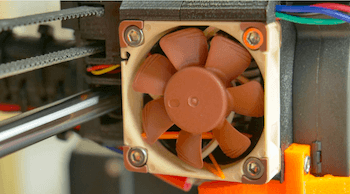
                  Your fan may be black

                  Heatbed & Hotend test

                  Please check/ Not connected - Heater/ Thermistor:
                  Bed/ Heater - Wiring error:

                  1. Make sure that both thermistors and heater are connected properly according to the Einsy RAMBo electronics wiring (MK3/MK3S/MK3S+).
                  2. Check your heated bed cables and confirm they are not damaged by an overtightened zip-tie. 
                  3. Make sure that your heated bed thermistor is firmly attached underneath the Golden Kapton tape.
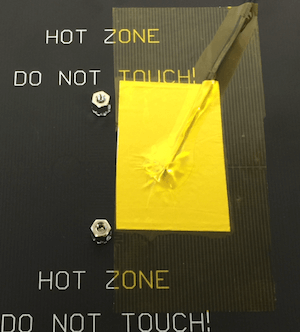
                   

                  You can also see our guide Heatbed not heating up properly.

                  XY axis length test

                  Please check: Axis length - Axis {XYZ}: 

                  1. Start the Selftest routine again in LCD Menu - Calibration - Selftest. Carefully observe, whether no obstacles are blocking the path on any of the axis.
                  2. Pay attention to extruder cable management and the assembly of the printer's axes. The most common cause of an improper X-axis movement is the cable harness hitting the EINSY/Mini RAMBo cover.
                  3. Check that you can move the axis by hand, smoothly, in both directions. If movement is not smooth, try to lubricate the rods as shown in Maintenance tips.
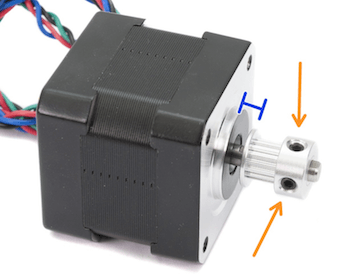
                  Find more information on this error in Check Axis Length X/Y/Z (MK3S)

                  Loose belt pulley test

                  Loose pulley - {XY}:

                  1. Make sure that both pulleys are properly tightened, on the flat side of the motor-rod. Give the pulley a light tug. If any of them are loose, then the motor's shaft won't be able to move the axis.
                  2. Make sure that the belts aren't extremely loose, as they might be going around the pulleys without actually moving either of the axes.
                  3. Check that you can move the axis by hand, smoothly, in both directions. If movement is not smooth, try to lubricate the rods as shown in Maintenance tips.


                  Filament sensor test

                  Filament sensor wiring error

                  Make sure the Filament sensor functioning and is connected, according to our illustrated article.

                  Was this article helpful?
                  This action is available only to registered users. Please log-in.

                  Topics

                  • Calibration
                    • Basic calibration
                      • Selftest failed (MK3/MK3S/MK3S+)
                      • XYZ Calibration details
                      • Mesh bed leveling
                      • XYZ Calibration (MK3/MK3S/MK3S+)
                      • Full system refresh Original Prusa i3
                      • Temperature Calibration
                      • Failing Z calibration (MK3S/MK2.5S)
                      • Idler screw tension
                      • First Layer Calibration (i3)
                    • Advanced calibration
                    • Calibration Error Messages

                  11 comments

                  Log in  to post a comment
                  Cowwolfe
                  •
                  My X axis test failed, I believe it was due to the fact that I added a cover to the cooling fan.  This restricted the X axis range as the cover was hitting the end stop.  Normally the fan itself hits the end stop.  Probably not a good method for homing in my robotics experience.Solution: remove the fan cover, run the self test, but the cover back on again.
                  Reply
                  Cowwolfe
                  •
                  My X axis test failed, I believe it was due to the fact that I added a cover to the cooling fan.  This restricted the X axis range as the cover was hitting the end stop.  Normally the fan itself hits the end stop.  Probably not a good method for homing in my robotics experience.Solution: remove the fan cover, run the self test, but the cover back on again.
                  Reply
                  Cowwolfe
                  •
                  My X axis test failed, I believe it was due to the fact that I added a cover to the cooling fan.  This restricted the X axis range as the cover was hitting the end stop.  Normally the fan itself hits the end stop.  Probably not a good method for homing in my robotics experience.Solution: remove the fan cover, run the self test, but the cover back on again.
                  Reply
                  nmath
                  •
                  My Y axis error was caused by the bed hitting the ends of the cable ties. I rotated the end out of the way and the self test passed.
                  Reply
                  James Musser
                  •
                  Thank you! I spent 2 hours dis-assembling and re-assembling the Y-axis but no dice. Just had to rotate the cable tie ends to be facing the outside of the printer at all 4 spots.I think I need to go lie down for awhile...
                  Reply
                  Ed
                  •
                  Hello,I am getting the y-axis error.  The issue seems to be with the motor(?).  When I move the bed towards the front. it move easily.  When I push it towards the back, there is a significant amount of resistance.  The gears and rails are clear of any debris.  Anyone run into this issue before?Thanks in advance,Ed
                  Reply
                  KazDaddy
                  •
                  I have exact same problem!
                  Did you manage to solve it?
                  Reply