Prusa
  • SHOP
    • Learn more
    • All deals
    3D printers
    • CORE One+ (Gen2)
    • CORE One L+
    • XL+
    • MK4S
    • Mini+
    • HT90
    Consumables and Merch
    • Prusament
    • Resin
    • Buddy filament
    • Merch
    • Accessories
  • ショップ
    • 最新製品
    カテゴリー別
    • 3Dプリンター
    • Upgrades
    • 材料
    • アクセサリー
    • スペアパーツ
    • コース
    • グッズ
    • Sales inquiry & Price quote
    クイックリンク
    • Shipping information
    • Refunds & returns
    • Payment options
    • 保証
    • VATと関税
    • よくある質問

    0 点の商品がカートに入っています点の商品がカートに入っています

    カートは空です

    カートを見る3Dプリンターを購入

    マイプロフィール

    ログイン すると注文や保存した商品を確認できます

    マイプロフィール

    ログイン中:

    • 注文
    • ログアウト
  • 3Dプリント
    • 3Dプリントを探る
    初心者向け
    • 3Dプリントの基礎
    • Types of printers (FDM/SLA)
    • How to choose a 3D Printer
    • Printables (3D models)
    用途別
    • ラピッドプロトタイピング
    • 製造
    • エンジニアリング
    • 研究
    • アートとデザイン
    さらに深く
    • 材料ガイド
    • コース
    • ウェビナー
    • 導入事例
    • カスタム3Dプリンティング
  • 3Dプリンター
    • すべての3Dプリンター
    用途
    • 自宅またはガレージ愛好家、改造愛好家、ホームプリンティング
    • Shop or studio小規模チーム向けの社内生産
    • エンタープライズフリート、セキュリティ、大規模生産
    • How to choose a 3D Printer
    ショップと閲覧
    • CORE One+
    • CORE One+ INDX
    • CORE One L+
    • CORE One L+ INDX
    • XL+
    • MK4S
    • Prusa Pro HT90
    • Prusa Pro AFS
    • Prusa Pro SLX
    プリンターからさらに
    • Upgrades
    • Spare parts
    • 重要インフラ
    • 導入事例
    • シグネチャーオーク
    • キット
  • 材料
    • すべての材料
    用途別
    • 日常とデザイン
    • 機能工学
    • 複合材料
    • プロフェッショナル向け特殊材料
    • SLAレジン
    Prusament
    • PLA
    • PETG
    • ASA
    • PC
    • PA11
    • Flex
    • TPU
    材料からさらに
    • 材料ガイド
    • 自社製材料
    • サステナビリティ
    • ストアで注文
  • ソフトウェア
    • すべてのソフトウェア
    印刷の準備
    • PrusaSlicer 3.0
    印刷と監視
    • Prusa Connect
    • EasyPrint
    • iOS & Androidアプリ
    • Prusaファーム
    始める
    • ダウンロードとインストール
    • ナレッジベース
    その他のソフトウェア
    • Printables (3D models)
  • サポート
    • サポートを探す
    回答を探す
    • ナレッジベース
    • トラブルシューティング
    • コース
    • ウェビナー
    ヘルプ
    • お問い合わせ
    • ライブチャット
    • Shipping information
    • 保証
    • Refunds & returns
    • Spare parts
    • Factory repair
    コミュニティ
    • フォーラム
    • Reddit
    • Printables
  • トラストセンター
    • トラストセンター概要
    トピック別
    • GDPR
    • 証明書
    • セキュリティ
    • コンプライアンス
    コミットメント
    • サステナビリティレポート
    お問い合わせ
    • セキュリティチームに連絡
  • 会社
    • Prusaについて
    私たちについて
    • 私たちのストーリー
    • プリンターの製造方法
    • オープンソース
    • ブランド&メディアキット
    ニュース
    • ブログ
    • ニュースルーム
    • イベント
    信頼とパートナー
    • サステナビリティ
    • 再販業者と販売代理店
    • アフィリエイトプログラム
    • お問い合わせ
    • English
    • Čeština
    • Deutsch
    • Español
    • Français
    • Italiano
    • Polski
    • 日本語
  • ログイン中:

    • 注文
    • 住所
    • 在庫アラート
    • マイコース
    • サブスクリプション
    • アカウントを編集
    • ログアウト

ログイン すると注文や保存した商品を確認できます

ログイン中:
  • 注文
  • 住所
  • 在庫アラート
  • マイコース
  • サブスクリプション
  • アカウントを編集
  • English
  • Čeština
  • Deutsch
  • Español
  • Français
  • Italiano
  • Polski
  • 日本語
ショップ

0 点の商品がカートに入っています点の商品がカートに入っています

カートは空です

カートを見る3Dプリンターを購入

マイプロフィール

ログイン すると注文や保存した商品を確認できます

マイプロフィール

ログイン中:

  • 注文
  • ログアウト
ショップ
  • 最新製品
カテゴリー別
  • 3Dプリンター
  • Upgrades
  • 材料
  • アクセサリー
  • スペアパーツ
  • コース
  • グッズ
  • Sales inquiry & Price quote
クイックリンク
  • Shipping information
  • Refunds & returns
  • Payment options
  • 保証
  • VATと関税
  • よくある質問

おすすめ製品

    人気のカテゴリー

      急上昇ワード

        記事

          ブログ

            製品

              カテゴリー

                検索候補

                  検索中…
                  結果がありません
                  エラーが発生しました。
                  ↑↓ 選択↵ 開くEsc 検索を閉じる
                  1. サポート
                  2. PrusaSlicer
                  3. Advanced options [進行中の翻訳]
                  4. Post-processing scripts
                   

                  内容

                  • Script setup
                  • Script execution
                  • Script Parameters
                  • Examples
                  • Historical changes and breaking backward compatibility

                  ブログ

                  • Prusament PLA ColorMix:わずか5巻のフィラメントで45色以上をプリント
                  • PrusaSlicer 3.0プレビュー版 — 3Dプリントの未来を見据えた仕様
                  • より高品質なプリントを、もっと簡単に:Prusa XL+、CORE One L+、CORE One+(Gen 2)― 大規模製品アップグレード

                  ニュースレター

                  ご登録いただくと、毎月 新しいファームウェア、PrusaSlicerの新バージョン、3Dプリントプロジェクトの一般的なヒントなど、役立つ情報をお届けします。

                  クリックして、ニュースレターを受け取る。

                  このサイトはreCAPTCHA Enterpriseによって保護されており、Googleのプライバシーポリシーと利用規約が適用されます。

                  Heavy Duty Keyboard Holder (No Supports)
                  E-shop
                  • 3Dプリンター
                  • プリンターのアップグレード
                  • フィラメント
                  • アクセサリー
                  • Prusa 商品
                  Prusa

                  © Prusa Research a.s.

                  Printables
                  • 3Dモデル
                  • Store
                  • Clubs
                  • 3Dデザインコンテスト
                  • Brands
                  コミュニティ
                  • ワールドマップ
                  • フォーラム
                  • ユーザーグループ
                  • イベント
                  ヘルプ
                  • Prusa ヘルプ
                  • Prusa アカデミー
                  • 3Dプリンティング計算機
                  ソフトウェア
                  • PrusaSlicer
                  • Prusa.app
                  • Prusa Connect
                  • ドライバーとソフトウェア
                  会社概要
                  • 私たちについて
                  • Blog
                  • プルサ正規販売代理店
                  • お問い合わせ
                  • ISO 9001・ISO 14001・ISO 45001 認証取得済み
                  • 一般利用規約
                  • PRUSAウェブサイト利用のための一般利用規約
                  • プライバシーポリシー
                  • クッキーに関する情報
                  • お客様の苦情対応に関する方針
                  • Webサイトのステータスページ
                  • Cookie 設定
                  Prusa
                  • 一般利用規約
                  • PRUSAウェブサイト利用のための一般利用規約
                  • プライバシーポリシー
                  • クッキーに関する情報
                  • お客様の苦情対応に関する方針
                  • Webサイトのステータスページ
                  • Cookie 設定

                  © Prusa Research a.s.

                  JOSEF PRUSA®、PRUSA RESEARCH®、PRUSA POLYMERS®、PRUSA ORANGE®、PRUSA 3D ® および PRUSAMENT® は、Prusa Development a.s. の登録商標であり、Prusa Research a.s. が Prusa Development a.s. からのライセンスに基づき使用しています。

                  Post-processing scripts

                  関連するもの

                  PrusaSlicer
                  記事 他の言語でもご覧になれます。
                  English
                  Čeština
                  Polski
                  Deutsch
                  Français
                  Español
                  Italiano
                  日本語

                  There are some things that PrusaSlicer simply doesn’t do. However, using post-processing scripts you can automatically modify the generated G-code to do (almost) anything you want.

                  You can specify the path to the script in Print settings - Output options - Post-processing scripts.
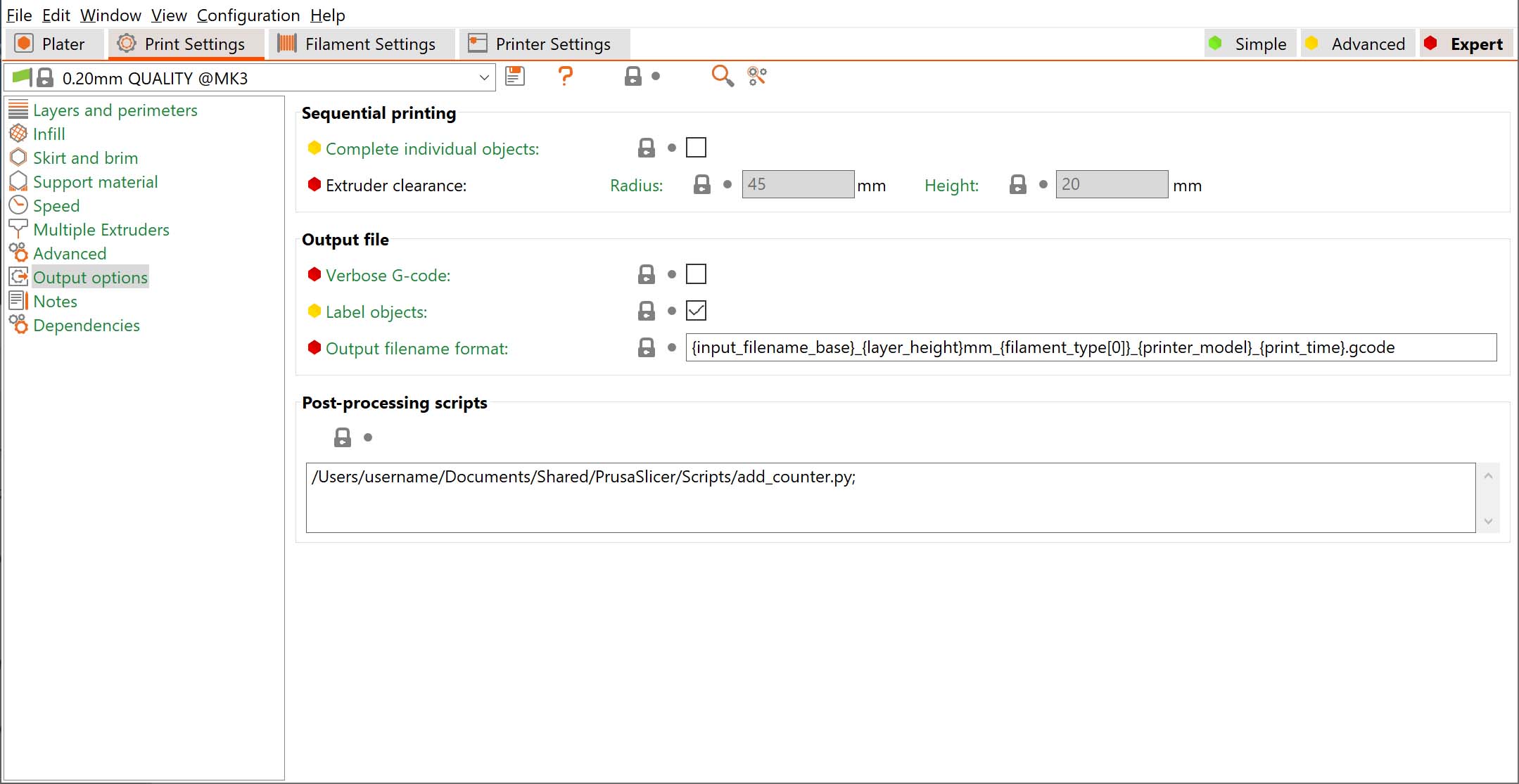
                  Script setup

                  Post-processing scripts can be written in any programming language (Perl, Python, Ruby, Bash etc.). They just need to be recognized by your system as an executable and accept the path to the G-code file as the only argument.

                  If you want to run several scripts, put each script invocation into its own line.

                  Script execution

                  Each script will be passed the absolute path of a temporary G-code file that PrusaSlicer generates. This file is stored in a temporary folder on your drive (typically your fast system drive). The script is then executed to modify the G-code in place and the resulting G-code file is written to your selected target folder or sent to a print host, such as PrusaConnect or Octoprint.

                  Please note that the G-code viewer still visualizes G-code before post-processing.
                  PrusaSlicer automatically converts all environment variables used in post-processing scripts to uppercase. To ensure compatibility, always reference them using fully capitalized names, such as "SLIC3R_FILL_DENSITY".
                   
                  Two additional environment variables are passed to post processing scripts: The environment variable SLIC3R_PP_HOST provides the host specification, where "File" means copying the G-code to a local hard drive or removable media, while the other values ("PrusaLink", "Repetier", "SL1Host", "OctoPrint", "FlashAir", "Duet", "AstroBox" ...) specify the print host type the G-code will be sent to.
                   
                  The environment variable SLIC3R_PP_OUTPUT_NAME contains the name of the G-code file including path (for SLIC3R_PP_HOST == "File") or a name that will be given to the file after it is uploaded to the host (PrusaLink, Octoprint ...)
                   
                  The post-processing script may suggest a new output file name (likely based on SLIC3R_PP_OUTPUT_NAME) by saving it as a single line into a new "output name" temp file, for example to add time stamps or sequence numbers to the final G-codes.The "output name" file name is to be created by suffixing the input G-code file name with ".output_name". PrusaSlicer will read the new name of the file and handle it properly, for example, when sending it to Octoprint.
                   

                  Script Parameters

                  You can use parameters with your script as such:

                  /path/to/executable becomes /path/to/executable with the arg outputfilename.gcode

                  /path/to/executable -arg -arg2 becomes /path/to/executable with args -arg, -arg2, and outputfilename.gcode

                  If path to executable or arguments contain spaces, these arguments need to be escaped using the escaping style common to the platform (shell escaping style on Linux and OSX, Windows command line escaping).

                  Examples

                  Python

                  Adding counter to the file name example

                  Path to the final exported file (or its name for Octoprint)

                  Python script that modifies the output path


                  Historical changes and breaking backward compatibility

                  Before version 2.4, PrusaSlicer used to execute the script on the final G-code exported to your desired target medium. Which was very often a removable drive, such as an SD card. SD cards are slow and wear out, so this was not ideal. There were also problems when sending the G-code to Octoprint. The new approach with the temporary file on your system drive prevents these problems and extends the functionality of post-processing scripts. However, it might break some of your existing scripts.


                  This documentation page includes some texts from the original Slic3r documentation and from Bob's Project Notebook.

                  この記事は役に立ちましたか?
                  この操作は登録ユーザーのみが利用できます。ログインしてください。
                  ログイン してコメントを投稿する
                  コメントなし

                  トピックス

                  • PrusaSlicer
                    • Advanced options [進行中の翻訳]
                      • モデルごとの設定
                      • カラーチェンジ
                      • 個別条件領域の設定
                      • ディスクからの再読み込み
                      • レイヤーに一時停止またはカスタムGコードを挿入する
                      • モデルの切取り
                      • メッシュの簡素化
                      • Post-processing scripts
                      • Shape Gallery
                      • Compare presets
                      • Gコードの置き換え
                      • Text tool
                      • SVG エンボスツール
                      • Pressure Advance
                    • About [進行中の翻訳]
                    • General [進行中の翻訳]
                    • User interface [進行中の翻訳]
                    • 入力/出力
                    • 左ツールバー
                    • トップツールバー
                    • プリント設定
                    • Filament settings [進行中の翻訳]
                    • Printer settings [進行中の翻訳]
                    • Multi-material slicing [進行中の翻訳]
                    • SLA スライス処理
                    • Other [進行中の翻訳]