Prusa
  • ショップ
    • 最新製品
    カテゴリー別
    • 3Dプリンター新着
    • 3Dプリンターアップグレード新着
    • 材料
    • アクセサリー
    • スペアパーツ
    • コース
    • グッズ
    • 見積もりを取得
    クイックリンク
    • 配送と配達
    • 返品と返金
    • 支払いと融資
    • 保証
    • VATと関税
    • よくある質問

    0 点の商品がカートに入っています点の商品がカートに入っています

    カートは空です

    カートを見る3Dプリンターを購入

    マイプロフィール

    ログイン すると注文や保存した商品を確認できます

    マイプロフィール

    ログイン中:

    • 注文
    • ログアウト
  • 3Dプリント
    • 3Dプリントを探る
    初心者向け
    • 3Dプリントの基礎
    • FDM印刷の仕組み
    • 初めてのプリンターを購入する
    • 3Dモデルカタログ
    用途別
    • ラピッドプロトタイピング
    • 製造
    • エンジニアリング
    • 研究
    • アートとデザイン
    さらに深く
    • 材料ガイド
    • コース
    • ウェビナー
    • 導入事例
    • カスタム3Dプリンティング
  • 3Dプリンター
    • すべての3Dプリンター
    用途
    • 自宅またはガレージ愛好家、改造愛好家、ホームプリンティング
    • ビジネス小規模チーム向けの社内生産
    • エンタープライズフリート、セキュリティ、大規模生産
    • どのPrusaが私に適していますか
    ショップと閲覧
    • CORE One+新着
    • CORE One+ INDX新着
    • CORE One L+新着
    • CORE One L+ INDX新着
    • XL+新着
    • MK4S
    • Prusa Pro HT90
    • Prusa Pro AFS
    • Prusa Pro SLX
    プリンターからさらに
    • 部品とアップグレード新着
    • 重要インフラ
    • 導入事例
    • シグネチャーオーク
    • キット
  • 材料
    • すべての材料
    用途別
    • 日常とデザイン
    • 機能工学
    • 複合材料
    • プロフェッショナル向け特殊材料
    • SLAレジン
    Prusament
    • PLA
    • PETG
    • ASA
    • PC
    • PA11
    • Flex
    • TPU
    材料からさらに
    • 材料ガイド
    • 自社製材料
    • サステナビリティ
    • ストアで注文
  • ソフトウェア
    • すべてのソフトウェア
    印刷の準備
    • PrusaSlicer 3.0新着
    印刷と監視
    • Prusa Connect
    • EasyPrint
    • iOS & Androidアプリ
    • Prusaファーム
    始める
    • ダウンロードとインストール
    • ナレッジベース
    その他のソフトウェア
    • 3Dモデルカタログ
  • サポート
    • サポートを探す
    回答を探す
    • ナレッジベース
    • トラブルシューティング
    • コース
    • ウェビナー
    ヘルプ
    • お問い合わせ
    • ライブチャット
    • 配送と配達
    • 保証
    • 返品と返金
    • サービスとスペアパーツ
    • サービスと修理
    コミュニティ
    • フォーラム
    • Reddit
    • Printables
  • トラストセンター
    • トラストセンター概要
    トピック別
    • GDPR
    • 証明書
    • セキュリティ
    • コンプライアンス
    コミットメント
    • サステナビリティレポート
    お問い合わせ
    • セキュリティチームに連絡
  • 会社
    • Prusaについて
    私たちについて
    • 私たちのストーリー
    • プリンターの製造方法
    • オープンソース
    • ブランド&メディアキット
    ニュース
    • ブログ
    • ニュースルーム
    • イベント
    信頼とパートナー
    • サステナビリティ
    • 再販業者と販売代理店
    • アフィリエイトプログラム
    • お問い合わせ
    • English
    • Čeština
    • Deutsch
    • Español
    • Français
    • Italiano
    • Polski
    • 日本語
  • ログイン中:

    • 注文
    • 住所
    • 在庫アラート
    • マイコース
    • サブスクリプション
    • アカウントを編集
    • ログアウト

ログイン すると注文や保存した商品を確認できます

ログイン中:
  • 注文
  • 住所
  • 在庫アラート
  • マイコース
  • サブスクリプション
  • アカウントを編集
  • English
  • Čeština
  • Deutsch
  • Español
  • Français
  • Italiano
  • Polski
  • 日本語
ショップ

0 点の商品がカートに入っています点の商品がカートに入っています

カートは空です

カートを見る3Dプリンターを購入

マイプロフィール

ログイン すると注文や保存した商品を確認できます

マイプロフィール

ログイン中:

  • 注文
  • ログアウト
ショップ
  • 最新製品
カテゴリー別
  • 3Dプリンター新着
  • 3Dプリンターアップグレード新着
  • 材料
  • アクセサリー
  • スペアパーツ
  • コース
  • グッズ
  • 見積もりを取得
クイックリンク
  • 配送と配達
  • 返品と返金
  • 支払いと融資
  • 保証
  • VATと関税
  • よくある質問

おすすめ製品

    人気のカテゴリー

      急上昇ワード

        記事

          ブログ

            製品

              カテゴリー

                検索候補

                  検索中…
                  結果がありません
                  エラーが発生しました。
                  ↑↓ 選択↵ 開くEsc 検索を閉じる
                  1. サポート
                  2. Original Prusa XL
                  3. Multi-material slicing [進行中の翻訳]
                  4. Mutliple extruders settings, Interlocking & Advanced bonding
                   

                  内容

                  • Extruders
                  • Ooze prevention
                  • Wipe tower
                  • Advanced

                  ブログ

                  • Prusament PLA ColorMix:わずか5巻のフィラメントで45色以上をプリント
                  • PrusaSlicer 3.0プレビュー版 — 3Dプリントの未来を見据えた仕様
                  • より高品質なプリントを、もっと簡単に:Prusa XL+、CORE One L+、CORE One+(Gen 2)― 大規模製品アップグレード

                  ニュースレター

                  ご登録いただくと、毎月 新しいファームウェア、PrusaSlicerの新バージョン、3Dプリントプロジェクトの一般的なヒントなど、役立つ情報をお届けします。

                  クリックして、ニュースレターを受け取る。

                  このサイトはreCAPTCHA Enterpriseによって保護されており、Googleのプライバシーポリシーと利用規約が適用されます。

                  Factorio Transport Belts
                  E-shop
                  • 3Dプリンター
                  • プリンターのアップグレード
                  • フィラメント
                  • アクセサリー
                  • Prusa 商品

                  © Prusa Research a.s.

                  Printables
                  • 3Dモデル
                  • Store
                  • Clubs
                  • 3Dデザインコンテスト
                  • Brands
                  コミュニティ
                  • ワールドマップ
                  • フォーラム
                  • ユーザーグループ
                  • イベント
                  ヘルプ
                  • Prusa ヘルプ
                  • Prusa アカデミー
                  • 3Dプリンティング計算機
                  ソフトウェア
                  • PrusaSlicer
                  • Prusa.app
                  • Prusa Connect
                  • ドライバーとソフトウェア
                  会社概要
                  • 私たちについて
                  • Blog
                  • プルサ正規販売代理店
                  • お問い合わせ
                  • ISO 9001・ISO 14001・ISO 45001 認証取得済み
                  • 一般利用規約
                  • PRUSAウェブサイト利用のための一般利用規約
                  • プライバシーポリシー
                  • クッキーに関する情報
                  • お客様の苦情対応に関する方針
                  • Webサイトのステータスページ
                  • Cookie 設定
                  • 一般利用規約
                  • PRUSAウェブサイト利用のための一般利用規約
                  • プライバシーポリシー
                  • クッキーに関する情報
                  • お客様の苦情対応に関する方針
                  • Webサイトのステータスページ
                  • Cookie 設定

                  © Prusa Research a.s.

                  JOSEF PRUSA®、PRUSA RESEARCH®、PRUSA POLYMERS®、PRUSA ORANGE®、PRUSA 3D ® および PRUSAMENT® は、Prusa Development a.s. の登録商標であり、Prusa Research a.s. が Prusa Development a.s. からのライセンスに基づき使用しています。

                  Mutliple extruders settings, Interlocking & Advanced bonding

                  関連するもの

                  MMU2S
                  XL
                  MMU3
                  XL family
                  MMU family
                  記事 他の言語でもご覧になれます。
                  English
                  Čeština
                  Polski
                  Deutsch
                  Français
                  Español
                  Italiano
                  日本語

                  Extruders

                  In this section, it is possible to choose which extruder in your printer to print specific parts.
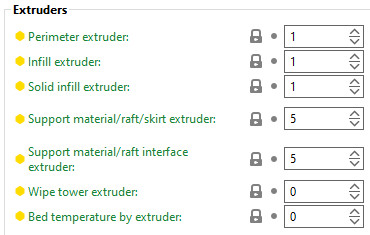
                  Perimeter extruder

                  Extruder to use when printing perimeters and brim.

                  Infill extruder

                  The extruder to use when printing infill.

                  Solid infill extruder

                  The extruder to use when printing solid infill.

                  Support material/raft/skirt extruder

                  The extruder to use when printing support material, raft and skirt. Set to 0 to use the current extruder, which will minimize tool changes.

                  Support material/raft interface extruder

                  The extruder to use when printing support material interface. Set to 0 to use the current extruder, which will minimize tool changes. This also affects the raft.

                  Wipe tower extruder

                  The extruder to use when printing the perimeter of the wipe tower. Set to 0 to use the current extruder. The current extruder is preferred when using soluble supports.

                  Bed temperature by extruder

                  This is the extruder that determines the heatbed temperature. Set to 0 to determine the temperature based on the first printing extruder of the first and second layers.

                  Ooze prevention

                  Enabling Ooze prevention drops the temperature of the inactive extruders to prevent oozing.

                  Temperature variation

                  Temperature difference to be applied when an extruder is not active. The value is not used when "Idle temperature" in filament settings is defined.

                  Wipe tower

                  Read more about the wipe tower settings here: 糸引きと垂れ.

                  Advanced

                  The features here help to create a strong well-bonded multi-material print by improving their strength and reliability.
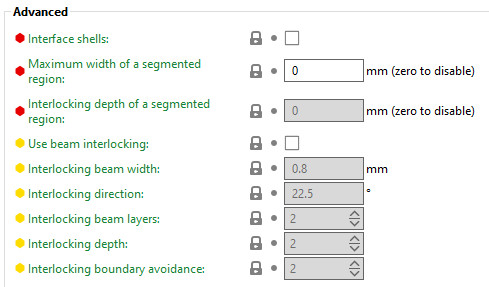
                  Interface shells

                  Force the generation of solid shells between adjacent materials/volumes. This is seful for multi-extruder prints with translucent materials or manual soluble support material.

                  Maximum width of a segmented region

                  Maximum width of a segmented region. Zero disables this feature.

                  This feature cannot be used when "Use beam interlocking" is selected.

                  Interlocking depth of a segmented region

                  Maximum depth of a segmented region. This feature is disabled if the value is zero, if the "Maximum width of a segmented region" is zero, or if a value higher than "Maximum width of a segmented region" is used.

                  This setting improves adhesion between painted color/material patches and helps prevent separation between colors. This is especially useful for models painted or merged in the slicer rather than split into separate physical meshes

                  This feature cannot be used when "Use beam interlocking" is selected.

                  Use beam interlocking

                  This feature is based on the implementation of OrcaSlicer.

                  Enable this feature to create internal cross-hatched beams at material boundaries to strengthen their bond. It works for face-to-face touching volumes, overlapping volumes, and painted regions with assigned materials. It is also useful when mixing materials and when printing structural parts with embedded flexible or soft sections.

                  This feature is disabled by default.
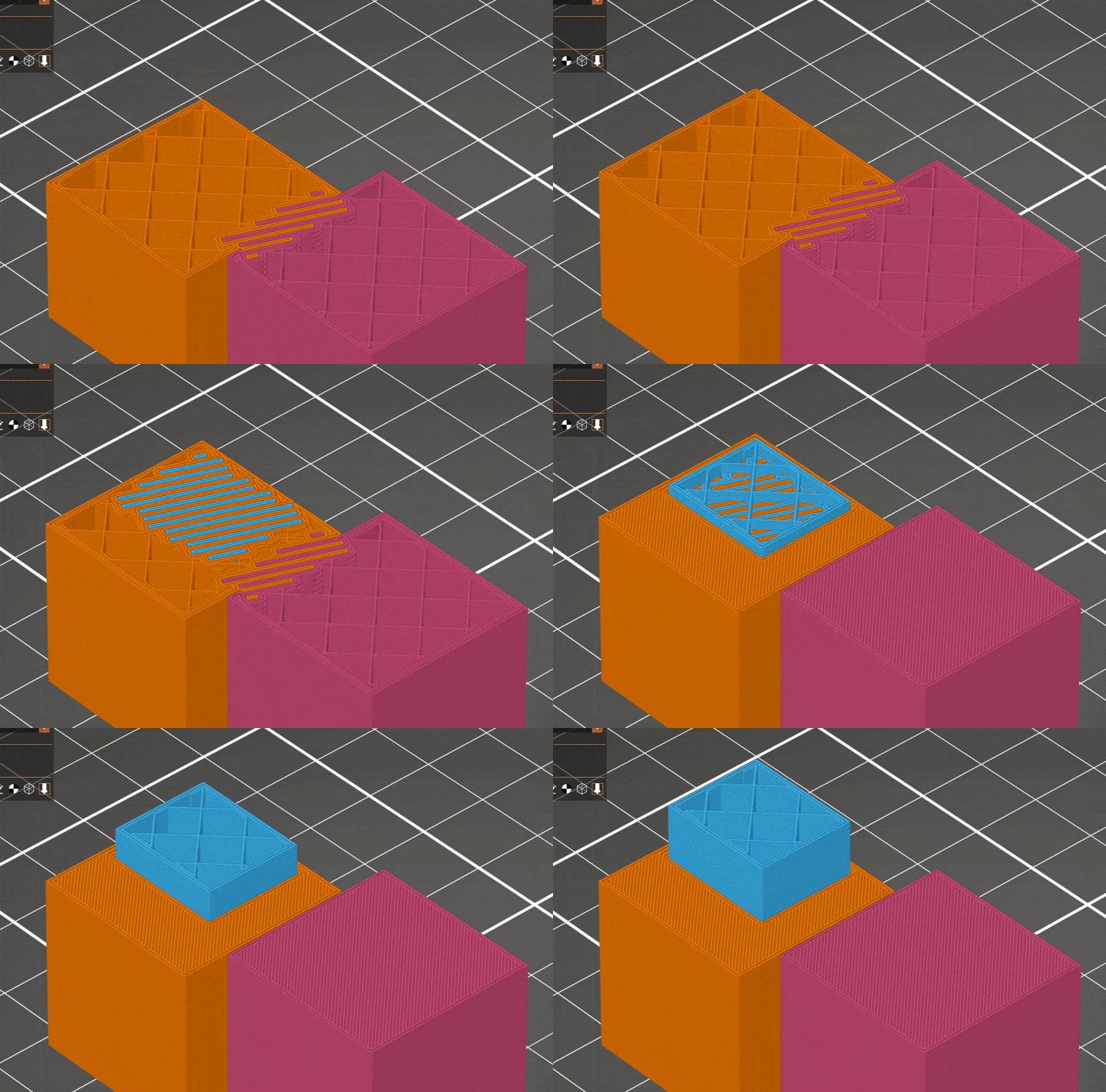
                  Interlocking beam width

                  The width of the interlocking structure beams.

                  Interlocking directions

                  Orientation of interlocking beams.

                  Interlocking beam layers

                  The height of the beams of the interlocking structure, measured in number of layers. Using fewer layers will make the connection stronger but more prone to defect.

                  Interlocking depth

                  The distance from the boundary between filaments to generate the interlocking structure, measured in cells. Too few cells will result in poor adhesion.

                  Interlocking boundary avoidance

                  The distance from the outside of a model where interlocking structures will not be generated, measured in cells.

                  この記事は役に立ちましたか?
                  この操作は登録ユーザーのみが利用できます。ログインしてください。
                  ログイン してコメントを投稿する
                  コメントなし

                  トピックス

                  • PrusaSlicer
                    • Multi-material slicing [進行中の翻訳]
                      • マルチマテリアルモデルのインポート
                      • パターン - エクストルーダーの順序設定
                      • ツール/カラー/エクストルーダーの割り当て
                      • MMUでカラープリント
                      • ワイプタワー
                      • パージボリューム (MMU)
                      • マルチマテリアルペインティング
                      • 異なるノズル径での実験的プリント
                      • Mutliple extruders settings, Interlocking & Advanced bonding
                      • ColorMix
                    • About [進行中の翻訳]
                    • General [進行中の翻訳]
                    • User interface [進行中の翻訳]
                    • 入力/出力
                    • 左ツールバー
                    • トップツールバー
                    • プリント設定
                    • Filament settings [進行中の翻訳]
                    • Printer settings [進行中の翻訳]
                    • Advanced options [進行中の翻訳]
                    • SLA スライス処理
                    • Other [進行中の翻訳]